Client intake is the first point of contact and, frequently, the first point of failure. The process is typically a patchwork of web forms, manual data entry, and follow-up emails that introduce human error and kill momentum. Automating this isn’t about replacing people; it’s about forcing a structured, repeatable process that stops bad data from poisoning your case management system before a matter is even opened.
Data Capture: The Intake Form as a Gatekeeper
Your public-facing intake form is not a simple data collection tool. It is an active validation layer. If you allow free-text fields where structured data is required, you are creating a downstream data cleanup problem for your paralegals. Every field must be deliberately chosen and rigorously validated before the user can hit “submit.”
Conditional logic is fundamental. A form for a personal injury claim should dynamically present different questions than one for estate planning. We build forms that reconfigure themselves in real-time based on a user’s initial selections, such as “Case Type.” This prevents users from being confronted with irrelevant fields and reduces form abandonment. More importantly, it provides clean, categorized data that can be used to trigger specific, appropriate workflows.
Data validation must be aggressive. For phone numbers, enforce a numeric format. For dates, use a calendar picker to standardize the input. For email addresses, run a basic regex check. This front-end validation offloads the server and provides instant feedback to the potential client. It stops someone from entering “next Tuesday” in a date field, an entry which would choke any downstream date-based automation.
Mapping Fields to Your CMS
The goal is a one-to-one mapping between form fields and the fields in your case management system. Before building the form, pull the API documentation for your CMS. Identify the required fields for creating a new contact and a new matter. Your form must capture, at a minimum, this required data set.
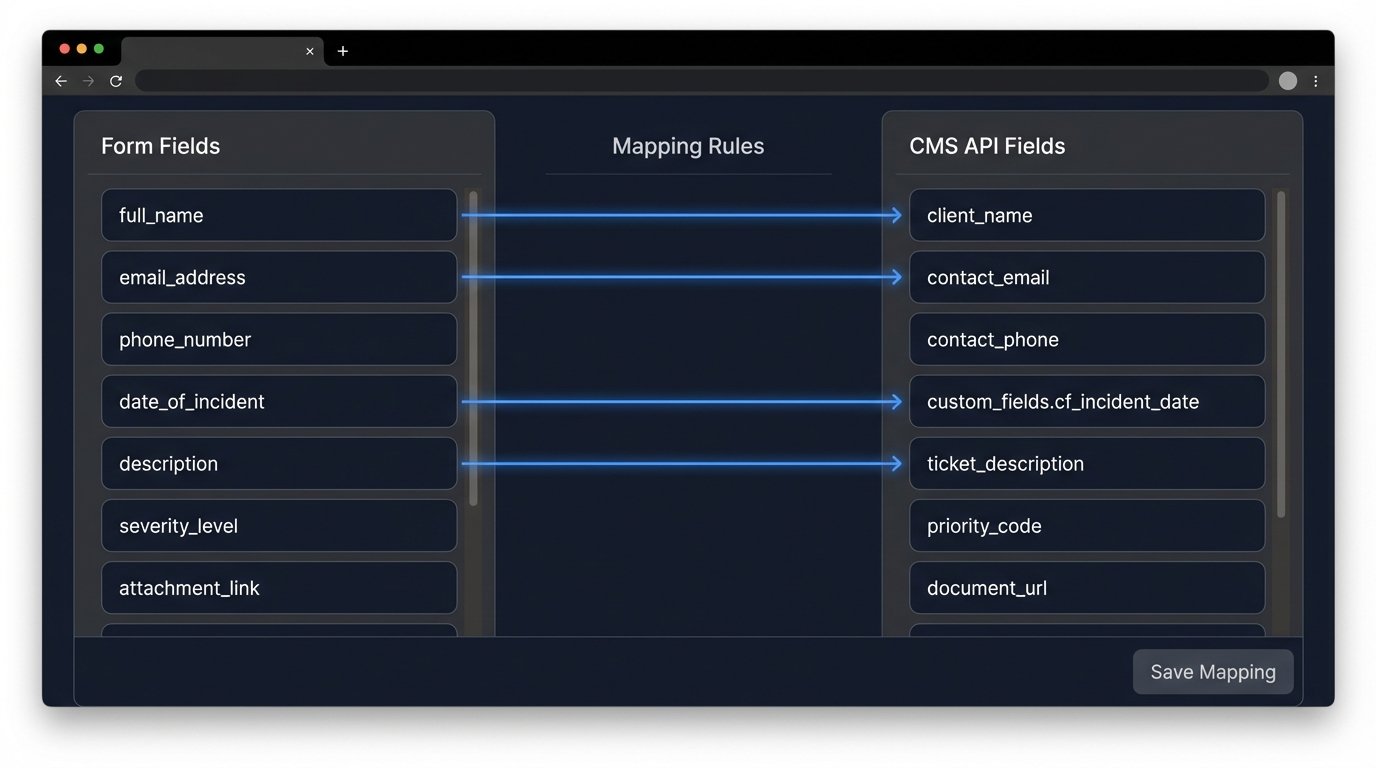
Failure to align these data structures results in failed API calls or, worse, incomplete records. A common failure point is data type mismatch. If your form captures a date as `MM-DD-YYYY` but your CMS API expects an ISO 8601 format like `YYYY-MM-DDTHH:mm:ssZ`, the import will fail. Your intermediary logic must handle this transformation.
Here is a basic JSON payload representing a new matter request. Note how the form fields, represented by template variables, are directly mapped to the CMS object structure. This is the target state for your data.
{

  "client_name": "{{form.full_name}}",

  "client_email": "{{form.email_address}}",

  "matter_type": "Personal Injury",

  "intake_source": "Web Form",

  "case_description": "{{form.incident_details}}",

  "status": "New Lead",

  "assigned_attorney_id": "null",

  "custom_fields": [

    {

      "field_id": "cf_incident_date",

      "value": "{{form.date_of_incident}}"

    }

  ]

}
This structure forces discipline. There is no room for ambiguity. The data is either correctly formatted and the record is created, or the call fails and gets logged for review.
The First Response: Automated Acknowledgment
The moment a potential client submits a form, they enter a state of uncertainty. The single most important function of an initial automated email is to resolve that uncertainty. A generic “Thank you for your submission” is insufficient. It confirms a database entry was created, nothing more. A proper acknowledgment email must set clear expectations.
Inject data from the form submission to personalize the email. Address them by name. Reference the case type they selected. This confirms you have received their specific information correctly. The email should then outline the exact next steps. For example: “Our intake team will review your information regarding your personal injury query and contact you within one business day to schedule a consultation if your case meets our criteria.”
This does two things. It provides a concrete timeline, which stops the client from calling the office two hours later. It also includes a qualification statement, managing expectations that a form submission does not guarantee representation.
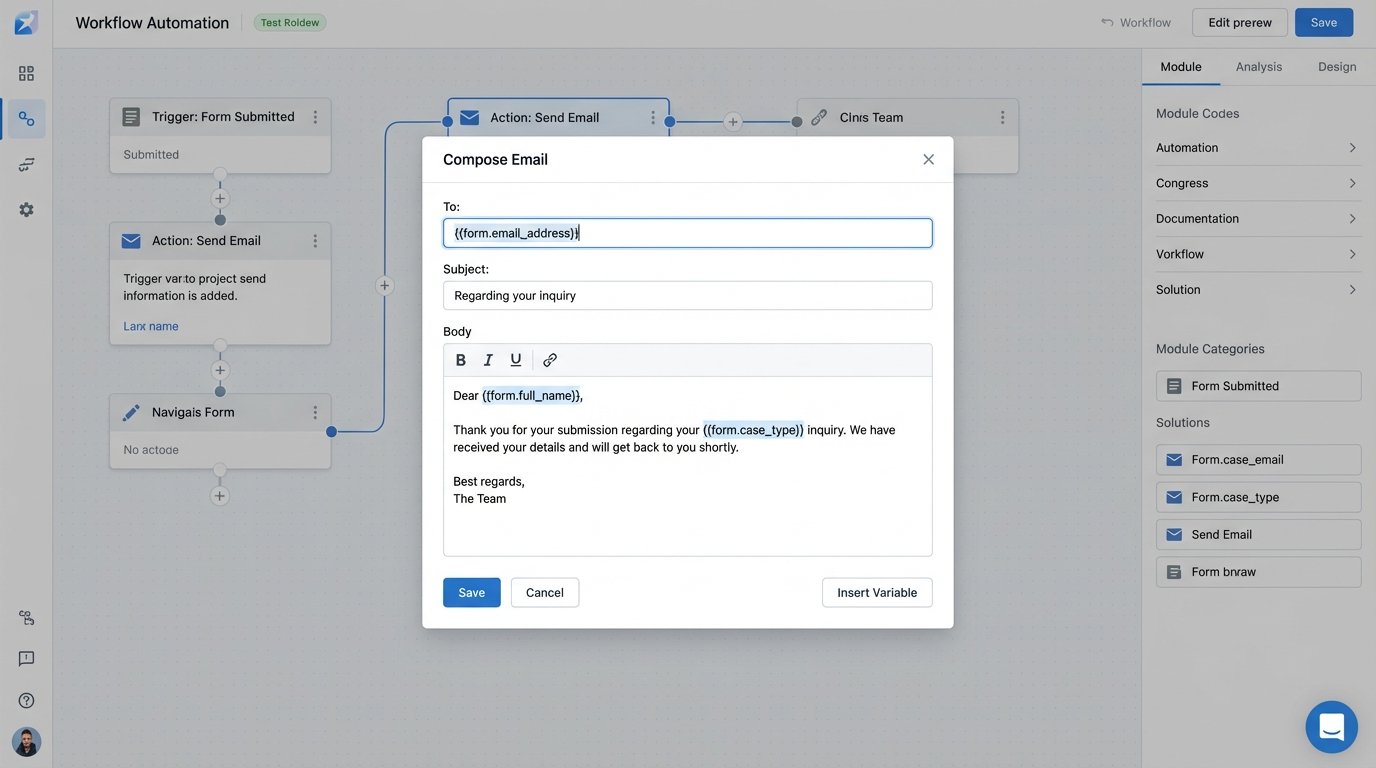
Be careful not to make the email sound robotic. While the content is templated, the tone should be professional and direct. The goal is to project competence and control over the process, not to simulate a personal email from an attorney. Overly familiar language from an automated system erodes trust.
Workflow Triggers: The Automation’s Central Logic
Once the data is captured and acknowledged, it must be routed. This is where workflow triggers come in. These are simple conditional statements that initiate actions based on the intake data. Treating your workflow logic like a simple IF/THEN statement is like trying to shove a firehose through a needle. You need fallbacks, error handling, and comprehensive logging, or the whole structure collapses the first time an API endpoint hiccups.
A basic trigger might look like this: IF `matter_type` = ‘Immigration’ THEN `assign_task` to ‘Paralegal Group A’ AND `add_tag` ‘IM-Lead’. A more complex workflow could involve multiple branches. IF `estimated_damages` > $100,000 THEN `send_sms_alert` to ‘Senior Partner’ AND `set_priority` to ‘High’.
The design of these workflows is critical. Map them out visually before you write a single line of code. Identify every decision point and every possible failure. What happens if the API call to assign the task fails? The system should have a retry mechanism with an exponential backoff. If it fails three times, it should be routed to a dead-letter queue and flag a human for manual intervention.
Without robust error handling, a single failed trigger can cause a potential client to sit in limbo indefinitely, with no one at the firm aware of the submission. This is not a theoretical risk. It is a common failure state in poorly architected intake systems.
System Integration: Bridging Intake and Case Management
The most fragile part of any intake automation is the bridge between your intake tools (web forms, e-signature platforms) and your core case management system. Many firms still operate on legacy CMS platforms with obtuse, poorly documented, or nonexistent APIs. This is where most integration projects stall.
Your first step is a technical audit of your CMS. Does it have a REST API? Is the documentation current? If not, you may be dealing with a SOAP API, which will increase complexity and development time. If there is no API, you must resort to less elegant solutions like robotic process automation (RPA) to simulate manual data entry, a notoriously brittle approach.
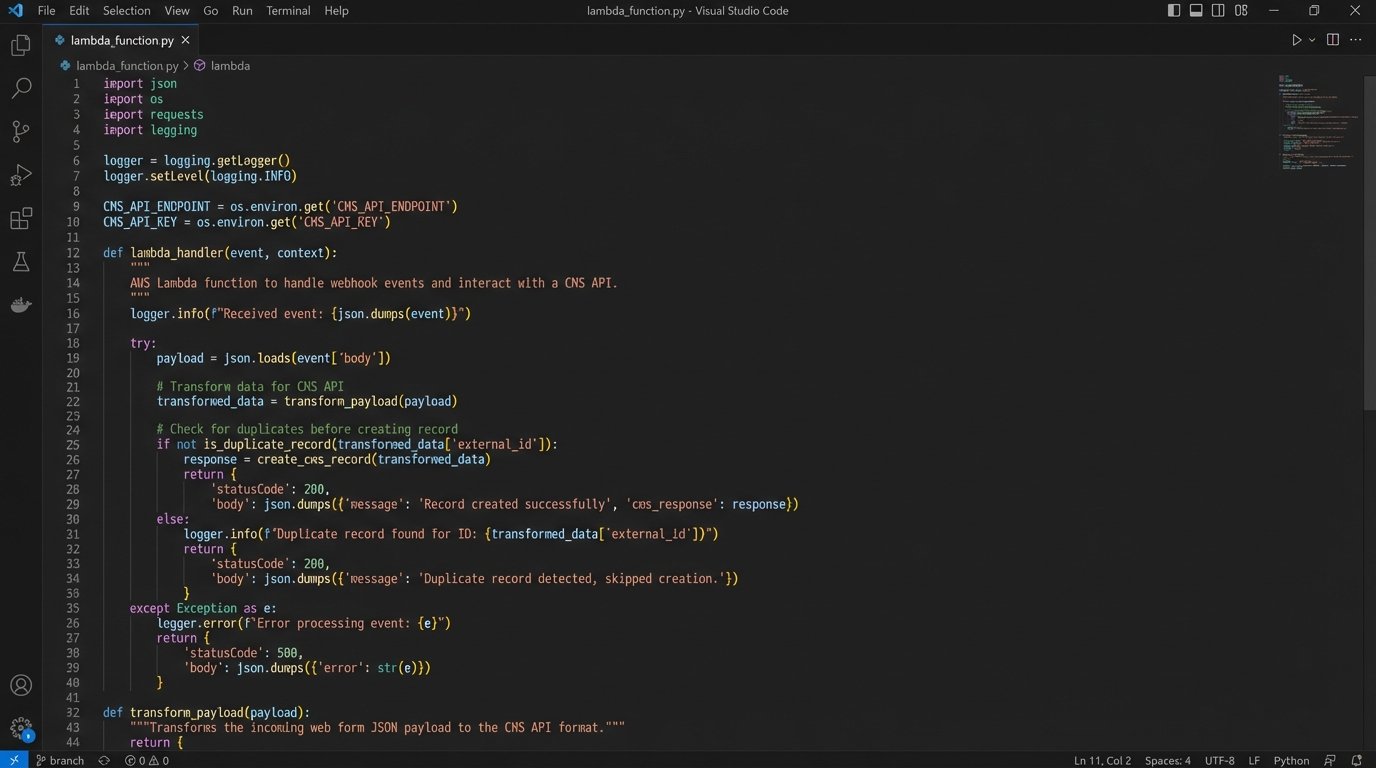
When an API is available, you need an intermediary service to handle the logic. Tools like Zapier or Make are useful for simple, linear workflows but can become expensive and difficult to debug at scale. For a high-volume firm, building a small, dedicated service (e.g., using a serverless function like AWS Lambda) provides more control and better logging. This service ingests the webhook from your form, transforms the data into the format required by the CMS API, executes the API call, and logs the result.
A key principle here is idempotency. Your system must be able to handle duplicate webhook events without creating duplicate client records. A webhook can sometimes fire twice due to network issues. Your intermediary service should first check if a record with the same email and submission timestamp already exists before attempting to create a new one.
Proactive Communication: Automated Status Updates
The client’s anxiety does not end after the initial acknowledgment. Automating status updates is key to reducing inbound “just checking in” calls and emails, which are a major drain on staff time. These updates should be triggered by stage changes within your CMS.
When a paralegal moves a matter’s status from ‘New Lead’ to ‘Pending Consultation,’ an automated email or SMS should be triggered. The message should be simple and direct: “Your consultation has been scheduled. You will receive a separate calendar invitation with details shortly.”
Another critical trigger is for case rejection. An automated but carefully worded email can inform a potential client that the firm is unable to take their case. This provides closure and prevents them from waiting for a call that will never come. While it may seem impersonal, it is far better than the alternative of no communication at all.
This level of automation depends entirely on your staff’s discipline in updating the matter status in the CMS. If they do not consistently maintain the data, the automation is useless. The technology can only work with the data it is given.
Monitoring and Logging: Building a Resilient System
Automation is not a “set it and forget it” solution. It is a system that requires constant monitoring. Every step of the intake process must be logged.
- Form Submission: Log the raw payload received.
- Data Transformation: Log the data before and after it is prepared for the CMS.
- API Calls: Log the request sent to the CMS and the full response received, including status codes and error messages.
- Email/SMS Sent: Log the recipient, subject, and a confirmation ID from your email delivery service.
This detailed logging is your black box recorder. When a potential client reports an issue, you cannot debug it without a complete record of what the system did. Without logs, you are blind. Use a structured logging format like JSON and ship these logs to a centralized service for analysis. This allows you to build dashboards to monitor intake volume, API error rates, and workflow execution times.
Start with the simplest, most impactful automation first. Perfect the path from web form to CMS entry for a single case type. Once that path is stable and well-logged, then begin adding more complex branching logic and communication triggers. Building a monolithic, all-encompassing system from day one is a recipe for a complex, brittle system that no one understands or trusts.