Most legal CRMs are sold as a solution but are delivered as an empty database. The expectation is that a functional client intake and management system will magically emerge. The reality is that without a rigid automation architecture, your CRM becomes a digital graveyard for client data, where leads go to be forgotten and follow-ups never happen. The core problem is not the software, it is the absence of enforced, machine-driven processes to move a contact from initial inquiry to a signed retainer.
Growth is a direct consequence of plugging leaks in the client acquisition funnel. Automation does not create new leads. It stops existing ones from bleeding out due to human error, forgetfulness, or an overloaded inbox. The goal is to build a system that makes it impossible for a viable lead to fall through the cracks. This is not about marketing slogans. It is about backend logic, API calls, and ruthless process enforcement.
Deconstructing the Intake Failure Point
The first 48 hours after a potential client makes contact determines the outcome. Manual data entry from a web form or a transcribed phone call is the primary failure point. An assistant gets pulled into a meeting, a Post-it note gets lost, or the email gets buried. The lead goes cold. Automation bypasses this manual dependency entirely by creating a direct data pipe from the source to the CRM.
We connect web form submissions directly to the CRM’s API. When a user clicks submit on your “Contact Us” page, a webhook fires. This payload, typically a JSON object, contains the raw lead data. The automation platform, whether it is a dedicated integration tool or custom code, catches this payload, validates the data types, and injects it into the CRM, creating a new contact and matter record instantly.
Mapping and Validation Logic
The critical step is the mapping. Your form field `full_name` must be correctly mapped to the CRM’s `contact.primaryName` field. A mismatch here means null values and a useless record. Before any data is committed, a validation layer is essential. This is a sequence of logic checks that clean the data. It forces phone numbers into the E.164 format, capitalizes proper nouns, and strips out garbage characters submitted by bots.
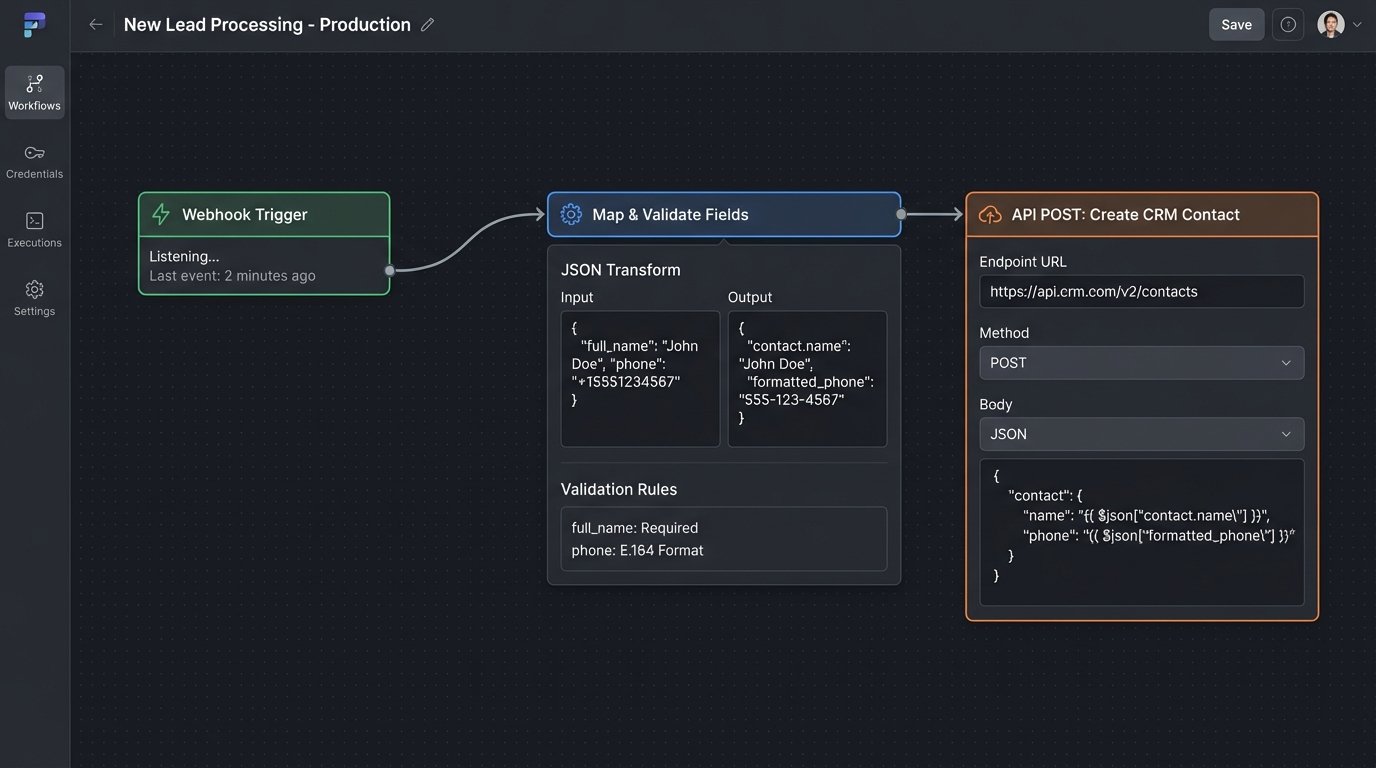
A typical intake workflow looks like this:
- Trigger: Webhook received from website form submission.
- Action 1: Parse the JSON payload. Extract name, email, phone, and message.
- Action 2: Run a de-duplication check. Query the CRM API with the email and phone number to see if a contact record already exists.
- Action 3 (Conditional): If a duplicate is found, append the new inquiry as a note to the existing contact. Do not create a new one.
- Action 4 (Conditional): If no duplicate exists, create a new contact record via a POST request to the ` /contacts` endpoint.
- Action 5: Create a new matter or opportunity record linked to that contact, setting its status to “New Lead”.
- Action 6: Create a task assigned to the intake specialist, “Follow up with [Contact Name],” with a due date of 2 hours from creation.
- Action 7: Send an immediate, automated SMS or email to the prospect confirming receipt. “We have received your inquiry regarding your [Case Type] matter and will contact you shortly.”
This entire sequence must execute in under two seconds. The result is a perfectly formatted lead, assigned to the right person, with a clear follow-up task in their queue before the prospect has even closed their browser tab. The chance for human error is zero.
Engineering Proactive Follow-Up Sequences
The second major leak is the follow-up black hole. A lead is successfully entered but then sits idle. The intake team is swamped, and the lead is forgotten. We engineer automated sequences to force action. These are not simple email blasts. They are complex workflows with conditional logic based on the lead’s status and engagement.
The simplest form is a time-based reminder sequence. If a lead’s status is still “New Lead” after 24 hours, the system triggers a series of actions. It could be an internal alert pinged to a Slack channel, an email to the managing partner, or the automatic reassignment of the lead to another team member. The system acts as an accountability engine.
Building Intelligent Nurturing Paths
Effective automation goes beyond simple reminders. It nurtures the lead with calculated, value-added communication. We use custom fields in the CRM to track a lead’s state. A field like `last_communication_date` gets updated automatically every time an email is sent or a call is logged. A `nurture_sequence_stage` field tracks where they are in the follow-up process.
A workflow can be configured to check these fields daily. For example, a rule might state: “IF `matter.status` is ‘Awaiting Documents’ AND `last_communication_date` is more than 3 days ago, THEN send email template ‘Document_Reminder_1’.” If another 3 days pass with no change, it sends “Document_Reminder_2”. This is how you prevent a case from stalling because someone forgot to send a simple email.
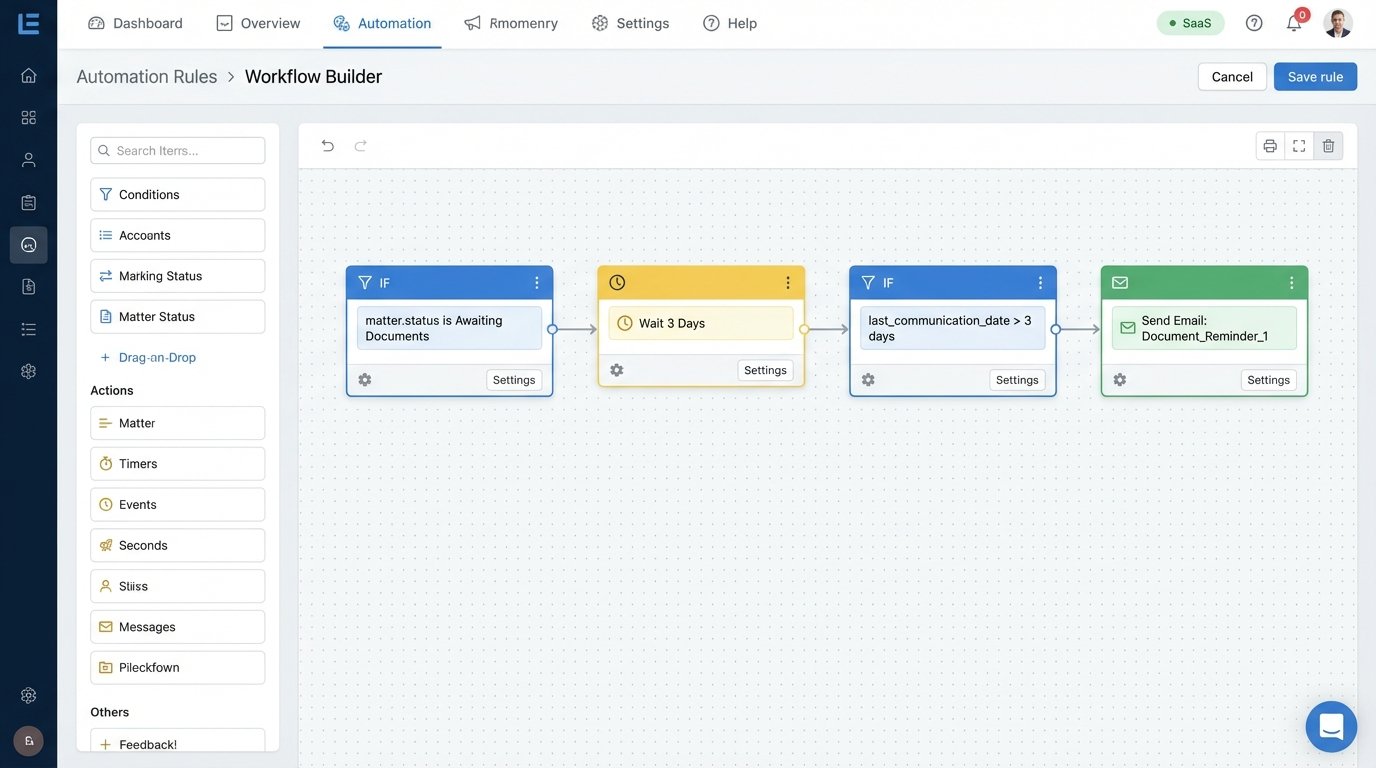
The logic can become much more complex. We can build branches based on client behavior. If a prospect clicks a link in an email, the system can tag them as “Engaged” and move them to a different, more aggressive follow-up path. If they do not open three consecutive emails, they can be automatically moved to a long-term, low-touch nurture sequence that sends a generic firm newsletter once a quarter. This segmentation prevents you from annoying promising leads and wasting resources on dead ones.
It is like building a series of logical gates. The lead must pass through each one, and the system dictates the path based on their properties and actions. Shoving every lead down the same generic email funnel is just sophisticated spam. Building conditional paths based on practice area, lead source, and engagement level is how you convert.
A Note on API Rate Limits
Every CRM API has rate limits. A poorly designed automation can bring your whole system down. If you have a workflow that queries all contacts and updates a field, running it on a database of 50,000 contacts could exhaust your API call budget for the hour. This is a rookie mistake that can be catastrophic.
We build our automations to be efficient. We use bulk API endpoints where possible. We structure queries to pull only the data fields we need, not the entire contact object. We build in pauses or “wait” steps in our workflows to spread the load over time. You have to treat the CRM’s API as a finite resource, because it is.
The Double-Edged Sword of Data Integrity
Automation can enforce data standards, but it can also corrupt your database at machine speed if built incorrectly. A misconfigured workflow can create thousands of duplicate contacts in minutes or, worse, incorrectly overwrite good data with bad. This is why error handling and logging are not optional features. They are fundamental requirements.
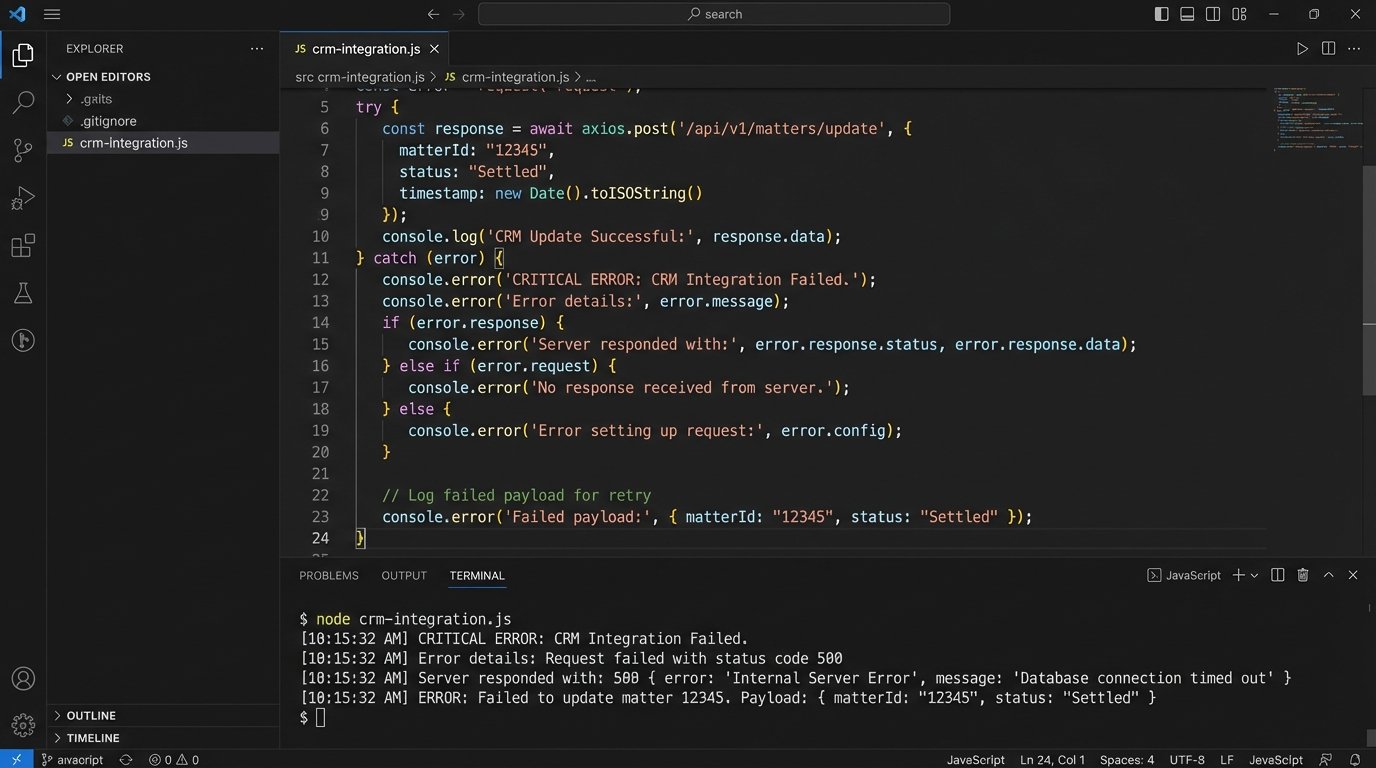
Every API call in an automation must be wrapped in an error-checking block. If the CRM’s server returns a 500 error, the workflow should not just fail silently. It must catch the error, log the full payload of the data it was trying to write, and send an alert to an administrator. This gives you a clear audit trail to debug the problem without losing the client data.
Consider a workflow that updates a case status. What happens if the status name is misspelled in the automation logic? The API call will fail. A robust workflow will have a fallback path. It will log the error, notify a human, and maybe tag the record with “Update Failed” so it can be found and fixed manually. A fragile workflow just stops, and you never know the case status was not updated.
A simple code structure for this might look like this in a pseudo-code format:
TRY {

  response = api.post("/matters/update", {

    matterId: "12345",

    status: "Settled"

  });

  log.info("Successfully updated matter 12345.");

} CATCH (error) {

  log.error("Failed to update matter 12345.", {

    errorCode: error.code,

    errorMessage: error.message,

    payload: { matterId: "12345", status: "Settled" }

  });

  notifications.send("admin-channel", "CRITICAL: Matter update failed for ID 12345.");

}
This type of defensive programming is the difference between a reliable automation and a ticking time bomb. You must assume that APIs will fail, data will be malformed, and network connections will drop. The automation’s design must account for this reality from the start.
Beyond Intake: Automating the Full Client Lifecycle
True growth comes from automating the entire client experience, not just the intake. Once a retainer is signed, a different set of workflows should take over. The client’s status changes from “Lead” to “Active Client,” which acts as a trigger.
This trigger can initiate a client onboarding sequence. It might automatically send a welcome packet email with key contacts and links to a secure client portal. It could create a series of introductory tasks for the assigned paralegal, such as “Prepare initial discovery requests” or “Schedule introductory call with client”. This ensures every new client has a consistent, professional onboarding experience without relying on a manual checklist.
The same principles apply to closing a case. When a matter’s status is changed to “Closed,” it can trigger a post-case workflow. This is a huge source of future revenue that most firms ignore. The workflow could wait 30 days, then send an automated request for a review on Google or Avvo. Six months later, it could send a follow-up email with a firm newsletter. It keeps the firm top-of-mind for future business and referrals, entirely on autopilot.
The investment in building this backend infrastructure pays dividends in efficiency and client retention. It frees up paralegals and attorneys from administrative drudgery to focus on billable work. It imposes a level of process discipline that is impossible to achieve with manual methods alone. The growth is not from a magical marketing campaign. It is the predictable result of a finely tuned, logical machine that optimizes every stage of the client relationship.