Most legal CRM automation is a tangled liability. It’s a collection of point-to-point integrations, Zapier workflows nobody documented, and brittle triggers waiting to fail silently. The goal isn’t to simply “connect” systems. The goal is to build a fault-tolerant engine that delivers client value without requiring a full-time babysitter. Forget the marketing promises. This is about building infrastructure that survives contact with reality.
Architecting the Appointment Reminder Engine
A reliable appointment reminder system is not a simple cron job that queries a calendar. That approach is fragile and ignores the source of truth: the Case Management System (CMS). The CMS, not the CRM’s calendar, holds the definitive record of a client’s status and matter. Pulling from a calendar that might be out of sync with the case file is asking for trouble, like sending a reminder for a consultation that was canceled at the case level five minutes prior.
The correct architecture involves syncing the CMS appointment data to the CRM as a one-way street. The CMS is the master record. The CRM record is a disposable copy used for communication triggers. This separation prevents a well-meaning paralegal from moving a calendar event in the CRM and breaking the official case timeline.
It’s more work upfront but it prevents data integrity chaos later.
Building a Stateful Reminder Workflow
A simple “24 hours before” trigger is amateur hour. Client interactions are stateful. A robust workflow must track the state of each appointment: `Pending Confirmation`, `Confirmed`, `First Reminder Sent`, `Final Reminder Sent`, `Attended`, or `No-Show`. This requires more than a simple trigger. It demands a small state machine for each appointment object in your CRM.
When an appointment is booked, a webhook from your scheduling tool (Calendly, Acuity, etc.) should fire. Do not point this webhook directly at your CRM’s generic API endpoint. Point it at an intermediary serverless function, like an AWS Lambda or Azure Function. This function acts as a routing and validation layer. It receives the payload, sanitizes the data, updates both the CMS and CRM with the correct initial state (`Pending Confirmation`), and logs the entire transaction.
This decouples the scheduling tool from your core systems. If the CRM API is down, the function can retry or shunt the event to a dead-letter queue for manual review. Your booking system never knows there was a problem.
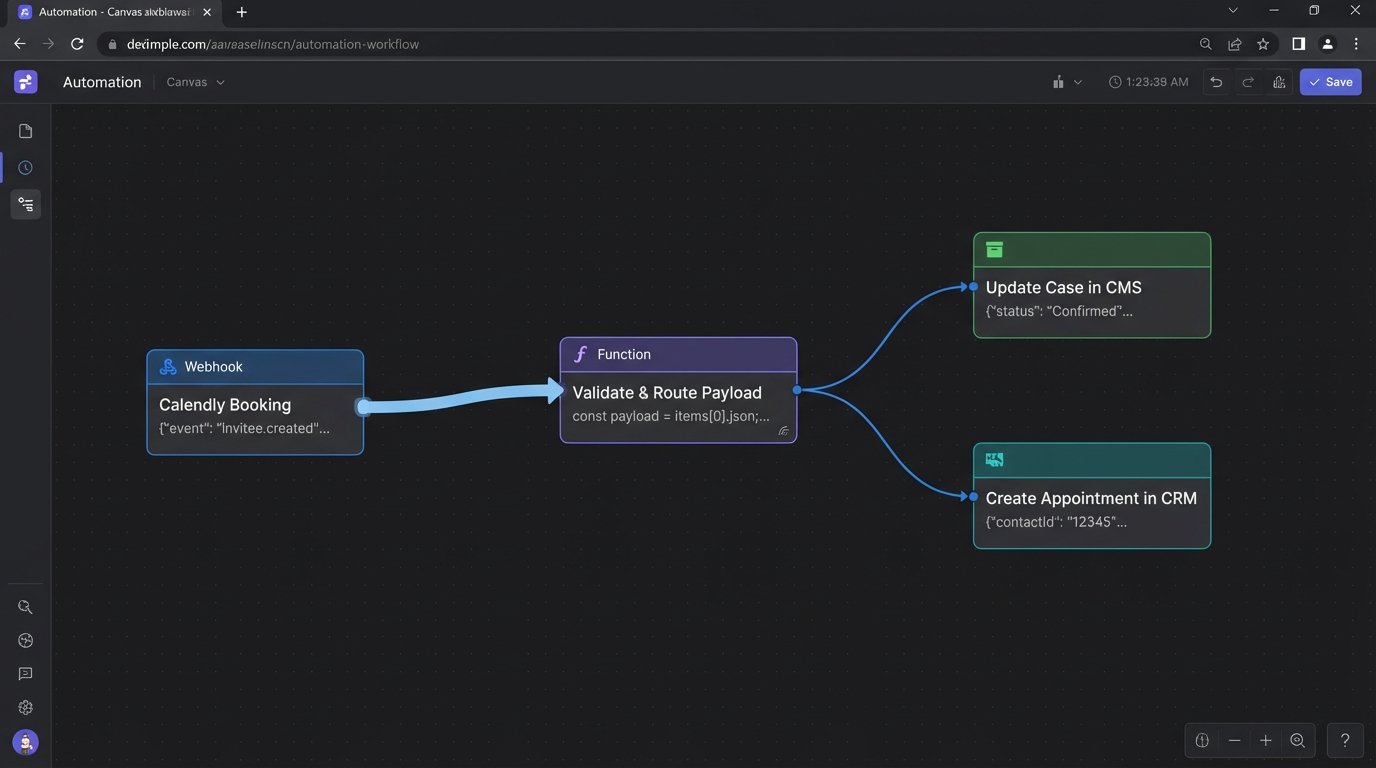
Here’s a sample JSON payload that your intermediary function might process from a booking tool webhook. Notice the inclusion of `caseId` which is critical for tying the event back to the master record.
{

  "eventId": "evt_12345abcdef",

  "eventType": "appointment.created",

  "eventTime": "2023-10-27T10:00:00Z",

  "appointment": {

    "appointmentId": "appt_98765",

    "startTime": "2023-10-28T14:00:00Z",

    "durationMinutes": 30,

    "attendee": {

      "name": "John Doe",

      "email": "j.doe@example.com",

      "phone": "+15551234567"

    },

    "context": {

      "caseId": "MAT-2023-0112",

      "attorneyId": "esquire_04"

    }

  }

}
The function parses this, finds `MAT-2023-0112` in your CMS, and updates the corresponding records. This is engineering. The alternative is just data plumbing.
Closing the Communication Loop
Sending an SMS or email is only half the job. You must validate delivery. Services like Twilio or SendGrid provide delivery status webhooks. When a message is successfully delivered to the carrier or inbox, that service makes a callback to an endpoint you specify. You must build this endpoint.
This callback should update a custom field on the appointment object in your CRM, changing `First Reminder Sent` to `First Reminder Delivered`. This closes the loop. It proves the message arrived and creates an auditable trail. If you get a `Failed` or `Undelivered` status, the system can flag the record for manual intervention or attempt delivery via an alternate channel.
This stops you from arguing with a client who claims they “never got the reminder.” You have carrier-level receipts.
Automating Feedback Collection Without Being Tone-Deaf
Most automated feedback requests are garbage. They’re triggered by a `Case.Status = “Closed”` flag, blasting a generic SurveyMonkey link to a client moments after a traumatic or disappointing case resolution. The resulting data is useless because the trigger lacks context. It treats a multi-million dollar settlement the same as a case dismissed for lack of evidence.
The trigger must be more intelligent. In your CMS, define a set of “feedback-eligible” resolution subtypes. `Settled – Favorable` or `Verdict – Won` are candidates. `Withdrew – Client Request` or `Dismissed – Sanctioned` are not. The automation should only fire for cases closed with an eligible subtype. This requires discipline in your firm’s case closing procedure, but it’s the only way to get meaningful feedback.
Using a Job Queue for Delayed, Civilized Requests
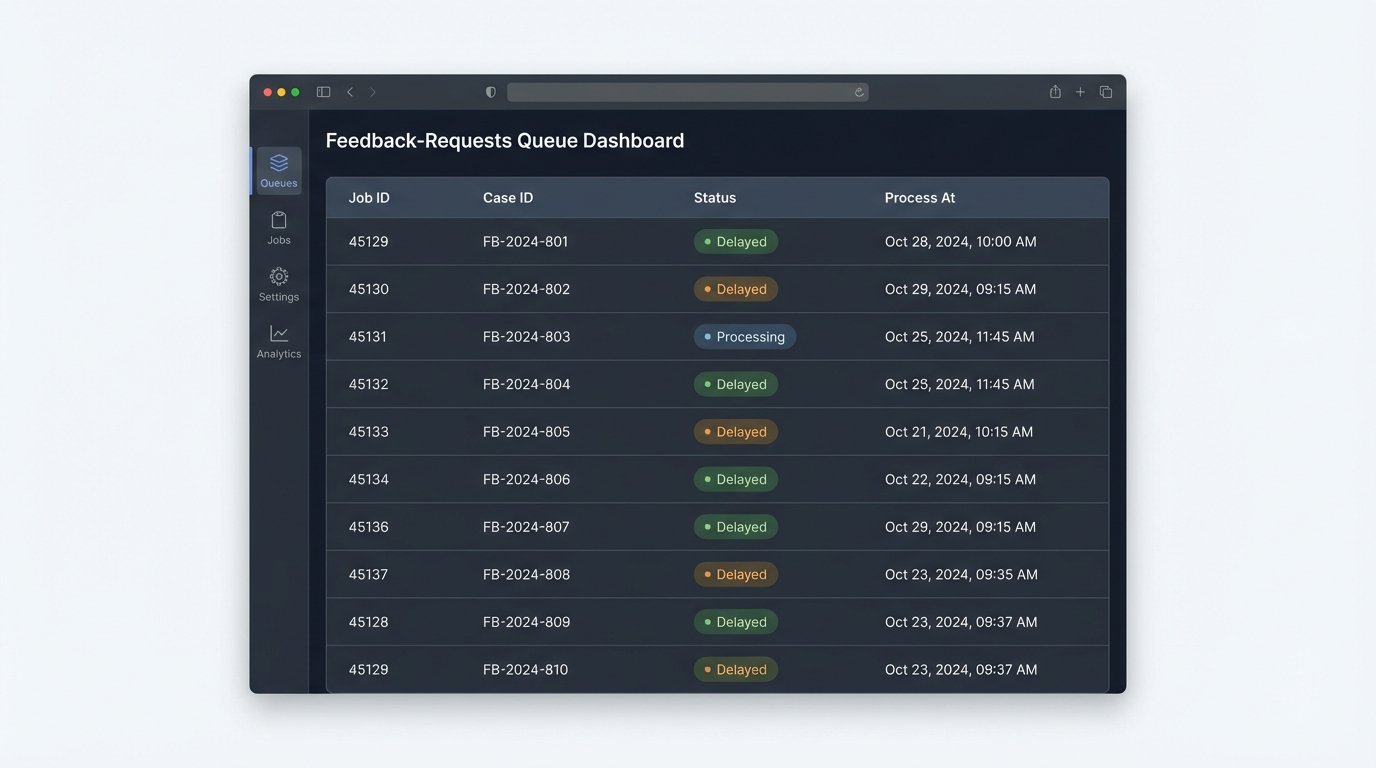
Even with the right trigger, timing is everything. Blasting the feedback request immediately is needy. Instead, use a delayed job queue like Redis, RabbitMQ, or Amazon SQS. When a case is closed with a feedback-eligible status, the trigger doesn’t send an email. It pushes a job to the queue. This job contains the client ID, case number, and responsible attorney. Crucially, you configure a delay on the job, perhaps for 7 or 14 days.
A separate, scheduled worker process (e.g., a cron job running a script) polls this queue every hour. It pulls only the jobs whose delay has expired and executes the feedback request logic. This architecture has several advantages. It smooths out the sends, prevents you from emailing clients at 2 AM, and decouples the case-closing event from the communication action. The entire feedback system can go down for maintenance without affecting case management operations.
This is how you build resilient systems instead of a house of cards. Your core business logic should never be held hostage by a marketing automation tool’s API.
The Non-Spammy Past Client Check-In
The periodic “just checking in” email is an insult to your past clients’ intelligence. It signals that you have nothing of value to say. Effective re-engagement is not about a calendar anniversary. It is about data-driven relevance. You need to automate check-ins based on events or data points that directly affect that specific client’s past legal matter.
This is impossible without structured data. For every case type, you must identify potential future trigger events.
- Estate Planning: A change in federal or state estate tax law. The client’s children reaching the age of majority.
- Business Formation: Annual report filing deadlines for the state of incorporation. Changes in corporate compliance laws.
- Real Estate: The expiration of a commercial lease term recorded in the original transaction. A significant change in local zoning laws.
The automation here isn’t a simple time-based trigger. It is a scheduled, complex query that runs against your client and case database. The goal is to build highly specific segments of clients who are all affected by the same external event. Think of it like a specialized data pipeline, not a marketing blast. You are trying to force a large volume of client data through the narrow aperture of a single, relevant legal development.
Querying for Re-engagement, Not Marketing
A nightly or weekly script should execute a query to identify these opportunities. This is not a task for a drag-and-drop marketing automation builder. This is a job for SQL. The query joins client data, case data, and potentially a custom table of legal deadlines or tracked statutes.
For example, to find all past California-based estate planning clients who haven’t been contacted in a year and whose case was closed over three years ago, the logic would look something like this:
SELECT

    c.ClientID,

    c.ClientFullName,

    c.ClientEmail,

    cs.CaseCloseDate

FROM

    Clients c

JOIN

    Cases cs ON c.ClientID = cs.ClientID

WHERE

    cs.PracticeArea = 'Estate Planning'

    AND c.State = 'CA'

    AND cs.CaseStatus = 'Closed'

    AND cs.CaseCloseDate < DATE_SUB(NOW(), INTERVAL 3 YEAR)

    AND c.LastContactDate < DATE_SUB(NOW(), INTERVAL 1 YEAR);
The output of this query is a target list. The subsequent email is not generic. It dynamically injects the context. “We are reaching out to past estate planning clients regarding the recent changes to California inheritance law…” This demonstrates relevance and respects the client’s time.
Centralized Logging for Sanity and Survival
Your automations will fail. APIs will change without notice, credentials will expire, and malformed data will enter the pipeline. Without centralized logging, you are flying blind. When an appointment reminder fails to send, you shouldn’t have to SSH into a server to read a log file, check the Zapier task history, and then look at the CRM’s API audit log. This is inefficient and unsustainable.
All of your automations, from the intermediary serverless functions to the nightly SQL scripts, must push logs to a single, unified logging service. Tools like Datadog, Logz.io, or even a consolidated AWS CloudWatch Log Group are not optional luxuries. They are fundamental to operating a stable system. Each log entry should be structured (JSON is standard) and contain a correlation ID that allows you to trace a single event as it moves through multiple systems.
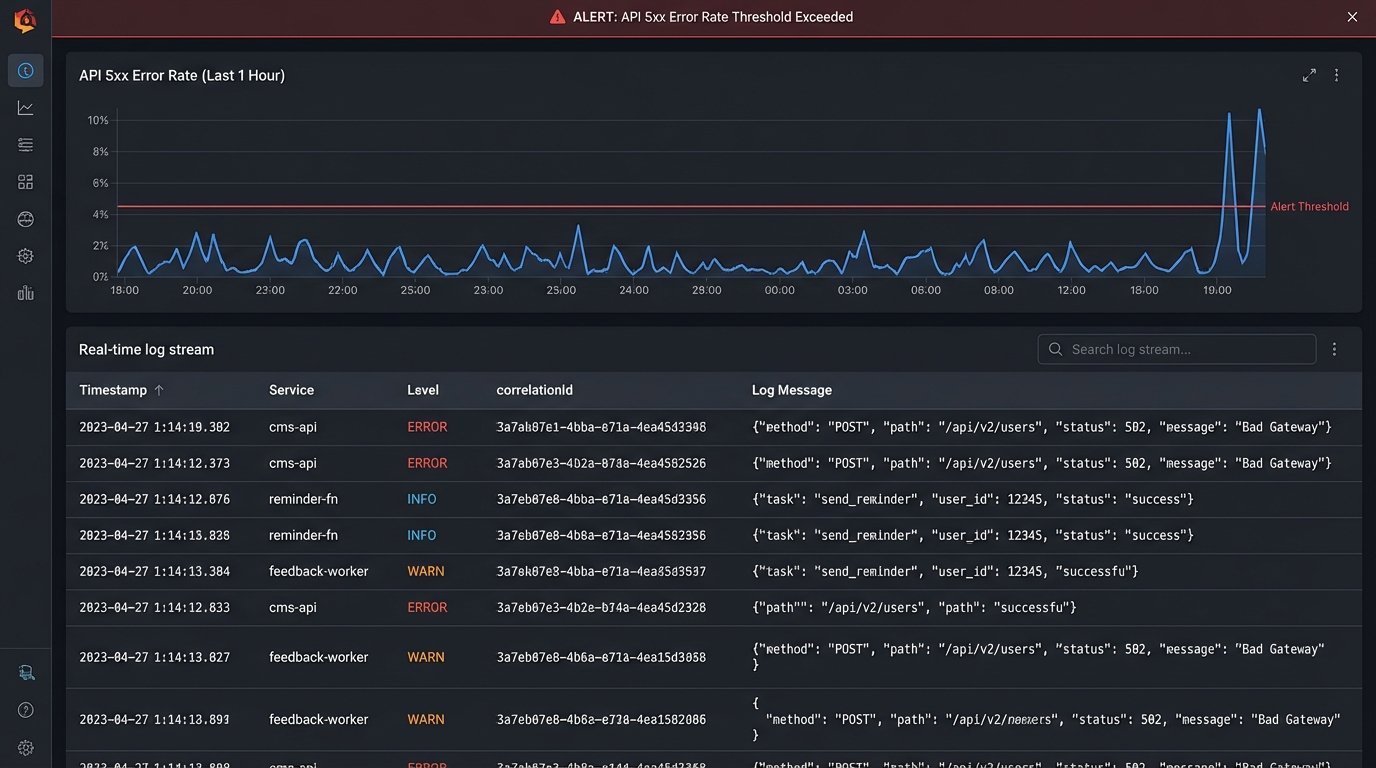
The final step is intelligent alerting. Do not alert on every single error. That just creates noise and leads to fatigue. Alert on trends and thresholds. A single 503 error from the CMS API is a transient network blip. A 50% error rate over a 5-minute window is a critical outage. Configure your logging platform to detect these patterns and notify the right people. This transforms you from a reactive firefighter into a proactive system maintainer.