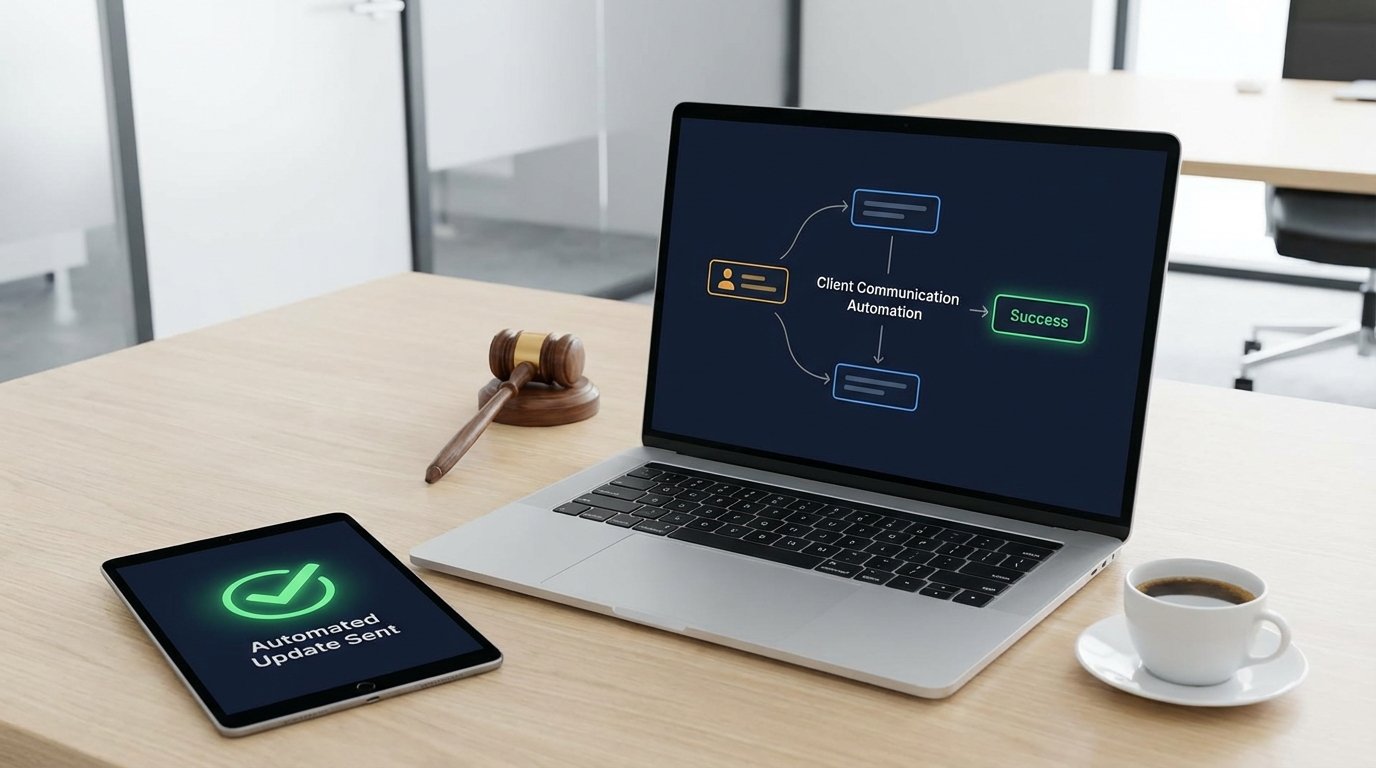
The average personal injury firm loses around 22% of its potential clients due to poor initial communication. For one of our clients, a mid-sized PI firm, the problem was not acquisition but retention and operational drag. Their paralegals were spending an estimated 15 hours per week, per person, answering the same three questions: “What is the status of my case?”, “Did you receive my documents?”, and “When is my next court date?”. This was not just a time sink. It was a primary driver of client dissatisfaction and a direct drain on billable efficiency.
Their existing process was entirely manual. A client would call or email. A paralegal would stop their current task, pull up the case file in their legacy Case Management System (CMS), interpret the latest entry, formulate a response, and send it. The total time for this cycle averaged between seven and fifteen minutes. Multiplied across hundreds of clients, the firm was burning thousands of hours a year on low-value, repetitive communication tasks. The risk of human error, misinterpreting a case note, or providing outdated information was constant.
Diagnostic: Pinpointing the Core Failure
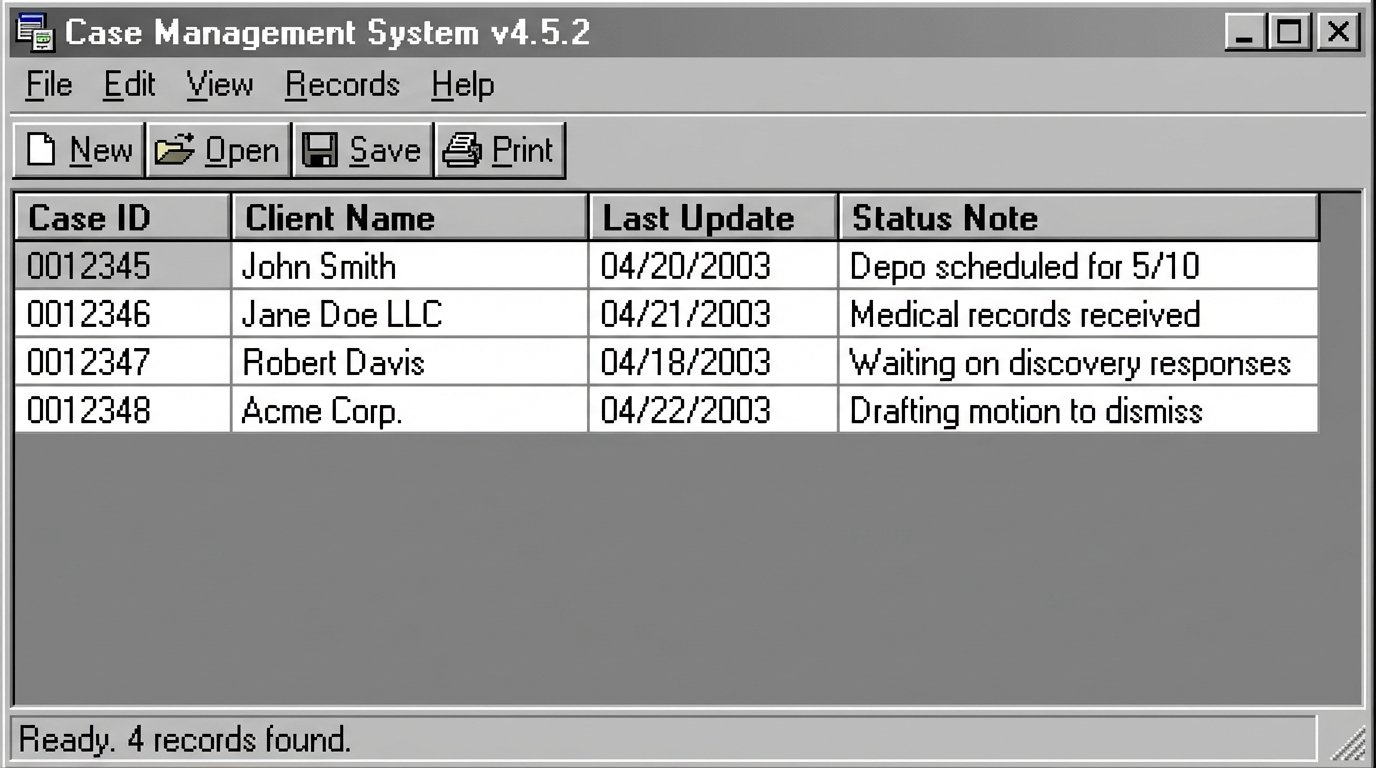
The fundamental issue was a data silo. All critical case information lived inside their on-premise CMS, an aging system with a poorly documented and unreliable API. The knowledge of a case’s status was locked away, accessible only through direct, manual queries by trained staff. There was no mechanism to proactively push updates to clients. The communication architecture was reactive by design.
We identified three primary trigger events in a typical case lifecycle that generated the most inbound communication:
- Case Milestone Reached: A deposition is scheduled, a motion is filed, discovery is sent.
- Document Received/Processed: Medical records are received from a provider, an expert report is filed.
* Key Date Set or Changed: A court hearing, mediation, or deadline is scheduled.
Each of these events was recorded in the CMS, but the data sat inert. The firm’s problem was not a lack of information, but a failure to mobilize it. They were using a powerful database as little more than a digital filing cabinet.
The Technical Debt of Manual Labor
Beyond the wasted hours, the manual process created significant technical and operational debt. Paralegal morale was low due to the repetitive, unfulfilling nature of the work. Training new staff was complicated, as they had to learn the nuances of interpreting dense case files. Worst of all, the client experience was inconsistent. A client might get a detailed update from an experienced paralegal one day and a terse, unhelpful reply from a rushed junior associate the next. This inconsistency erodes trust.
The firm had attempted a solution before we were engaged. They set up a generic email auto-responder. This failed spectacularly. It increased client frustration because the messages were impersonal and lacked the specific information clients were requesting. It was a classic case of applying a blunt tool to a problem that required surgical precision.
Architecture of the Solution: Bridging the Silo
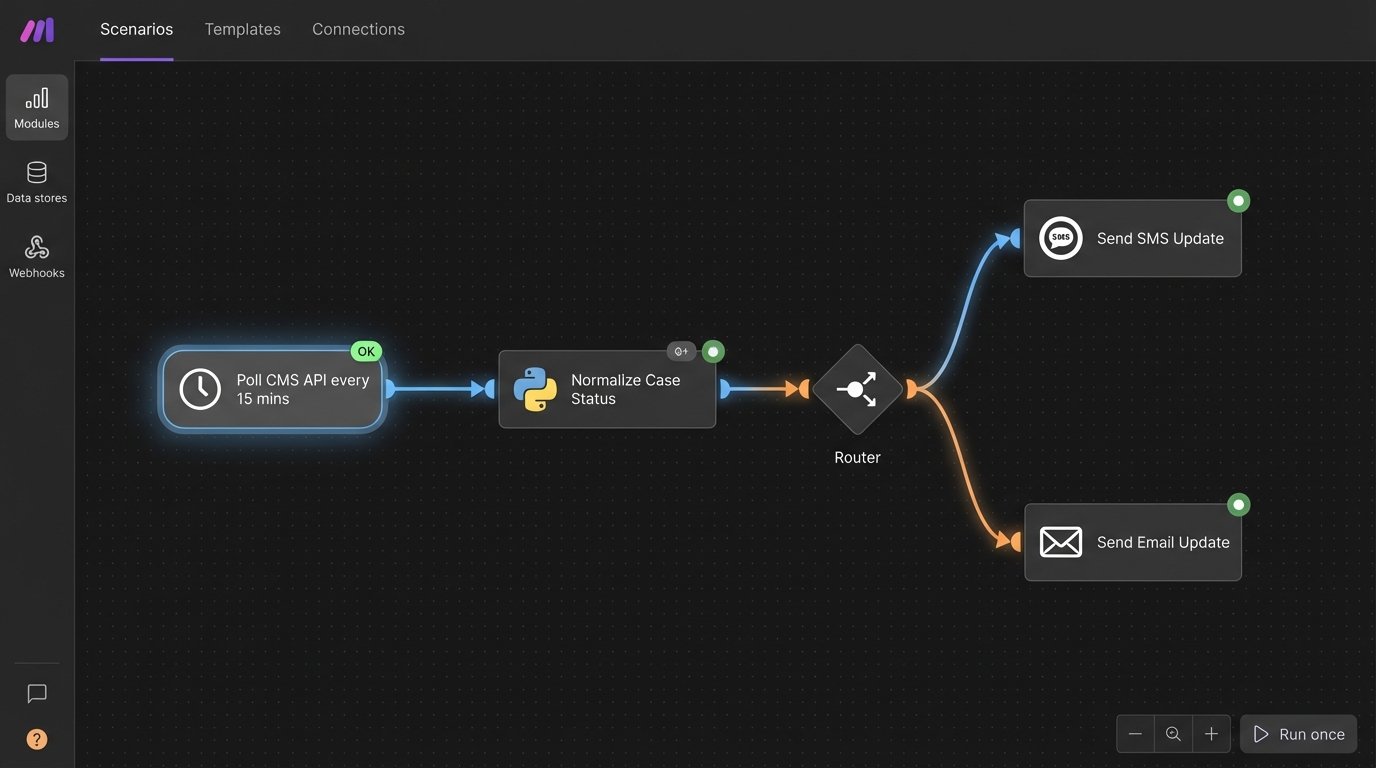
Our objective was to build a system that could monitor the CMS for specific event triggers and automatically push contextually relevant updates to clients via SMS and email. We did not want to replace the CMS. That would be a wallet-drainer and operationally disruptive. Instead, we needed to build a bridge between the CMS data and a modern messaging platform.
The stack we engineered consisted of three core components:
- The Data Source: The firm’s on-premise CMS.
- The Integration Layer: An iPaaS (Integration Platform as a Service), in this case, Make.com, to handle logic and API calls.
- The Messaging Gateway: Twilio, for its reliable SMS and email APIs.
The initial challenge was the CMS itself. Its API was sluggish and lacked support for webhooks, meaning it could not proactively notify an external service of a change. We were forced to build a polling mechanism. Our iPaaS scenario was configured to query a specific endpoint on the CMS API every 15 minutes, looking for cases with a `last_updated` timestamp newer than the last check.
This approach is not ideal. Polling is inherently less efficient than using webhooks. But it was the only viable path forward without demanding a complete overhaul of the firm’s core infrastructure. The first version of this trigger logic was a Rube Goldberg machine of nested filters. A change in one part of the case file would cause a cascade of unintended notifications, like bumping a single domino that topples the entire set.
Data Sanitization and Logic Processing
Once a new or updated case record was identified, its data was pulled into the integration layer. The raw data from the CMS was messy. The `case_status` field, for example, was a free-text string. One paralegal might enter “Depo scheduled for 5/10,” while another might type “Deposition of Dr. Smith set.” This variability would break any simple automation logic.
To solve this, we injected a data sanitization and normalization step. A Python script within our Make.com scenario was used to parse these free-text fields using regular expressions and keyword matching to standardize them into machine-readable statuses like `DEPOSITION_SCHEDULED` or `MEDICAL_RECORDS_RECEIVED`.
Here is a simplified version of the logic used to standardize the status updates:
def normalize_case_update(raw_text):

    """

    Parses a raw text update from the CMS and returns a standardized key.

    """

    text = raw_text.lower().strip()
# Check for deposition keywords
if 'deposition' in text or 'depo' in text and 'scheduled' in text or 'set' in text:
return 'DEPOSITION_SCHEDULED'
# Check for document receipt keywords
if 'medical records' in text and 'received' in text:
return 'MED_RECS_RECEIVED'
# Check for settlement keywords
if 'settlement offer' in text or 'settled' in text:
return 'SETTLEMENT_UPDATE'
# Fallback for unrecognized updates
return 'GENERAL_CASE_UPDATE'
# Example usage within the iPaaS workflow
cms_update_text = input_data.get('latest_note')
standardized_status = normalize_case_update(cms_update_text)
if standardized_status != 'GENERAL_CASE_UPDATE':
# If the status is specific, trigger the corresponding template
trigger_templated_message(client_id, standardized_status)
This script became the logical core of the system. It transformed unreliable human input into a predictable trigger for the messaging gateway. Only after the status was successfully standardized would the workflow proceed to the next step.
Templated, Personalized Messaging
With a clean, standardized status, the workflow would then fetch the relevant client contact information and the specifics of the update (like the date and time of the deposition). It then passed this data to the Twilio API to send a message.
We created a library of message templates, one for each standardized status. The messages were designed to be concise and informative, not robotic. For example:
Status: `DEPOSITION_SCHEDULED`
SMS Template: “Update from [Firm Name] on case [CaseNumber]: A deposition has been scheduled for [Date] at [Time]. Please confirm receipt. Reply STOP to unsubscribe.”
This structure provided the client with the critical information they needed without requiring them to call the office. We also built in logic to respect client communication preferences. If a client opted out of SMS, the system would default to email. If they opted out of both, it would create a task in the CMS for a paralegal to make a manual call. This fail-safe prevented the system from alienating clients who preferred traditional contact.
Quantifiable Results and Operational Impact
The system was deployed over a weekend to minimize disruption. We monitored its performance closely for the first month, fine-tuning the normalization script and adding new logic to handle edge cases. The results surpassed our initial projections.
Within three months of full deployment, the firm reported the following metrics:
- A 78% reduction in inbound client calls and emails related to case status.
- An estimated 120 paralegal hours saved per month across the entire firm.
- A 95% reduction in the time required to communicate a key case milestone to a client (from minutes/hours to under 30 seconds).
- Client satisfaction surveys, which were conducted quarterly, showed a 35% increase in scores related to communication and responsiveness.
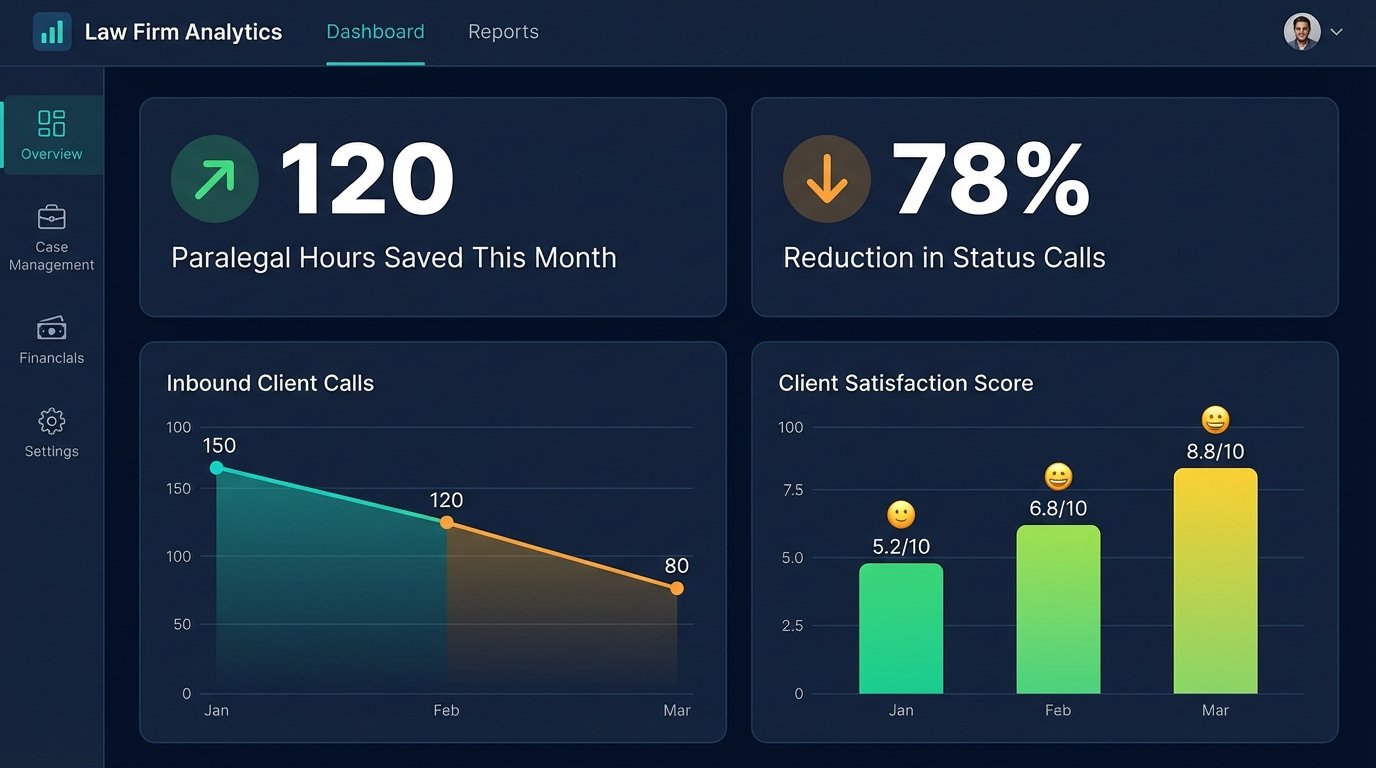
These numbers represent a direct and significant return on investment. The hours saved were reallocated to higher-value tasks such as drafting motions, preparing for depositions, and performing legal research. The project paid for itself in reclaimed labor costs within six months.
Unforeseen Friction and Lessons Learned
The implementation was not without its problems. Our initial polling frequency of 5 minutes was too aggressive for the legacy CMS. It caused performance degradation during peak business hours. We had to throttle it back to 15 minutes, which represented an acceptable compromise between update speed and system stability.
We also learned that paralegals needed to be trained on how to write case notes for the machine. While our normalization script was robust, certain ambiguous phrases could still fool it. We conducted a training session on “writing for automation,” which coached them to use clearer, more consistent language in their CMS entries. This simple human-factor adjustment improved the system’s accuracy from around 85% to over 98%.
This case study shows that automation is not about replacing legal professionals. It is about augmenting them. We did not remove the paralegal from the communication loop. We just freed them from the most repetitive and least valuable part of it. The firm’s clients are now better informed, the staff is more productive, and the practice is more profitable. The system works because it does not try to be intelligent. It simply executes simple, logical tasks with perfect consistency, forcing a bridge between a legacy system and a modern client expectation.