
The firm wasn’t failing. It was drowning. A 15-attorney litigation boutique, they were bogged down by the sheer volume of non-billable, administrative friction required to open a new matter. Paralegals spent an estimated 10-12 hours per week simply shuffling data from a client’s initial email into the case management system, then into an engagement letter, and finally onto a billing setup form. The process was a magnet for errors, with transposed digits in phone numbers and misspelled names causing downstream rework that nobody had time for.
This wasn’t a problem that could be solved by hiring another person. It was a systemic failure of process and a complete absence of system integration. The core challenge was a lack of a single source of truth for client data at the most critical stage: intake. Every new piece of information was manually re-entered, creating multiple opportunities for data drift and corruption before the first billable hour was even logged.
The Diagnosis: A Chain of Manual Hand-offs
We started by mapping their existing workflow. The term “workflow” is generous. It was a series of disjointed tasks held together by email forwards and sticky notes. The primary point of failure was the initial contact. A prospective client would fill out a generic contact form on their WordPress site, which generated a plain-text email sent to a general inbox. This email became the genesis block for a chain of manual data entry.
The process broke down into three distinct, yet equally broken, stages:
- Data Capture: The initial email was unstructured. A paralegal had to read through the message, identify the client’s name, address, phone number, and the opposing party, then manually type this information into their case management system, Clio. There was no validation, no required fields, just a human trying to interpret a block of text.
- Document Generation: To create an engagement letter, that same paralegal would open a Word document template. They would then copy and paste the client data from Clio into the Word document. This step was repeated for conflicts checks and other internal forms, multiplying the risk of error with each paste operation.
- System Synchronization: The firm used separate systems for case management and accounting. Data from Clio had to be manually re-keyed into their accounting software to set up billing. A single mistake here could delay invoicing by weeks.
The firm was paying skilled paralegals to be data-entry clerks. It was a colossal waste of talent and a direct drain on profitability. The objective was clear: automate the flow of client data from the first touchpoint through to case setup, and force data integrity from the very beginning.
Initial Architecture: A Low-Code Bridge Built on Shaky Ground
A complete custom-coded solution was off the table. The firm had a limited budget and zero in-house development resources. We had to prove the concept with off-the-shelf tools that required minimal code and could be implemented quickly. The goal was to build a functional prototype to demonstrate ROI before committing to a more expensive, permanent fix.
The initial stack was a pragmatic collection of low-code platforms:
- Intake Form: We replaced their basic WordPress form with Gravity Forms, which offered conditional logic and better data structuring capabilities.
- Integration Platform: Zapier was the logical choice for the central nervous system. It provided pre-built connectors for the key applications and a visual interface for building the logic.
- Case Management: They were already using Clio, so we were forced to work within the constraints of its API.
- Document Storage: Google Drive was used for its simplicity and Zapier integration.
The first automated workflow was simple by design. When a new form was submitted via Gravity Forms, it triggered a Zap. The Zap would parse the form data, create a new Contact and Matter in Clio, and then generate a notification in a shared Slack channel. It worked, but it was brittle. The primary issue was the direct mapping of form fields to Clio fields. If a client entered data in an unexpected format, or if Clio’s API had a momentary hiccup, the Zap would fail silently. There was no robust error handling or retry logic.
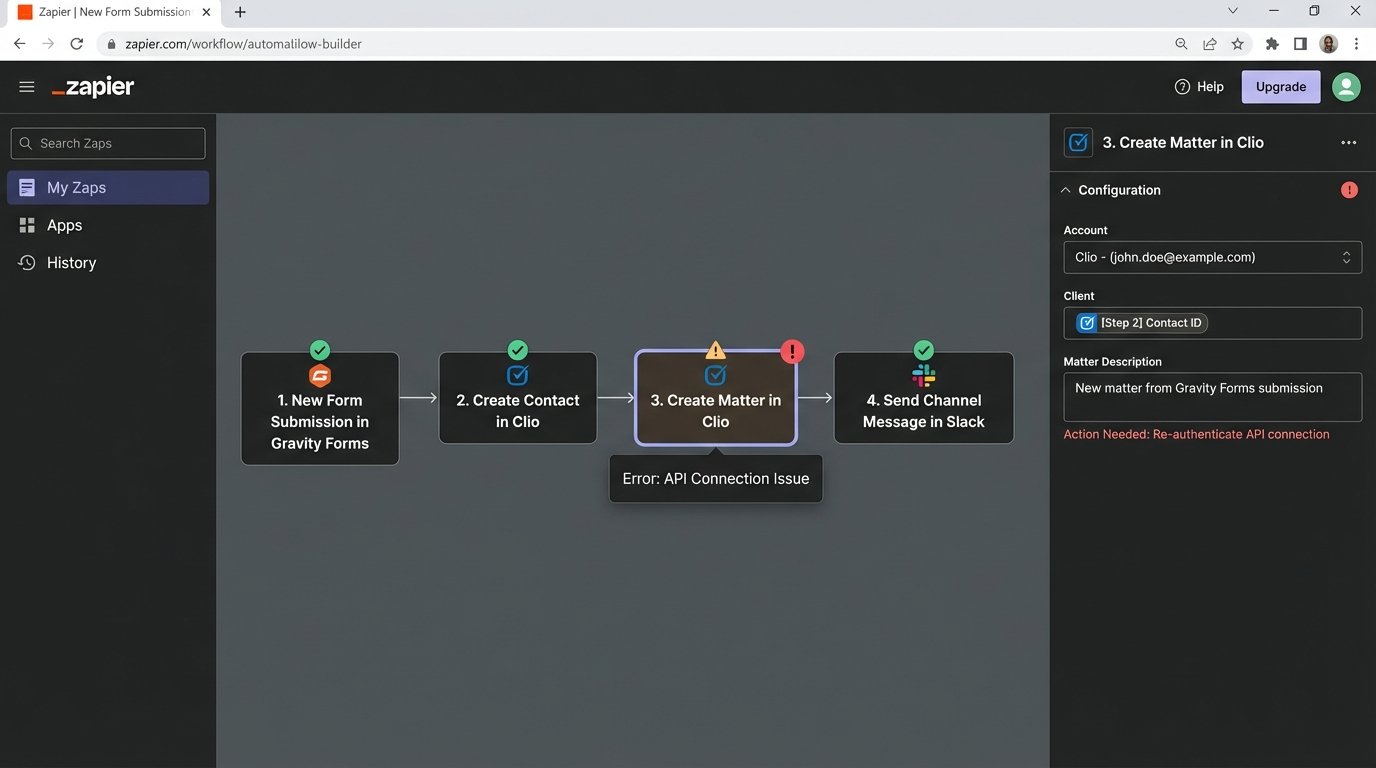
This initial setup exposed a critical flaw in many legal tech APIs. They are often poorly documented and lack the flexibility to handle complex data structures. Clio’s API, for instance, had difficulty with custom fields and required data to be formatted in a very specific, unforgiving way. The low-code solution got us 70% of the way there, but the remaining 30% was a minefield of edge cases and failed runs that required constant manual intervention.
The Intake Bottleneck: Building a Smarter Funnel
The generic web form was the source of the polluted data. We gutted it completely. The new Gravity Form was designed not as a simple contact form, but as a structured data collection tool. We used conditional logic to guide the user through the intake process. For example, selecting “Divorce” as the case type would reveal a different set of questions than selecting “Personal Injury.” This ensured we were capturing the right information for each specific practice area from the start.
The key was transforming unstructured user input into a predictable JSON object. Instead of sending a messy email, the form submission was configured to post a clean data package to a webhook endpoint that Zapier could easily ingest. This gave us a consistent data structure to work with, which is the absolute bedrock of any stable automation.
A typical JSON payload from the new form looked something like this:
{
"client_info": {
"first_name": "Jane",
"last_name": "Doe",
"email": "jane.doe@example.com",
"phone": "555-123-4567"
},
"case_info": {
"case_type": "PI",
"incident_date": "2023-10-26",
"opposing_party": "Acme Corp"
},
"metadata": {
"form_id": "intake-v2",
"submission_ip": "192.168.1.1"
}
}
This structured approach immediately solved half our problems. We were no longer guessing what the data meant. We could now map `client_info.first_name` directly to the corresponding field in the CMS with confidence. It removed the human interpretation step that was generating so many errors.
Bridging the API Gap with a Middleware Buffer
Even with clean data, directly connecting the form to Clio via Zapier was proving unreliable. The API would frequently time out or return cryptic error codes. We needed a buffer, a piece of middleware to manage the interaction with the CMS API more intelligently. We decided against a full-fledged server and opted for a Google Apps Script bound to a Google Sheet. It was cheap, effective, and leveraged a platform the firm already used.
The new workflow was more robust. The Gravity Form webhook now sent its JSON payload to the Google Apps Script. The script would parse the data, write it to a new row in a “Staging” Google Sheet, and then attempt to push the data to Clio via its API. If the API call succeeded, the script updated the row’s status to “Processed.” If it failed, it logged the error message from the API and set the status to “Error.”
Pushing unstructured data from a form directly into a structured API endpoint is like trying to shove a firehose through a needle. You get a lot of backpressure and very little throughput. The middleware script acted as a pressure regulator. It allowed us to format, validate, and retry the data submission without losing the original intake information. A paralegal could now review the “Error” rows in the Google Sheet each morning, see the exact reason for the failure, and manually fix the data or retry the submission with a single click.
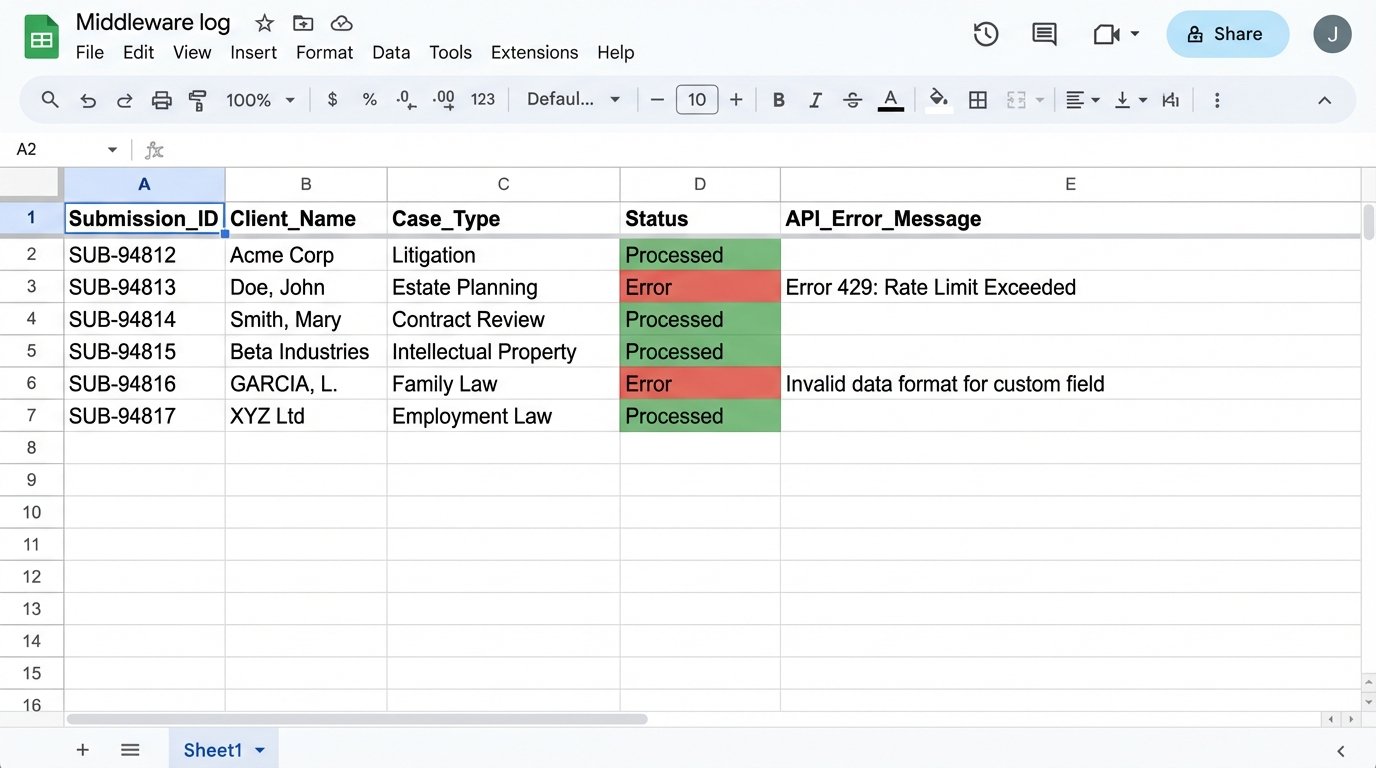
This approach provided the error handling and visibility that Zapier alone lacked. It wasn’t elegant, but it was resilient. It converted an unpredictable, silent failure point into a manageable queue of exceptions.
Automating Document Assembly
With a reliable source of structured client data in Clio, we could finally tackle the document generation problem. The old process of copying and pasting data into Word templates was replaced with Lawyaw, a document automation tool that integrates directly with Clio. Because we had enforced data integrity at the intake stage, we could now trust the data in the CMS.
We rebuilt their engagement letters, fee agreements, and internal checklists as templates in Lawyaw. These templates were linked directly to Clio fields. Generating a complete engagement letter was now a three-click process. Select the matter, select the template, and generate the document. The system would pull the client’s name, address, case details, and the assigned attorney directly from Clio and populate the document perfectly every time.
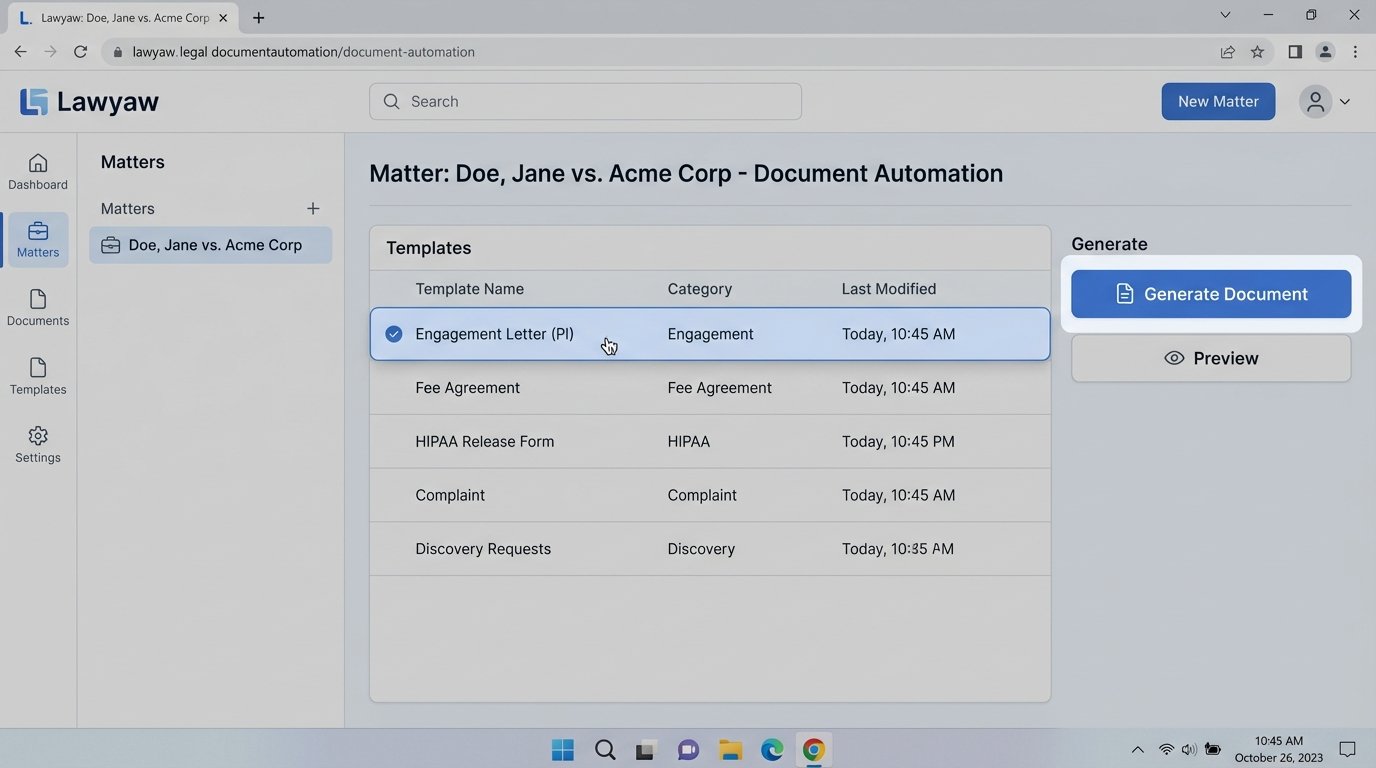
This eliminated hours of tedious work and, more importantly, removed the risk of sending a letter with another client’s information in it, a potentially catastrophic error. The automation of this single task provided a massive and immediate return on the entire project’s investment.
Quantifiable Results and Lingering Headaches
The project was a success, but not a perfect one. The results were measured not in vague efficiencies but in hard numbers. We tracked the time spent on intake and document generation for two months before and two months after implementation.
The metrics were clear:
- Manual Data Entry Time: Reduced by approximately 90%. The 10-12 hours per week of paralegal time spent on data entry was cut to less than one hour of managing exceptions in the Google Sheet.
- New Matter Opening Time: The total time from receiving a client’s information to having a signed engagement letter and an active matter in the system was reduced from an average of 48 hours to just under 2 hours.
- Data Entry Errors: We tracked errors found in client names, addresses, and case numbers. The error rate dropped from an estimated 15% of new matters to less than 1%.
The solution is not without its own maintenance burden. The Google Apps Script is a piece of custom code that needs to be monitored. When Clio updates its API, which happens infrequently and with little warning, the script can break. The firm doesn’t have a developer on staff, so they rely on our team for support. This is the hidden cost of custom middleware. It’s powerful, but it’s not a set-it-and-forget-it solution.
Key Lessons for Other Small Firms
This firm’s journey provides a blueprint for other small law practices looking to escape administrative gridlock. The lessons learned were paid for with late nights and frustrating debugging sessions.
First, fix your intake process before you do anything else. All other automation depends on having clean, structured data from the very beginning. A smart web form is the single most valuable investment you can make.
Second, assume any legal tech API is unreliable until proven otherwise. Build a buffer. Whether it’s a simple spreadsheet or a more complex queuing system, you need a way to handle API failures gracefully without losing data.
Finally, low-code tools are an excellent way to start, but they have limitations. Be prepared for the point where a simple Zap isn’t enough. Having a plan for a “version 2.0” that might involve a small amount of custom code can save you from hitting a hard wall when your needs become more complex. Automation is not a one-time project. It is an ongoing process of refinement.