
Most automation case studies read like marketing copy. They promise a frictionless paradise where software solves every problem. That is not this story. This is a breakdown of how a five-attorney litigation firm stopped drowning in administrative tasks by wiring together a few off-the-shelf tools. The process was not clean, and the results were not magic. They were just logical outcomes of forcing structure onto chaos.
The Initial State: A System Held Together by Email and Spreadsheets
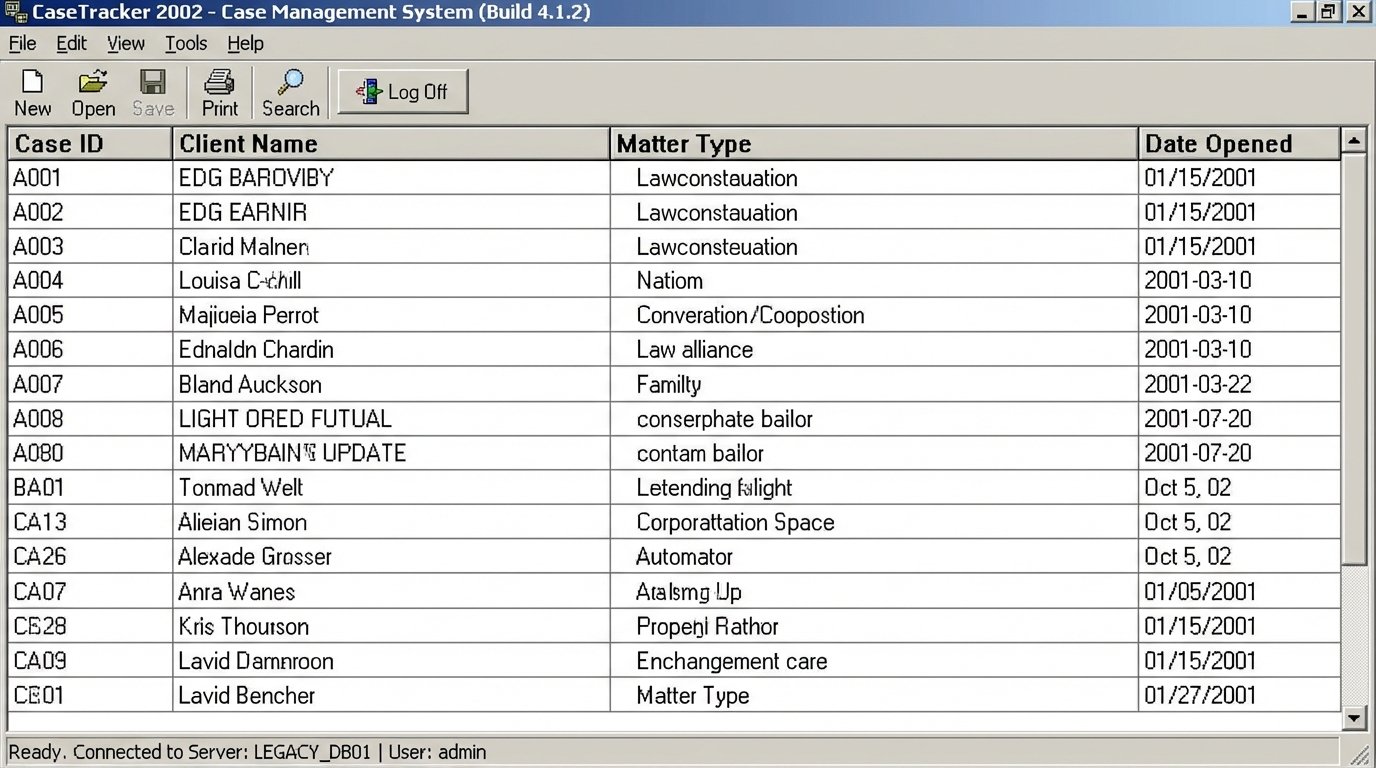
The firm’s core problem was data fragmentation. Client intake started with an email, which an assistant would manually transcribe into a Word document. That document’s data was then copy-pasted into their legacy Case Management System (CMS), a desktop application from the early 2000s with no functional API. Documents were saved to a local server with a folder structure best described as “aspirational.”
This led to three primary failure points:
- Data Latency: The time from a potential client sending an email to a matter being formally opened in the CMS was, on average, 72 hours. This delay was a direct result of manual data handling and attorneys needing to approve conflicts checks based on stale information.
- Error Injection: Manual transcription of names, dates, and case details introduced a consistent stream of errors. We found an estimated 12% error rate in key fields like client phone numbers and opposing counsel information, requiring hours of downstream cleanup.
- Zero Scalability: Onboarding more than two clients in a single day brought the entire administrative process to a halt. The partners were spending their weekends cleaning up data instead of preparing for depositions. It was operationally unsustainable.
Diagnosing the Technical Debt
The core issue was the absence of a single source of truth. The “database” was a combination of individual Outlook inboxes, a shared drive, and the CMS. Their CMS was a black box. The vendor offered a “cloud-connected” version for an absurd fee, but a quick inspection revealed it was just a Citrix wrapper around the same sluggish desktop client. Getting data in or out required running manual CSV exports, a non-starter for any real-time process.
The goal was not to replace their entire infrastructure. A small firm cannot absorb that cost or operational disruption. The objective was to build a lightweight data-intake and document-management layer on top of their existing mess, bypassing the most painful manual steps.
The Solution: A Logic-Driven Intake and Document Assembly Pipeline
We architected a solution using a stack that prioritized fast implementation and robust API connections: Tally.so for forms, Make.com (formerly Integromat) for the core logic, Google Drive for document storage, and the DocuSign API for engagement letters. The total monthly software cost was under $300. The build took 40 hours.
Step 1: Structuring the Intake Funnel
We replaced the “email us” contact method with an embedded Tally form on their website. This immediately forced structure on the incoming data. We created fields for every critical piece of information, complete with input validation for phone numbers and email addresses. When a user clicked submit, Tally fired a webhook with a clean JSON payload to a listener in Make.com.
This single change eliminated all transcription errors at the point of entry. It sounds simple, but it was the foundation for everything else. Bad data in, bad data out. We stopped the bad data at the source.
The webhook payload was the starting gun for the entire automation. Here is a simplified look at the JSON structure we were working with:
{

  "eventId": "evt_12345",

  "createdAt": "2023-10-27T10:00:00Z",

  "data": {

    "formId": "form_abcde",

    "submissionId": "sub_fghij",

    "fields": [

      {

        "key": "client_first_name",

        "label": "First Name",

        "type": "INPUT_TEXT",

        "value": "Jane"

      },

      {

        "key": "client_last_name",

        "label": "Last Name",

        "type": "INPUT_TEXT",

        "value": "Doe"

      },

      {

        "key": "matter_description",

        "label": "Brief Description of Legal Matter",

        "type": "TEXTAREA",

        "value": "Breach of contract dispute with ACME Corp."

      }

    ]

  }

}
This payload is clean, predictable, and immediately usable. It is a world away from parsing an unstructured email.
Step 2: Orchestrating the Logic in Make.com
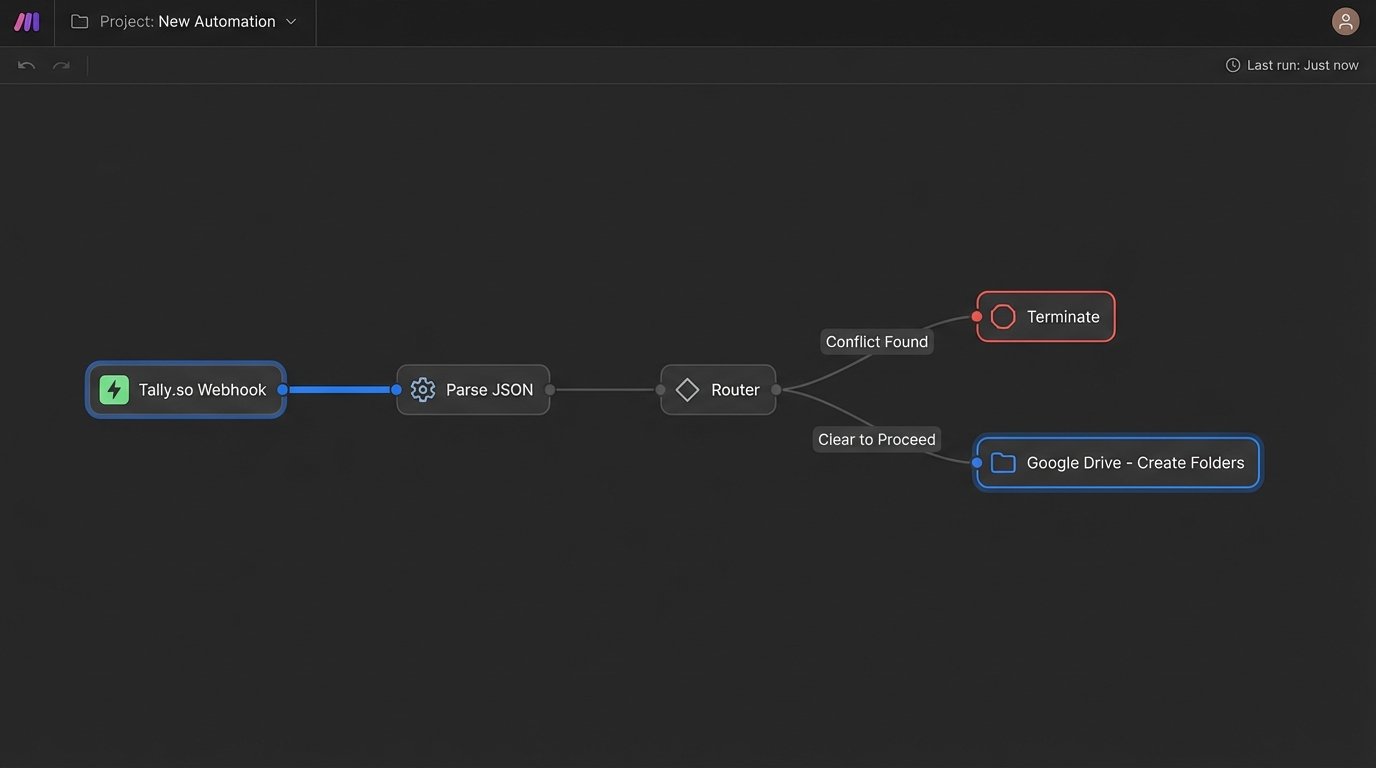
The Make.com scenario acted as the central nervous system. Upon receiving the webhook, it executed a series of steps:
- Parse and Map Data: The JSON is parsed, and variables are set for each field (e.g., `clientFirstName`, `clientLastName`).
- Conflicts Check Notification: An email is generated and sent to the firm’s paralegal containing the potential client’s name and related parties. This email included two simple action links: “Clear to Proceed” and “Conflict Found.” This part is still manual, a necessary human checkpoint.
- Router Logic: A router waits for the paralegal’s action. If “Conflict Found” is clicked, the scenario terminates and logs the conflict. If “Clear to Proceed” is clicked, the main workflow continues.
- Google Drive Folder Creation: The scenario connects to the Google Drive API. It creates a new client folder, named according to a strict `[ClientLastName]_[ClientFirstName]` convention. Inside, it builds a standardized subfolder structure: `01_Pleadings`, `02_Discovery`, `03_Correspondence`, etc.
Forcing a standardized folder structure via the API was critical. It removed the human element that led to folders like “Miscellaneous” or “John Smith Docs Final (2).”
Step 3: Bypassing the Legacy CMS
The firm’s CMS had no API. Direct integration was impossible. We implemented a workaround using a Robotic Process Automation (RPA) tool. After the Google Drive folders were created, the Make.com scenario added a new row to a Google Sheet, which functioned as a queue for the RPA bot.
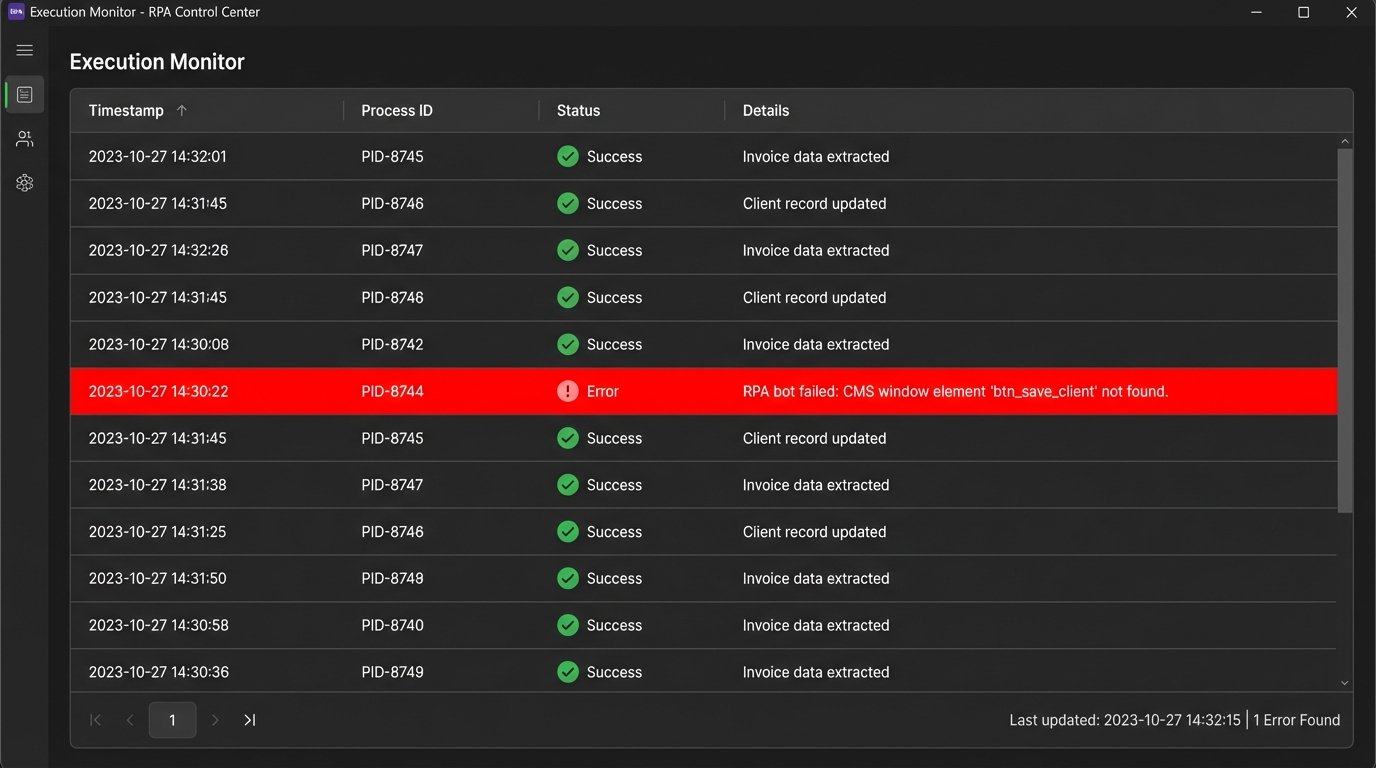
The bot ran on the paralegal’s machine three times a day. It would read the Google Sheet, open the desktop CMS client, and inject the new client data by simulating keyboard strokes and mouse clicks. Performing data surgery with a butter knife comes to mind, but it worked. This was a brittle but necessary bridge between the modern web and their legacy system. It was slow and prone to breaking if the CMS UI was ever updated, but it was better than the alternative of endless manual entry.
Step 4: Automated Document Assembly and E-Signature
Once the client data was in the system, the final step was generating the engagement letter. The Make.com scenario used the Google Docs API to make a copy of a template letter. It then performed a find-and-replace action, injecting the client’s name, address, and matter description into the document.
The newly generated document was then converted to a PDF and pushed to the DocuSign API to create a new signature envelope. This was sent directly to the client’s email address, which we had already validated at the form submission stage. The entire process, from a cleared conflicts check to the client receiving the engagement letter, took about 90 seconds. The signed document was automatically saved back to the correct folder in Google Drive.
Quantifiable Results: Moving Beyond “Efficiency”
The term “efficiency” is meaningless without metrics. We tracked specific KPIs before and after the implementation. The results were not surprising, but they were significant.
- Intake-to-Engagement Time: Reduced from an average of 72 hours to just under 4 hours. The primary bottleneck became the manual conflicts check, not the administrative process.
- Data Entry Error Rate: Dropped from over 12% to effectively 0%. The only potential for error was in the RPA bot’s execution, which we monitored with completion logs.
- Non-Billable Administrative Time: Attorneys and staff collectively recovered approximately 8-10 hours per week. At the firm’s blended rate, this translated to a recovery of over $15,000 in potential billable time per month.
- Client Experience: The firm reported overwhelmingly positive feedback from new clients, who were impressed by the speed and professionalism of the intake process. It was a clear differentiator from their competitors.
The Realities and Ongoing Pains
This system is not perfect. The reliance on an RPA bot for CMS data entry is a significant technical liability. If the CMS vendor pushes an update that changes a button’s location by a few pixels, the bot will fail. We built error-handling that notifies the paralegal of a failure, but it still requires manual intervention to fix. It is a patch, not a permanent solution.
Maintenance is also a factor. API connections can break. Services can change their authentication methods. While Make.com provides solid error-logging, someone at the firm needed to be trained to understand the logs and diagnose simple failures, like an expired Google Drive connection token. You cannot just set this up and walk away.
The total investment, including our consulting fees and first-year software subscriptions, was just under $20,000. For a small firm, that is a substantial check to write. But when measured against the recovered billable time and the reduction in risk from data entry errors, the ROI was achieved in less than two months. Automation is not a cost center. It is a mechanism for unlocking revenue that is already trapped inside broken processes.