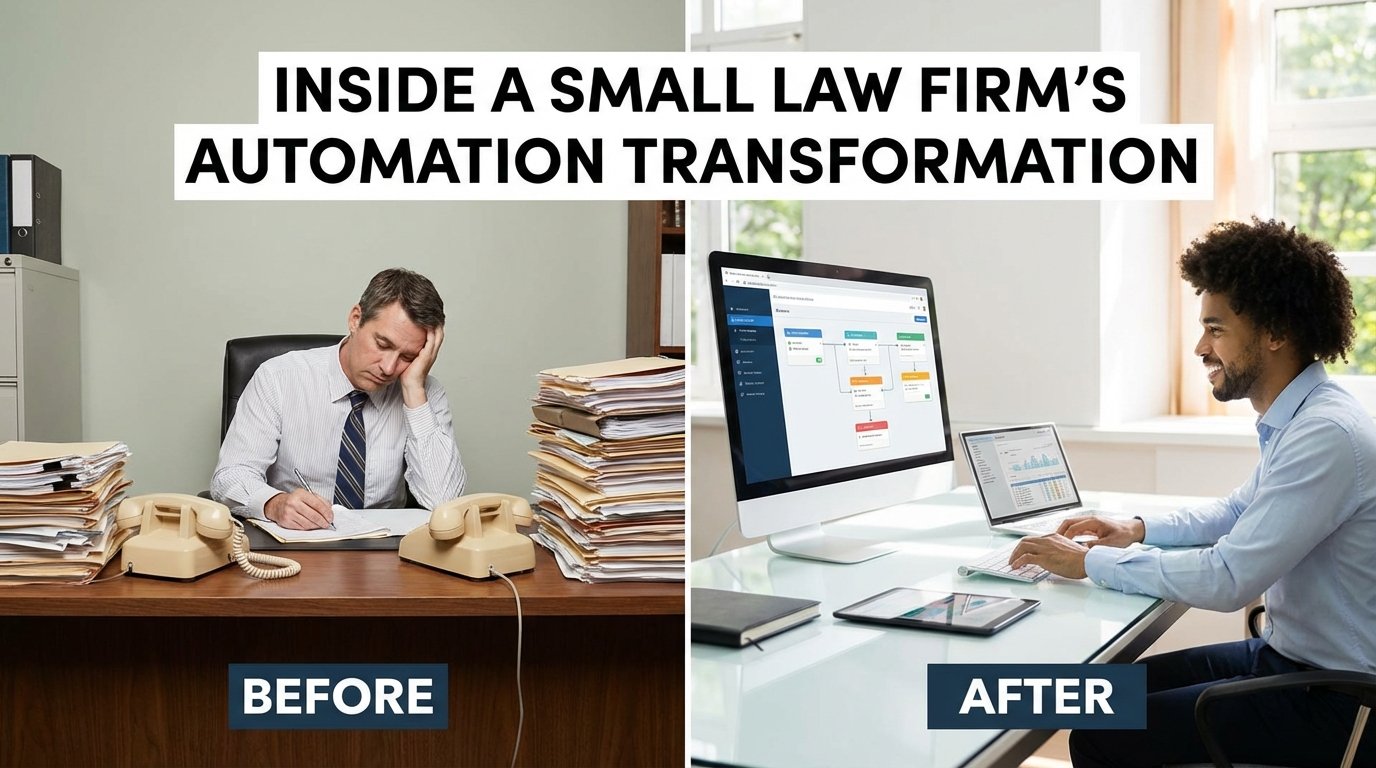
The firm wasn’t broken. It was just slow. Ten attorneys, a solid book of personal injury business, and an operational stack held together by spreadsheets and institutional memory. Their “process” was a chain of manual data entry, duplicated effort, and paralegals spending half their day chasing paper instead of building cases. The initial audit revealed that an average client intake took 45 minutes of active staff time, not including the follow-ups for missing information. This wasn’t a technology problem. It was a logic problem enabled by outdated tools.
The Mess We Found: A Manual Workflow Autopsy
Before any code was written or any new subscription was purchased, we had to map the existing chaos. The primary source of new clients was a simple contact form on their website. The form submission triggered an email notification to a shared paralegal inbox. From there, the process was entirely manual, a fragile sequence of human actions prone to error at every step. A paralegal would read the email, open the firm’s case management software (a legacy desktop application), and re-type every single piece of information. The client’s name, address, phone number, and a summary of their incident were all transcribed by hand.
This introduced the first point of failure: data entry errors. Transposing a phone number or misspelling a name created downstream problems that could delay case progress for weeks. Once the client was created in the system, the paralegal drafted an engagement letter from a Word template, manually filling in the client’s details again. The document was then printed, mailed, and tracked for signature in a separate Excel spreadsheet. This spreadsheet was the firm’s single source of truth for client onboarding status, and it was a masterpiece of conditional formatting and human desperation.
Billing and Document Hell
Billing was another time-drain. Attorneys tracked their hours in disparate ways. Some used notebooks, others used the clunky timer in the old case management software. At the end of the month, a legal assistant would spend nearly a week collecting, collating, and keying these hours into invoices. The process of generating and mailing these invoices ate up 30 to 40 hours of staff time every single month. It was an expensive, error-prone system that delayed revenue collection and frustrated everyone involved.
Document management was a simple folder structure on a shared server. Organizing discovery, correspondence, and pleadings relied on strict adherence to a naming convention that was, predictably, not strictly followed. Finding a specific document often required a full-text search across the entire case folder, a sluggish operation that tested the patience of everyone in the office. This entire system was a ticking time bomb of inefficiency. It functioned only because the people operating it were diligent, not because the system itself was sound.
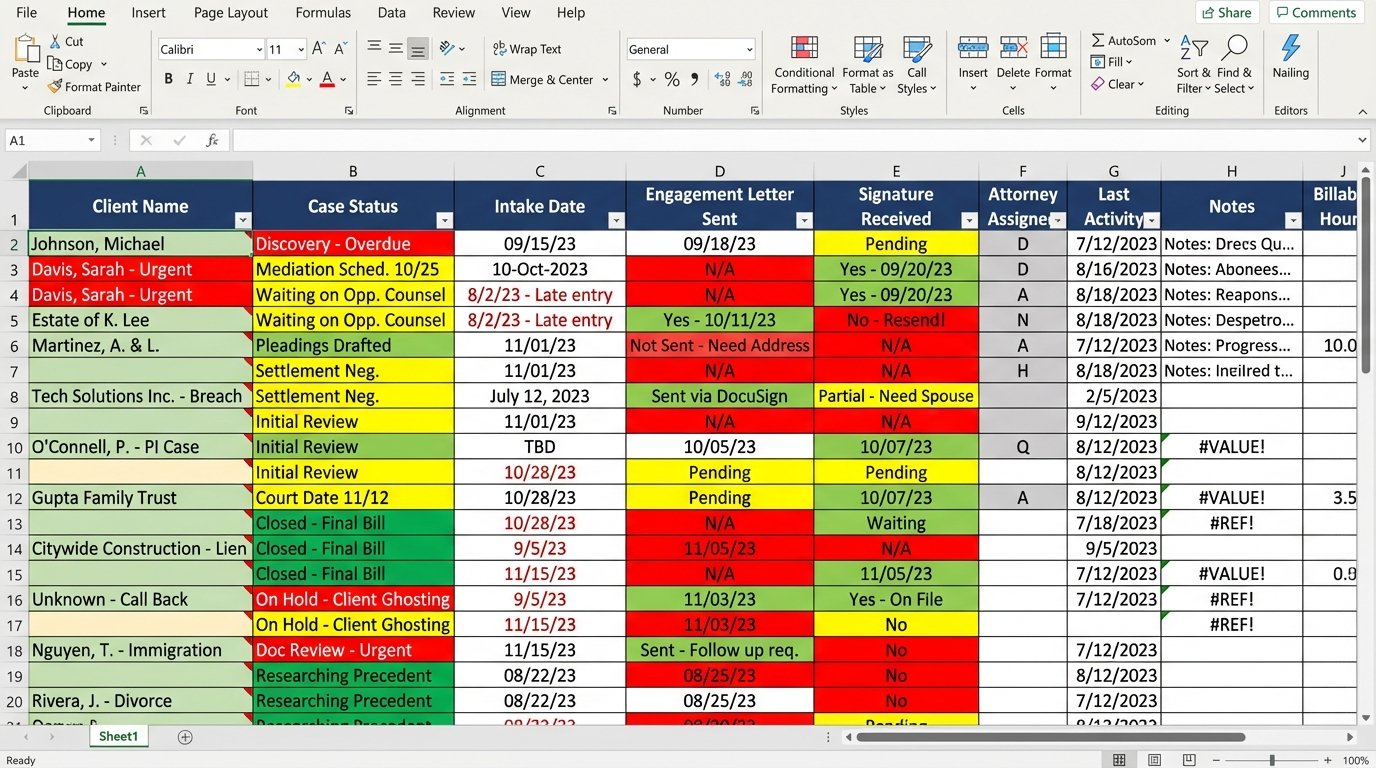
The core issue was data fragmentation. Client information lived in at least five separate places before the first billable hour was even logged: the initial email, the case management system, the Word document, the Excel tracker, and the attorney’s personal notes. Updating a client’s address meant a scavenger hunt through the digital file cabinet. This is the reality of many small firms. They aren’t failing, but they are leaking productivity from a thousand tiny cuts.
The Architecture We Built: Forcing Order from Chaos
We didn’t propose a single, wallet-draining platform to solve everything. That approach rarely works. Instead, we targeted the highest-friction workflows with a stack of modern, API-first tools bridged together with a bit of custom logic. The goal was to create a single, authoritative data path for new clients and case information, eliminating manual re-entry entirely.
The new stack consisted of three core components:
- A modern, cloud-based practice management system (we’ll call it LawOS for this discussion). The key was its well-documented REST API.
- An integration platform (like Zapier or Make) to act as the central nervous system for data movement.
- A document generation tool (like DocuSign Gen or a similar product) that could merge data into templates.
This wasn’t a rip-and-replace project. It was a surgical bypass of the broken parts of their old workflow. The first target was that client intake form.
Fixing Client Intake: The Webhook and the API
We replaced the old contact form with a more intelligent one from a service like JotForm or Typeform. When a potential client submits the form, it no longer sends a simple email. Instead, it triggers a webhook. This webhook sends a structured JSON payload to our integration platform. This payload contains all the information needed to create a new matter and contact in LawOS without a human touching the keyboard.
The initial data transfer felt like trying to force-feed a vending machine. The form fields didn’t perfectly match the API endpoints in LawOS. We had to build a transformation step in the integration platform to map the incoming data, clean it up (e.g., standardizing phone number formats), and then POST it to the correct endpoints in LawOS. First, we create the contact. Then, using the contact ID returned by the API, we create the associated matter.
Here’s a simplified look at the JSON payload from the form and how it gets mapped:
// Incoming Webhook Payload from Form

{

  "submission_id": "987654",

  "form_data": {

    "first_name": "Jane",

    "last_name": "Doe",

    "email_address": "jane.doe@example.com",

    "phone_mobile": "(555) 123-4567",

    "incident_date": "2023-10-26",

    "incident_summary": "Rear-ended at a stoplight."

  }

}
// Transformation Logic (pseudo-code)
contact_payload = {
"client": {
"first_name": form_data.first_name,
"last_name": form_data.last_name,
"email": form_data.email_address,
"phone_number": strip_formatting(form_data.phone_mobile)
}
}
// POST to /api/v4/contacts
// On success, get new_contact_id
matter_payload = {
"matter": {
"display_name": `PI - ${form_data.last_name}`,
"client_id": new_contact_id,
"description": form_data.incident_summary,
"custom_field_incident_date": form_data.incident_date
}
}
// POST to /api/v4/matters
Once the matter is created in LawOS, the automation triggers two final actions. First, it creates a standardized folder structure for the new matter in their document management system. Second, it sends the client’s information to the document generation tool, which automatically creates the engagement letter and sends it for e-signature via DocuSign. The signed document is then automatically saved back into the correct matter folder.
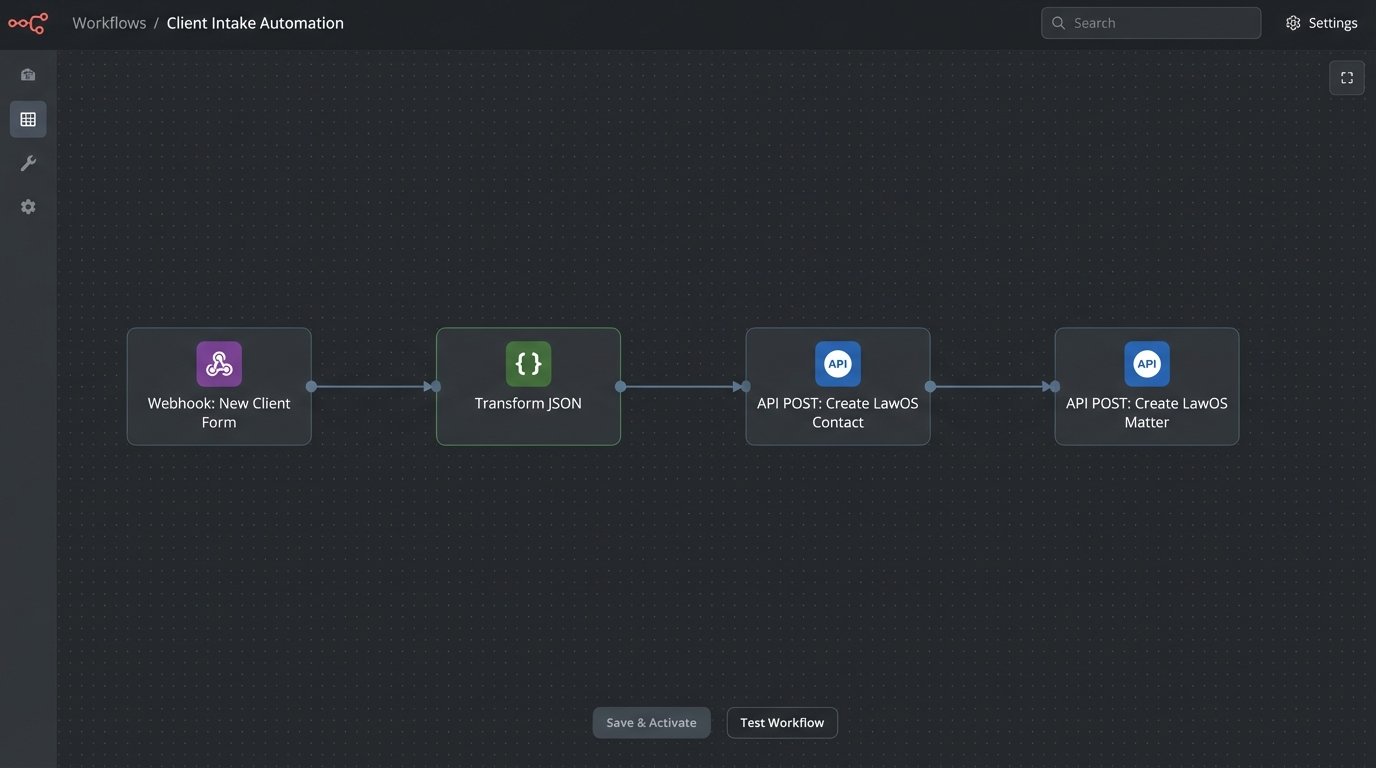
The human’s role changed from data entry clerk to workflow supervisor. A paralegal now gets a single notification: “New client Jane Doe created and engagement letter sent.” Their job is to verify, not to type.
Automating Billing and Reminders
With a cloud-based practice management system, time tracking became standardized. Attorneys could now enter time from their phones or laptops directly into the relevant matter. The month-end billing crunch was replaced by a semi-automated process. We configured the system to generate draft invoices for all active matters on the 25th of each month. A managing partner reviews the drafts, makes any adjustments, and approves them in a batch.
Upon approval, the system automatically emails the invoices to the clients with a link to a payment portal. The real efficiency gain came from the reminder system. We set up an automated sequence: if an invoice is unpaid after 15 days, send a polite reminder. If it’s unpaid after 30 days, send a firmer one. This simple logic-check removed the need for a legal assistant to manually track accounts receivable in a spreadsheet. It was a simple, unemotional collections agent working 24/7.
The Results: Quantified and Clear
The impact was immediate and measurable. We tracked key performance indicators before and after the implementation to validate the investment. The numbers speak for themselves. This wasn’t about esoteric “efficiency gains.” It was about giving back hours that could be used for billable work or to simply go home on time.
Here is the breakdown of the operational improvements:
- Client Intake Time: Reduced from 45 minutes of manual work per client to less than 5 minutes of verification. This saved the firm approximately 20 hours of paralegal time per month.
- Time to Engagement: The time from initial contact to a signed engagement letter dropped from an average of 3-5 business days to under 24 hours. This improved the client experience and reduced the risk of losing a potential client to a more responsive firm.
- Billing Cycle Time: The monthly billing process, which used to consume 30-40 hours of administrative time, was cut to just 4-6 hours of review and approval.
- Average Days Sales Outstanding (DSO): With automated invoicing and reminders, the average time to get paid dropped by 12 days, significantly improving the firm’s cash flow.
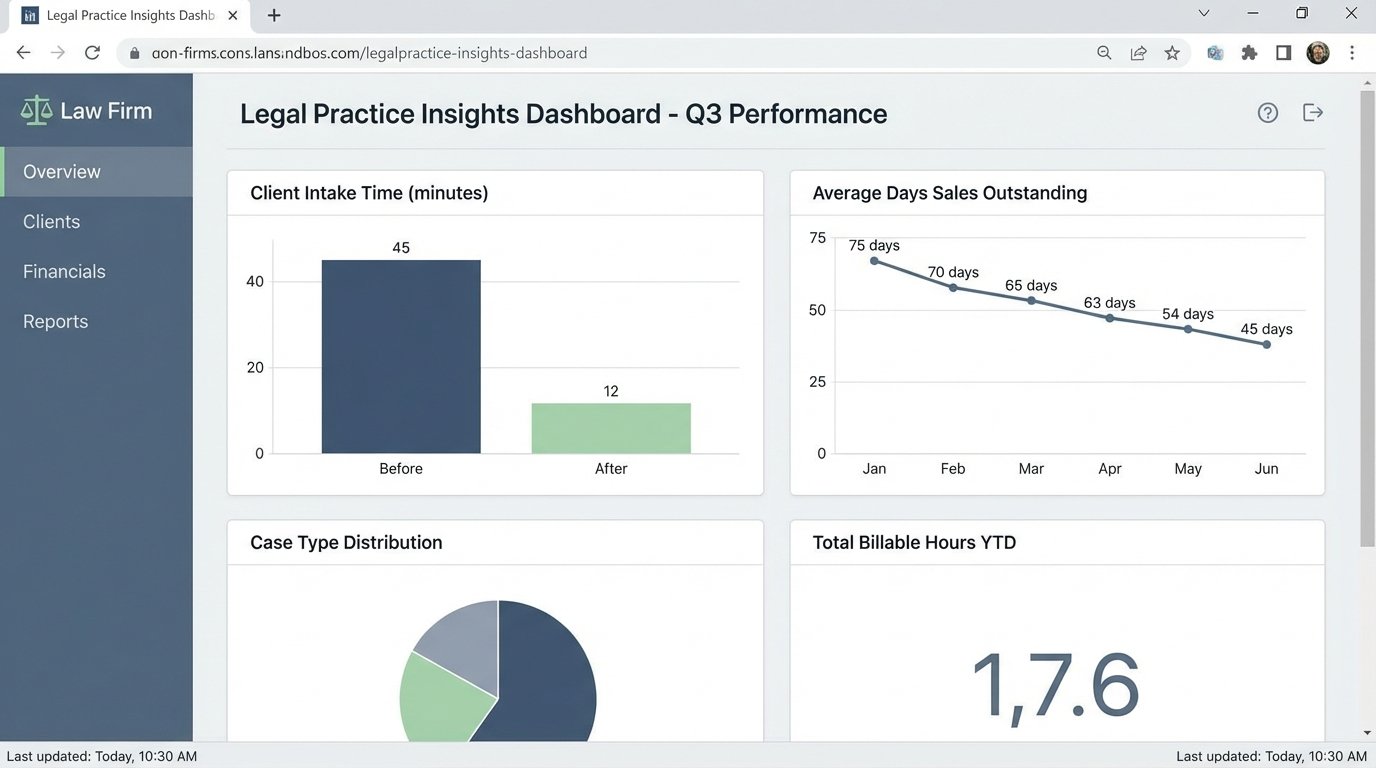
The secondary effects were just as important. Errors from manual data entry dropped to virtually zero. Staff morale improved because the most tedious parts of their jobs were eliminated. Paralegals could now focus on substantive case work, drafting motions and communicating with clients, which is what they were hired to do. Attorneys had a real-time view of their case files and billable hours without having to ask anyone.
This wasn’t a magic bullet. The migration required careful planning. We had to clean up years of inconsistent legacy data. There were long nights spent debugging API connection issues because the documentation was outdated. But the result was a resilient, scalable system that allows the firm to grow without proportionally increasing its administrative overhead. They stopped patching holes in a sinking ship and built a new boat.