Most email automation for real estate is garbage. It’s a pre-written, seven-day drip campaign that treats a CEO looking for a penthouse the same as a college student clicking on a Zillow ad at 2 AM. The result is a flooded inbox, an abysmal open rate, and leads that are dead on arrival. We are not building drip campaigns here. We are building conditional, data-driven systems that triage, qualify, and engage leads with precision.
This is about shifting from a “send-to-all” mentality to a “send-to-one” execution, scaled through logic. The goal isn’t to send more email. It’s to make every email sent a calculated action based on lead data, market data, and client behavior. Forget the marketing fluff. These are the architectures that actually work.
1. The New Lead Triage and Enrichment Engine
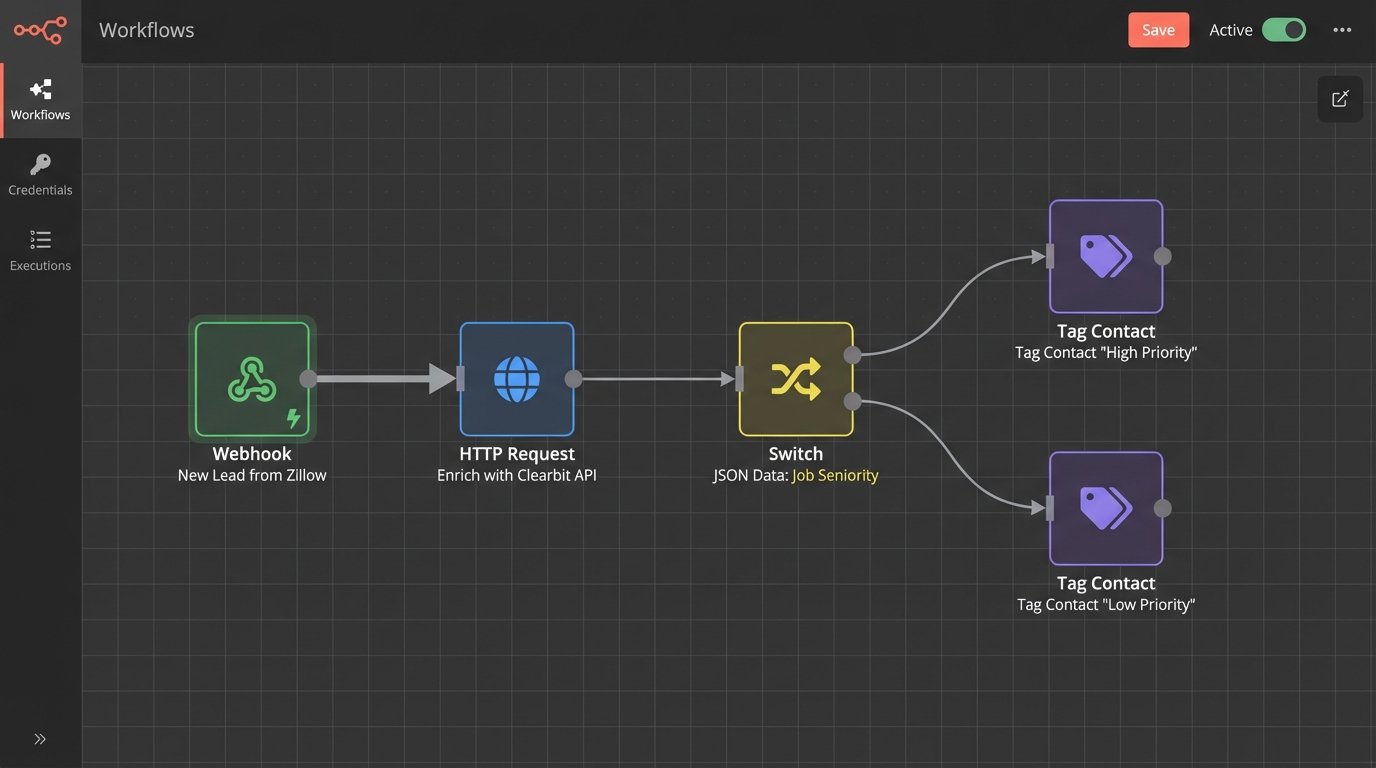
A new lead from your website or a portal is a black box. The default action is to dump it into a generic welcome sequence, a process that is functionally useless. A proper triage engine bypasses this. Its sole job is to answer one question in under 500 milliseconds: who is this person, really? The system logic-checks the lead’s email address against a data enrichment provider the moment it hits your CRM.
This isn’t about getting a first name. It’s about pulling job titles, company data, social profiles, and location information to build an instant profile. An email from a corporate domain with a director-level title is immediately routed to a high-touch, personalized sequence. An anonymous Gmail address with no associated data gets a more standard qualification sequence. You stop wasting your prime time on tire-kickers.
Technical Breakdown
The core of this is a webhook from your lead source (e.g., Zillow, Realtor.com, your own web form) that triggers a serverless function. That function takes the lead’s email, fires a request to an enrichment API like Clearbit or Hunter, and parses the returned JSON. Based on the data points, or lack thereof, it applies a specific tag to the contact in your CRM. The tag itself then triggers the appropriate email sequence. The entire process is about segmenting before the first email is even sent.
Here’s a simplified Python example using a serverless function framework to illustrate the core logic.
import json

import requests
def lambda_handler(event, context):
lead_email = event['email']
api_key = 'YOUR_ENRICHMENT_API_KEY'
enrichment_url = f'https://person.api.clearbit.com/v2/people/find?email={lead_email}'
headers = {'Authorization': f'Bearer {api_key}'}
response = requests.get(enrichment_url, headers=headers)
tag = 'low_priority_lead' # Default tag
if response.status_code == 200:
data = response.json()
if data.get('employment') and data['employment'].get('seniority') in ['director', 'vp', 'executive']:
tag = 'high_priority_lead'
elif data.get('employment'):
tag = 'mid_priority_lead'
# Now, update the CRM via its API
# crm_update_function(lead_email, tag)
return {
'statusCode': 200,
'body': json.dumps(f'Lead {lead_email} tagged as {tag}')
}
The system works. But enrichment services can be a wallet-drainer, and their data on non-corporate emails is often thin. You have to monitor your cost-per-lead against the value of the intel you receive.
2. The Property-Matching Engine (That Doesn’t Look Like It’s From 2005)
Standard IDX-powered “new listing” alerts are hideous. They have zero personalization and often end up in the spam folder. A property-matching engine you control does the opposite. It connects directly to your MLS data feed, pulls your new listings, and cross-references their attributes against the saved search criteria of your existing contacts. It constructs a clean, personalized email for each matched contact.
The email doesn’t just say “New Listing.” It says, “John, a 3-bedroom matching your price range just hit the market in the Northgate neighborhood you were interested in.” This is achieved by mapping MLS data fields to CRM custom fields and using merge tags to inject property-specific details into the email template. It’s the difference between a mass broadcast and a targeted notification.
Technical Breakdown
The biggest hurdle is getting clean, consistent data from the MLS. Many agents still rely on clumsy CSV exports via FTP. A better method is to use the RESO Web API if your MLS provides it. You’ll build a scheduled script (a cron job) that runs every 15 minutes. The script polls the API for new listings associated with your agent ID. If it finds one, it pulls the core data: price, beds, baths, square footage, and neighborhood.
Next, the script queries your CRM for contacts who have saved searches or tags matching those attributes. For each match, it triggers a transactional email service like Postmark or SendGrid to send a single, targeted email. Using a transactional service is critical for deliverability. Trying to shove these time-sensitive alerts through a bulk marketing platform like Mailchimp is asking for throttling and delays.
Trying to sync and normalize data fields from multiple MLS feeds is like trying to force a firehose of unstructured data through the eye of a needle. Each feed has its own naming conventions and quirks. You’ll spend most of your time building a normalization layer to map fields like “GAR_SQ_FT” and “GarageSize” to a single, consistent “garage_sqft” variable in your system. Expect this to be a constant source of maintenance.
3. The Post-Showing Feedback Automation
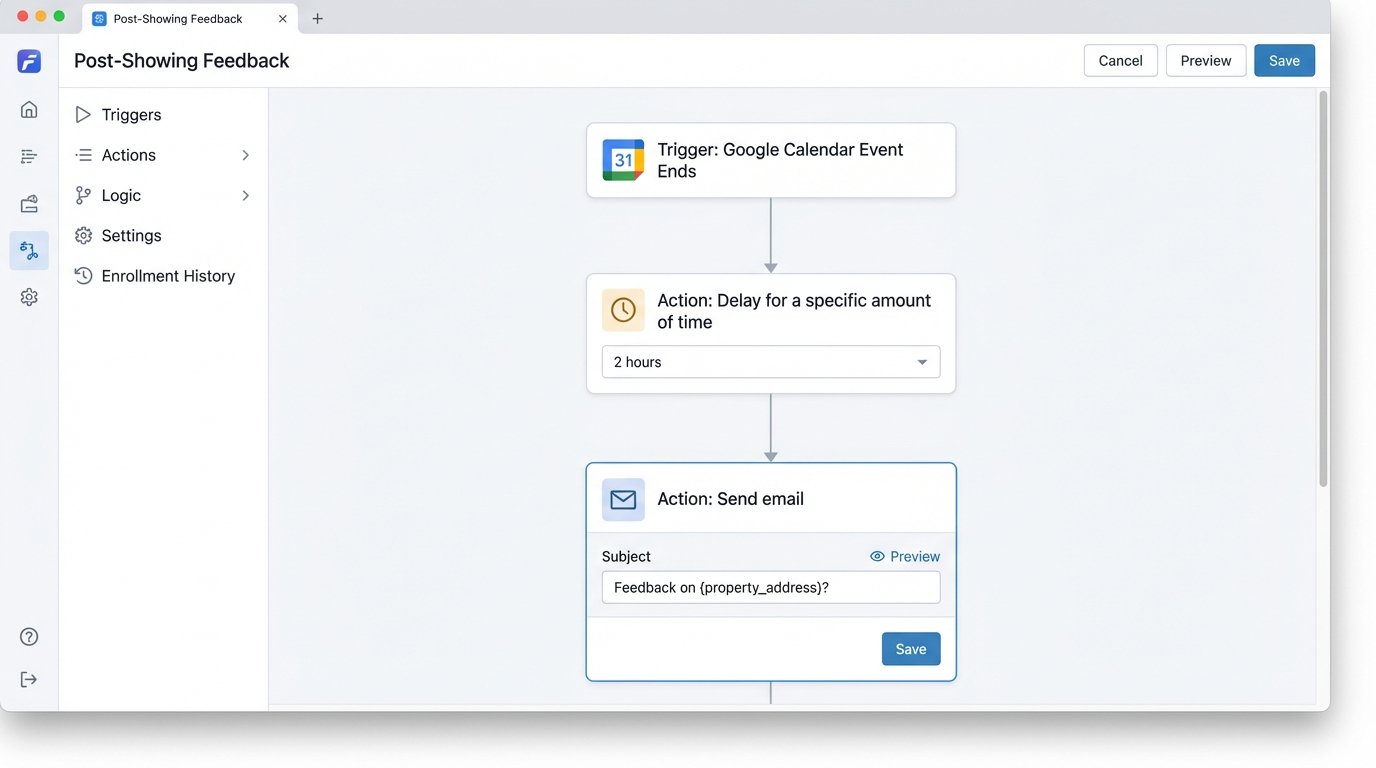
Manually chasing clients for feedback after a showing is inefficient. An automated feedback loop system uses your calendar as the trigger. The automation monitors your calendar for events with specific keywords, like “Showing: 123 Main St.” Once the event’s end time passes, a delay is initiated. After a set period, say two hours, an email is automatically sent to the client attendee.
This email shouldn’t be a long, boring form. It should contain three simple, clickable links or buttons: “Loved this property,” “It was okay,” and “Not the one for me.” Each link is unique to the contact and the property. When clicked, it takes them to a simple thank you page while a webhook fires in the background, updating a custom field in their CRM contact record. This action gives you immediate, structured feedback without requiring the client to type a single word.
Technical Breakdown
This requires connecting to the Google Calendar API or Microsoft Graph API with OAuth2. You’ll need to build a service that polls the `events` endpoint, scanning for recently concluded events that match your criteria. When a match is found, you extract the attendee’s email and the property address from the event title or description. You then generate unique URLs for your feedback options.
A sample URL might look like this: `https://yourapi.com/feedback?contact_id=12345&property_id=ABC987&rating=3`. Your webhook receiver at the `/feedback` endpoint would parse these query parameters. It then makes an API call to your CRM to update the contact record. For example, a `rating=1` might trigger a task for you to call them, while a `rating=3` (Loved it) could add them to a “hot prospects” list for similar properties.
The main failure point here is parsing the event details. If you or your assistant enter the client’s name in the title instead of adding them as an attendee, the automation breaks. You have to enforce a rigid, consistent format for how showings are scheduled on your calendar, which is often harder than writing the code itself.
4. The Market-Triggered Re-Engagement Sequence
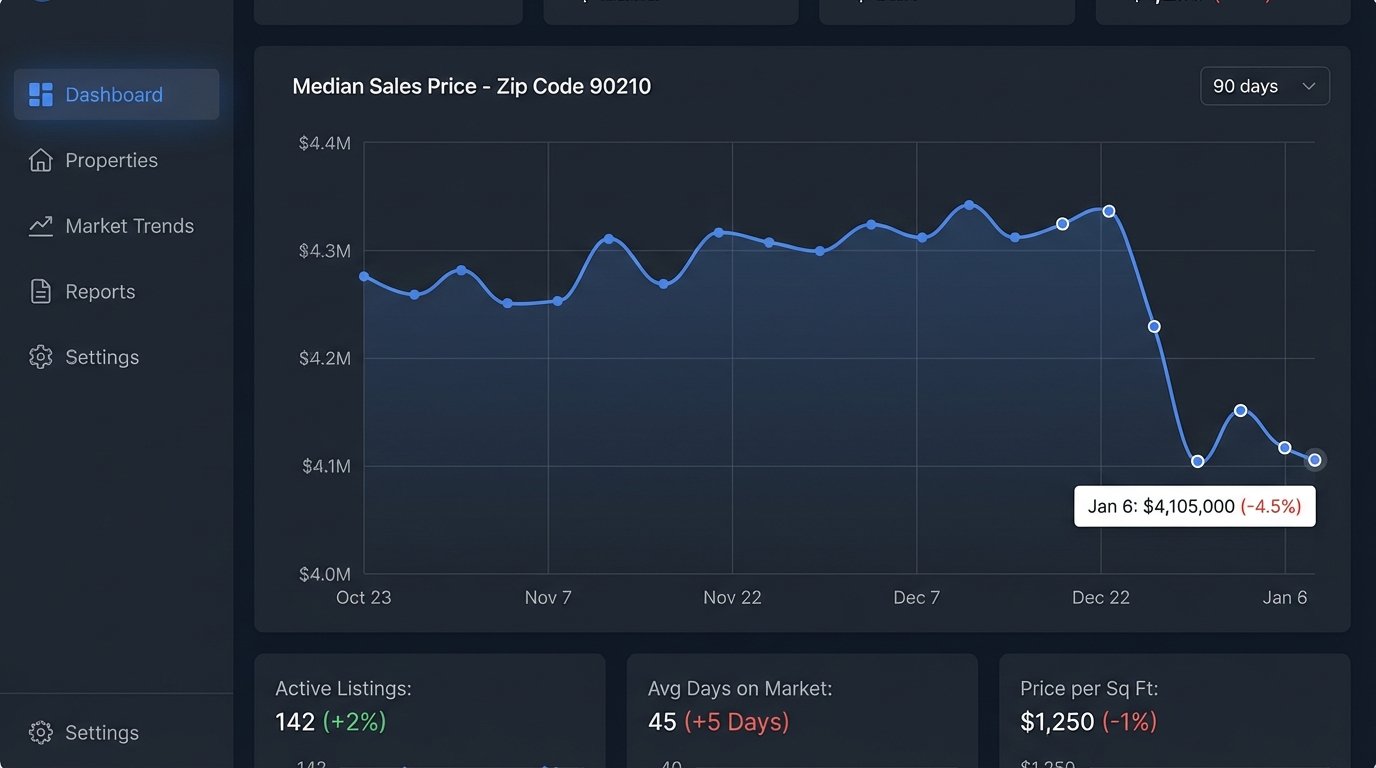
Leads go cold. The typical response is to put them in a “long-term nurture” sequence that sends a monthly newsletter nobody reads. A more effective approach is to re-engage them based on a relevant market event, not just the passage of time. This system connects to a real estate data API to monitor key metrics in specific zip codes, like median sales price, days on market, or inventory levels.
The automation lies dormant until a significant data threshold is crossed. For example, if the median sales price in a prospect’s target zip code drops by more than 3%, the system automatically triggers a highly specific email. “Hi Jane, the median home price in 90210 has dropped by $45,000 in the last 30 days. This may be the market shift you were waiting for.” This transforms a dead lead into a timely, data-driven conversation.
Technical Breakdown
You need a reliable source for hyper-local housing data, which can be an API from Zillow, Altos Research, or another provider. You’ll set up a scheduled task to run daily. This task queries the data API for the zip codes your cold leads are interested in. It stores the results in a simple database to track trends over time. The core of the automation is a conditional check: `if today’s median_price < (30_day_avg_price * 0.97)`.
When this condition is true for a specific zip code, the script fetches all contacts from your CRM tagged with that zip code and a “cold lead” status. It then injects this list into a pre-defined email campaign, using merge fields to insert the specific data point (e.g., the exact price drop) that triggered the send. This is a CPU- and API-intensive process. You need to be mindful of API call limits and processing costs, especially if you’re tracking hundreds of zip codes.
The data is only as good as its source. If the API has a lag or provides inaccurate data, you risk sending incorrect information and damaging your credibility. Always run a sanity check on the data before your automation acts on it.
5. The Post-Close and Referral Engine
The most valuable client is the one you just closed. Yet most agents abandon them the second the check clears. This automation sequence is triggered by a deal stage change in the CRM, moving from “Pending” to “Closed.” This single event kicks off a multi-touch, value-add sequence that spans over a year, designed to generate reviews and referrals.
The sequence is not just a series of reminders. It provides value at each step. The first email delivers a list of trusted movers and utility setup contacts. The 90-day email asks for a review on a specific platform. The six-month email is a simple check-in. The one-year email is the most powerful. It delivers an automated, lightweight Comparative Market Analysis (CMA) showing them the potential equity they’ve gained in their first year. This positions you as an ongoing advisor, not a one-time salesperson.
Technical Breakdown
This entire workflow lives inside your CRM’s automation builder (like HubSpot Workflows or ActiveCampaign Automations), or it can be built with a tool like Zapier. The trigger is the deal stage update. Each step in the sequence is a timed delay followed by an action.
- Trigger: Deal Stage = Closed.
- Wait 1 Day: Send Email “Congrats & Vendor List”.
- Wait 89 Days: Send Email “Review Request” with a direct link to your Google Business Profile or Zillow page.
- Wait 90 Days: Send Email “Home Anniversary & CMA”.
The most complex part is generating the one-year CMA. Some modern real estate platforms offer APIs that can generate a “CMA Lite” report on demand. Your automation would make a call to this API with the property address and trigger the email containing a link to the generated report. If you don’t have access to such an API, this step can be a task created for you to perform manually. The automation still works, it just offloads that one specific action to a human.
This system relies completely on disciplined CRM usage. If you don’t diligently update your deal stages, the trigger never fires, and the entire automation is dead in the water.