
A ten-person personal injury firm was operating on a tech stack that was charitably described as archaic. The core problem was data friction. A single client’s information was manually entered into at least four different systems: the initial Word document for client notes, the case management system (a desktop-based relic), the billing software, and Outlook for calendaring. This created redundant labor, introduced a high probability of data entry errors, and made reporting a manual nightmare of spreadsheet consolidation.
The firm’s partners knew they were inefficient. They just didn’t grasp the scale. We ran a time study on two paralegals for one week. The results showed that 35% of their time, a combined 28 hours per week, was spent on non-billable data transposition and administrative scheduling. That’s the equivalent of hiring a full-time administrator and having them do nothing for over half the week. The cost was not just in wasted salaries but in opportunity. That time could have been spent on case development or client communication.
Diagnostic: Isolating the Failure Points
Before architecting a solution, we had to map the existing workflow and identify the exact points where efficiency broke down. The process was a classic example of linear, manual hand-offs. A potential client calls, a paralegal takes notes in a Word doc, then re-keys that info into their legacy case management software (CMS). An engagement letter is then manually drafted by copying and pasting data from the CMS into a template. The process was a slow-motion train wreck.
We identified three primary choke points ripe for intervention:
- Client Intake: Purely manual data collection and entry. There was no single source of truth for client data, leading to version control issues and typos that propagated through every document.
- Document Generation: Paralegals were burning hours on “find and replace” in document templates. Conditional clauses based on case type or jurisdiction were handled by manually deleting irrelevant paragraphs, a practice begging for errors.
- Appointment Scheduling: Scheduling a single client deposition involved an average of four back-and-forth emails. This not only consumed attorney and paralegal time but also introduced significant delays in moving cases forward.
The core issue was the lack of a central nervous system for data. Information was siloed in applications that didn’t communicate. Trying to get their old CMS to talk to a modern cloud service would be like trying to hotwire a lawnmower to a starship. The protocols just don’t speak the same language. We decided to bypass the legacy system for these specific workflows and build a lightweight, API-driven layer on top of it.
The New Architecture: An API-First Approach
The strategy was not to perform a rip-and-replace of their entire tech stack. That would have been a budget-killer and operationally disruptive. Instead, we chose to build a parallel workflow using modern, accessible tools that could be bridged together with a workflow automation platform. The goal was to intercept the data at its point of origin and automate its journey.
The chosen stack consisted of three core components:
- Gravity Forms on WordPress: For the initial client intake. It’s highly customizable, allows for conditional logic, and most importantly, has robust webhook capabilities. This would be our single point of data entry.
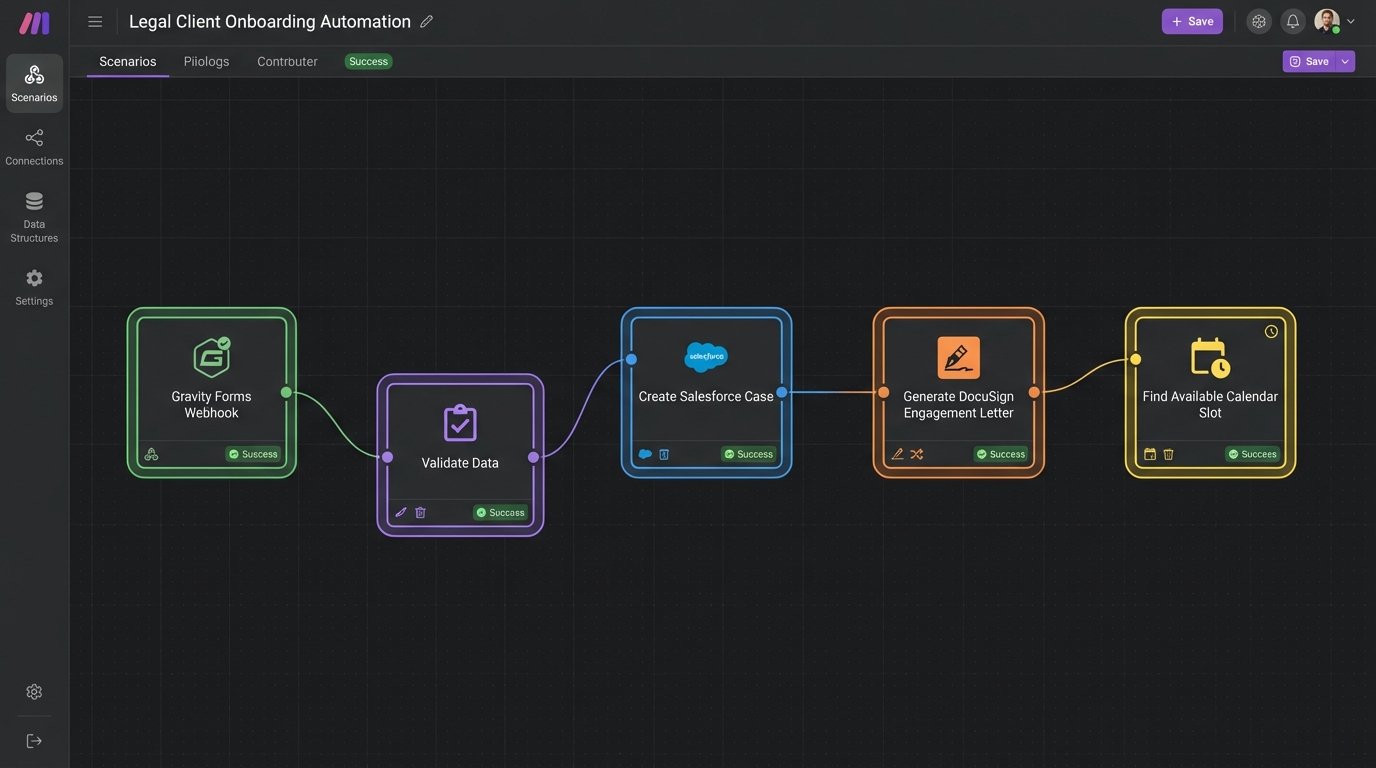
- Make (formerly Integromat): The orchestration engine. It’s more capable than Zapier for complex, multi-step scenarios with branching logic. We used it to catch the webhook from the form and then route the data.
- DocuSign Gen for Salesforce: For document assembly. While the firm didn’t use Salesforce as a CRM, we could use a developer instance as a cheap, powerful data store and leverage Gen’s superior template-building and conditional logic features.
- Microsoft 365 Calendar API: For scheduling. Instead of a third-party tool, we decided to interact directly with their existing Outlook calendars to avoid subscription bloat and data privacy questions.
This approach created a new, automated pathway for data that operated independently of the old manual process. The legacy CMS would still be used for case history, but all new client data would flow through this new, efficient channel first.
Stage 1: Rebuilding the Intake Valve
The first step was to replace the phone call and Word document combo with a structured web form. We built a multi-page intake form in Gravity Forms with conditional logic. For example, if a user selected “Motor Vehicle Accident” as the incident type, a new section would appear asking for information about the other driver, insurance details, and the police report number. This ensured we collected the right data from the start.
Upon form submission, Gravity Forms was configured to fire a webhook with a JSON payload to a specific endpoint in Make. This is a critical architectural choice. Relying on polling an API for new entries is inefficient and prone to delays. A webhook is an event-driven push, meaning the data transfer is instant.
The raw JSON payload looked something like this:
{

  "form_id": 1,

  "entry_id": 102,

  "client_first_name": "Jane",

  "client_last_name": "Doe",

  "client_phone": "555-867-5309",

  "case_type": "MVA",

  "incident_date": "2023-10-26",

  "incident_details": {

    "location": "Main St and 1st Ave",

    "police_report_filed": "yes",

    "report_number": "PD-12345"

  }

}
This structured data is far more reliable than a paralegal’s transcribed notes. It’s the raw material for all subsequent automation.
Stage 2: Orchestrating the Data Flow
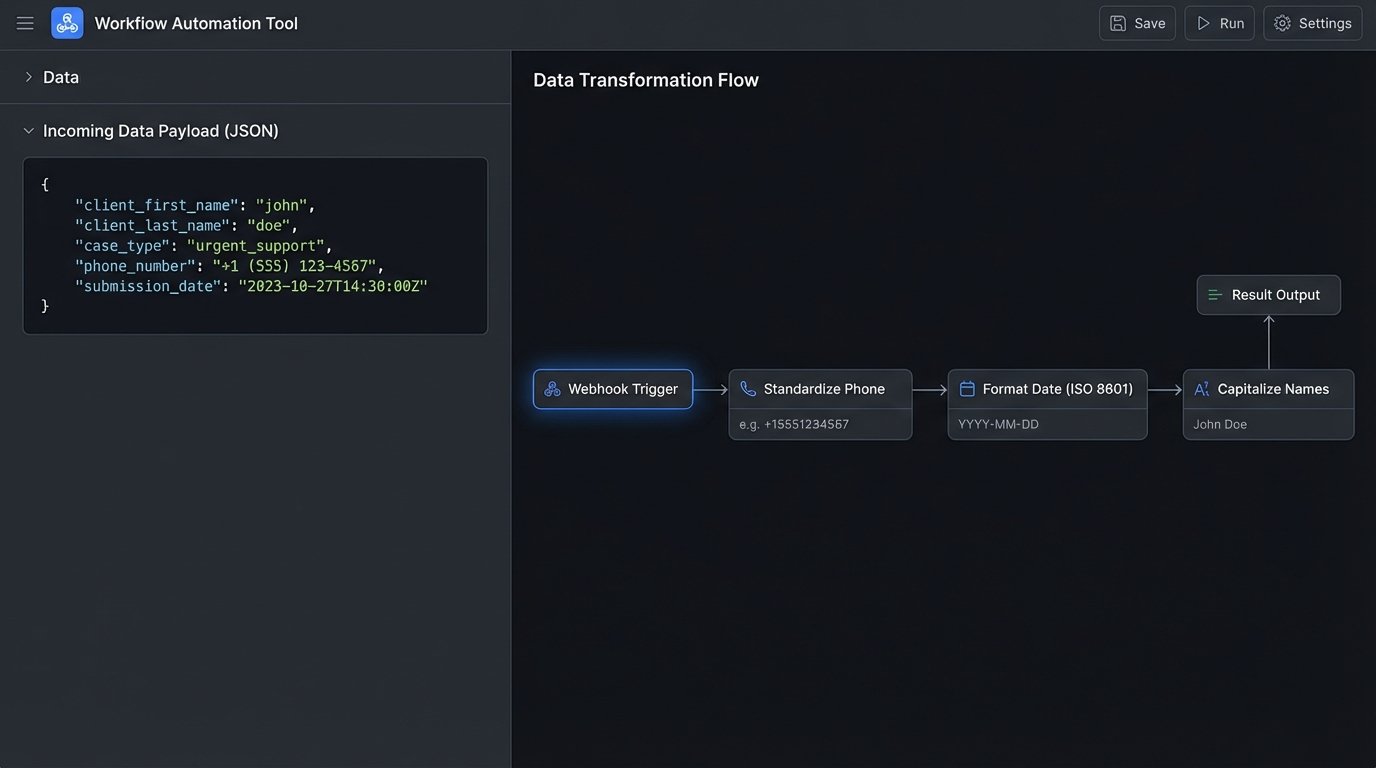
Inside Make, we built a scenario that listened for this webhook. The moment the data arrived, the scenario would trigger a series of actions. The first action was data validation and transformation. Even with form validation, users can enter messy data. We built in modules to strip special characters from phone numbers, standardize date formats to ISO 8601, and capitalize proper nouns.
Once the data was clean, the Make scenario performed two parallel actions:
- Create a Contact and Case Record: An API call was made to the Salesforce developer instance. We mapped the fields from the incoming JSON to the appropriate fields on the Contact and Case objects. This created our new “source of truth” record.
- Initiate Document Generation: A second API call was made, this time to the DocuSign Gen API, passing the ID of the newly created Salesforce record. This instructed DocuSign to generate the engagement letter using a predefined template and the data from that record.
This multi-step process sounds complex, but it executes in under two seconds. It converted a 45-minute manual process into a near-instantaneous, fully automated workflow. Shoving this volume of structured data through a series of dedicated APIs is infinitely more efficient than having a human act as the bridge.
Stage 3: Automating Document Assembly and Scheduling
The DocuSign Gen template was the heart of the document automation. We embedded merge fields directly into a Word document template, like `{{!Contact.FirstName}}` and `{{!Case.Incident_Date__c}}`. We also built in conditional logic using DocuSign’s syntax. For example, a specific paragraph related to commercial vehicle regulations would only be included if the `Case.Is_Commercial_Vehicle__c` field was true.
The generated document was then automatically sent to the client for e-signature via DocuSign eSignature. No more printing, scanning, or mailing.
While the document was out for signature, the Make workflow initiated the scheduling process. It used the Microsoft Graph API to query the assigned attorney’s calendar for available 30-minute slots over the next five business days. It filtered out existing appointments and internal blocks. The workflow then composed and sent an email to the client with a list of available times. The client could simply reply with their choice, and a subsequent workflow would parse the reply and book the meeting via another API call. It’s not as slick as Calendly, but it cost nothing and kept all data within their Microsoft 365 tenant.
Quantified Results and Unavoidable Friction
The impact was immediate and measurable. After three months of operation, we compared the metrics against the initial baseline study. The results were stark.
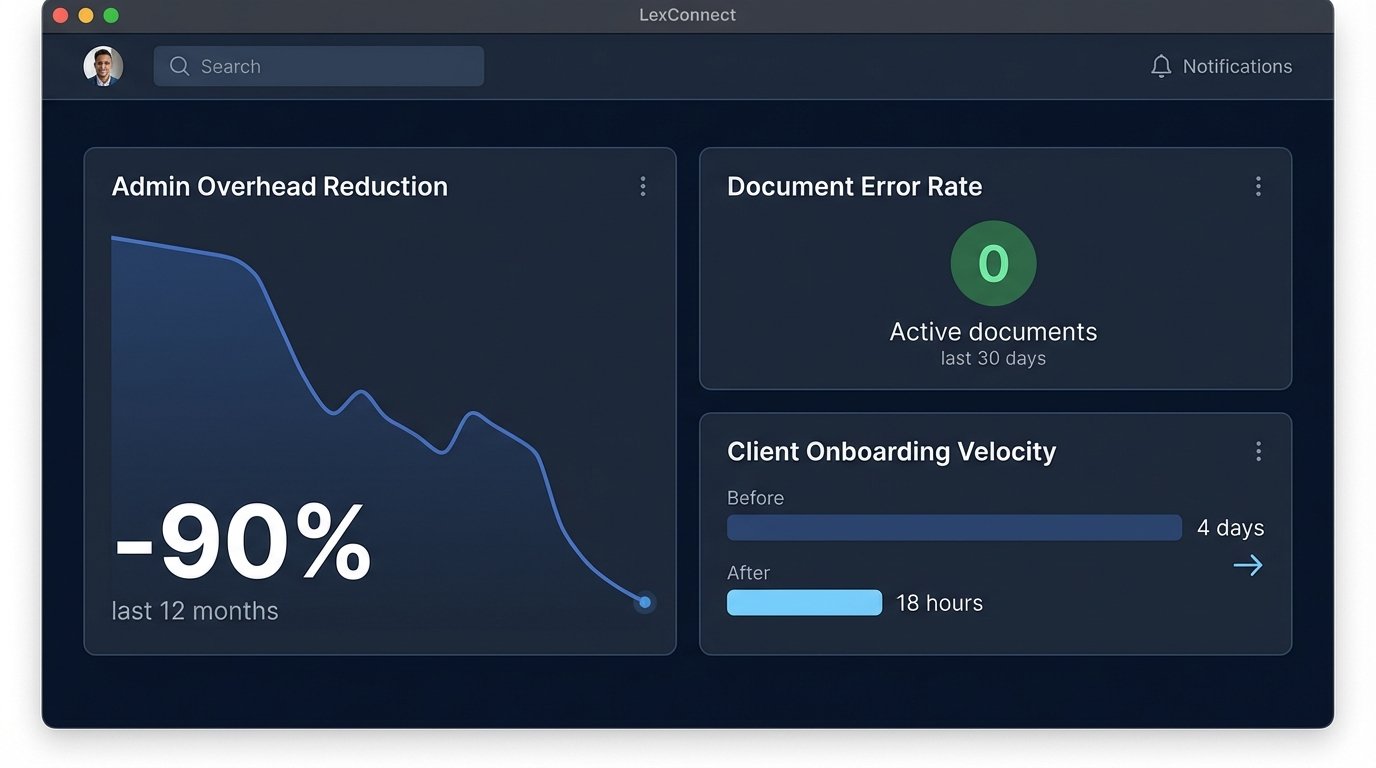
- Administrative Overhead Reduction: The 28 hours per week spent on manual data entry and scheduling dropped to under 3. This represents a 90% reduction in time spent on these specific tasks.
- Document Error Rate: The firm previously averaged one significant error in client documents per month, requiring correction and re-sending. That rate dropped to zero.
- Client Onboarding Velocity: The average time from initial contact to a signed engagement letter decreased from 4 days to 18 hours. This acceleration had a direct impact on cash flow and case progression.
The project was a success, but it was not frictionless. The primary challenge became dependency management. We had chained together four different services. When Gravity Forms pushes an update, we have to regression test the entire workflow. If a Microsoft API token expires, the scheduling arm of the system fails silently until someone notices. The maintenance burden shifted from fixing paralegal typos to monitoring API uptimes and software-as-a-service subscription renewals.
The firm also had to invest in training. The paralegals who used to perform data entry now had to learn how to manage the DocuSign templates and troubleshoot basic workflow failures in Make. Their jobs became less about typing and more about systems management. This was a positive change, but it required a shift in mindset and skills.
This automation project did not create an infallible system. It replaced a slow, error-prone manual process with a fast, efficient automated one that came with its own set of technical demands. For a small firm willing to accept that new reality, the return on investment was undeniable. They didn’t just get faster. They fundamentally changed their operational capacity without increasing headcount.