
Most ROI discussions are fantasies written by marketing departments. They present a clean upward curve where upfront investment magically transforms into profit. The reality is a chaotic, messy process of gutting legacy workflows and forcing new logic into systems that were never designed to talk to each other. We recently took a three-attorney, five-paralegal firm and ripped out their most time-intensive, non-billable process: client intake and case creation. This is the breakdown, without the varnish.
The Diagnosis: Quantifying the Bleed
The firm’s process was standard, which is to say, broken. A prospective client filled out a PDF form on their website. A paralegal would then manually re-type that information into three separate systems: the Case Management System (CMS), the billing software, and a shared spreadsheet used for conflict checks. The time spent on this data entry was staggering, but invisible because it was absorbed into general overhead. It was a death by a thousand papercuts.
We started by attaching timers to the actual tasks. We didn’t estimate. We measured the clicks, the keyboard entry, and the time spent correcting typos. Over a two-week period, we logged every second of this manual process. The data was ugly.
- Average Time Per Intake: 25 minutes.
- Average Intakes Per Week: 20.
- Total Weekly Time Sink: 500 minutes, or 8.3 hours.
- Paralegal Blended Hourly Rate (including overhead): $45/hour.
- Monthly Cost of Manual Intake: 8.3 hours/week * 4.3 weeks/month * $45/hour = $1,602.75.
This single, mundane task was costing the firm nearly $20,000 a year. It wasn’t billable work. It was pure, unadulterated operational drag. The process also introduced a significant error rate. Transposing a digit in a phone number or misspelling a name created downstream problems that required even more non-billable time to fix. The conflict check spreadsheet was a particular point of failure, often lagging days behind the official CMS entry.
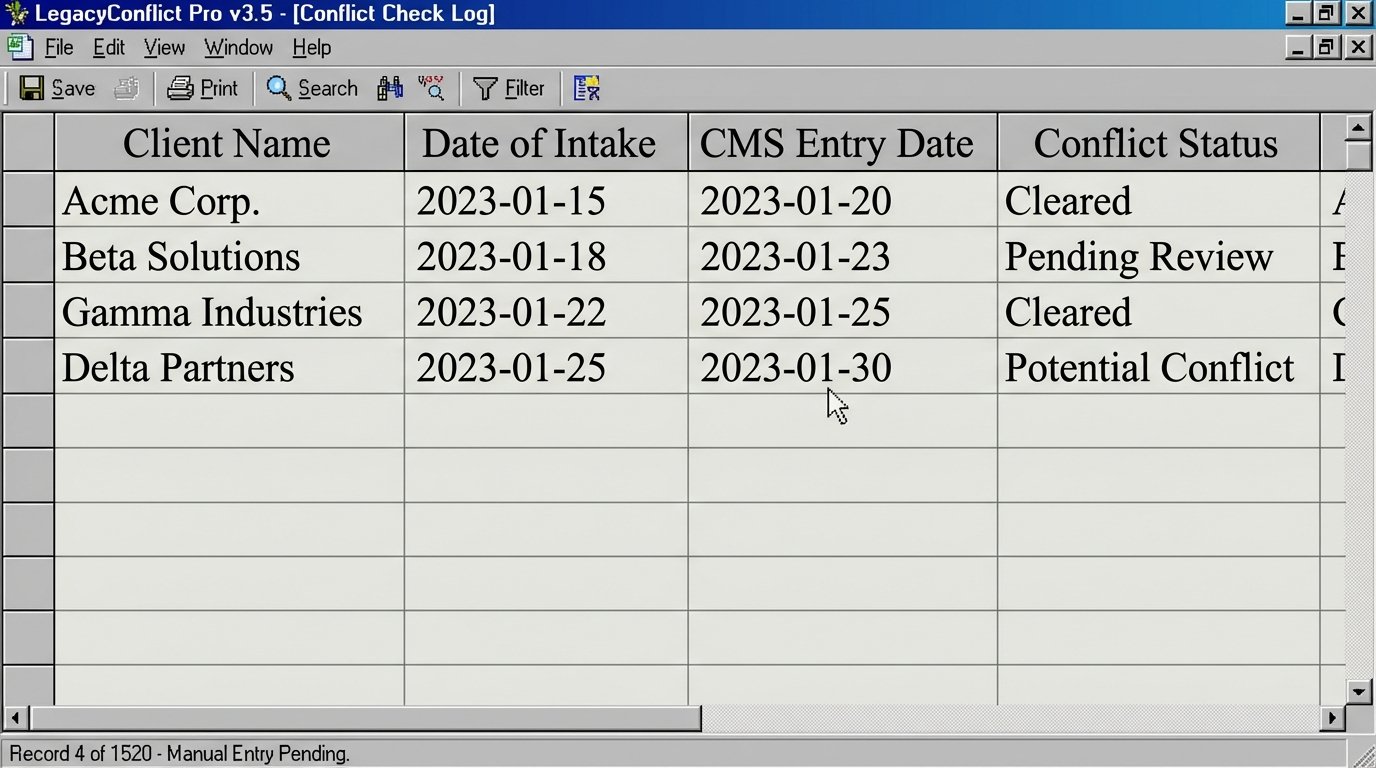
The core problem wasn’t the people, it was the architecture. They were using human labor as a low-speed, high-error API between disconnected systems. Forcing a paralegal to be the bridge between a static PDF and a database is like using a bucket to empty a swimming pool. It works, eventually, but it’s a colossal waste of a valuable resource.
The Architecture: Building the Conduits
We rejected an all-in-one “practice management suite” immediately. Those monolithic systems are wallet-drainers and often force firms to change their processes to fit the software’s rigid logic. A better approach is to build lightweight, durable bridges between the tools they already use and understand. Our goal was to create a single point of data entry that would propagate information to all necessary systems without human intervention.
The Tech Stack and Upfront Costs
The solution required three core components. We chose tools known for reliability and decent API support, not flashy features.
- Data Capture: We replaced the PDF with a JotForm license. Its conditional logic allows for smarter forms that guide the client, and its API is straightforward. Cost: $408 annually.
- Integration Middleware: We used Make (formerly Integromat) to act as the central nervous system. It pulls data from JotForm and pushes it to the other systems. It’s more granular and cost-effective than Zapier for multi-step scenarios. Cost: $1,188 annually.
- Implementation and Development: This is the primary upfront cost. It took 30 hours of my time to architect, build, test, and deploy the solution. This included mapping fields, writing error handling logic, and dealing with the CMS’s sluggish API. Cost: 30 hours * $200/hour = $6,000.
Total Upfront Investment: $7,596 ($6,000 one-time + $1,596 first year subscription).
The Logic Flow
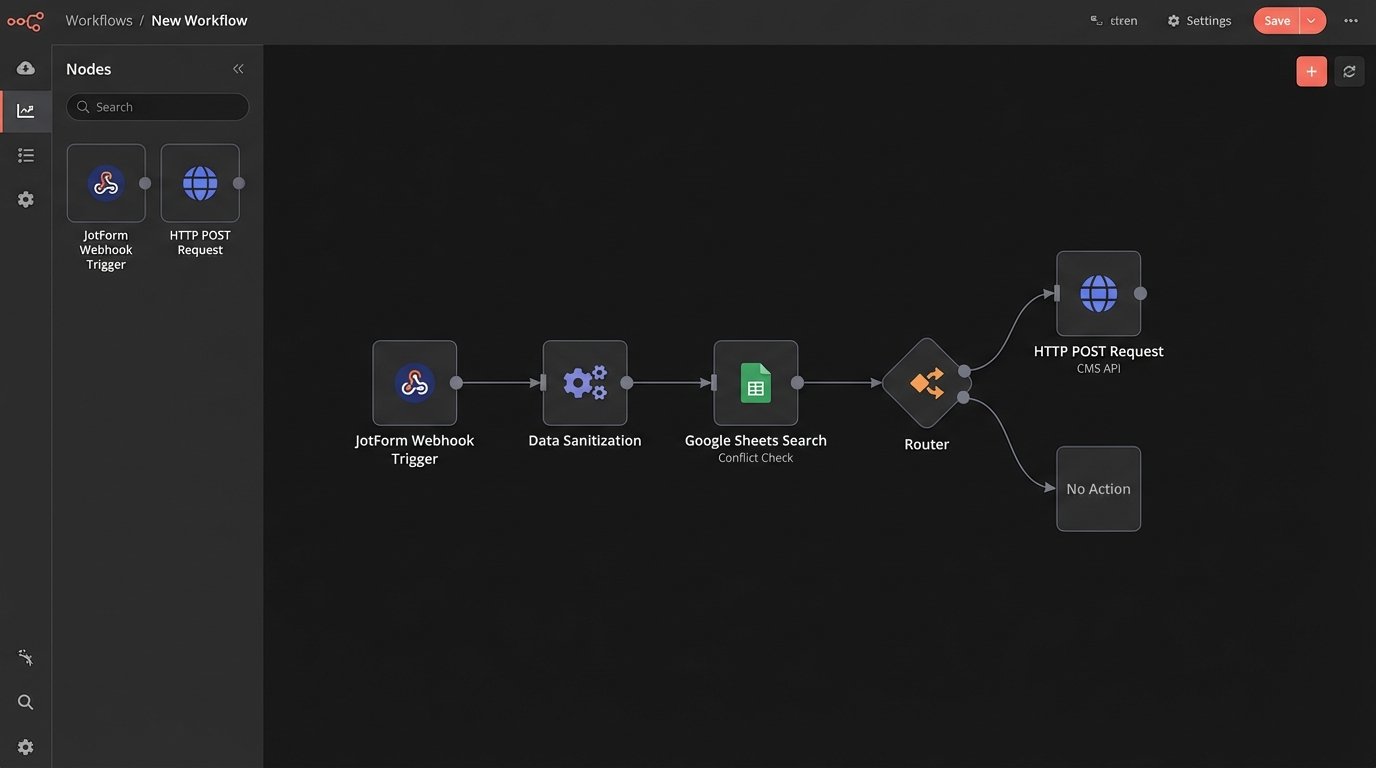
The automation sequence is direct. When a potential client submits the JotForm, a webhook fires, triggering a scenario in Make.
Step 1: Sanitize and Validate. The first module in Make grabs the raw JSON payload from the form. We don’t trust user input. The first thing we do is strip out special characters, format phone numbers to a consistent E.164 standard, and force email addresses to lowercase. This prevents data contamination in the destination systems.
Step 2: Conflict Check. The scenario then queries their conflict check spreadsheet via the Google Sheets API. It searches for the client’s name and any related parties. If a potential match is found, the process halts. It sends an email to the managing partner with a link to the new intake and the potential conflict. The automation does not proceed until a human clears it. This injects a critical human-in-the-loop checkpoint where judgment is required.
Step 3: Create Case in CMS. Once the conflict check is clear (or if no match was found), the next module makes a POST request to their CMS API. This was the main bottleneck. The API documentation, likely written years ago, was not entirely accurate. It required several rounds of trial and error to structure the JSON payload correctly. We had to inject a 5-second delay and a verification step because the API would sometimes accept the data but take several moments to commit it to the database.
Here’s a simplified look at the kind of data structure we had to force into their system. Notice the nested objects and specific ID requirements that a manual entry process would never get right consistently.
{

  "case": {

    "name": "Case for John Doe",

    "status": "pending_review",

    "opened_at": "2023-10-27T10:00:00Z",

    "practice_area_id": "pa_12345"

  },

  "contacts": [

    {

      "first_name": "John",

      "last_name": "Doe",

      "role": "client",

      "email": "john.doe@example.com",

      "phone": "+15551234567"

    }

  ],

  "custom_fields": {

    "intake_source": "web_form_v2",

    "referral_name": "Jane Smith"

  }

}
Step 4: Create Client in Billing Software. A parallel branch in the scenario fires a request to their billing software’s API. This creates a client record, but does not yet create an invoice. This ensures that when the first billable action occurs, the client is already in the system, eliminating another manual data entry step down the line.
Step 5: Confirmation and Logging. The final step sends a confirmation email to the internal paralegal group, notifying them that “Case for John Doe” has been created automatically and is ready for review. It also writes a log entry to a separate Google Sheet with the timestamp, client name, and the result of each API call. This log is our source of truth for debugging if something fails.
The Results: The Break-Even Point and Beyond
The system went live. The upfront cost of $7,596 was a significant check for a small firm to write. The monthly subscription cost of $133 ($1,596 / 12) became their new operational expense for this process. Now, we can calculate the real return.
Hard ROI Calculation
We already established the old process cost them $1,602.75 per month in wasted labor. The new process has a hard cost of $133 per month in software subscriptions.
- Old Monthly Cost: $1,602.75
- New Monthly Cost: $133.00
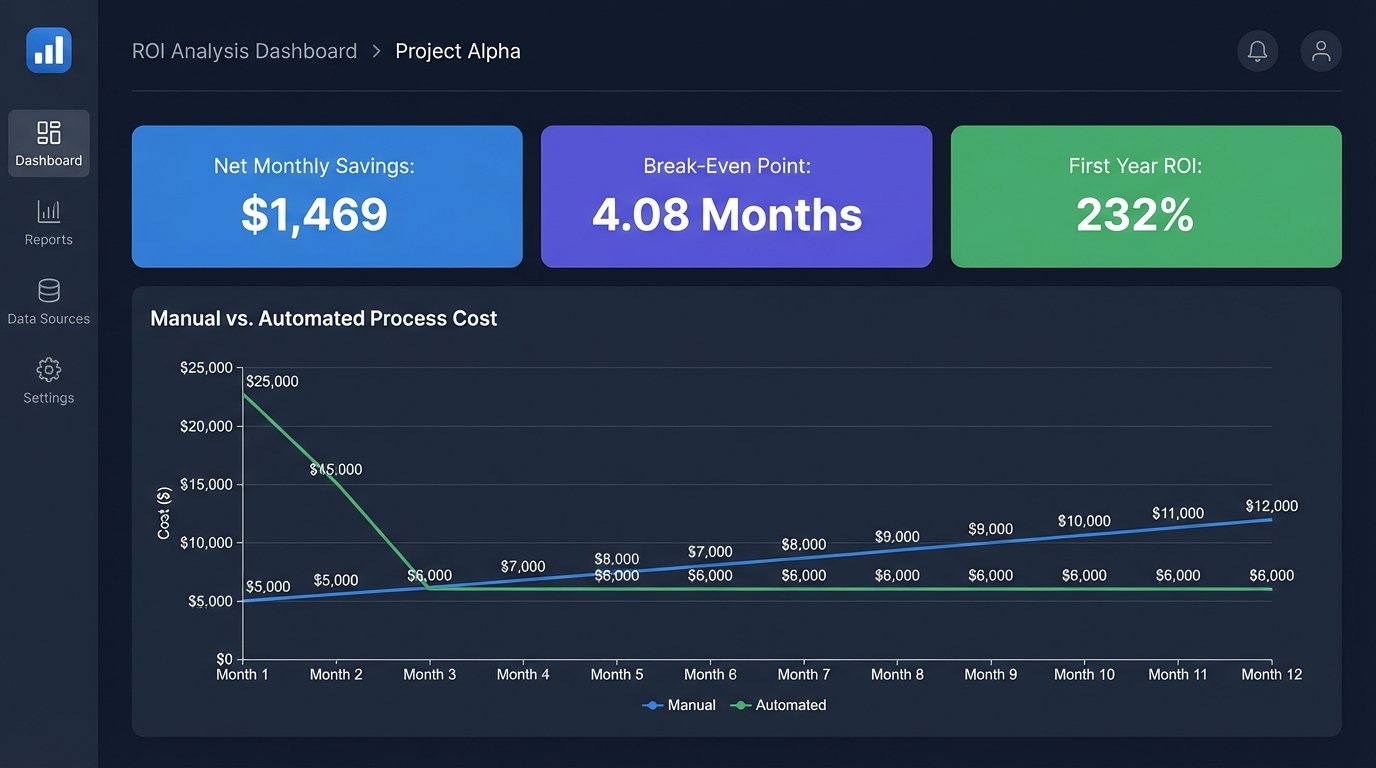
- Gross Monthly Savings: $1,469.75
With these numbers, we can find the break-even point for the initial one-time investment.
Break-Even Point: $6,000 (Implementation Cost) / $1,469.75 (Monthly Savings) = 4.08 months.
After roughly four months, the firm had completely paid off the investment. Every month after that, they are netting nearly $1,500 in pure operational savings. Annually, this single automation saves them $17,637. That’s a 232% return on their initial investment in the first year alone. This is not marketing fluff. It’s the direct result of replacing an expensive, error-prone manual process with a cheaper, more reliable automated one.
The “Soft” ROI: Second-Order Effects
The financial return is only part of the story. The operational improvements are less easy to quantify but are just as significant. The firm’s partners reported three major changes.
1. Increased Velocity. The time from a client filling out the form to having a case ready for an attorney’s review dropped from an average of 24 hours to under 5 minutes. This speed demonstrates competence to new clients and allows the legal team to engage with the case substance almost immediately.
2. Drastically Reduced Error Rate. In the six months since deployment, there has not been a single data entry error from a new web intake. The validation and sanitization steps we built into the middleware catch inconsistencies before they can pollute their core systems. The cost of fixing these downstream errors, while hard to track, has effectively dropped to zero.
3. Improved Staff Morale. The paralegals who were once tasked with this mind-numbing data entry can now apply their 8+ hours a week to more valuable, billable work like drafting documents, communicating with clients, and organizing case files. Removing the most tedious part of their job led to a noticeable increase in job satisfaction. You can’t put a dollar amount on that, but it directly impacts employee retention and the quality of work produced.
This project was not a magic wand. It involved a direct capital outlay and a period of testing and adjustment. The CMS API still has its quirks, and we have alerts in place to monitor for failures. But by targeting the most repetitive, lowest-value task with a focused, pragmatic solution, the firm converted a significant operational liability into a strategic asset in just four months.