
A national firm with over 700 attorneys was bleeding operational efficiency. Their core problem was not legal strategy but data logistics. Paralegals, some of the most expensive administrative staff on the payroll, spent an estimated 25% of their day manually transcribing information. Data came from client intake forms, discovery documents, and internal emails, and was then hand-keyed into a case management system (CMS) that was a decade past its prime. The process was a guaranteed source of errors, delays, and frustrated staff.
This wasn’t a challenge of finding a single software fix. It was a problem of digital plumbing. The firm’s systems were a collection of isolated data islands, and the manual effort of building bridges between them for every single case was becoming unsustainable. We were brought in not to replace the entire infrastructure, a wallet-draining fantasy, but to build automated conduits between the existing, disparate platforms.
Diagnostic: Pinpointing the Core Inefficiencies
Before writing a single line of code or designing a workflow, we embedded with their litigation support and client intake teams. We mapped their exact processes, not the idealized versions in their SOP manuals. The reality was predictably messy. We identified three primary failure points that were ripe for automation, each representing a significant bottleneck in the firm’s daily operations.
Client Onboarding: A Manual Gauntlet
The client intake process was a slow-motion disaster. A prospective client filled out a PDF form, emailed it to a general inbox, and then a paralegal would print it, re-type every field into the CMS, and manually create a matter number. This sequence took, on average, 48 hours to complete and was prone to typos that could invalidate conflicts checks. The firm was losing potential clients in this initial black hole of administrative delay.
Every intake was a unique project, subject to human error and availability. There was no standardization, no validation, and no speed.
Case Management API: The Illusion of Connectivity
The firm’s legacy CMS had an API, but the documentation was a work of fiction written years ago. The available REST endpoints were sluggish and returned poorly structured data that required significant cleaning before it could be used. Any attempt at direct integration with modern tools was like shoving a firehose of structured JSON data through the eye of a needle. The system was designed for manual entry, and its API felt like an afterthought bolted on to check a box on a sales brochure.
This forced a reliance on CSV imports and exports, another manual, error-prone step that broke any semblance of a real-time workflow. The data in the CMS was perpetually out of date.
Internal Communications: The “Where Are We On This?” Loop
Partners and senior associates constantly pinged paralegals for case status updates. These interruptions required the paralegal to stop their current task, log into the CMS, find the relevant information, and then draft an email reply. This repetitive, low-value communication loop consumed hours each week and broke the concentration needed for deep work like drafting briefs or managing discovery.
The firm relied on human-to-human polling for information that should have been readily available through a dashboard or automated notification. It was inefficient and created a constant state of distraction for the support staff.
The Solution Architecture: A Practical, Multi-Layered Approach
Our strategy was not to rip and replace. The firm had millions invested in their CMS and the political will to change it was nonexistent. Instead, we built a lightweight automation layer on top of their existing tools, using a combination of Microsoft Power Automate, SharePoint, and some custom scripting to bridge the gaps.
Phase 1: Automating Client Intake and Validation
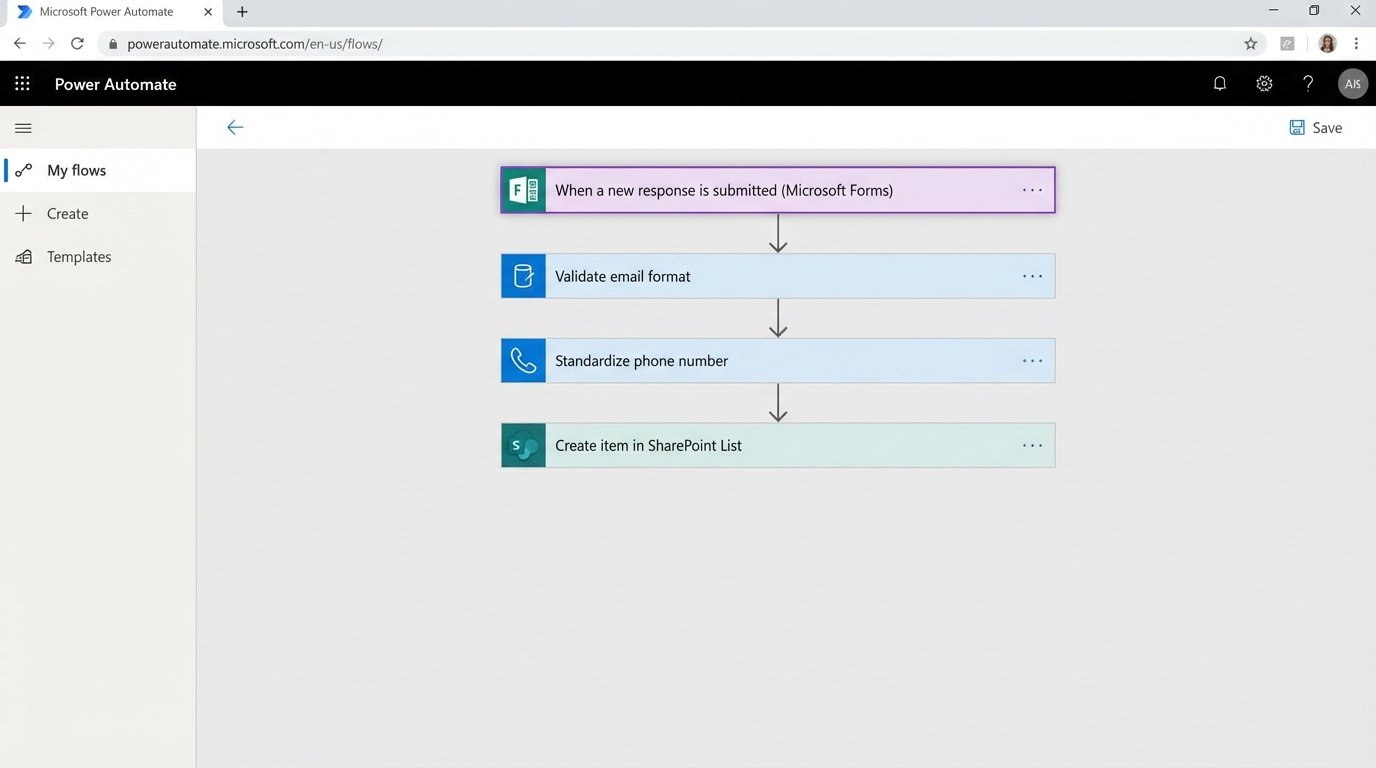
We replaced the PDF intake form with a Microsoft Form. This immediately gave us structured data. When a form is submitted, a Power Automate flow is triggered. The flow executes a series of logical steps to gut the manual work from the process.
- Data Reception: The flow ingests the form submission data as a JSON object.
- Validation and Formatting: The first step is to strip and sanitize the inputs. We force uppercase on specific fields, check for valid email formats, and re-format phone numbers to a standard E.164 convention. This pre-emptive data cleaning prevents garbage from entering the CMS.
- SharePoint Logging: The validated data is written to a SharePoint List. This serves as a non-volatile staging area and an immutable log of all intake requests, creating an audit trail that was previously nonexistent.
- Conflicts Check Trigger: The flow then packages key data points (client name, opposing counsel) and sends a formatted email to the conflicts department, initiating their review process automatically.
This initial stage alone cut the data entry portion of intake from hours to seconds. It also enforced a level of data quality that was impossible with the old manual method.
Phase 2: Bridging to the Legacy CMS
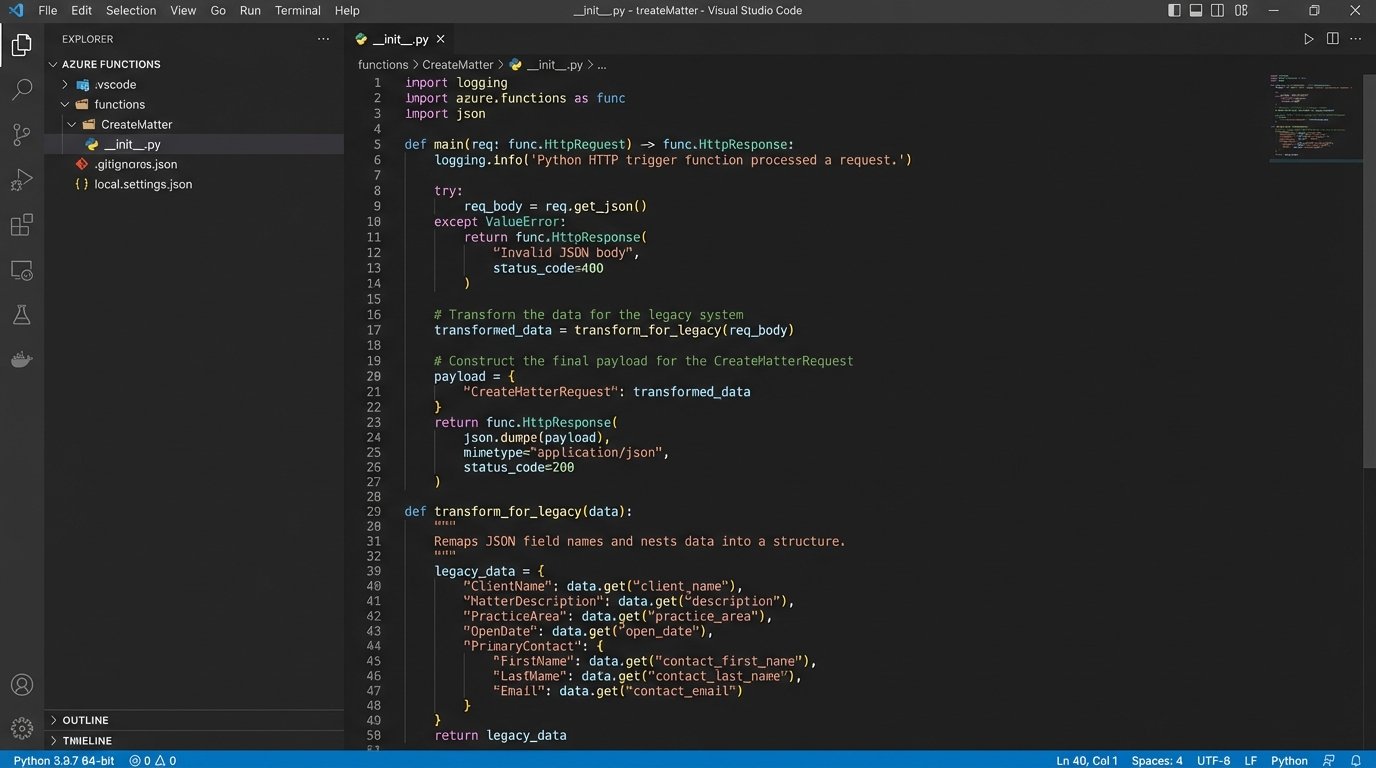
Getting data into the old CMS was the hardest part. The API was fragile and demanded a very specific data structure. We used a Power Automate flow with an HTTP action to call the API, but it required a middle step to transform the clean JSON from our intake process into the messy format the CMS expected.
The flow would pull the approved client data from the SharePoint list, then pass it to an Azure Function for transformation. A small Python script inside the function handled the re-mapping of field names and data structures. It was a necessary layer of abstraction to protect the main workflow from the legacy system’s quirks.
# Example Python snippet within Azure Function

# for transforming intake data to legacy CMS format
import json
def transform_for_legacy(intake_data):
# intake_data is a dict from Power Automate
legacy_payload = {
"Matter_Name": intake_data.get("clientName") + " v. " + intake_data.get("opposingParty"),
"Client_Primary_ID": intake_data.get("clientInternalID"),
"Case_Type_Code": intake_data.get("caseType"),
"Open_Date": intake_data.get("submissionTimestamp"),
"Assigned_Atty_ID": "default_partner_id" # Placeholder, later assigned
}
# The legacy API required a weirdly nested XML-like JSON structure
final_structure = {
"CreateMatterRequest": {
"AuthToken": "STATIC_API_KEY",
"Payload": legacy_payload
}
}
return json.dumps(final_structure)
Once the Azure Function returned the correctly formatted payload, the Power Automate flow would make the POST request to the CMS API endpoint. The flow would then wait for a response, check the HTTP status code for success (a 201), and if successful, parse the response to extract the newly created matter number. This number was then written back to our SharePoint list, closing the loop.
Phase 3: Building a Proactive Notification System
With the intake and case creation process automated, we turned to the internal communication problem. We built another set of flows triggered by changes in the SharePoint list which now contained the official matter number.
- New Matter Alerts: When a new matter number is written to the SharePoint list, a flow triggers. It posts a message to a dedicated Microsoft Teams channel for the relevant practice group. The message includes the client name, matter number, and a direct link to the case in the CMS.
- Task Assignment Notifications: When a managing partner assigned a lead associate from a dropdown in the SharePoint list, another flow would trigger. This automatically created a task in Microsoft Planner for that associate and sent them a direct message in Teams with the assignment details.
This system replaced the manual, interrupt-driven communication with a proactive, automated one. Information was pushed to the right people at the moment it was created, eliminating the need for them to go hunting for it.
The Results: Quantifiable Metrics and Unavoidable Friction
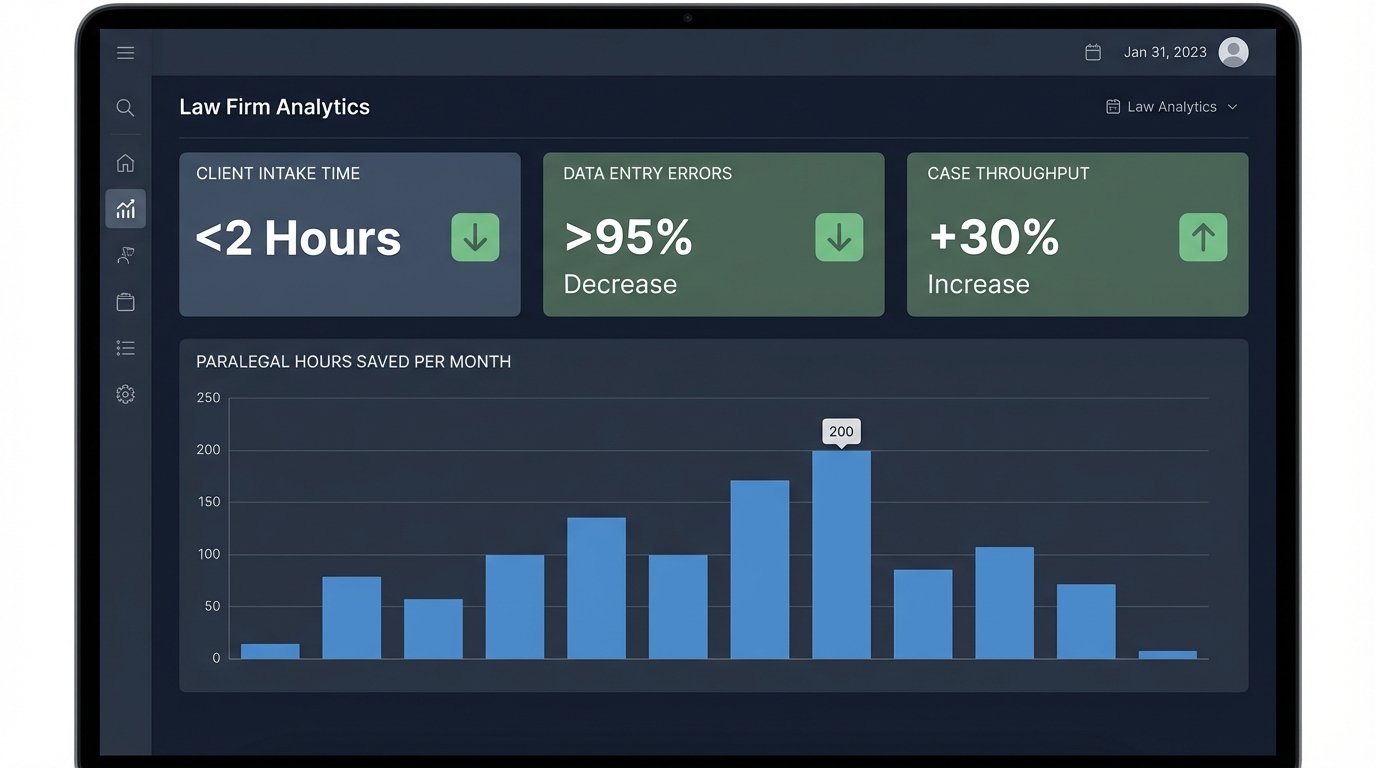
The impact was immediate and measurable. We tracked key performance indicators before and after the deployment to validate the investment. The numbers confirmed that targeting these small, repetitive tasks had a massive aggregate effect on the firm’s operational capacity.
Key Performance Metrics
- Client Intake Time: Reduced from an average of 48 hours to under 2 hours. The time is now dictated by the human-driven conflicts check, not data entry.
- Data Entry Errors: Decreased by over 95%. The errors that remain are from the initial client input, not transcription mistakes by paralegals.
- Paralegal Reclaimed Hours: We estimated the system saved the litigation support group approximately 200 hours of manual labor per month. This time was reallocated to higher-value, billable work like document review and trial preparation.
- Case Creation Throughput: The firm was able to process 30% more new matters with the same number of support staff.
The Reality: New Problems for Old Ones
This project was not a magic bullet. We traded one set of problems for another, more manageable one. The solution introduced a new layer of technical complexity that the firm’s IT department had to be trained to support. When the legacy CMS API goes down, which it does, the automated workflow fails and requires manual intervention to resubmit the queue from the SharePoint list.
The solution is also less flexible. For a highly unusual client intake that doesn’t fit the standardized form, the process requires a paralegal to manually override the system and key in the data the old way. We accepted this trade-off. Optimizing for 98% of cases and creating a manual workaround for the 2% of edge cases was a far better outcome than the previous state where 100% of cases were a manual slog.
The project succeeded because it focused on a narrow, well-defined set of problems and applied a practical, if not elegant, solution. It did not try to boil the ocean or replace core systems. It simply built the bridges that should have existed in the first place, allowing data to flow freely and freeing up highly skilled people from the drudgery of being human middleware.