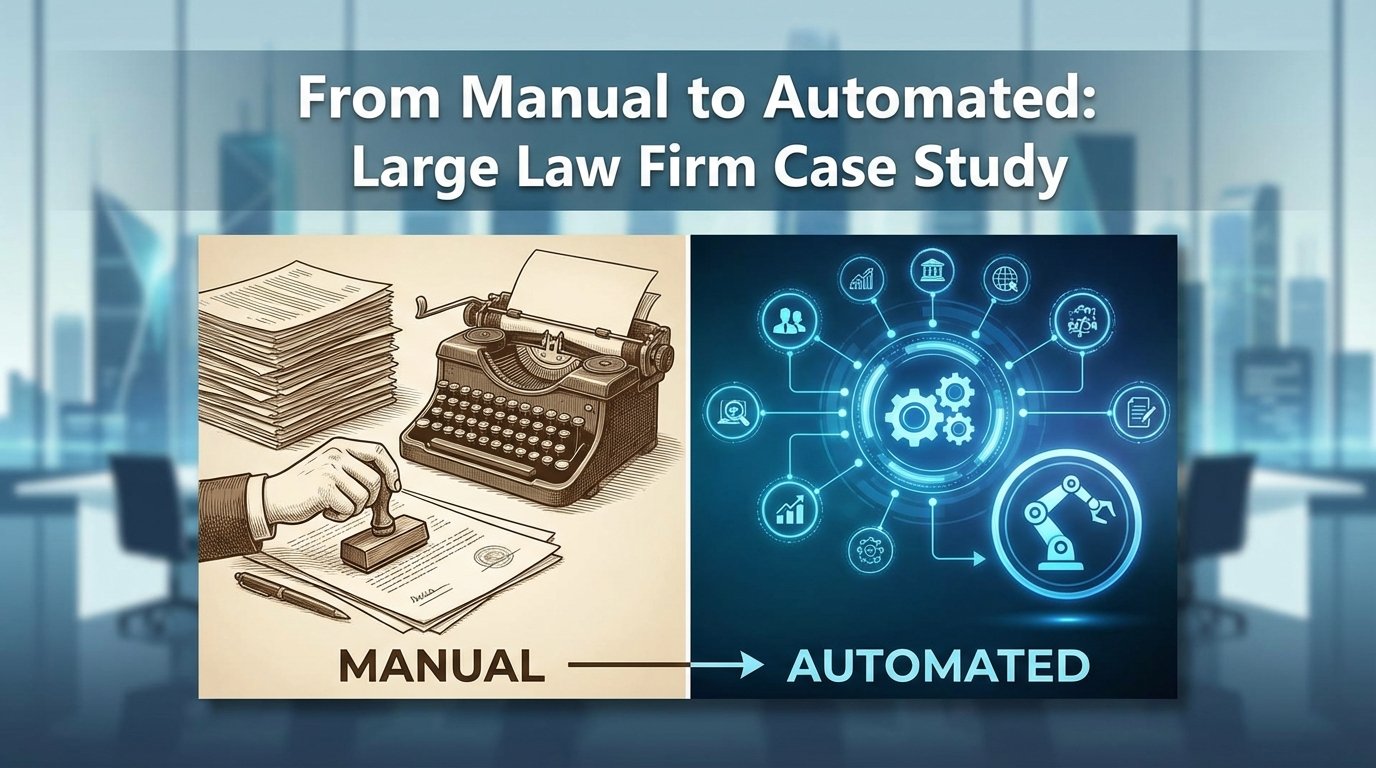
The firm, a global Am Law 100 entity, was bleeding operational hours on discovery request processing. Their existing workflow involved a team of ten paralegals manually monitoring a shared Outlook inbox, downloading attachments, and keying data into a decade-old case management system. The process was a known failure point, with an average turnaround of four business hours per request and a data entry error rate hovering around 8%. This wasn’t just inefficient. It was a clear liability.
Initial State Analysis: A System Designed for Failure
Our first step was a full audit of the existing manual process. The workflow started with an email hitting a generic `discovery@firm.com` inbox. A paralegal would claim the email by flagging it, a system that frequently broke down during peak hours, leading to duplicate work. They would then open the email, download multiple PDF and DOCX attachments, and manually identify key information like case name, matter number, producing party, and due date.
This data was then copied and pasted into the firm’s on-premise case management system (CMS). The CMS, a legacy platform with no functional API for this particular module, required navigating through seven different screens to log a single request. The attachments were then uploaded to a separate document management system (DMS), and a link was manually pasted back into a notes field in the CMS. The entire sequence was brittle, prone to human error, and impossible to scale.
The core problems were clear.
- Data Silos: Email, the CMS, and the DMS were completely disconnected systems. Information did not flow. It was manually carried.
- Lack of Validation: There was no automated check to see if a matter number was valid or if a due date was formatted correctly. Typos were common and caused significant downstream problems.
- No Audit Trail: It was nearly impossible to track the lifecycle of a request without a forensic review of three different systems and individual employee actions. Accountability was nonexistent.
This setup was a perfect example of technical debt manifesting as operational drag. The firm had invested in a powerful DMS but had failed to bridge the gap between it and their core operational software. Connecting their legacy CMS to a modern API felt like plumbing a fire hydrant to a garden hose. The pressure was all in the wrong place.
Architecture of the Solution: A Phased Approach
A rip-and-replace of the CMS was not on the table. The budget and political will were simply not there. The solution had to be an intelligent automation layer that could sit on top of the existing infrastructure, bridging the systems and stripping out the manual labor. We proposed a three-phase build using a combination of Python scripts for processing and an iPaaS platform to handle orchestration and API connections.
The architecture was designed for resilience. We knew the legacy systems were unreliable, so every component included robust error handling and retry logic. The goal was not to build a perfect, instantaneous system, but a dependable one that could absorb the shocks of its environment.
Phase 1: Automated Ingestion and Triage. The first objective was to get the humans out of the inbox. We would build a service to monitor the inbox, parse incoming emails, and classify them.
Phase 2: Data Extraction and Enrichment. Once ingested, the system would use Optical Character Recognition (OCR) and pattern matching to pull structured data from the unstructured attachments.
Phase 3: System Integration and Reporting. The final step was to inject the validated data into the CMS and DMS, then generate confirmation notifications and operational dashboards.
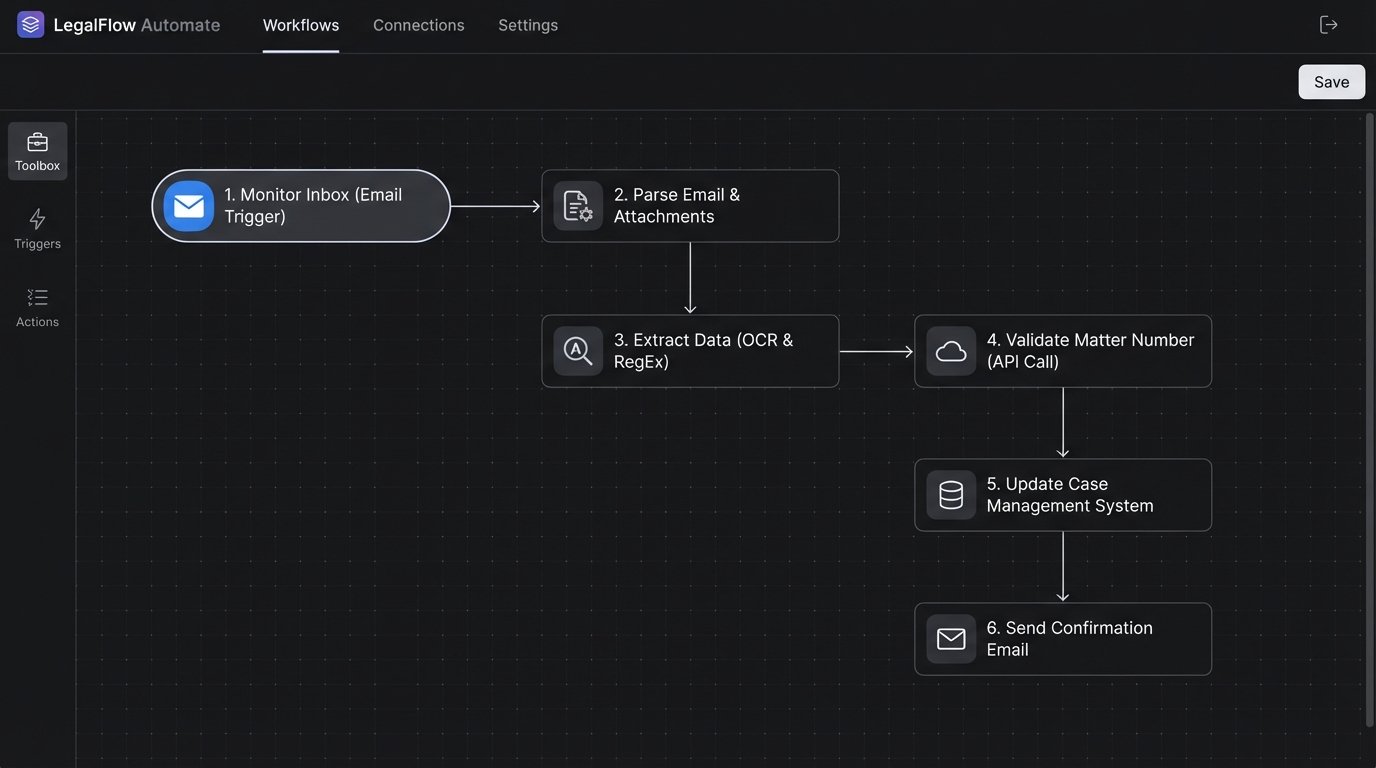
This phased approach allowed us to deliver value quickly. The firm saw initial benefits after Phase 1 went live, which helped build momentum and trust for the more complex stages of the project.
Phase 1: Taming the Inbox
We started by replacing the shared Outlook inbox with a service account monitored by a Python script running on a schedule. We used the `imaplib` library to connect to the mail server and fetch new messages. The script was designed to be idempotent, meaning it kept track of processed email UIDs in a simple SQLite database to avoid duplicate processing if the script was restarted.
The initial script logic was straightforward. It connected to the server, searched for unseen emails, and for each one, it would strip the attachments and save them to a temporary processing directory. The email body and headers were saved as a JSON object. This created a standardized input format for the next stage of the pipeline. A critical function was parsing the `From:` and `To:` headers to identify the sender and intended recipients, which helped in routing and error notifications.
This initial step immediately eliminated the risk of two paralegals working the same request. It also created a single, auditable source of truth for all incoming requests. No more arguments over who was supposed to handle what.
Phase 2: Intelligent Data Extraction
Extracting data from the attachments was the most complex part of the build. The documents were a mix of scanned PDFs, native PDFs, and Word documents, with no consistent formatting. We used a cloud-based OCR service for the scanned documents to convert them into text. The cost of this service was a concern, so we built a preliminary check to determine if a PDF already had a text layer, bypassing the OCR call when possible. This simple check cut our OCR API costs by nearly 40%.
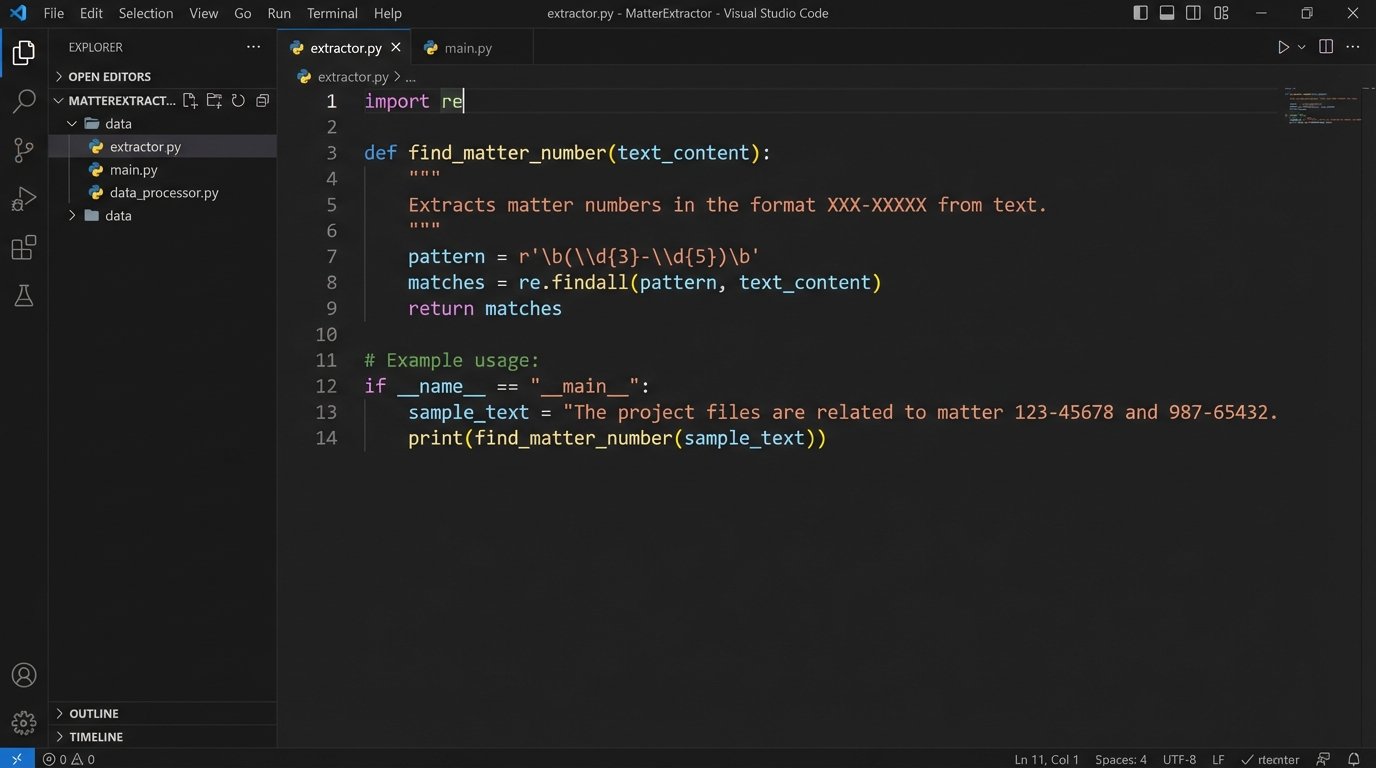
With the raw text extracted, we used regular expressions (RegEx) to find key pieces of information. For example, we developed patterns to identify matter numbers, which followed a predictable `NNN-NNNNN` format. We also searched for keywords like “Due Date,” “Producing Party,” and “Requesting Party” to locate associated values.
python
import re
def find_matter_number(text_content):
# Pattern to find a 3-digit client code, a hyphen, and a 5-digit matter code.
pattern = r’\b(\d{3}-\d{5})\b’
match = re.search(pattern, text_content)
if match:
return match.group(1)
return None
# Example usage:
document_text = “Please see the attached discovery request for case 234-56789. The due date is May 1, 2024.”
matter_id = find_matter_number(document_text)
# matter_id would be ‘234-56789’
This approach was effective for about 80% of documents. For the remaining 20%, where the language was less structured, we implemented a secondary check using a Named Entity Recognition (NER) model. The model was trained on a sample set of 500 documents to recognize firm-specific entities. This two-pass system, starting with cheap RegEx and escalating to a more expensive NER model only when needed, balanced accuracy with operational cost.
The extracted data was then validated. We used the firm’s rudimentary CMS API, which, despite its flaws, could at least confirm if a matter number existed. This validation step was slow and the endpoint was prone to timeouts. We engineered a wrapper around the API call with an exponential backoff retry mechanism. If the API failed to respond after three attempts, the request was flagged for manual review. It wasn’t elegant, but it was durable.
Phase 3: Closing the Loop
With clean, validated data, the final phase was to push the information into the target systems. We used the iPaaS platform to orchestrate these API calls. A workflow was triggered for each successfully processed request.
The workflow first uploaded the original attachments to the correct folder in the DMS. The DMS API was modern and reliable, so this step was straightforward. The API returned a unique document ID and a permanent link, which we needed for the CMS.
The next step was the most delicate: writing to the legacy CMS. Since the CMS had no proper endpoint for creating a discovery log entry, we were forced to use a UI automation script. We built a Selenium-based robotic process automation (RPA) bot that would log into the CMS web interface, navigate to the correct matter, and populate the form fields with the extracted data, including the link to the documents in the DMS. This was our least favorite part of the solution. It was brittle and would break if the firm ever changed the CMS user interface. We documented this risk extensively and built in detailed logging and screenshot-on-error functionality to help diagnose failures.
Once the data was successfully entered, the workflow sent a confirmation email via the Microsoft Graph API to the original sender and the internal case team. The email confirmed receipt and included the extracted data for verification. Finally, all processing results, including timings and success or failure status, were written to a logging database, which powered a simple web-based dashboard for the Legal Ops team to monitor system health.
Quantifiable Results and Operational Impact
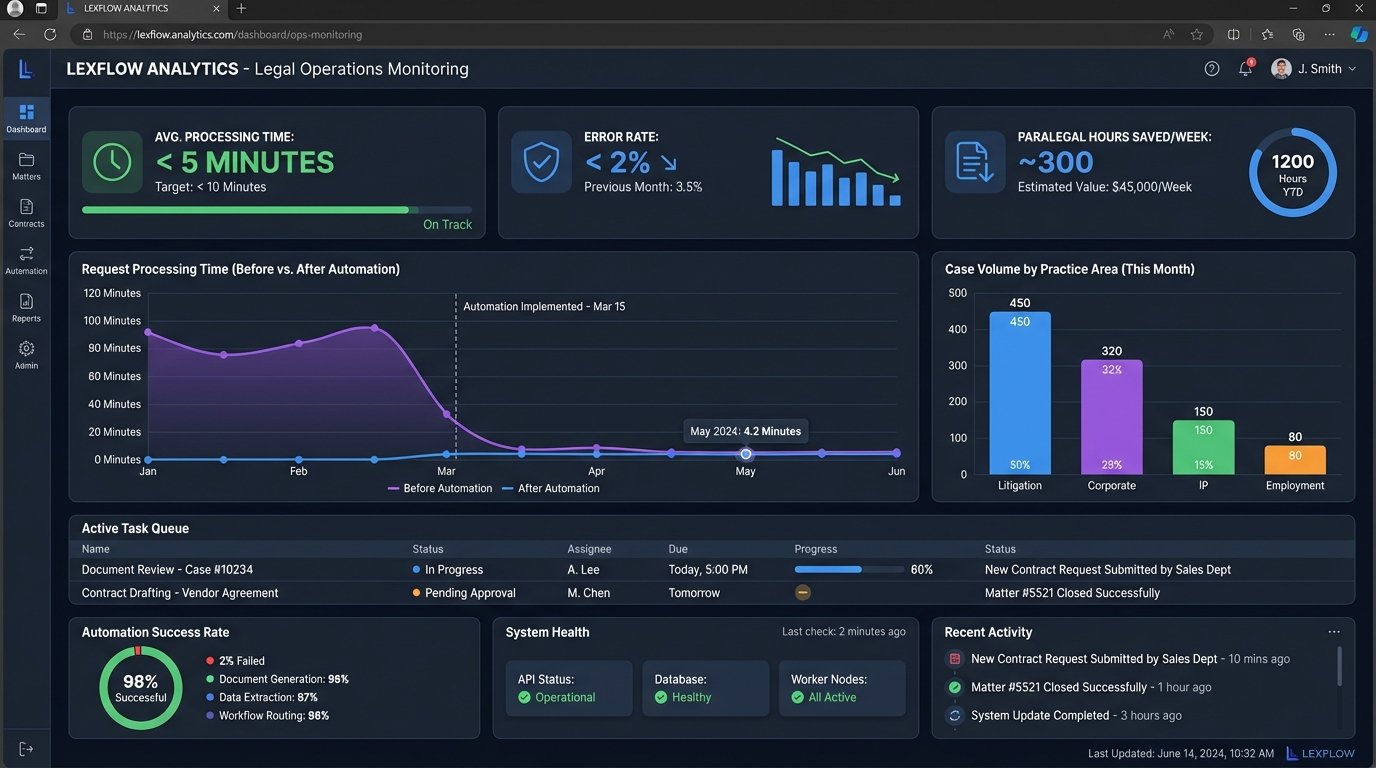
The project moved from concept to production in four months. The impact was immediate and measurable. We tracked key performance indicators before and after the implementation to quantify the return on investment.
- Processing Time: Average time to process a single discovery request dropped from 4 hours to under 5 minutes.
- Error Rate: Manual data entry errors were eliminated. The new system’s error rate, which consisted of items flagged for manual review due to unreadable documents or API failures, was less than 2%.
- Employee Reallocation: The ten paralegals previously dedicated to this manual task were freed up. The firm estimated that 300 hours of low-value work were eliminated per week, allowing those employees to focus on substantive legal tasks like document review and case analysis.
- Morale: This was a soft metric, but an important one. The paralegals hated the mind-numbing task of data entry. Shifting them to more engaging work led to a noticeable improvement in team morale and a reduction in employee turnover in that department over the following year.
The financial case was straightforward. The cost of the automation platform, cloud services, and development was recouped within nine months based on the reclaimed paralegal hours alone. This does not even account for the value of reduced risk from data entry errors.
Lessons Learned From the Trenches
The project was a success, but it was not without its challenges. The instability of the legacy CMS API caused two separate outages during the first month. The RPA bot for data entry proved as fragile as we feared, breaking twice due to minor UI updates deployed by the CMS vendor without warning. This forced us to build a more sophisticated monitoring system to detect UI changes and alert our team before they caused widespread failures.
We also learned that our initial OCR and RegEx models struggled with low-quality scans and documents containing extensive handwritten notes. This forced us to refine the confidence scoring in our extraction logic. Any document where the model’s confidence fell below a 90% threshold was automatically routed to a human review queue. This queue now handles less than 5% of the total volume but ensures a human safety net is always in place.
This case demonstrates that automation in a large law firm does not require a complete overhaul of existing systems. A targeted, intelligent layer of technology can bridge legacy platforms and deliver significant operational improvements. The key is to acknowledge the imperfections of the existing environment and build a solution that is resilient enough to function within it. You do not always need to replace the foundation. Sometimes you just need to build a smarter house on top of it.