
Most legal automation initiatives crash and burn. Not because the technology is flawed, but because the strategy is built on management slide decks instead of operational reality. The core failure is attempting to bolt a clean, logical system onto a messy, illogical human workflow without first acknowledging the technical debt and ingrained habits that define a law practice. Success isn’t about finding the perfect platform. It’s about surgically targeting a specific, high-friction task and building a solution so tightly integrated that users barely notice it’s there.
The goal is to solve a problem, not to “implement automation.” The latter is a project with a budget. The former is a fix that generates support.
Deconstructing the Pilot Project
The standard advice is to start with a small, low-risk pilot. This is a trap. A pilot that automates a trivial task, like a basic email auto-response, proves nothing. It’s a tech demo that generates zero momentum because it solves a problem no one actually cares about. An effective pilot must target a process that is repetitive, rule-based, and a source of genuine frustration for the legal team. The pain has to be real for the relief to be felt.
Picking the wrong target guarantees your project dies in committee.
Look for the points of manual data transfer. A paralegal copying client information from an intake form into the case management system is a prime target. This process is prone to error, universally hated, and has measurable inputs and outputs. You can instrument the “before” state by tracking error rates from manual entry and the time it takes to create a new matter. This isn’t about saving five minutes. It’s about eliminating the cognitive load and downstream consequences of a single typo in a client ID.
Your pilot isn’t a test of the technology. It’s a test of your ability to identify and quantify a business problem.
Instrumenting the Pilot for Political Ammunition
From the first line of code, your pilot needs logging and metrics baked in. Do not treat this as an afterthought. The purpose of the pilot is not just to see if the automation works, but to generate the hard data required to justify its expansion. Forget soft metrics like “user satisfaction.” You need cold, hard numbers that finance and managing partners understand.
Track everything. Log the start time, end time, and outcome of every automated run. Capture initial data states and post-process data states. If the automation validates addresses, log the number of corrections made. This data is your defense when someone claims the old way was better.
Here’s a basic Python logger setup using a dictionary for structured logging. This forces you to capture specific data points with every event, making your logs machine-readable and easy to parse for analysis later. It’s not fancy, but it gets the job done and prevents you from having to grep through unstructured text files when someone asks for a report.
import logging

import json
class JsonFormatter(logging.Formatter):
def format(self, record):
log_record = {
"timestamp": self.formatTime(record, self.datefmt),
"level": record.levelname,
"message": record.getMessage(),
"process_id": record.process,
"automation_name": getattr(record, "automation_name", "unknown"),
"matter_id": getattr(record, "matter_id", "N/A"),
"status": getattr(record, "status", "N/A")
}
return json.dumps(log_record)
def setup_logger(automation_name):
logger = logging.getLogger(automation_name)
logger.setLevel(logging.INFO)
if not logger.handlers:
handler = logging.FileHandler(f'{automation_name}.log')
formatter = JsonFormatter()
handler.setFormatter(formatter)
logger.addHandler(handler)
return logger
# --- Usage Example ---
intake_logger = setup_logger("ClientIntakeAutomation")
extra_info = {'automation_name': 'ClientIntakeAutomation', 'matter_id': 'CLI-2024-00123', 'status': 'SUCCESS'}
intake_logger.info("Validated and created new matter in CMS.", extra=extra_info)
This approach moves your logging from a simple text file to a structured data source. Now you can easily query for all failed processes for a specific matter or calculate average processing times without complex text parsing. This is how you build a case for expansion.
Workflow Integration Over User Training
If your adoption strategy relies on attorneys attending a one-hour training session, you have already failed. The friction of learning a new tool is greater than the perceived benefit, especially for fee-earners. The most successful automation doesn’t replace their workflow. It injects itself into the existing one. They should not have to log into a new system or open a different application.
The change should be invisible or, at most, a single new button within the software they already use every day.
Consider a document assembly task. Instead of directing a lawyer to an automation portal, you build a plugin for their document management system or even a simple script triggered by a specific folder action. When a “New Engagement Letter” template is copied into a new client’s folder, the automation triggers. It pulls the client data from the CMS via its API, populates the letter, and saves it as a draft for review. The attorney’s behavior barely changes, but the tedious work is eliminated.
This is like adding a turbocharger to an existing engine instead of trying to convince the driver to learn a whole new vehicle. The core mechanics are the same, but the performance is radically different.
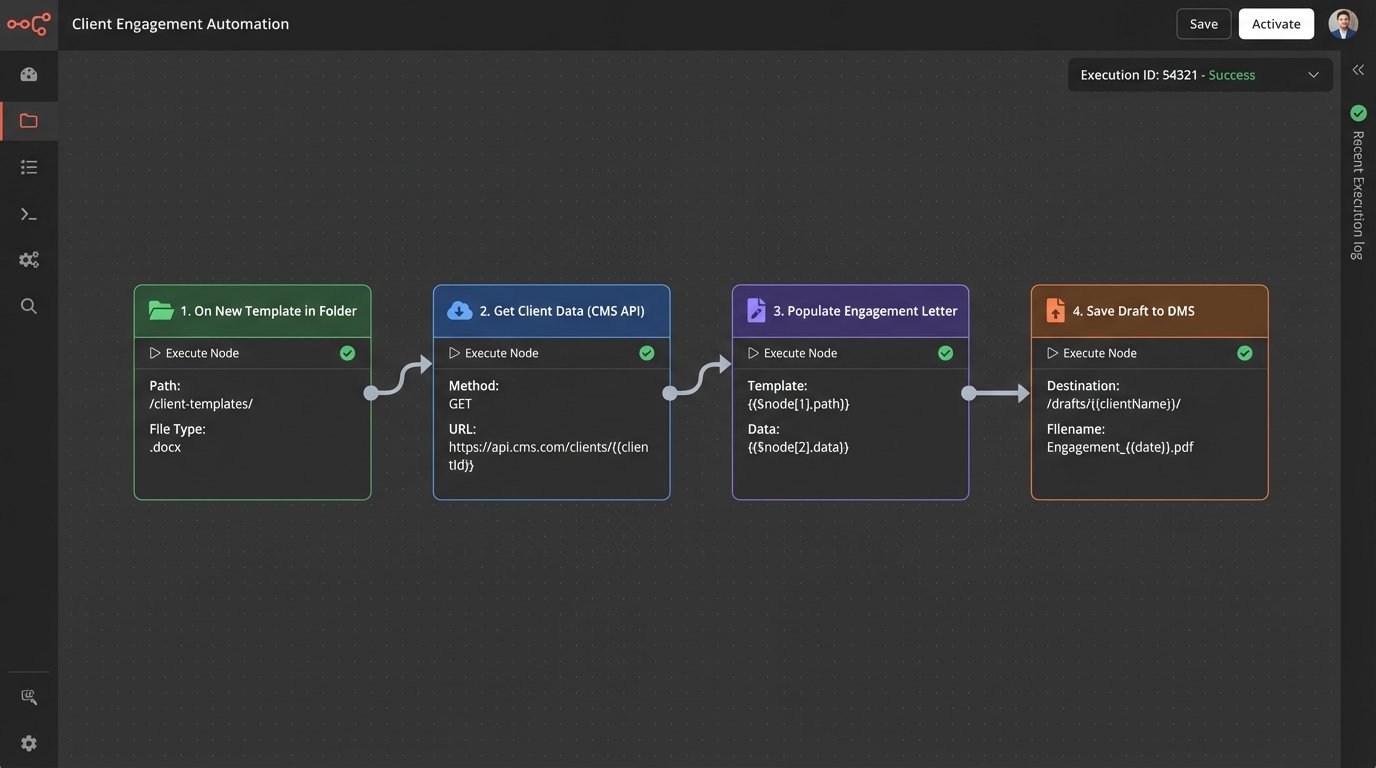
Connecting to a legacy CMS is often the biggest hurdle. Their APIs can be poorly documented and sluggish. Your integration code must be defensive, with built-in retries, explicit timeouts, and robust error handling. Assume the endpoint will fail. Assume the data returned will be malformed.
A simple API call needs to be wrapped in a fortress of exception handling.
Metrics That Expose Value, Not Vanity
Leadership often asks for “time saved” or “ROI.” These are difficult to prove and easy to dispute. Focus instead on operational metrics that are logged automatically and are irrefutable. These metrics expose the second-order effects of bad manual processes.
Instead of “hours saved,” measure “reduction in data correction tickets.” Every time IT has to manually fix a client record because of a data entry error, that’s a ticket. Your automation should drive that number toward zero. Track the number of document versions before finalization. If your automation correctly populates templates on the first try, you should see a decrease in v2, v3, and “FINAL_final_v2” file names. That is a concrete indicator of improved quality control.
These are not vanity metrics. They are direct measures of operational drag.
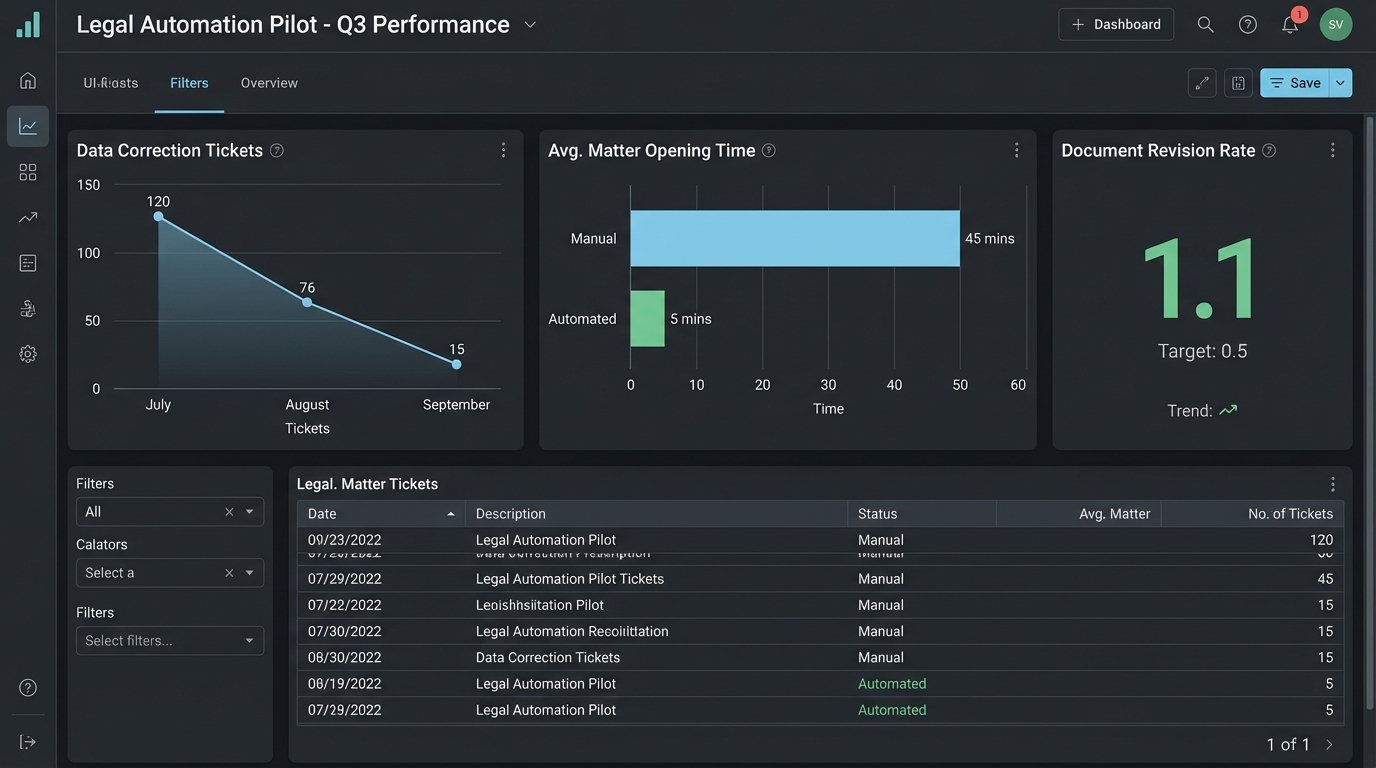
Another powerful metric is cycle time. Measure the time from a triggering event to a completed action. For example, what is the average time from a client signing an engagement letter via DocuSign to their matter being formally opened and billable in the system? Manual processes might spread this over days. A well-designed automation can shrink it to minutes. This directly impacts the billing cycle and revenue recognition. You can pull this data directly from API timestamps in the respective systems and present it as a clear before-and-after improvement.
This is a conversation that gets a CFO’s attention.
Build for Failure and Skepticism
Every system you build will eventually fail. The difference between a minor hiccup and a catastrophic outage is whether you planned for failure from the start. Your automation must be designed with the assumption that data sources will be unavailable, APIs will time out, and validation logic will encounter an edge case you never anticipated.
The most important feature is not the automation itself, but the failsafe.
Implement a “human-in-the-loop” exception queue. When your automation encounters data it cannot parse or a situation that fails its internal logic checks, it should not crash. It must package up the problematic transaction, flag it with a clear error message, and route it to a designated paralegal or admin for manual review. This approach accomplishes two things. It prevents bad data from corrupting downstream systems, and it builds trust. The team knows the system has guardrails and won’t run wild.
A silent failure is infinitely more dangerous than a loud one.
Your operations must also be idempotent. This means that running the same process with the same input multiple times produces the same result. If your automation to create a client record is accidentally triggered twice, it should create the record on the first run and do nothing on the second, rather than creating a duplicate. This is critical for recovery. When a process fails halfway through, you want to be able to simply re-run it without worrying about duplicating the steps that already succeeded.
The Unavoidable Data Hygiene Problem
Automation is an accelerant. If you have clean data and clean processes, it will make them faster and more efficient. If you have garbage data, it will produce garbage results at an alarming rate. Before you write a single line of automation code, you must perform a data audit on the source systems.
This is the least glamorous part of the job, and the most critical.
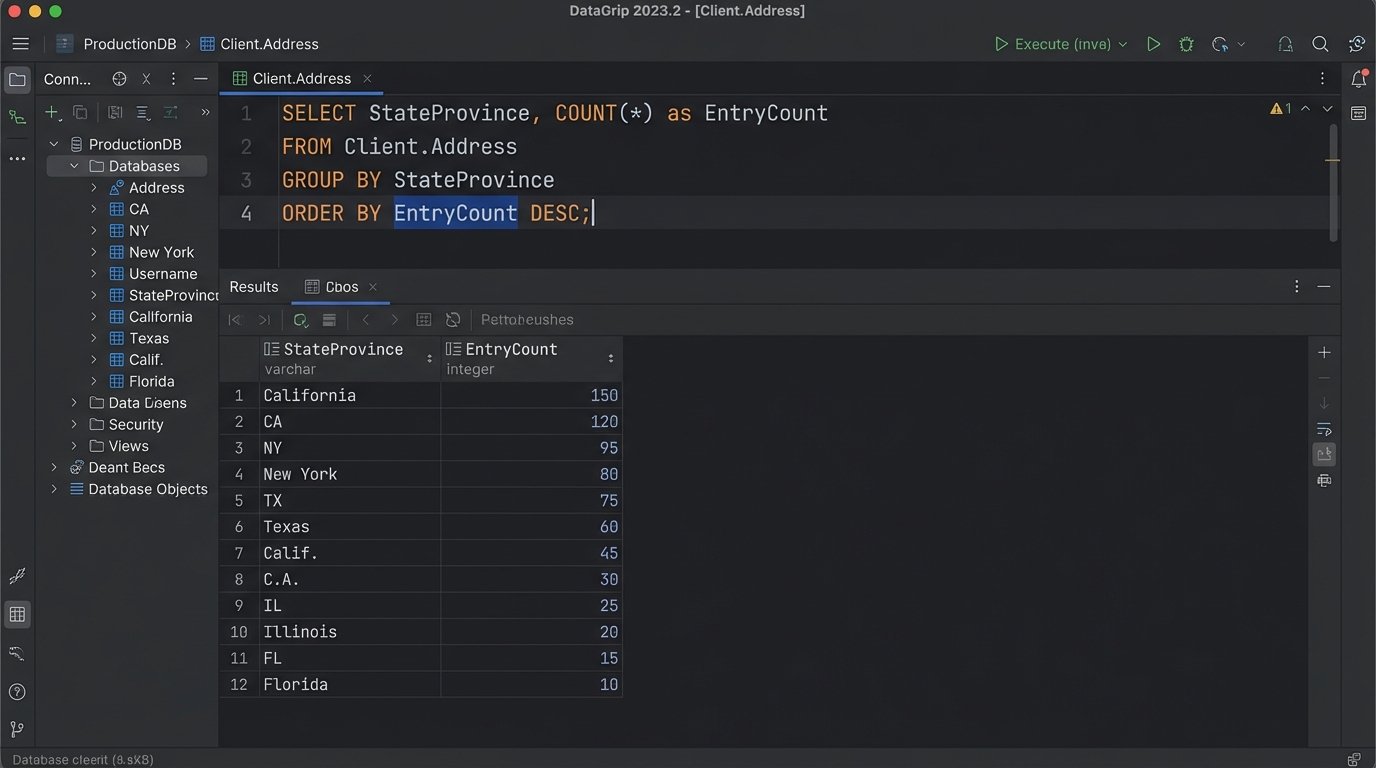
Write scripts to profile the data you plan to use. Look for inconsistencies, null values in required fields, and deviations from expected formats. A simple SQL query against your client database can reveal how many different ways your firm has entered state names. This must be cleaned up before you can reliably use that data for anything.
-- Simple SQL query to find inconsistent state entries

SELECT

    StateProvince,

    COUNT(*) as EntryCount

FROM

    Client.Address

GROUP BY

    StateProvince

ORDER BY

    EntryCount DESC;
-- You'll quickly find entries like 'CA', 'Calif.', 'California', 'C.A.'
-- This needs to be normalized before any automation can rely on it.
Failing to address data hygiene first is like trying to build a pre-fabricated house on a crooked foundation. The pieces won’t fit, and the entire structure will be unstable. The pre-project data cleanup is a project in itself. Budget for it, and do not let management pressure you into skipping it.
Scaling Beyond the Initial Win
A successful pilot creates a new problem: demand. Everyone will want their pet project automated. This is where you must impose architectural discipline. Avoid the temptation to build a single, monolithic “automation bot” that does everything. This creates a single point of failure and a maintenance nightmare.
The right approach is to build a collection of small, independent, single-purpose automations that can be chained together if needed. A microservice architecture is more resilient and easier to manage. Your client intake automation should be a separate process from your document signing automation. If one fails, the other continues to function. This modularity also allows for faster development, as different components can be built and deployed independently.
Build a library of reusable components. As you build integrations, abstract the core functions. Create a standardized function for connecting to the CMS, another for accessing the DMS, and another for interacting with your e-billing platform. These become the building blocks for all future automations. This approach enforces consistency, reduces redundant code, and dramatically accelerates the development of new projects. You are no longer starting from scratch each time. You are assembling solutions from a pre-vetted toolkit.
This is how you scale an automation program, not as a series of one-off projects, but as an integrated platform of capabilities.