
Most automation projects in legal are DOA. They fail not because the technology is flawed, but because they are pointed at the wrong target. The impulse is to automate a complex, high-value workflow for a senior partner. This is a vanity project, a wallet-drainer, and a maintenance nightmare waiting to happen. Successful automation isn’t about flashy demos. It’s about identifying the most repetitive, mind-numbing, and structurally consistent tasks and methodically eliminating them with code.
Stop thinking about what would look good in a press release. Start thinking about what makes your paralegals want to quit.
Step 1: Identify High-Volume, Low-Variance Processes
Forget automating bespoke legal analysis or a partner’s idiosyncratic reporting style. That is the equivalent of trying to shove a firehose through a needle. The data is unstructured, the logic is fluid, and the exceptions outnumber the rules. You will spend months building a brittle system that breaks the first time a partner changes their mind. The maintenance costs will eclipse any potential savings.
The real targets are the boring, predictable tasks that burn hours every week.
- Client Intake: Stripping data from a web form and injecting it into your case management system.
- Document Assembly: Populating standard engagement letters, NDAs, or corporate formation documents from a structured data source.
- Invoice Generation: Pulling time entries that match specific criteria and formatting them for billing.
- Conflict Checks: Running a new client name against a database of existing and former clients and flagging potential matches.
These processes are valuable because they are repeatable. The inputs are consistent, the logic is binary, and the output is predictable. We are not building an artificial intelligence. We are building a logical machine to execute a fixed checklist. Calculate the value based on frequency and time, not perceived importance. A task that takes 5 minutes but is done 100 times a day is a far better target than a task that takes 4 hours but is done once a month.
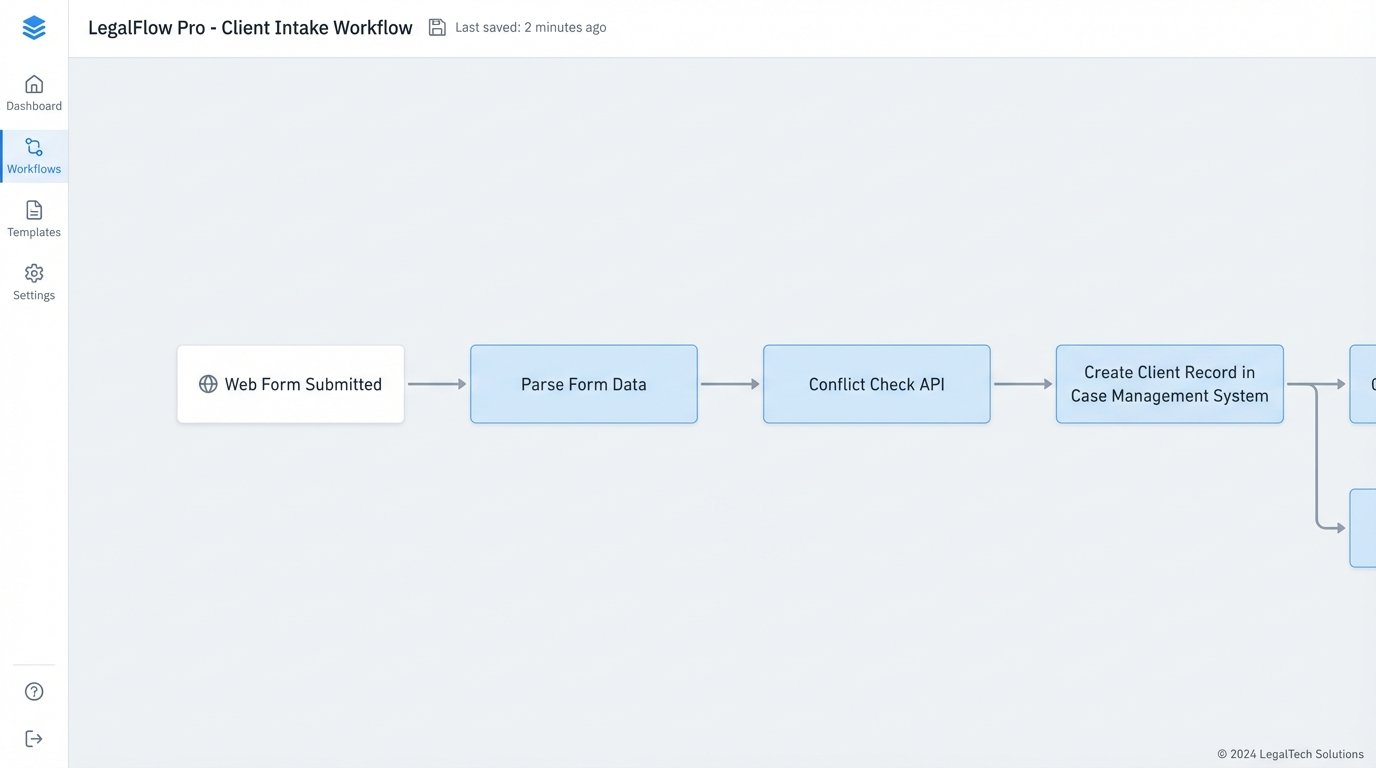
You need to gut the process first. Before you write a single line of code, map the existing manual workflow. Identify every decision point, every manual data entry field, and every system involved. If you cannot draw it on a whiteboard with clear, unambiguous steps, you cannot automate it. This diagnostic phase forces you to simplify and standardize the process itself, which is often where the majority of the efficiency gain comes from.
Step 2: Probe the API Endpoints
Your firm runs on a collection of SaaS platforms and on-premise legacy systems. The bridge between these systems is the Application Programming Interface (API). Before committing to a project, you must validate that the APIs you need are actually functional and not just a marketing bullet point. The documentation is often outdated or outright wrong. Assume nothing.
Your first move is reconnaissance. Use a simple tool like Postman or even the command-line utility `curl` to make live calls to the API. Can you authenticate successfully? Can you pull a list of client matters? Can you create a new contact? Pay close attention to the response headers. Look for rate limits, which dictate how many requests you can make in a given period. A sluggish API with a low rate limit can kill a high-volume automation project before it starts.
Here is a basic Python script to test fetching matters from a hypothetical case management API. This is not production code. This is a cheap, fast way to determine if the API is even viable. It specifically checks for the `429 Too Many Requests` status code, a common problem with cloud-based legal tech.
import requests

import time

import os
API_KEY = os.environ.get("LEGAL_API_KEY")
BASE_URL = "https://api.case-system.com/v3/"
HEADERS = {
"Authorization": f"Bearer {API_KEY}",
"Content-Type": "application/json"
}
def get_matters():
endpoint = f"{BASE_URL}matters"
try:
response = requests.get(endpoint, headers=HEADERS)
if response.status_code == 200:
print("Successfully fetched matters.")
return response.json()
elif response.status_code == 429:
print("Rate limit exceeded. Waiting before retry.")
# Simple exponential backoff could be implemented here
time.sleep(60)
return None # Or retry logic
else:
print(f"Failed to fetch matters. Status: {response.status_code}")
print(f"Response: {response.text}")
return None
except requests.exceptions.RequestException as e:
print(f"An error occurred: {e}")
return None
matters_data = get_matters()
if matters_data:
print(f"Found {len(matters_data.get('data', []))} matters.")
This script does one thing: it forces a confrontation with reality. If you cannot get this simple check to work reliably, your automation project is dead. You have just saved yourself months of work building on a foundation of sand.
Step 3: Engineer the Logic and Handle Failures
With a viable process and confirmed API access, you build the core logic. This is the code that connects the trigger (e.g., a new form submission) to the action (e.g., creating a client in the case management system). You have two primary paths: low-code platforms like Zapier or Make, or a custom script hosted on a server or as a serverless function.
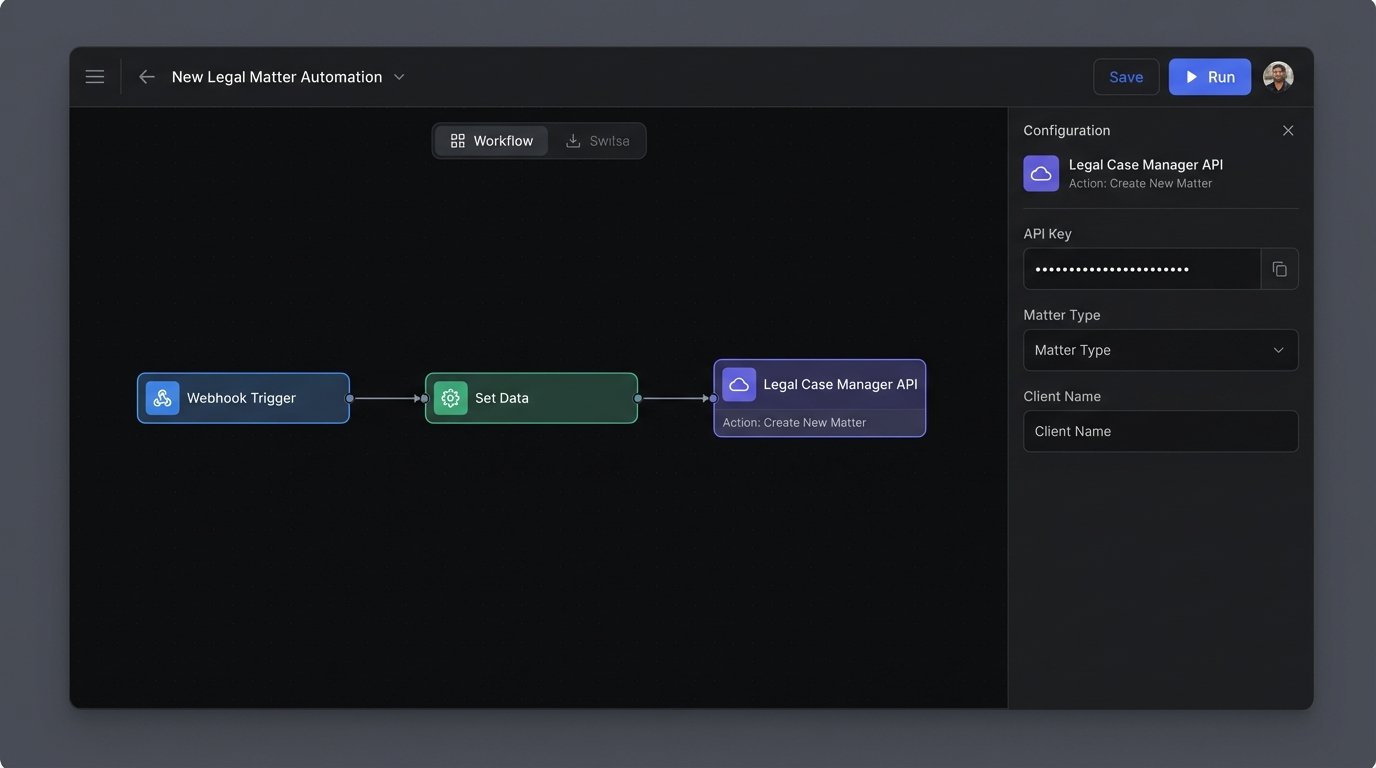
Low-code platforms are excellent for simple, linear workflows. They get you started fast. Their weakness is their opacity. When a step fails, debugging is a nightmare. You are at the mercy of their pre-built connectors and limited logging capabilities. They become a brittle chain of black boxes that are difficult to troubleshoot when something inevitably goes wrong at 2 AM.
A custom script in Python or PowerShell gives you absolute control. You control the logic, the error handling, and the logging. The cost is higher initial development time and the need for someone to maintain the code. For any process that involves conditional logic or data transformation, a custom script is almost always the more resilient long-term solution. You can build in robust retry mechanisms, send detailed failure alerts to a Slack channel, and log every single transaction for auditing.
Whatever path you choose, error handling is not optional. Your automation will fail. A network will drop, an API will be down for maintenance, or a user will input malformed data. Your code must anticipate these failures. A workflow that crashes and requires manual intervention is often worse than no automation at all. It creates cleanup work and destroys user trust. Every API call should be wrapped in a try-except block. Every piece of user input should be sanitized and validated before it is processed.
Step 4: Rollout to a Pilot Group
Never launch an automation firm-wide on day one. Select a small pilot group of 2-3 tech-savvy paralegals or assistants. These are your power users and, more importantly, your best stress testers. They will use the tool in ways you never anticipated and find edge cases you did not account for. Their job is to break your automation so you can fix it before it is deployed to the entire team.
Training is not a one-hour meeting and a PDF guide. It is an active feedback loop. Set up a dedicated channel in Teams or Slack for the pilot group. Encourage them to report every issue, no matter how small. When they report a problem, your first question should be “What time did it happen?” You must have detailed logs for every execution of your automation. Without logs, you are flying blind. You cannot fix a problem you cannot see.
This pilot phase is critical for building trust. When users see that their feedback leads to immediate improvements, they become champions for the project. When they see a tool that is unreliable and unsupported, they will quietly revert to their old manual processes and your project will die from neglect.
Step 5: Measure Adoption and Error Rates, Not ROI
Management wants to see a return on investment (ROI) chart. Pushing for that metric in the first three months is a mistake. The initial goals are stability and adoption. An automation that saves 100 hours but has a 15% failure rate is not a success. It creates 15 manual cleanup jobs and erodes confidence in the system.
Your initial dashboard should track two key metrics: execution count and success rate.
- Execution Count: How many times is the automation actually being used? If the number is low, you need to find out why. Is the trigger failing? Is the tool harder to use than the manual process? Are users just unaware it exists?
- Success/Error Rate: What percentage of executions complete successfully versus failing or requiring manual intervention? Your target for a mature automation should be a success rate greater than 99%. A high error rate is a red flag that your logic is flawed or your error handling is insufficient.
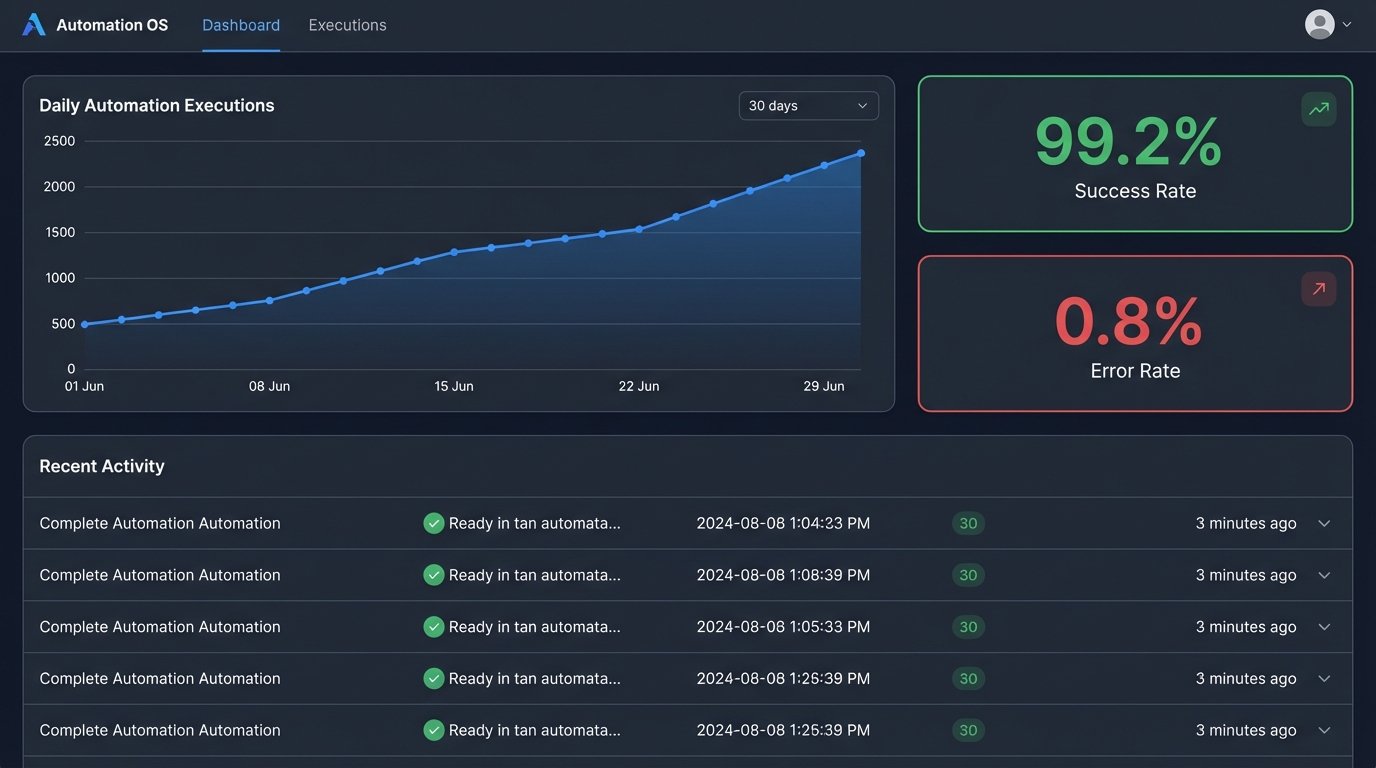
Only when you have a high execution count and a low error rate can you begin to calculate meaningful ROI. At that point, the calculation is simple: `(Executions * Time Saved Per Execution) * Blended Hourly Rate`. But that number is meaningless if the team refuses to use the tool because it is unreliable.
Iterate based on this data. A successful automation program is not a single project with a start and end date. It is a continuous process of identifying targets, building resilient logic, gathering user feedback, and refining the system. Get the first one right, prove its stability, and then move on to the next mind-numbing task. That is how you succeed.