Most automation initiatives in law firms fail. They don’t fail because the technology is inadequate. They fail because they are treated like software rollouts instead of what they are: fundamental changes to operational logic. The goal isn’t to buy a shiny platform, it’s to surgically remove the repetitive, low-value tasks that drain budget and introduce human error. This is not about disruption. It is about plumbing.
Step 1: The Pre-Mortem and Process Audit
Before you write a single line of code or sign a vendor contract, you must map the existing workflows. This isn’t a high-level flowchart for a partner presentation. This is a granular, painful documentation of every click, every copy-paste, and every manual data validation that happens inside a process. The objective is to find the tasks that are both high-frequency and highly structured.
Your targets live at the intersection of mind-numbing repetition and zero ambiguity. Document intake, initial conflict checks, and boilerplate contract assembly are classic starting points. These processes are governed by rules, not judgment. A human adds little value in copying a case number from an email subject into a case management system, but the potential for a typo is constant.
We build a simple matrix: one axis for task frequency, the other for structural complexity. Tasks that are performed hundreds of times a week and require no subjective analysis are your primary targets. Automating a partner’s highly nuanced brief-writing process is a fool’s errand. Automating the ingestion of 300 daily court notices is a direct cost saving.
Quantifying the Pain
Attach real numbers to these processes. If a paralegal spends 90 seconds processing each court notice, and you receive 300 per day, that’s 7.5 hours of manual labor. At a loaded rate of $50/hour, that single process costs the firm nearly $94,000 annually. This isn’t an efficiency gain. It’s plugging a financial leak.
Do not rely on what people say they do. Observe the actual workflow. You will find undocumented workarounds, redundant data entry points, and manual checks that exist because no one trusts the system. These are the symptoms of a process ripe for a logic-based overhaul.
Step 2: Selecting the Right Tool for the Job
The legal tech market is a minefield of over-marketed platforms that promise end-to-end solutions. The reality is that your choice of tool is dictated by three factors: the complexity of the task, your in-house technical skill, and your firm’s tolerance for vendor lock-in. There are three basic tiers of tooling.
No-Code Platforms
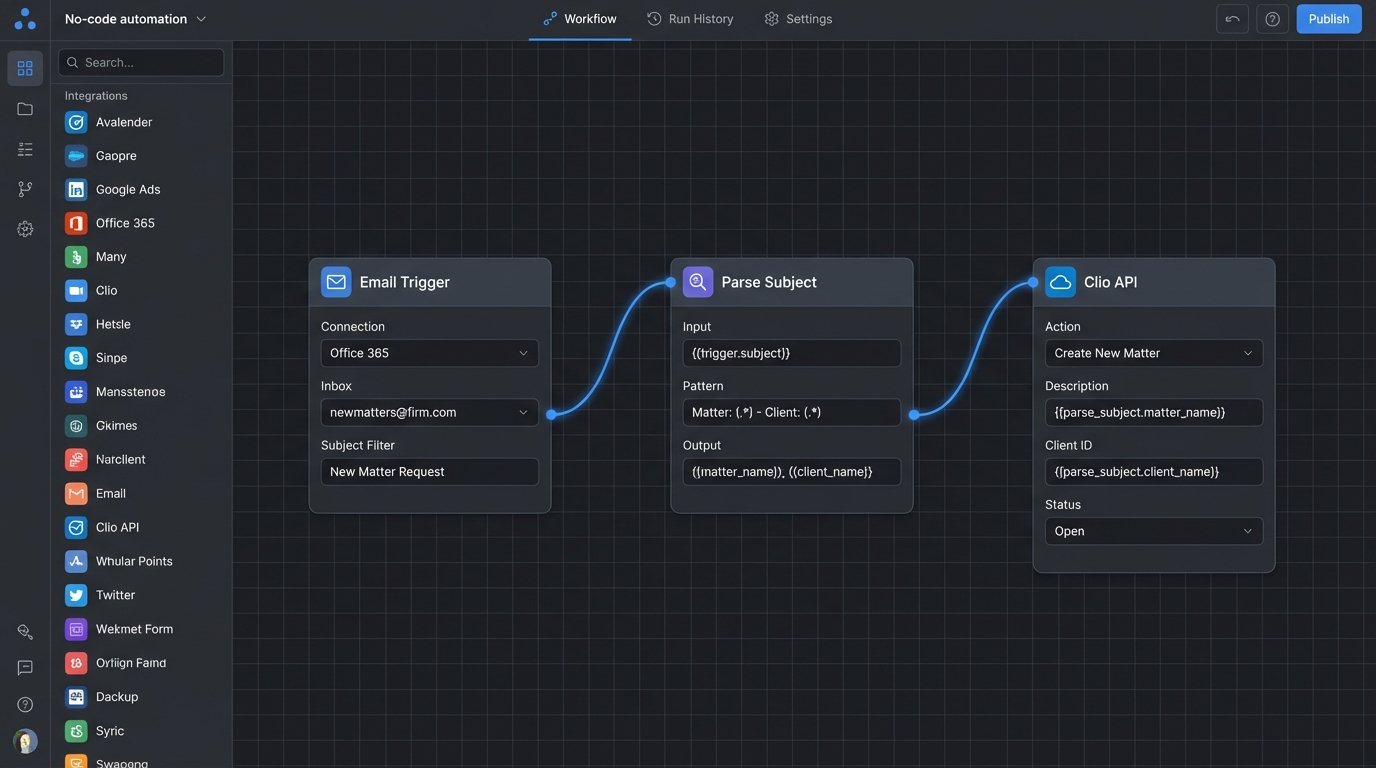
Tools like Zapier or Power Automate are excellent for simple, linear workflows. They act as a bridge between cloud-based applications. For example, when a specific type of email arrives in a shared inbox, create a new record in Clio. They are fast to configure for basic tasks but have a low ceiling. Their error handling is often opaque and debugging a failed “Zap” can be more time-consuming than the manual task it replaced.
These platforms are a good entry point, but they are not a scalable solution for core business processes. They are brittle, and a minor change in a connected application’s UI or API can shatter the automation without warning.
Low-Code and RPA Platforms
This category includes players like UiPath, Blue Prism, and Appian. They offer more sophisticated logic, allowing for branching, loops, and integration with on-premise legacy systems that lack proper APIs. Robotic Process Automation (RPA) literally records and mimics human interaction with a user interface. It’s powerful but also incredibly fragile. If a button on the screen moves five pixels to the right, the bot breaks.
Low-code is a better long-term bet, as it focuses more on API integrations and structured data. It’s a significant step up in cost and requires specialized training. You are building durable workflows, but you’re also buying into a vendor’s entire ecosystem, which can be a wallet-drainer.
Pro-Code: The Ground Truth
For maximum control, flexibility, and cost-effectiveness at scale, nothing beats a custom script. Using Python with libraries like `requests` for API calls, `BeautifulSoup` for web scraping, and `pandas` for data manipulation gives you absolute power over the process. You are not dependent on a vendor’s feature roadmap or pricing model.
The barrier is obvious: you need engineering talent. You need someone who can write clean, maintainable code, manage authentication keys securely, and build proper logging and error alerting. This approach is not for firms that want a plug-and-play solution. It is for firms that view technology as a core operational competency.
Step 3: The Pilot Project: A Controlled Burn
Your first automation project must be small, specific, and measurable. The goal is not to transform the firm overnight. The goal is to prove the concept, build trust, and learn the failure modes of your chosen tool and your own internal processes. We will use the example of automating the creation of a new matter record from a designated email inbox.
Defining the Scope
The scope must be brutally narrow. The automation will:
- Monitor a specific mailbox (e.g., `newmatters@firm.com`).
- For each new email, parse the subject line for a client ID formatted as `[CLIENT-12345]`.
- Extract the sender’s email address.
- Extract the body of the email as the initial matter description.
- Using the firm’s CMS API, create a new matter record with the client ID, contact email, and description.
- Move the processed email to an “Archive” folder.
Anything outside this scope is deferred. Emails without a properly formatted client ID? Ignored. Emails with attachments? Ignored. This tight focus prevents scope creep and makes success binary. It either worked or it did not.
Data Mapping and API Interrogation
This is the most critical technical step. You must get the API documentation for your case management system. Assuming it wasn’t written five years ago and completely forgotten, you will need to find the correct endpoint for creating a new matter. You then map your source data to the required API fields.
For example:
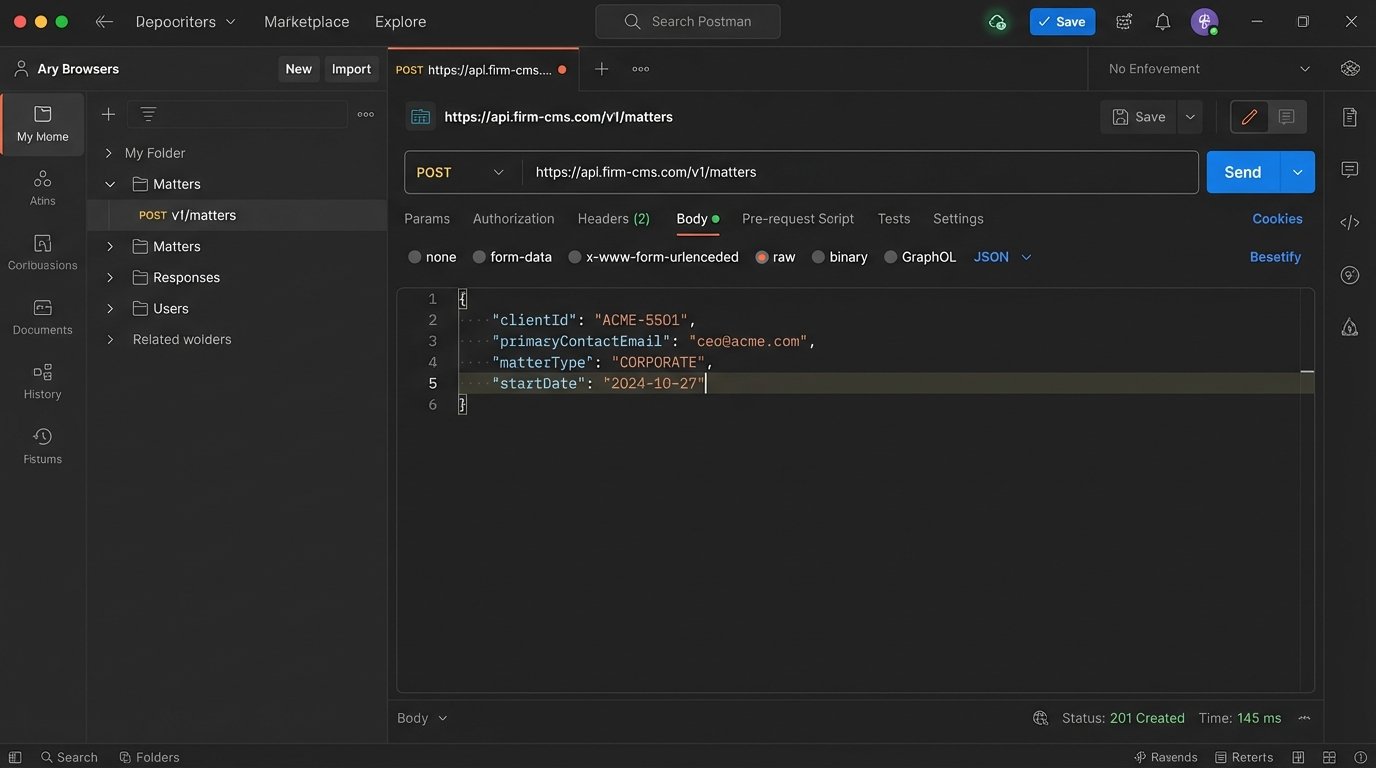
- Source: Email Subject `[ACME-5501]` -> Destination: `matter.clientID`
- Source: Email From `ceo@acme.com` -> Destination: `matter.primaryContactEmail`
- Source: Email Body -> Destination: `matter.description`
This mapping feels trivial, but it’s where integrations die. You will discover data type mismatches, character limits, and undocumented required fields. You must test each API call manually using a tool like Postman before you even think about writing the automation script. You are stress-testing the API, not your code.
Trying to force data from one system into another without this level of analysis is like shoving a firehose through a needle. You just make a mess.
Step 4: Building for Failure
The “happy path” where every email is perfectly formatted is a fantasy. A production-grade automation is defined by how it handles exceptions. You must anticipate and build logic for every conceivable failure point. What if the API is down? What if the email is spam? What if the client ID does not exist in the master database?
Your code must be wrapped in defensive structures. For every external call, especially an API request, there must be a `try-except` block. This prevents a single bad request from crashing the entire process.
Here is a simplified Python example demonstrating this principle:
import requests

import json
CMS_API_ENDPOINT = "https://api.firm-cms.com/v1/matters"
API_KEY = "YOUR_SECRET_API_KEY"
def create_matter(client_id, contact_email, description):
headers = {
"Authorization": f"Bearer {API_KEY}",
"Content-Type": "application/json"
}
payload = {
"clientId": client_id,
"primaryContact": contact_email,
"details": description
}
try:
response = requests.post(CMS_API_ENDPOINT, headers=headers, data=json.dumps(payload), timeout=10)
response.raise_for_status() # This will raise an HTTPError for 4xx or 5xx status codes
print(f"Successfully created matter for client {client_id}")
return response.json()
except requests.exceptions.HTTPError as e:
print(f"HTTP Error creating matter for {client_id}: {e.response.status_code} {e.response.text}")
# Logic to send an alert to an admin
return None
except requests.exceptions.RequestException as e:
print(f"Network or connection error creating matter for {client_id}: {e}")
# Logic to retry later
return None
This code does not just make a request. It anticipates HTTP errors (like a 401 Unauthorized or 500 Server Error) and network failures. It logs the error and returns a predictable `None` value, allowing the calling function to handle the failure gracefully, perhaps by moving the email to a “Manual Review” folder.
An automation without robust error handling is not an asset. It is a liability waiting to silently corrupt your data.
Step 5: Human-in-the-Loop Validation
Never deploy a new automation directly into a production workflow. You must first run it in a “shadow mode.” The automation runs in the background, but the human performs the same task manually. The goal is to compare the output of the machine to the output of the human.
Create a simple validation log or dashboard. For every execution, log what the bot intended to do and what the final result was.
- Timestamp: 2023-10-27 10:05:11 UTC
- Input: Email from `newclient@example.com`, Subject `[MEGA-9001] New IP Matter`
- Bot Action: Create Matter for Client `MEGA-9001`
- Human Action: Create Matter for Client `MEGA-9001`
- Result: Match
You will inevitably find discrepancies. The bot may misinterpret a typo that a human would have instinctively corrected. These discrepancies are not failures. They are invaluable data points that you use to refine your parsing logic and error handling. You run in shadow mode until you achieve a 99% or higher match rate over a statistically significant volume of transactions.
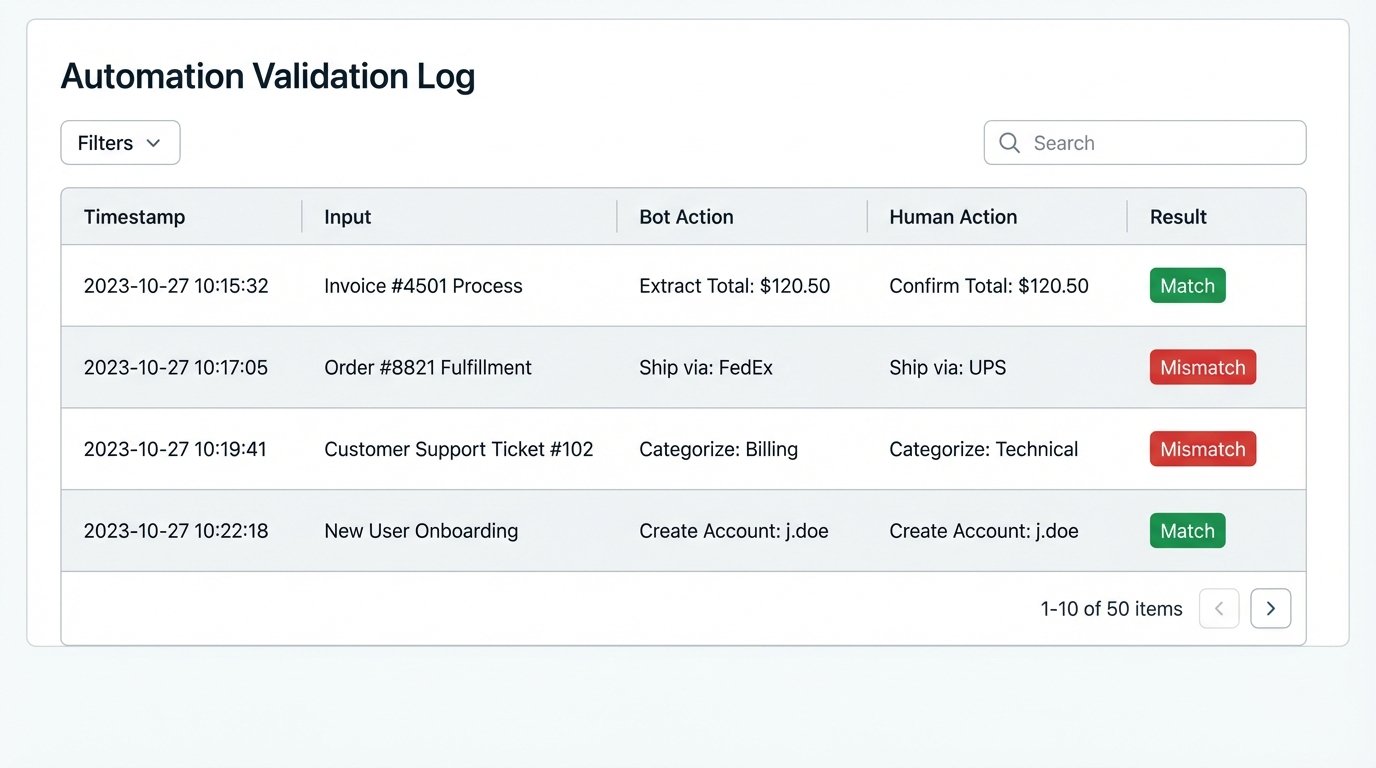
Only then do you consider moving to a “human-in-the-loop” model. The bot handles the majority of cases and flags the ambiguous ones for human approval. The human is no longer doing the data entry. They are performing quality control, which is a much higher-value use of their time.
Step 6: Scaling and Governance
Successfully automating one process creates an appetite for more. This is a dangerous phase. Scaling automation isn’t about building 20 siloed bots. It’s about building a centralized, manageable automation practice. If every paralegal starts building their own Power Automate flows, you create a shadow IT nightmare that is impossible to maintain or secure.
Appoint a clear owner for the automation platform. This person or small team is responsible for:
- Standardizing Tools: Preventing the proliferation of redundant platforms.
- Managing Credentials: Securely storing and rotating API keys and service account passwords.
- Code Review: Ensuring every new automation meets a minimum standard for logging, error handling, and efficiency.
- Monitoring and Maintenance: An automation that runs unmonitored will eventually fail. You need centralized dashboards to track the health and performance of all automated processes.
As you add more automations that interact with the same systems, you will hit API rate limits. Your CMS will not let you make 1,000 requests per second. Your code must be designed to handle this by implementing exponential backoff and retry logic. Throwing a `time.sleep(1)` in a loop is a novice move that does not scale.
Automation is not a one-time project. It is living infrastructure. It requires the same level of care and feeding as your network or your document management system. Without that discipline, your initial quick win will devolve into a brittle mess of technical debt.