
Stop Building Brittle Drip Campaigns
The standard real estate email automation playbook is a liability. It treats every lead like an identical cog in a linear process, blasting generic “Just Listed” alerts until the contact unsubscribes or is forgotten. This approach fails because it ignores the foundational problem of all automation: input data is garbage, and lead intent is a moving target. A resilient system doesn’t just send emails; it validates, segments, and reacts to change. Anything less is just scheduled spam.
We are not building a simple mail merge. We are building a system that can handle the chaotic reality of real estate data feeds and fickle human behavior. The goal is to create automations that are maintainable, scalable, and don’t require a full-time operator to clean up their messes.
Practice 1: Pre-Process and Normalize All Inbound Data
Data from an MLS, a portal like Zillow, or even your own web forms will arrive with zero consistency. You’ll get “St” and “Street,” phone numbers with and without country codes, and names in all caps. Injecting this raw data directly into your email automation platform forces you to build hideous conditional logic inside the platform itself. This is slow, error-prone, and makes migrations a nightmare.
Your automation platform is for orchestration, not data transformation.
The correct architecture is to force all inbound data through a normalization layer first. This can be a simple serverless function (like AWS Lambda or a Google Cloud Function) that intercepts a webhook. This function’s only job is to strip whitespace, standardize address formats, capitalize names properly, and validate required fields. Only clean, predictable data gets passed to your CRM and, by extension, your email engine.
This adds a point of failure, but it centralizes the logic. Fixing a single script is infinitely easier than updating 50 different automation workflows when a data source changes its format.
For example, a basic Python function using a library like `usaddress` can parse and standardize messy address strings before they ever touch your contact records. This prevents your personalization from looking amateurish.
import usaddress
def normalize_address(raw_address_string):
"""
Parses a raw address string and returns a standardized dictionary.
Returns None if parsing fails to avoid injecting bad data.
"""
try:
# The 'usaddress' library can be inconsistent, so wrap it.
parsed = usaddress.tag(raw_address_string)
address_dict = parsed[0]
# Build a clean, predictable output format
standardized = {
'street_number': address_dict.get('AddressNumber', ''),
'street_name': address_dict.get('StreetName', ''),
'street_post_type': address_dict.get('StreetNamePostType', ''),
'city': address_dict.get('PlaceName', ''),
'state': address_dict.get('StateName', ''),
'zip': address_dict.get('ZipCode', '')
}
# Force specific formatting, e.g., uppercase state abbreviation
standardized['state'] = standardized['state'].upper()
return standardized
except (usaddress.RepeatedLabelError, IndexError):
# Log the failure and return nothing.
# Don't pass broken data downstream.
print(f"Failed to parse address: {raw_address_string}")
return None
# --- Usage ---
# dirty_address = "123 main st., anytown, CA 90210"
# clean_data = normalize_address(dirty_address)
# if clean_data:
# # Now push 'clean_data' to your CRM via API
# pass
Practice 2: Segment Leads by Behavior, Not Just by a Dropdown Menu
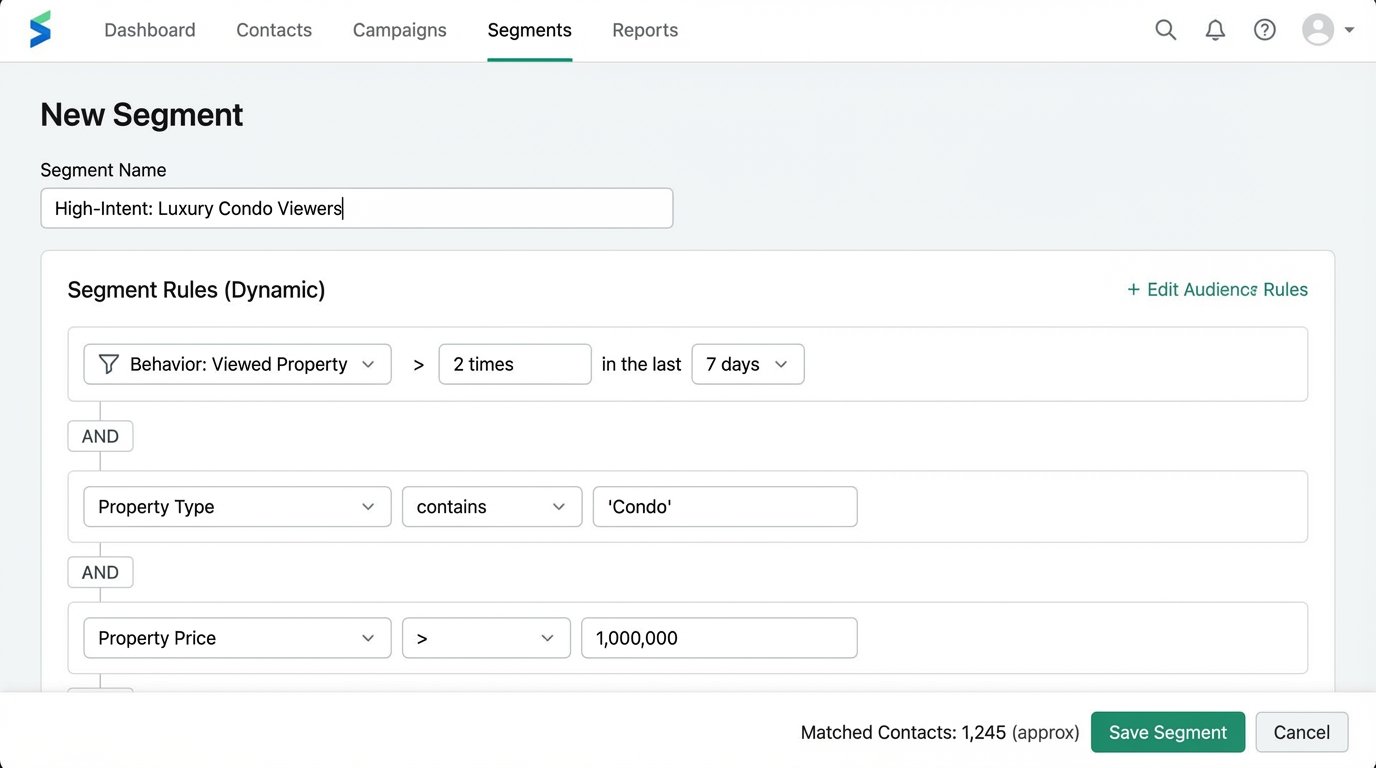
Segmenting by “Buyer” or “Seller” is the bare minimum. It’s a static tag that often gets assigned once and never updated. Effective automation requires dynamic segmentation based on demonstrated behavior. This means bridging your web analytics with your contact database. The data points that matter are frequency, recency, and category of interest.
A lead who views three 4-bedroom homes in a specific suburb in the last 48 hours is expressing urgent, specific intent. They belong in a different segment than someone who downloaded a “Guide to Selling Your Home” six months ago and has been inactive since. Your system must be able to tell the difference and react accordingly.
This is achieved by firing tracking events from your website to a tool like Segment or directly to your CRM via its API. When a user is identified (e.g., they fill out a form), their anonymous event history is merged with their new contact record. Now you can build segments like “Viewed Luxury Condos > 2 times in last 7 days” or “Calculated Mortgage on Property X.”
These are the triggers that should launch a targeted, high-value sequence, not a generic newsletter.
Practice 3: Use a State Machine, Not a Linear Drip
A standard drip campaign is a time-based sequence that is ignorant of the lead’s actual journey. It will happily send “Check out these new listings!” to a client who just went under contract. This happens because the automation is a one-way street; it doesn’t receive updates from the real world. The fix is to model your lead nurture process as a state machine.
A lead can only be in one state at a time: “New Inquiry,” “Contacted,” “Showing Scheduled,” “Offer Submitted,” “Under Contract,” “Closed,” or “Nurture – Cold.” Transitions between these states are triggered by explicit events, not the passage of time. An agent logging a call in the CRM triggers a transition from “New Inquiry” to “Contacted.” A calendar integration firing a webhook for a new appointment triggers “Showing Scheduled.”
Email automations are then tied to *states*, not to a sequence. A contact in the “Showing Scheduled” state might get an email with details about the neighborhood. A contact who enters the “Nurture – Cold” state after 90 days of inactivity gets put on a low-frequency market update sequence. This structure makes it impossible to send the wrong message at the wrong time.
Building this requires a CRM and automation platform that can be manipulated by an external system via API, because the state changes will come from multiple sources. It is more complex to set up, but it is far easier to debug and maintain.
Practice 4: Implement a Global Communication Frequency Cap
Multiple automations running in parallel is a recipe for overwhelming a lead. The “Just Listed” alert, the “Market Report” drip, and a new “Price Reduction” notification can all fire on the same day. To the lead, it just looks like spam. They don’t know or care that three separate, well-intentioned systems are at work. Without a central check, you’re basically letting multiple firehoses aim at the same thimble. The lead doesn’t get nurtured, they get drowned.
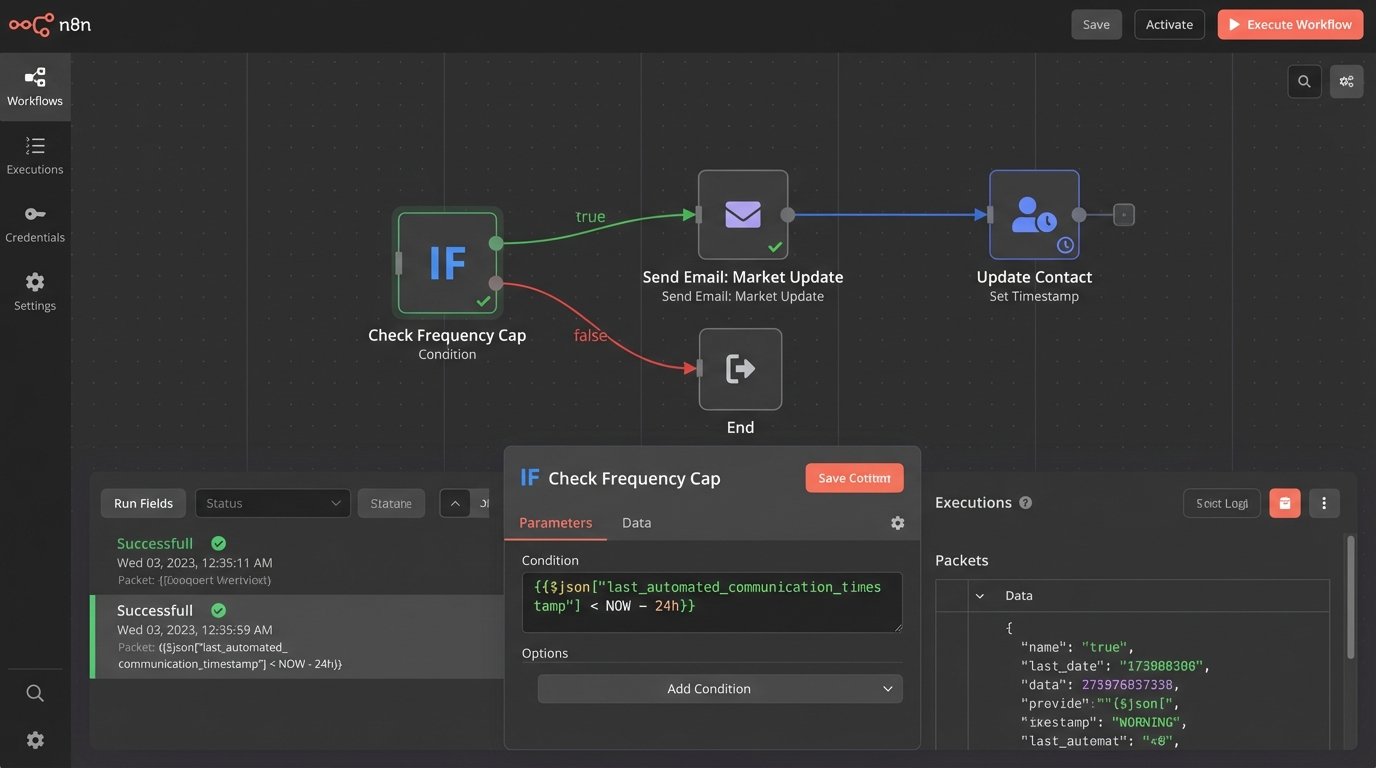
You must enforce a global communication cadence. Before any automated email is sent, the system must perform a logic-check against a central timestamp. This is typically a custom field on the contact record, `last_automated_communication_timestamp`. The automation rule checks this field: “Only send if `last_automated_communication_timestamp` is more than 24 hours ago.”
When an email is sent, the automation’s final step is to update this timestamp with the current time. This creates a crude but effective mutex (mutual exclusion lock) on the contact, preventing another automation from immediately firing. This requires discipline. Every single automated send must include the check-then-set logic.
This adds a few milliseconds of latency and another API call to your workflow. It’s a small price to pay for not alienating your entire lead database.
Practice 5: Inject Dynamic, API-Driven Content
Personalization with a first name is not impressive. Real estate is hyperlocal, and your automated content should reflect that. Instead of sending a static email about “market trends,” inject a block of content that is generated on-demand and is specific to the lead’s exact area of interest. This means treating your emails not as static templates, but as containers for dynamically assembled components.
The architecture works like this: the email template contains a placeholder, like `%%market_stats_widget%%`. When the automation for a specific contact runs, it triggers a webhook to a service layer you control. This service takes the contact’s target zip code or neighborhood as an input. It then makes a server-side API call to a housing data provider (like ATTOM Data or CoreLogic) to fetch the latest stats: median sale price, days on market, recent sales.
Your service then formats this data as a clean HTML table or chart and returns it. The email platform injects this HTML payload into the email body right before sending. The result is a highly relevant, data-rich email that is impossible to create with the platform’s native tools.
This is a wallet-drainer if you are not careful. Hitting a paid data API for every single email send is expensive. You need to build a caching layer (using something like Redis) that stores the results for each zip code for a few hours, drastically reducing your API call volume.
Practice 6: Build for Failure with Dead-Letter Queues
Your automations will fail. The CRM API will time out. A data-enrichment service will return a 500 error. The webhook you rely on will stop firing without notice. A silent failure is the most dangerous kind, because your system appears to be working until you realize no leads have been contacted for three days. You must assume every external dependency is unreliable and plan for it.
Do not build automations that simply stop when a step fails. Every critical API call or data processing step should be wrapped in error-handling logic. If a call to enrich a contact with property data fails, the workflow shouldn’t terminate. It should branch. The contact ID and the error message should be shunted to a “dead-letter queue” for manual review.
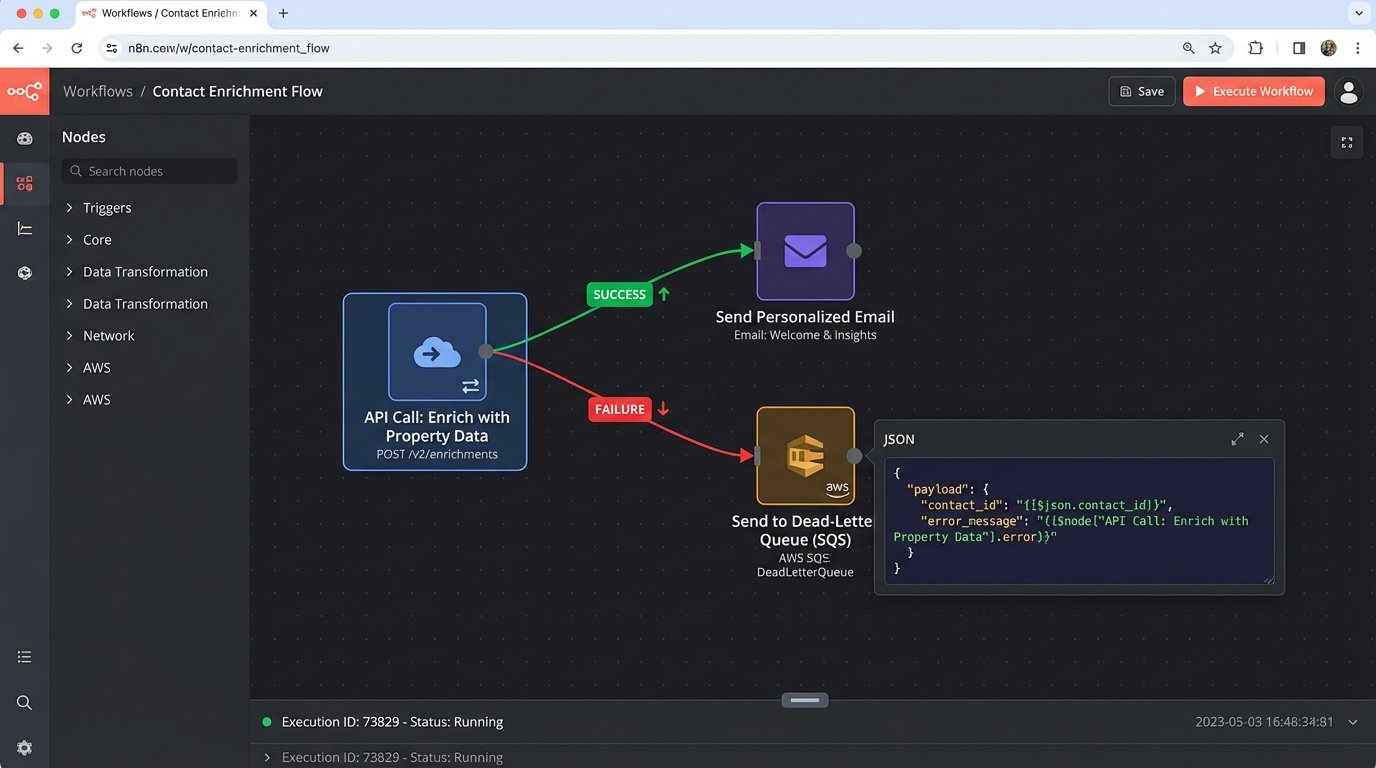
This queue can be a simple spreadsheet, a Slack channel, or a proper AWS SQS queue. The important thing is that failures are logged and made visible. The workflow can then continue, perhaps by sending a more generic version of the email that didn’t rely on the failed data enrichment. This provides a graceful fallback and ensures the lead’s journey isn’t completely stalled by a transient network hiccup.
You need monitoring on this queue. An alert should fire in PagerDuty or your monitoring tool of choice when the queue size exceeds a certain threshold. This is your early warning system that a critical integration is broken. Waiting for an agent to complain that their leads are cold is not a monitoring strategy.