
Your lead scoring model is decaying. It started the day you deployed it. The rules you wrote six months ago are now assigning top scores to leads who will never convert, while your ideal buyers are getting ignored. The problem is not the concept of scoring, but the operational laziness that follows the initial setup. This is a maintenance problem, not a strategy problem.
Most systems fail because they are built on a static view of the market. They assume a buyer’s “request a demo” click today is worth the same as it was last quarter. That assumption is wrong. Here are the architectural and maintenance principles required to force accuracy back into a system that naturally drifts toward chaos.
1. Mandate Data Normalization at the Point of Ingress
Lead scoring engines are not magic. Feeding them inconsistent, dirty data and expecting accurate output is a fantasy. The single biggest point of failure is inconsistent field values, especially for job titles and country names. A rule that gives points for “VP of Sales” will completely miss a lead with the title “Vice President, Sales” or “Sales Vice President”. The system sees them as three distinct, meaningless strings.
The fix is to process and normalize this data before it ever touches your scoring logic. Build a pre-processing layer or a webhook-triggered serverless function that intercepts incoming data from forms and API integrations. This function’s only job is to scrub and standardize the data according to a canonical map you control.
Standardizing Job Titles and Seniority
Forget trying to match exact titles. Map titles to seniority and department. Create a dictionary or a simple key-value store. “VP of Marketing”, “Marketing Director”, and “CMO” all map to Department: Marketing, Seniority: Decision Maker. “Engineer” and “Developer” both map to Department: Technical, Seniority: Practitioner. This strips the ambiguity and lets you build scoring rules on stable, meaningful categories instead of brittle strings.
Here is a basic Python example of what this logic looks like. This isn’t production code, just the core concept.
def normalize_title(title):
title = title.lower().strip()
# Department Mapping
if any(keyword in title for keyword in ['marketing', 'cmo']):
department = 'Marketing'
elif any(keyword in title for keyword in ['sales', 'cro']):
department = 'Sales'
elif any(keyword in title for keyword in ['engineer', 'developer', 'cto']):
department = 'Technical'
else:
department = 'Other'
# Seniority Mapping
if any(keyword in title for keyword in ['c-level', 'chief', 'cmo', 'cto', 'cro']):
seniority = 'C-Level'
elif any(keyword in title for keyword in ['vp', 'vice president', 'director']):
seniority = 'Decision Maker'
elif any(keyword in title for keyword in ['manager']):
seniority = 'Manager'
else:
seniority = 'Practitioner'
return {'department': department, 'seniority': seniority}
# Example Usage
lead_title = " Vice President of Marketing Strategy "
normalized_data = normalize_title(lead_title)
# Output: {'department': 'Marketing', 'seniority': 'Decision Maker'}
Inject this logic into your data flow. You stop the bleeding at the source instead of trying to build dozens of OR conditions in your scoring rules to catch every possible title variation.
2. Implement Negative Scoring for Disqualifying Signals
A default lead scoring model only adds points. It’s a system of pure positive reinforcement. This creates a vulnerability where a highly engaged but completely unqualified lead can accumulate a high score. Think of students using your whitepapers for research or a competitor downloading every case study. They look like hot leads, but they are noise.
Negative scoring is the kill switch. It subtracts points for actions that signal a poor fit. This is the immune system for your lead queue, actively identifying and downgrading junk leads before they waste a sales rep’s time.
Common sources for negative scores include:
- Use of personal email domains: A submission from a gmail.com or yahoo.com address is almost never a serious B2B buyer. Subtract 50 points immediately.
- Visiting the careers page: Someone viewing your open positions multiple times is a job seeker, not a customer. If `page_view_count(‘/careers’) > 2`, subtract 20 points.
- Competitor activity: Maintain a list of known competitor domains. If a lead’s email domain matches one, assign a massive negative score to push them to the bottom of any list.
- Geographic disqualification: If you cannot legally or logistically sell to a certain country, any lead from that region should get a negative score that effectively archives them.
Without negative scoring, you are only measuring enthusiasm, not intent or qualification. It’s a critical mechanism to keep the sales pipeline clean.
3. Build a Score Decay Model
Lead intent has a half-life. A lead who downloaded a pricing sheet 90 days ago is not the same as a lead who did it 90 minutes ago. Most scoring systems fail to account for this, treating old and new activity as equal. This results in “ghost leads” clogging the pipeline, leads that were once hot but are now completely cold, yet still carry a high score.
A score decay model systematically reduces a lead’s score over time in the absence of new activity. The implementation can be simple. Run a daily or weekly script that queries for leads who have not had any meaningful engagement in the last X days. For that cohort, reduce their behavioral score by a fixed percentage.
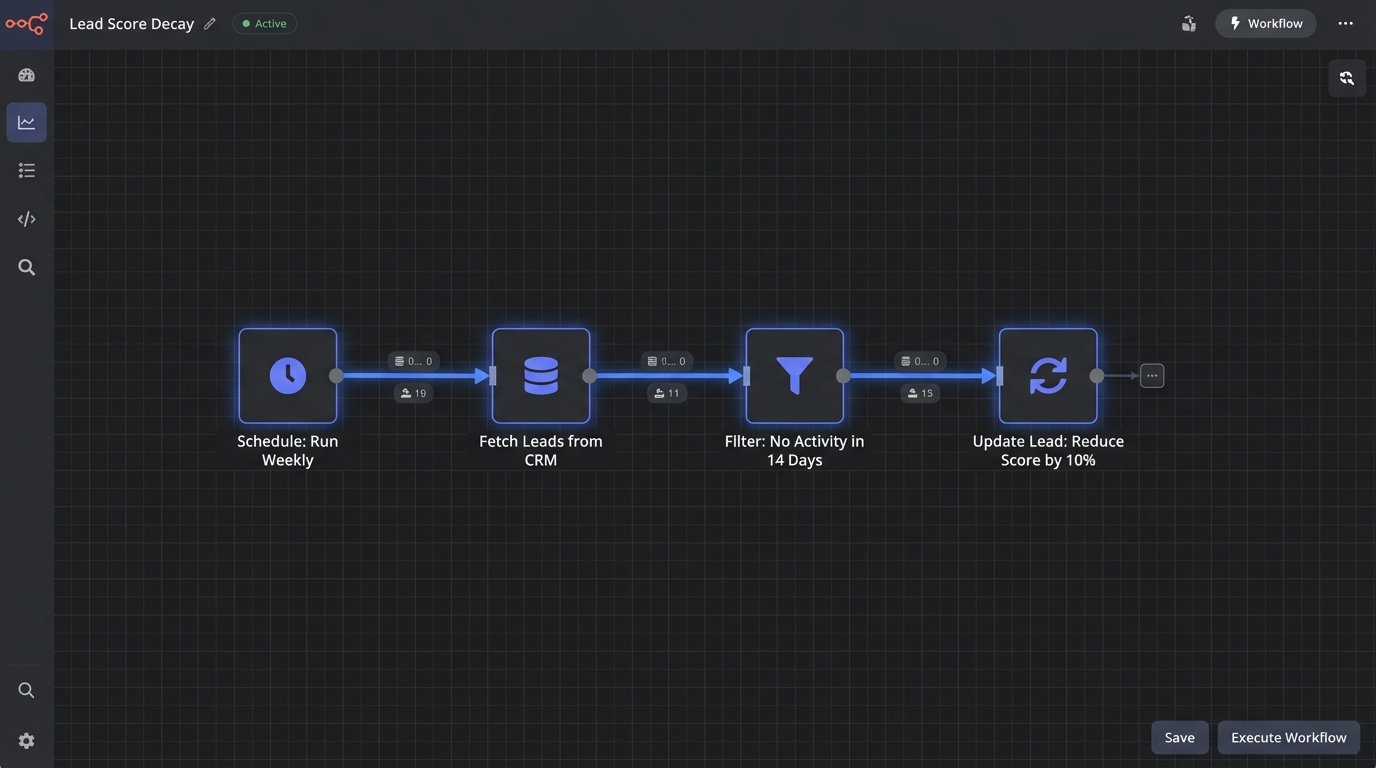
For example, a weekly automation could apply this logic:
- Condition: Last engagement date > 14 days ago AND Behavioral Score > 0.
- Action: Reduce Behavioral Score by 10%.
This is like managing memory in an application. You have to periodically run garbage collection to free up resources. Score decay is the garbage collector for your lead database, ensuring that only currently engaged leads command the attention of your sales team.
A more advanced approach involves varying the decay rate based on the original action. A “Contact Us” form submission might have a slower decay rate than a webinar attendance, but the principle is the same. Stale scores are misleading scores.
4. Decouple Demographic and Behavioral Scoring
Combining demographic data (like job title or company size) and behavioral data (like page views or email clicks) into a single, monolithic score is a common mistake. It creates a black box that is impossible to debug. Did the score increase because the lead is a CTO at a Fortune 500 company, or because they clicked on three emails? With a single score, you cannot know.
The correct architecture is to maintain two independent scores:
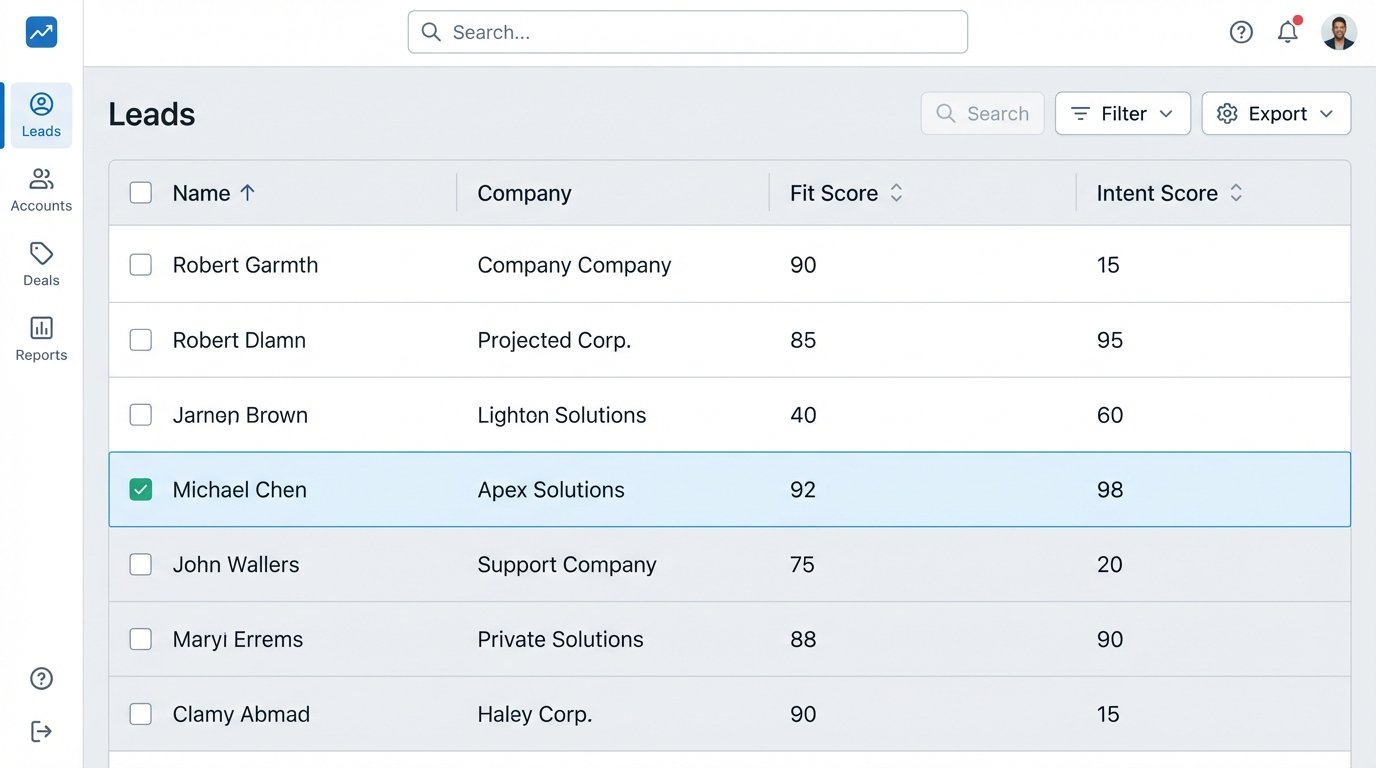
- Fit Score (Demographic): This score answers the question, “Is this the right type of person from the right type of company?” It is based on static, explicit data like title, industry, company revenue, and location. This score should change rarely.
- Intent Score (Behavioral): This score answers the question, “Is this person showing active buying signals?” It is based entirely on a lead’s actions over time: website visits, content downloads, email engagement, and form submissions. This score is volatile and should decay.
Splitting these is like separating a program’s configuration from its runtime state. It introduces clarity and control. You can now create a qualification matrix. A lead with a high Fit Score but low Intent Score is a perfect candidate for a long-term nurture campaign. A lead with a high Intent Score but low Fit Score might be a junior employee doing research who should be routed to a different resource. A lead with high scores in both is the one you send to sales immediately.
This two-vector approach allows for nuanced routing and reporting. You stop asking “What’s the lead score?” and start asking “What’s the fit, and what’s the intent?”. It’s a fundamentally more intelligent way to segment and prioritize.
5. Engineer a Closed-Loop Feedback System from Sales
A lead scoring model that operates without feedback from the sales team is a blind system guessing in the dark. The entire point of scoring is to identify leads that will convert. If you do not pipe conversion data back into the model, you cannot validate its accuracy or improve it over time.
The most important piece of feedback is the lead status change in the CRM. When a sales rep converts a Marketing Qualified Lead (MQL) to a Sales Accepted Lead (SAL) or Sales Qualified Lead (SQL), that is a direct signal that marketing’s scoring was correct. When a lead is disqualified with a reason like “Not the right person” or “No budget,” that is a signal that the scoring was wrong.
Do not rely on manual processes for this. Build an automated bridge. Use the CRM’s outbound messaging, webhooks, or API to send a real-time notification to your marketing automation platform (or a middleware endpoint) whenever a lead’s status is updated. This payload should contain the lead ID, the new status, and the disqualification reason if applicable.
Once you have this data, you can:
- Validate your model: Analyze the demographic and behavioral attributes of all leads marked as SQL. Do they share common traits that are not being properly weighted in your model?
- Identify weaknesses: Look at the disqualified leads. If a large number are being rejected for “Wrong industry,” your firmographic filters are failing and need to be tightened.
- Automate model tuning: In more advanced systems, this feedback can trigger automated adjustments. If leads with a certain attribute consistently get disqualified, the system can automatically lower the points assigned for that attribute.
This feedback loop turns a static scoring system into a dynamic learning system. Without it, your marketing and sales teams are operating in separate silos, and your model will never improve.
6. Version and A/B Test Your Scoring Models
Never deploy a new lead scoring model to your entire database at once. The risk of mis-calibrating the model and flooding sales with junk leads (or starving them of good ones) is too high. Treat changes to your scoring model like a software release. It requires version control and testing in a controlled environment.
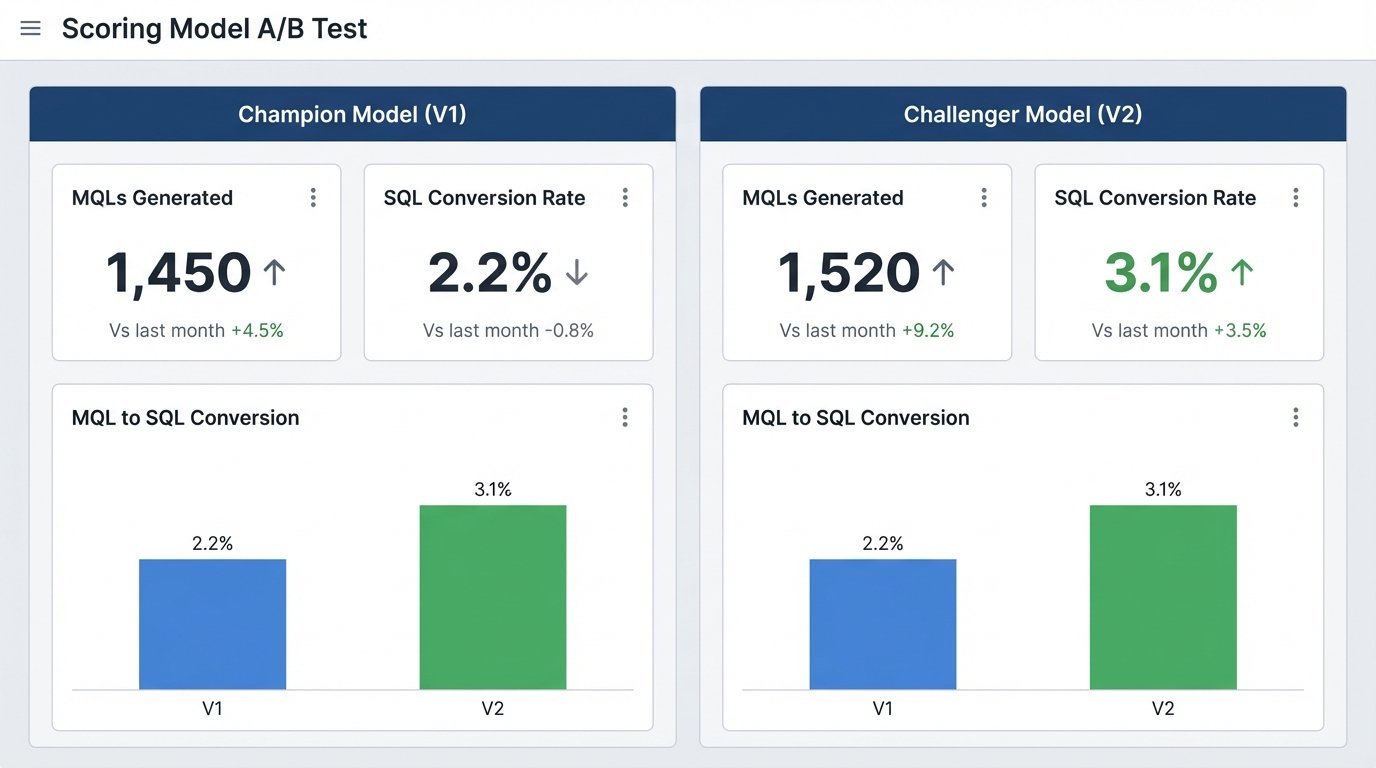
Before deploying a new model (“Challenger”), establish the performance of your current model (“Champion”). You need a baseline conversion rate from MQL to SQL for the Champion model. Once you have that, run the Challenger model in parallel. Route a small percentage of new, incoming leads, maybe 10-15%, through the Challenger logic.
The operational steps are:
- Clone the current model: Create a copy of your existing scoring rules. This is Version 2.0.
- Implement changes: Make your proposed adjustments to the V2.0 model.
- Segment incoming leads: Set up a rule that assigns, for example, 90% of new leads to the V1.0 model and 10% to the V2.0 model. This can be done with a simple round-robin or a randomizer function.
- Measure and compare: Let the test run for a statistically significant period, maybe 30 or 60 days, depending on your lead volume. At the end of the period, measure the MQL-to-SQL conversion rate for both cohorts.
If the Challenger model produces a higher conversion rate, it becomes the new Champion. If it performs worse, discard it and analyze why it failed. This methodical, data-driven approach prevents catastrophic errors and ensures that every change you make is a quantifiable improvement. It replaces guessing with empirical evidence.