10 Tools to Automate Real Estate Transaction Management
The average real estate transaction generates a pile of documents and a sequence of state changes that would crash a lesser workflow. Manual entry is the default failure mode. You are paid to bypass that failure mode with logic and endpoints. The goal is not a paperless office. The goal is a system where data is entered once and then programmatically routed, validated, and archived without human intervention.
Most transaction management platforms were built as self-contained systems, not as cogs in a larger automated machine. Their APIs are often afterthoughts, with inconsistent rate limits and documentation that lags three versions behind the production endpoint. Forcing them to talk to each other and to your other systems requires a specific set of tools. Trying to sync these legacy systems without a staging database is like shoving a firehose of unstructured data through a keyhole. It gets messy, and most of the data ends up on the floor.
1. Dotloop
Dotloop functions as a central repository for transaction documents and compliance checklists. Its primary value in automation is its API, which exposes transaction states, participant data, and document statuses. You can build triggers based on a loop’s status changing from “Pre-Offer” to “Under Contract,” initiating downstream workflows like sending a notification to the lending team or creating a calendar event for the inspection deadline.
- Technical Benefits: Provides webhook support for real-time updates on key transaction events. The API gives direct access to loop, participant, and task list data structures, which is critical for syncing with an external CRM or data warehouse.
- Specific Use Cases: Triggering an onboarding sequence in your CRM when a new loop is created. Automatically pulling signed documents and archiving them to a separate cloud storage provider. Populating a closing calendar based on contract dates extracted from the loop details.
The API is functional but not exhaustive. You will find gaps, especially around accessing granular field data within PDF documents. It tells you a document is signed, but it won’t easily give you the contract price from box 3c without another tool to read the document itself.
2. SkySlope
SkySlope is another major transaction management hub, often favored by larger brokerages. Its automation strength lies in its checklist and compliance engine. From a technical standpoint, you can use its integration points to push and pull transaction data, ensuring that agent activities align with brokerage compliance rules. The API allows you to create, update, and retrieve transaction and listing records.
- Technical Benefits: Stronger focus on compliance-related endpoints than many competitors. Can programmatically manage checklists, which is useful for building dashboards that track agent compliance across an entire brokerage. Decent documentation for its core API functions.
- Specific Use Cases: Building a custom agent dashboard that flags transactions with incomplete compliance checklists. Syncing commission data from SkySlope to an accounting system upon transaction closing. Automating the creation of a new transaction file in SkySlope when a lead is marked as “won” in a sales CRM.
Its integration capabilities are solid for core transaction data, but it operates within a walled garden. Getting data out is more straightforward than getting it in, and complex conditional logic often requires a middleware tool to orchestrate.
3. Make (formerly Integromat)
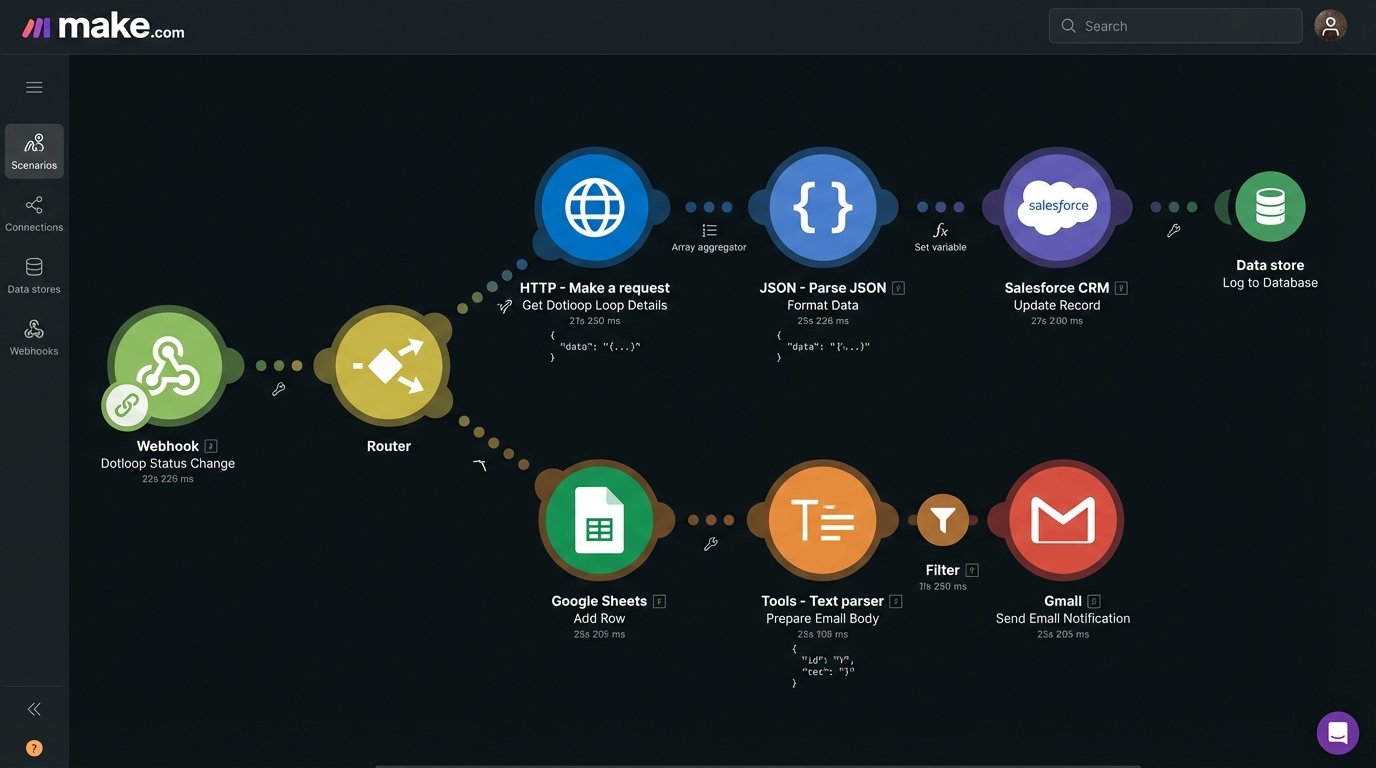
Make is an Integration Platform as a Service (iPaaS) that serves as the logical glue between your applications. It’s more complex than Zapier, offering more robust error handling, data manipulation, and conditional branching. You visually map API calls and webhooks, creating scenarios that can route data between your transaction platform, CRM, and communication tools. A webhook from Dotloop can trigger a Make scenario that filters the data, finds the client in your CRM, calculates a commission estimate, and then sends a formatted email.
- Technical Benefits: Advanced data routing and transformation tools without writing extensive code. Supports complex, multi-step workflows with branching logic. The visual debugger is invaluable for tracing how data flows and fails between API endpoints.
- Specific Use Cases: When a document is signed in DocuSign, use Make to grab the document, check the transaction status in SkySlope, and then upload the signed PDF to a specific folder in Google Drive named after the property address. Create an aggregator that pulls daily new listings from multiple MLS sources (via an API) and consolidates them into a single Airtable base.
The power is a double-edged sword. It is easy to create a tangled mess of scenarios that become impossible to debug or maintain. It is a workflow engine, not a database, and using it to store state is asking for trouble.
4. UiPath
Sometimes there is no API. You will encounter county property record websites, ancient MLS desktop clients, or title company portals that were built in 2003 and never updated. For these, you need Robotic Process Automation (RPA). UiPath uses software robots to mimic human actions, directly interacting with user interfaces to log in, click buttons, scrape text, and enter data.
- Technical Benefits: Interacts with any application, regardless of whether it has an API. Can automate workflows involving legacy desktop software. The Studio IDE allows for building resilient bots with error handling and logging.
- Specific Use Cases: A bot logs into the county clerk’s website each morning, searches for newly recorded deeds for properties under contract, and downloads the PDF copies. Automating the process of entering a new listing into an old, desktop-based MLS system by having a bot fill out the form fields from a structured data source like a spreadsheet.
RPA is brittle and a wallet-drainer. If a website changes its layout, your bot breaks. It requires dedicated machine resources and licensing costs are significant. It is the automation of last resort, the brute-force tool for when elegant solutions are not possible.
5. DocuSign API
DocuSign is more than a signature tool. it is a document workflow platform with a mature API. You can use it to programmatically generate and send envelopes, pre-fill documents with data from your systems, track signing status in real-time with webhooks, and pull the completed documents and audit trails. The Connect module is its webhook service, which is the key to any real-time automation.
- Technical Benefits: Granular control over the entire document lifecycle. Webhooks provide instant status updates (e.g., “Delivered,” “Viewed,” “Signed”). The composite templating feature allows you to dynamically assemble documents from multiple sources into a single envelope.
- Specific Use Cases: A new client record in your CRM triggers an API call to DocuSign that generates a buyer representation agreement, pre-fills the client’s name and address, and sends it for signature. A webhook signals that the purchase agreement is fully executed, which then triggers a notification to the transaction coordinator to begin their checklist.
The learning curve for its API, particularly for complex features like composite templates, is steep. You have to manage the API credentials and user permissions carefully, as you are handling legally binding documents.
6. Airtable
Think of Airtable not as a spreadsheet but as a user-friendly relational database with a great API. It serves as an excellent staging ground or a lightweight data backend for real estate workflows. You can create tables for Transactions, Contacts, Properties, and Documents, then link them together. It becomes the flexible data hub that your rigid transaction platform cannot be.
- Technical Benefits: The API is simple, well-documented, and allows for full CRUD operations on your data. The Automations feature provides a simple, built-in engine for triggering scripts or sending notifications based on data changes. Its user interface makes it easy for non-technical staff to view and manage the data your automations are processing.
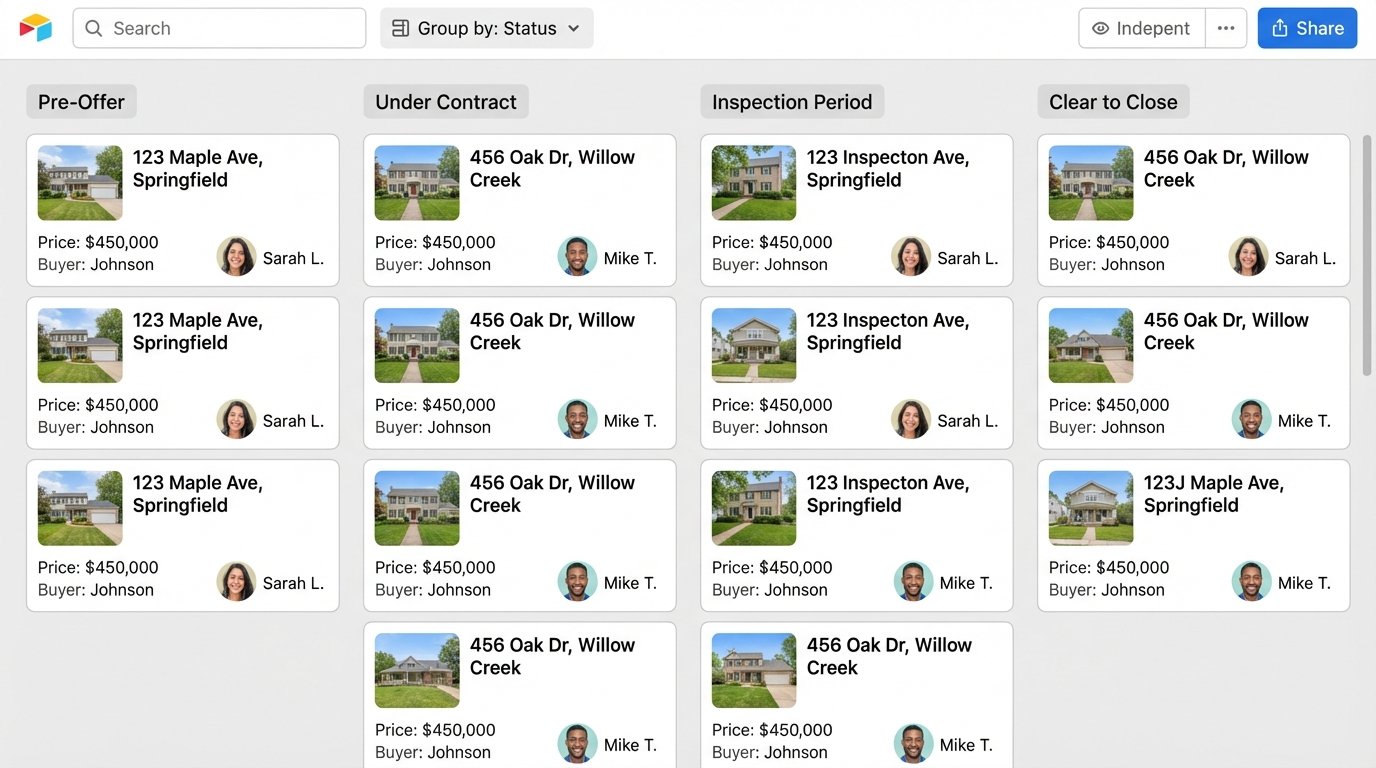
- Specific Use Cases: Create a central dashboard for tracking all transactions, pulling data from Dotloop via Make and displaying it in a clean Kanban view for agents. Use it as a data source for commission calculation scripts that run when a transaction’s status is changed to “Closed.” Build a marketing content calendar for new listings, managed in Airtable and pushed to social media scheduling tools.
Airtable is not a high-performance database. It has record limits and API rate limits that make it unsuitable for massive-scale operations. It is a fantastic tool for brokerage-level automation, not for building a national portal.
7. Puppeteer
Puppeteer is a Node.js library that provides a high-level API to control a headless Chrome or Chromium browser. When a web portal has critical data but no API, you use Puppeteer to write a script that navigates to the site, logs in, fills out forms, clicks buttons, and scrapes the resulting data. It gives you raw, programmatic access to the web.
- Technical Benefits: Full control over a browser environment allows you to automate interactions with complex, JavaScript-heavy websites. You can take screenshots and generate PDFs of pages. It runs headless on a server, making it perfect for scheduled data extraction tasks.
- Specific Use Cases: Writing a script that runs nightly to log into a competing brokerage’s public portal and scrape new listing data to analyze market trends. Automating the download of daily hot sheets from an MLS website that only provides a “Print to PDF” button and no export function.
Like RPA, Puppeteer scripts are brittle. A minor change to a website’s HTML structure or CSS selectors can break your script. It requires constant maintenance and robust error checking to be reliable in a production environment.
const puppeteer = require('puppeteer');
async function getListingPrice(url) {
const browser = await puppeteer.launch();
const page = await browser.newPage();
await page.goto(url, { waitUntil: 'networkidle2' });
// This selector is fragile and will break.
const priceSelector = '.price-container .main-price';
const priceElement = await page.waitForSelector(priceSelector);
const price = await page.evaluate(element => element.textContent.trim(), priceElement);
await browser.close();
return price;
}
getListingPrice('https://some-listing-portal.com/property/123').then(price => {
console.log(`Extracted Price: ${price}`);
});
8. Google Cloud Vision API
Real estate is still drowning in scanned PDFs and poorly digitized forms. The Google Cloud Vision API provides Optical Character Recognition (OCR) to extract text and even structured data from these images and documents. You can feed it a scanned purchase agreement and get back the raw text, which you can then parse to find key dates, names, and amounts.
- Technical Benefits: Highly accurate text detection. Can recognize handwriting with decent success. The Document Text Detection feature can identify paragraphs, lines, and words, preserving the original structure of the document.
- Specific Use Cases: An automated workflow watches an email inbox for new contracts. When a PDF arrives, it’s sent to the Vision API. The extracted text is then searched for keywords like “Closing Date” or “Purchase Price” to auto-populate fields in your transaction management system.
OCR is not magic. It is messy. The accuracy depends heavily on the scan quality, and parsing the resulting unstructured text dump to reliably find specific data points requires careful string manipulation and regular expressions. You will spend more time writing the parser than calling the API.
9. Twilio
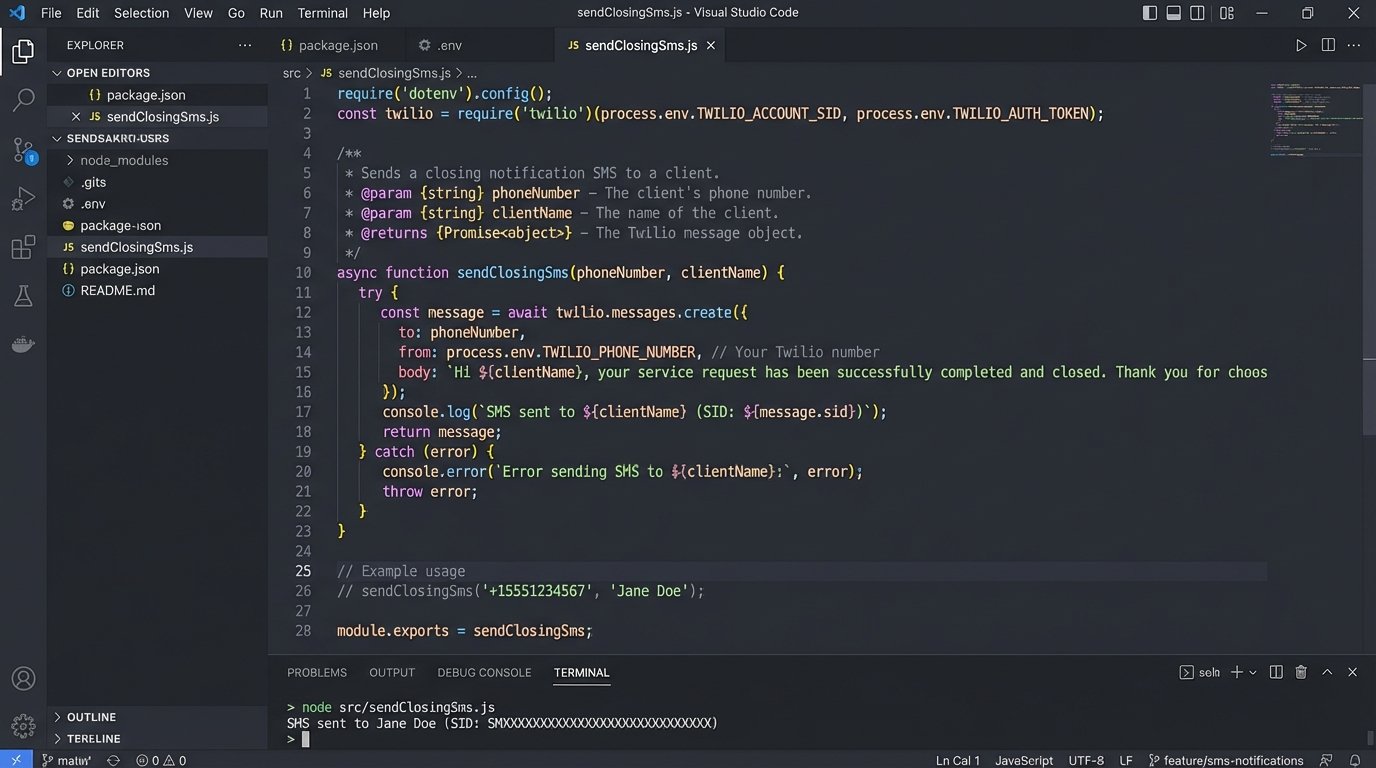
Communication is a huge part of any transaction. Twilio provides APIs for SMS, voice, and email, allowing you to build automated communication directly into your workflows. Instead of relying on an agent to manually send updates, the system can do it based on data-driven triggers. This ensures consistent and timely communication with clients, lenders, and other parties.
- Technical Benefits: Robust and reliable APIs for core communication channels. Webhook support to process incoming messages and delivery status reports. SDKs available for nearly every major programming language.
- Specific Use Cases: When a transaction status changes to “Clear to Close” in your CRM, automatically send an SMS to the buyer, seller, and both agents. Create a system where clients can text a property code to a number and receive an automated reply with the listing details and a link to the virtual tour.
The primary cost is per-message, which can scale quickly. You also need to manage opt-ins and opt-outs carefully to comply with communication regulations. It is a powerful tool, but it also introduces another compliance vector you are responsible for.
10. PostgreSQL with PostgREST
At some point, you outgrow the data models of off-the-shelf systems. You need a central, authoritative database. PostgreSQL is a powerful, open-source relational database that can serve as the core of your real estate data platform. When you couple it with a tool like PostgREST, it automatically generates a RESTful API directly from your database schema.
- Technical Benefits: You get a full-featured, high-performance database and a secure, standards-compliant API with minimal development overhead. You control the schema completely, allowing you to build a data model that perfectly fits your business logic. It’s built for performance and data integrity.
- Specific Use Cases: Building a central data warehouse that consolidates information from multiple transaction systems, MLS feeds, and CRMs. Creating a custom back-end for an agent productivity app that needs to read and write transaction data. Archiving decades of transaction history in a structured, queryable format.
This is the “build it yourself” option. You are responsible for hosting, security, backups, and maintenance. It offers the most power and flexibility, but it also carries the highest operational burden. This is not a starting point. It is where you end up when every other tool has revealed its limitations.