The final closing package in a real estate transaction is a minefield of data redundancy. The same names, addresses, and loan numbers are keyed in repeatedly across dozens of forms, creating an unacceptable margin for error. The move to digital signing isn’t about saving paper. It’s about data integrity and injecting automation into a process that still runs on manual verification and overnight courier services.
A failed signature invalidates the entire package. A faulty API integration corrupts the source data in your CRM or transaction management system. Selecting a platform requires you to look past the marketing deck and inspect the API documentation, the webhook architecture, and the rigidity of the audit trail. These are the components that break at 2 AM on a Saturday, not the drag-and-drop UI.
1. DocuSign: The Enterprise Default
DocuSign is the incumbent for a reason. Its eSignature API is mature and its compliance documentation is strong enough to satisfy most legal and regulatory bodies. The platform is built around the “Envelope” concept, a container for documents, recipients, and signing tabs. This object model is logical and maps cleanly to the physical closing package it’s meant to replace.
API and Developer Sandbox
The REST API is extensive, covering everything from envelope creation to identity verification and bulk sending. Their developer sandbox is a full-featured environment, allowing for genuine end-to-end testing of complex signing workflows without burning through production API calls. You can model out multi-signer scenarios with specific routing orders, a non-negotiable for purchase agreements involving multiple parties, agents, and lenders.
The key is mastering the composite template structure. You can define a base template for a standard purchase agreement and then programmatically overlay document and tab information via the API. This strips out the need to manually position signature fields for every single transaction. It’s a massive reduction in busy work.
Compliance and Audit Trails
DocuSign’s Certificate of Completion is the core of its legal defensibility. This document is a tamper-evident audit log of the entire signing process. It captures IP addresses, timestamps, and the full sequence of events from envelope creation to final signature. When a dispute arises, this is the non-repudiation evidence you bring to the table. They support ESIGN, UETA, and have specific configurations for eIDAS compliance in the EU.
Don’t assume the default settings are enough. You have to configure the correct identity verification methods, like SMS or knowledge-based authentication, to meet specific lender or underwriter requirements.
The Downside: The Wallet Drain
This platform is expensive. API call limits on lower-tier plans are restrictive and can be chewed through quickly by a chatty integration. The pricing model is designed to force you into higher enterprise tiers, where the cost per envelope becomes more manageable but the initial commitment is significant. Check your expected transaction volume before signing any contract.
2. Adobe Acrobat Sign: The PDF Powerhouse
Adobe owns the PDF format, so it’s no surprise their signing platform has deep integration with the document type itself. Where other platforms treat the document as a static backdrop for signature fields, Acrobat Sign can interact with form fields directly. This allows for more dynamic document workflows, especially with complex calculation requirements found in settlement statements.
Advanced Form Logic
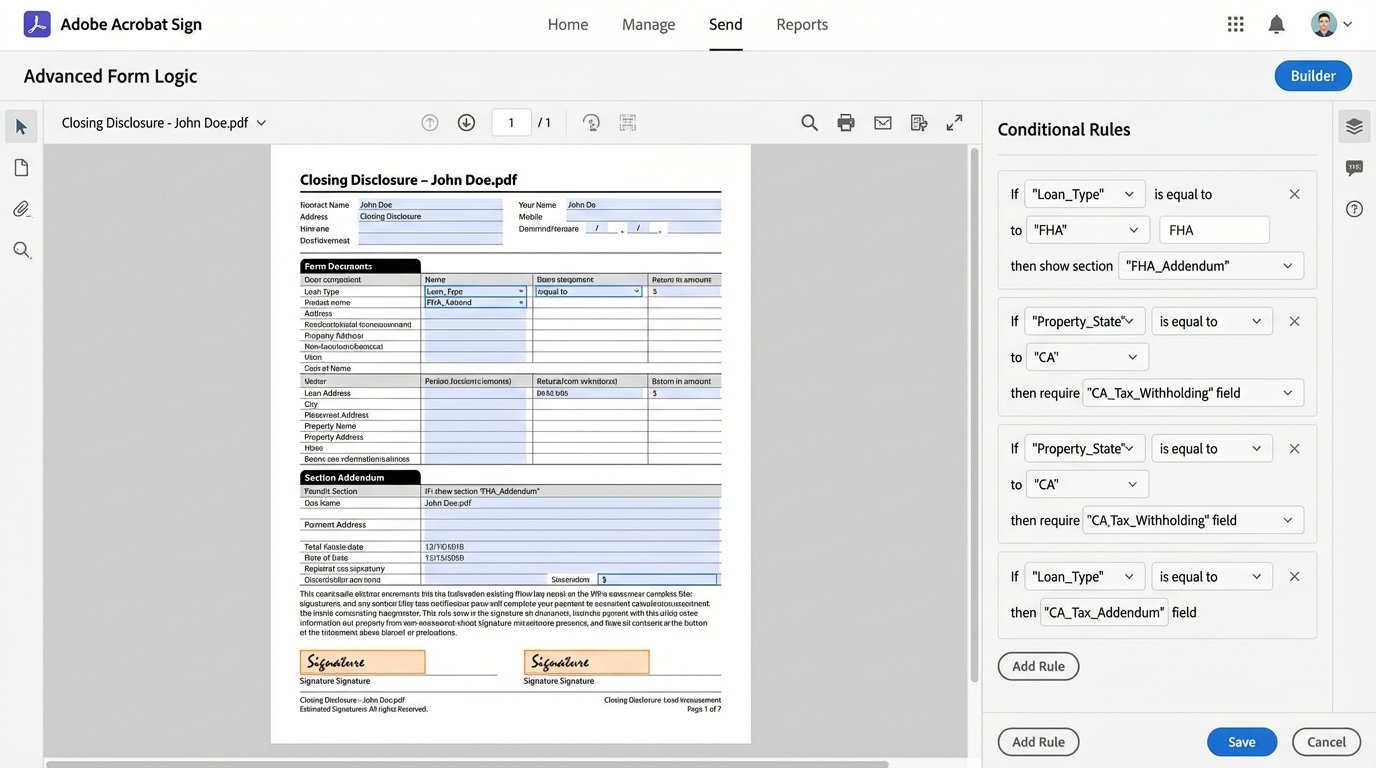
The platform excels at documents with embedded logic. You can build forms where fields are dynamically shown or hidden based on user input, or where calculations are performed in real-time within the document. For a Closing Disclosure form with its endless prorations and fee calculations, this is a critical feature. It allows you to offload some of the data validation to the document itself before the data ever hits your backend systems.
Its API lets you pre-fill these fields from your system of record, have the signer confirm them, and then extract the final, signed data back out. This turns the signing ceremony into a final data verification step.
Integration and Security
Acrobat Sign has native integrations with Microsoft 365 and Salesforce that are more than just simple connectors. They embed the signing workflow directly into those platforms’ UIs. For real estate brokerages running on Dynamics 365 or Salesforce, this can significantly reduce context switching for agents. On the security front, it supports integrations with Hardware Security Modules (HSMs) for organizations that need to control their own cryptographic keys.
Getting that level of integration working requires a significant configuration effort. It’s not a plug-and-play affair.
3. Dropbox Sign (formerly HelloSign): The API-First Contender
Dropbox Sign was built from the ground up with developers in mind. The API documentation is clean, the SDKs are well-maintained, and the focus is on embedding the signing experience directly into your own application. Instead of redirecting users to a branded signing page, you can use an iframe to present the entire workflow within your transaction portal. This creates a seamless user experience.
Embedded Signing and White-Labeling
The API for embedded signing is their strongest feature. With a few lines of code, you can generate a `sign_url` that opens the signing session directly in your application. This is powerful for maintaining brand consistency and keeping users within your ecosystem. Full white-labeling is available, letting you strip all Dropbox Sign branding from the UI and email notifications. To the end user, it looks like a native part of your software.
This sounds simple, but managing the iframe events and post-signature callbacks to correctly update your application state requires careful front-end development. A missed callback can leave a transaction in a pending state indefinitely.
Webhooks and Data Extraction
Their webhook system is straightforward and reliable. You get event notifications for key actions like `signature_request_viewed`, `signature_request_signed`, and `signature_request_all_signed`. The payloads are clean JSON objects that are easy to parse. You can also use the `form_fields_per_document` parameter in the API response to pull back all the data entered by the signers, which is perfect for syncing back to your database without requiring manual data entry.
This is where trying to shove a firehose through a needle comes in. Your webhook listener endpoint must be built to handle sudden spikes in traffic during end-of-month closing rushes. If it falls over, you’re flying blind.
Here’s a basic JSON structure for an embedded signature request. Notice the simplicity.
    {
        "client_id": "YOUR_CLIENT_ID",
        "title": "Purchase Agreement - 123 Main St",
        "subject": "Signature Request for 123 Main St",
        "message": "Please sign the purchase agreement for the property at 123 Main St.",
        "signers": [
            {
                "email_address": "buyer@example.com",
                "name": "John Buyer",
                "order": 0
            },
            {
                "email_address": "seller@example.com",
                "name": "Jane Seller",
                "order": 1
            }
        ],
        "file_urls": ["https://example.com/docs/purchase_agreement.pdf"],
        "test_mode": true
    }
4. SignNow: The Workflow Specialist
SignNow, part of the airSlate Business Cloud, differentiates itself with a heavy focus on workflow automation beyond the signature itself. It’s designed for orchestrating complex, multi-stage document processes. This is a good fit for real estate transactions, which are rarely a simple “sign here” event. They involve sequential approvals from agents, brokers, lenders, and title companies.
Conditional Routing and Logic
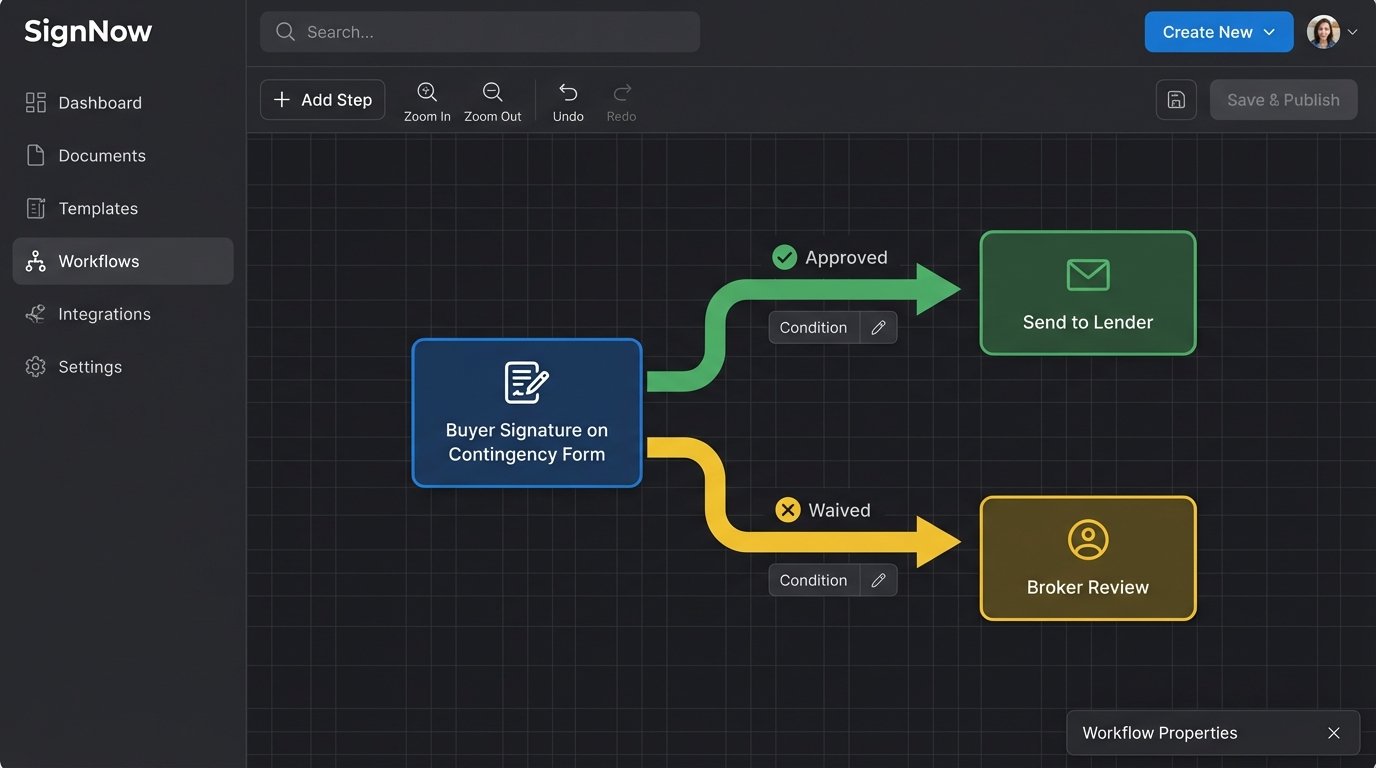
The platform allows you to build signing workflows with conditional logic. For example, if a buyer checks a box indicating they are waiving the inspection contingency, you can automatically route the document to a different internal review queue. This “if-this-then-that” capability lets you automate decision-making that would otherwise require manual intervention by a transaction coordinator.
Building these workflows is complex. The UI for the workflow builder can be sluggish and requires a procedural mindset to get right. A mistake in the logic can send a document into a dead end.
Team Collaboration
SignNow includes features for creating teams and sharing document templates and signing workflows. For a brokerage, this means you can create a master set of approved, compliant documents and distribute them to all agents. When a form is updated due to regulatory changes, you update it in one place, and the change propagates to the entire team. This enforces consistency and reduces compliance risk.
The permission models can be granular, which is good for control but also introduces another layer of administrative overhead to manage.
5. PandaDoc: The Document Generation Engine
PandaDoc comes at the problem from a different angle. It started as a document generation and proposal tool and later added e-signature capabilities. Its core strength lies in creating polished, data-driven documents from templates. For real estate, this is ideal for generating listing agreements, offer letters, and marketing materials that require both data merge and a signature.
Template and Content Library
The platform’s editor is more powerful than most. You can create rich templates with embedded images, videos, and pricing tables. Its content library allows you to save reusable blocks of text, like legal clauses or agent bios, and drop them into documents as needed. You can use tokens as placeholders that are replaced with data from your CRM when a document is generated via the API.
This is great for sales-focused documents, but for multi-page, legally-dense forms like a loan application, the editor can feel less precise than a dedicated forms tool like Adobe’s.
Engagement Analytics
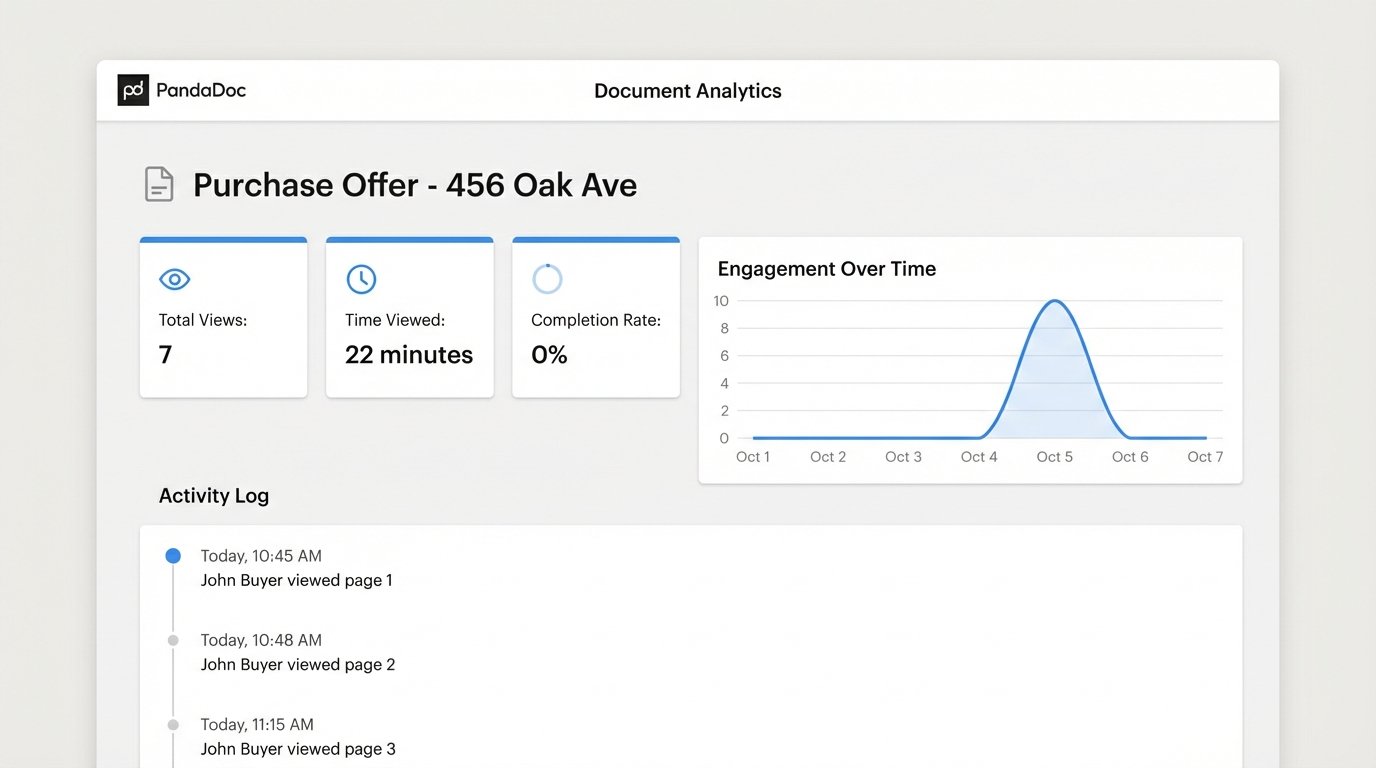
Because of its sales proposal DNA, PandaDoc provides detailed analytics on how recipients interact with a document before they sign. You can see how many times a document was viewed, which sections they spent the most time on, and if it was forwarded. For an agent sending an offer, this can provide valuable insight into the other party’s engagement level.
This is useful data, but it’s secondary to the primary function of getting a legally-binding signature. Don’t let analytics distract from the core requirement of a bulletproof audit trail. The platform is solid, but its compliance features are not as front-and-center as DocuSign’s. You have to actively seek them out and configure them correctly.