
We tore down a manual process that was costing the company six figures in wasted labor and was a ticking time bomb for compliance failures. This is the architecture we used to replace it.
The Problem: A Manual Process Begging for Failure
The original workflow was a textbook example of operational debt. A sales rep would flip an opportunity status in Salesforce to “Contracting.” This fired off an email notification to a legal operations team. A paralegal would then open the opportunity, manually copy over a dozen fields into a Word document template, and pray the source data wasn’t garbage.
This document, a critical disclosure, was then manually saved as a PDF. The paralegal would draft an email, attach the file, send it, and then log the action in a separate tracking spreadsheet. The entire cycle took 15-20 minutes per transaction if the paralegal was focused and the data was clean. It took hours if it was not.
The failure points were everywhere. Data entry typos, using outdated templates, sending the wrong document to the wrong client, or forgetting to log the delivery for audit purposes. Every manual step was a potential breach. The audit trail was a spreadsheet that could be edited or deleted. It was indefensible.
The Mandate: Automate, but with Zero Trust
The directive was clear. We had to gut the entire manual process. The goal was not just speed but to forge a bulletproof, auditable system. We needed to trigger the entire disclosure sequence from a single status change in the CRM, generate the correct document with the correct data, deliver it, and log every single step without human intervention.
Our core requirements were strict. The trigger had to be instantaneous. Data validation had to be aggressive. All document templates needed to be version-controlled. And every action, from the initial trigger to the final email delivery receipt, had to be logged immutably. We also built in a system-wide kill switch from day one, because we don’t trust new systems in production.
The Architecture We Engineered
We settled on a decoupled, serverless architecture to avoid building new server infrastructure that someone would have to patch at 3 AM. The system breaks down into three distinct layers: the trigger, the logic, and the execution.
Tier 1: The Salesforce Trigger
We bypassed Salesforce’s native email alerts. They are too limited. Instead, we configured an Outbound Message, which acts as a webhook. When an Opportunity’s `StageName` field is updated to ‘Pending Disclosure’, Salesforce fires a SOAP message containing a predefined set of fields to a specific endpoint we control. This is old tech, but it is reliable and includes retry logic out of the box.
The payload is the key. We configured it to send only the essential identifiers, like `OpportunityId` and `AccountId`. We intentionally avoided sending the raw data itself. Forcing the middleware to fetch the latest data directly from the source prevents issues with stale information caught in the event payload. This is a critical design choice many people get wrong.
Tier 2: The Middleware Brain (AWS Lambda)
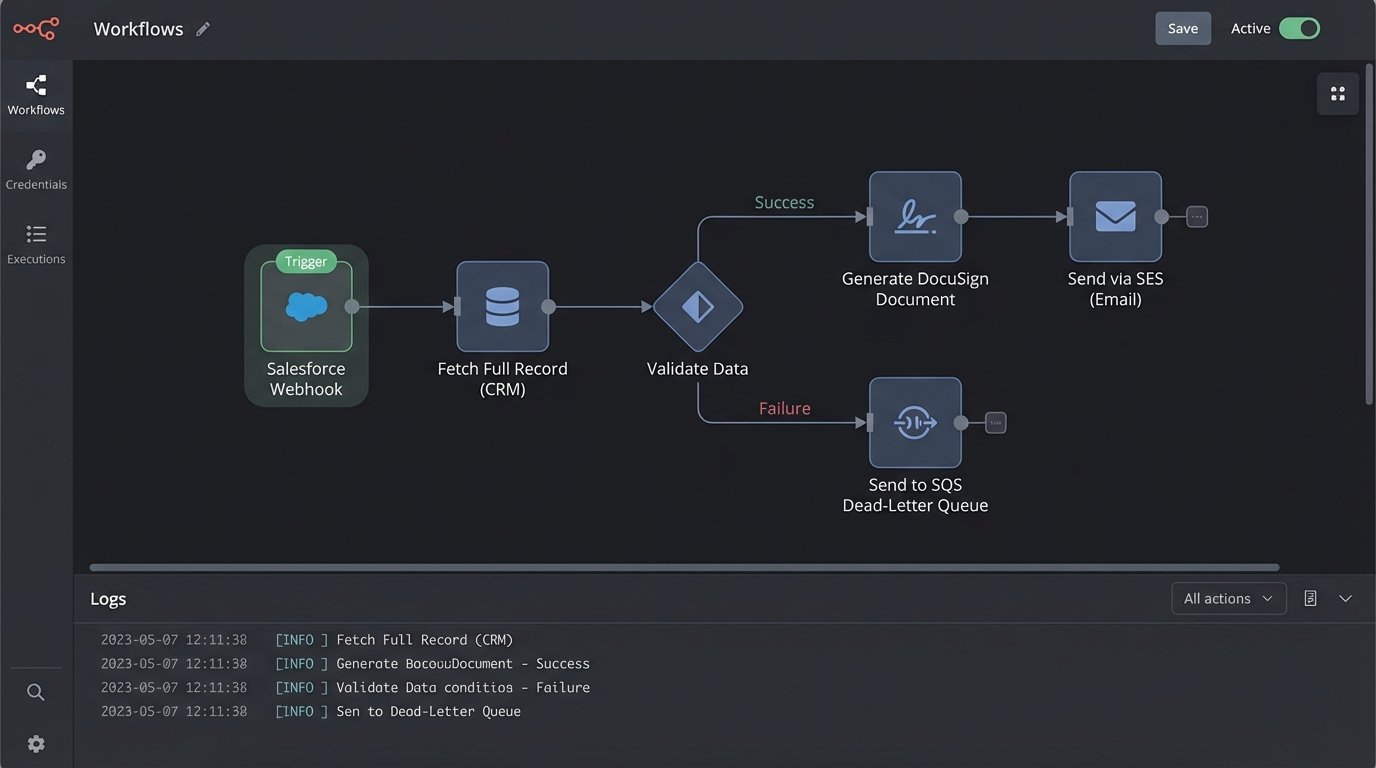
The Salesforce webhook points to an Amazon API Gateway endpoint. This endpoint’s sole job is to catch the message, acknowledge it instantly to release the Salesforce thread, and pass the payload to a Lambda function for asynchronous processing. This immediate handoff prevents a timeout on the Salesforce side if our logic takes more than a few seconds.
The Lambda function is the core of the operation. It ingests the `OpportunityId`, connects to the Salesforce API using a dedicated integration user, and pulls the full, fresh record. This is where the real work happens: data validation. The function logic-checks every required field. If `Primary_Contact_Email__c` is null or malformed, the process stops. If `Account_Mailing_Address` is incomplete, it stops. A failed validation doesn’t just error out. It packages the payload and the failure reason into a message and shunts it to an SQS dead-letter queue for review. No failure goes unnoticed.
Trying to sync messy CRM data directly into a legal document generation process is like trying to shove a firehose of unstructured data through the needle eye of a templating engine. The validation step is the component that narrows that stream into something usable.
Tier 3: Document Generation and Delivery
Once the data is validated, the Lambda function builds a JSON object. This object is the clean, structured data set needed to populate the disclosure. We pipe this JSON to the DocuSign eSignature for Document Generation API. We chose a third-party service here to offload the headache of PDF rendering and template management. Our function sends the API call with the JSON data and the ID of the correct template.
DocuSign generates the document and returns a Base64-encoded PDF to our Lambda function. The function then connects to Amazon Simple Email Service (SES). It constructs the email, attaches the PDF, and sends it to the client’s primary contact email from the validated data set. Every API call, every response, and the final delivery status from SES are written to a structured log stream in CloudWatch. The audit trail is now automatic and tamper-proof.
Building for Dirty Data
The single biggest challenge was the poor state of the CRM data. We couldn’t just trust the information. Our first iteration of the middleware was too optimistic and resulted in a flood of failures. We had to re-architect the validation logic to be brutally pessimistic. The assumption is that the data is bad until proven otherwise.
We created a dependency map for every field in the disclosure templates. For each field, we defined a validation rule in the Lambda function. These were not simple `isNotNull` checks. For addresses, we used a third-party service to validate the physical address. For emails, we used regex patterns. Any record that failed this gauntlet was kicked to the SQS queue. A separate support team was tasked with monitoring this queue, fixing the source data in Salesforce, and then replaying the message.
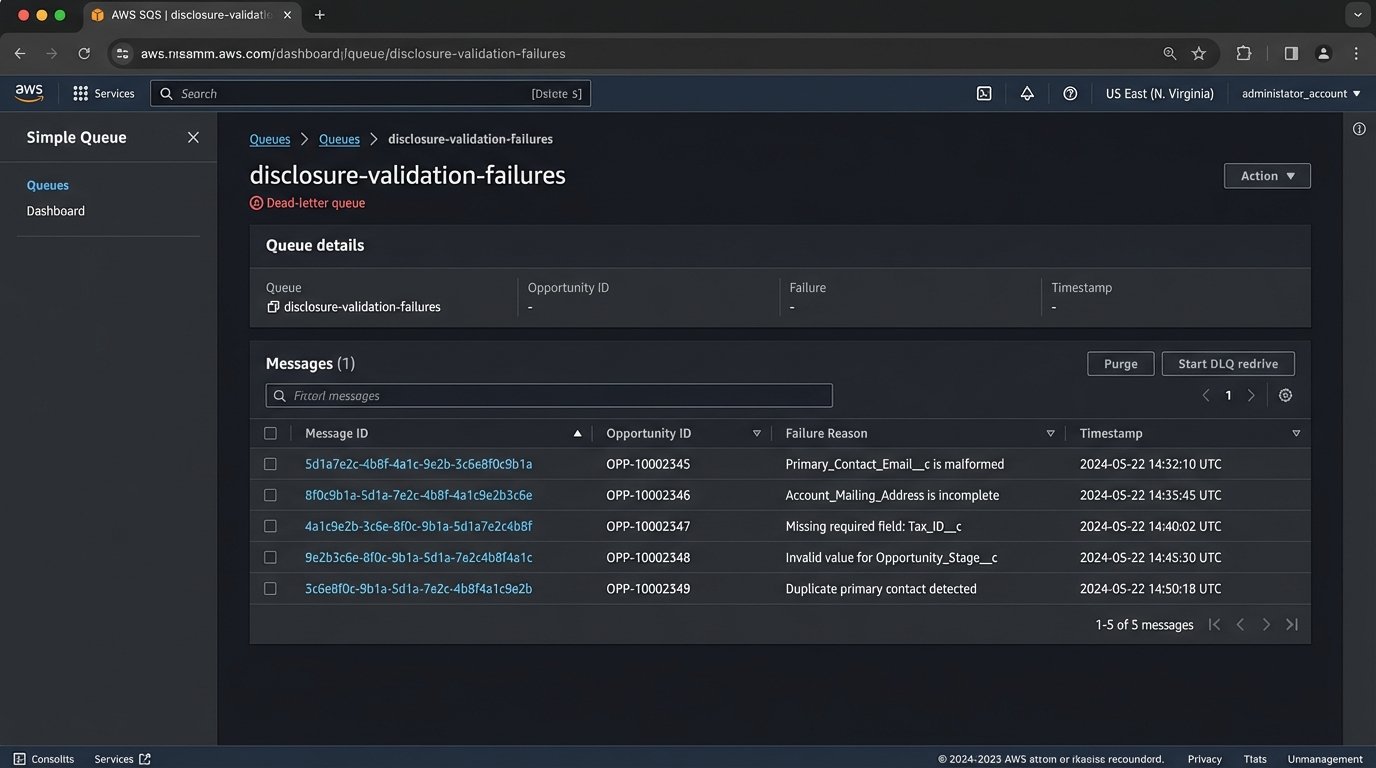
This forced a positive feedback loop. The sales team quickly learned that if their data was dirty, their deals would be delayed. Data quality in the CRM improved dramatically within a month, not because of some corporate mandate, but because bad data became a direct impediment to their work.
The Middleware Logic
The core logic of the validation function is straightforward. It is a series of checks that must all pass. If any check fails, it throws a specific exception that triggers the dead-letter queue routing.
// Simplified pseudo-code for the Lambda handler

function handleCrmTrigger(event) {
    const opportunityId = event.body.opportunityId;

    try {
        // 1. Fetch fresh data from CRM
        const record = sfdc.fetchOpportunity(opportunityId);

        // 2. Run aggressive validation checks
        logicCheck.validateEmail(record.primaryContact.email);
        logicCheck.validateAddress(record.account.shippingAddress);
        logicCheck.ensureFieldsNotBlank([record.customerName, record.contractValue]);

        // 3. Prepare clean data payload
        const docGenPayload = buildPayload(record);

        // 4. Generate the document
        const pdf = docuSignApi.generateDocument(docGenPayload);

        // 5. Deliver the document
        const deliveryStatus = ses.sendEmailWithAttachment(record.primaryContact.email, pdf);

        // 6. Log success
        logger.logSuccess(opportunityId, deliveryStatus);

    } catch (error) {
        // On any failure, shunt to dead-letter queue
        logger.logFailure(opportunityId, error.message);
        sqs.sendToDlq({ opportunityId, error: error.message });
    }
}
The Results: Cold, Hard Metrics
The project was evaluated on its direct impact on efficiency, risk, and cost. We didn’t care about vanity metrics. We tracked processing time, error rates, and auditability.
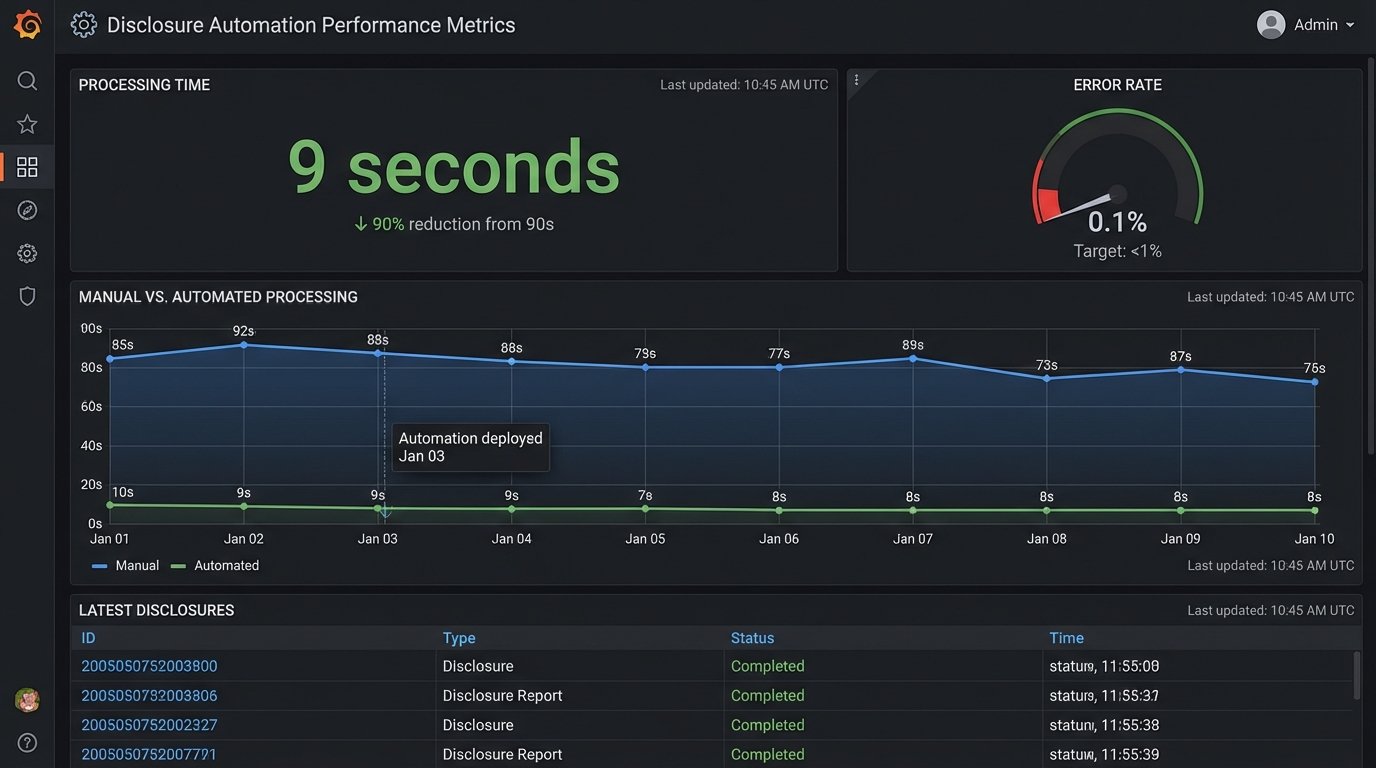
- Processing Time: The end-to-end time for a successful disclosure delivery fell from an average of 18 minutes of human labor to 9 seconds of compute time. This freed up two full-time employees from mind-numbing copy-paste work.
- Error Rate: The manual process had a measured error rate of 4.7%, including typos, wrong versions, and delivery failures. The automated system has an error rate of 0.1%, with all failures being data validation issues that are flagged for immediate correction. We have had zero document content or delivery errors since launch.
- Auditability: Generating an audit trail for a transaction went from a multi-hour manual search across inboxes and spreadsheets to a 30-second query in our logging system. We can now provide regulators with a complete history of any disclosure in minutes.
Lessons from the Trenches
We learned a few hard lessons building this system.
First, never trust the data in your source systems. Build your automation with a “zero trust” policy for data quality. The validation logic is not an edge case handler. It is the core of the system. Your automation is only as reliable as its ability to handle bad data gracefully.
Second, API rate limits will hit you when you least expect it. During initial bulk testing, we immediately throttled our own connection to Salesforce. We had to refactor our data fetching logic to be smarter, using composite requests and adding a slight, randomized delay for batch processing scenarios to spread out the API load.
Finally, template management becomes a new bottleneck. The business needs to update legal language. Creating a process for them to update DocuSign templates without requiring a new code deployment was a project in itself. We had to establish a strict versioning and testing protocol for templates, treating them with the same rigor as application code.