
5 Tips for Integrating Your Transaction Coordinator Tool with Other Systems
Connecting a transaction coordinator (TC) tool to other systems isn’t about convenience. It’s about data integrity. A failed sync means a missed closing date, an incorrect commission payout, or a compliance document vanishing into the ether. The goal is to build a data pipeline that survives network hiccups, bad data, and APIs that were clearly designed by an intern over a long weekend.
Most off-the-shelf integration platforms promise a drag-and-drop paradise. The reality is a labyrinth of undocumented fields, mismatched data types, and authentication schemes that break every 90 days. These tips are not about finding the perfect tool. They are about building a resilient process that assumes the tools will fail.
1. Prioritize the API. Ignore the UI.
Any integration built on UI automation is a time bomb. Screen scraping or robotic process automation (RPA) is fragile. A simple CSS change in the source application breaks your entire workflow, and you won’t know until a transaction coordinator is screaming about a missing file. You must interface directly with the application’s Application Programming Interface (API).
The first step is a brutal assessment of the API documentation. If the docs are a PDF from 2017 or a swagger page with more “TBD” fields than actual definitions, your project risk just tripled. You need to logic-check the endpoints for creating, reading, updating, and deleting transactions. Pay close attention to rate limits. A system that only allows 100 API calls per minute is useless for a bulk data migration.
Authentication is the next gate. Most modern systems use OAuth 2.0, which involves a token exchange dance. You need a secure way to store and refresh these tokens. Hardcoding them is malpractice. Use a proper secrets manager like AWS Secrets Manager or HashiCorp Vault. If the system uses a simple static API key, question its security posture immediately.
Your job is to bypass the fragile front-end and connect directly to the system’s engine.
2. Map Data Fields with Extreme Prejudice
The core of any integration is the data map. This is where you translate fields from System A to System B. It is never a one-to-one mapping. You will find that “Closing Date” in your TC tool is a datetime object, but in your CRM it’s a string formatted as MM/DD/YYYY. You have to force a type conversion and handle the inevitable formatting errors.
Create a definitive mapping document before writing a single line of code. This should be a simple spreadsheet listing the field name in the source system, the corresponding field name in the destination system, the data type for each, and any transformation rules. For example, `source: agent_license (integer)` might map to `destination: agentLicenseNumber (string)`. The rule is to convert the integer to a string. Without this document, your code becomes a mess of hardcoded assumptions.
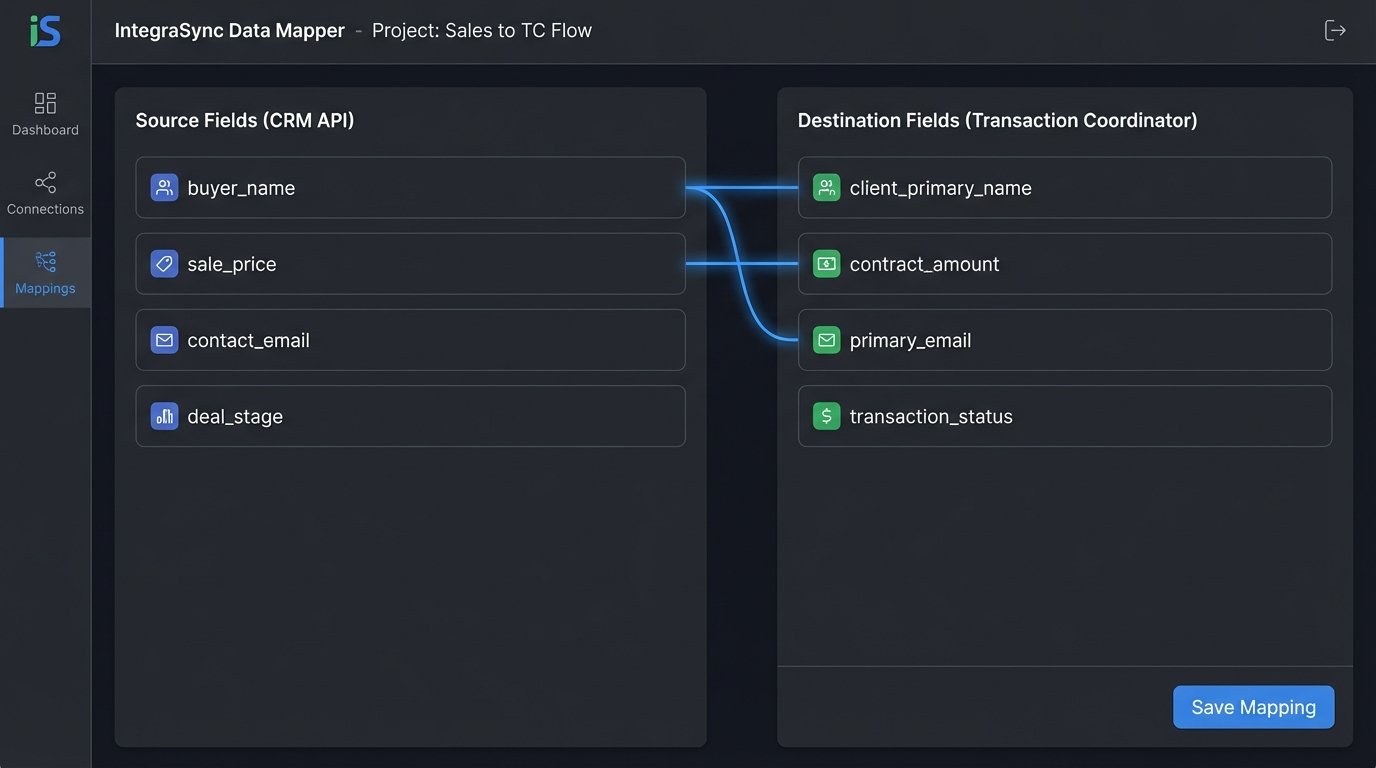
Custom fields are where these projects die. A user can create a field in the CRM called “Buyer’s Dog’s Name.” Your integration code has no idea what to do with that. You must decide on a strategy. Either you dynamically create a corresponding custom field in the TC tool via its API, or you ignore any field that isn’t on your official mapping document. The first option is flexible but complex. The second is rigid but stable.
A simple Python dictionary can serve as a rudimentary mapping engine. You can strip the incoming payload, iterate through your map, and build the new payload for the destination system. This isolates the mapping logic from your API connection logic, making it easier to update when a sales manager decides to rename a field.
    # Example of a simple field mapping dictionary in Python
    FIELD_MAP = {
        "transactionId": "external_id",
        "property_address": "address_full",
        "buyer_name": "client_primary_name",
        "sale_price": "contract_amount",
    }

    def transform_payload(source_data):
        destination_payload = {}
        for source_key, dest_key in FIELD_MAP.items():
            if source_key in source_data:
                # Add data type conversions and validation logic here
                destination_payload[dest_key] = source_data[source_key]
        return destination_payload
This approach forces you to be explicit about what data moves. No surprises.
3. Enforce Idempotency in Every Request
Idempotency means that making the same API request multiple times produces the same result as making it once. Imagine a network timeout. Your code sends a request to create a new transaction. The server creates it but the response gets lost. Your code, thinking the request failed, sends it again. Without idempotency, you now have two duplicate transactions.
This is a critical failure in systems dealing with documents and money.
The standard way to handle this is with an idempotency key. You generate a unique identifier (like a UUID) for each operation you want to perform. You then include this key in the API request header, typically something like `Idempotency-Key: your-unique-uuid`. The server, on receiving the request, checks if it has ever seen this key before. If it has, it doesn’t process the request again. It just sends back the original result.
If the API you’re working with doesn’t support an idempotency key, you have to build a poor man’s version. Before you POST to create a new record, you must first GET to see if a record with a unique identifier from your source system already exists. For example, before creating a new transaction, query the destination system for a transaction with the same `source_transaction_id`. This is slower and more cumbersome, but it prevents duplicate data.

This check-before-create logic adds latency to every call. It’s a direct price you pay for data integrity when the API provider didn’t build their system correctly.
4. Build a Dead-Letter Queue for Failures
Integrations fail. APIs go down, authentication tokens expire, and validation rules change without notice. A silent failure is the worst possible outcome. Your code tries to sync a new contract, the API returns a `503 Service Unavailable` error, and the process simply stops. The data is lost unless someone notices it’s missing.
You need a mechanism to catch these failures and store them for later processing. This is a dead-letter queue (DLQ). When an API call fails after a set number of retries (e.g., three attempts over five minutes), your code should not discard the request. It should push the entire failed payload, along with the error message and a timestamp, into a separate, persistent queue.
This queue could be a simple database table, an AWS SQS queue, or even a designated folder of JSON files on a server. The technology doesn’t matter as much as the process. Building a reliable integration is less about a perfect, uninterrupted flow and more about designing a system that can absorb punches. The DLQ is your shock absorber, catching the failed requests instead of letting them shatter your data pipeline. It turns a catastrophic data loss event into a manageable operational task.
You now have a list of every failed sync that can be examined by an engineer. They can see why it failed. Maybe the destination system was down for an hour. They can then trigger a re-processing of the entire queue once the issue is resolved. Without a DLQ, you’re just hoping for the best.
Hope is not an engineering strategy.
5. Write Logs for 3 AM Debugging Sessions
When an integration breaks in the middle of the night, nobody wants to read a log file that just says `ERROR: Request Failed`. That’s useless. Good logging is about providing context for the person who has to fix the problem when they are tired and under pressure.
Every log entry for an API call must contain specific, actionable information:
- Correlation ID: A unique ID that follows a single transaction across all systems.
- System Names: Explicitly state the source and destination systems (e.g., “Attempting to sync from Salesforce to SkySlope”).
- Entity ID: The ID of the record being processed (e.g., `transaction_id: 1138`).
- The Action: What you were trying to do (e.g., `action: CREATE_DOCUMENT`).
- The Outcome: Success or failure, including the HTTP status code (`status: FAILED, http_code: 401`).
- The Full Error: The complete error message from the API, not a truncated version.
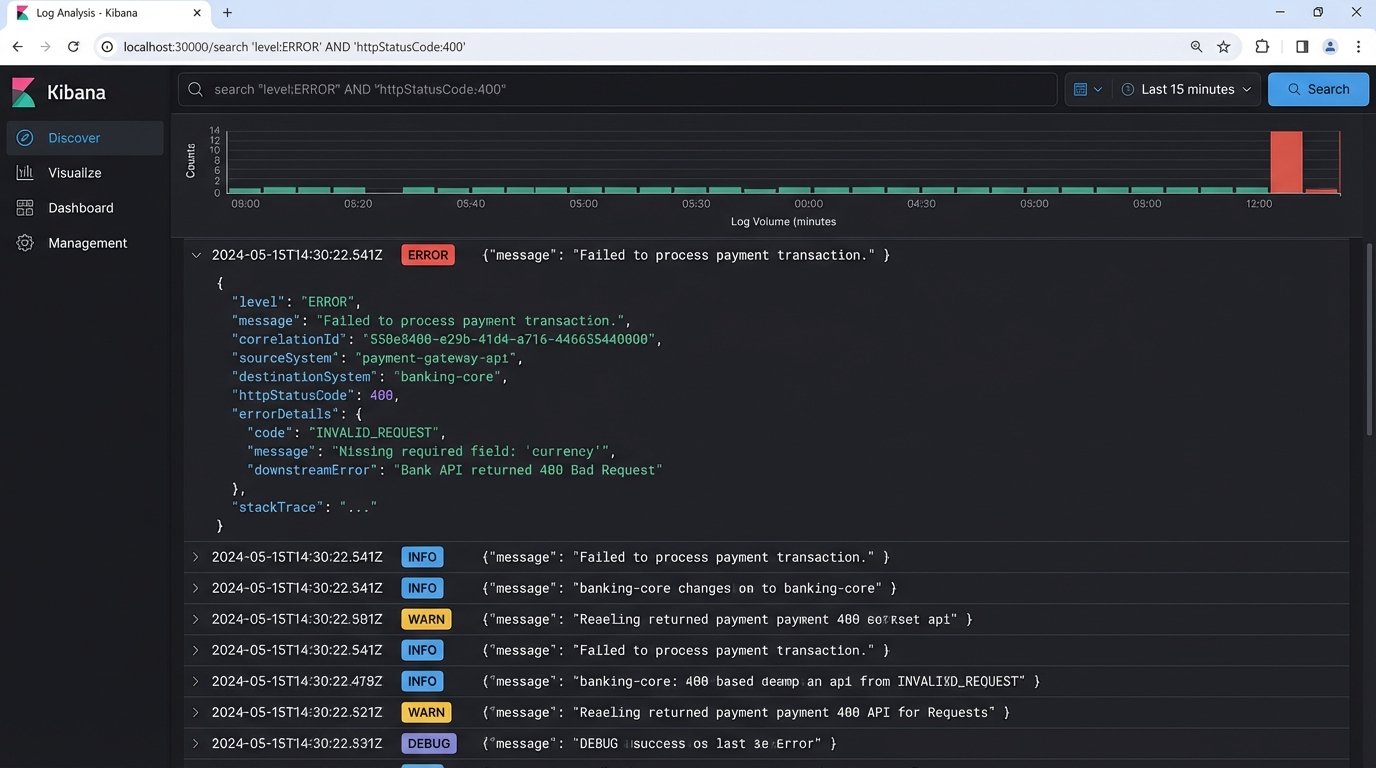
Here is the difference between a bad log and a good log. One is noise, the other is a diagnostic tool.
Bad Log Entry:
`[2023-10-27 03:15:00] ERROR – An error occurred.`
Good Log Entry (as structured JSON):
    {
      "timestamp": "2023-10-27T03:15:02Z",
      "level": "ERROR",
      "correlationId": "abc-123-xyz-789",
      "sourceSystem": "InternalCRM",
      "destinationSystem": "TransactionToolAPI",
      "action": "CREATE_TRANSACTION",
      "entityId": "crm_lead_4591",
      "status": "FAILED",
      "httpStatusCode": 400,
      "message": "API validation failed",
      "errorDetails": {
        "field": "closing_date",
        "issue": "Date format must be YYYY-MM-DD"
      }
    }
Structured logging (like JSON) is not a luxury. It allows you to filter and query your logs effectively in tools like Splunk or an ELK stack. You can instantly find all failed API calls for a specific transaction or see every error returned by a particular system. This turns a multi-hour debugging nightmare into a five-minute query.