
Your lead form captures a prospect at 10 PM. The confirmation email promises a callback within 24 hours. By the time your agent calls at noon the next day, that lead has already booked a showing with another realtor who had an instant booking link. This is not a sales problem. It’s a failure of system architecture. Generic scheduling tools often buckle under the specific pressures of real estate workflows, like multiple agent routing, property-specific availability, and MLS integration. What follows is a technical breakdown of ten tools, exposing their strengths and, more importantly, their breaking points.
1. Calendly
Calendly is the baseline. Its primary function is to expose your calendar availability via a public link, preventing the endless email chain of finding a time. It handles the basics well: connecting to Google Calendar, Outlook, or iCloud, setting buffers between appointments, and creating different event types for a 15-minute intro call versus a 60-minute showing. The workflow automation is its most useful feature for a technical operator. You can trigger actions based on an event being scheduled, like adding the contact to a Mailchimp list or creating a task in Asana.
The system is clean, and the API is straightforward for basic integrations. You can embed it directly onto a landing page with minimal fuss. For a solo agent who just needs to stop playing email tag, it’s adequate.
The problems start when you scale. Round-robin lead distribution is available, but the logic is primitive. It distributes evenly but lacks the intelligence to route based on lead source, property value, or agent performance. It’s a blunt instrument for team scheduling.
Key Technical Points:
- Workflows: The trigger-action system is surprisingly capable for a tool at this price point. You can build multi-step automations to send confirmation texts, follow-up emails, and internal Slack notifications.
- API Access: The v2 API is RESTful and well-documented. You can programmatically create, cancel, and retrieve scheduling links and events. This allows for deeper integration into a custom CRM if you have the development resources.
- Limitations: Lacks nuanced routing logic required by brokerages. If Agent A specializes in luxury condos and Agent B handles suburban homes, Calendly’s round-robin will assign leads incorrectly, creating operational drag.
2. Acuity Scheduling
Acuity is what happens when you give a scheduler a heavy dose of customization options. It goes far beyond Calendly in its ability to manage resources and complex availability. For real estate, this means you can assign specific agents (resources) to specific properties (also resources). An agent can be booked, or a property can be booked, preventing double-bookings for both the person and the place. This is a critical distinction that most generic tools miss.
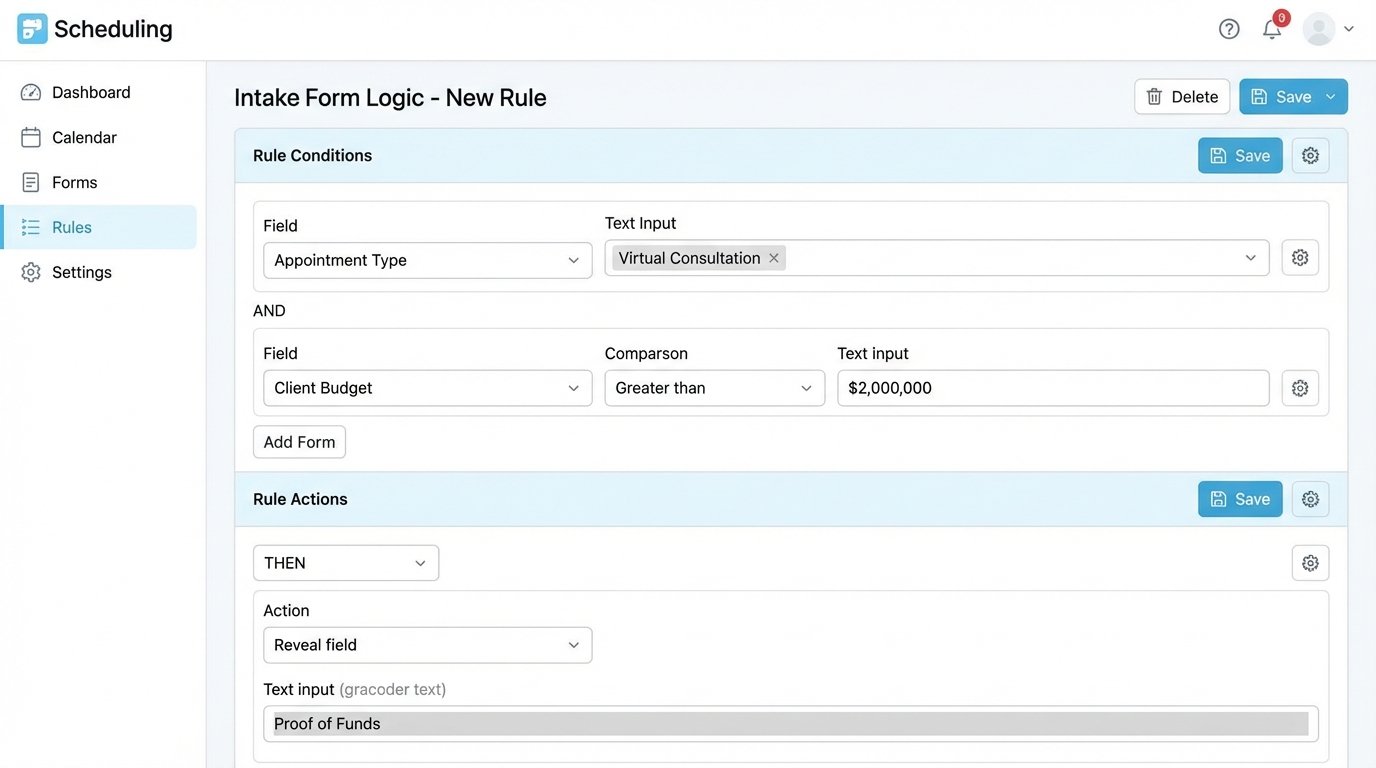
You can also build custom intake forms to qualify leads before they even book a time. Ask for their budget, desired neighborhood, and pre-approval status. You can then use branching logic to show different availability or agents based on their answers. The setup is a bear, requiring you to map out every variable and condition meticulously.
Don’t expect to get this running in an afternoon. This is a tool for operators who want to dictate every step of the scheduling process.
Key Technical Points:
- Resource Management: The ability to create calendars for people and assets (properties) is its core advantage. This prevents the classic scenario of two agents booking showings at the same small condo simultaneously.
- Intake Form Logic: You can build forms that change dynamically. For example, if a prospect selects a budget over $2M, the form can reveal a new field asking for their financial advisor’s contact information.
- Configuration Overhead: The flexibility comes at a high cost of complexity. The user interface for setting up these rules is dense and unforgiving. A single misconfigured setting can break an entire scheduling flow.
3. ShowingTime
ShowingTime is built for the real estate industry, and it shows. Its primary function is not lead capture but agent-to-agent showing coordination. The deep integration with Multiple Listing Services (MLS) is its entire reason for existence. You can request a showing for a property listed on the MLS directly from the listing page, and it handles all the back-end communication with the listing agent, including approvals, denials, and feedback requests.
The system manages lockbox codes, showing instructions, and communication trails. It’s an entrenched piece of infrastructure. If you’re a listing agent, it centralizes all showing requests into a single dashboard, which beats getting a hundred random text messages. For a buyer’s agent, it’s the path of least resistance to get a foot in the door.
Its API is notoriously difficult to work with for anything outside its intended guardrails. Trying to pull showing data into a third-party business intelligence tool or a custom CRM is a significant technical project. It’s a walled garden, and they like it that way.
Key Technical Points:
- MLS Integration: This is its non-negotiable feature. It hooks directly into the data feed, pulling property details and agent information automatically. This is not something a generic tool can replicate.
- Centralized Communication: It creates a verifiable audit trail for every showing request, confirmation, and cancellation. This is critical for compliance and dispute resolution.
- Data Accessibility: Poor. Exporting data or integrating with non-partner systems is a known pain point. You operate within their ecosystem, or you don’t operate at all.
4. HubSpot Meetings
If your brokerage already runs on HubSpot, using their Meetings tool is a logical step. It’s baked directly into the CRM, so when a lead books a meeting, the event is automatically logged on their contact record. All the lead’s properties, from page views to email opens, are visible right next to the meeting details. This context is incredibly valuable for an agent preparing for a call.
The tool itself is a stripped-down version of Calendly. It handles 1-on-1 scheduling and basic round-robin for teams. You can embed it in emails and on your website. The real power isn’t in the scheduling features but in its native connection to the HubSpot database. There’s no need to use a third-party connector like Zapier to bridge the gap between your scheduler and your CRM, which eliminates a potential point of failure.
This is a wallet-drainer if you aren’t already paying for HubSpot Sales Hub or Service Hub. Buying into their ecosystem just for the meetings tool makes zero financial sense.
5. Chili Piper
Chili Piper is not a general-purpose scheduler. It’s a high-powered tool designed for one specific job: converting inbound web leads into booked meetings instantly. When a prospect fills out a form on your website, Chili Piper’s rules engine kicks in. It can qualify, route, and book a meeting with the correct agent in milliseconds, right on the thank you page. The goal is to eliminate the lead-to-meeting time gap entirely.
Its routing logic is its main selling point. You can build complex rules based on any field in your CRM. Is the lead looking for a property in a specific zip code? Route it to the agent who owns that territory. Is the lead from a paid search campaign? Route it to your top-performing inside sales agent. This is far beyond the simple round-robin of other tools. It requires careful setup and a clean CRM database to function.
Here’s a simplified example of how you might pass data from a web form to the Chili Piper JavaScript snippet to pre-fill information and assist routing.
javascript
This code block grabs the email and zip code from your form and injects it directly into the Chili Piper scheduling call. Their backend router then uses the zip code to find the right agent’s calendar. It’s fast, but it’s also expensive. Prepare your budget for a shock.

6. ScheduleOnce (now OnceHub)
OnceHub is built for process-driven organizations. It excels at multi-stage scheduling scenarios. For instance, a real estate transaction might require an initial 15-minute call with an inside sales agent, followed by a 60-minute showing with a field agent, and finally a 30-minute contract review with a transaction coordinator. OnceHub can chain these events together in a single booking flow.
It also provides robust support for panel meetings, where a client needs to book a time with multiple people from your team simultaneously. This is useful for investor meetings or coordinating with both the listing agent and a preferred mortgage broker. The configuration is not for the faint of heart, but the power is there if you need to orchestrate complex, multi-participant appointments.
Configuring these chained events is like setting up a logic gate. You define the sequence and the dependencies, but one wrong turn in the settings can send a lead down a dead-end path.
Key Technical Points:
- Multi-stage Journeys: You can build a booking flow that guides a prospect through a series of required meetings with different team members.
- Panel Scheduling: Finds common availability across multiple internal calendars, which is a nightmare to do manually.
- UI/UX: The interface feels dated and can be confusing to navigate during the initial setup. It favors function over form.
7. Appointlet
Appointlet is a solid, no-nonsense scheduler that competes directly with Calendly. It handles team scheduling with pooled availability and round-robin distribution effectively. Where it stands out is in its control over branding and embedding. You can customize the look and feel of the booking page to match your brokerage’s brand more closely than some competitors allow.
It integrates with the usual suspects: Google Calendar, Office 365, Stripe for paid consultations, and Zapier for everything else. The user interface is clean, and the learning curve is gentle. It’s a workhorse tool that does its job without much fanfare. For a small to mid-sized brokerage that needs reliable team scheduling without the enterprise price tag or complexity, it’s a strong contender.
Think of it as the middle ground. It’s more powerful than Calendly for teams but lacks the surgical routing precision of a tool like Chili Piper. Trying to make it perform complex routing based on lead data is like shoving a firehose through a needle. It’s just not designed for that task.
8. SavvyCal
SavvyCal’s approach is centered on reducing friction for the person booking the meeting. Its signature feature is the ability to overlay the recipient’s calendar on top of your availability. This lets the person booking immediately see what times work for both parties, eliminating the mental gymnastics of cross-referencing two calendars. It’s a small user experience improvement that makes a noticeable difference.
It also allows you to rank your preferred meeting times, subtly guiding people to choose the slots that are best for you. For agents trying to stack their showings geographically, this is a useful feature. You can prioritize morning slots for one side of town and afternoon slots for the other. The tool is fast, modern, and built by a small team that is highly responsive to user feedback.
This tool is less about complex backend routing and more about optimizing the front-end experience. It’s a bet that a smoother booking process leads to higher conversion.
9. Doodle
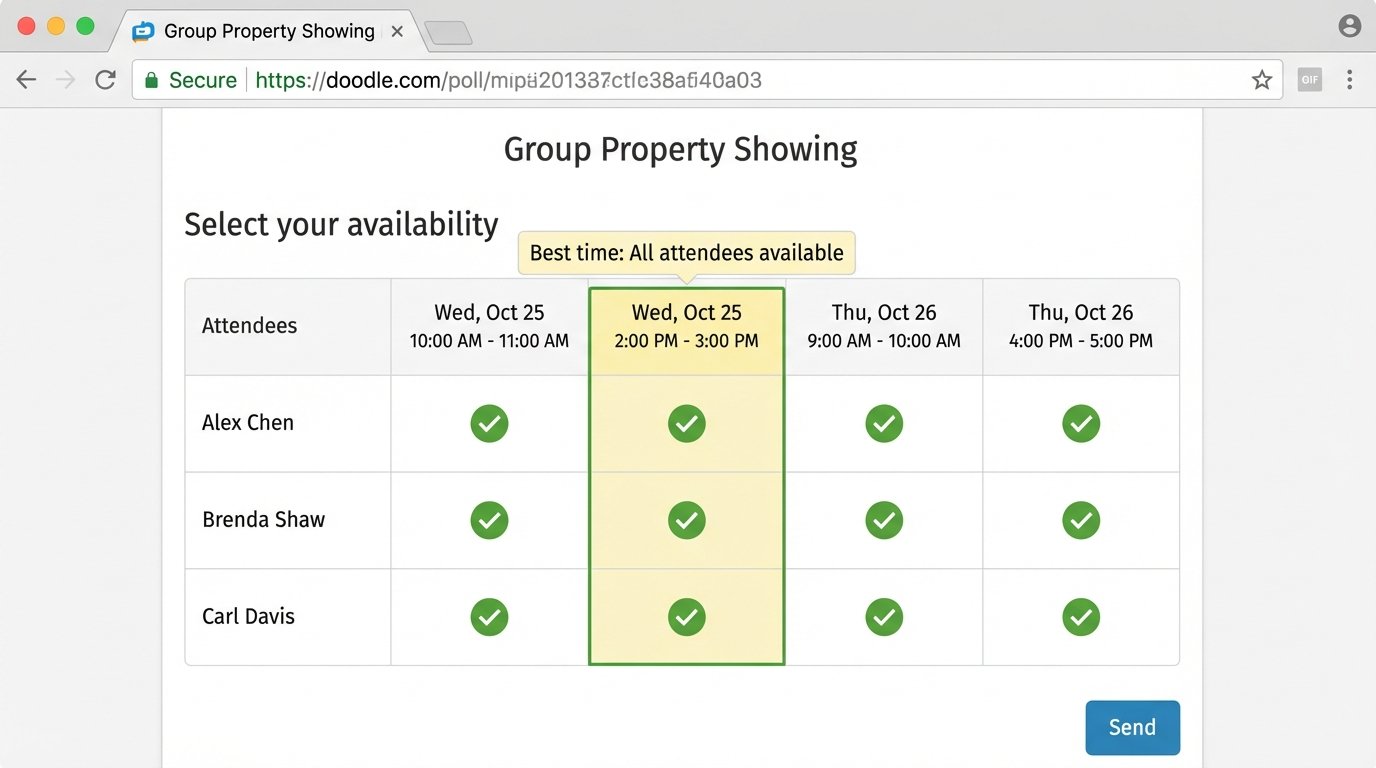
Doodle is not a lead conversion tool. Its purpose is to find a common meeting time for a group of people. For real estate, its primary use case is scheduling a group showing or an open house with multiple interested parties. You propose several time slots, send out a single poll link, and participants vote on the times that work for them. The dashboard shows you which slot is the most popular.
Using Doodle for 1-on-1 lead scheduling is a mistake. It introduces unnecessary steps and friction. The lead has to vote on a time and then wait for you to confirm it. This delay is where leads are lost. The tool is designed for internal team coordination or group event planning, not for capturing and engaging a new prospect at the peak of their interest.
It’s the right tool for the wrong job if you try to use it for initial lead booking. Stick to its core competency: coordinating groups.
10. Custom Build (e.g., FullCalendar + Backend Logic)
For brokerages with in-house development talent, the ultimate solution is to build your own system. Using a front-end library like FullCalendar.io, you can design a booking interface that is perfectly tailored to your workflow. The real power comes from the backend, where you have total control over the business logic.
You can build a routing engine that queries your CRM, considers agent specialties, current workload, and even performance metrics before assigning a lead. Want to route high-value leads from Zillow only to agents who have closed a similar deal in the last 90 days? You can build that. Want to integrate directly with your proprietary property management software? No problem.
The control is absolute, but so is the responsibility. You own the code, which means you also own the bugs, the security vulnerabilities, and the maintenance schedule. When an API you depend on changes, it’s your team that has to work overnight to patch the system. This path is not for the timid and requires significant, ongoing investment.