Beyond ‘Thanks’: Architecting Post-Appointment Automations That Aren’t Garbage
Most automated follow-up emails are digital noise. They are a lazy confirmation that a calendar event has passed, offering zero value and getting archived on sight. The fundamental engineering failure is treating the “send email” step as the entire process. The real work happens before a single packet hits the SMTP server. It involves ingesting a state change, parsing a data payload, executing conditional logic, and posting results back to a system of record.
The entire sequence is brittle. It hinges on the reliability of a webhook from your scheduling platform, the consistency of its JSON payload, and the uptime of every API endpoint in the chain. We are not just sending emails. We are building a state machine that reacts to a customer action, and every state transition is a potential point of failure. Forget the marketing fluff about “nurturing leads.” Let’s talk about the architecture required to do it without constant manual intervention.
1. The Immediate Resource Dispatch
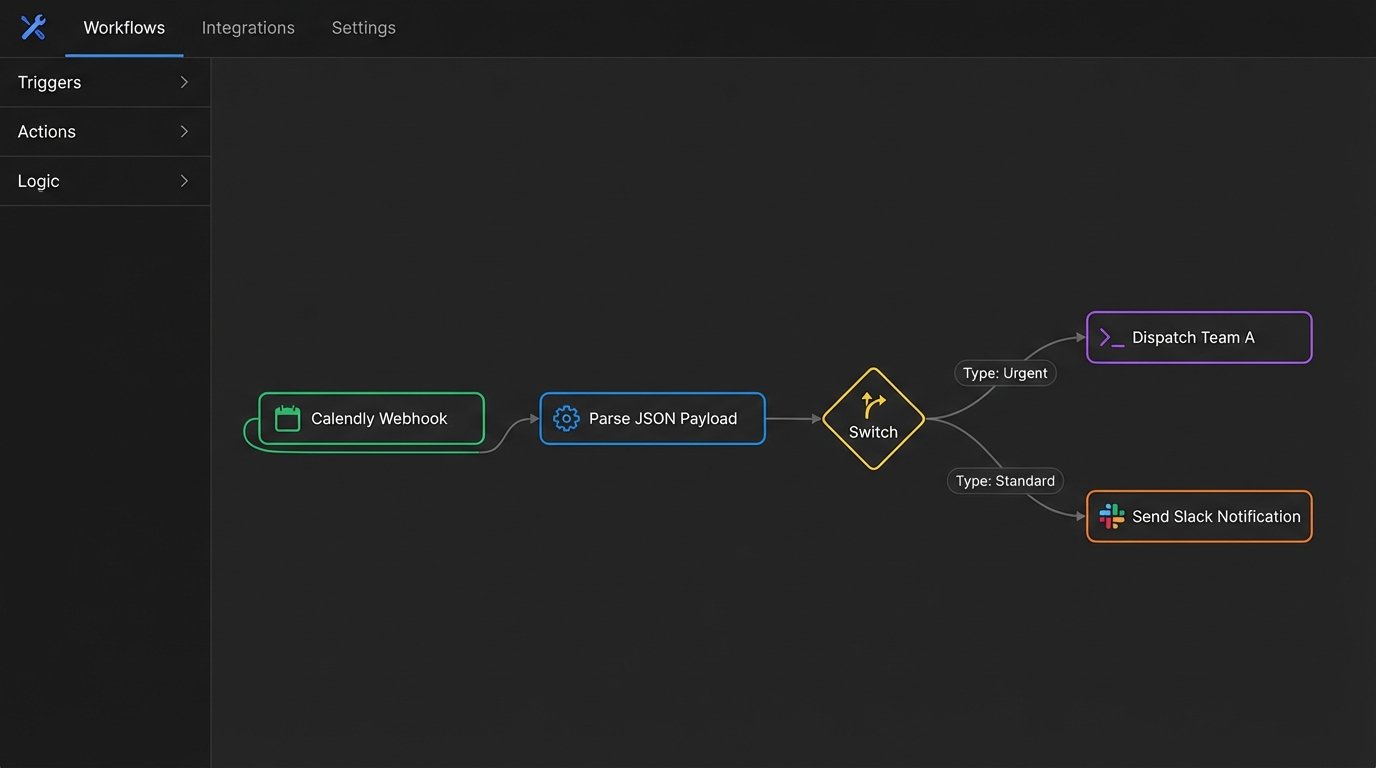
This is the most basic, table-stakes automation. The goal is to fire an email the instant the appointment’s end time passes. The trigger should be a webhook from the scheduling tool, such as Calendly’s `invitee.updated` event when the status changes to `attended` or simply using the `end_time` attribute. Polling a calendar API every minute is a clumsy, inefficient alternative that burns through your API quotas for no good reason.
The payload must contain more than just the attendee’s name. We need to inject appointment-specific resources. This requires mapping the `appointment_type` field from the webhook to a corresponding set of links or documents stored in a database or a simple key-value store. This logic prevents a generic, useless email and delivers targeted information based on the service rendered. It’s the difference between a tool and a toy.
Your automation logic needs to handle this data mapping. For example, if `appointment_type` is “Initial SEO Audit,” the system should pull the link to your standard audit checklist. If it’s “PPC Campaign Review,” it injects the link to a performance metrics guide. This is a simple lookup operation.
{

  "event": "invitee.created",

  "payload": {

    "uri": "https://api.calendly.com/scheduled_events/GBGBD-...",

    "name": "John Doe",

    "email": "john.doe@example.com",

    "status": "active",

    "scheduled_event": {

      "start_time": "2024-09-27T14:00:00.000000Z",

      "end_time": "2024-09-27T14:30:00.000000Z",

      "event_type": {

        "name": "Initial SEO Audit"

      }

    },

    "tracking": {

      "utm_campaign": "fall_promo"

    }

  }

}
This JSON is your ground truth. Your parsing logic must be robust enough to handle missing fields or unexpected data types without crashing the entire workflow. Assume the `tracking` object might be null.
The Template Payload:
Subject: Resources from our {{ scheduled_event.event_type.name }}
Hi {{ name }},
Following up on our meeting today. As discussed, here are the resources I mentioned:
- [Resource 1 Title]: {{ resource_link_1 }}
- [Resource 2 Title]: {{ resource_link_2 }}
I’ve also attached the raw notes to your profile in our client portal. If any questions come up while you review this, book a quick 15-minute follow-up here: [Link to Quick Follow-up Calendar]
2. The Feedback Extraction Request
Requesting feedback is a delicate operation. Firing it too soon feels desperate. Firing it too late means the client has already forgotten the details. The optimal trigger is a time-delayed event, queued for 24 to 48 hours after the `appointment.end_time`. This delay gives the client time to process the information from the meeting. Do not use a simple `sleep()` command in a script. This is amateur hour. A proper automation platform or a message queue like RabbitMQ or AWS SQS should handle the delayed execution.
The real technical challenge here is state management. The system must verify that the client hasn’t already provided feedback through another channel or booked another appointment. Before sending the email, your workflow must execute a lookup against your CRM or database. Query the contact record for a `last_feedback_date` or check for any `future_appointments`. If either condition is met, the automation terminates. Sending a feedback request to a client who just booked their next session is just bad logic.
The payload itself should be direct. Your goal is to minimize friction. An embedded one-click survey is better than a link to a long form. Services like Delighted or an in-house solution can generate unique survey links per user, tying the response directly back to their contact record without requiring a login.
The Template Payload:
Subject: How did we do?
Hi {{ name }},
Hoping you found our session yesterday productive. Could you spare 30 seconds to provide feedback on your experience? It helps us strip out what doesn’t work.
[Link to 1-Click NPS Survey]
No long forms, just a quick rating. Your input directly impacts how we structure these calls.
3. The Re-engagement Hook
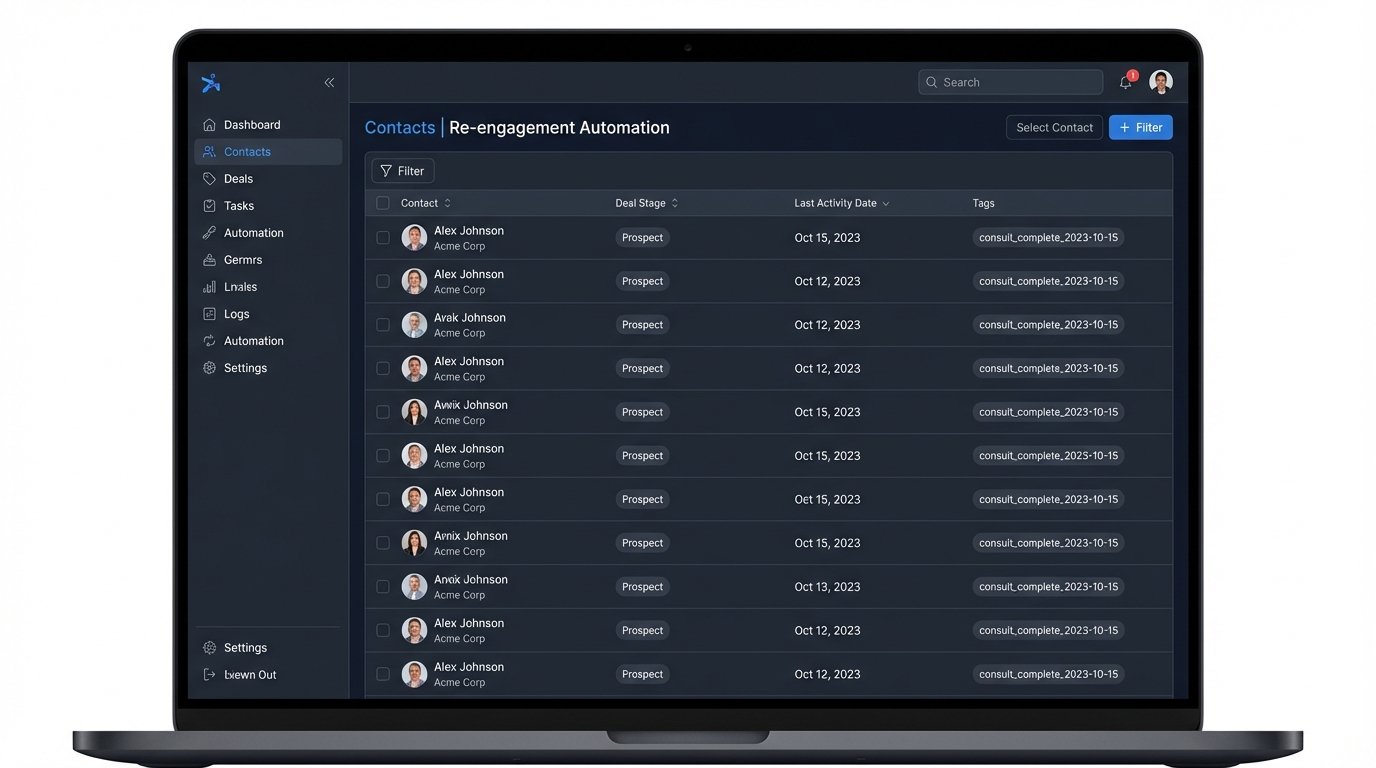
This automation targets clients who completed an initial consultation but failed to purchase a full service or package. It is not a generic marketing blast. It’s a precision strike triggered by a combination of time and inaction. The trigger should be set for 7-14 days post-appointment, but only if the contact’s status in the CRM is still marked as `lead` or `prospect` and their associated deal stage has not progressed.
This requires a tight bridge between your scheduling system and your CRM. When the appointment is completed, a tag like `consult_complete_YYYY-MM-DD` should be applied to the contact. The re-engagement automation runs on a schedule, querying the CRM for contacts with that tag where the date is 7 days in the past and the `deal_stage` is not `closed-won`. This is a batch process, not a real-time webhook trigger.
This entire workflow is like building a complex machine out of parts from different manufacturers. The CRM API, the scheduling tool’s data, and the email platform must all have their data schemas perfectly aligned. A change in a picklist value in the CRM for `deal_stage` could break the entire automation silently. This is why you need input validation and dead-letter queues to catch records that fail the logic check.
The Template Payload:
Subject: Checking in on the {{ scheduled_event.event_type.name }}
Hi {{ name }},
Just following up on our call last week regarding your SEO strategy. Usually, after this type of audit, the next step is implementing on-page fixes for pages flagged with critical errors.
Did you have any questions about the data we reviewed? Happy to clarify any points before you move forward.
4. The No-Show Interrogation
Handling no-shows requires a completely different logical path. When the webhook fires with a `status: no-show`, the automation should branch. The goal isn’t just to reschedule. It is to diagnose the point of failure and update the contact record to prevent them from wasting more time in the future. Was it a technical issue? Did they forget? Are they a serial time-waster?
First, the automation must immediately tag the contact in the CRM as `no-show_1`. If this tag already exists, it should be incremented to `no-show_2`. A secondary rule should then run to flag any contact with `no-show_3` for manual review and potentially blacklist them from the scheduling tool via its API. This prevents your calendar from being filled with dead slots.
The email itself should be neutral in tone but mechanically precise. It provides a single-click reschedule link, which is crucial. Forcing them to go back through the entire booking process again adds friction and lowers the probability of recovery. The link should have URL parameters that pre-fill the form with their details, pulling the `name` and `email` from the original event payload.
The Template Payload:
Subject: Your appointment today at {{ scheduled_event.start_time | format_time }}
Hi {{ name }},
Looks like we missed you for our scheduled call today. Sometimes connections fail or wires get crossed.
If you’d like to reschedule, you can find another time here:
[Link to Reschedule with Pre-filled Data]
If you’re no longer interested, no action is needed.
5. The Long-Term Value Drip
This is the most complex automation to build because it relies on deep segmentation. After an appointment, the client isn’t just a name. They are a person who had a specific type of conversation. The automation should leverage this context. Based on the `appointment_type`, the contact is added to a specific, low-volume email sequence.
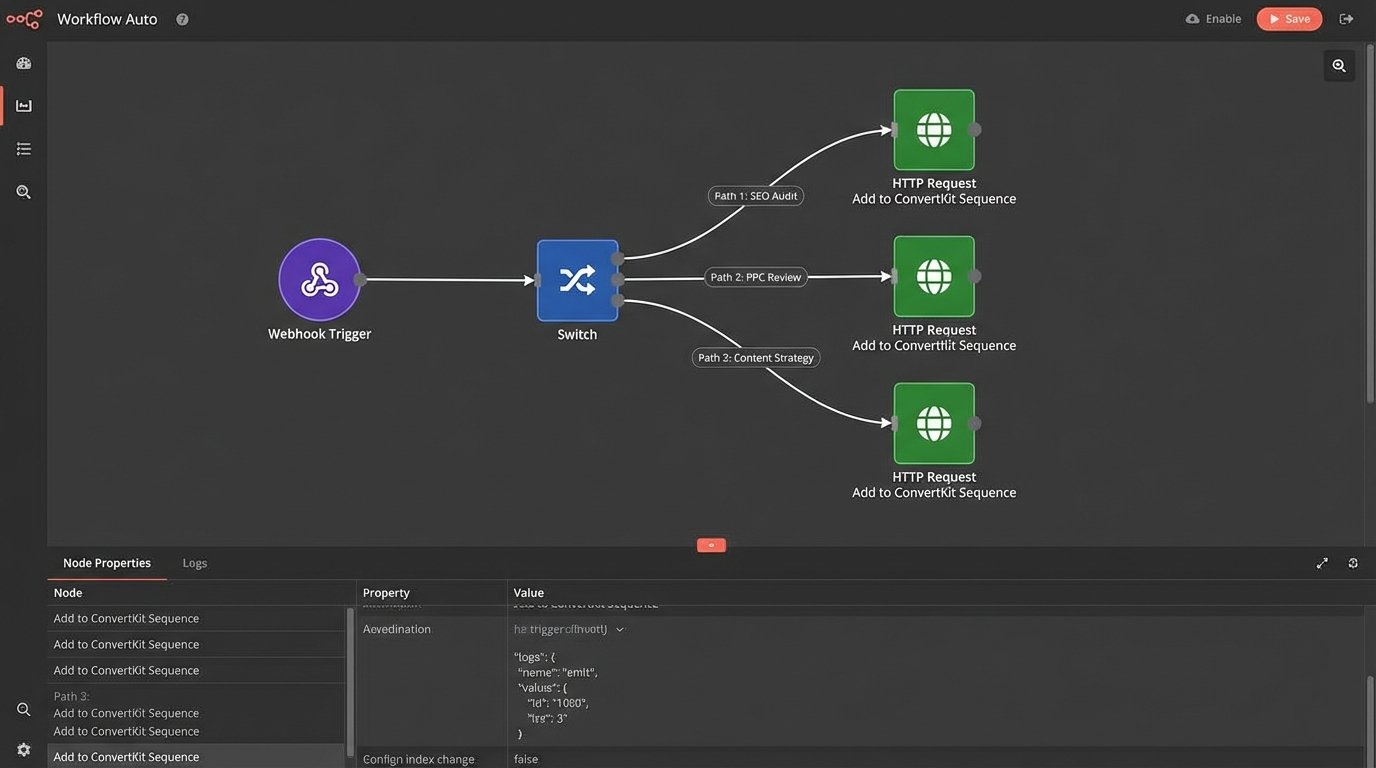
This isn’t a sales pitch. It’s a calculated delivery of high-value information over time. The process looks like this:
- Trigger: `appointment.completed` webhook.
- Logic Step 1: Read the `appointment_type` from the payload.
- Logic Step 2: Use a switch/case statement or a lookup table to map the type to a campaign ID in your email marketing platform (e.g., Mailchimp, ConvertKit).
- Logic Step 3: Make an API call to add the contact’s email to that specific campaign or sequence.
A client who had an “Initial SEO Audit” gets put on a 3-month drip that sends one email per month about algorithm updates, link-building tactics, or content strategy. A client who had a “PPC Campaign Review” gets a different drip about conversion rate optimization and ad copy testing. You are forcing relevance into the system instead of hoping for it.
The failure point here is list hygiene. The automation must include logic to remove a contact from a drip campaign if they book another appointment or if their CRM status changes to `customer` or `unqualified`. Sending introductory content to a paying customer is a sign of a poorly architected system.
The Template Payload (Example from SEO Drip, Email #1):
Subject: Core Web Vitals: One thing most sites get wrong
Hi {{ name }},
Since we discussed your site’s technical SEO, I thought you’d find this data point interesting.
We analyzed 50 sites in your vertical and found that 80% fail the LCP (Largest Contentful Paint) metric specifically because of unoptimized hero images. Before you do anything else, run your homepage through Google’s PageSpeed Insights and check that one number. It’s often the fastest win.
No sales pitch here. Just passing along some field data.
Executing these automations requires moving beyond simple if-this-then-that recipes. It demands a grasp of data structures, API contracts, state management, and robust error handling. The email template is just the last, simplest piece of a much larger engineering puzzle.