
Case Study: Resurrecting Dead Leads with a CRM and SMS Automation Stack
Our sales follow-up process was broken. Leads logged in the CRM were manually assigned, and the initial contact was left to human discretion. The result was a lead-to-contact latency of over 72 hours. By that point, a warm lead is effectively a corpse. The core failure was a reliance on manual triggers in a system that demanded immediate, programmatic action. We weren’t losing to competitors; we were losing to apathy and time.
The mandate was to force engagement within five minutes of a lead entering our system. Management assumed this meant hiring more sales staff. We knew it was an integration problem that required a brutal, simple automation. The goal was to build a system that would poke the lead via SMS if no sales activity was logged within a predefined window, bypassing human delay entirely.
The Initial State: A Data Silo with Good Intentions
The CRM, a heavily customized Salesforce instance, was treated as a system of record. It did its job as a database but was a black hole for action. A new lead would trigger an email notification to a regional sales queue, an alert that was easily buried under a hundred other emails. There was no mechanism to logic-check if contact was actually attempted or made.
We established a baseline by analyzing 1,000 recent leads. Over 40% received no outbound contact for three days. Of those that did, the average response time from the lead was a dismal 8%. The data showed a direct correlation between our delay and their disinterest. Every hour of inaction was costing us money, turning potential deals into sunk marketing costs.
Architecture of the Solution: A Three-Part System
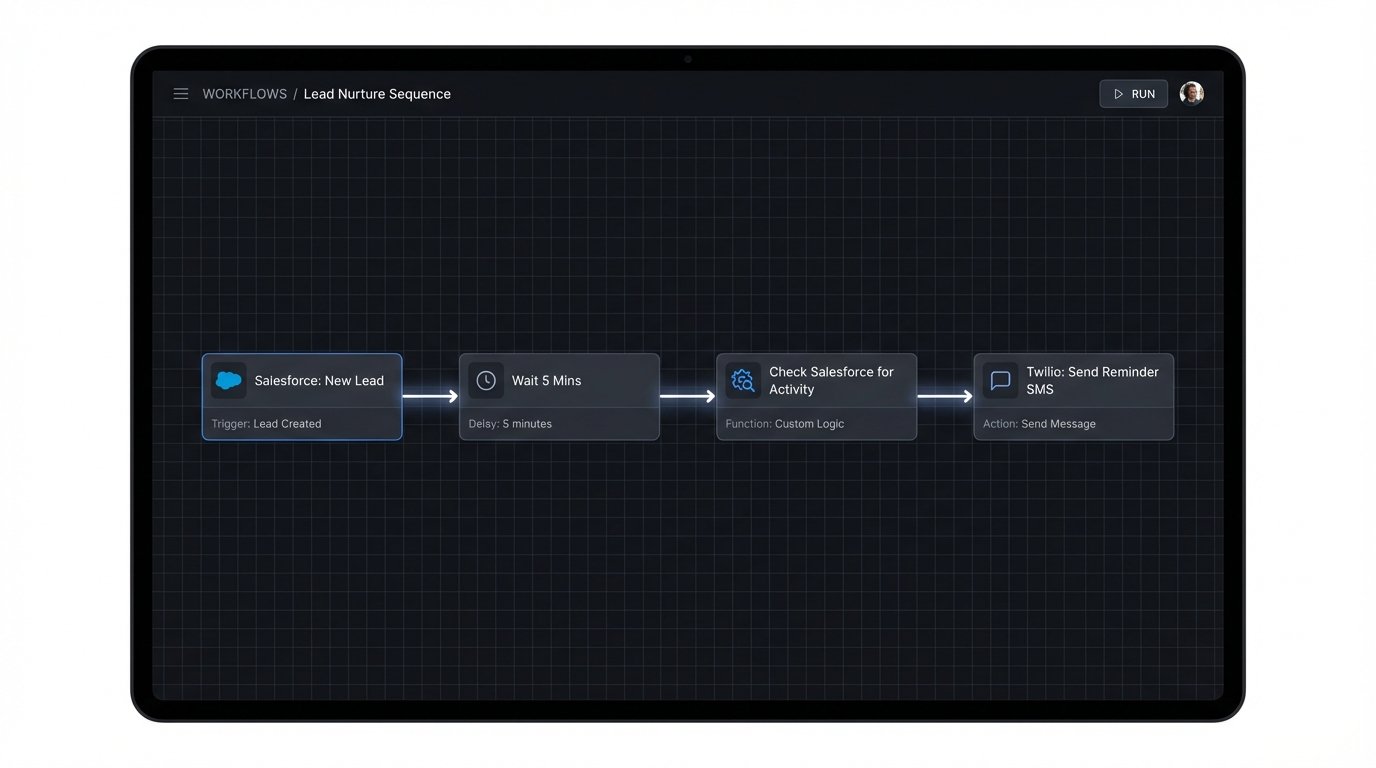
We decided to chain three components together: the Salesforce CRM, a serverless function acting as the logic controller, and the Twilio SMS API. The entire workflow was designed to be stateless and triggered by events, which keeps it cheap to run and easier to debug than a monolithic application.
The sequence is straightforward:
- Trigger: A new
Leadobject is created in Salesforce. This fires an outbound message (webhook) to a specific endpoint we control. - Middleware Logic: An AWS Lambda function ingests the webhook payload. It immediately starts a 5-minute countdown.
- Verification & Action: After 5 minutes, the Lambda function makes a SOQL query back to Salesforce to check the
TaskorEventhistory for that specific lead ID. If no activity is found, it proceeds. - Execution: The function then constructs and sends a targeted SMS message via the Twilio API, using the lead’s name and a pre-approved template.
This approach puts a machine in charge of the initial prod, removing the primary point of failure: human inconsistency.
Building the Middleware: The Brains of the Operation
We chose AWS Lambda with Python for the middleware. It’s inexpensive and scales automatically. The initial function was just a webhook receiver to validate that Salesforce was sending the data correctly. We used API Gateway to expose the Lambda function as a public HTTPS endpoint.
The core challenge was managing the 5-minute delay. A simple time.sleep(300) in a Lambda function is a terrible idea. It ties up the process and you get billed for the entire execution time. Instead, we pushed the initial event to an SQS queue with a delay timer. A separate Lambda function polls this queue, picking up messages only after their visibility timeout expires. This is a far more resilient and cost-effective way to handle timed events.
The first Lambda function’s job is to receive the webhook, strip the necessary data (Lead ID, Name, Phone), and push it to SQS.
import json

import boto3

import os
sqs = boto3.client('sqs')
def webhook_receiver_handler(event, context):
try:
# Extract lead data from the Salesforce webhook payload
body = json.loads(event['body'])
lead_id = body.get('Id')
first_name = body.get('FirstName')
phone = body.get('Phone') # Assumes phone number is clean
if not all([lead_id, first_name, phone]):
# Bad data, log it and stop processing
print(f"Incomplete data for lead: {lead_id}")
return {'statusCode': 400, 'body': 'Bad Request: Missing required fields'}
message_body = {
'lead_id': lead_id,
'first_name': first_name,
'phone': phone
}
# Send to SQS with a 5-minute delay
sqs.send_message(
QueueUrl=os.environ['SQS_QUEUE_URL'],
MessageBody=json.dumps(message_body),
DelaySeconds=300
)
return {'statusCode': 202, 'body': 'Accepted'}
except Exception as e:
print(f"Error processing webhook: {e}")
return {'statusCode': 500, 'body': 'Internal Server Error'}
This first function is intentionally dumb. Its only job is to catch the ball from Salesforce and hand it off. Complex logic comes next.
Implementing the Logic-Check and SMS Send
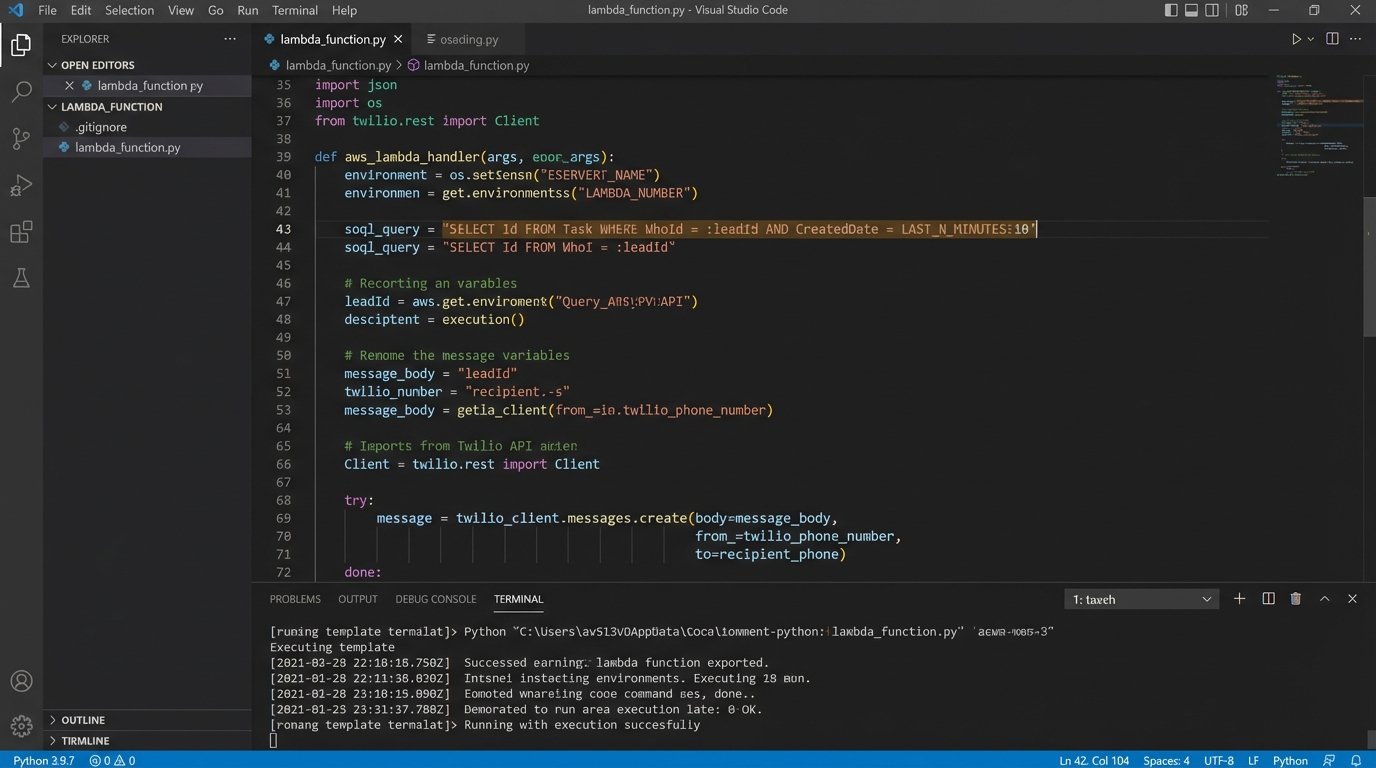
The second Lambda function is triggered by messages becoming visible in the SQS queue. This function is where the real work happens. It queries Salesforce to check for recent activity associated with the lead ID. This required setting up a Connected App in Salesforce to allow for API authentication via OAuth 2.0.
The SOQL query was simple: SELECT Id FROM Task WHERE WhoId = :leadId AND CreatedDate = LAST_N_MINUTES:10. If this query returned zero results, we knew the sales team hadn’t logged a call or email. This check is the entire point of the system. It’s the digital tripwire.
If the check fails (meaning no activity), the function formats a message and pushes it to Twilio. The initial message was basic: “Hi [FirstName], this is Jane from [OurCompany]. Saw you were interested in our services. Is now a good time for a quick call?” We logged every SMS send event back into a custom object in Salesforce to provide a full audit trail and prevent duplicate messages.
The data flow felt like trying to connect high-pressure plumbing with garden hoses. Each API has its own authentication model, its own rate limits, and its own special formatting quirks for data like phone numbers. Getting Salesforce, AWS, and Twilio to talk reliably took more error handling and retry logic than actual feature code.
Hurdles and Headaches: Where Theory Met Reality
The first major problem was data sanitation. Phone numbers came in multiple formats: (555) 555-5555, 555-555-5555, 5555555555. The Twilio API is strict about requiring E.164 format (+15555555555). We had to inject a normalization function that stripped all non-numeric characters and prefixed the country code. This broke for international numbers until we added more sophisticated validation logic.
Rate limiting was another issue. During a high-volume import of new leads, we hammered the Salesforce API with verification queries and update calls. This triggered Salesforce’s API governor limits, and our function started failing with REQUEST_LIMIT_EXCEEDED errors. We implemented an exponential backoff strategy in our API client and staggered the SQS message visibility to smooth out the load.
The final headache was handling replies. Our initial SMS was a fire-and-forget message. When leads replied “STOP” or “Who is this?”, there was no system to process it. This is not just bad practice; it violates regulations. We had to set up a third Lambda function to handle Twilio’s inbound message webhook, parse the reply, update the contact record in Salesforce, and add the number to a “Do Not Contact” list.
Results: Quantifying the Impact
The system was not perfect, but it was effective. We deployed it and monitored the metrics for 30 days. The results were immediate and validated the entire effort.
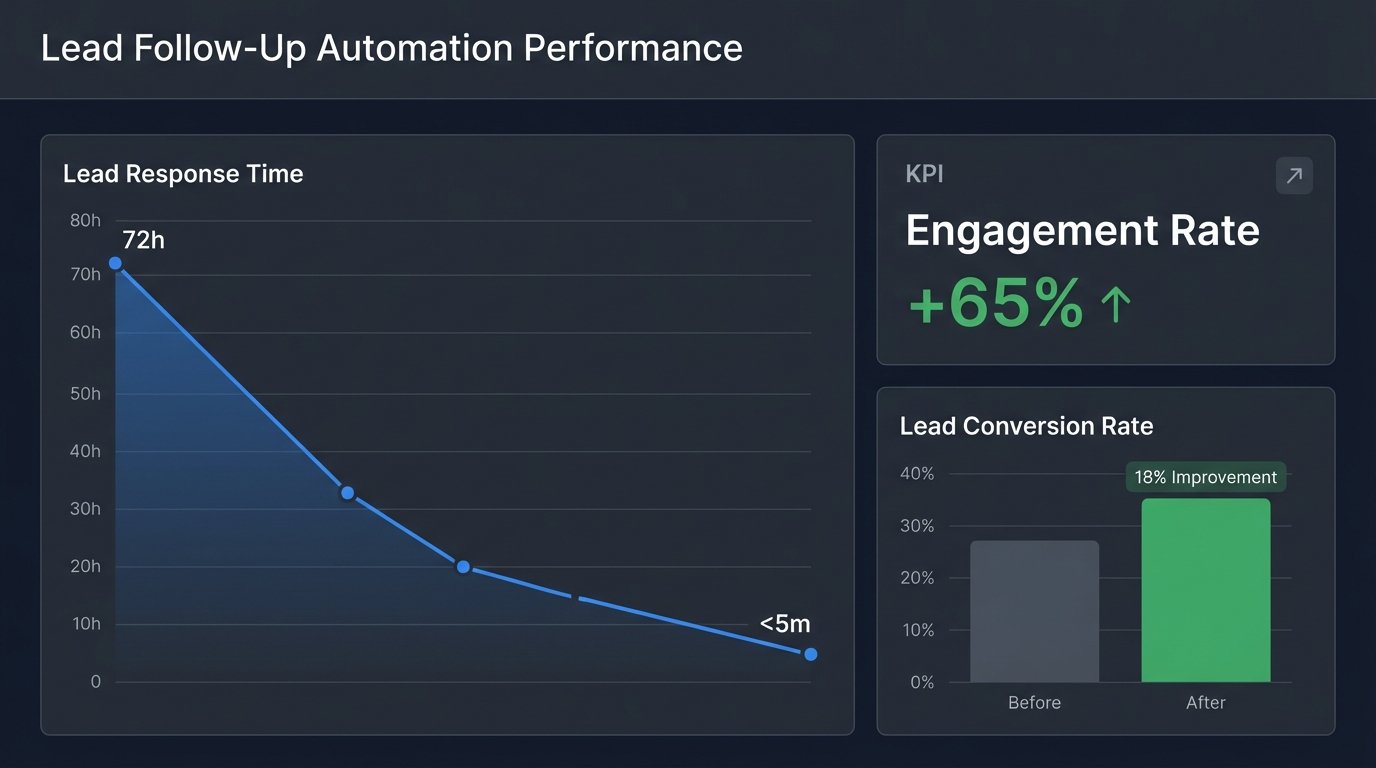
- Lead Response Time: The average time from lead creation to first contact attempt dropped from 72 hours to 4.5 minutes. This was our primary KPI and the most dramatic success.
- Engagement Rate: The rate of leads who responded to the initial outreach (either the automated SMS or a subsequent call) increased by 65%. We were talking to people while their interest was still high.
- Lead Conversion Rate: The overall lead-to-opportunity conversion rate improved by 18%. By forcing faster engagement, we were qualifying or disqualifying leads much earlier in the funnel, saving sales time.
The operational cost was trivial. The entire AWS stack (API Gateway, Lambda, SQS) ran for less than $50 per month. The main expense was the Twilio SMS usage, which was a necessary wallet-drainer directly tied to lead volume. We considered it a cost of acquisition, not an operational overhead.
This project proved that the biggest bottleneck was not staff performance but process latency. By automating the first critical follow-up, we forced the pace of engagement to match the customer’s expectation of immediacy. The system acts as an insurance policy against human error and delay, ensuring no lead simply rots away in a database queue ever again.