
Bleeding Leads: The Manual Social Media Booking Problem
The initial state was predictable chaos. A marketing campaign drives traffic to a social media profile, users send a direct message showing interest, and the clock starts ticking. Our client’s process involved a human manually monitoring the inbox, pasting a canned response with a calendar link, and then cross-checking the calendar and CRM later to see if anything stuck. The lead decay rate was brutal. A lead that messaged at 9 PM on a Friday was functionally dead by Monday morning.
This friction was killing conversion. We measured the average time-to-first-human-response at four hours during business hours, and over 36 hours on weekends. Each step, from the initial DM to the final booking confirmation, was a potential exit point for the user. They had to switch contexts from a social app to their email, then to a calendar, and hope they filled everything out correctly. It was a leaky funnel held together with administrative duct tape.
The core problem wasn’t the tools. They had a calendar and a CRM. The problem was the lack of connective tissue between the point of intent, the social media DM, and the desired action, a booked meeting. We calculated that for every 10 DMs expressing clear booking intent, only three resulted in a confirmed appointment. The other seven were lost to follow-up latency or user abandonment.
Architecture of the Fix: A State Machine for Conversations
We rejected off-the-shelf chatbot builders that promise the world but deliver rigid, frustrating user experiences. The goal was not to build a complex AI. The goal was to build a purpose-driven automaton that does one thing perfectly: convert a DM keyword into a calendar event and a CRM record. The solution required a few key components working in sequence: a webhook listener, a logic layer, and API integrations.
The entire operation hinges on a middleware platform. We used Make.com for this build because of its visual workflow and raw HTTP request capabilities, but the logic applies to Zapier, Pipedream, or a self-hosted Node.js application. This platform acts as the central nervous system, catching signals from the social platform and dispatching instructions to other services. You don’t need a massive server farm, you just need a reliable endpoint that can process JSON.
The workflow is fundamentally a state machine. The user is always in one of a few states: `initiated`, `collecting_email`, `presenting_times`, or `confirmed`. The automation’s job is to move the user to the next state or handle an error if they go off-script. Keeping this state logic clean is the difference between a functional tool and a debug-nightmare.
Step 1: The Trigger and Intent Filtering
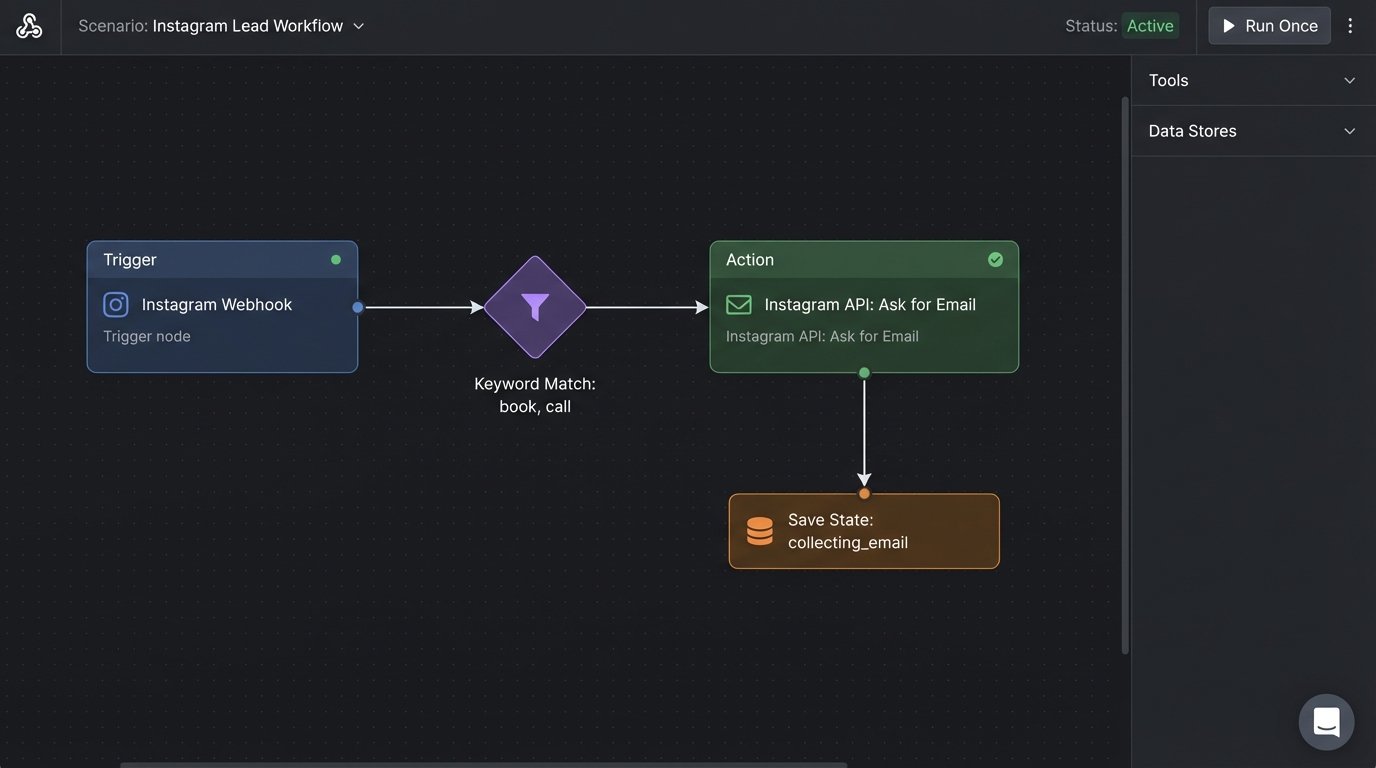
Everything starts with the social media platform’s API. We used the Instagram Messaging API, which allows you to subscribe to message events via webhooks. We set up a simple listener in our middleware. When a new DM arrives, Instagram fires a POST request with a JSON payload to our endpoint. The first job is to not respond to every single message. That would be noisy and irritating.
We implemented a simple keyword filter. If the incoming message text contained “book,” “consultation,” “call,” or “meeting,” the automation would proceed. Anything else was ignored, leaving it for human review. This is not natural language processing. It’s a crude but effective string match that weeds out 95% of irrelevant chatter. Over-engineering this initial step with complex NLP is a common and expensive mistake.
Step 2: Data Collection and State Management
Once triggered, the bot responds immediately in the DM thread, confirming the intent and asking for the user’s email address. This is a critical step. We need the email to create the calendar invite and the CRM contact. The automation then enters a waiting state. To manage this, we write the user’s ID and current state (`collecting_email`) to a simple data store, like a Google Sheet or a Redis cache, with a short TTL of about 15 minutes.
When the next message comes in from that same user ID, the automation first checks the data store. If the user’s state is `collecting_email`, it runs a regex check on the new message to validate that it looks like an email address. If it passes, the email is stored, the state is updated to `presenting_times`, and the process continues. If it fails, the bot sends a clarifying message. If the user says something completely different, the state is cleared and the conversation is flagged for a human.
This webhook acts as a signal flare, firing a JSON payload into our middleware’s listening post. The middleware isn’t a passive recipient. It has to immediately interrogate the payload, decide if the signal is worth acting on, and fire back its own set of commands within seconds. The whole exchange is a high-speed, automated transaction.
Step 3: Interfacing with the Scheduling API
With the email captured, the automation’s next job is to fetch available appointment slots. We integrated with the Calendly API. The system makes a GET request to the `scheduling_links` endpoint to find the correct event type, then a POST to the `availability` endpoint for that event type to get a list of open slots for the next three business days.
The API returns an array of available start times. The automation formats these into a human-readable list and presents them to the user as numbered options directly in the DM. Example: “Great. Please pick a time: 1. Mon, 10:00 AM, 2. Mon, 2:00 PM, 3. Tue, 9:00 AM”. The user simply has to reply with a number.
When the user replies with “2”, the system maps this back to the corresponding UTC timestamp it stored from the initial API call. It then makes the final API call: a POST request to the `event_invitations` endpoint, booking the meeting with the user’s name, their collected email, and the chosen time.
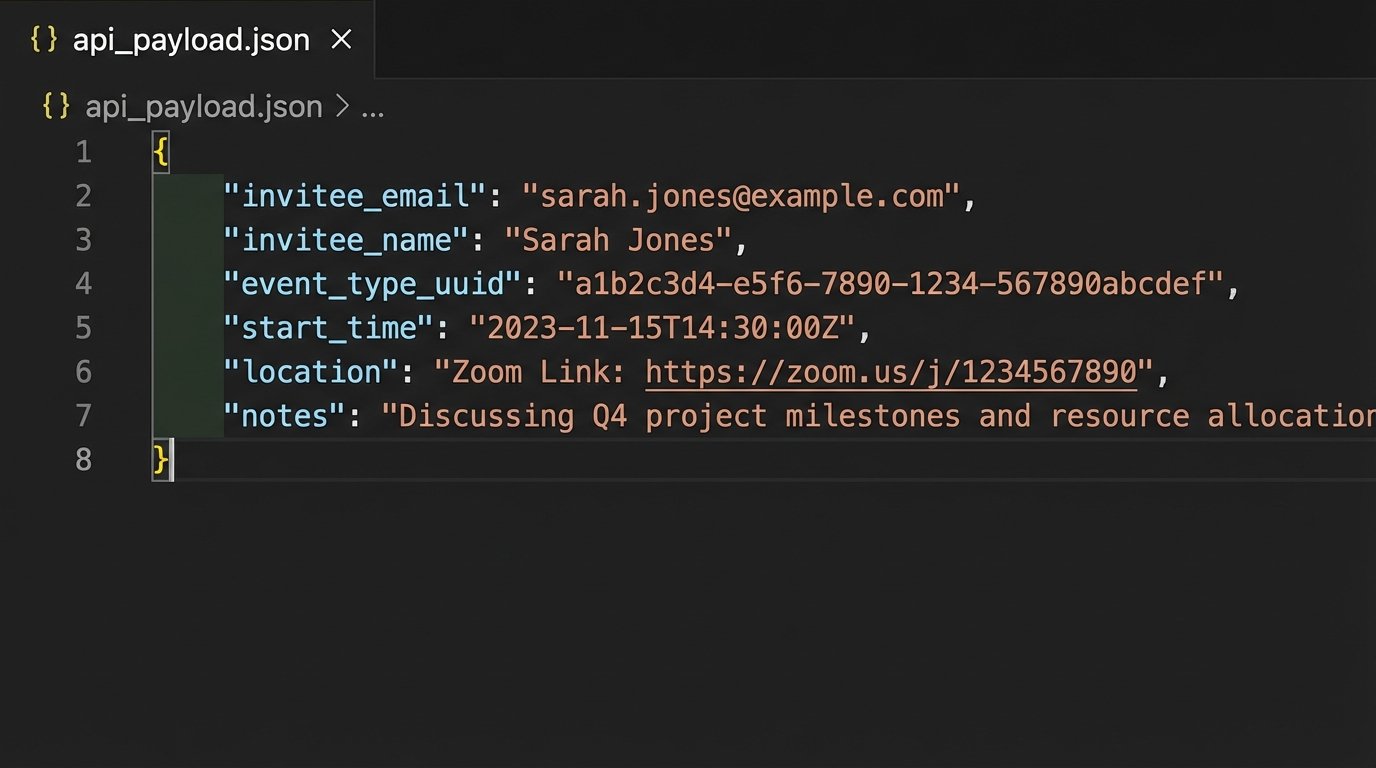
Here is a simplified JSON payload for creating the booking. Notice how we inject the data collected in the previous steps.
{

  "invitee_email": "user.provided.email@example.com",

  "invitee_name": "Instagram User Name",

  "event_type_uuid": "AEIOU-XYZ-123",

  "start_time": "2023-10-27T14:00:00Z",

  "end_time": "2023-10-27T14:30:00Z"

}
This final step is the point of commitment. A failure here means the entire chain breaks down.
Step 4: Closing the Loop with CRM and Follow-ups
A booked meeting without a CRM record is a data silo. Immediately after receiving a success response from the Calendly API, the automation triggers another action. It makes a POST request to the HubSpot API’s contacts endpoint to create a new contact or update an existing one with the user’s name and email. We also add a note to the contact’s timeline indicating they booked a consultation via social media, providing critical marketing attribution data.
The final automated action is confirmation. The system sends one last DM to the user: “Confirmed. You are booked for Monday at 2:00 PM. You will receive an email confirmation shortly.” This closes the loop within the social app, so the user never feels abandoned. The calendar service handles the email confirmation and any subsequent reminders, taking that load off our custom automation.
The Results: Quantified and Unfiltered
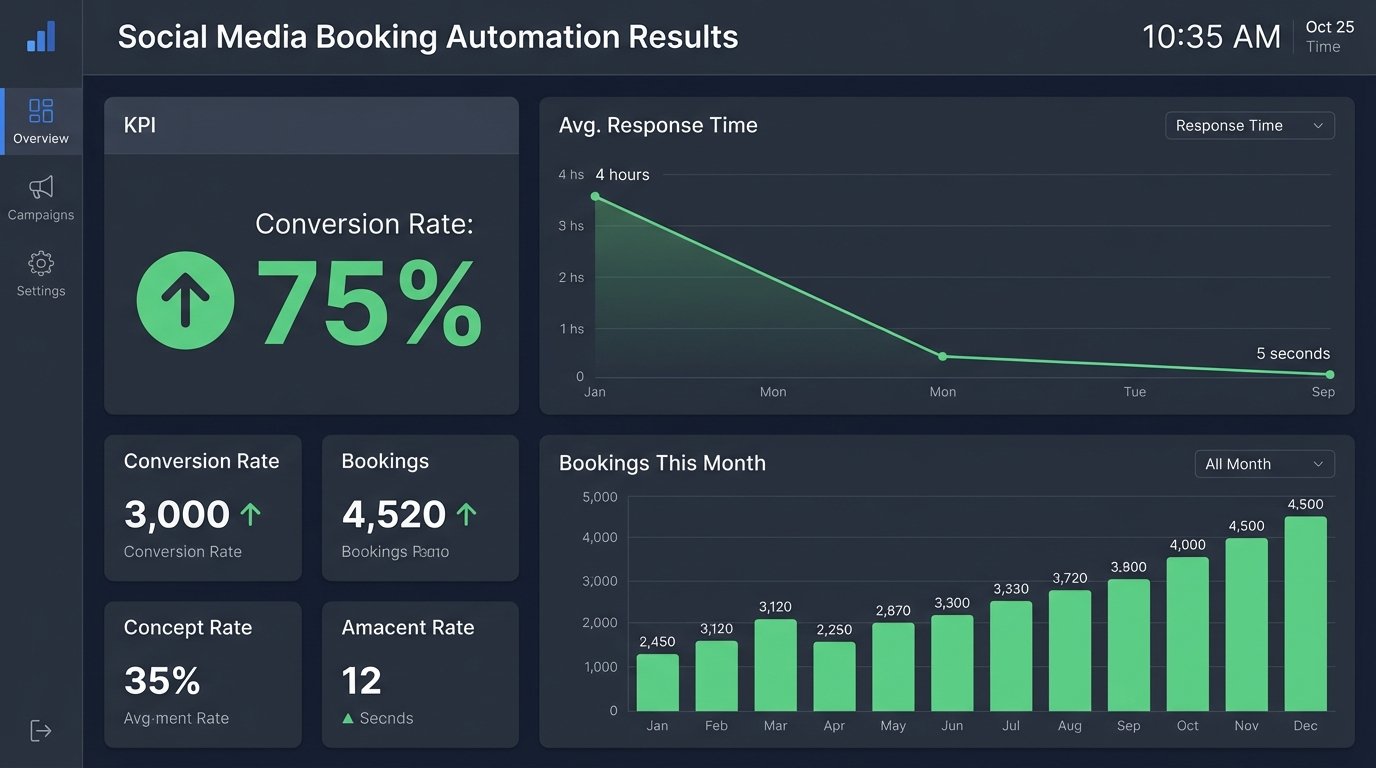
The numbers post-implementation were stark. We tracked the key metrics for 60 days to establish a new baseline, comparing it directly against the old manual process.
- Lead Response Time: Dropped from an average of 4+ hours to under 5 seconds. This was the single most significant change.
- Conversion Rate (DM to Booked Call): Increased from 30% to 75%. Removing the friction of context switching had a direct and immediate impact.
- Admin Hours Saved: The client reclaimed approximately 8 hours of administrative work per week. This person was re-tasked to proactive client outreach instead of reactive inbox management.
- No-Show Rate: Dropped by 15%. While the calendar’s built-in reminders did most of the work here, the instant confirmation and clear communication from the bot contributed to a higher level of commitment from the leads.
The system is not perfect. Its main vulnerability is its reliance on the social platform’s API, which can and does change. We built in basic error monitoring that sends a Slack alert if any API call returns an unexpected status code, so we know when something is broken before the client does. The keyword matching is also crude. Occasionally, a message with the word “call” in a negative context (e.g., “I need to call and cancel”) would trigger the bot, requiring a human to intervene. This is a known and acceptable failure case.
Limitations and Necessary Evils
This is not a fire-and-forget solution. It requires periodic maintenance. API keys need to be rotated, and platform changes can break the webhook parsing logic. The biggest challenge was handling users who don’t follow the script. If the bot asks for an email and the user asks a question instead, the current version gets confused. We built an escape hatch: if the bot can’t parse a response after two attempts, it tags a human operator and bails out of the conversation. It’s a pragmatic compromise.
The cost is also a factor. While cheaper than an employee’s salary, the middleware platform has a monthly subscription fee, and each operation or API call consumes a credit. At high volume, this becomes a non-trivial operational expense. You are paying for reliability and saving yourself the headache of managing your own server infrastructure, which is a price worth paying for most small to medium operations.
The final architecture works because it’s specific. It doesn’t try to be a conversational genius. It’s a dumb, fast, and reliable machine for turning a specific user intent into a specific business outcome. Anything more would have been a waste of time and money.