Your CRM is a Data Graveyard
Every CRM eventually becomes a repository for dead leads. We had a segment of over 250,000 contacts who had not opened an email or logged into our platform in over 18 months. These were not just idle records. They were a direct drag on performance, inflating costs for our primary marketing automation platform and actively damaging our domain’s sending reputation with every low-engagement campaign they were included in.
The business directive was predictable: “re-engage them.” This is a classic hospital pass. The marketing team sees a quarter-million contacts as untapped potential. We see a high-risk segment capable of getting our primary sending domain blacklisted. The open rate for this group was a statistical zero, hovering around 0.2% on the rare occasion they were included in a broad send. The immediate problem was not just how to contact them, but how to do so without nuking our entire email infrastructure.
Initial analysis showed the data was a mess. Years of imports, manual entries, and system migrations had left a trail of syntactically valid but non-existent email addresses. A simple export-and-blast approach would have resulted in a bounce rate high enough to trigger automated blocks from major ISPs. We had to architect a solution that would isolate the risk, surgically identify signs of life, and pipe any re-engaged contacts back into the main funnel without contaminating the active database.
This was not a marketing problem. It was a data-handling and infrastructure problem.
Phase 1: Segmentation and Data Sterilization
First, we had to define “dormant” with precision. “No activity in 18 months” was too broad. We built a query against the CRM database that used a layered set of negative constraints. We targeted contacts whose `last_marketing_email_open_date` was older than 18 months AND whose `last_platform_login_date` was older than 18 months AND who were NOT associated with any `opportunity_status = ‘Closed Won’` records. This prevented us from bothering established customers who just happened to ignore marketing emails.
We scripted the extraction using the CRM’s REST API, paginating through the results to avoid timeouts. The script’s job was to pull the contact ID and email address, nothing more. We had to hammer the API in batches to stay under the 100,000 calls-per-day limit, which meant the extraction process alone took the better part of a day. This is the reality of working with large datasets under API governance; it’s a slow, deliberate process.
Here is a simplified Python block showing the core logic for fetching and filtering the contacts. This ignores pagination and error handling for clarity.
import requests
import json
API_KEY = 'YOUR_CRM_API_KEY'
CRM_ENDPOINT = 'https://api.yourcrm.com/v3/contacts/search'
HEADERS = {'Authorization': f'Bearer {API_KEY}', 'Content-Type': 'application/json'}
# The query looks for contacts with no recent activity and no sales history.
# Timestamps are formatted for the specific CRM's API.
QUERY_PAYLOAD = {
"filterGroups": [
{
"filters": [
{"propertyName": "last_marketing_email_open_date", "operator": "LESS_THAN", "value": "1577836800000"},
{"propertyName": "last_platform_login_date", "operator": "LESS_THAN", "value": "1577836800000"},
{"propertyName": "associated_deal_count", "operator": "EQ", "value": "0"}
]
}
],
"properties": ["email"],
"limit": 100
}
def fetch_dormant_contacts():
dormant_emails = []
response = requests.post(CRM_ENDPOINT, headers=HEADERS, data=json.dumps(QUERY_PAYLOAD))
if response.status_code == 200:
results = response.json().get('results', [])
for contact in results:
dormant_emails.append(contact['properties']['email'])
# ...add pagination logic here...
return dormant_emails
# The final list is then passed to the validation service.
final_list = fetch_dormant_contacts()
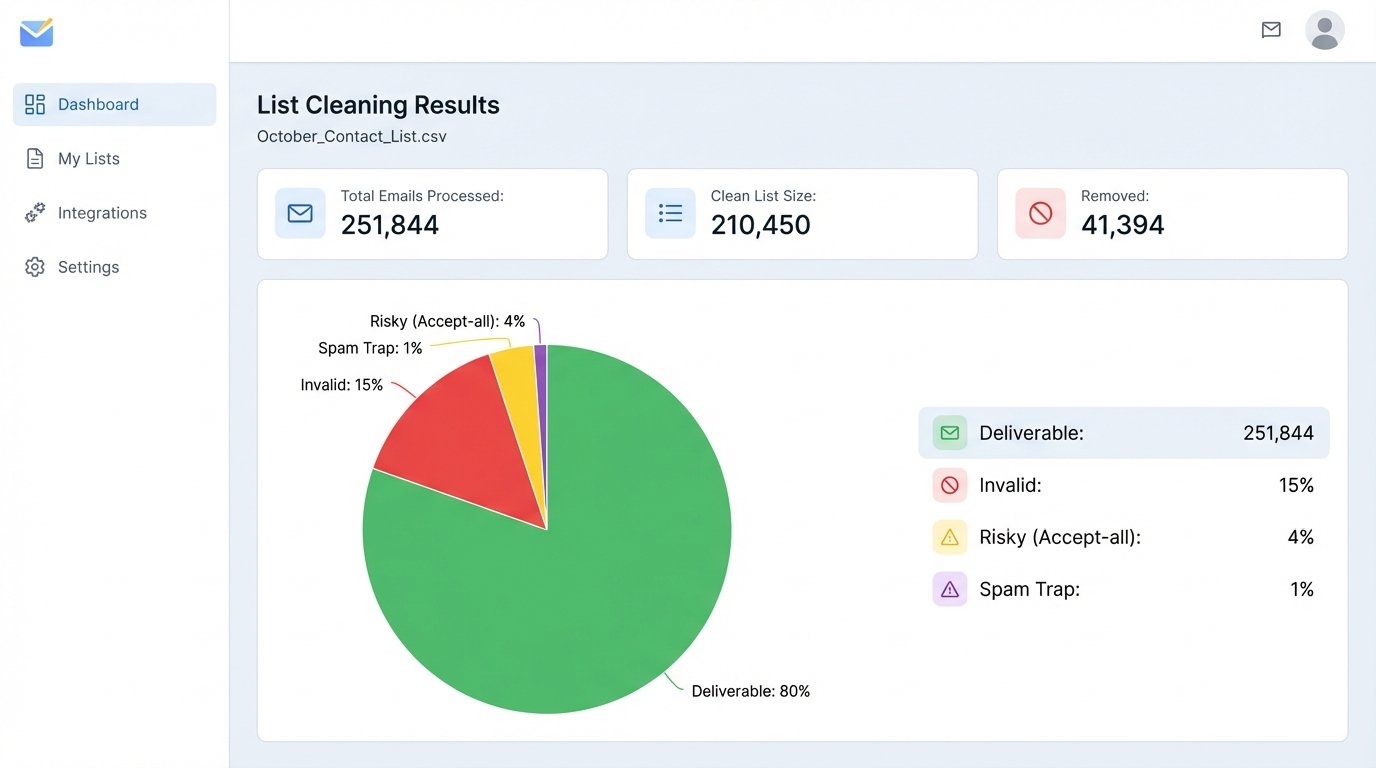
The extracted list of 251,844 contacts was then piped directly into a third-party email validation service. We used ZeroBounce for this. This step is not optional. It cost about $1,200, a fraction of the cost of dealing with a blacklisted domain. The service scrubs the list for invalid syntax, known hard-bounce addresses, spam traps, and disposable domains. The process is like shoving a firehose through a needle; you force a massive, dirty list through a small aperture and accept that some volume will be lost for the sake of a clean output.
The result of the scrub was a list of 210,450 “deliverable” or “risky (accept-all)” emails. We discarded nearly 41,000 contacts, or 16% of the original segment. That is 41,000 hard bounces we prevented from ever hitting our sending infrastructure. We made the decision to include the “accept-all” addresses, knowing they represented a higher bounce risk but also a potential source of engagement. The sanitized list was our actual target audience.
Phase 2: The Isolated Campaign Architecture
You do not run a re-activation campaign from your primary marketing IP. Period. The risk of collateral damage is too high. We provisioned a separate Mailgun account with a new, dedicated IP address and a subdomain we had been warming up for months (e.g., `mg.yourcompany.com`). This completely sandboxed the campaign. If this IP got flagged, it would have zero impact on our primary transactional and marketing email streams running through HubSpot.
The campaign itself was not a single email blast. It was a three-step logical sequence designed to elicit a specific action: a click. We were not trying to sell anything. We were just running a sonar ping to see if anything was still moving down there. A click was the only signal we cared about.
The Three-Touch Sequence
- Email 1: The “No-Ask” Content Offer. The first email was stripped of all marketing language. The subject line was “A new guide for you.” The body contained a link to a genuinely useful, ungated PDF guide on a relevant industry topic. There was no sales pitch, no demo request, nothing but a link. The goal was to provide value and register a click from anyone curious enough to engage.
- Email 2 (for non-openers): The “Last Chance” Prompt. Sent seven days later to anyone who did not open or click the first email. The subject was direct: “Are we clearing your contact record?” This email explained that we were cleaning our database and would remove them unless they clicked a link to remain subscribed. It creates urgency and leverages loss aversion.
- Email 3 (for clickers): The Soft Pitch. This email was sent only to the small segment that clicked the link in Email 1. It acknowledged their interest in the guide and presented a very soft call-to-action related to a new feature we had launched. This was the first and only attempt at conversion within this sequence.
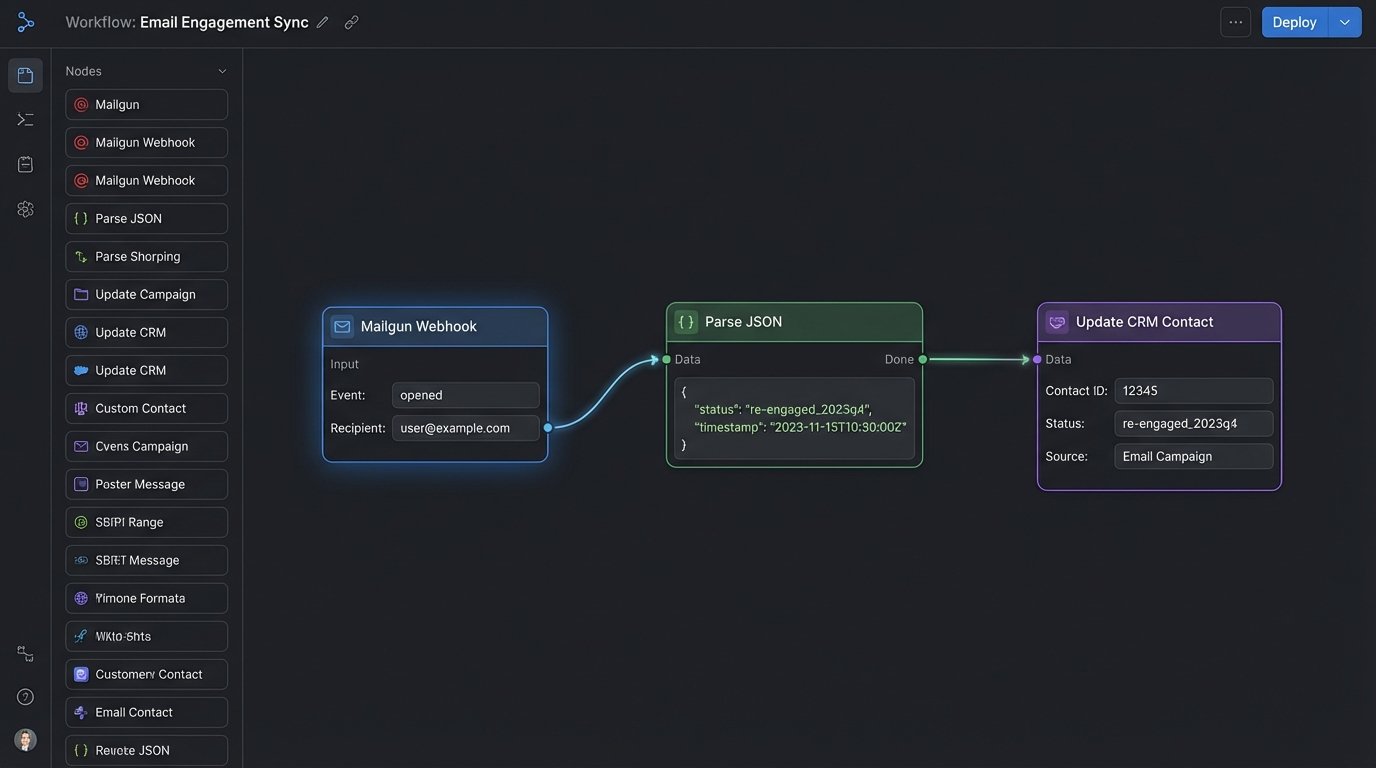
This entire sequence was automated within Mailgun. The critical piece was connecting the engagement data back to our primary CRM. We configured webhooks in Mailgun to fire for every `clicked` and `unsubscribed` event. These webhooks pointed to a simple AWS Lambda function that acted as our integration middleware.
The Webhook Bridge
When a user clicked a link, Mailgun sent a JSON payload to our Lambda function’s API Gateway endpoint. The Lambda function’s job was to parse this payload, extract the recipient’s email address, and make an API call to our main CRM. The function would find the contact by email and update a custom property `reactivation_status` to `re-engaged_2023q4`. A similar process handled unsubscribes, marking them for permanent deletion.
This serverless function is the heart of the architecture. It’s cheap, scalable, and decouples the high-risk sending environment (Mailgun) from the system of record (CRM). It prevents a firehose of dirty data from ever flowing back into our main system. Only the validated, positive signals get passed through.
Phase 3: Results and The Financial Bottom Line
The numbers from this campaign were not glamorous, but they were profitable. We did not resurrect 250,000 leads. We identified the small percentage that were still viable and pruned the rest. That was the entire point.
From the starting list of 210,450 sanitized contacts, the campaign produced the following metrics:
- Total Clicks: 3,878 contacts clicked at least one link across the campaign sequence. This represents a 1.84% re-engagement rate on the targeted list.
- Total Unsubscribes: 4,210 contacts unsubscribed. A healthy and expected outcome for list hygiene.
- Total Bounces: The bounce rate held at 3.5%, which was manageable for the isolated IP and validated our decision to use a scrubbing service.
The 3,878 re-engaged contacts were automatically updated in the CRM and moved back into our primary, low-tempo lead nurturing sequences. They were now treated as new, engaged leads. The real success of the campaign is measured by what happened next.
Within 90 days of the campaign concluding:
- The re-engaged cohort generated 52 new sales-qualified opportunities.
- Of those, 19 converted to “Closed Won” deals.
- The total new annual recurring revenue (ARR) from these 19 deals was $118,500.
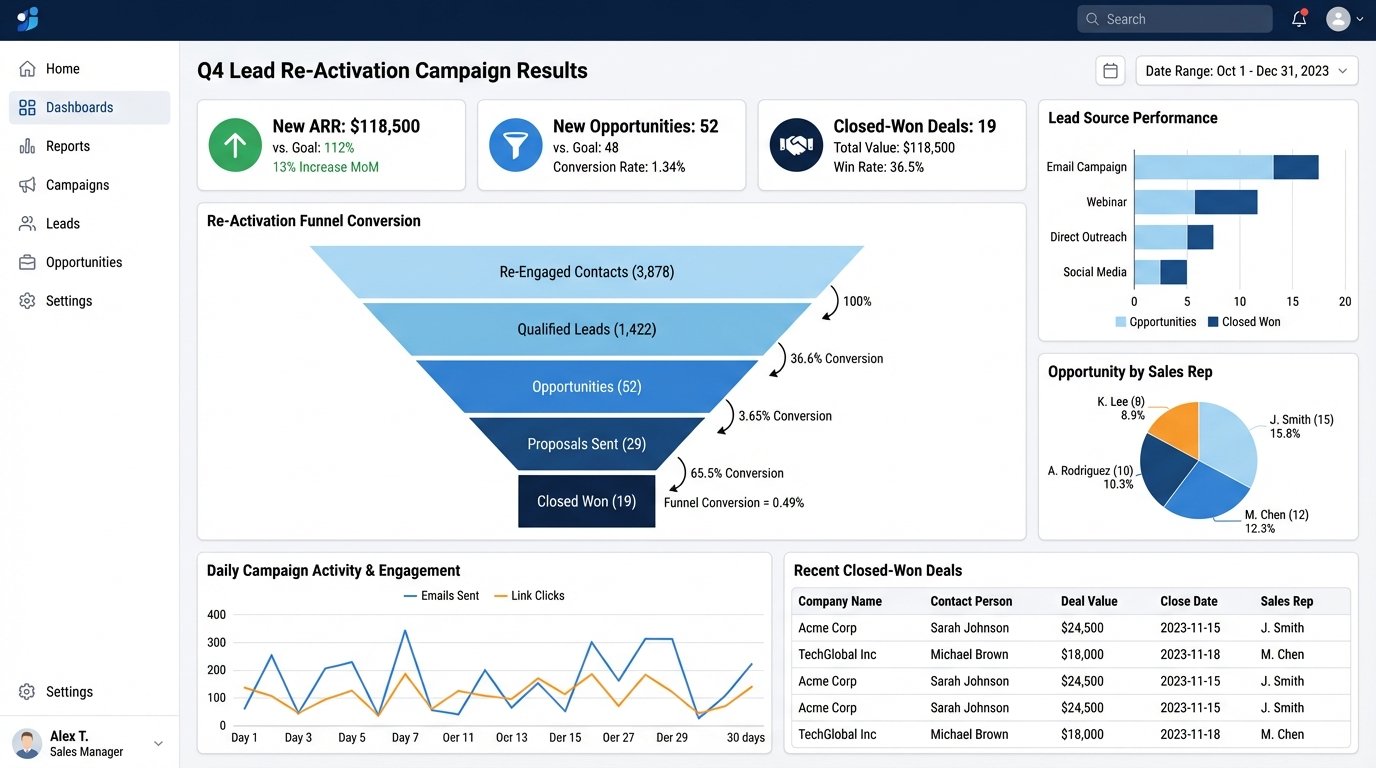
The total cost of the project was approximately $6,500. This included the email validation service, Mailgun sending costs for the volume, and a conservative estimate of 40 hours of engineering time to build the scripts and Lambda function. The return on investment was immediate and substantial. We spent $6,500 to generate $118,500 in new revenue from a list that was previously considered worthless.
The secondary benefit is arguably more valuable. We permanently removed over 247,000 dead records from our primary marketing platform. This action immediately lowered our monthly subscription cost. It also produced a measurable uptick in our global email deliverability metrics for all subsequent campaigns, as our overall list quality and engagement-to-volume ratio improved. We stopped wasting sends on a dead audience, which made our engagement signals for active audiences much cleaner for ISPs to interpret. This was not just a one-time revenue bump. It was a necessary system overhaul that continues to pay dividends.