
Stop Lying About Personalization
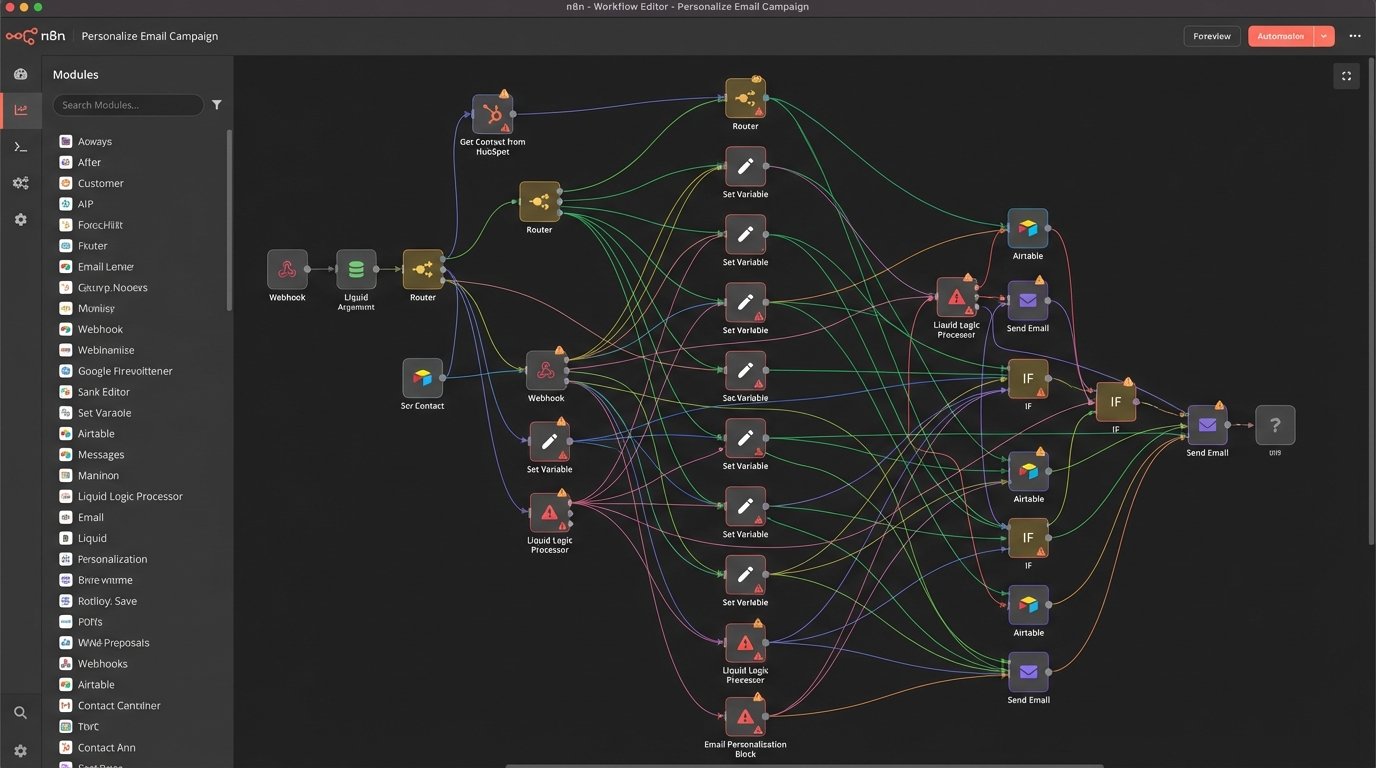
The marketing department sold everyone on a fantasy. They call it “personalization at scale.” The reality is a glorified mail merge connected to a CRM full of stale, incorrect, and often null data fields. We’ve all seen the result: the “Hi {{ FNAME }},” email that makes the entire company look incompetent. The core problem is a fundamental misunderstanding of what personalization means to an end user. It isn’t about using their first name. It’s about context.
Real personalization is sending the right message at the exact moment it’s relevant. The trigger isn’t a scheduled batch job; it’s a user action. The system must react to behavior, not to a calendar entry. Anything else is just sophisticated spam, and clients have become exceptionally good at tuning it out. The industry’s obsession with injecting CRM data into templates is a dead end. It produces brittle, error-prone campaigns that generate more apologies than conversions.
The Myth of the Clean CRM
Every single personalization strategy that relies on a CRM as the single source of truth is doomed. I have seen inside hundreds of production databases. Not one has been pristine. Sales reps enter junk data to get past required fields. Support teams have different formatting standards. Data imported from a third-party list five years ago still lingers, waiting to misgender a CEO or send a “we miss you” email to a deceased client.
Relying on this data for automated communications is not engineering. It’s gambling. The belief that you can just pipe `contact.job_title` into an email template assumes the `job_title` field is accurate, populated, and sensible. It often is not. Trying to build complex liquid logic statements to handle the edge cases is like trying to patch a dam with chewing gum. The core data structure is the problem, and no amount of template-level hacking will fix it.
This entire approach is backwards. We are attempting to force a static, unreliable dataset onto a dynamic conversation. It’s the equivalent of trying to assemble a car engine with a parts list written on a napkin. You might get something that looks right, but the first time you turn the key, it’s going to seize.
A Shift to Contextual Automation
A better model exists. It ignores most of the garbage in the CRM and focuses on one thing: events. An event is a discrete action a user takes. They sign up. Their payment fails. They trip an API rate limit. They view the pricing page three times in one day. These are hard, verifiable data points that provide immediate context for communication. They are superior to demographic data in every way because they reflect intent, not identity.
Building around an event-driven architecture means your communication system becomes a state machine. Instead of a linear campaign of “Email 1, wait 3 days, Email 2,” the system reacts. A `user.login.failed` event can trigger an immediate password reset email. A `subscription.renewal.failed` event from a payment processor webhook can trigger an SMS with a link to update billing info. This is useful. This is what users actually want from us.
The tooling for this has matured. We are no longer stuck with cron jobs and brittle scripts. Webhooks are the nervous system of modern architecture. Services like Stripe, an internal application database, or a CDP like Segment can fire off a JSON payload to a webhook listener the instant something happens. That listener, whether it’s a serverless function or an integration platform, can then execute a specific, highly relevant workflow.
This is not about being clever with a subject line. It is about being useful at the point of failure or intent. It is the difference between a system that shouts at everyone and a system that whispers to one person at exactly the right time.
Example: The Payment Failure Event
Consider a `invoice.payment_failed` webhook from Stripe. The payload is a goldmine of context. It tells you the customer ID, the amount due, the reason for the failure (e.g., ‘generic_decline’, ‘insufficient_funds’), and the invoice number. A legacy system might just send a generic “Your Payment Failed” email to the customer’s billing contact on file. This is lazy.
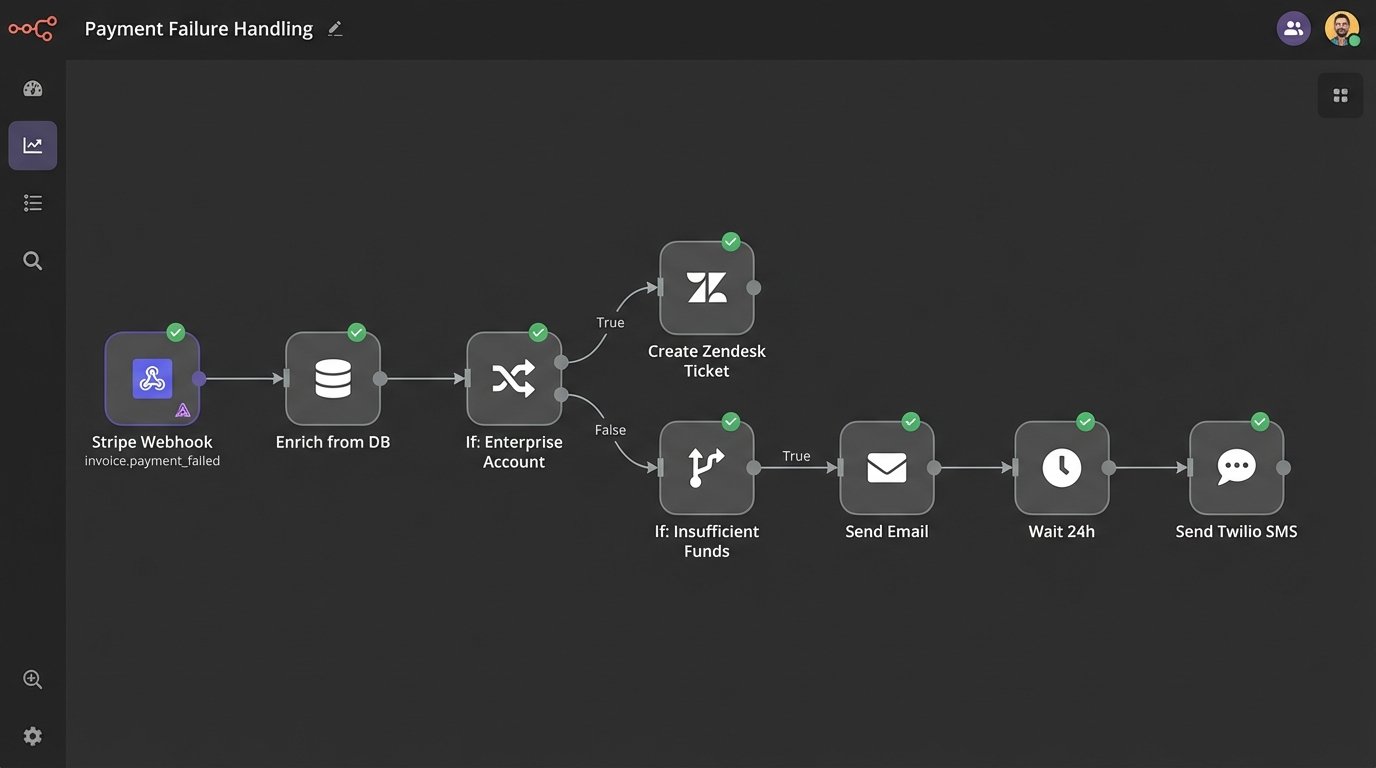
A contextual system consumes that payload and acts with precision. The logic would look something like this:
- Trigger: Webhook received for `invoice.payment_failed`.
- Step 1: Data Ingestion. Parse the JSON payload. Extract `customer_id`, `invoice_id`, `charge.failure_message`, and `amount_due`.
- Step 2: Enrichment. Query the internal database with the `customer_id` to get the user’s name and account type (e.g., ‘free’, ‘pro’, ‘enterprise’).
- Step 3: Logic Branch. If `account_type` is ‘enterprise’, create a high-priority ticket in Zendesk or Salesforce and assign it to their dedicated account manager. Do not email the user directly. Let a human handle it.
- Step 4: Another Logic Branch. If `failure_message` contains ‘insufficient_funds’, trigger an email with the subject “Action Required: Your Payment for Invoice {{invoice_id}} Was Declined” and a body that links them directly to the billing update page.
- Step 5: SMS Fallback. If the email from Step 4 gets a hard bounce or is not opened within 24 hours, trigger a single, polite SMS: “Hi {{ FNAME }}. We had an issue processing your recent payment. Please update your details here to maintain service: [shortlink].”
This workflow is infinitely more effective than a blast campaign. It respects the client relationship for high-value accounts, provides specific failure context, and uses a multi-channel approach intelligently. It is harder to build. It is worth it.
Here is a simplified look at the kind of data payload that starts the whole process. This is the truth, the raw material. It is not a guess from a stale database field.
{

  "id": "evt_1JZxGz2eZvKYlo2CiL5d9j1a",

  "object": "event",

  "api_version": "2020-08-27",

  "created": 1629824221,

  "data": {

    "object": {

      "id": "in_1JZxGz2eZvKYlo2CSyq5b0v4",

      "object": "invoice",

      "customer": "cus_K3fB9g7aY5g3xQ",

      "billing_reason": "subscription_cycle",

      "charge": "ch_1JZxGz2eZvKYlo2C2a3b4c5d",

      "paid": false,

      "status": "open",

      "attempt_count": 1,

      "next_payment_attempt": 1630073821

    }

  },

  "livemode": true,

  "type": "invoice.payment_failed"

}
The Unspoken Cost of Context
This approach is not cheap or easy. The marketing slide decks that promise this level of sophistication from an off-the-shelf platform are selling fiction. The primary cost is not software licensing; it is development hours and a brutal commitment to data integrity. You cannot build a responsive, event-driven system on top of a messy, monolithic application with no clear event hooks.
The first prerequisite is a clean data pipeline. Events must be captured reliably. If your application doesn’t natively fire webhooks for key actions, they must be built. This means instrumenting the code base to emit structured logs or, better yet, fire events to a message queue like RabbitMQ or Kafka. This is foundational engineering work that precedes any fancy automation.
The second cost is in the integration layer. You need a system that can listen for these events and orchestrate the workflows. This could be a low-code platform like Make or a fully programmatic solution using serverless functions (AWS Lambda, Google Cloud Functions). The choice depends on complexity and scale, but neither is free. The logic for handling retries, error states, and branching paths must be designed and maintained. This is a living system, not a one-time setup.
Finally, there’s the cost of vigilance. These systems can fail silently. A change in an API response, a deprecated webhook, or a bug in the logic can halt a critical process like dunning for failed payments. You need robust monitoring and alerting. If you are not logging every execution and watching for anomalies, you are flying blind. This adds another layer of operational overhead that is frequently ignored in the initial project plan.
SMS: The High-Stakes Channel
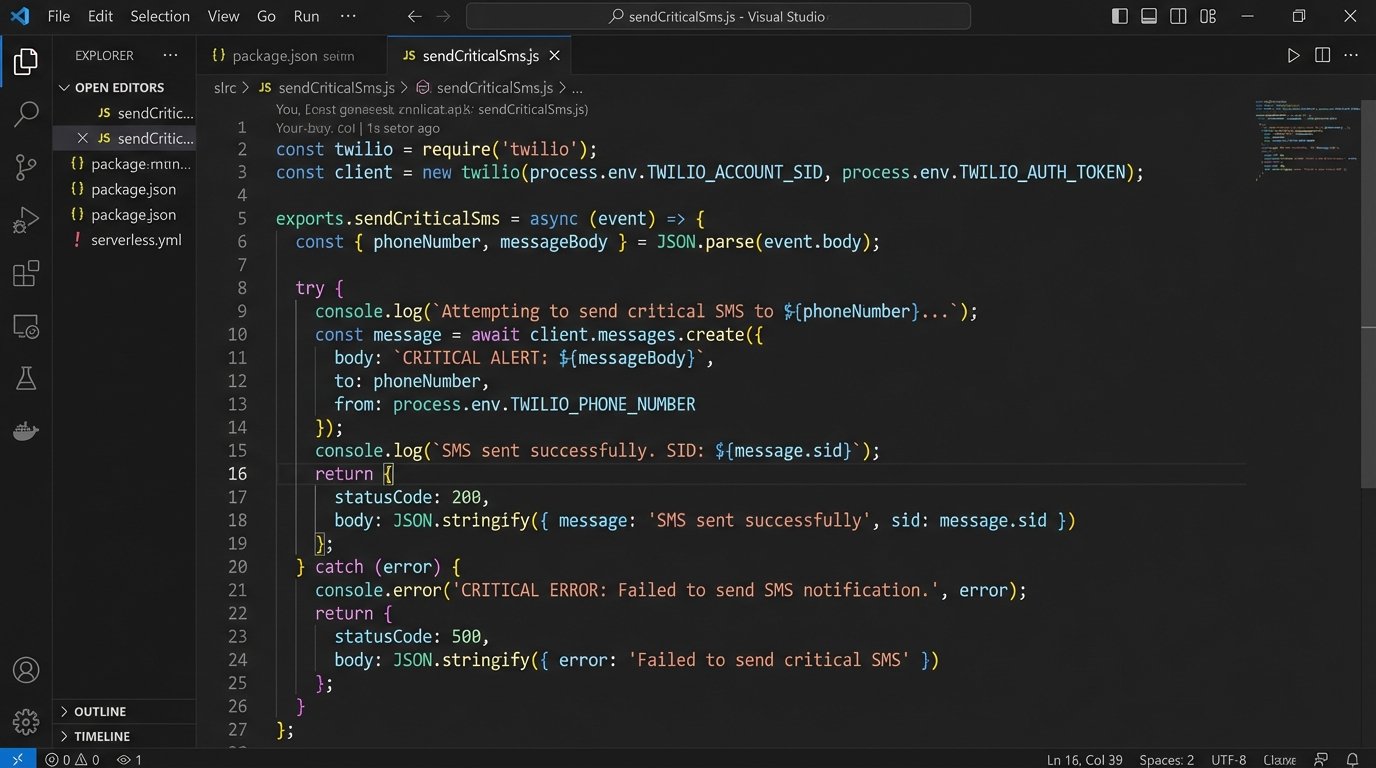
Everything I’ve discussed is amplified for SMS. Email is a forgiving medium. An unwanted message gets archived or ignored. An unwanted SMS feels like a physical intrusion. The tolerance for error is zero. You cannot “oops” your way out of a bad SMS blast that hits thousands of customers at 3 AM because a cron job was configured in the wrong timezone.
The rules for SMS are simple and harsh. First, the trigger must be an explicit user action or a critical account notification. “Your package has shipped” is a good SMS. “Check out our new spring sale” is a terrible SMS unless the user has explicitly opted in for promotional texts. Second, the timing must be perfect. The message should arrive within seconds of the triggering event. A password reset code that arrives ten minutes late is useless. This demands a high-availability, low-latency processing pipeline.
Most importantly, the data must be perfect. Sending a text to the wrong number is not just an error; it can be a compliance violation depending on the region and content. Phone number validation and sanitation must be aggressive. Any automation that triggers an SMS must have its logic triple-checked. This channel has the power to destroy customer trust in a single, 160-character mistake.
Build for Utility, Not Personality
The goal of all this work is not to create a “personal” connection or to simulate a human conversation. That is a fool’s errand. A machine will never be your customer’s friend. The goal is to be brutally efficient and useful. The best automated communication is the one that solves the user’s problem before they even have to ask, then gets out of the way.
Forget about crafting the perfect, witty email copy. Instead, focus on the integrity of the trigger. Map out every critical event in your user’s lifecycle: account creation, trial expiration, feature usage limits, payment success, payment failure, and subscription cancellation. For each event, design a workflow that provides immediate, actionable information. That is the beginning and the end of the job.
This requires a shift in thinking from marketing to engineering. It means prioritizing system architecture over campaign slogans. It requires a budget for data hygiene and monitoring. The result is a system that feels less like a series of marketing campaigns and more like an extension of the product itself. It is quiet, reliable, and helpful. In a world of noisy, irrelevant notifications, that is the only thing that earns a client’s attention.