Automating client communication is not about canned, impersonal emails. It is about surgically removing points of failure and operational drag from your firm. The goal is to build a system that transmits critical information with machine-level reliability, because a paralegal forgetting to send a court date reminder is a liability. This is an engineering problem with direct impact on case outcomes and malpractice risk.
We will construct a three-part communication stack. This stack is built on the reality that most legal data lives inside a clunky Case Management System (CMS) with a poorly documented API. Our work will bridge that legacy system to modern communication channels: direct status updates, intelligent appointment reminders, and a front-line chatbot to field redundant questions. Forget marketing fluff. This is about operational integrity.
Prerequisites: Checking the Foundation Before You Build
Before writing a single line of code, you have to audit the source. The single source of truth for all client and case data must be your CMS. If you have paralegals managing critical dates in spreadsheets and lawyers using personal calendars, this entire project is dead on arrival. You cannot automate a process that doesn’t exist. The first step is to force all data into one locked-down system.
API access is the next gate. You need to know what you’re dealing with. Is it a modern REST API with OAuth 2.0, or are you stuck with a decade-old SOAP endpoint that demands a static API key? Get the credentials, read the documentation, and then assume the documentation is wrong. Your first task is to run a simple `GET` request with Postman or cURL to pull a test case record. If that fails, everything else is theoretical.
The tooling stack itself depends on your budget and internal skillset. You can glue simple things together with platforms like Zapier, but they become a wallet-drainer at scale and offer zero granular control over error handling. A serious implementation requires a dedicated script running on a server or as a serverless function (AWS Lambda, Azure Functions). Python with Flask for webhooks and the Requests library for API calls is a standard, battle-tested setup. For messaging, Twilio for SMS and SendGrid for email are the industry defaults for a reason: they work and their APIs are predictable.
Part 1: Engineering Automated Case Status Updates
The core logic here is event-driven. A specific action inside the CMS must trigger an outbound message. We are not polling the database every five minutes. That is inefficient and will likely get your IP address banned by your CMS provider. The correct implementation uses webhooks. When a field like `Case.Status` is changed from “Discovery” to “Deposition Scheduled” in the CMS, the system should fire a POST request with the case data payload to an endpoint you control.
Step 1: Configure the CMS Webhook
Locate the webhook or integration settings in your CMS. This is often buried under an “Administrator” or “Developer” panel. You will need to provide a URL for your listener endpoint. This URL must be publicly accessible. During development, a tool like ngrok is essential for exposing your local machine to the internet to receive these test payloads. Without it, you are coding blind.
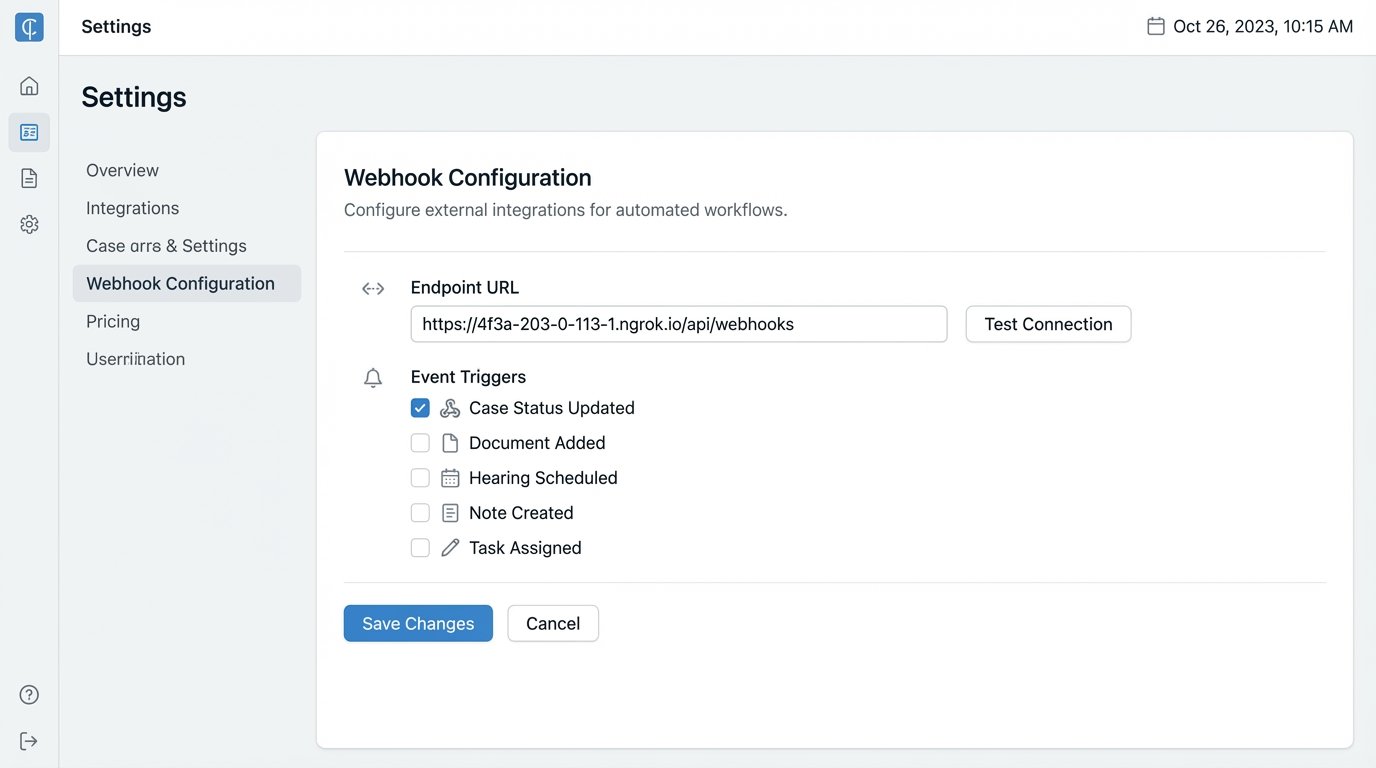
The payload sent by the CMS is often a messy, deeply nested JSON object. Your first job is to simply capture and log this payload to understand its structure. You need to identify the unique case ID, the client’s contact information, and the old versus new status fields. Do not build your logic until you have seen the actual data.
Step 2: Build the Webhook Listener
A simple web server is all you need to catch the webhook. Here is a bare-bones example using Python and Flask. This code does nothing but receive the request, print the JSON payload, and return a success response. This is the first building block.
from flask import Flask, request, jsonify
app = Flask(__name__)
@app.route('/webhook-listener', methods=['POST'])
def receive_webhook():
if request.is_json:
data = request.get_json()
case_id = data.get('caseId')
new_status = data.get('newStatus')
# Log the received data for debugging
print(f"Received update for case {case_id}: status changed to {new_status}")
# Next steps: Trigger message mapping and sending logic here
return jsonify({"status": "success"}), 200
else:
return jsonify({"error": "Request must be JSON"}), 400
if __name__ == '__main__':
app.run(debug=True, port=5000)
This script is the entry point. A 200 status code tells the CMS that you have successfully received the event. If you return an error or time out, many systems will attempt to resend the webhook, creating a nasty duplicate processing problem.
Step 3: Map Statuses and Send Notifications
Never send raw system statuses to a client. They don’t know what “Awaiting Docs_FINAL_v2” means. You must create a mapping layer that translates internal jargon into clear, concise language. A Python dictionary is a straightforward way to manage this.
STATUS_MAP = {

    "DISCOVERY_PENDING": "Our team is currently gathering initial documents for your case.",

    "DEPO_SCHEDULED": "We have scheduled a deposition. You will receive a separate confirmation with the date and time.",

    "SETTLEMENT_OFFER": "We have received a settlement offer. Your case manager will contact you shortly to discuss it."

}
def get_client_message(status_code):
return STATUS_MAP.get(status_code, "Your case has been updated. Please log in to the client portal for details.")
This function isolates the messy logic of translation. The final step is to call the appropriate communication API, injecting the client’s phone number or email and the human-readable message. Wrap these API calls in `try…except` blocks. Network connections fail, and APIs go down. Your script cannot crash because Twilio had a momentary outage.
Logging the result of every attempted send is non-negotiable. You need an audit trail to prove a message was sent, or to debug why it failed. A simple log file is a start; a proper logging service is better.
Part 2: A Reliable System for Appointment Reminders
Appointment reminders are more complex than status updates because they are time-sensitive and user-specific. The architecture here shifts from event-driven to a scheduled task. A cron job or a scheduled serverless function runs once a day, queries the CMS for upcoming appointments, and dispatches reminders. This seems simple, but the process is like trying to shove a firehose of data through the needle of time zone conversions and user preferences.
Step 1: The Daily Query
Your script needs to query the CMS for all appointments scheduled for the next 24 or 48 hours. The API call must be precise. You need to filter by date range. Pulling all appointments and filtering in your script is horribly inefficient. The query should look something like `GET /api/v1/appointments?start_date=YYYY-MM-DD&end_date=YYYY-MM-DD`.
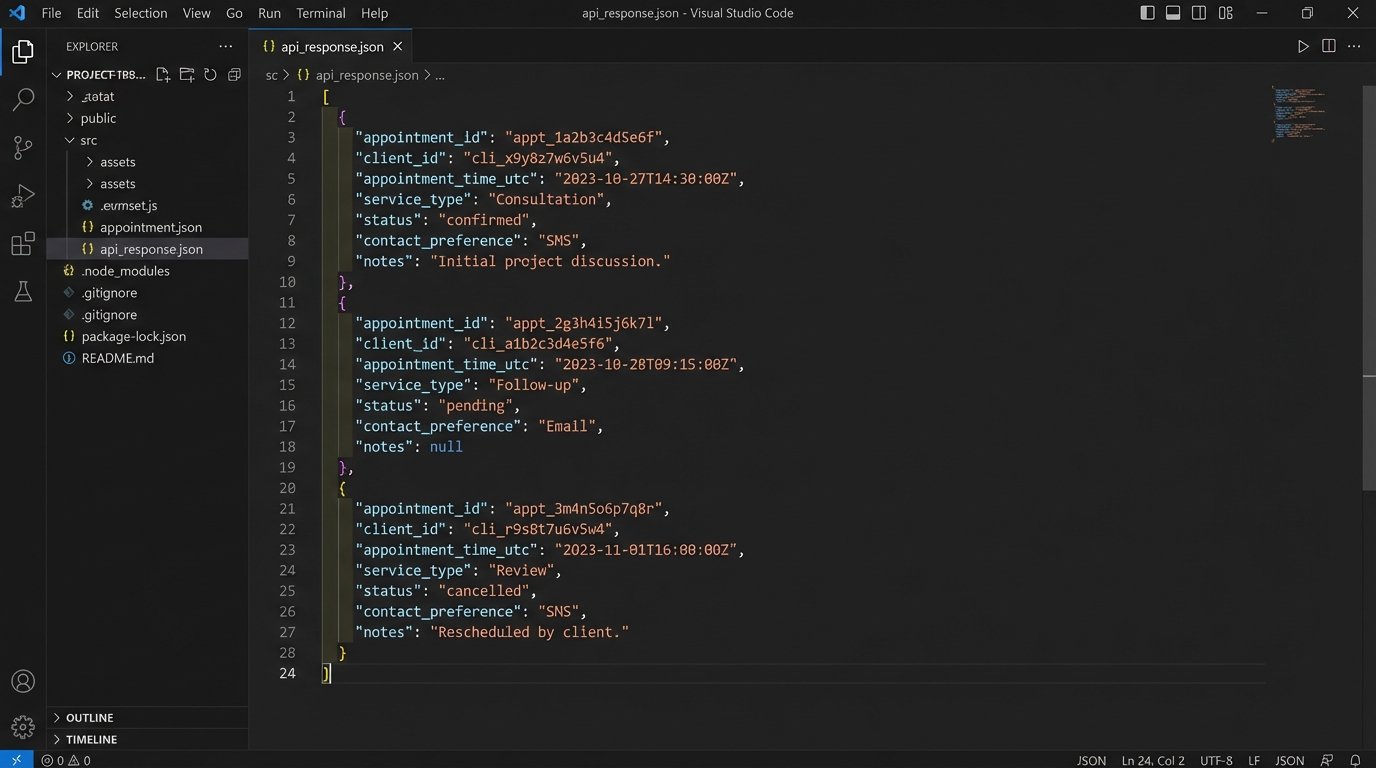
The response will be a list of appointment objects. Each object needs to contain the client ID, appointment time, and appointment type. It also must contain the client’s communication preference. If your CMS does not have a field for `ContactPreference` (e.g., “SMS”, “Email”, “None”), you have a data model problem that must be fixed before any automation is possible.
Step 2: Handling Time Zones and Preferences
Databases should always store time in UTC. Always. The reminder script is responsible for converting that UTC time to the client’s local time zone before sending the message. Storing a `Client.TimeZone` field (e.g., “America/New_York”) in your CMS is the only sane way to do this. Hard-coding office hours or assuming a single time zone is a rookie mistake that results in sending text messages at 3 AM.
The logic flow is straightforward. For each appointment, check the `ContactPreference` field. If it’s “Email”, call the SendGrid function. If it’s “SMS”, call the Twilio function. If it’s “Both”, call both. If it’s blank or “None”, do nothing. This conditional logic prevents you from spamming clients who have explicitly opted out.
Step 3: Idempotency and State Management
What happens if your script runs twice by accident? You cannot send duplicate reminders. Your system must be idempotent, meaning running it multiple times has the same effect as running it once. The simplest way to achieve this is to record the fact that a reminder has been sent. After successfully sending a reminder for an appointment, write the appointment ID and reminder type (e.g., “24-hour”) to a separate logging database or even a simple file. Before processing any appointment, check if a reminder has already been logged for it.
This prevents embarrassing and confusing duplicate messages. It is a critical detail that separates a reliable system from a fragile one.
Part 3: A Practical Chatbot for Triage
Most client questions are repetitive. “Where is your office?” “What is my case number?” “How do I upload a document?” A chatbot can deflect these low-value queries, freeing up staff time. The goal is not to create a sentient AI lawyer. The goal is to build a simple, predictable, rules-based system that can answer the top 20% of common questions and intelligently escalate everything else.
Step 1: Intent Definition, Not AI Magic
Start with your data. Pull the last six months of emails from your main contact inbox and phone logs from the front desk. Categorize every single query. You will quickly see patterns. These categories become your chatbot “intents.” An intent is just a mapping of a user’s question to a pre-defined answer. Use a platform like Google Dialogflow or Rasa to build these mappings. You do not need a large language model for this.
For example, questions like “Where are you located?”, “What’s the address?”, and “How do I get to your office?” all map to the `FindOfficeLocation` intent. The response for this intent is always the same static block of text with your address and a map link.
Step 2: The Secure API Handshake for Case Data
Some intents require access to case data. A query like “What’s the status of my case?” cannot be answered with a static response. This requires the chatbot to query your CMS. You cannot give the chatbot platform your primary CMS API keys. That is a massive security risk.
Instead, you build a middleman API. This is a highly restricted, single-purpose endpoint that your chatbot can call. The endpoint should only expose the specific data needed and nothing more. The flow works like this:
- Chatbot asks the user for their case number and a second authenticator (e.g., date of birth).
- Chatbot sends this information to your secure middleman API.
- Your API validates the information against the CMS.
- If valid, your API calls the main CMS API, retrieves only the case status, translates it using the same mapping logic from Part 1, and returns the single, human-readable string to the chatbot.
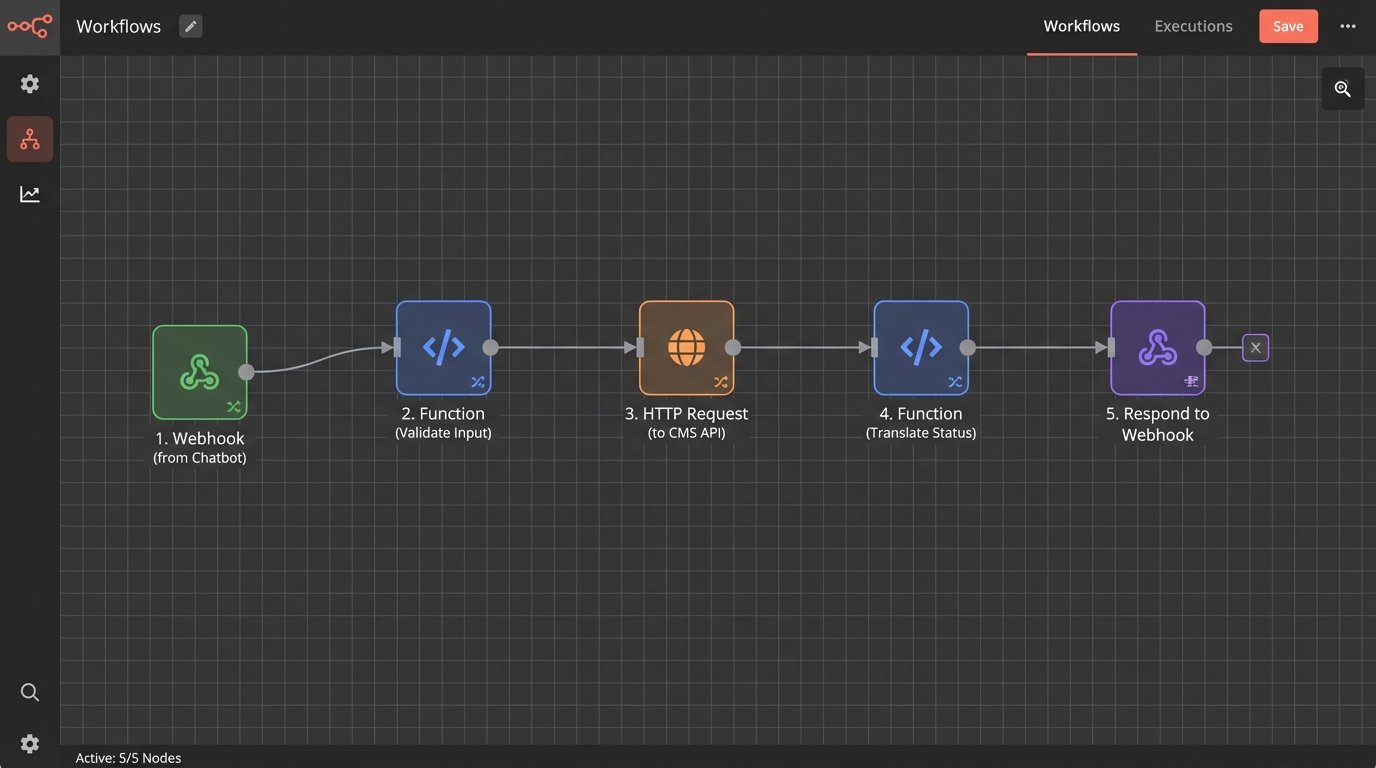
This architecture limits your exposure. The chatbot platform never has direct access to your core system.
Step 3: The Escalation Path
The most important feature of any chatbot is knowing when to quit. If the bot cannot match a user’s query to an intent with a high confidence score, its only job is to escalate to a human. The escalation should be seamless. The bot should say, “I can’t answer that, but I can create a ticket for our team. Please describe your issue.” The bot then collects the information and uses an API to create a ticket in your practice management or help desk system, assigning it to the right person.
A bot without a clean escalation path is just an obstacle. It creates frustration and makes your firm look incompetent.
Maintaining and Validating the System
Building this stack is only half the battle. These systems require monitoring. You need to set up health checks that ping your endpoints. You need alerting that notifies you if the daily reminder script fails to run or if the webhook listener starts returning a high rate of 500 errors. Relying on clients to report that they missed a meeting is not a maintenance strategy.
All of this code must live in a version control system like Git. All changes must be tested in a staging environment that mirrors production as closely as possible. Testing against a live, production CMS is a recipe for corrupting data or spamming real clients with test messages. A proper staging environment, including a sandboxed instance of your CMS, is not optional.
This level of automation is not a one-time project. It is a piece of critical infrastructure. It reduces manual error, creates an unimpeachable audit trail of communications, and plugs the operational gaps that lead to client complaints and malpractice claims. The improved client experience is simply a useful byproduct of sound engineering.