Your firm’s client intake is a liability masquerading as a process. Each manually transcribed phone number, every misspelled name, introduces a data-debt that compounds with every document filed. The objective is not to make intake friendlier. The objective is to make it deterministic. This guide is about forcing data into a structured format from the first point of contact, bypassing the paralegal’s keyboard and injecting it directly into your case management system. Forget about “client experience” for a moment. Think about data integrity.
Prerequisites: The Non-Negotiable Stack
Before you write a single line of code, you need access and tooling. Getting this access is a political problem, not a technical one, so solve it first. Do not proceed without a firm yes on these three points, or you will be blocked at the first hurdle.
- A Form Builder with Webhooks: Standard embedded forms that email you a flat text file of the results are useless. You need a tool that can trigger a POST request to an endpoint you control upon submission. Gravity Forms, Typeform, or Jotform all have this capability. Check the documentation for rate limits on webhook calls.
- Case Management System API Access: You need programmatic access to your firm’s CRM or case management system (CMS). This means an API key with write permissions, not your personal login credentials. If your CMS is a legacy desktop application with no web API, stop here. Your project is an internal data migration, not an intake automation task.
- A Middleware Environment: Never point a public-facing form directly at your primary case management API. You need a middle layer to catch, validate, and transform the data. An AWS Lambda function, Google Cloud Function, or even a simple Express.js app on a small server instance is required. This is your sanitation airlock.
Securing the API Key
Requesting an API key is often the first point of failure. The person who holds the master account for your Clio, MyCase, or Salesforce instance might not even know what an API is. You need to be specific. Ask for a “production key with permissions to create new contacts and matters.” Specify that you need the “secret” as well as the “key.” Get it in writing. Store it in a proper secrets manager like AWS Secrets Manager or HashiCorp Vault, not in a text file on a shared drive.
Step 1: Architecting the Intake Form
The client doesn’t care about your database schema. They care about answering as few questions as possible. Your job is to build a form that feels short but extracts the maximum amount of structured data. This is achieved with aggressive conditional logic.
Every question should be a gate. Does the client select “Divorce” as their case type? Show the fields for “Spouse’s Name” and “Date of Marriage.” Do they select “Personal Injury”? Suppress the divorce fields and show “Date of Incident” and “Location of Incident.” The goal is a form that dynamically reshapes itself based on user input, preventing them from ever seeing an irrelevant field.
This client-side logic has a performance cost. A form with 50 fields and 200 conditional rules can become sluggish on slow connections. Test it. Profile the JavaScript execution time. If it’s slow, you’ve built a bad experience that will be abandoned.
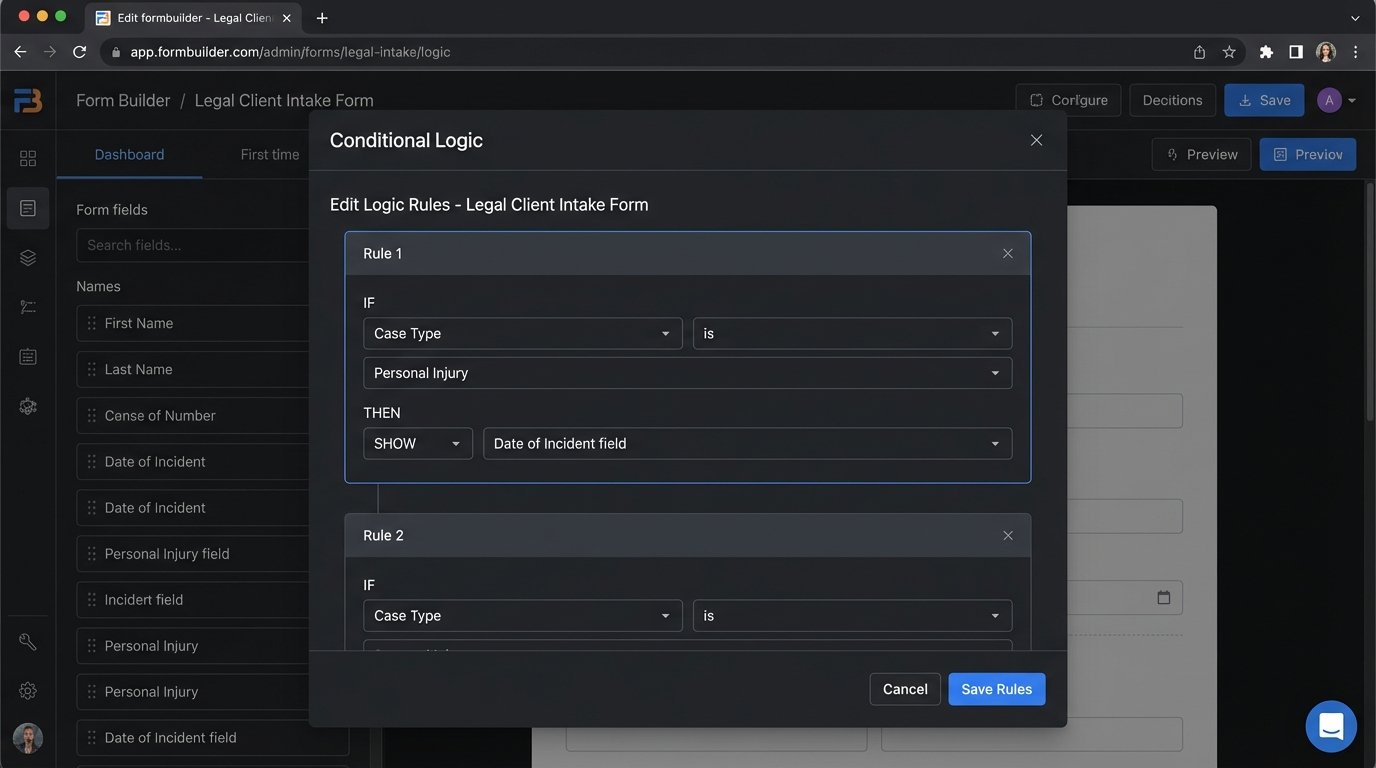
Your form’s output should be a clean JSON object. Do not allow free-text fields where a structured option is possible. Use dropdowns for case types, date pickers for dates, and address auto-completion APIs to reduce transcription errors. Force the user to provide clean data because you cannot trust them to do it on their own.
Step 2: The Chatbot as a Triage Bot
Chatbots are mostly useless for substantive legal advice. Their actual function in an intake stack is to act as a highly interactive routing and qualification script. A well-configured chatbot is not a replacement for a paralegal. It is a filter that prevents unqualified leads from ever consuming a paralegal’s time.
Forget complex natural language processing for the initial interaction. Use a simple decision-tree structure. The bot’s first question should be direct: “What legal issue can I help you with today?” Provide buttons for your main practice areas. Based on the button clicked, the bot then executes a pre-written script to ask the bare minimum qualifying questions.
Escalation is the Only Feature That Matters
The chatbot will fail. It will misinterpret a user’s request or get stuck in a logic loop. The single most important part of its design is the escape hatch. There must be a clear, persistent option to “Speak with a human.” This action must trigger a reliable notification. It could be a message to a specific Slack channel, an email to an intake team alias, or an event pushed to a live chat tool like Intercom. A chatbot with no clear escalation path is just a digital wall between you and a potential client.
Step 3: Bridging the Form to the CRM
This is where the real work happens. The form is submitted, the webhook fires, and your middleware receives a JSON payload. Now you must sanitize, validate, and transform that data before you can safely inject it into your case management system. This process is fragile and breaks constantly.
Your middleware function has one job: translate the chaotic, user-generated data from the form into the rigid, strictly-typed structure your CRM’s API expects. This is like trying to shove a firehose of unstructured JSON through the keyhole of a typed CRM API endpoint. You must map every single field. The form field `client_email` must be mapped to the `primary_email` field in your CRM’s Contact object. If the CRM expects a phone number as an integer but your form sends it as a formatted string, your code must strip the parentheses and hyphens before making the API call.
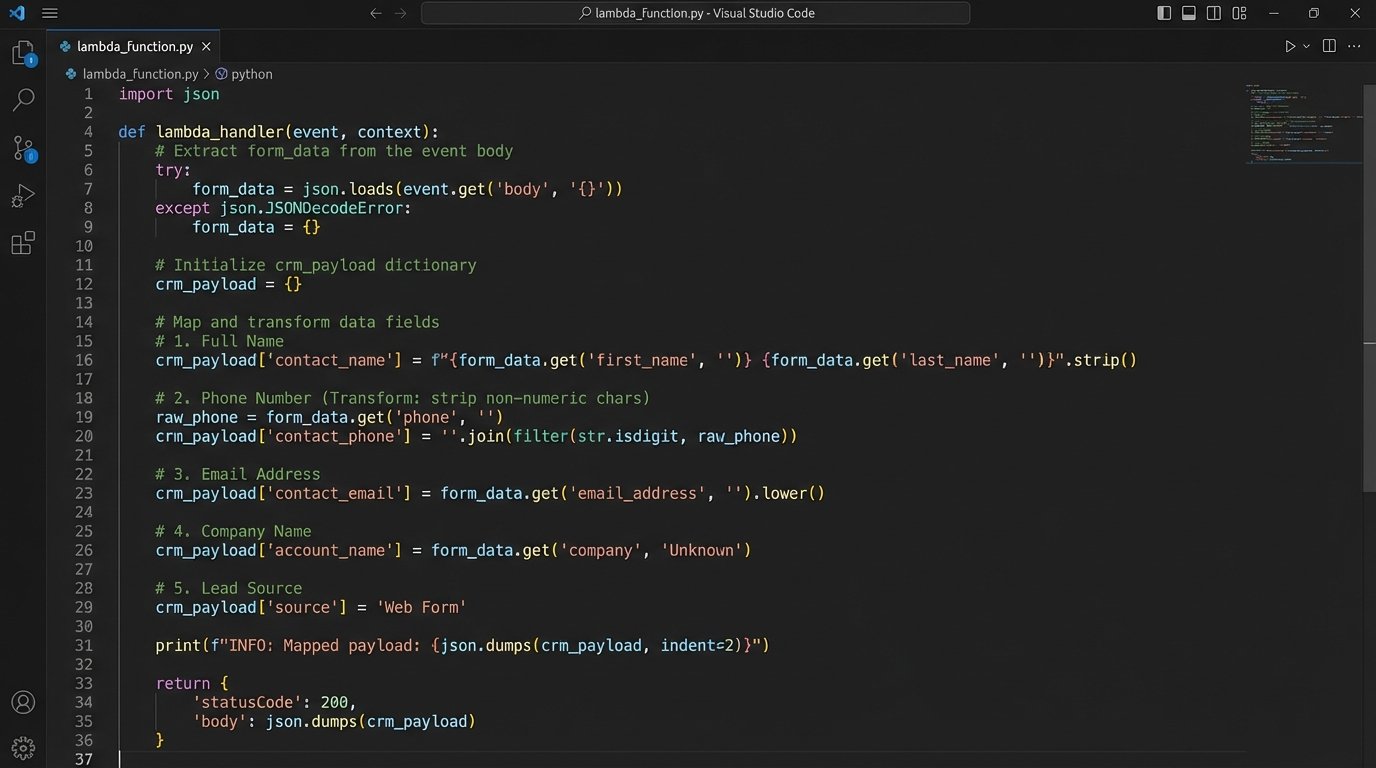
Below is a skeletal Python example using the `requests` library to post a new contact to a hypothetical CRM API. This runs in your middleware, like AWS Lambda.
import json

import os

import requests
def create_crm_contact(event, context):
# Extract form data from the incoming webhook event
form_data = json.loads(event['body'])
# Get API credentials from environment variables, not hardcoded
API_KEY = os.environ.get('CRM_API_KEY')
API_ENDPOINT = 'https://api.yourcrm.com/v4/contacts'
# Map form fields to the CRM's expected schema
# This mapping is the most fragile part of the entire system
crm_payload = {
'contact': {
'first_name': form_data.get('firstName'),
'last_name': form_data.get('lastName'),
'email_address': {
'address': form_data.get('email'),
'type': 'primary'
},
'phone_number': {
'number': ''.join(filter(str.isdigit, form_data.get('phone'))), # Strip formatting
'type': 'mobile'
}
}
}
headers = {
'Authorization': f'Bearer {API_KEY}',
'Content-Type': 'application/json'
}
try:
response = requests.post(API_ENDPOINT, headers=headers, json=crm_payload)
# Force an exception for bad status codes (4xx or 5xx)
response.raise_for_status()
except requests.exceptions.RequestException as e:
# Log the error for debugging
print(f"API call failed: {e}")
# Return an error response to the caller
return {
'statusCode': 500,
'body': json.dumps({'message': 'Failed to create contact in CRM'})
}
# If successful, return the new contact's ID
return {
'statusCode': 201,
'body': json.dumps(response.json())
}
This code is deceptively simple. The real problem emerges when the marketing team decides to add a “middle_name” field to the form. Your code knows nothing about this field. It is ignored. Six months later, someone complains that middle names are missing from the CRM. Now you have to debug the middleware, update the mapping, and figure out a backfill strategy for the missing data.
Step 4: Logic-Checking and Failure States
Automation creates new and more interesting ways for things to break. A successful API call that creates a duplicate contact is worse than a failed one. Your middleware must be defensive.
Before you even attempt to create a new contact, you should perform a lookup. Does a contact with this email address or phone number already exist? If so, your logic should append the new intake information as a note or a new matter linked to the existing contact. Creating a duplicate is a cardinal sin. It splits the client’s history across two records and causes massive confusion down the line.
Handling API Downtime
Your CRM’s API will go down. It will return 503 errors during its maintenance window. It will time out. Your middleware cannot simply drop the intake data on the floor when this happens. A robust system uses a dead-letter queue (DLQ). If the initial API call fails, the entire JSON payload from the form is shunted to a queue. A separate process can then attempt to re-process these failed submissions every few minutes.
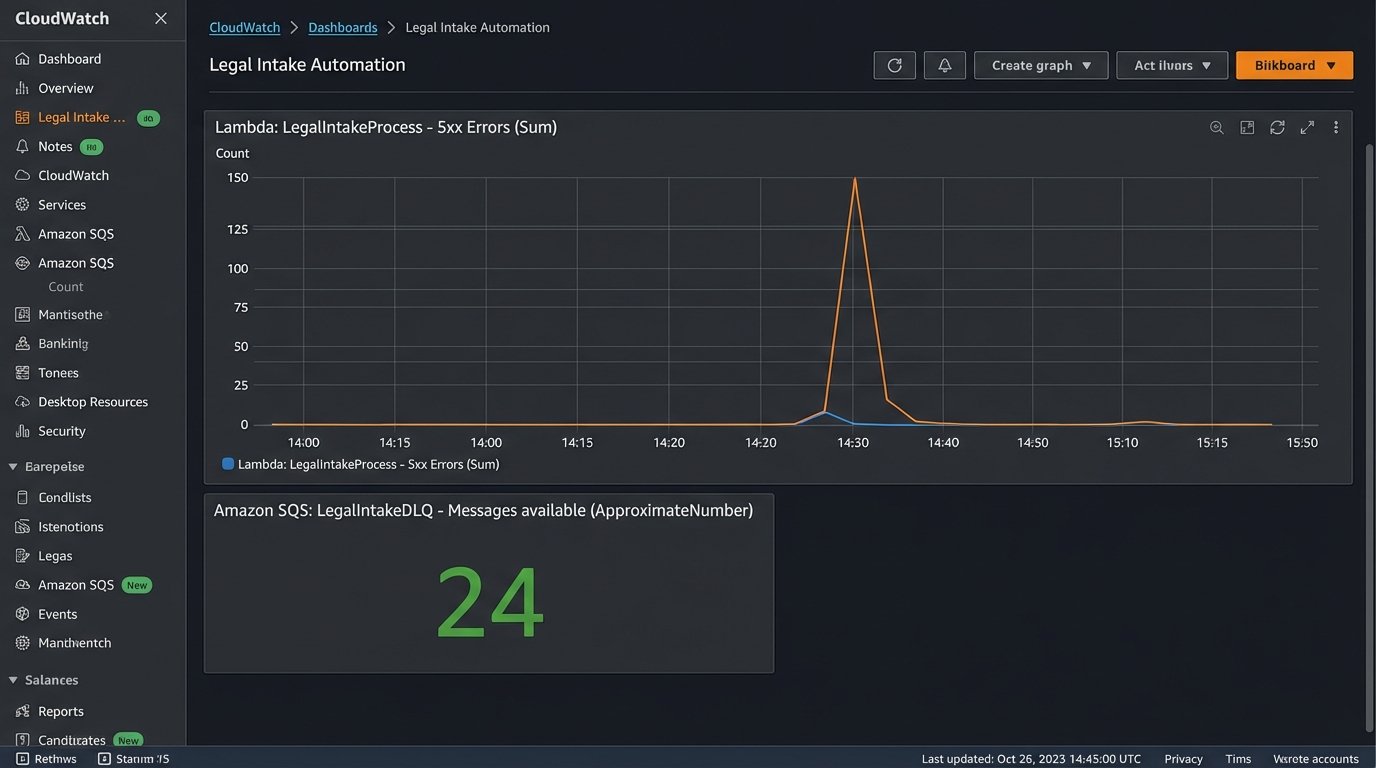
Without a retry mechanism and a DLQ, you are guaranteeing data loss. You will lose potential clients and have no record of their attempt to contact you. This is not a corner you can cut.
Post-Deployment is a Verb
The system is live. The work is not over. You are now responsible for monitoring. Set up alerts for API error rates. Watch the logs for malformed data payloads. When the firm adds a new practice area, you have to update the conditional logic on the form, the decision tree in the chatbot, and the field mapping in the middleware.
This is not a project that you finish. It is a system that you maintain. The goal was never to build a fancy website widget. The goal was to enforce data quality at the point of entry. The cost is constant vigilance.