Most legal CRMs are digital graveyards. They hold client data hostage, accessible only through manual reports that are obsolete the moment they are generated. A “client-centric approach” is not about warm feelings. It is about building a data pipeline that forces proactive communication and exposes operational drag before a client complains. This is an engineering problem, not a marketing one.
Prerequisites: Auditing Your Data Structure
You cannot automate a mess. Before writing a single line of code or building a workflow, you must strip the CRM data down to its essential components. Most off-the-shelf legal tech CRMs are bloated with hundreds of default fields you will never use, while missing the critical custom fields your firm actually needs. Your first job is to perform a data model audit.
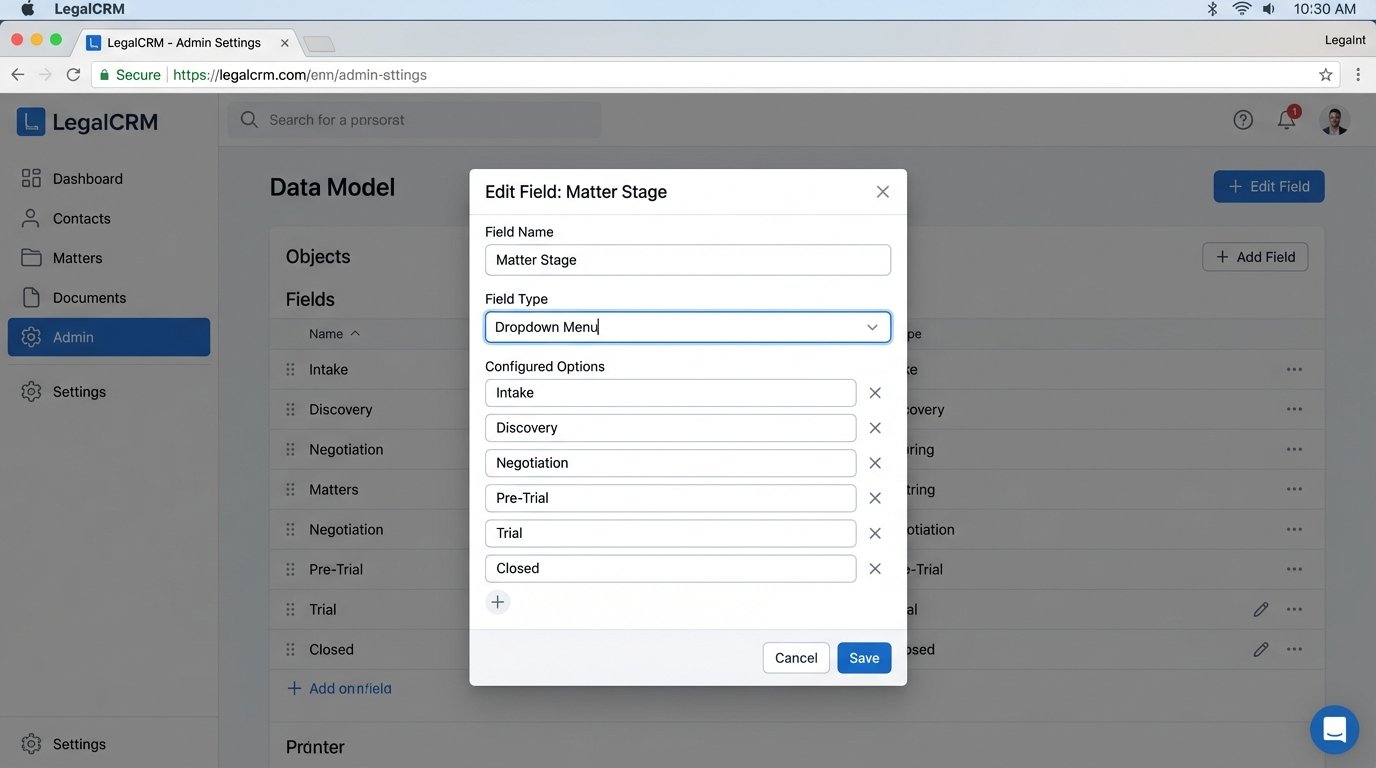
Focus on standardizing fields that will drive logic later. This means forcing dropdown menus or dependent picklists instead of allowing free-text entry for core data points like “Matter Stage,” “Client Status,” or “Practice Area.” A user typing “Corp” instead of “Corporate” breaks your automation before it even runs.
Key Fields to Standardize
- Matter Stage: Define a finite, linear progression. For example: Intake > Discovery > Negotiation > Pre-Trial > Trial > Closed. This becomes the primary trigger for stage-specific communications.
- Last Contact Date (Client): A timestamp automatically updated by an integrated system, not manually by a paralegal. This field is the bedrock for identifying clients who are being ignored.
- Last Action Date (Firm): A timestamp that logs the last time anyone at the firm logged a note, sent an email, or updated a document related to the matter. This helps differentiate between client contact and internal work.
- Communication Preference: A simple picklist. Email, SMS, Phone Call. This prevents you from building an SMS reminder system for a client who only wants emails.
This initial data cleansing is the most tedious, politically charged part of the project. It requires you to force attorneys and paralegals to change how they input data. There is no shortcut.
Building Automated Reminders with API Webhooks
Native CRM automation tools are often sluggish and limited. They are fine for sending a happy birthday email but fall apart when you need conditional logic or integrations with external systems. Bypassing the native tools and working directly with the CRM’s API gives you precise control over the entire process. The goal is to set up event-driven notifications.
The architecture is simple. An external, lightweight script runs on a schedule (e.g., a cron job on a Linux server or an AWS Lambda function). This script queries the CRM’s API for specific conditions. For example, “find all open matters in the ‘Discovery’ stage where the ‘Last Action Date’ is more than 14 days ago.” For each record returned, the script then makes a second API call to create a task assigned to the responsible attorney.
Example: A Python Script for Inactivity Alerts
This is a stripped-down example using Python to query a hypothetical CRM’s API. It identifies stalled cases and creates a follow-up task. This assumes you have an API key with the correct permissions and that the endpoint documentation is not a complete work of fiction.
import requests
import json
from datetime import datetime, timedelta
API_KEY = ‘YOUR_SECRET_API_KEY’
API_ENDPOINT = ‘https://api.yourlegalcrm.com/v2/’
HEADERS = {
‘Authorization’: f’Bearer {API_KEY}’,
‘Content-Type’: ‘application/json’
}
def find_stalled_matters():
two_weeks_ago = (datetime.now() – timedelta(days=14)).isoformat()
query_params = {
‘filters[matter_stage]’: ‘Discovery’,
‘filters[last_action_date_before]’: two_weeks_ago,
‘filters[status]’: ‘Open’
}
try:
response = requests.get(API_ENDPOINT + ‘matters’, headers=HEADERS, params=query_params)
response.raise_for_status() # This will raise an HTTPError for bad responses (4xx or 5xx)
return response.json().get(‘data’, [])
except requests.exceptions.RequestException as e:
print(f”API request failed: {e}”)
return []
def create_followup_task(matter_id, attorney_id):
task_payload = {
‘title’: ‘Stalled Matter Alert: Follow-up Required’,
‘due_date’: (datetime.now() + timedelta(days=1)).strftime(‘%Y-%m-%d’),
‘assigned_to_user_id’: attorney_id,
‘related_matter_id’: matter_id,
‘description’: ‘This matter has had no firm-side activity for over 14 days. Please review and update.’
}
try:
response = requests.post(API_ENDPOINT + ‘tasks’, headers=HEADERS, data=json.dumps(task_payload))
response.raise_for_status()
print(f”Task created for matter {matter_id}”)
except requests.exceptions.RequestException as e:
print(f”Failed to create task for matter {matter_id}: {e}”)
if __name__ == “__main__”:
stalled_matters = find_stalled_matters()
if stalled_matters:
for matter in stalled_matters:
create_followup_task(matter[‘id’], matter[‘responsible_attorney_id’])
else:
print(“No stalled matters found.”)
This script is brutally simple. A production version requires robust error handling, logging, and pagination for the initial query. It also depends on the API providing reliable filtering, which is often a generous assumption.
Tracking and Ingesting Communications
An automated reminder is useless if the CRM data is stale. The system must automatically ingest client communications to keep the ‘Last Contact Date’ accurate. This means bridging your email server and any SMS platforms directly to the CRM. You are trying to get systems that were never designed to speak to each other to share data reliably. This part of the project is often like trying to pipe a river through a garden hose.
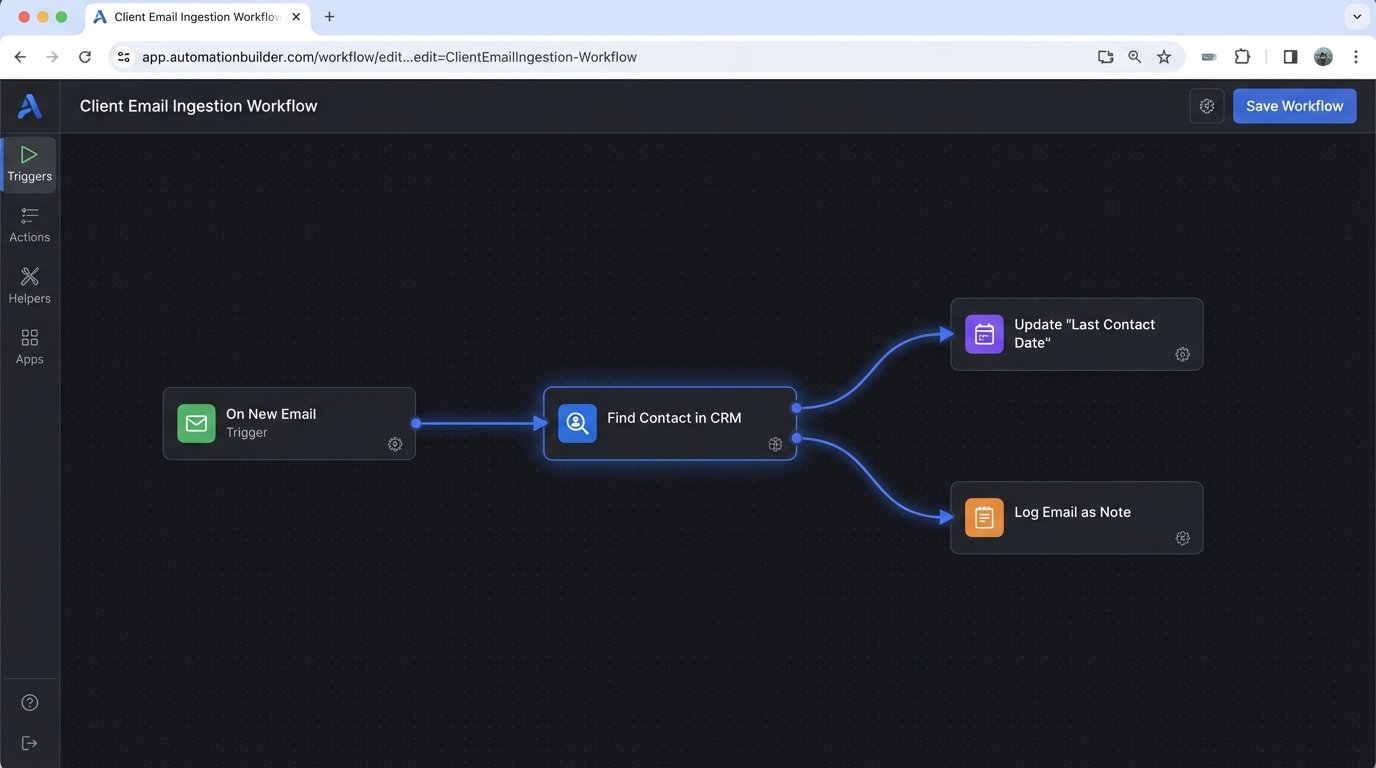
For email, you can use services like Zapier or Integromat to watch a dedicated inbox or use more direct methods like Microsoft Power Automate to trigger a workflow whenever an email from a client’s domain arrives. The workflow’s job is to parse the email, find the corresponding contact in the CRM using the sender’s address, and then post a record of the email as a note or activity on their contact record. It must also update the ‘Last Contact Date’ field.
SMS tracking is more direct if you use a platform with a coherent API, like Twilio. You can configure a webhook in Twilio that fires every time an incoming message is received. This webhook points to a small application you host that receives the message data (sender number, message body, timestamp) and injects it into the appropriate CRM record. This bypasses the need for anyone to manually log that a text message was received or sent.
Challenges in Communication Logging
- Data Mapping: The primary challenge is accurately mapping an incoming communication to the correct contact and matter. Relying on an email address is simple. Mapping an inbound phone number to a specific client among thousands can be problematic if numbers are not unique or are not properly formatted in the CRM.
- Noise Filtering: You must build logic to filter out automated replies, spam, and other non-essential communications. Logging every single email will quickly bury attorneys in useless activity notifications.
- API Rate Limits: Hitting your email server and CRM APIs constantly can trigger rate limiting. You must implement intelligent batching and queueing to avoid being temporarily blocked by the services you depend on.
This is not a set-it-and-forget-it system. It is a fragile data bridge that needs constant monitoring.
Using Data to Personalize Client Interactions
Once you have reliable data and communication logging, you can move beyond simple alerts. True client-centric automation uses aggregated data to personalize outreach. This is not about inserting a contact’s first name into an email template. It is about using matter-specific data to provide relevant information at the right time.
For instance, you can segment clients based on their matter type and current stage. A client in a personal injury case who has just entered the “Negotiation” stage could automatically receive a pre-written email explaining what to expect during this phase. This email is triggered by the ‘Matter Stage’ field changing in the CRM. This reduces the time attorneys spend answering the same procedural questions and demonstrates proactive management of the case.
Segmentation Logic Example
To build these segments, you need to query your CRM data for records that meet multiple criteria. Think of it as a simple database query. The logic looks for a combination of tags, field values, and date ranges to create a target list for a specific communication campaign.
A pseudo-SQL query to find these clients might look like this:
SELECT
contact.id,
contact.full_name,
contact.email_address
FROM
contacts contact
JOIN
matters matter ON contact.id = matter.client_id
WHERE
matter.practice_area = ‘Personal Injury’
AND matter.stage = ‘Negotiation’
AND matter.stage_last_changed_date = CURRENT_DATE;
This query identifies all personal injury clients whose matter stage was just updated to ‘Negotiation’ today. An automation script would run this logic daily, then feed the resulting list of email addresses into an email sending service, injecting matter-specific details into the template. The key is that the trigger is a change in structured data, not a manual action.
Validation and Health Monitoring
Automation is not a one-time setup. It is a system that requires constant validation and monitoring. APIs change, credentials expire, and third-party services have outages. An automation that fails silently is more dangerous than no automation at all because it creates a false sense of security.
Implement a basic logging system for every automated script. At a minimum, log every run, the number of records processed, and any errors encountered. For API calls, log the request payload and the response status code. These logs are the first place you will look when an attorney reports that they did not get an alert they were expecting.
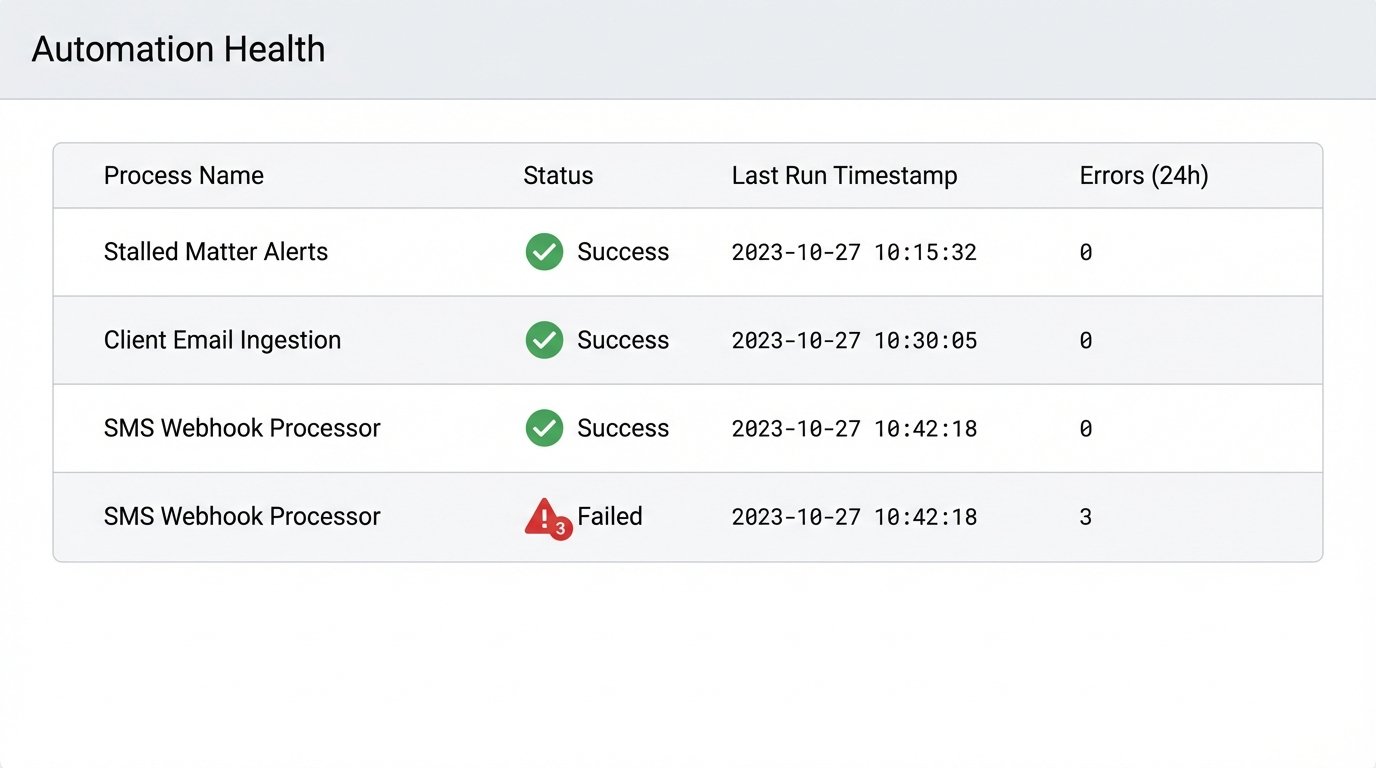
A simple health dashboard can provide a high-level view of your automations. This does not need to be complex. It can be a simple internal webpage that shows the last successful run time for each automated job and a count of any errors in the last 24 hours. This visual check makes it immediately obvious if a critical process has stopped running.
Building these systems requires a fundamental shift. You must treat your firm’s operations as an engineering system, not a collection of manual processes. The payoff is not just efficiency. It is a client experience dictated by logic and data, not by how busy an attorney is on a given day.