
Most automation projects in legal are sold with a promise of frictionless efficiency. The reality is a swamp of poorly documented APIs, user adoption resistance, and weekend maintenance calls. The goal isn’t to buy a magic box. The goal is to build a resilient system that survives contact with your firm’s actual, chaotic workflows and legacy tech stack. Forget the sales deck. This is about what happens after the ink is dry on the purchase order.
Deconstruct the Workflow, Not the PowerPoint Version
Before you write a single line of code or sign a SaaS contract, you must map the target process exactly as it exists. This is not the neat flowchart the practice group leader shows you. This is the version with sticky notes, rogue spreadsheets, and undocumented email chains that serve as critical state management. You must physically observe the end-users performing the task. Document every click, every copy-paste, every time they have to call someone for an approval that isn’t in the official process diagram.
Failure to do this means you automate a fantasy. The resulting tool will be bypassed by users because it doesn’t account for the necessary exceptions they handle dozens of times a day.
Your first deliverable shouldn’t be a proof-of-concept. It should be a brutally honest process map that includes all the ugly, manual workarounds. Get the users to sign off on that map. This document is your shield when management asks why the project is more complex than they assumed.
Isolate the Automation Target
Not all parts of a workflow are fit for automation. Look for the repetitive, rules-based, low-value tasks embedded within a larger process. A classic mistake is trying to automate the entire client intake process from end to end in one go. This is a massive, multi-departmental effort with dozens of edge cases. It is a guaranteed failure.
Instead, target the discrete task of checking for client conflicts. Or the task of creating a new matter shell in the document management system. Isolate a single, high-volume, low-complexity step. Automate that. Prove its reliability. Then, and only then, look for the next adjacent step to connect to it. This incremental approach builds confidence and contains the blast radius when something inevitably breaks.
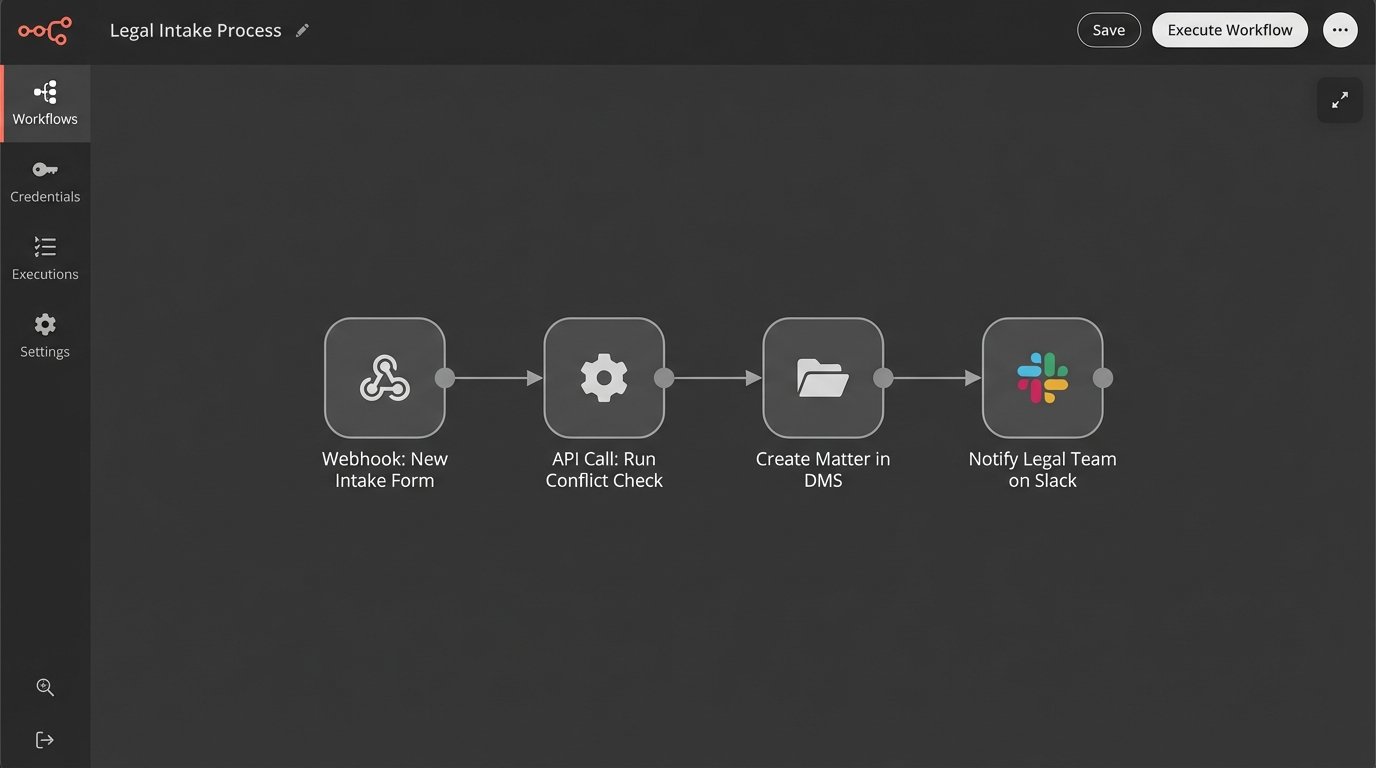
The architecture becomes a Jenga tower of dependencies if you attempt to boil the ocean from day one. Pull one block, and the whole thing collapses. Start with a solid foundation of single, reliable automated tasks.
Vet the API, Not the Salesperson
The slick user interface of a potential software solution is irrelevant. The quality of its Application Programming Interface (API) is everything. Your ability to connect this new tool to your existing systems, like your case management or billing software, depends entirely on the API’s design, documentation, and reliability. Ask for developer-level API documentation before you even agree to a full demo.
Look for these specific red flags:
- Outdated Documentation: Check the “last updated” dates on the API docs. If they are more than a year old, it’s a sign of a neglected platform. The code samples will likely fail.
- Vague Rate Limits: If the documentation doesn’t clearly state the number of API calls allowed per minute or per day, you are flying blind. You risk getting your connection throttled or shut off during critical business hours.
- Lack of Webhooks: A modern API should offer webhooks to push data to your system when an event occurs. If the only way to get data is by constantly polling their server, the integration will be inefficient and slow. It’s the difference between getting a notification and repeatedly asking “Are we there yet?”.
- Poor Error Codes: An API that returns a generic “500 Internal Server Error” for every problem is a nightmare to debug. You need specific error codes that tell you exactly what went wrong, whether it was a bad input, a permissions issue, or a problem on their end.
Force the vendor to give you sandboxed API keys. Run tests against it. A simple health check script can tell you more than an hour-long presentation.
import requests

import os
# Basic check to see if an endpoint is alive and respects credentials.
# This is table stakes. If this fails, walk away.
API_BASE_URL = "https://api.vendor.com/v2/"
API_KEY = os.environ.get("VENDOR_API_KEY")
headers = {
"Authorization": f"Bearer {API_KEY}",
"Content-Type": "application/json"
}
def check_api_health():
try:
response = requests.get(f"{API_BASE_URL}status", headers=headers, timeout=10)
if response.status_code == 200:
print("API Health Check: PASSED. Endpoint is responsive.")
print(f"Response: {response.json()}")
return True
elif response.status_code == 401:
print("API Health Check: FAILED. Unauthorized. Check your API key.")
return False
else:
print(f"API Health Check: FAILED. Status Code: {response.status_code}")
print(f"Response: {response.text}")
return False
except requests.exceptions.RequestException as e:
print(f"API Health Check: FAILED. Connection error: {e}")
return False
if __name__ == "__main__":
check_api_health()
Running this kind of basic test against a vendor’s sandbox environment cuts through the marketing fluff. If they can’t provide a stable environment for you to run these simple checks, imagine the stability of their production environment.
Pilot Programs: Contain the Blast Radius
A firm-wide rollout of a new automation tool on day one is an act of supreme arrogance. It assumes your design is perfect and your users are infinitely patient. Neither is true. You must launch a pilot program with a small, hand-picked group of users. This group should include both tech-savvy enthusiasts and vocal skeptics.
The enthusiasts will find creative ways to use the tool and provide positive momentum. The skeptics will mercilessly identify every flaw, bug, and design oversight. You need both. Their feedback is gold. It allows you to fix critical issues when the user base is five people, not five hundred. This phase is not about proving the tool works. It’s about finding all the ways it breaks.
Trying to integrate a new automation platform across an entire practice group at once is like trying to shove a firehose of unstructured data through the needle eye of a structured database schema. The pressure will find every weak point and cause a catastrophic failure.
Establish Hard Metrics for the Pilot
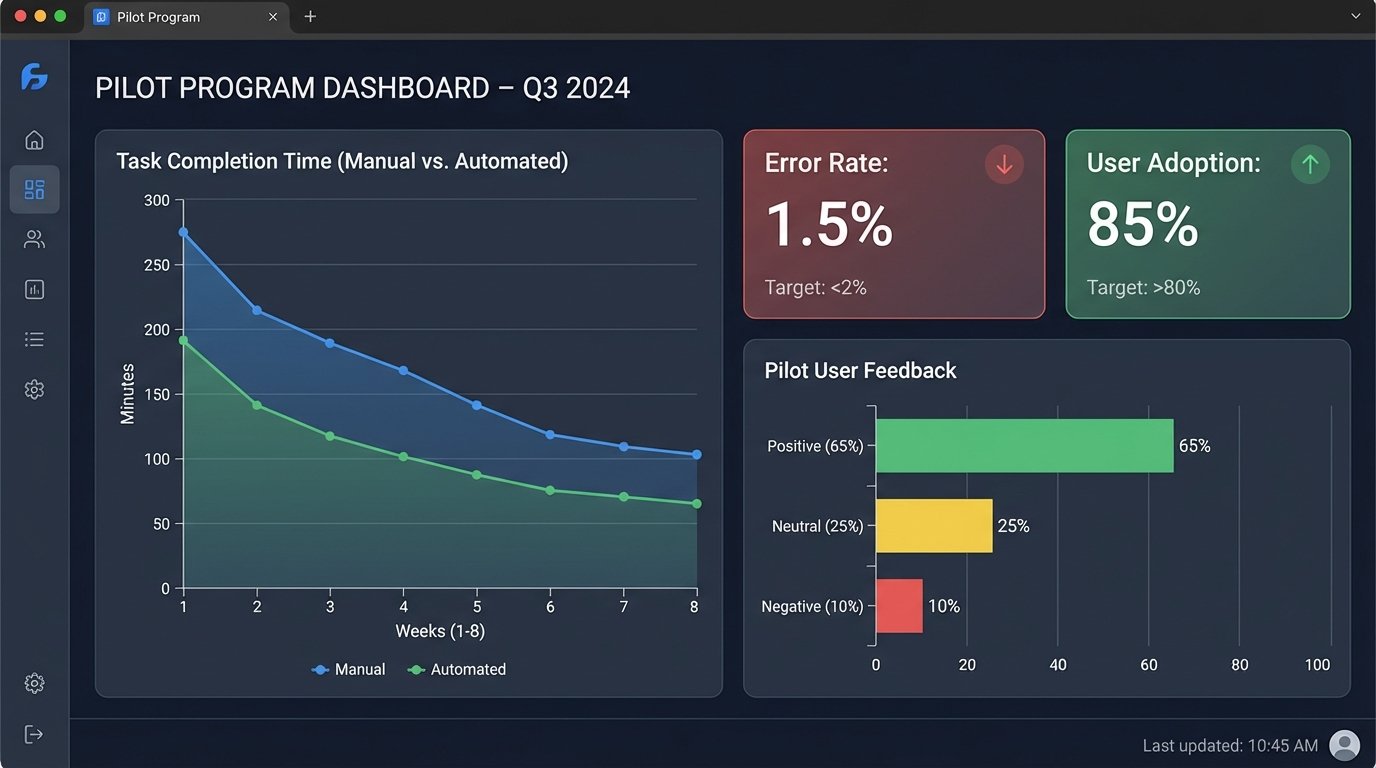
The pilot program cannot be a vague “let’s see how it goes” exercise. You need concrete Key Performance Indicators (KPIs) to determine if it’s a success, a failure, or needs modification. Don’t measure nebulous concepts like “efficiency.” Measure concrete things.
- Task Completion Time: Time the user performing the task manually versus with the automation tool. Is it actually faster once you account for setup and review?
- Error Rate: Track the number of human errors in the manual process versus the number of exceptions or failures in the automated process.
- User Adoption Rate: Of the pilot group, what percentage used the tool more than once? What percentage reverted to the old manual process? Find out why.
- Support Ticket Volume: How many questions or bug reports did the pilot group generate? This helps you anticipate the support load for a full rollout.
These numbers, not user anecdotes, will determine the next steps. Data allows you to make a rational decision to proceed, modify, or kill the project before you invest significant political and financial capital into a full launch.
Build for Failure: The Centrality of Error Handling
Any automation that cannot gracefully handle an error is a liability. Your system will encounter malformed data, unavailable APIs, and unexpected changes in source documents. It’s not a question of if, but when. Your automation logic must be built with robust error handling and logging from the very beginning.
Every critical automation workflow needs a few key components:
- A Dead-Letter Queue: When a transaction fails for a reason that isn’t temporary (like malformed input data), it shouldn’t just vanish. It needs to be routed to a specific queue for manual human review. The system should notify an administrator that an item requires intervention.
- Idempotent Design: If a script fails halfway through, can you safely run it again without creating duplicate records or sending duplicate emails? Each operation should be designed to be safely repeatable. This is a non-negotiable principle for any process that modifies data.
- Clear, Actionable Logging: “An error occurred” is a useless log message. A good log message includes a timestamp, the transaction ID, the specific function that failed, and a descriptive error message. Without this, debugging is guesswork.
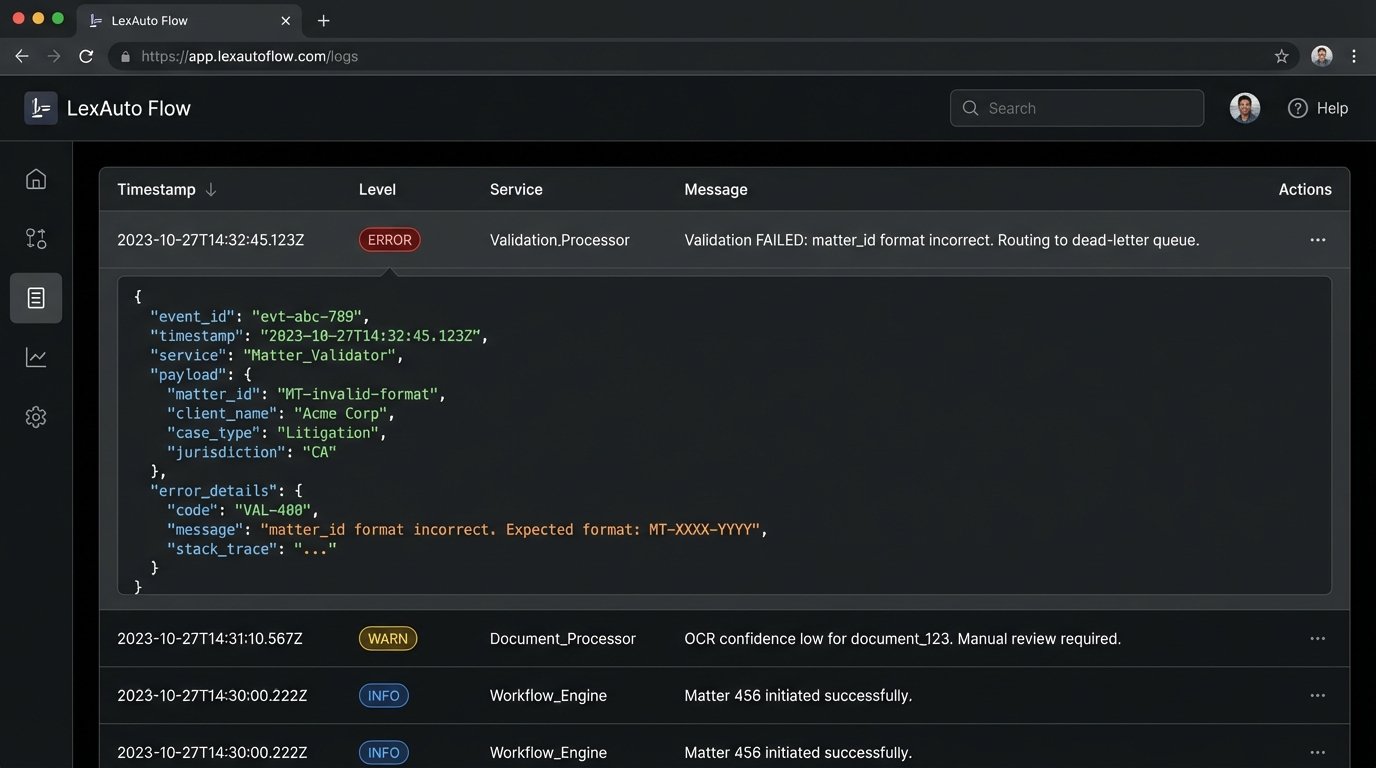
Data validation is your first line of defense. Before you even attempt to process data from another system, validate its structure and content. This prevents garbage data from corrupting your downstream systems and triggering a cascade of failures.
from jsonschema import validate, exceptions
# Example: Validate incoming matter data from a legacy case management system's API
# before trying to create a record in a new system.
MATTER_SCHEMA = {
"type": "object",
"properties": {
"matter_id": {"type": "string", "pattern": "^[0-9]{6}-[0-9]{5}$"},
"client_name": {"type": "string", "minLength": 1},
"opening_date": {"type": "string", "format": "date"},
"matter_type": {"type": "string", "enum": ["Litigation", "Transactional", "Advisory"]},
},
"required": ["matter_id", "client_name", "opening_date"]
}
def validate_matter_data(data):
"""
Validates a dictionary against the defined MATTER_SCHEMA.
Returns True if valid, False otherwise, and logs the error.
"""
try:
validate(instance=data, schema=MATTER_SCHEMA)
print(f"Validation PASSED for matter_id: {data.get('matter_id')}")
return True
except exceptions.ValidationError as e:
print(f"Validation FAILED for matter_data: {data}")
print(f"Error: {e.message} in field '{'.'.join(str(p) for p in e.path)}'")
# In a real system, this would route to a dead-letter queue.
return False
# --- Sample Usage ---
valid_data = {
"matter_id": "123456-00123",
"client_name": "ACME Corporation",
"opening_date": "2023-10-26",
"matter_type": "Litigation"
}
invalid_data = {
"matter_id": "999-001", # Fails pattern validation
"client_name": "ACME Corporation",
# Missing opening_date, which is required
}
validate_matter_data(valid_data)
validate_matter_data(invalid_data)
This simple validation step prevents a huge number of downstream errors. It quarantines bad data at the entry point. Skipping this is professional negligence.
User Training is Not a One-Time Event
The idea that you can run a single two-hour training session and expect perfect adoption is a fantasy. Adult learning doesn’t work that way, especially with busy legal professionals who are skeptical of new technology. Training must be an ongoing process, not a launch day event.
Develop a library of short, task-specific video tutorials (2-3 minutes max) that users can access on demand. No one is going to read a 50-page PDF manual. Create a dedicated communication channel, like a Teams or Slack channel, for the automation tool where users can ask questions and power users can share tips. This creates a community of practice around the tool and reduces the burden on the IT helpdesk.
The feedback loop from this channel is more valuable than any formal survey. It gives you a real-time pulse on user friction points and ideas for future improvements. The initial launch is not the end of the project. It is the beginning of an iterative cycle of refinement based on direct user feedback.