
Most document automation projects fail before the first line of code is written. They fail because the initial focus is on the software, not the structural integrity of the documents and the data that feeds them. The goal isn’t to buy a magic box that spits out perfect contracts. The goal is to build a logical assembly line, and that starts with deconstructing your source materials into their base components.
Deconstruction: Gut the Template First
Before you even think about a vendor, you must strip your existing document templates down to the studs. Take your most-used NDA, MSA, or purchase agreement. Print it out and identify every single variable field, conditional clause, and optional section. This isn’t a junior paralegal’s job. This requires a senior lawyer who understands the logic behind why a clause is included or excluded. You are building a blueprint for logic, not just filling in blanks.
This process forces you to standardize language. You will find three different versions of the same liability clause used by different partners. You must pick one. This is a political battle, not a technical one. Settle it before you start building. Failure to standardize means you are not automating one document. You are attempting to automate a dozen chaotic variations, a project doomed to become a tangled mess of unmaintainable conditional logic.
Define a Rigid Data Schema
Every variable field you identify becomes a key in a data model. This model is your single source of truth. It must be brutally specific. A field for “Client Name” is not enough. You need separate, typed fields: `client.legalEntityName`, `client.dbaName`, `client.signatory.fullName`, `client.signatory.title`. This level of granularity prevents ambiguity and is the bedrock of reliable automation.
Your data schema should be formalized in a format like JSON Schema. This allows you to programmatically validate incoming data before it ever touches your template engine. It’s the bouncer at the door that checks IDs, ensuring no malformed data gets into the system to break the document assembly process downstream.

Consider this basic schema for a client entity. It defines required fields and data types. Any data payload that doesn’t conform gets rejected immediately.
{
  "$schema": "http://json-schema.org/draft-07/schema#",
  "title": "Client Entity Schema",
  "type": "object",
  "properties": {
    "legalEntityName": {
      "type": "string",
      "description": "The official registered name of the client entity."
    },
    "jurisdiction": {
      "type": "string",
      "description": "State or country of incorporation."
    },
    "entityType": {
      "type": "string",
      "enum": ["LLC", "S-Corp", "C-Corp", "Sole Proprietorship"]
    },
    "signatory": {
      "type": "object",
      "properties": {
        "fullName": { "type": "string" },
        "title": { "type": "string" }
      },
      "required": ["fullName", "title"]
    }
  },
  "required": ["legalEntityName", "jurisdiction", "signatory"]
}
This isn’t optional. Without a strict schema, you are just institutionalizing the “garbage in, garbage out” principle. Your expensive new system will just generate garbage faster.
Conditional Logic: Keep It Flat
The power of document automation comes from conditional logic. “If the deal value is over $1M, then insert the enhanced indemnification clause.” The temptation is to nest these conditions deeply. This is a trap. Deeply nested `if-then-else` trees become impossible to debug or update when a regulation changes.
A better practice is to flatten your logic. Use a series of independent, atomic rules where possible. Instead of a monolithic block of nested conditions, your system should evaluate a checklist of triggers. Does the `dealValue` exceed the threshold? Check. Is the `jurisdiction` in a specific list? Check. Each check toggles the inclusion of a specific text block or clause. This makes the logic transparent and easier to modify without causing cascading failures.
Version Your Clauses, Not Just Your Documents
Treat every clause and text block as an independent, version-controlled component. When the boilerplate for your governing law section is updated, that component gets a new version number. Your document templates should reference specific versions of these clauses.
This approach gives you a full audit trail. You can instantly see which version of a clause was used in a document generated six months ago. When legal requirements change, you update the master clause, and all new documents automatically pull in the compliant language. This avoids the nightmarish task of manually finding and replacing old text across hundreds of templates. It separates the content from the structure, which is critical for long-term maintainability.
Integration: The Data Ingestion Problem
Automated documents are useless without data. Getting clean data into the system is typically the hardest part of the entire project. You will be pulling information from a CRM, a matter management system, or worse, having users fill out a web form. Each source is a potential point of failure.
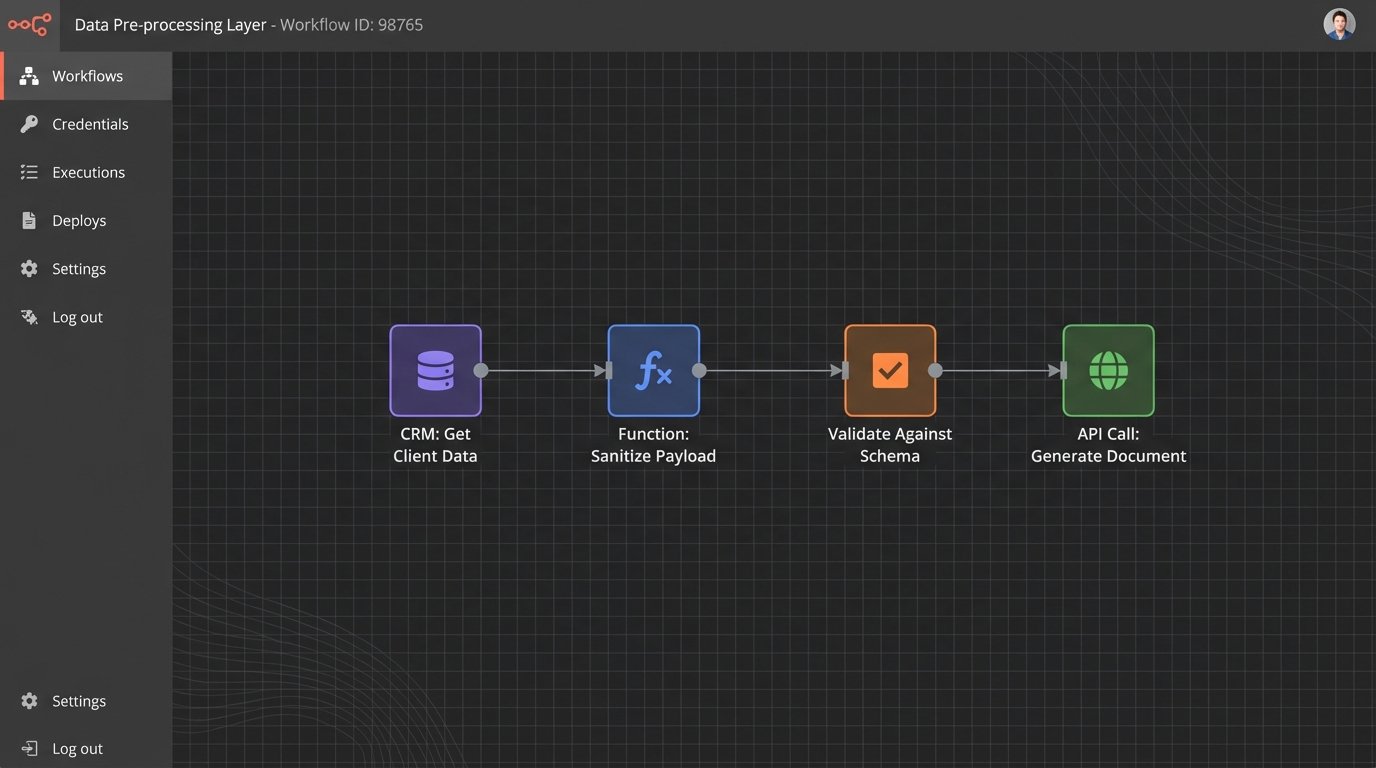
The most reliable method is a well-defined API endpoint that accepts a JSON payload conforming to your schema. This is the clean, modern approach. The reality for most firms is a kludge of different systems. You might be pulling client data from a legacy case management system with a sluggish, poorly documented API. Injecting unstructured data from multiple sources into a pristine, structured template engine is like trying to force-feed a high-performance engine with unfiltered swamp water. It will seize.
You must build a data pre-processing layer. This layer sits between your data sources and your document engine. Its only job is to fetch, sanitize, and transform data into the exact structure your schema requires. It’s an unglamorous but non-negotiable piece of infrastructure. It catches null values, strips illegal characters, and reformats dates before they can corrupt a document.
APIs Are Not Always Stable
Relying on external or internal APIs means you inherit their instability. The CRM endpoint might go down. The matter management system might return a `500 Internal Server Error` during its nightly backup window. Your automation workflow must be built with this reality in mind. Implement retry logic with exponential backoff for API calls. Log every failed request. Set up alerts that tell you when a data source is unresponsive. Do not assume the data will always be there when you ask for it.
A resilient system includes a manual override. When an API fails, the system should allow a user to enter the required data by hand. This creates a fallback that keeps the business running while you debug the broken connection. It’s a safety valve that prevents a technical glitch from becoming a complete work stoppage.
Validation and Output Control
The system generated a document. How do you know it’s correct? Blind trust is not a strategy. You need multiple layers of validation. The first layer was the data schema validation at the input stage. The next layer is at the output stage.
For mission-critical documents, implement a human-in-the-loop review queue. The system generates a draft, but it isn’t sent to the client until a qualified professional reviews it. The interface for this review should be efficient. It should highlight all the variable data that was inserted and show exactly which conditional clauses were triggered. The reviewer should be answering “Is this correct?” not re-reading the entire document from scratch.
Output Formats Matter
The final output format has legal and practical implications. Generating a locked-down PDF prevents unauthorized changes and provides a clean execution copy. However, in many cases, the output needs to be a DOCX file that allows for final redlining and negotiation. Your system must support both.
Generating clean, well-structured DOCX files is notoriously difficult. The underlying XML structure of a Word document is complex. Using a poor-quality generation library can result in corrupted files with bizarre formatting artifacts that are difficult to fix. Test your chosen engine’s DOCX output rigorously. Ensure it produces documents that are not just visually correct but also structurally sound and easy to edit by the opposing counsel. A system that produces messy Word documents just shifts manual cleanup work from one part of the process to another, defeating the purpose.

Maintenance and Error Logging
An automation system is not a one-time project. It is a living piece of infrastructure that requires ongoing maintenance. Laws change. Business strategies pivot. Partners decide they hate the new indemnification clause. You must have a plan for managing these changes.
Your logic and your content must be easy to update. This goes back to the principles of flattened logic and versioned clauses. If a change is required, a legal engineer should be able to modify a rule or update a text block without a three-week development cycle. If your lawyers can’t describe the change they need in a simple, logical statement, then your system is too complex.
Logging is Not a Feature, It’s a Requirement
When a document is generated incorrectly, the first question will be “Why?” Without detailed logs, the answer is “I don’t know.” Your system must log everything:
- The incoming data payload.
- Which conditional rules were evaluated and their outcomes (true/false).
- Which clause versions were injected into the template.
- The final output status (success, failure).
- Any errors from external API calls.
This level of logging is your only hope for debugging a production failure at 2 AM. When a partner calls because a major client received a contract with the wrong governing law, you need to be able to trace the exact path of data and logic that produced the error. Without that audit trail, you are flying blind.