
Most billing automation initiatives fail before a single line of code is written. The failure originates in the assumption that the problem is about moving data from point A to point B. The actual problem is managing the chaotic, error-prone, and inconsistent data that lives at point A, then forcing it through a rigid, unforgiving API at point B. Your success depends entirely on how you handle the exceptions, not the clean runs.
Forget the glossy sales brochures. The first real step is a brutal audit of the target system’s API documentation. If the platform vendor hesitates to give you full developer portal access before you sign a contract, walk away. You are looking for specific indicators of production-readiness, not marketing promises. Check the API’s rate limits, authentication methods, and, most critically, the structure of its error responses. A system that returns a generic “500 Internal Server Error” for a malformed invoice line is a system designed to waste your developers’ time.
The core battle is with data integrity. Your practice management system is likely a swamp of inconsistent client-matter numbers, free-text time entries, and outdated billing rates. Pushing this data directly into an automated invoicing engine is like shoving a firehose of muddy water through a needle. The system will choke, produce garbage outputs, or fail silently. The only sane approach is to build a quarantine zone for your data before it ever touches the billing API.
Isolate and Pre-Process All Billing Data
Your primary data source cannot be trusted. The first architectural principle is to create an intermediate data layer, often a set of staging tables in a separate database schema. Raw time and expense entries are pulled into this layer, but they are not yet considered valid. This is where you run a series of validation and transformation scripts to clean the data. This de-couples the messy reality of data entry from the strict requirements of the invoicing system.
Validation logic should be aggressive. Check for valid matter IDs against a master list. Force expense codes into a standardized format. Flag any time entry narratives that are below a certain character count or contain forbidden keywords like “miscellaneous work.” These are not suggestions for the user, they are hard gates that prevent bad data from proceeding.
Example: SQL Validation Check
A simple SQL query run against your staging table can flag entries that will cause downstream failures. This check identifies time entries with null matter IDs or narratives that are too short to be compliant. These records are then flagged for manual review instead of being sent to the invoicing API where they would trigger a vague error.
UPDATE time_entry_staging

SET validation_status = 'FLAGGED_FOR_REVIEW',

    error_reason = 'Missing Matter ID or Invalid Narrative'

WHERE

    matter_id IS NULL OR

    (client_id = 'C1024' AND matter_id NOT LIKE 'M-2%') OR

    LEN(narrative) < 15;
This approach moves error detection upstream. It tells you what’s wrong at the source, not after a failed API call.
Build for Failure, Not the Happy Path
Every component in your automation workflow will eventually fail. The network will drop, an API will be down for maintenance, or a specific data format will change without notice. A resilient system is not one that never fails, but one that anticipates failure, logs it correctly, and has a plan for recovery. Hope is not a strategy. Build dead-letter queues and retry mechanisms from day one.
When an API call to generate an invoice fails, the worst possible outcome is for the system to simply move on. The data for that invoice is now in limbo. Instead, the failed payload, along with the error response from the API, must be pushed into a separate queue or log table. This “dead-letter” queue becomes the definitive list of all transactions that require human intervention. Without it, you are flying blind and will lose revenue.
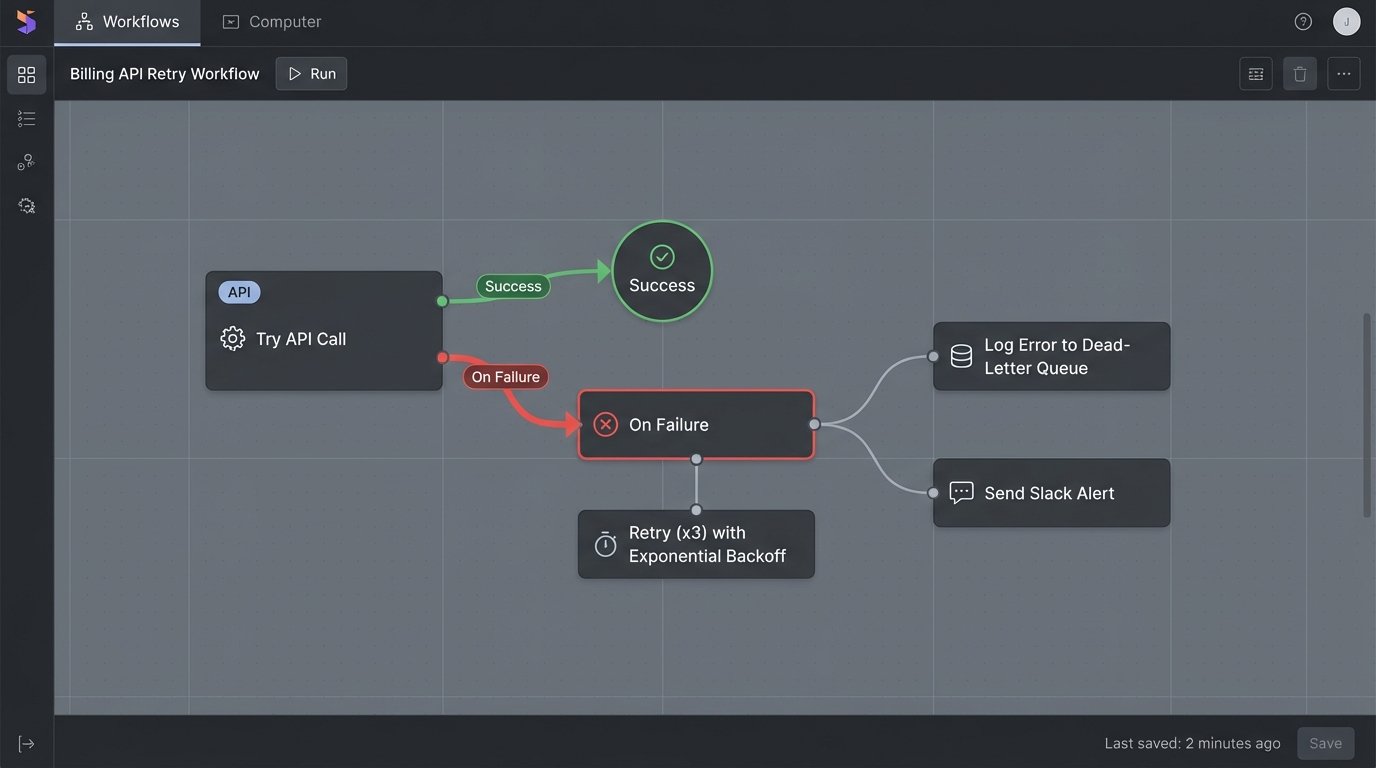
Implement an exponential backoff strategy for transient network errors. If an API call fails with a 503 Service Unavailable error, do not immediately retry. Wait two seconds, then retry. If it fails again, wait four seconds, then eight, and so on, up to a maximum number of retries. This prevents your system from hammering a struggling service and contributing to a denial-of-service scenario. It also allows temporary issues to resolve themselves without manual input.
The User Interface for Exceptions Defines the System
Your attorneys and billing staff will not use a system they do not trust. If handling an exception requires logging into a server to read raw logs, they will abandon your automation and revert to their manual spreadsheets. The interface for managing the dead-letter queue is just as important as the automation engine itself. It must be brutally simple and action-oriented.
A functional exception dashboard needs only three elements for each failed item:
- A clear, human-readable error message (e.g., “Invalid Matter ID provided for client ABC Corp”).
- The full data payload that caused the error, so the user can see exactly what was sent.
- A “Retry” button that re-submits the exact same payload to the API after the user has fixed the underlying data in the source system.
This turns a technical failure into a simple, business-level task. The user doesn’t need to know about HTTP status codes. They only need to know what to fix and how to re-run the process.

Externalize Business Logic from Code
Hard-coding billing rules is a rookie mistake. Client-specific rates, narrative requirements, and approval thresholds change constantly. If every change requires a developer to edit, test, and deploy new code, your automation will become a bottleneck. Business logic must be stored outside the application code in a format that can be managed by non-technical staff.
Store your rules in a database table or a dedicated configuration file. For example, a JSON file can define specific billing rules for different clients. This allows a finance manager to update a rate or a narrative rule by simply editing a text file or a database entry, without any code changes. The automation script reads this configuration on every run, ensuring it always uses the latest rules.
Example: JSON Configuration for Client Rules
This simple JSON structure defines different narrative length requirements and forbidden words for two different clients. Your application code loads this file and applies the correct rules based on the client ID of the invoice being processed. Adding a new rule for a new client is a matter of adding a new entry to this file.
{

  "client_rules": [

    {

      "client_id": "C1024",

      "min_narrative_length": 25,

      "disallowed_terms": ["work", "review", "call"],

      "requires_activity_code": true

    },

    {

      "client_id": "C2055",

      "min_narrative_length": 10,

      "disallowed_terms": [],

      "requires_activity_code": false

    }

  ]

}
This configuration-driven approach separates the “what” from the “how.” The code knows how to apply rules, and the configuration file tells it what the rules are.
De-Couple Time Capture from Invoice Generation
A monolithic system where the timekeeping platform is also the invoicing engine is brittle. It locks you into a single vendor and makes it difficult to adapt. A more resilient architecture separates these functions into distinct services that communicate through a well-defined process. Your automation should act as the intelligent bridge between them.
The workflow should be linear and unidirectional.
- The automation script extracts raw data from the time and billing system.
- It pushes this data to the staging layer for validation and cleansing.
- It applies the business rules from the external configuration engine.
- It transforms the cleansed, validated data into the precise format required by the invoicing API.
- It pushes the final, structured data to the invoicing system to generate the bill.
This modularity means you can replace the timekeeping system (Point 1) or the invoicing tool (Point 5) without having to gut the entire workflow. You only need to update the specific adapter for that component. It’s the difference between replacing a car’s tire and replacing its entire engine just to get new tread.
Replace Passive Training with Active Validation Loops
Annual training sessions on billing hygiene are useless. People forget. A better approach is to build immediate, automated feedback loops that force compliance at the point of data entry. The system itself should be the primary enforcer of your billing policies, not a manager who reviews reports a month later.
Set up an automated check that runs every hour against new time entries. If a lawyer enters a narrative like “Further work on matter,” the system should immediately flag it. It then sends an automated message via Teams or email back to that lawyer stating, “Your time entry for matter X lacks sufficient detail for client Y’s billing guidelines. Please update it here [link] to avoid rejection during invoicing.”
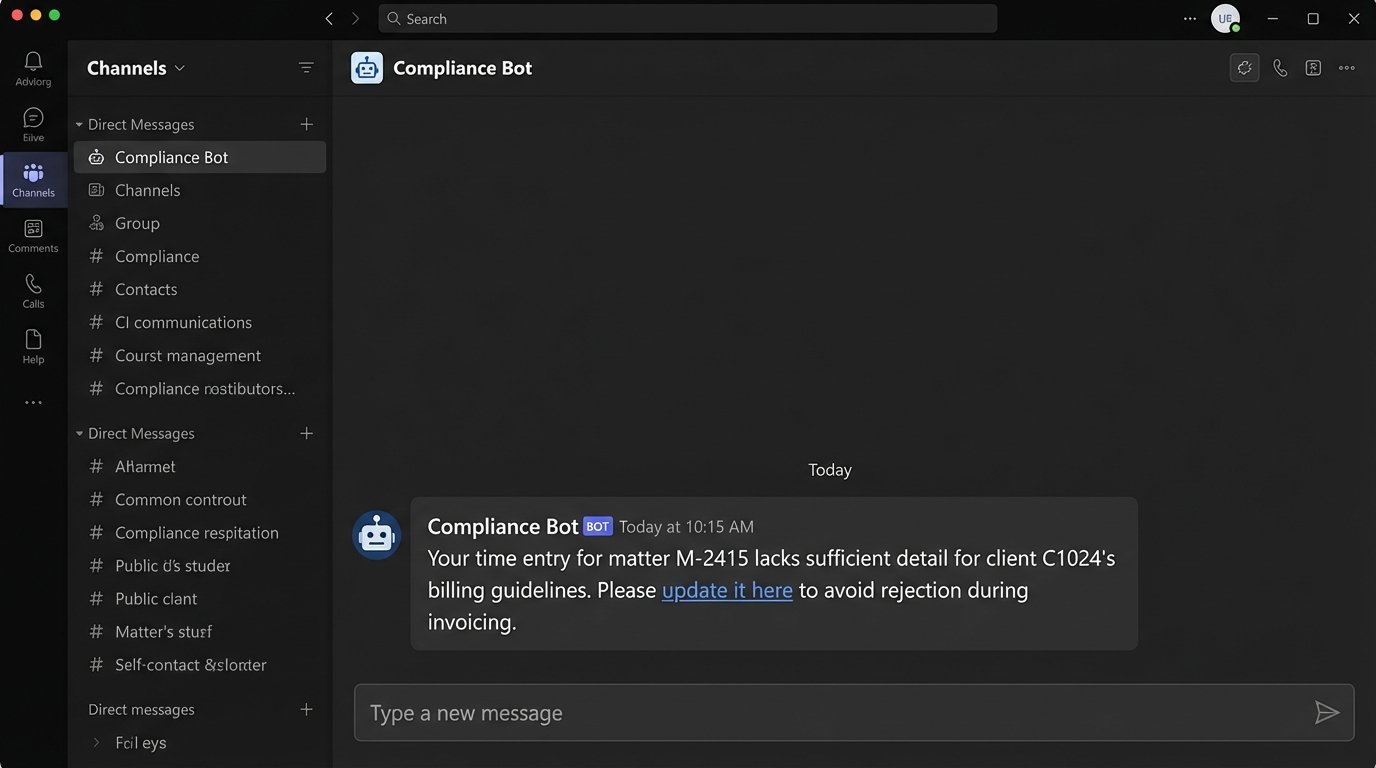
This is not about punishment. It is about providing a tight feedback loop that corrects behavior in real-time. It shifts the burden of quality control from the finance team at the end of the month to the timekeeper at the moment of entry. This single practice eliminates a huge percentage of the downstream errors that plague billing automation.
Ultimately, a successful billing automation platform is not a fire-and-forget solution. It is a dynamic system that requires monitoring, maintenance, and a clear process for handling the inevitable exceptions. The goal is not to achieve 100% hands-off automation. The goal is a resilient system that makes the 95% of standard invoices disappear, freeing up your finance team to focus their expertise on the 5% that are actually complex.