Most scheduling automation projects fail before the first line of code is written. They fail because the objective is framed as connecting Outlook to the case management system. The real objective is to build a deterministic, rules-based engine that treats the firm’s calendar as a state machine, where every event is a direct and auditable consequence of a case action. Anything less is just a digital version of the same manual, error-prone process you are trying to replace.
The core problem is drift. An attorney manually adjusts a meeting in their personal calendar, and suddenly the official case record is out of sync. This isn’t a user training issue. It’s an architectural failure.
Ground Zero: Forcing a Single Source of Truth
You cannot have calendar automation without an undisputed source of truth. For any law firm, this must be the case or practice management system. Individual Outlook or Google Calendars are merely read-only displays, or at best, controlled-write endpoints. The moment you permit bidirectional sync between a user’s personal calendar and the CMS, you have created a race condition that will eventually cause a critical deadline to be overwritten by a dentist appointment.
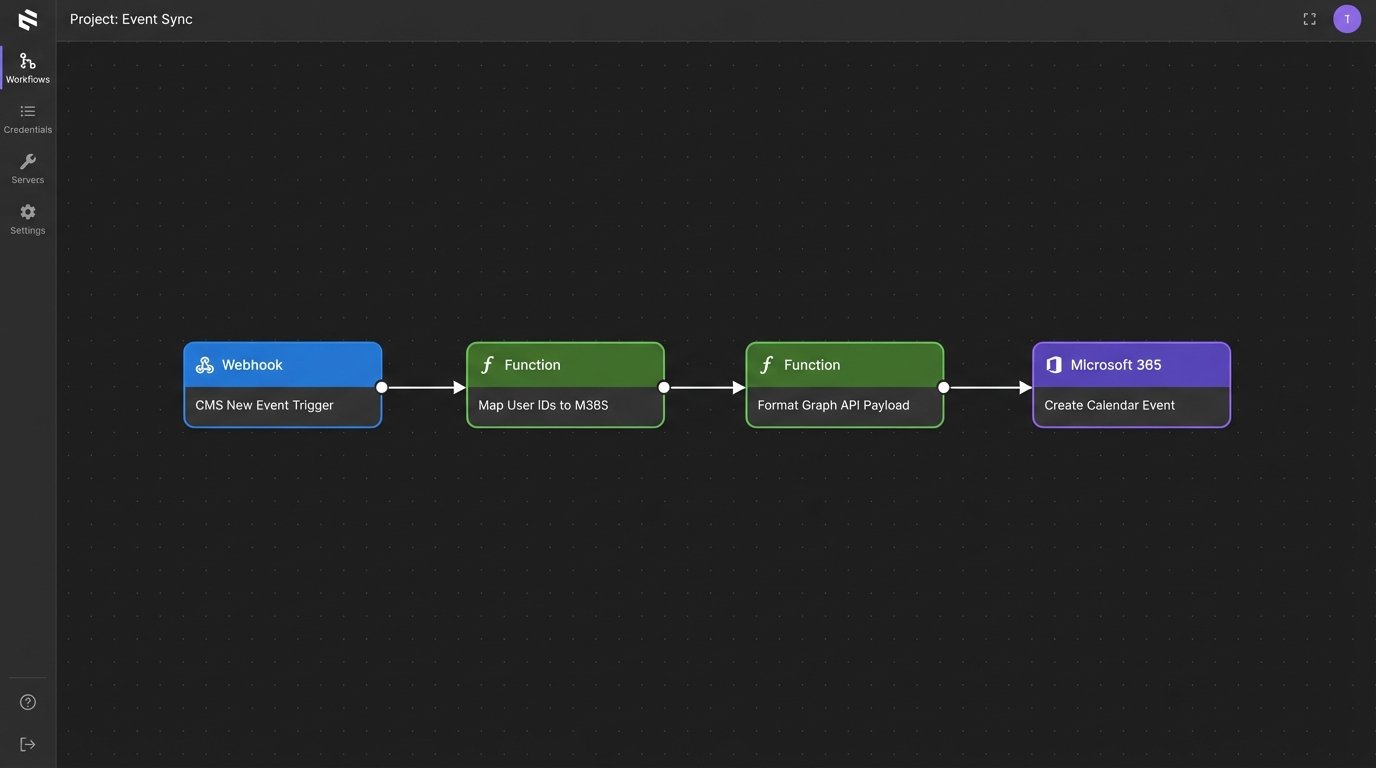
The correct architecture is a one-way propagation of data. The CMS is the master. An intermediary service, often a serverless function triggered by a webhook from the CMS, is responsible for creating, updating, and deleting events on the user-facing calendars via the Microsoft Graph API or Google Calendar API. All changes must originate from the system of record.
This service acts as a gatekeeper. It interprets event data from the CMS, maps it to the correct user calendars based on case assignments, and formats the payload for the calendar provider’s API. It also handles the authentication tokens, refresh logic, and rate limiting required to communicate with these external services. Attempting to build this sync logic directly into a legacy CMS is a fool’s errand that ends in unmaintainable code.
The resistance to this model is always about convenience. Attorneys want to drag and drop appointments in Outlook. You must make it clear that this convenience introduces unacceptable risk. The system must be designed to override manual changes on the user calendar during its next sync cycle, reinforcing the CMS’s authority.
Mapping and Propagation Logic
The propagation service needs a clear mapping of CMS users to their Microsoft 365 or Google Workspace identities. This is typically stored in a simple database table or configuration file. When a new event for “Case 123” is created in the CMS and assigned to User A and User B, the service queries this map to get their respective email addresses, then injects the event into both calendars.
A critical detail is handling event updates and deletions. Each event created by the automation must be tagged with a unique identifier from the CMS. This is typically stored in the `iCalUId` or an extended property of the calendar event. Without this unique key, you have no reliable way to find and modify a specific event later. You would be forced to search by title and time, which is fragile and prone to error.
You end up with a system that is rigid by design. That’s the entire point.
Automating Deadlines: Beyond Simple Appointments
Booking a client meeting is trivial. The real value is in procedural deadline calculation based on jurisdictional rules of civil procedure. When a “Complaint Filed” event is logged in the CMS, the system should not wait for a paralegal to calculate the next 15 deadlines. It should trigger them programmatically.
This requires a rules engine. This can be a sophisticated off-the-shelf product or a homegrown solution built around a set of JSON or YAML files that define the dependencies and calculations. Each rule specifies a trigger event (e.g., `event_type: ‘ComplaintFiled’`), a set of conditions (e.g., `jurisdiction: ‘CA_Central’`), and a series of actions that create new calendar events with calculated dates.
The date calculation logic is the most complex piece. It must account for business days, court holidays, and jurisdiction-specific nuances. You cannot simply add 30 days to a trigger date. You need a robust date calculation library that can be fed a list of non-business days for each jurisdiction. This holiday list must be an updatable configuration, not hardcoded into the application.
Trying to manage these complex legal workflows with simple calendar invites is like trying to route a city’s plumbing with garden hoses. It establishes a connection, but the system lacks the structural integrity to handle the real-world pressure and complexity. The result is leaks and failures.
Example Rule Structure
A simplified rule might look like this in JSON. The engine would parse this file, listen for the `ComplaintServed` trigger, and then execute the `actions` array to schedule the subsequent deadlines on the appropriate case calendar.
{

  "rule_id": "CCP-430.40",

  "trigger_event": "ComplaintServed",

  "conditions": [

    { "field": "jurisdiction", "operator": "equals", "value": "CA_Superior" },

    { "field": "service_method", "operator": "equals", "value": "personal_delivery" }

  ],

  "actions": [

    {

      "action_type": "create_event",

      "event_title": "Response to Complaint Due",

      "days_offset": 30,

      "calculation_method": "court_days",

      "assignee_role": "lead_attorney"

    },

    {

      "action_type": "create_event",

      "event_title": "Internal Review of Draft Response",

      "days_offset": 20,

      "calculation_method": "court_days",

      "assignee_role": "all_case_staff"

    }

  ]

}
This approach decouples the legal logic from the application code. When a rule changes, you update a configuration file, not redeploy the entire service. This is fundamental for long-term maintenance in a legal environment where procedural rules are constantly amended.
Reminder Configuration: Noise vs. Necessity
Default calendar reminders are useless. A 15-minute pop-up for a statute of limitations deadline is an insult. An effective reminder system is tiered and context-aware, delivering notifications through different channels based on the event’s criticality and proximity.
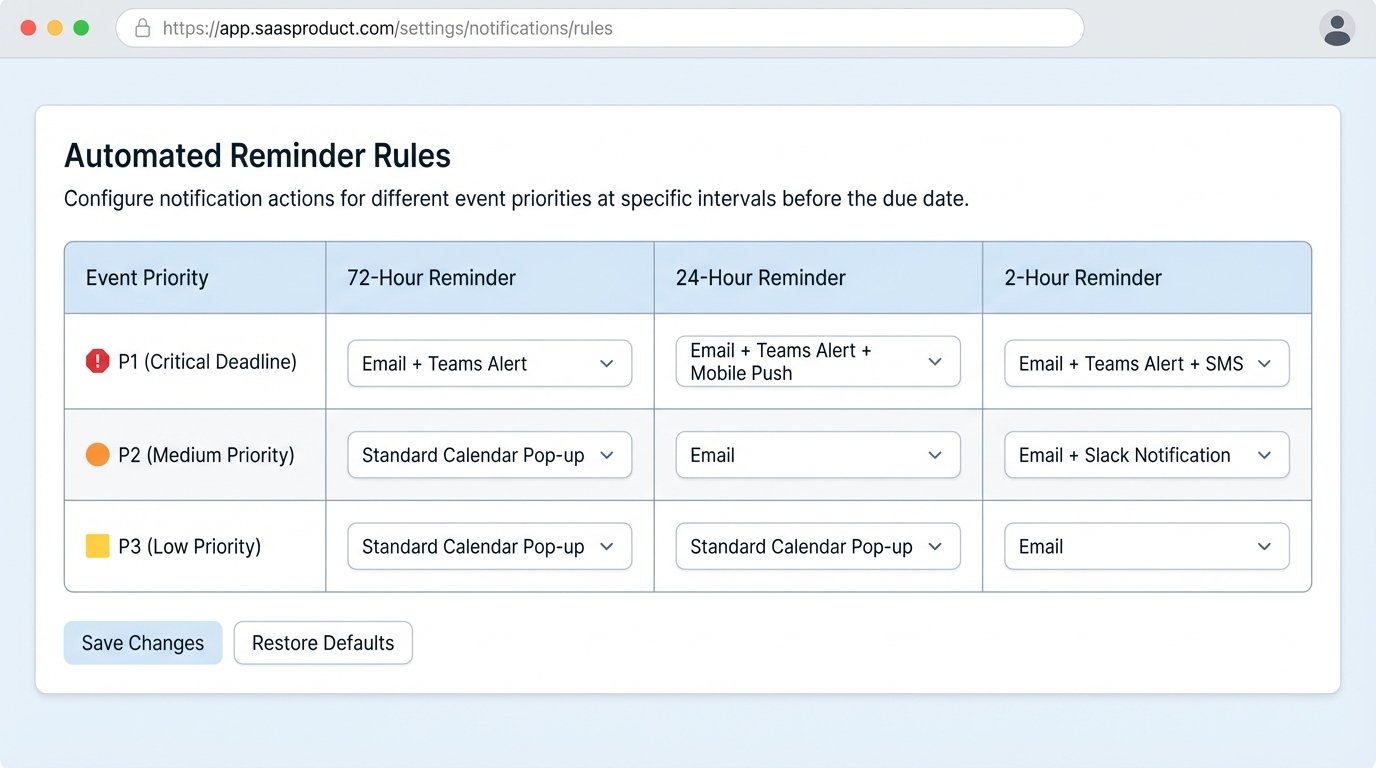
A sane architecture involves tagging events with a priority level (e.g., P1 for critical deadlines, P3 for routine meetings) when they are created. A separate notification service then runs on a schedule, querying the calendar for upcoming events and dispatching reminders according to a defined policy.
A viable policy could be:
- P3 Event (Low Priority): Standard 15-minute calendar pop-up. No extra action needed.
- P2 Event (Medium Priority): Email reminder sent 24 hours in advance to all attendees.
- P1 Event (Critical): Email at 72 hours, another email at 24 hours, and a direct message via Teams or Slack to the assigned attorney 2 hours before the deadline.
This requires integration with email and messaging platforms. The notification service fetches the event, identifies its priority and attendees, then constructs and sends the payload to the appropriate API (e.g., SendGrid for email, Microsoft Bot Framework for Teams). This prevents notification fatigue and ensures that genuinely critical alerts cut through the noise.
This service must also respect user preferences. A senior partner may wish to opt out of all but P1 notifications, while an associate may need every reminder. These preferences should be stored against a user’s profile and consulted by the notification service before dispatching any message. Failure to allow this customization will lead to users creating their own filters, defeating the purpose of the centralized system.
Locking It Down: Data Security and Access Control
A firm’s calendar is a roadmap of its strategy and client vulnerabilities. Exposing it through poorly configured automation is a significant security risk. Every API call to and from the calendar system must be authenticated and authorized.
Service accounts and API keys need to be managed through a proper secrets management system like Azure Key Vault or AWS Secrets Manager. They should never be stored in configuration files or source code. These keys should also be scoped with the minimum required permissions. A service account that only needs to write calendar events should not have permission to read emails or delete contacts.
The most overlooked aspect is Role-Based Access Control (RBAC). The automation service must be aware of who is staffed on which case. When a user requests calendar data, the API shouldn’t just return all events. It must first verify that the user has a right to see events associated with that specific matter. This enforcement must happen on the backend. Relying on the front-end to filter data is insecure and easily bypassed.
Here is a conceptual Python snippet demonstrating a server-side permission check before returning event data. This is the kind of logic gate that must exist in your API layer.
# This is a simplified example. Production code would be more complex.

import user_permissions_db
def get_events_for_case(user_id, case_id):
"""
Fetches calendar events for a given case, but only if the user
has permission to view that case.
"""
if not user_permissions_db.is_user_on_case(user_id, case_id):
# The user is not staffed on this case. Return an empty list or 403 Forbidden.
return {"error": "Access Denied"}, 403
# User is authorized. Proceed to fetch data from the calendar service.
events = calendar_service.fetch_by_case(case_id)
return events, 200
External scheduling tools also present a risk. A public Calendly link can expose attorney availability and, if configured improperly, the titles of other appointments. These tools should be integrated via their APIs, with booking pages placed behind a client portal or other authenticated session. Never expose a raw, public scheduling link for anything related to client matters.
When It Breaks: Auditing and Rollback Logic
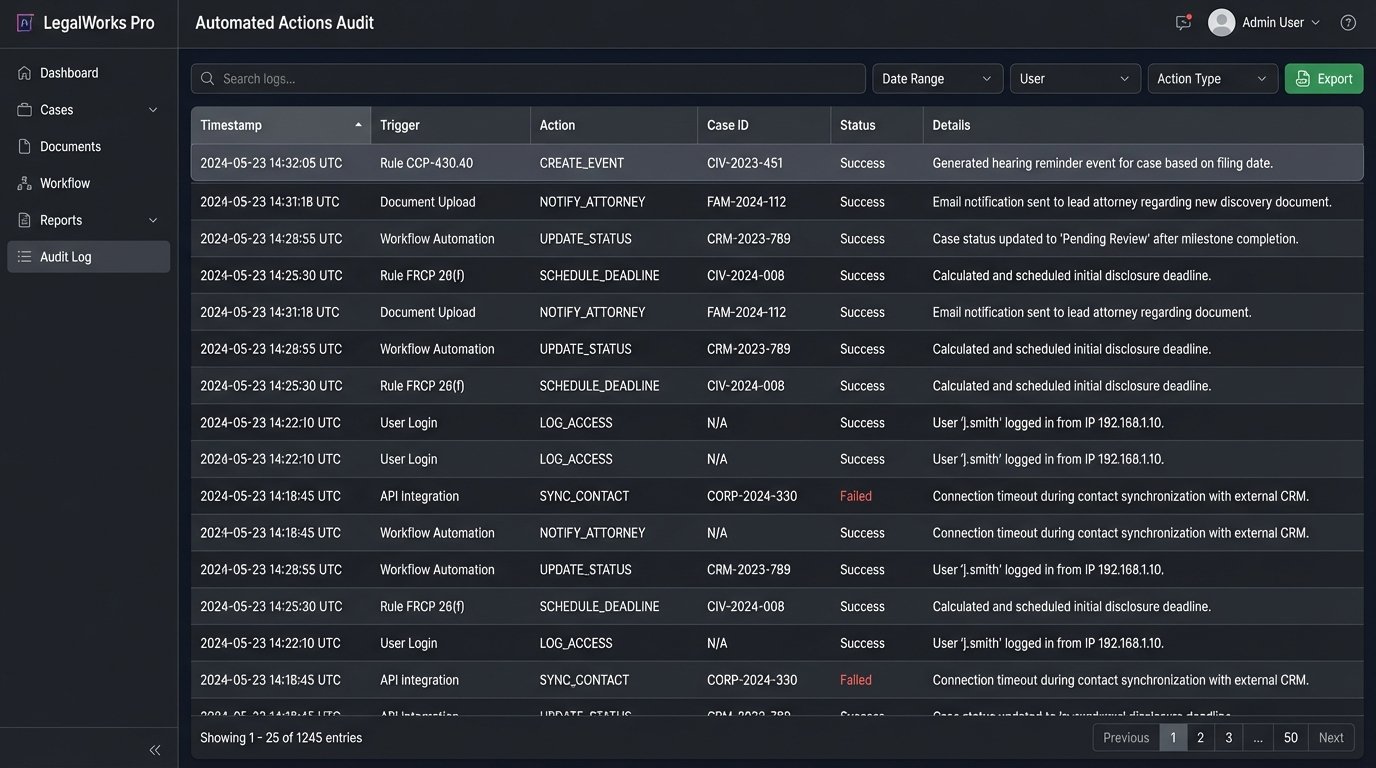
The automation will eventually fail. A bug in the rules engine, a change in a court’s holiday schedule, or a simple API outage will cause incorrect events to be created or missed entirely. Your primary defense against this is a comprehensive, immutable audit log.
Every single action the automation takes must be logged. This includes every event created, updated, and deleted. The log entry must contain a timestamp, the source trigger (e.g., “Rule CCP-430.40”), the data payload sent to the calendar API, and the response received. Without this trail, diagnosing a problem is pure guesswork.
Error handling must be robust. If the Microsoft Graph API is temporarily unavailable, the service should not simply give up. It needs to implement a retry strategy with exponential backoff. If the operation continues to fail after several retries, the failed job and its data payload should be moved to a dead-letter queue. This allows a developer or administrator to manually inspect the failure without losing the original trigger data.
Finally, you need a strategy for mass corrections. If you discover a faulty rule has generated 50 incorrect deadlines across 10 cases, how do you fix it? Manual deletion is not an option. This is where the unique CMS identifier you embedded in each calendar event becomes critical. Your system needs a cleanup utility that can take a list of these unique IDs and issue deletion commands to the calendar API, surgically removing only the bad data.
The goal is not a system that never fails. It’s a system that fails loudly and predictably, with a clear path to diagnosis and remediation. In legal calendaring, silent failure is the precursor to malpractice.