
Most conversations about client communication automation are pure marketing fluff. They promise a world of happy clients and five-star reviews, conveniently ignoring the tangled mess of legacy systems and bad data that defines the average law firm’s tech stack. The real challenge isn’t buying another subscription service. The challenge is stitching together a fragmented ecosystem where your case management system (CMS), client relationship manager (CRM), and accounting software barely speak the same language.
The core failure is architectural. Firms bolt on communication tools that poll for updates, creating a sluggish and brittle system. This approach forces the communication platform to be the brain, constantly asking the CMS, “Anything new? Anything new yet?” This is fundamentally backward. The source of truth, the trigger for every meaningful client interaction, lives inside your case management system. The automation logic must originate there, not in a third-party tool that only gets a stale, second-hand version of reality.
Deconstructing Off-the-Shelf Automation Failures
Platforms like Lawmatics, Clio Grow, or even generic connectors like Zapier present a clean UI that masks a clumsy backend reality. Their primary mechanism is often a scheduled poll against a vendor’s API. This means your “instant” notification about a case update might have a latency of 5, 15, or even 30 minutes. In the context of scheduling a critical deposition, that delay is not just an inconvenience; it is a potential source of malpractice.
These systems are built for the simplest workflows. They excel at sending a welcome email when a new contact is created. They fail when the logic requires branching based on case type, jurisdiction, and the specific status of a multi-stage litigation process. The templating is often a thin veneer of personalization, limited to injecting a client’s first name. True personalization requires pulling data from multiple objects, like the opposing counsel’s name from the case record and the next hearing date from the calendar. Shoving a firehose of complex legal data through the needle of a simple marketing automation tool is bound to fail.
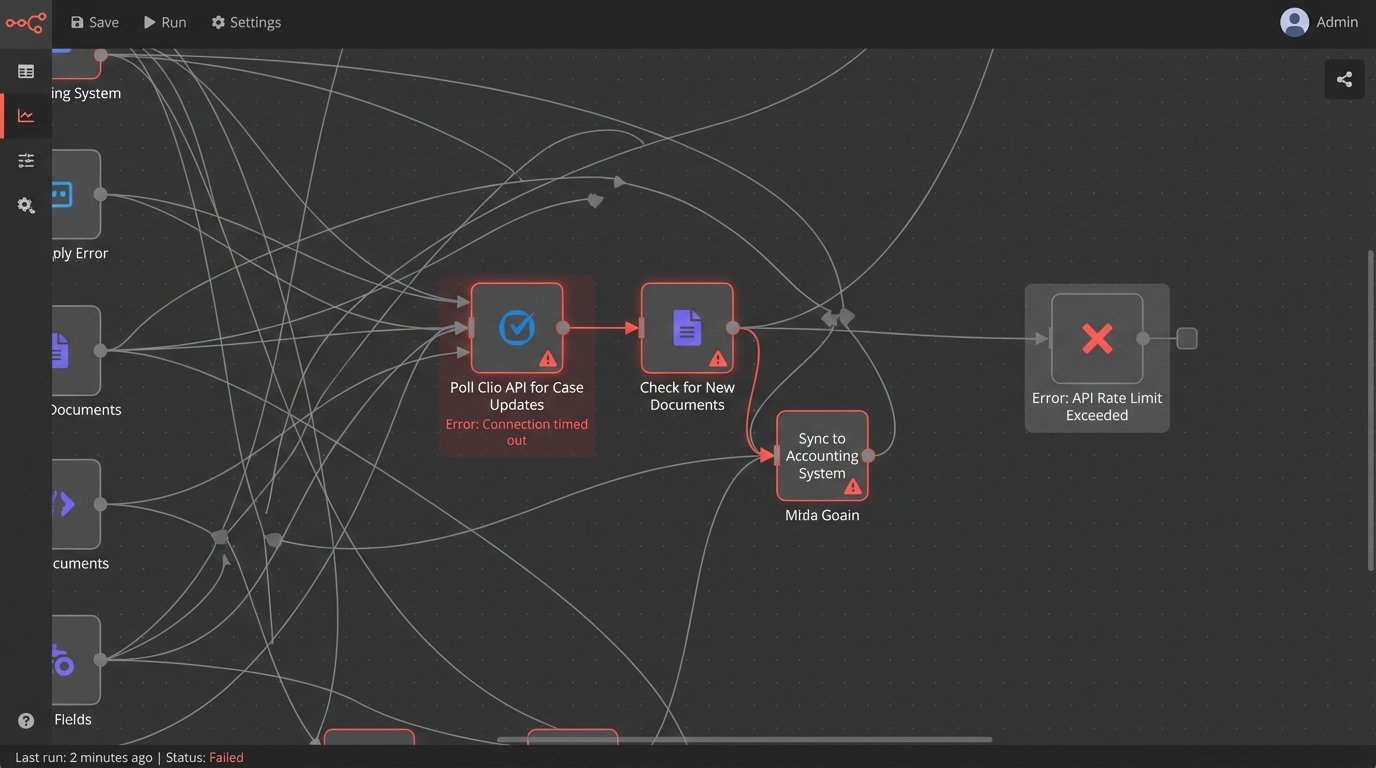
The APIs themselves are a frequent point of failure. You operate at the mercy of their uptime, their rate limits, and their often-outdated documentation. When a connection breaks, the default behavior is rarely a graceful failure with intelligent retries. It is a silent failure. The automation simply stops, and you discover it three weeks later when a client complains they never received a crucial document.
The Illusion of “Set It and Forget It”
The sales pitch is a system you configure once and never touch again. The operational reality is a system that demands constant monitoring. Case statuses change, partners invent new internal workflows, and court procedures are updated. Each of these real-world shifts can break your automation logic. Without a dedicated owner who understands both the legal process and the system architecture, these platforms devolve into a collection of broken triggers and outdated message templates.
This creates a dangerous false sense of security. Staff believe communications are being handled automatically, so they stop performing manual checks. The automation fails silently, and the client is left in the dark. The technology designed to improve client satisfaction becomes the direct cause of its collapse.
A Trigger-First Architecture: Putting the CMS in Control
A more resilient architecture inverts the common model. The CMS must be the engine. Any change to a critical field or status within the CMS should emit an event. This event, a simple data payload containing the case ID and the nature of the change, is the starting pistol for any and all communication workflows. This event-driven approach is faster, more reliable, and infinitely more scalable than API polling.
The ideal implementation uses webhooks. When a case status changes from “Discovery in Progress” to “Depositions Scheduled,” the CMS should fire a webhook to a designated endpoint. This endpoint is not your email provider or SMS gateway. It is a piece of middleware that you control. This could be a serverless function (AWS Lambda, Azure Functions) or a small application server. This layer is where the business logic lives. It ingests the raw event from the CMS, enriches it with data from other systems if needed, and then directs the final, formatted message to the appropriate communication API.
This decouples your core system from the delivery mechanism. If you want to switch from Twilio to MessageBird for SMS, you change a few lines of code in your middleware, not your entire CMS configuration. It gives you a central point for logging, error handling, and debugging. When a client says they did not get a message, you have a single log to check, not three different vendor dashboards.
Defining the Automation Map
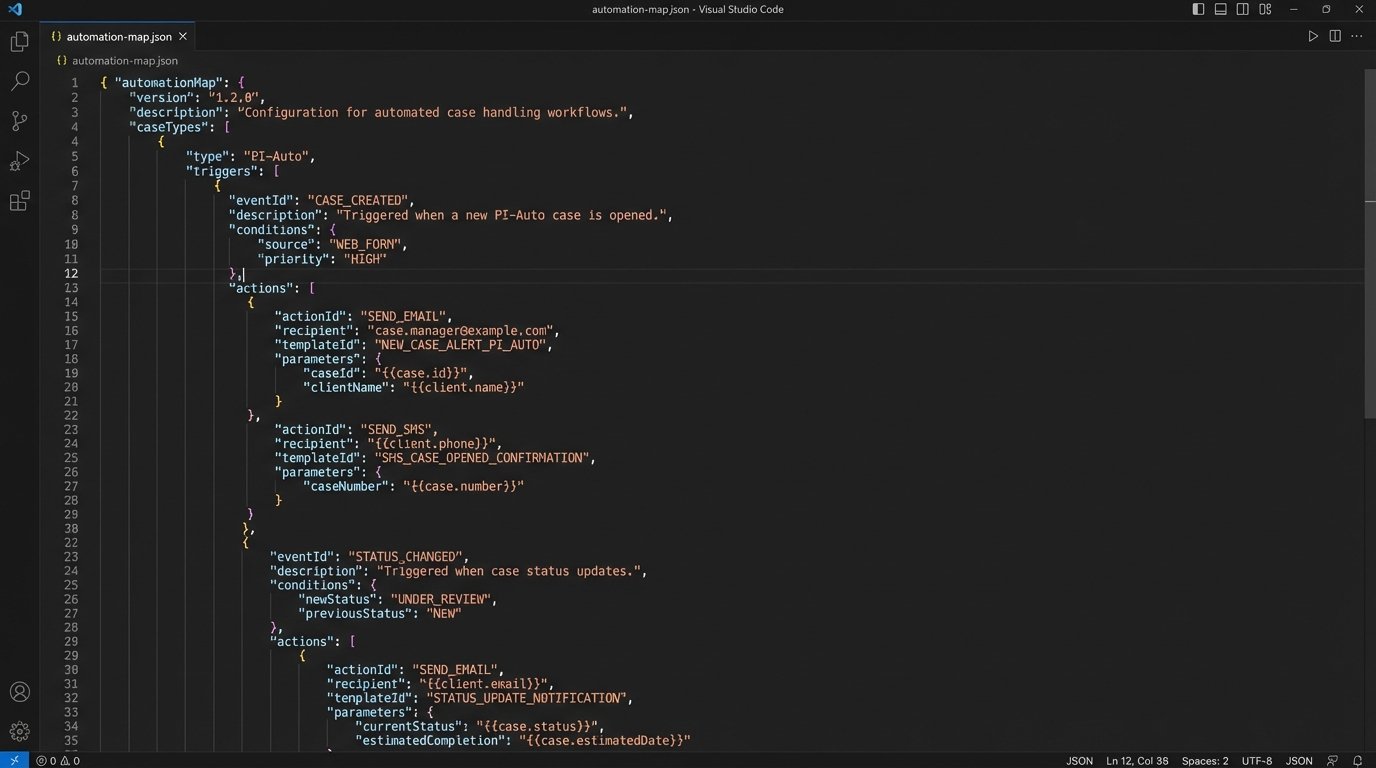
The logic itself should not be hard-coded. A maintainable system externalizes its rules into a configuration file or a database table. This “automation map” defines the relationship between a CMS event and a communication action. It is a simple key-value store that links a trigger to a template and a channel.
A JSON object representing this map might look something like this:
{

  "automations": [

    {

      "trigger": {

        "case_type": "PI-Auto",

        "status_change": {

          "from": "Intake",

          "to": "Representation Agreement Sent"

        }

      },

      "action": {

        "channel": "email",

        "template_id": "TEMP-001-RepAgreement",

        "delay_minutes": 5

      }

    },

    {

      "trigger": {

        "case_type": "PI-Auto",

        "event": "HearingScheduled"

      },

      "action": {

        "channel": "sms",

        "template_id": "TEMP-002-HearingReminder",

        "delay_minutes": 0

      }

    }

  ]

}
This structure allows non-technical staff to understand the logic, and it allows you to modify the firm’s communication strategy without a full code deployment. Adding a new reminder is a matter of adding a new JSON object, not rewriting a function.
Confronting the Legacy System Problem
Of course, the idea of a modern CMS that supports webhooks is a fantasy for many firms. Many are stuck with on-premise, closed-box systems that offer no API, let alone real-time event triggers. In these scenarios, you are forced to get creative and accept a certain level of technical debt to move forward.
The most direct method is to query the backend database. A script, running on a scheduler every one to five minutes, can look for changes in key tables. It is not as elegant as a webhook, but it is a reliable way to manufacture events from a system that does not produce them natively. This requires read-only database access and a deep understanding of the CMS data schema, which vendors are often reluctant to provide.
The Last Resort: Screen Scraping with RPA
When database access is off the table, the final, ugly option is Robotic Process Automation (RPA). This involves deploying a bot that logs into the CMS user interface, navigates to specific reports or case pages, and scrapes the data directly from the screen. It is a brittle, high-maintenance solution. A minor UI change by the vendor can break your entire workflow.
RPA should be treated as a temporary bridge, not a permanent solution. It is a costly and complex way to compensate for a deficient core system. The budget spent on RPA licenses and development would often be better applied to a CMS migration project. However, for a firm locked into a long-term contract with a legacy vendor, it might be the only viable path to automation.
Closing the Loop: Automating Feedback and Reviews
One-way communication is a wasted opportunity. The same event-driven architecture used for status updates can be used to systematize the collection of feedback and public reviews. The process is straightforward: a case status changing to “Closed-Won” becomes the trigger.
The logic in your middleware can then execute a simple workflow. Wait 14 days. After the delay, send an email or SMS asking the client for feedback. The intelligence is in where you send them. Before sending the message, your middleware should perform a quick lookup. Query your internal systems for any Net Promoter Score (NPS) data or client satisfaction surveys collected during the case. If the client was a promoter (NPS 9-10), the link in the message should point directly to your Google My Business or Avvo review page. If they were a detractor (NPS 0-6), the link should go to an internal feedback form, giving you a chance to address their issues privately before they air them publicly.
This is not about tricking clients. It is about routing feedback to the most appropriate channel. It transforms a generic, hopeful request for a review into a targeted, data-driven process that protects your firm’s reputation and generates actionable internal insights.
Measuring Operational Impact, Not Vanity Metrics
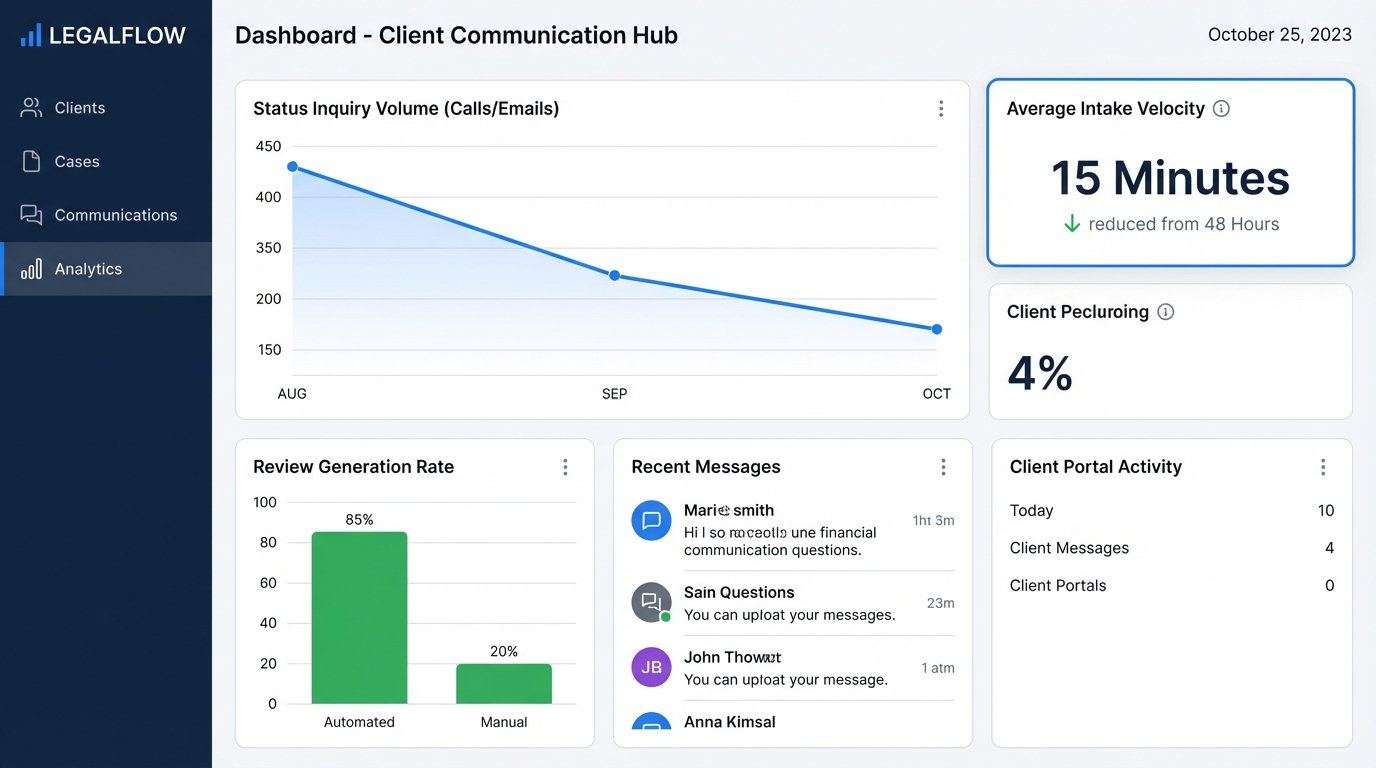
The success of a communication automation project is not measured in email open rates or click-throughs. Those are marketing metrics. The operational key performance indicators (KPIs) are what matter to the firm’s bottom line.
- Status Inquiry Volume: The primary goal is proactive communication. You must track the number of inbound calls and emails from clients asking for a status update. A successful automation system should drive this number down by at least 40-50%. This is a direct measure of freed-up paralegal and attorney time.
- Review Generation Rate: Calculate the percentage of closed-won cases that result in a new, positive public review. Automating the request process should consistently outperform manual, ad-hoc requests.
- Client Intake Velocity: For intake automation, measure the time from a new lead submission to the sending of a representation agreement. Reducing this from days to minutes has a direct correlation with conversion rates.
Building this system is not a one-time project. It requires ongoing maintenance, a clear owner, and a willingness to gut and refactor the parts that break. The tools will change, the APIs will be deprecated, and the firm’s internal processes will evolve. The goal is not a perfect, unbreakable system. The goal is a resilient, observable system that fails gracefully and provides more value in saved time and client satisfaction than it costs to maintain.