
Most discussions about client intake automation begin with a flawed premise. They focus on software features and saving paralegal time. This perspective misses the fundamental engineering problem. The real challenge is not task reduction. It is about creating a resilient, auditable data pipeline that converts unstructured inquiries into structured, actionable records before human intervention becomes a bottleneck.
The standard law firm model routes a web form submission directly to an email inbox. This is not a process. It is a digital bottleneck waiting for a single point of failure. It guarantees slow response times, encourages data entry errors, and makes any meaningful performance metric impossible to track. Growth is not driven by buying a new CRM. Growth is driven by architecting a system that forces speed and accuracy from the first point of contact.
The Structural Defect in Manual Intake
The core defect of manual intake is that data structuring happens last. An email containing a prospect’s name, phone number, and a paragraph of context is an unstructured blob of text. A paralegal must manually parse this information, interpret the context, and then transcribe it into a case management system or CRM. Every step introduces latency and a high probability of error, from typos in a phone number to misclassifying a case type.
This model creates an information liability. The data’s integrity is entirely dependent on human attention, which degrades under pressure. When lead volume increases, the system does not scale. It breaks. Response times lengthen, valuable leads go cold, and the very growth you seek is throttled by the manual process meant to support it.
A Data-First Architecture
A data-first intake architecture inverts this model completely. The system is designed to capture, validate, and structure information at the point of entry. A human is not the first stop. A human is the destination for a pre-processed, qualified, and routed piece of work. The goal is to hand off a clean, structured data object, not a messy email.
This requires thinking of your intake process not as a series of tasks, but as an assembly line with defined stages. Each stage has a specific function: data capture, initial validation, conflict checking, data enrichment, and intelligent routing. Only when a lead successfully passes through these automated gates does it trigger a notification for human action. This forces discipline into the top of your business development funnel.
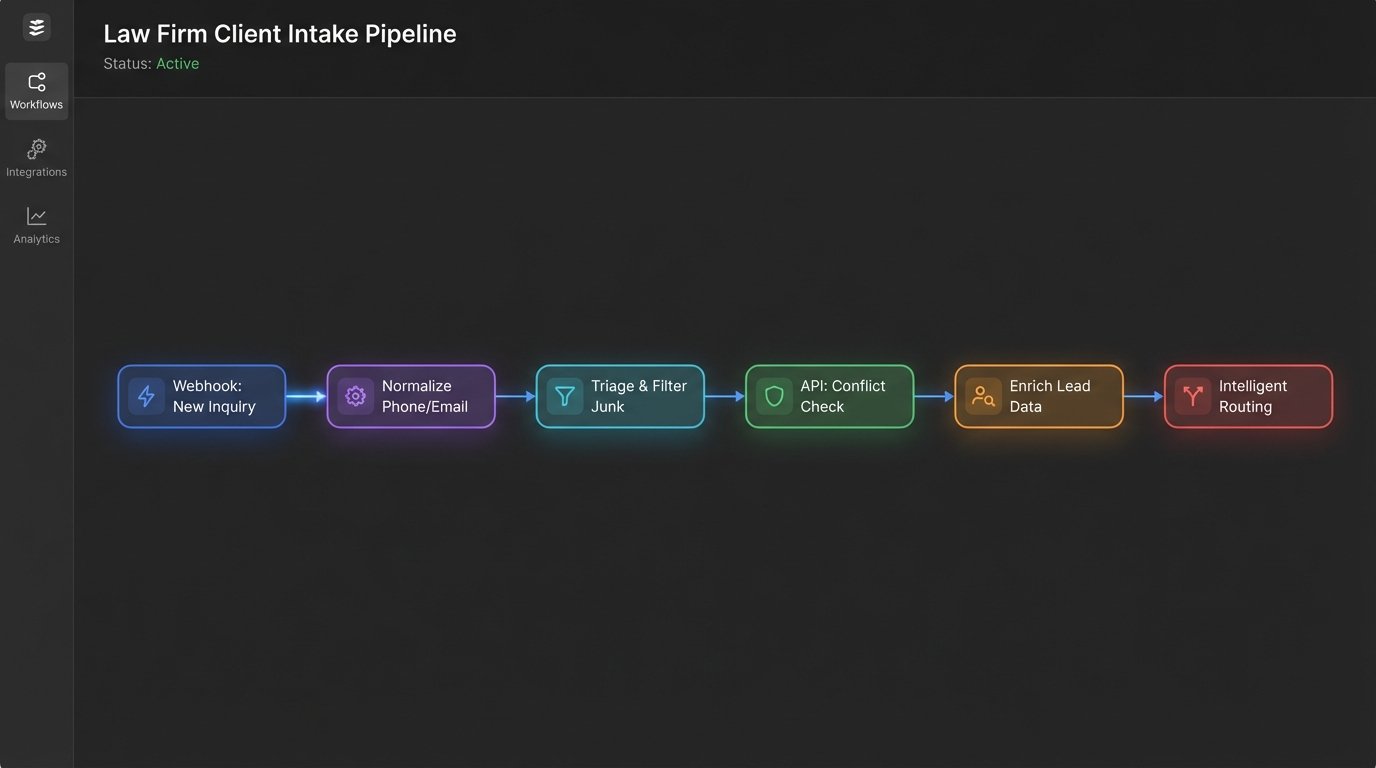
The immediate effect is a radical reduction in lead leakage. A system that can automatically respond with a scheduling link or a confirmation email within seconds of submission has a significantly higher chance of converting an inquiry than one that waits hours for a manual reply. The prospect’s intent is highest at the moment they hit “submit”. Every second of delay works against you.
Building the Automated Intake Pipeline: Core Stages
Constructing a proper intake pipeline means breaking the process into discrete, manageable, and automatable stages. Each stage should be a logical unit with a clear input and output. Tying these stages together with a workflow engine like Make, Zapier, or a custom script is the technical implementation. The strategy lies in defining the stages themselves.
Stage 1: Data Capture and Normalization
This begins at your web form. Forget basic HTML forms that just email content. Your forms need to be API-first, capable of sending a structured JSON payload to a webhook endpoint. This ensures the data is born structured. Field names are consistent, data types are correct, and you have a machine-readable object from the start.
Normalization is the next step. Phone numbers should be stripped of parentheses and hyphens, forced into E.164 format. Email addresses should be converted to lowercase. State names should be standardized to two-letter abbreviations. This sanitization is critical for preventing duplicate records and ensuring data can be used reliably in subsequent systems. Trying to solve this with just a CRM is like building an engine by buying a really nice steering wheel. The core logic is missing.
A typical JSON payload from a well-designed intake form might look like this. Notice the structured fields, which eliminate any need for a human to parse a block of text.
{
"submission_id": "a1b2c3d4-e5f6-7890-1234-567890abcdef",
"timestamp": "2023-10-27T14:30:00Z",
"source_url": "https://yourfirm.com/contact-us",
"contact": {
"first_name": "Jane",
"last_name": "Doe",
"email": "jane.doe@example.com",
"phone": "+15551234567"
},
"case_details": {
"case_type_inquiry": "personal_injury",
"incident_date": "2023-09-15",
"incident_location": {
"city": "New York",
"state": "NY"
},
"description": "Client was involved in a slip and fall accident at a commercial property."
},
"opposing_party": {
"name": "MegaCorp Inc."
}
}
Stage 2: Automated Triage and Filtering
Not all inquiries are leads. Many are spam, solicitations, or simply irrelevant. A human should never waste time on this junk. The second stage of the pipeline is an automated triage layer that acts as a filter. Using simple conditional logic, the system can inspect the incoming data payload and make an instant decision.
This logic can check for keywords in the description field like “solicitation,” “SEO services,” or “job inquiry.” It can validate that the email domain is not on a known blocklist of temporary email providers. It can check if the phone number format is valid. Inquiries that fail these checks are either discarded or routed to a separate, low-priority inbox for occasional review. This keeps the primary intake queue clean and focused exclusively on potential clients.
Stage 3: Preliminary Conflict Checking
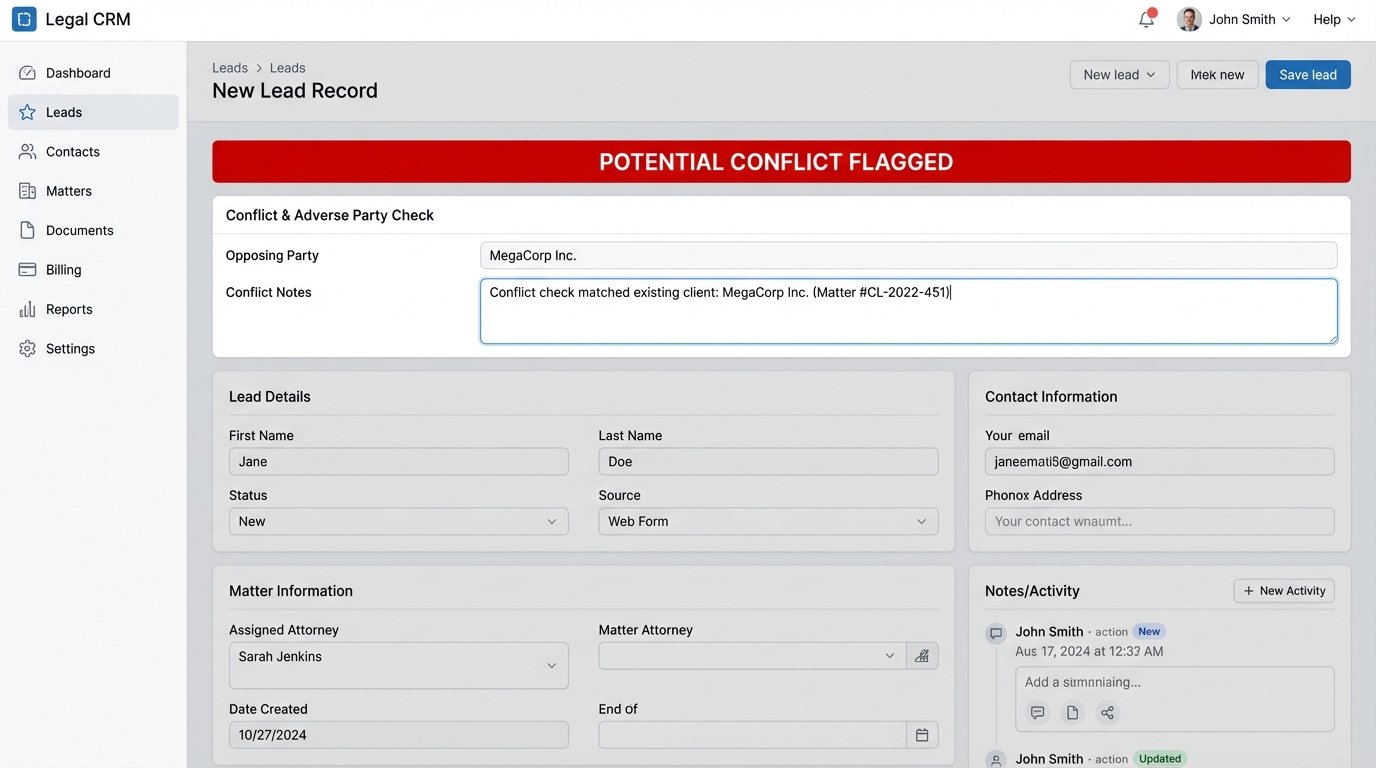
Before a potential client ever speaks to an attorney, a basic conflict check can and should be performed automatically. This is a massive efficiency gain. The system can take the name of the opposing party from the intake form and run a query against your case management system’s API.
The check looks for existing clients or matters where that entity is listed. If a potential conflict is flagged, the system does not reject the lead. Instead, it enriches the lead record with a “Potential Conflict” flag and routes it to a designated partner or compliance officer for manual review. This provides critical information to the intake team upfront, preventing wasted time on consultations that can’t proceed.
Stage 4: Data Enrichment
The data from the form is only the beginning. True automation leverages external data sources to build a richer profile of the potential client. This allows your team to have a more informed first conversation. For corporate clients, an email address can be used to query an enrichment service like Clearbit to pull company name, size, and industry. For individuals, you might check public records APIs for relevant information based on the case type.
This stage transforms a simple inquiry into an intelligence brief. The intake specialist is no longer just reading a form submission. They are viewing a consolidated record that includes the prospect’s own words plus externally validated data. This positions your firm as exceptionally prepared from the very first interaction.
Stage 5: Intelligent Routing
The final automated stage is routing the processed, qualified, and enriched lead to the right person. Basic round-robin assignment is primitive. Intelligent routing uses the data collected to make a strategic decision. A personal injury case originating from California gets routed to the PI team in the LA office. A high-value corporate litigation inquiry can be routed directly to a senior partner’s assistant, bypassing the general paralegal pool.
This can even integrate with calendar APIs. The system can check the availability of attorneys in the relevant practice group and assign the lead to the one with the most open capacity, ensuring the fastest possible follow-up. The routing logic is the brain of the operation, turning a random influx of leads into an organized and optimized workflow.
The Toolchain Is a Liability Without Architecture
Firms often get distracted by the tools. They debate Clio Grow versus Lawmatics, or Zapier versus Make. This is the wrong conversation. The specific software is far less important than the underlying architecture and the logic that connects the components. You are not buying a solution. You are assembling a system from a collection of parts, and you are responsible for the integrity of the connections.
Every tool adds another potential point of failure. An API key can expire. A webhook URL can be changed during a software update. A third-party service can experience an outage. A robust intake system requires comprehensive error handling and monitoring. What happens if your case management system’s API is down when a new lead comes in? The system should not fail silently. It must have a fallback mechanism, like holding the data in a queue and retrying the API call every five minutes, while simultaneously sending an alert to an administrator.
Here is a simplistic JavaScript example showing input validation. This logic must exist somewhere in your pipeline, either in the form itself or in the first function that receives the webhook. Without it, you are injecting bad data directly into your core systems.
function validateIntakePayload(payload) {
const errors = [];
const emailRegex = /^[^\s@]+@[^\s@]+\.[^\s@]+$/;
if (!payload.contact || !payload.contact.email) {
errors.push("Email is a required field.");
} else if (!emailRegex.test(payload.contact.email)) {
errors.push("Invalid email format provided.");
}
if (!payload.contact || !payload.contact.phone) {
errors.push("Phone number is a required field.");
}
if (!payload.case_details || !payload.case_details.description) {
errors.push("Case description is required.");
} else if (payload.case_details.description.length < 20) {
errors.push("Case description must be at least 20 characters long.");
}
return {
isValid: errors.length === 0,
errors: errors
};
}
This is not a “set it and forget it” project. It is living infrastructure that requires maintenance, monitoring, and periodic upgrades, just like any other critical system in your firm.
Measuring What Actually Drives Growth
The final piece is measurement. The value of this system is not “time saved,” which is a soft, ambiguous metric. The value is in hard, quantifiable improvements to your business development KPIs. Your automated system should be logging data at every stage, feeding a dashboard that gives you an unvarnished view of your intake performance.
Focus on these core metrics:
- Lead Response Time: The median time in minutes from form submission to the first human reply. Automation should drive this from hours down to under five minutes.
- Qualification Rate: The percentage of total inquiries that pass the automated triage stage. This shows you the quality of your marketing traffic.
- Conversion Rate from Qualified Lead: Of the leads that pass triage, what percentage result in a signed retainer? This is the ultimate measure of intake and sales effectiveness.
- Data Error Rate: The percentage of new contact records created via automation that require manual correction later. This number should approach zero.
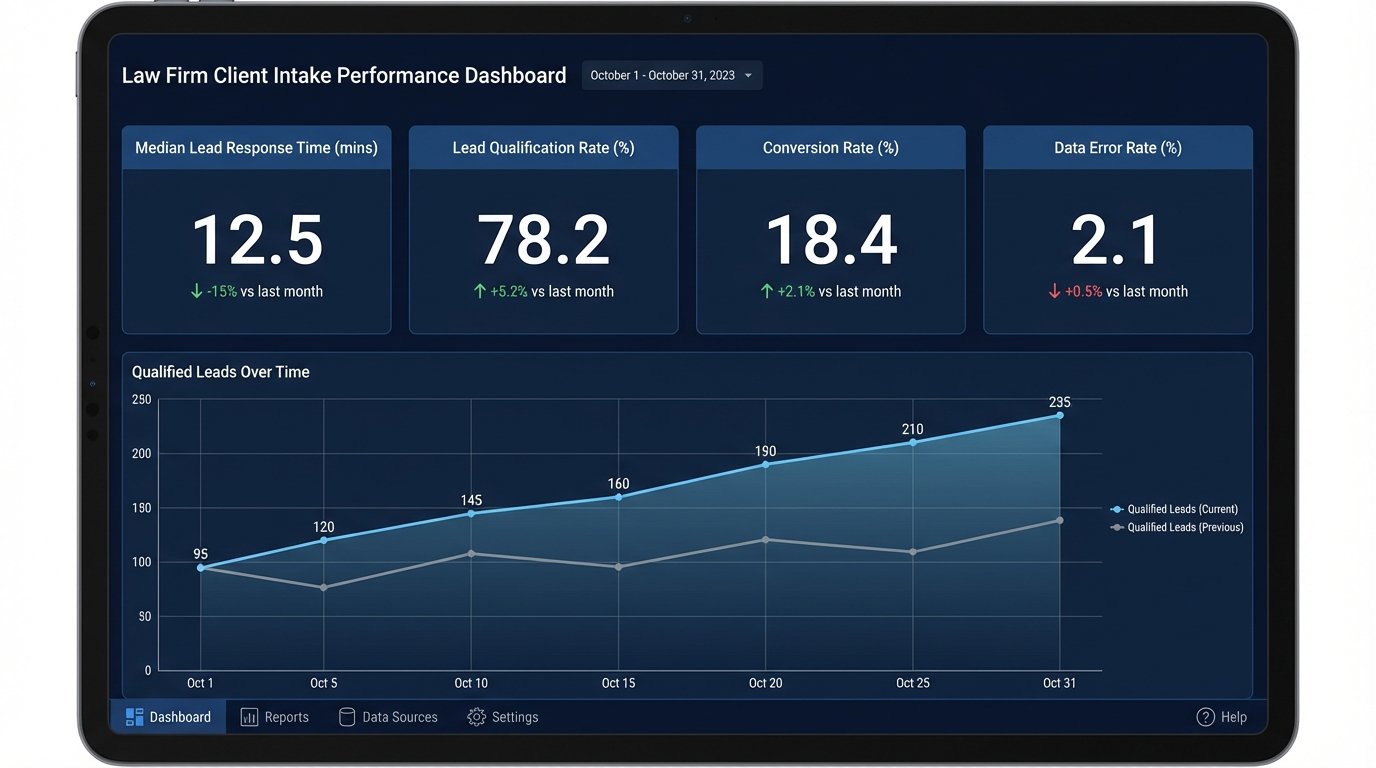
Tracking these numbers allows you to manage intake like any other part of the business. You can run A/B tests on your forms, adjust your triage logic, and see the direct impact on your conversion rates. This is how you build a predictable engine for growth. You cannot optimize a process you do not measure, and you cannot measure a manual process happening in someone’s inbox.
Ultimately, automating the client intake process is an exercise in operational discipline. It forces a firm to standardize its procedures, define its qualification criteria, and build a system that is scalable by design, not by accident. The result is not just efficiency. The result is a faster, more reliable, and more profitable path from inquiry to client.