The General Counsel’s request was simple: stop wasting attorney time on low-risk, high-volume contracts. The primary offender was the boilerplate Non-Disclosure Agreement. A team of three senior attorneys spent a combined 15 hours a week reviewing third-party NDAs that, 90% of the time, were either acceptable or required the same two predictable redlines. The process was a manual, error-prone cycle of email, download, save, review, and reply. The cycle time for a standard NDA averaged 48 hours, a delay that irritated the sales department.
This wasn’t a problem that needed a six-figure enterprise CLM platform. It was a triage problem. We needed a system to ingest, analyze, and classify incoming contracts, automatically approving the safe ones and flagging the risky ones for human intervention. The goal was to shrink that 48-hour cycle time and reclaim those 15 weekly attorney hours for work that actually requires a law degree.
The Anatomy of a Broken Workflow
Before any code was written, we mapped the existing manual process. The path an NDA took from receipt to signature was convoluted and created multiple points of failure. An inbound email with an NDA attached would land in a shared paralegal inbox. A paralegal would then manually download the document, rename it according to a fragile naming convention, and upload it to the firm’s document management system (DMS). They would then create a task in the case management system (CMS), assign it to a rotational attorney, and paste in a link to the document.
The attorney would get a notification, navigate to the DMS, and open the document. They would read every clause, comparing it mentally to the company’s approved playbook. If the terms were acceptable, they would approve it. If they were not, they would redline the Word document, save it as a new version in the DMS, and then email the counterparty. Version control was a constant headache, with attorneys occasionally redlining outdated drafts. There was no central tracking of non-standard clauses that were frequently accepted or rejected, which prevented any data-driven updates to the playbook.
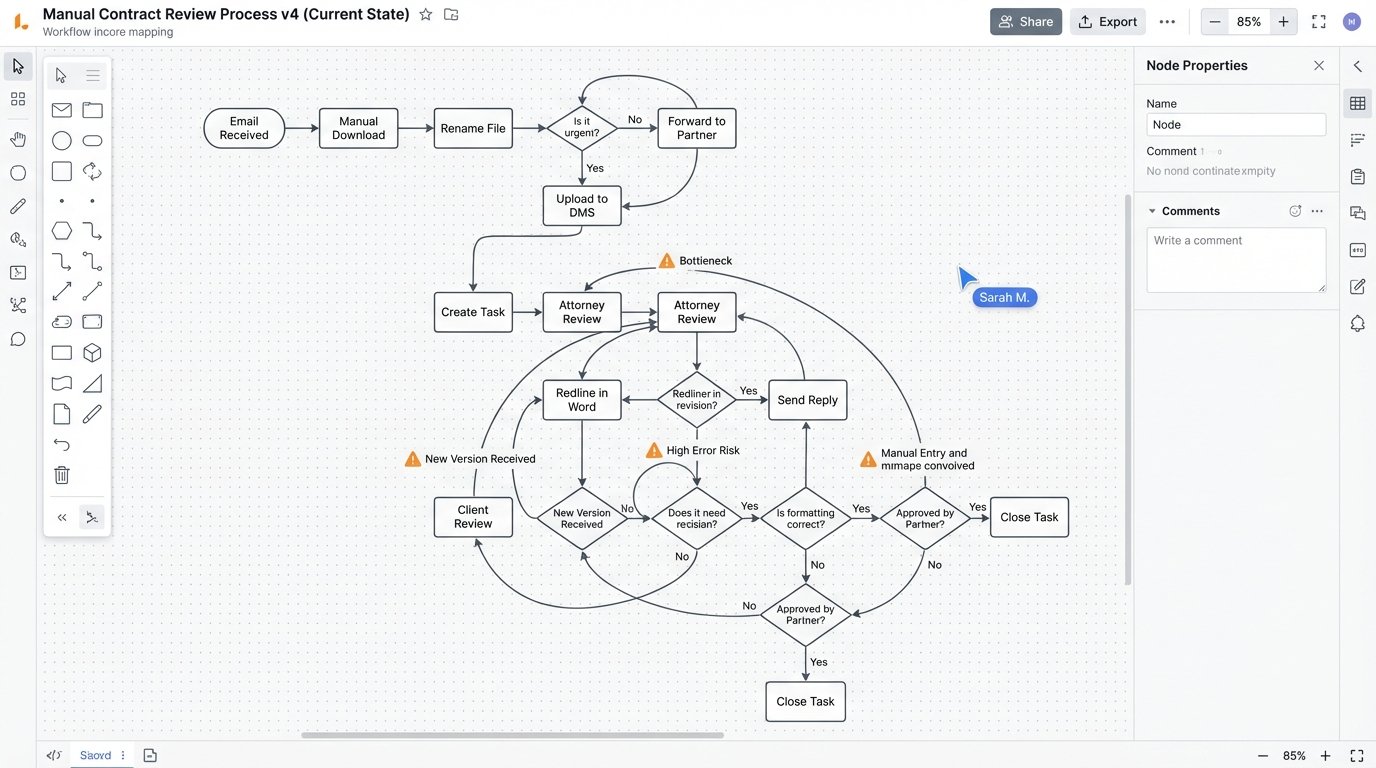
This entire chain relied on human diligence. A misnamed file could orphan a document. A forgotten task assignment could leave an NDA sitting for days. The most expensive part of the process, the attorney review, was spent mostly on confirming that standard clauses were, in fact, standard.
Architecture of the Triage Engine
The solution was designed as a lightweight, automated triage engine, not a full-blown contract analysis platform. We bolted together a few specific tools to handle a linear workflow: Ingestion, Text Extraction, Classification, and Disposition. The core principle was to build a filter, not a replacement for legal judgment.
Step 1: Ingestion and Parsing
We bypassed the shared inbox entirely. A dedicated email address, nda.review@company.com, was established. A Python script running on a small cloud instance used `imaplib` to poll this inbox every 60 seconds. When a new email arrived, the script stripped all attachments with `.docx` or `.pdf` extensions. It ignored inline images and signature blocks to reduce noise.
Metadata from the email, like the sender’s address and the subject line, was captured and stored as JSON. This was critical for the final step of replying to the correct counterparty. The attachments were saved to a temporary, secure storage bucket for processing.
Step 2: Text Extraction and Normalization
Getting clean, workable text from contracts is the hardest part. For `.docx` files, the process was straightforward using the `python-docx` library to extract raw text. PDFs were the real problem. Scanned documents, often low-resolution and skewed, were common. We built a sub-routine that first attempted to extract text directly from the PDF. If the character count was nonsensically low, indicating a scanned image, the file was routed through an Optical Character Recognition (OCR) engine.
We used Tesseract OCR, but not out of the box. It required significant pre-processing using OpenCV to deskew pages, increase contrast, and remove digital noise. Getting the clean text was like trying to filter crude oil through a coffee filter; you get something usable, but the gunk clogs up the works fast. Even with pre-processing, OCR introduced errors, particularly with punctuation and special characters, which had to be cleaned up with a battery of RegEx substitutions before analysis.
Step 3: The Rule-Based Classifier
With clean text, the classification engine could run. We opted against a complex machine learning model for this initial phase. The firm’s NDA playbook was already well-defined and based on specific clause language. A rule-based system was faster to implement and, more importantly, easier for the legal team to understand and trust. The engine’s job was to check for three things: the presence of acceptable clauses, the absence of prohibited clauses, and the specific wording of critical terms.
The core of the classifier was a Python dictionary where keys were clause names and values were lists of approved regular expressions. The engine would scan the document for each key phrase, like “Governing Law” or “Confidentiality Period.” Once it found a potential clause, it would test the surrounding text against its library of approved patterns.
A simplified rule might look something like this in code:
rules = {
    "governing_law": {
        "pattern": r"(?i)governing law",
        "allowed_text": [r"State of Delaware", r"Commonwealth of Massachusetts"],
        "risk_score": 10
    },
    "term": {
        "pattern": r"(?i)(confidentiality period|term)",
        "allowed_text": [r"[1-5]\syears?"],
        "risk_score": 5
    }
}

def analyze_document(text):
    flags = []
    for rule_name, rule_data in rules.items():
        if re.search(rule_data["pattern"], text):
            # Simplified logic: check if any allowed text is present
            match_found = any(re.search(p, text) for p in rule_data["allowed_text"])
            if not match_found:
                flags.append({"rule": rule_name, "risk": rule_data["risk_score"]})
    return flags
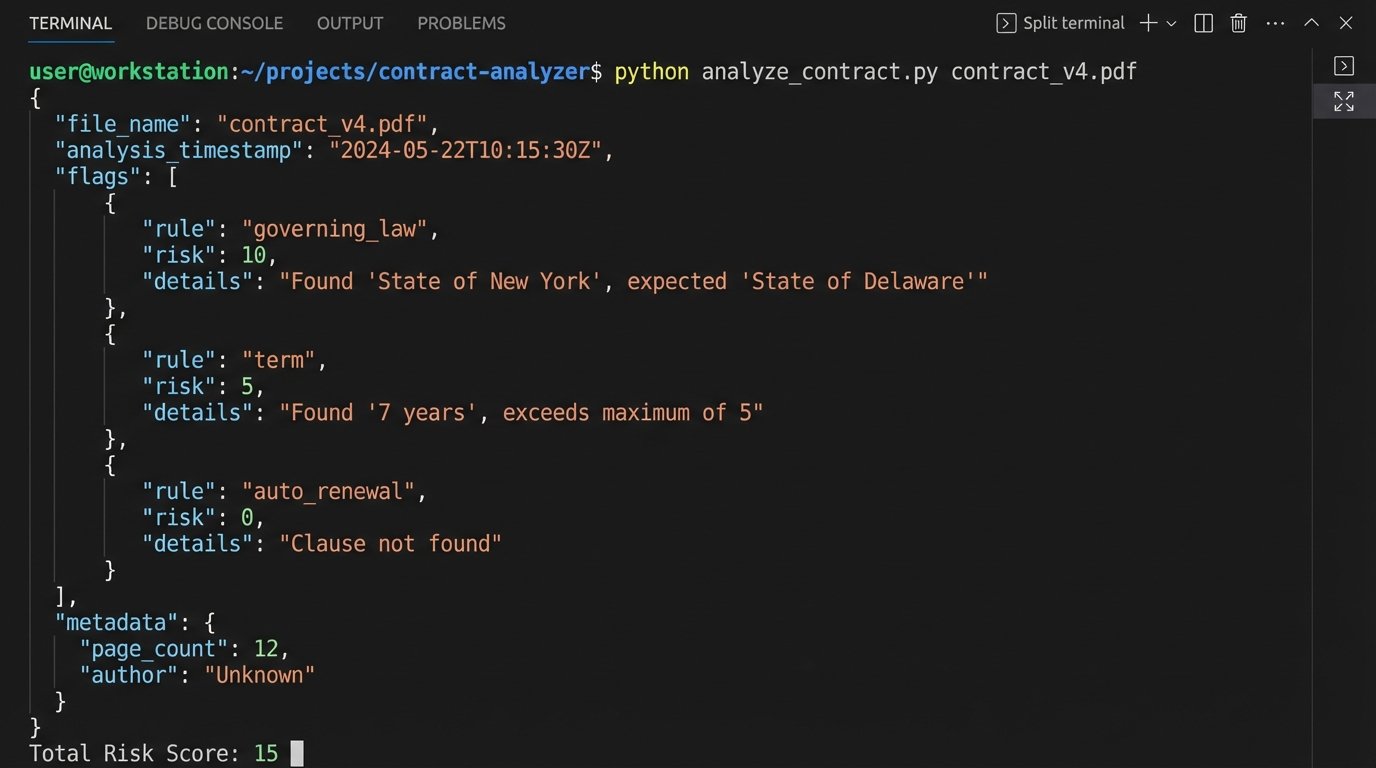
This is a stripped-down example. The production version had dozens of rules with more complex logic to handle proximity and negation. Each rule failure added points to a total risk score for the document. If the final score was zero, the NDA was considered “standard.” If the score was greater than zero, it was flagged for review.
Step 4: Integration and Disposition
The final step was to act on the classification. The system had three output paths:
- Standard (Risk Score 0): An email was automatically generated and sent back to the original sender with the firm’s signature-ready counter-signed copy attached. A record of the transaction, including the final document, was created in the CMS via its archaic SOAP API.
- Low Risk (Risk Score 1-15): A task was created in the CMS and assigned to a paralegal. The task included the risk score, a list of the specific clauses that were flagged, and a link to the document. The paralegal could quickly review the flagged items and, if acceptable, execute the agreement.
- High Risk (Risk Score > 15): A task was created and assigned directly to an attorney. The summary of flagged clauses allowed the attorney to jump straight to the problem areas without reading the entire document from scratch.
Bridging the gap with the on-premise CMS was the most fragile part of the build. The API was poorly documented and prone to timeout errors. We had to wrap all API calls in a retry loop with exponential backoff to force the integration to be stable.
Results After Six Months
The metrics gathered after six months of operation confirmed the project’s value. The system wasn’t perfect, but it was a massive improvement over the manual workflow. We didn’t eliminate human review; we focused it.
Key Performance Indicators:
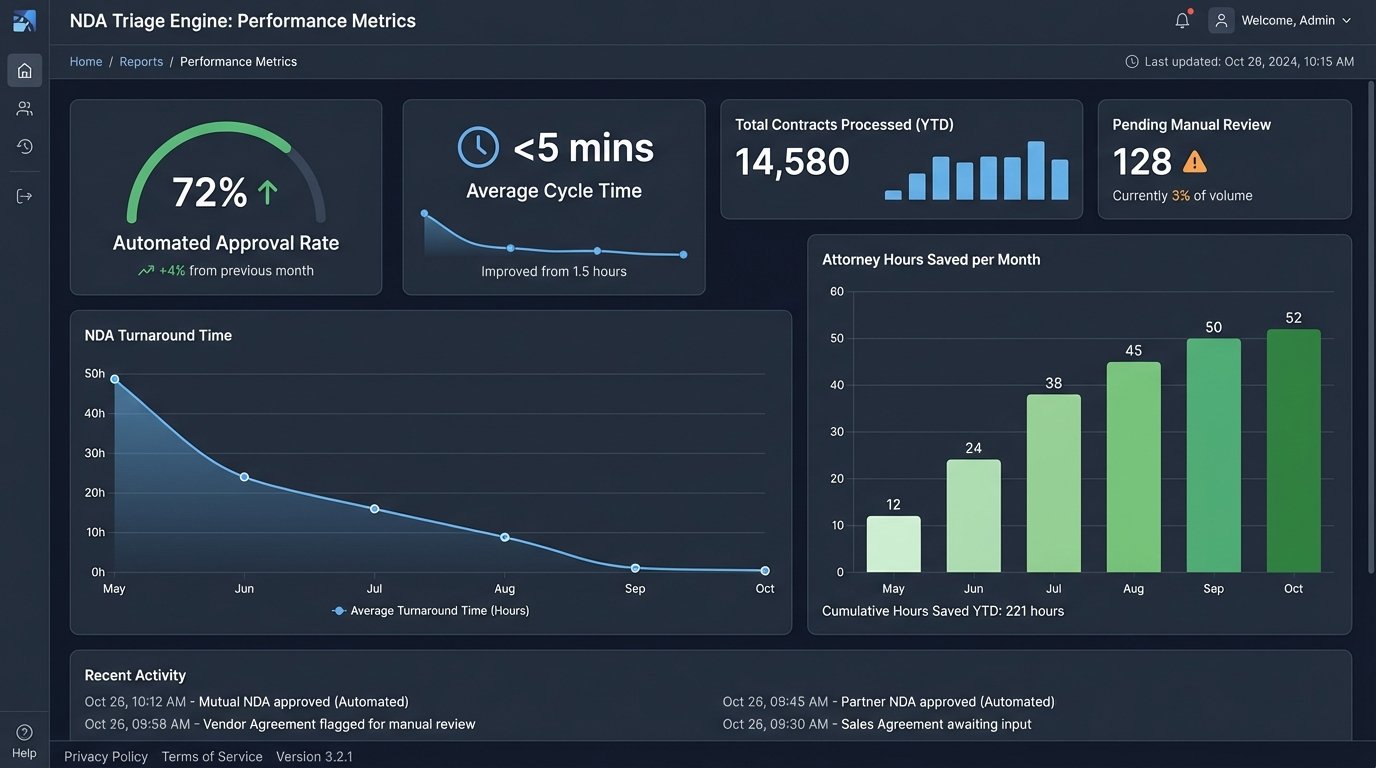
- Automated Approval Rate: 72% of all submitted NDAs were classified as standard and processed without any human intervention.
- Average Triage Time: The system took an average of 90 seconds to process a document from ingestion to final disposition.
- Cycle Time Reduction: The average turnaround time for a standard NDA dropped from 48 hours to less than 5 minutes. For NDAs requiring review, the time dropped to an average of 4 hours, as lawyers could focus immediately on the flagged issues.
- Attorney Hours Reclaimed: The estimated 15 hours per week spent on routine NDA review was reduced to less than 2 hours per week. This reclaimed over 50 attorney-hours per month.
The sales department was the biggest advocate. Getting NDAs signed in minutes instead of days removed a significant point of friction from their initial engagement with new clients. It directly accelerated the sales pipeline.
Where The System Still Fails
Automation is not a one-time fix. The system requires maintenance. The OCR engine still struggles with very poor quality scans, requiring manual intervention about once a week. We encountered a major issue in the third month where a large counterparty changed their standard NDA template. The new language broke half of our rules, and every one of their NDAs was suddenly flagged as high risk. This forced us to update the rule engine.
The playbook is a living document. The system requires a feedback loop where attorneys can easily suggest updates to the rules based on new clauses they encounter. We built a simple interface for this, but it requires the discipline to use it. The triage engine is only as smart as the rules that govern it. It effectively codified the firm’s existing policy, but it cannot create new policy. The value is in execution speed and consistency, not in novel legal interpretation.