The firm, a three-attorney litigation practice, was operating on a stack of disconnected tools. A generic WordPress contact form dumped leads into a shared Outlook inbox. Client data lived in a series of Excel spreadsheets, a method prone to version control failures and data entry errors. Their practice management system (PMS) was a decade-old, on-premise server that required a VPN for remote access and offered no meaningful API. The managing partner estimated his team spent 10 to 15 hours per week on non-billable, administrative tasks that were pure friction.
Their primary pain points were concrete and measurable. Client intake was a manual copy-paste operation from email to spreadsheet to PMS. Document assembly involved manually changing names, dates, and case numbers in Word templates. Billing reminders were sent sporadically, whenever an admin had a free moment to cross-reference invoices against bank statements. The process was a constant source of unforced errors.
The Diagnostic Phase: Mapping the Bleed
Before writing a single line of code or subscribing to any new service, we forced a full stop. The first step was to instrument the existing manual workflows. We mapped every single click, copy, and paste action required to move a client from initial contact to a paid invoice. This wasn’t about finding a one-to-one digital replacement for each task. It was about identifying the data handoffs and decision points that consumed the most time.
We established a few key metrics to anchor the project:
- Time-to-Intake: The duration from a potential client submitting a web form to having a conflict check run and a matter opened in the PMS. The baseline was 24-48 hours.
- Document Generation Time: The average time spent creating a standard retainer agreement or initial complaint. The baseline was 25 minutes.
- Invoice Aging: The average number of days an invoice remained outstanding. The baseline was 47 days.
These numbers provided a clear, objective target. Any proposed solution had to move these needles in a significant way, or it was a non-starter. This is the only way to get buy-in from attorneys who are, by nature, skeptical of anything that changes their routine.
Architecture of the Solution: A Pragmatic Stack
A full system replacement was off the table. Small firms cannot absorb the cost or operational disruption of a massive platform migration. The strategy was to build a lightweight automation layer that could bridge their existing, disparate systems. The core problem wasn’t the tools themselves, but the lack of communication between them.
The selected stack was deliberately simple:
- Practice Management System: We first had to address the on-premise PMS. We migrated them to Clio, a cloud-based PMS with a well-documented REST API. This was the single largest expense but was non-negotiable. Without API access, any automation is just a fragile screen-scraping script waiting to break.
- Intake Form: Gravity Forms for WordPress was chosen for its advanced conditional logic and, critically, its robust webhook capabilities. This allowed us to capture structured data on submission and immediately fire it off to a processing endpoint.
- Integration Platform: We used Make (formerly Integromat) as the central nervous system. Its visual workflow builder and HTTP request modules allowed us to construct the logic without deploying a dedicated server. While Zapier is more known, Make offers more granular control over data structures and error handling routes, which was critical.
- Document Generation: Lawyaw was integrated directly with Clio. This allowed us to build reusable document templates that could be populated directly from matter data stored in the PMS.
Connecting the modern web form to the old case management system’s SOAP endpoint felt like plumbing a new high-pressure water main into a network of crumbling clay pipes. The move to a cloud PMS with a modern API was the foundational step that made everything else possible.
The goal was never a “no-code” solution. The term itself is a misnomer. We wrote custom logic inside Make’s expression editors and small Python scripts hosted on a serverless platform for data transformations that were too complex for the integration tool alone. The result was a hybrid system that used off-the-shelf components for 80% of the work and targeted code for the remaining 20%.
Automating Client Intake
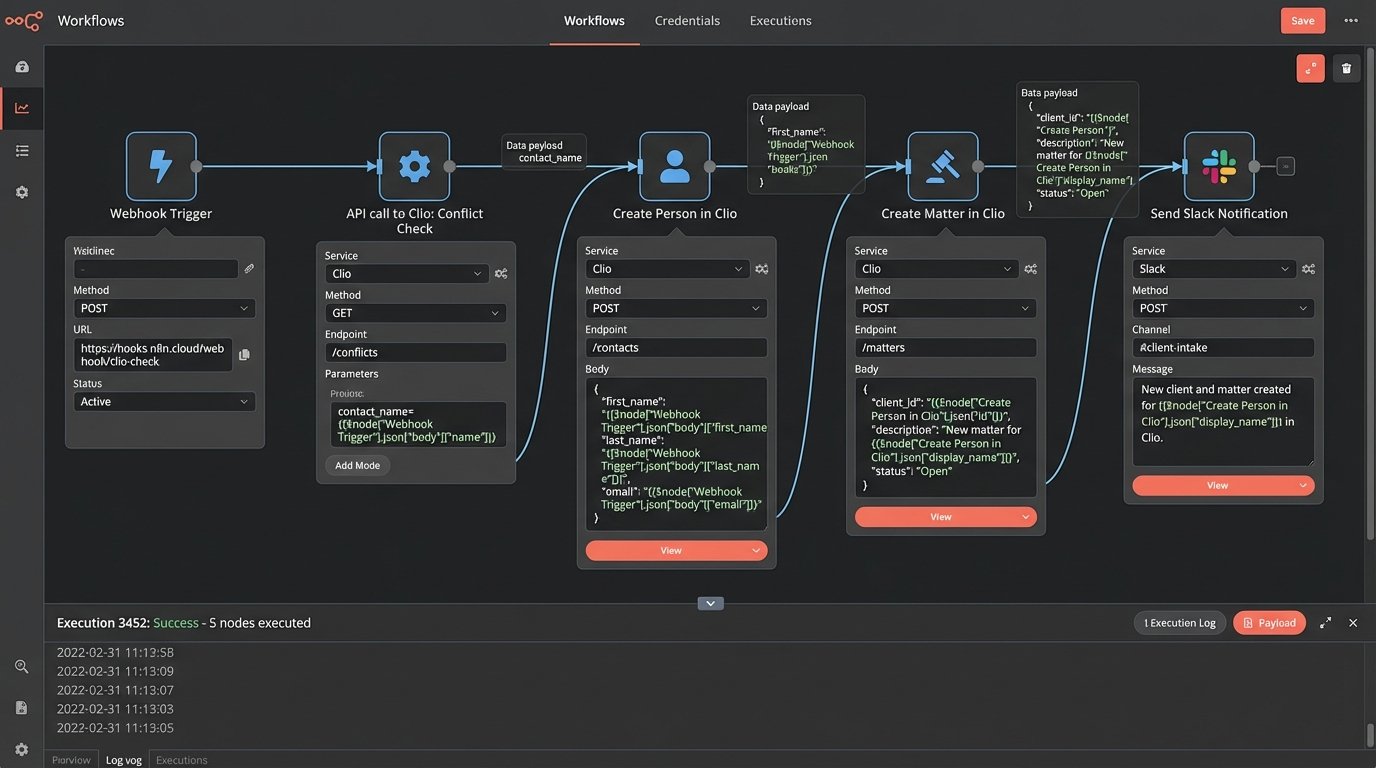
The intake workflow was the first target. The new process completely bypasses the shared inbox for new leads. When a potential client fills out the Gravity Form, the submission triggers a webhook that sends a JSON payload to a Make scenario.
The scenario executes the following sequence:
- Parse Data: The incoming JSON from the form is parsed into distinct variables (name, email, phone, case description).
- Conflict Check: The system makes an API call to Clio’s contact endpoint, searching for any existing contacts with the same name or email address. This doesn’t replace the attorney’s final check, but it flags obvious conflicts instantly.
- Create Person and Matter: If no immediate conflict is found, the scenario makes two subsequent API calls. The first creates a new “Person” contact in Clio. The second uses the returned Contact ID to create a new “Matter,” linking the person to it and setting its status to “Pending.”
- Internal Notification: A formatted message is sent to a specific Slack channel, notifying the team of the new lead. The message includes a direct link to the newly created matter in Clio.
- Client Confirmation: A confirmation email is sent to the potential client, acknowledging receipt of their inquiry.
Here is a simplified example of the JSON payload sent from the intake form to the automation platform. Notice the clean key-value structure, which is essential for reliable parsing and mapping to the PMS fields.
{
"lead_source": "Website Contact Form",
"contact_info": {
"first_name": "Jane",
"last_name": "Doe",
"email": "jane.doe@example.com",
"phone": "555-123-4567"
},
"case_details": {
"matter_type": "Breach of Contract",
"description": "Client is seeking representation regarding a failed supplier agreement.",
"adverse_party": "Acme Corp"
},
"form_id": "gf_form_1"
}
The most difficult part was implementing robust error handling. What happens if the Clio API is temporarily down? The workflow was built with a retry mechanism and a “dead-letter” route. If an API call fails after three attempts, the original JSON payload is sent to a designated paralegal via email with an error log, allowing for manual intervention. Automation without a failure plan is just a faster way to create a mess.
Streamlining Document Generation
With client data now entering Clio in a structured format, we could attack the document assembly bottleneck. We created templates in Lawyaw for the firm’s most common documents: retainer agreements, engagement letters, and initial complaints. These templates use special placeholder syntax to pull data directly from Clio matter fields.
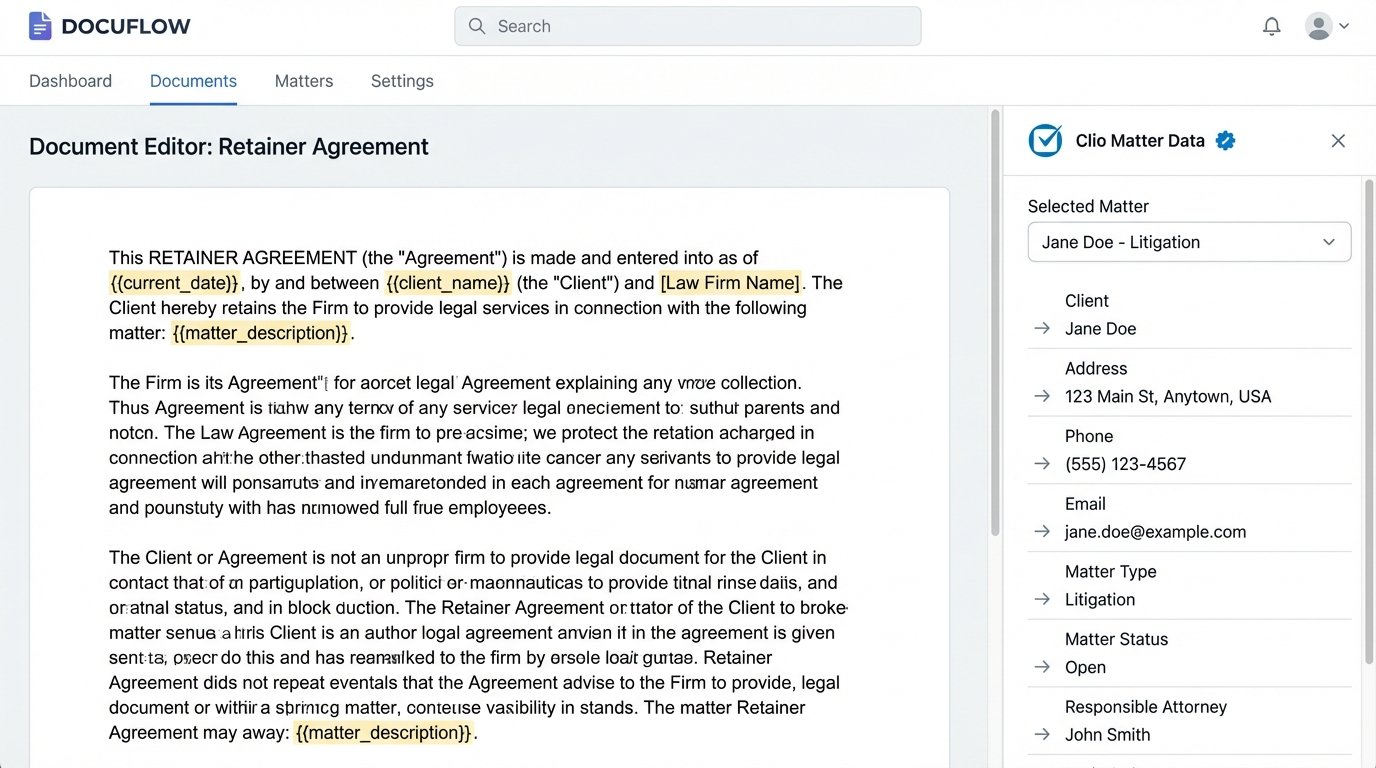
Generating a retainer agreement changed from a 25-minute manual task to a 3-click process:
- Open the matter in Clio.
- Select “Generate Document” from the Lawyaw integration.
- Choose the “Retainer Agreement” template.
The system pulls the client’s name, address, matter description, and fee structure directly from custom fields in the Clio matter. It populates the document and presents it for final review. We built conditional logic into the templates. For example, a clause related to litigation expenses only appears if the “Matter Type” in Clio is set to “Litigation” instead of “Transactional.” This eliminated the risk of paralegals leaving in irrelevant clauses from a previous document.
Automating Billing and Collections
The final piece of the puzzle was billing. Manually chasing down unpaid invoices was a significant drain on administrative time. We built a scheduled scenario in Make that runs every morning at 7 AM.
The process is straightforward:
- Get Overdue Invoices: The scenario makes an API call to Clio to fetch all invoices with a status of “Issued” and a due date in the past.
- Loop and Filter: It iterates through each overdue invoice. A filter checks if a reminder has already been sent in the last 7 days to prevent spamming clients. This is tracked using a custom tag on the invoice within Clio.
- Send Reminder: For each eligible invoice, a polite but firm reminder email is sent to the client’s primary email address. The email includes the invoice number, amount due, and a direct link to the payment portal.
- Log Action: After sending the email, the scenario adds a note to the Clio matter, logging the date and time the reminder was sent. This creates an auditable trail of collection activities.
This automation doesn’t replace human oversight. It handles the low-value, repetitive task of sending initial reminders. The firm’s office manager can then focus their time on invoices that are more than 30 days overdue, which require a direct phone call.
Quantifiable Results: The Data Doesn’t Lie
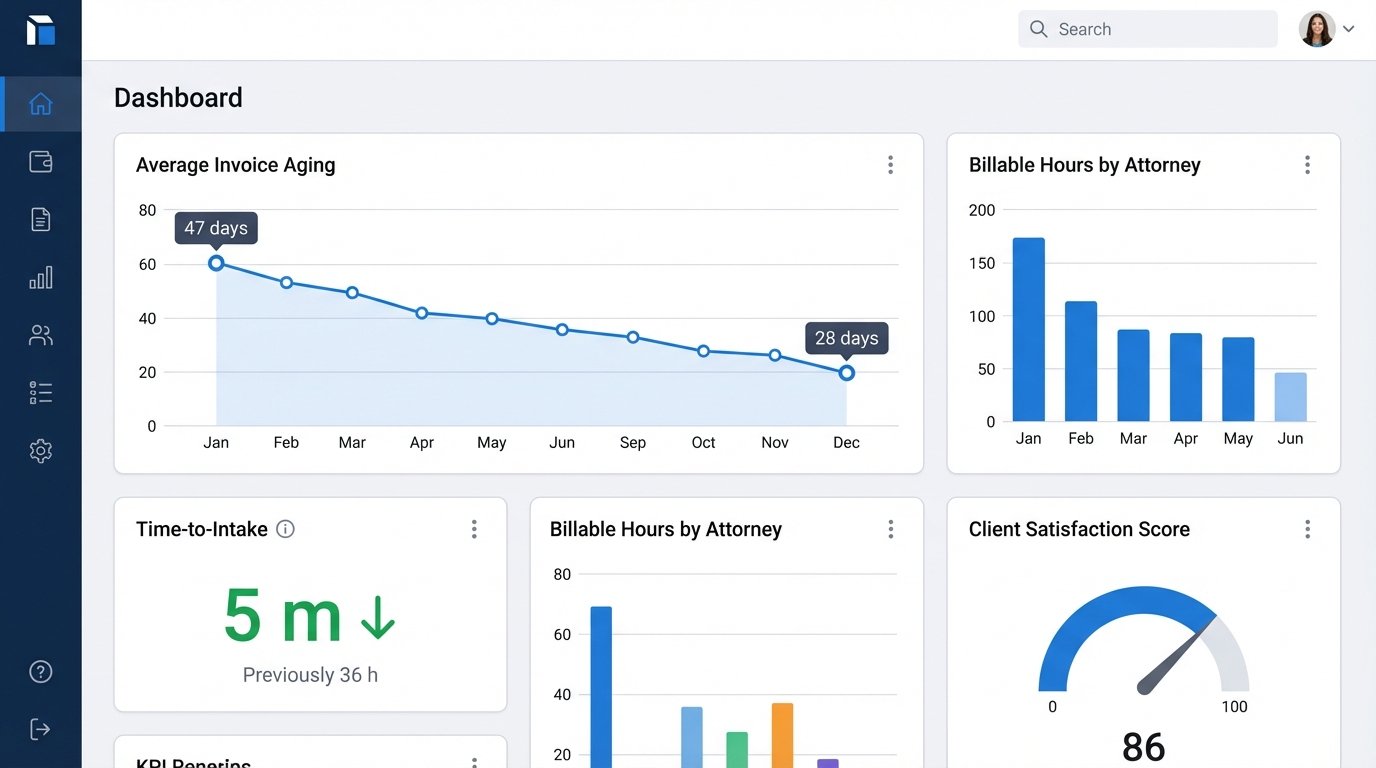
After three months of operation, we revisited the initial KPIs. The results were clear.
Time-to-Intake dropped from an average of 36 hours to under 5 minutes. New leads were in the system and ready for review almost instantly. This allowed the attorneys to respond to promising leads faster than their competitors.
Document Generation Time for standard documents was reduced by over 90%, from 25 minutes to less than 2 minutes. The time saved was reallocated to more complex, strategic legal work.
Invoice Aging saw a significant improvement. The average time to payment dropped from 47 days to 28 days. The consistent, automated reminders improved cash flow and reduced the administrative burden of collections.
The firm calculated that the automations saved approximately 12 hours of administrative work per week. At a blended rate, this translated to thousands of dollars in reclaimed productivity each month. The qualitative feedback was just as important. The attorneys reported lower stress levels, as they no longer had to worry about routine tasks falling through the cracks. Client service improved because communication was faster and more consistent.
Lessons Learned and Lingering Friction
The project was not without its problems. The initial data migration from the old PMS to Clio was a painful process that required significant data cleaning. The team also had to develop a new discipline for data entry. The automations are only as good as the data they receive. An incorrectly entered email address or a misspelled name will cause a workflow to fail. We had to implement validation rules on the intake form and conduct training to enforce better data hygiene.
There are still limitations. Highly complex legal documents with numerous optional clauses are still difficult to fully automate and require manual attorney review. The system is also dependent on the APIs of its constituent parts. If Clio or Make has an outage, the automations stop working. This necessitates monitoring and a clear plan for manual reversion when a service is down. The work is never truly “done.” It is a continuous process of refinement, monitoring, and adaptation as the firm’s needs evolve.