
The partners at a 70-attorney litigation firm were convinced they were leaking revenue. They were right. A manual audit of timesheets against calendar and document management system (DMS) logs suggested a gap of at least 15% between actual work performed and time billed. The problem was classic operational drag. Attorneys, deep in casework, would forget to record short calls, emails, or research blocks. The manual, end-of-day reconstruction of a workday was guesswork at best, malpractice at worst.
Their existing Practice Management System (PMS) offered a time entry module that was, to put it mildly, hostile to users. It required navigating four separate screens to log a single six-minute phone call. This friction guaranteed non-compliance. Our objective was not to replace the PMS, a politically and financially impossible task, but to bypass its data entry bottleneck entirely. We needed to build a system that passively captured activity data and presented it to attorneys for simple validation, not manual creation.
Diagnostic and System Architecture
The core failure was forcing a creator mindset onto a reviewer. An attorney’s job is to practice law, not perform data entry. We designed a system to reverse that dynamic. The system would create the time entries based on digital footprints, and the attorney would simply approve or discard them. This shifts the cognitive load from creation to validation, a far less intensive task.
The architecture was built on three primary data sources:
- Microsoft Exchange Calendars: Pulled via the Graph API for all appointments, including titles, attendees, and durations.
- NetDocuments DMS: Queried its API for document open, edit, and save events, logging the user, document name, and timestamps.
- VoIP Phone System: Ingested raw Call Detail Records (CDRs) from the firm’s Cisco phone system, providing call origin, destination, and duration.
These disparate sources fed into a central processing script. We chose Python for its robust data manipulation libraries and straightforward API integration capabilities. The script ran as a scheduled task on an internal virtual machine every 30 minutes, ensuring a near real-time feed of potential time entries.
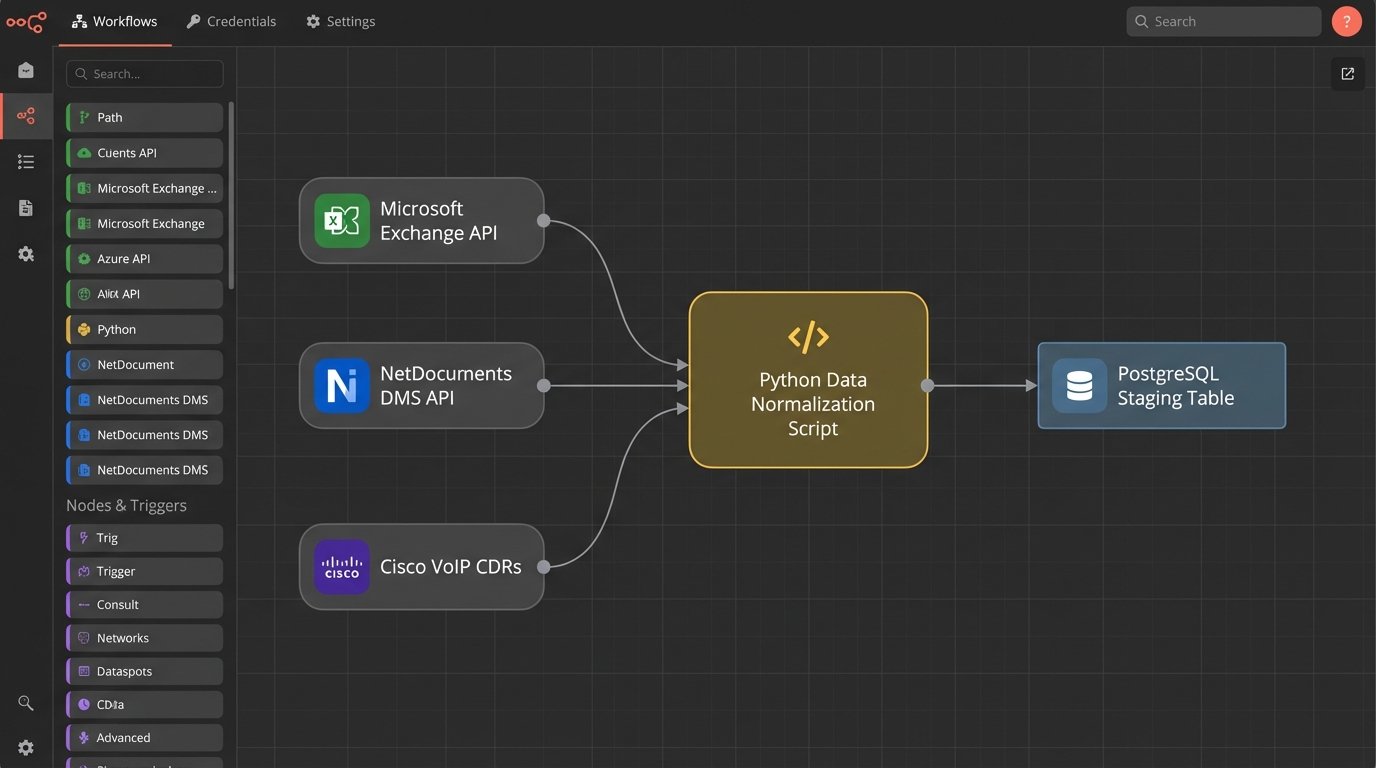
This wasn’t a plug-and-play operation. Each data source had its own authentication method and data structure. We had to force a common format. Forcing raw data from three different APIs into a single, normalized structure felt like shoving a firehose through a needle. You spend less time on the actual logic and more time building custom adapters and error handlers just to manage the input pressure.
The Data Normalization Engine
The script’s first job was to gut the raw data, stripping it down to five key fields: User, Timestamp, Duration, Activity Type, and a raw Description string. The description was a concatenation of the source data, like an email subject line or a document name. This raw, unprocessed data was dumped into a staging table in a PostgreSQL database.
A second, more intelligent process then worked through the staging table. This is where the real logic resided. Its primary function was to map the raw description to a specific Client and Matter ID. The firm used a standard `CLIENT-MATTER` numbering format, such as `1001-0025`. We built a series of regular expressions to find and extract these IDs from calendar invites, email subjects, and document titles.
import re
def extract_matter_id(text_string):
# Pattern looks for a 4-digit client ID, a hyphen, and a 4-or-5-digit matter ID.
pattern = re.compile(r'(\d{4}-\d{4,5})')
match = pattern.search(text_string)
if match:
return match.group(1)
return None
# Example usage:
raw_description = "FW: Call with opposing counsel re: Motion to Compel 2351-0014"
matter_id = extract_matter_id(raw_description)
# matter_id would be '2351-0014'
This simple regex handled about 60% of the entries automatically. The remaining 40% were the problem children. Vague descriptions like “Follow-up call” or “Document review” had no immediate hook. For these, we built a secondary check. The script would look at the user’s other entries within the same two-hour block. If a validated entry for `2351-0014` existed, it would tentatively assign that same matter ID to the ambiguous entry, flagging it for closer review.
The User Interface: A Low-Friction Review Portal
The final component was a web-based portal. We used Flask, a lightweight Python web framework, to build a dead-simple interface. When an attorney logged in, they saw a timeline of their day with system-generated “draft” time entries. Each entry had three buttons: Approve, Edit, or Delete.
Approving an entry was a single click. The script would then format the data and POST it directly to the PMS’s time entry API endpoint. This was a critical chokepoint. The PMS had a sluggish, poorly documented SOAP API that would time out under moderate load. We had to build in a retry mechanism with exponential backoff to handle the API’s instability. A successful POST removed the entry from the draft portal.
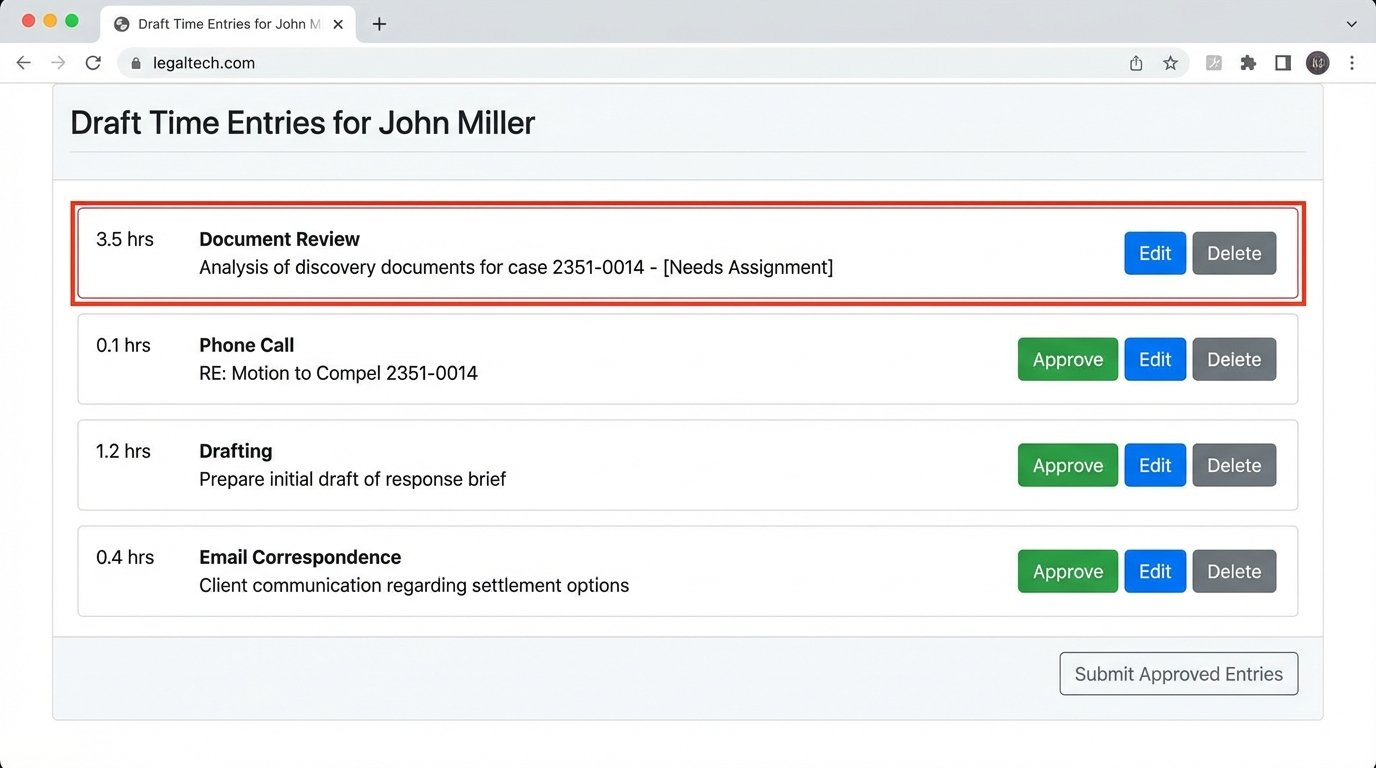
The Edit button opened a minimal modal window allowing the attorney to change the matter ID, adjust the time, or refine the narrative. The key was that they were editing an almost-complete record, not starting from a blank screen. This lowered the psychological barrier to entry. Entries that were not client-billable, like internal meetings, could be deleted instantly.
Any entry that the system could not confidently map to a matter ID appeared at the top of the list with a red border, forcing a manual assignment before it could be approved. This prevented unassigned time from polluting the billing system.
Measurable Outcomes and Operational Realities
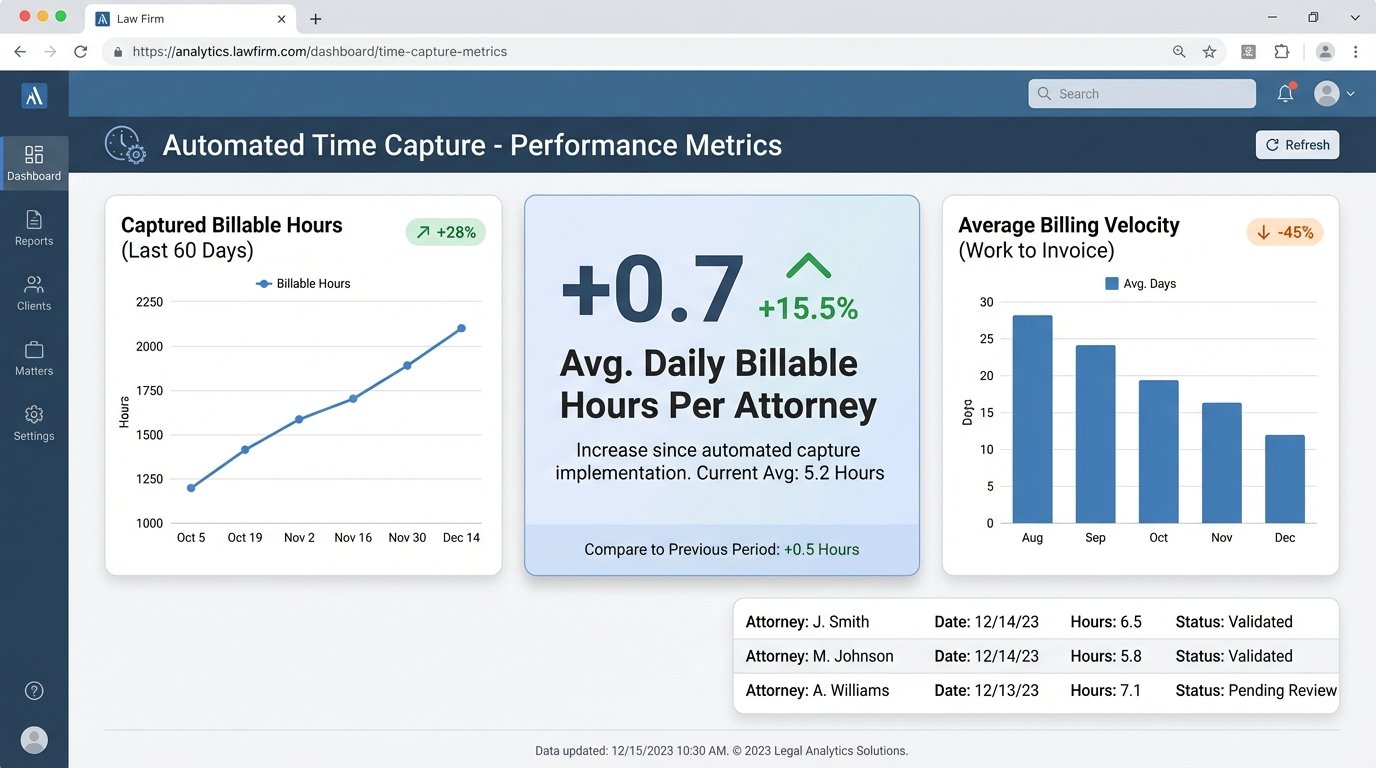
We tracked metrics for 60 days post-implementation. The results were immediate and significant. The primary KPI was the volume of captured billable increments, specifically those under 15 minutes which were most frequently lost in the manual system.
Key Performance Indicators:
- Increase in Captured Billable Hours: The system captured an average of 0.7 additional billable hours per attorney, per day. For a 70-attorney firm, this translated to nearly 50 extra hours of billable time recorded daily.
- Reduction in Time Entry Administration: Attorneys reported spending an average of 20 minutes per week reviewing their draft entries, down from an estimated 2-3 hours per week trying to reconstruct their time manually.
- Improved Billing Velocity: With timesheets being completed daily instead of weeks late, the accounting department could issue invoices faster. The average time from work completion to invoice sent dropped by 12 days.
The financial return was substantial. Based on the firm’s average billing rate, the system generated enough new revenue to pay for its entire development cost in just under five months. This ROI calculation doesn’t even account for the soft benefits of improved compliance and more accurate records.
The rollout wasn’t without its issues. A small but vocal group of senior partners initially resisted the change. They were accustomed to their old methods and viewed the tool with suspicion. The turning point came when we showed one of the resisting partners a side-by-side comparison of his manually entered timesheet and the draft entries from the automation tool. The tool had identified eight phone calls and a dozen document edits he had completely forgotten, totaling over 1.5 hours of unbilled time for a single day. He became its biggest advocate overnight.
We also learned that API documentation lies. The PMS vendor’s documentation for their time entry endpoint was five years out of date. It specified parameters that were no longer valid and omitted required headers. The only way we solved it was by opening a developer console in the web application and watching the network traffic as we submitted a time entry manually. We reverse-engineered the API call structure we actually needed.
Lessons Learned and Future Iterations
Automated time capture is not a fire-and-forget solution. It requires constant monitoring. Data sources change their API schemas. Users develop new ways of describing their work that break the parsing logic. We built a dashboard for the IT department that flags entries that repeatedly fail to parse or map, allowing them to refine the regex rules over time.
The biggest technical takeaway was the importance of an exception queue. Our initial design tried to process everything in real time. This was a mistake. When the PMS API went down, which it did frequently, our script would hang, and the entire data pipeline would back up. We refactored it to push all approved entries into a dedicated queue table first. A separate, resilient “sender” process then worked through that queue, posting to the PMS API. If a post failed, it remained in the queue to be retried later. This decoupled our capture system from the unreliable PMS, making the entire architecture more stable.