
The firm’s client relationship management system was a data graveyard. Before the project, their “Legacy Legal CRM,” a well-known but aging platform, functioned as a glorified address book. Paralegals manually keyed in every new lead from web forms, phone calls, and referrals. The process was a direct path to data corruption. Typos in email addresses killed communication. Incorrect matter types skewed firm-wide reporting. Marketing spent five figures a month on ads with zero visibility into which campaigns generated actual, paying clients.
This wasn’t a failure of personnel. It was a failure of architecture. The system forced humans to act as slow, error-prone APIs. The core problem was a complete disconnect between client acquisition channels and the system of record. Every new client represented a minimum of 15 minutes of duplicate data entry and verification, a cost that multiplied across the firm’s 20-person support staff.
The Diagnostic: Quantifying the Inefficiency
Our initial audit focused on mapping the data journey from first contact to signed retainer. We logged every manual touchpoint. The results were worse than suspected. The marketing team used one system for ad analytics, the intake team used spreadsheets to track initial calls, and the legal teams operated solely within the CRM. Data was siloed by design.
The key metrics of failure were:
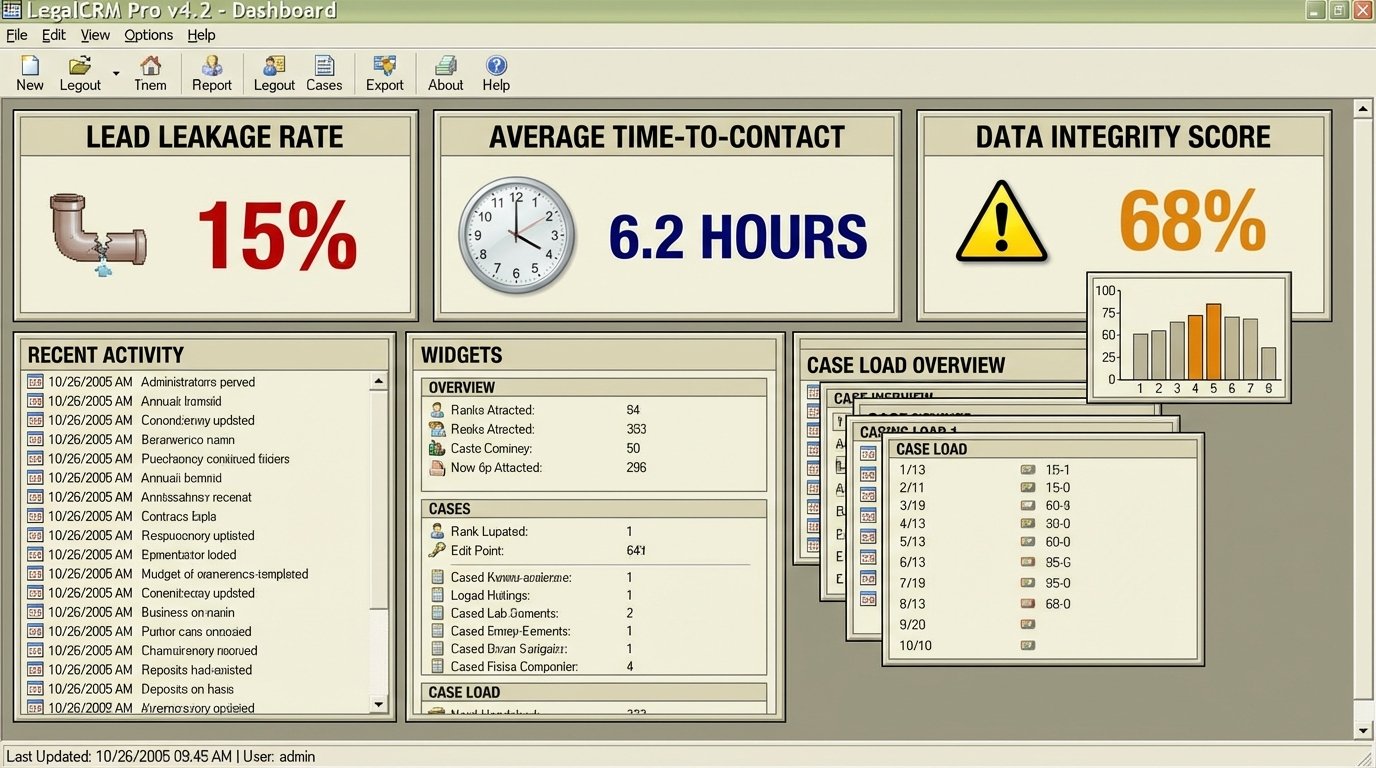
- Lead Leakage Rate: An estimated 15% of web-based inquiries were never entered into the CRM due to human error or oversight. These leads were digital ghosts, their budget allocation a complete loss.
- Time-to-Contact: The average time from a web form submission to a paralegal making the first contact call was 6 hours. In the competitive personal injury space, this delay was fatal.
- Data Integrity Score: We audited 500 random client records. Over 30% contained at least one critical error, such as a misspelled name, an incorrect phone number, or a misclassified case type.
- Zero Marketing Attribution: The firm could not definitively link a single dollar of marketing spend to a specific signed case. All decisions were based on gut feelings and vanity metrics like website traffic.
This manual workflow was not just inefficient. It actively damaged the client experience and burned marketing capital. The firm was paying for leads, then paying its own staff to lose them.
Architecture of the Solution: Building the Data Bridge
We rejected the idea of ripping and replacing the core CRM. That approach is a wallet-drainer, a massive disruption for a theoretical benefit. The existing CRM, despite its flaws, was deeply embedded in the firm’s billing and case management processes. The smarter path was to build an intelligent layer on top of it, forcing it to behave correctly through an external automation engine.
The chosen stack was built for pragmatism, not for chasing trends:
- Website Intake: The firm’s WordPress site used Gravity Forms. We leveraged its built-in webhook functionality to fire a JSON payload upon every successful form submission. This is the starting gun for the entire automation.
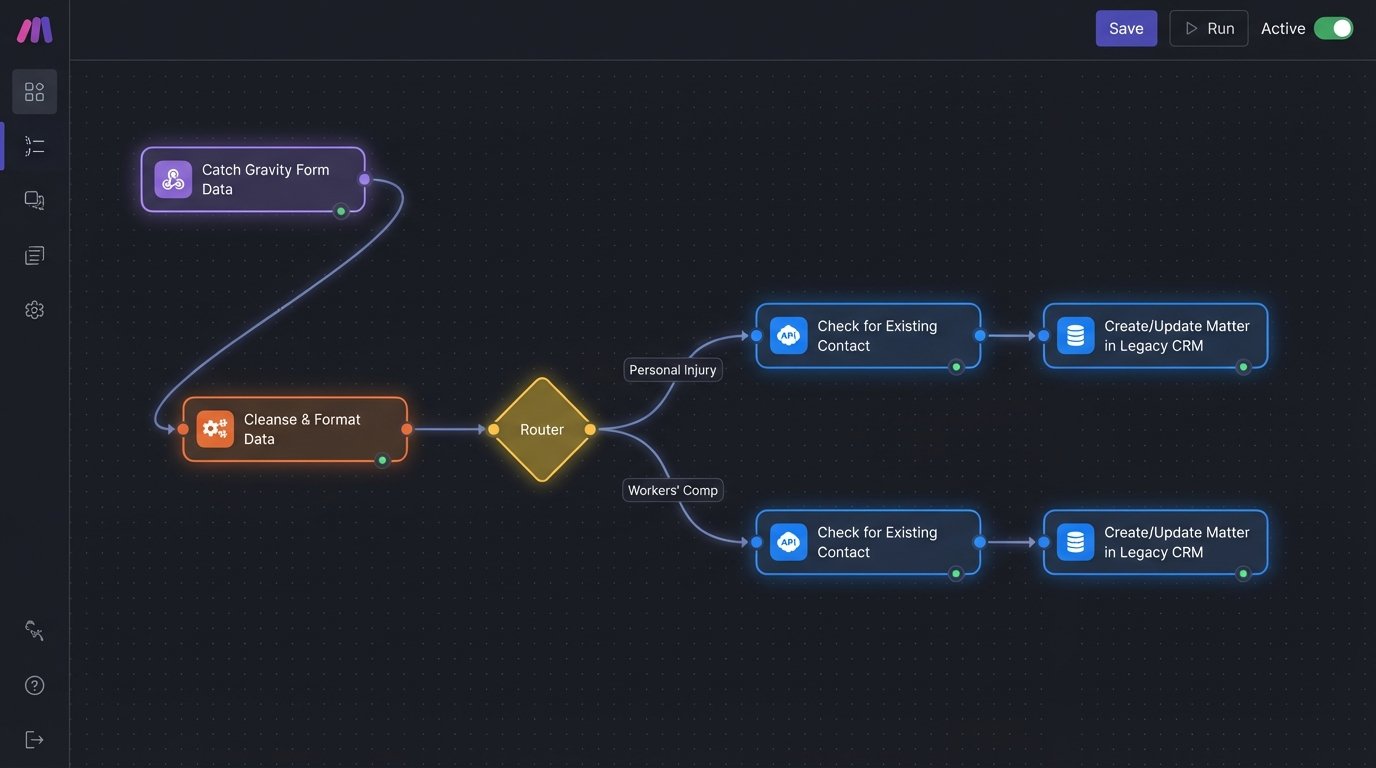
- Automation Middleware: We used Make (formerly Integromat) as the central nervous system. Its visual workflow builder allowed us to prototype and deploy complex logic without a heavy development cycle. It acted as the translator between the web form and the CRM’s rigid API structure.
- CRM API Integration: The Legacy Legal CRM had a REST API. The documentation was five years out of date, but the core endpoints for creating contacts and matters were stable. This was the most fragile part of the build, requiring significant trial-and-error to handle authentication and data formatting.
The process was designed to eliminate the human as the data courier. When a potential client submits the web form, the automation sequence is triggered instantly.
Step 1: Ingest and Validate the Webhook Data
The instant a form is submitted, Gravity Forms sends a POST request with the lead’s data to a unique Make webhook URL. The first module in our automation scenario catches this data. We don’t trust this data. We immediately run a series of validation and formatting checks.
We strip any special characters from phone numbers. We force all email addresses to lowercase to prevent duplicate contact creation. We parse the `utm_campaign` and `utm_source` parameters captured by the form to get clean marketing attribution data. This initial cleansing is critical. Garbage in, garbage out.
A simplified version of the incoming JSON payload looks like this:
{

  "firstName": "Jane",

  "lastName": "Doe",

  "email": "jane.doe@example.com",

  "phone": "(555) 123-4567",

  "caseType": "Personal Injury",

  "description": "Details of the accident...",

  "utm_source": "google",

  "utm_medium": "cpc",

  "utm_campaign": "pi_adgroup_1"

}
This structured data becomes the single source of truth for the new lead.
Step 2: Logic-Driven Data Enrichment and Routing
Once the data is clean, the automation applies business logic. A router module checks the `caseType` field. A “Personal Injury” lead is routed down a different path than a “Workers’ Compensation” lead. This determines which paralegal team is assigned, what welcome email template is used, and which internal Slack channel gets the notification.
We then perform a search against the CRM API using the lead’s email address. Is this person an existing client? If a match is found, the automation adds a new matter to the existing contact. If no match is found, it proceeds to create a new contact and a new matter. This check prevents the creation of duplicate contacts, a plague in most poorly managed CRMs. Trying to get this logic right was like trying to thread a needle in the dark, as the API’s search function was sluggish and occasionally timed out, forcing us to build in retry logic.
Step 3: Force-Feeding the CRM and Triggering Communications
With the data validated and the logic path chosen, the automation makes a series of API calls to the Legacy Legal CRM. It first creates the contact, waits for the CRM to return the new Contact ID, and then uses that ID to create the associated matter. We inject the marketing attribution data into custom fields on the matter record. Now, every case has its origin story attached directly to it.
The moment the CRM confirms the matter has been created, the automation branches again. It sends a notification to the designated Slack channel with all the lead details, alerting the intake team. Simultaneously, it triggers a personalized email to the potential client, confirming receipt of their information and setting expectations for the next steps. This entire sequence, from form submission to client confirmation email, executes in under 60 seconds.
The human element is removed from the data entry and initial response, freeing the paralegals to do what they are paid for: talk to potential clients and provide value.
The Results: Measurable Impact on Operations and Revenue
The new system went live after a two-week development and testing sprint. We ran it in parallel with the manual system for one week to ensure data fidelity. The cutover was seamless. The impact was immediate and quantifiable across the entire firm.
Operational Metrics:
- Data Entry Time Eliminated: The automation saved an estimated 120 hours of manual data entry per month across the support staff. This time was reallocated to higher-value client communication tasks.
- Time-to-Contact Reduced by 99%: The average time from lead submission to the first client-facing communication dropped from 6 hours to under 1 minute. This speed became a competitive advantage.
- Data Integrity Near 100%: By automating data entry from a single source, we eliminated typos and misclassifications. Reporting became accurate overnight. Lead leakage from web forms dropped to zero.
Marketing and Revenue Metrics:
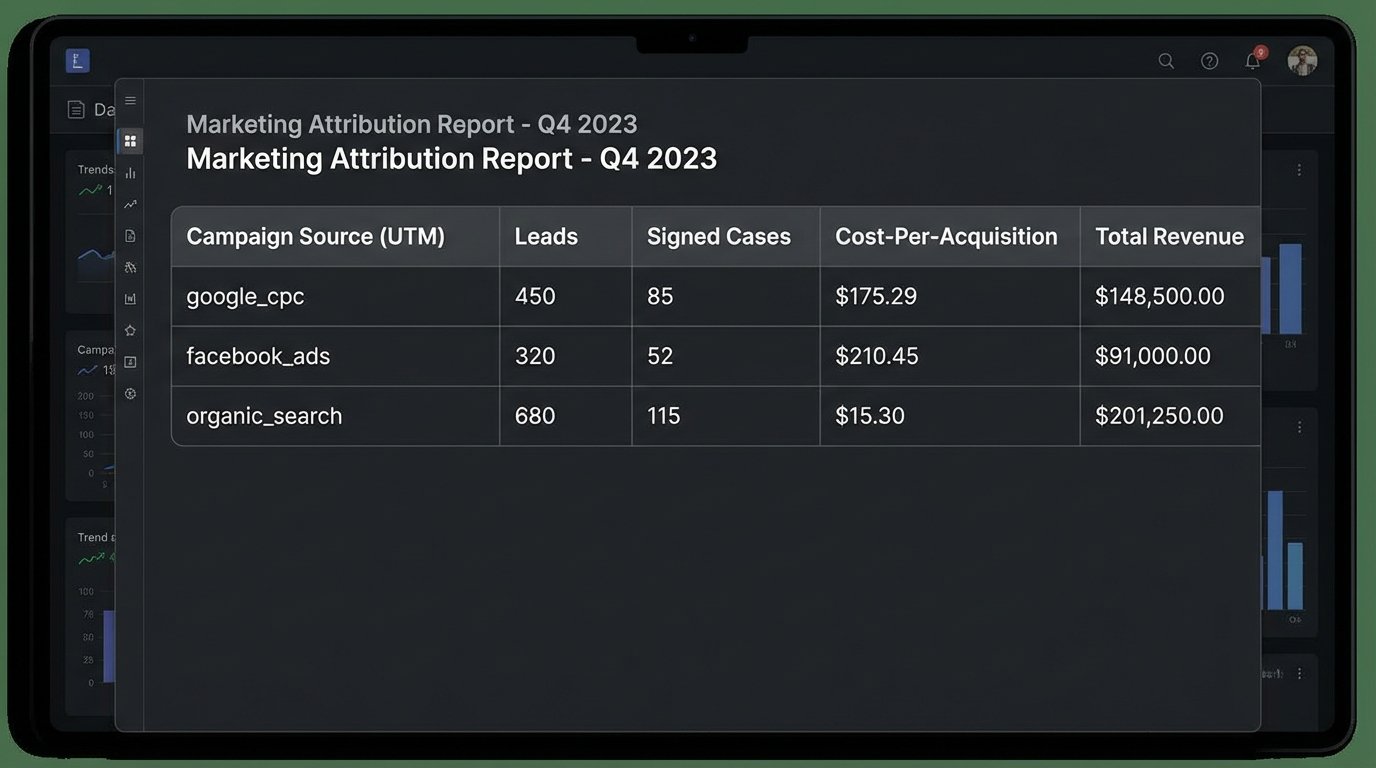
- Achieved 100% Marketing Attribution: For the first time, the firm could see exactly which Google Ads campaigns, keywords, and social media posts were generating signed cases. They could calculate a true cost-per-acquisition (CPA) and client lifetime value (LTV) by channel.
- Reduced Ad Spend by 40%: Within three months, the marketing team identified and cut non-performing ad campaigns, slashing their monthly budget by 40% while maintaining the same volume of high-quality leads. They simply reallocated the funds to the channels the data proved were working.
- Increased Lead Conversion Rate by 18%: The combination of immediate follow-up and accurate data routing led to a measured 18% increase in the rate at which web leads converted into paying clients over a six-month period.
This project was not about buying a new piece of software. It was about fundamentally re-architecting a broken business process. We took a system that created friction and manually-induced errors and forced it into a streamlined, automated workflow. The CRM is still the same legacy system, but its function has been disciplined by an external layer of logic that bridges the gap between marketing spend and legal work.