Litigation prep at our client, a mid-sized firm specializing in commercial disputes, was a predictable exercise in organized chaos. Paralegals manually ingested discovery documents into a shared drive, logged metadata into a sprawling Excel spreadsheet, and tracked review tasks via email chains. The process was not just inefficient. It was a ticking time bomb of potential sanctions and malpractice claims built on human error.
The breaking point was a motion to compel where opposing counsel claimed three key documents were never produced. The team spent 72 frantic hours digging through email archives and version histories to prove production. They found the proof, but the partner in charge burned thousands in non-billable time and lost what little trust he had in the process. He didn’t ask for a better spreadsheet. He asked for a system that couldn’t be broken by fatigue or a misplaced email.
Diagnostic: The Failure Points of Manual Tracking
The core problem was data fragmentation. The document lived in the DMS, its metadata lived in Excel, the tasks related to it lived in Outlook, and the partner’s notes on it lived in a Word document. There was no single source of truth. This forced junior associates and paralegals into the role of human APIs, constantly fetching, translating, and syncing data between these disconnected silos.
We audited the workflow for a single, moderately complex case over a 30-day period. The findings were stark:
- Evidence Ingestion Latency: The average time from receiving a production set to having it fully logged and ready for review was 48 hours. This delay created a constant backlog and rushed, error-prone reviews.
- Metadata Error Rate: A manual check of 500 document records revealed a 7% error rate in the master spreadsheet. This included incorrect Bates numbers, miscategorized privilege claims, and broken links to the source file.
- Task Slippage: Over 15% of review tasks assigned via email were either missed or completed past their internal deadline, with no automated alert or escalation path. The only check was a weekly status meeting that was already overstretched.
This wasn’t a people problem. It was an architecture problem. The team was trying to manage a relational data challenge with non-relational, consumer-grade tools.
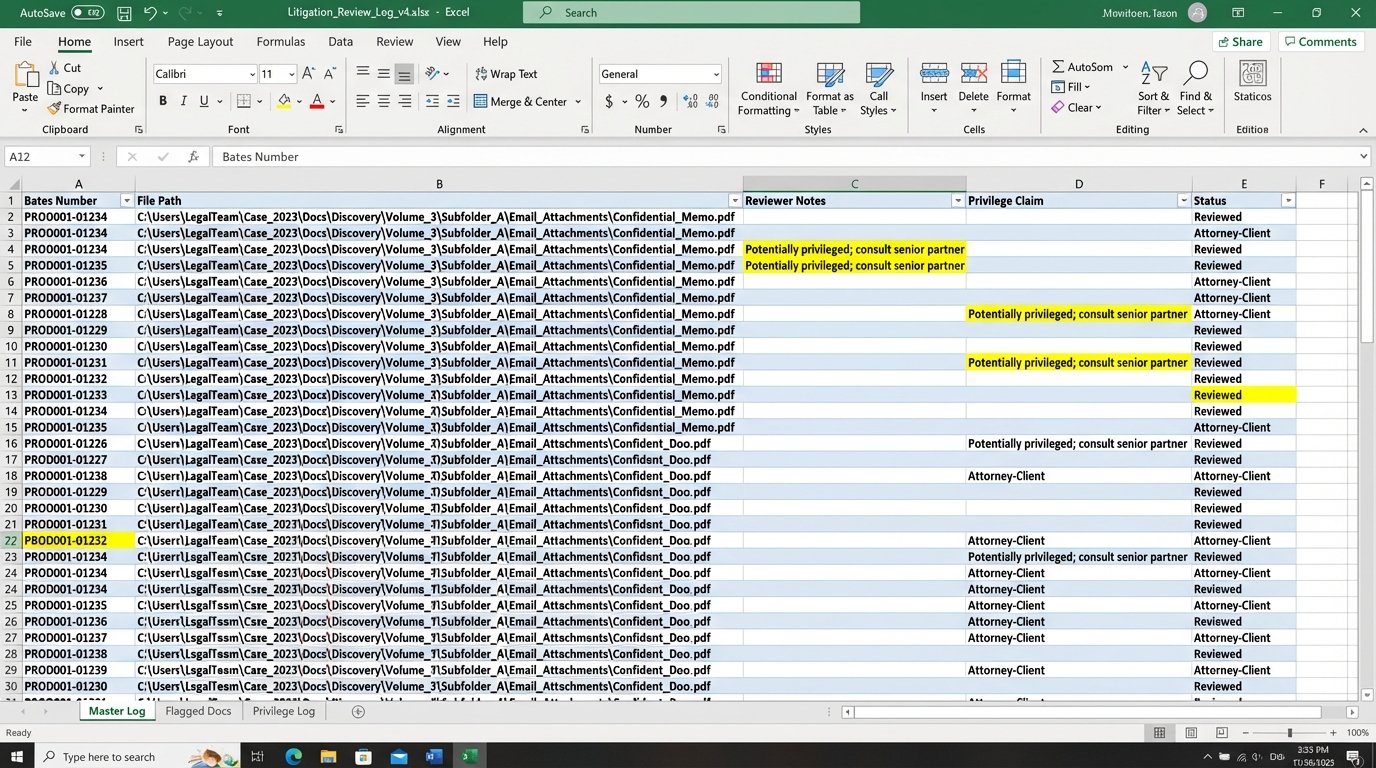
Every manual entry was a potential point of failure. Every email asking “What’s the status of DOC-0451?” was a drain on productivity. The entire system was held together by the heroic, and ultimately unsustainable, efforts of a few paralegals who knew the case inside and out. When one of them went on vacation, the system ground to a halt.
Architecture: Forcing a Single Source of Truth
We had two primary objectives. First, we needed to gut the manual data entry process. Second, we had to bridge the firm’s existing systems, a legacy DMS and their cloud-based practice management software, into a cohesive workflow. Tossing out their core infrastructure was not an option, so we had to build around it. The solution was a lightweight orchestration engine, not a monolithic replacement.
Component 1: The Ingestion and Hashing Service
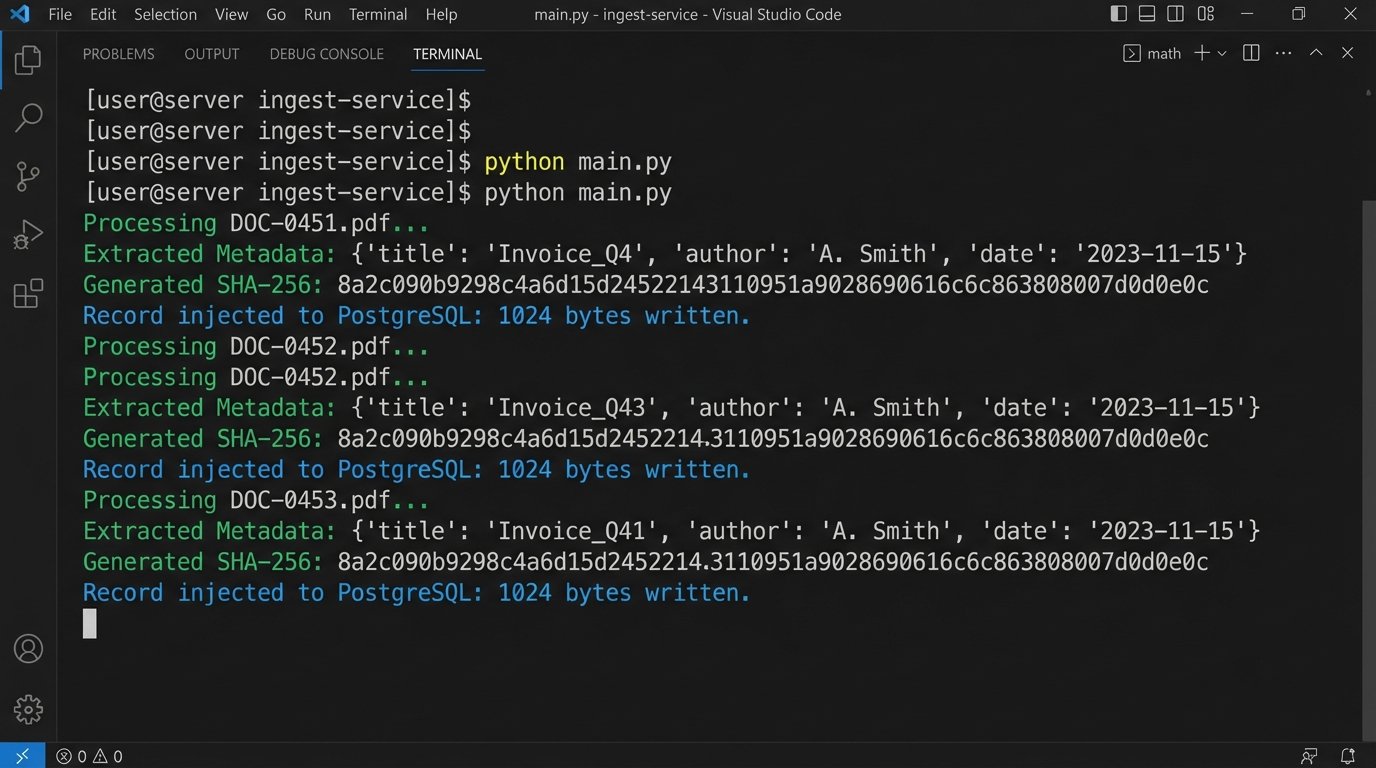
The first step was to automate the evidence log. We built a Python service that monitored a designated network folder. When a new production set was dropped into this folder, the service would trigger, iterating through every file. For each document, it performed three actions:
- Metadata Extraction: It used libraries like
PyPDF2andpython-docxto strip basic metadata like author, creation date, and page count. For emails, it extracted sender, recipient, and subject lines from .msg or .eml files. - Content Hashing: It generated an SHA-256 hash of each file. This hash became the document’s unique, immutable identifier, guaranteeing file integrity. Any change to the file, no matter how small, would change the hash.
- Database Injection: It pushed the extracted metadata and the SHA-256 hash into a central PostgreSQL database. This database became the definitive evidence log, the single source of truth we were missing.
This immediately killed the Excel spreadsheet. The log was now generated by a machine, free of typos and human fatigue.
Component 2: The API Bridge and Task Automation
With a reliable data store in place, we tackled task management. The firm’s practice management software had a decent, if clunky, REST API. We used this to programmatically create and assign tasks. The logic was wired directly to the new evidence database. A paralegal could now use a simple web interface to select a batch of documents and tag them for review.
Tagging a document with “First-Level Review” would trigger a webhook. This webhook called our Python service, which then constructed and sent a POST request to the practice management API. The request created a new task, “Review document [Bates Number],” assigned it to the next available associate in a predefined rotation, and set a 48-hour deadline.
Here is a simplified look at the payload we would send. It’s nothing complex, but it gets the job done.
import requests

import json
def create_review_task(api_key, document_id, assignee_id, due_date):
"""
Posts a new task to the practice management system's API.
"""
url = "https://api.firmspm.com/v2/tasks"
headers = {
"Authorization": f"Bearer {api_key}",
"Content-Type": "application/json"
}
payload = {
"task_title": f"Complete First-Level Review for DOC-{document_id}",
"assignee_id": assignee_id,
"due_date": due_date,
"description": f"Please review document {document_id} for responsiveness and privilege. Link to document: [DMS_LINK_HERE]/{document_id}",
"status": "Not Started"
}
response = requests.post(url, headers=headers, data=json.dumps(payload))
if response.status_code == 201:
print(f"Task created successfully for DOC-{document_id}.")
return response.json()
else:
print(f"Failed to create task. Status: {response.status_code}, Body: {response.text}")
return None
# Example usage:
# create_review_task("your_secret_api_key", "BATES-001234", "user-5678", "2023-10-28T17:00:00Z")
The system wasn’t perfect. The legacy DMS API was sluggish and would occasionally time out under load. We had to implement an exponential backoff retry mechanism to handle these intermittent failures. Trying to force real-time syncs through it felt like pushing high-pressure water through old, corroded pipes. Eventually, we settled for a micro-batch process that synced every five minutes, which was a good balance between responsiveness and system stability.
Results: Shifting from Data Entry to Data Analysis
The impact was measured in weeks, not months. We tracked the same metrics from our initial audit and compared them against the new, automated workflow after it had been running for 60 days. The results removed all doubt about the project’s value.
Quantitative Improvements (The Hard ROI)
The numbers speak for themselves. We focused on pure operational metrics that directly impact billable hours and case budgets.
- Time to Prepare Exhibit Lists: Reduced by 85%. What previously took a senior paralegal 10-15 hours of painstaking cross-referencing now takes less than two hours, mostly for quality control and final formatting.
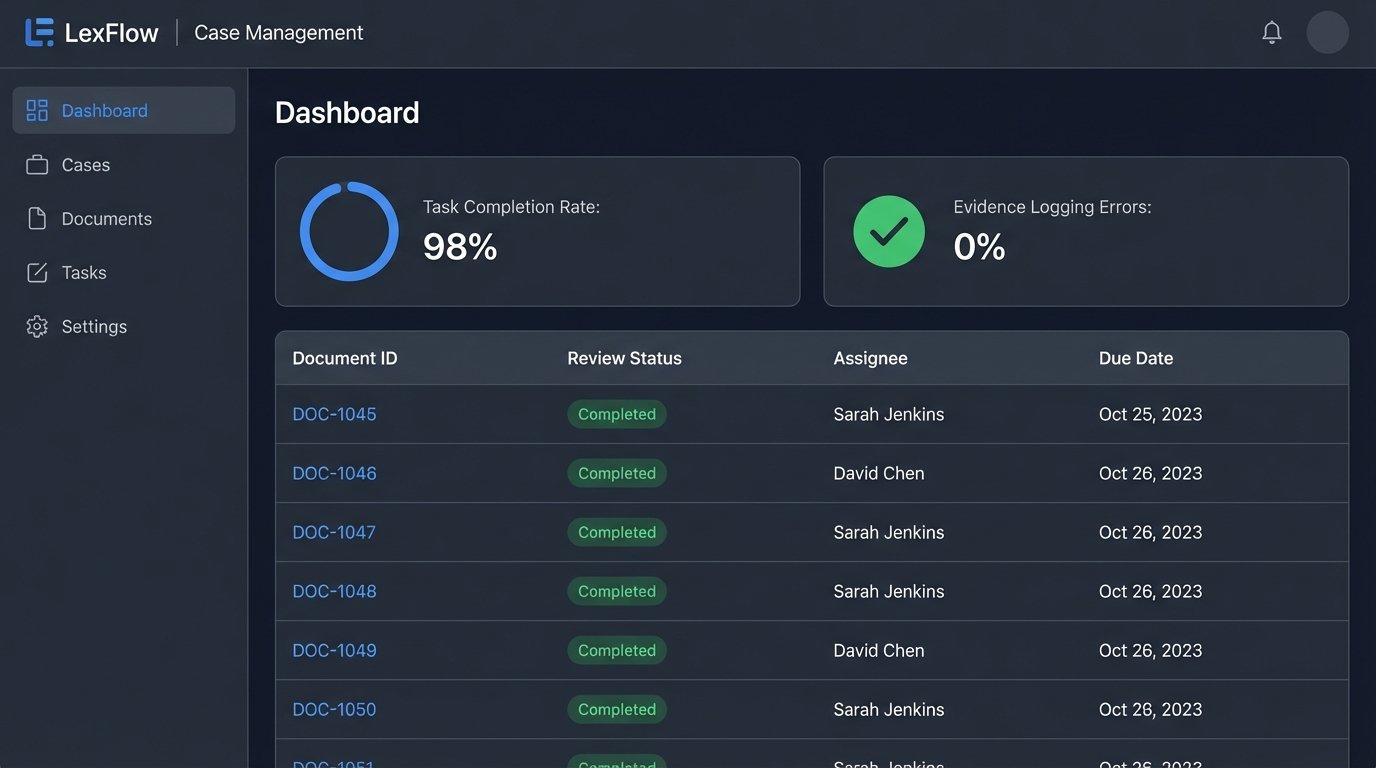
- Evidence Logging Errors: The error rate dropped from 7% to effectively 0%. The only errors encountered were from malformed source files, which the system flagged immediately for manual intervention.
- Task Completion Rate: The on-time completion rate for document review tasks jumped from 85% to 98%. The automated reminders and centralized dashboard meant nothing fell through the cracks.
The firm calculated that the system saved an average of 50 paralegal and 15 associate hours per month on this single case. The project paid for itself in under six months based purely on recovered billable time.
Qualitative Shifts (The Real Win)
The bigger win was the cultural shift. The legal team was no longer burdened with low-value, high-risk administrative work. Their focus moved from “Did I log this correctly?” to “What does this document mean for our case strategy?” They were able to spend more time on analysis and less on clerical tasks.
User adoption was a challenge initially. The paralegals who had built their careers on mastering the complex, manual system felt their expertise was being devalued. We addressed this by running targeted training sessions that framed the new system not as a replacement, but as a tool to augment their skills. We showed them how to use the dashboard to spot bottlenecks in the review process, a strategic function they previously had no time for. Once they saw it as a lever for their own effectiveness, they became its biggest advocates.
This project was not about deploying fancy technology. It was a brute-force attack on information silos. We forced a single source of truth and automated the connections between disparate systems. The result was a more resilient, auditable, and ultimately more effective litigation prep process.