Most contract automation projects fail silently. They don’t explode. They slowly calcify, becoming a tangled mess of conditional logic that nobody on the legal or engineering team has the courage to touch. The initial goal of speed gives way to a new reality of managing a brittle, unpredictable system. This isn’t a failure of technology. It’s a failure of architecture and a fundamental misunderstanding of how legal content and software logic should intersect.
Mistake 1: The Monolithic “God” Template
The first instinct is always to build one master template to rule them all. An MSA template that, through a series of dropdowns and checkboxes, can also generate a SaaS agreement, a reseller agreement, or a statement of work. This approach stuffs hundreds of conditional clauses into a single document, controlled by a web of `IF/ELSE` statements that quickly becomes impossible to debug.
You end up with a document that is 90% dormant logic and 10% generated text. When a partner asks for a minor language change in the Indemnification clause for California-based clients, the developer has to trace that condition back through a dozen nested dependencies. The risk of accidentally altering a clause for a New York client becomes unacceptably high.
This is technical debt with compounding interest.
The Fix: Deconstruct and Compose
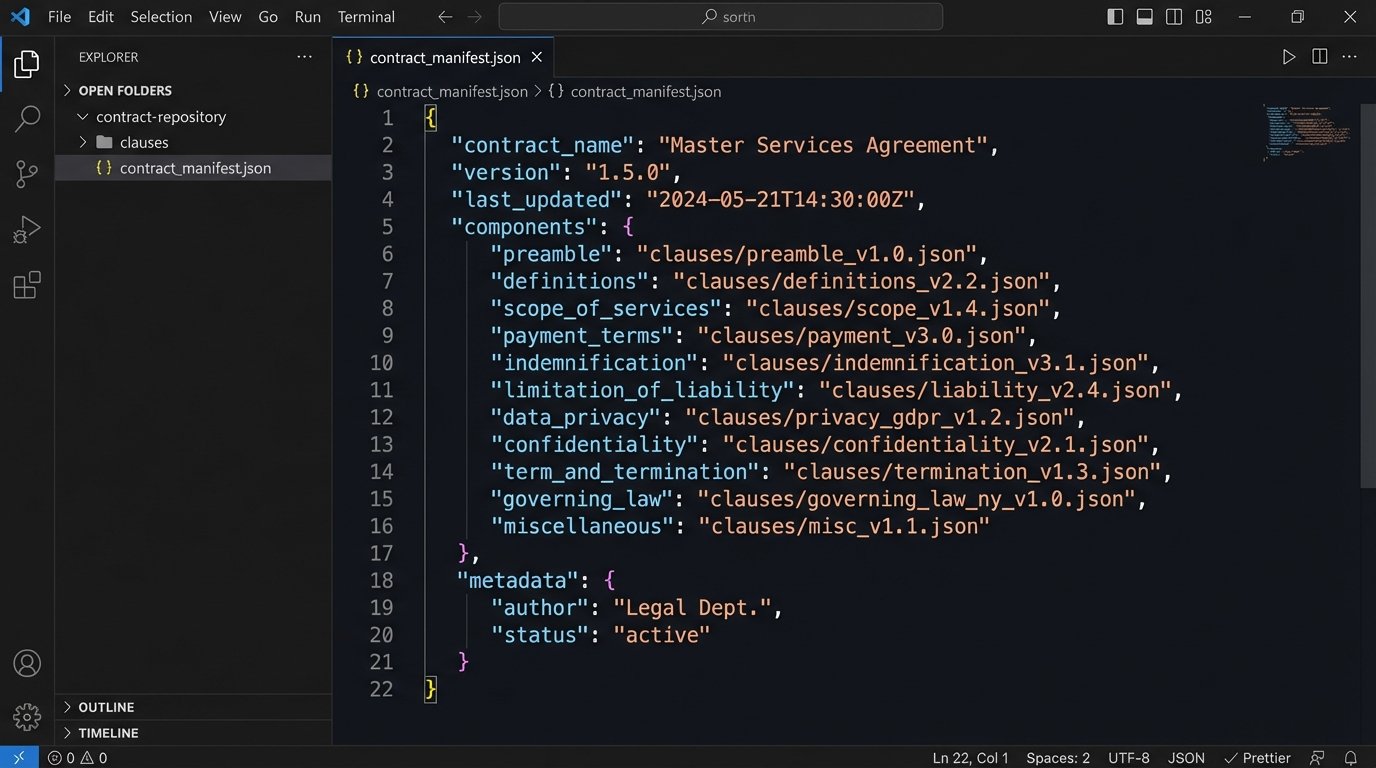
You have to gut the monolithic template. The correct architecture is a clause library, where each provision (Indemnification, Limitation of Liability, Data Privacy) is a discrete, version-controlled component. These are not just text blocks. They are objects with their own metadata, such as jurisdiction, deal size triggers, or risk level.
The automation engine doesn’t modify a giant template. It acts as an assembler, fetching the required clause components from the library and stitching them together based on a set of rules. Your “master template” becomes a simple manifest file, a blueprint that lists which components to pull under which conditions. Updating the Indemnification clause now means updating one component, testing it in isolation, and deploying it. The blast radius is contained.
- Break down existing agreements into their smallest logical parts.
- Store these parts in a structured repository, not a Word document. A simple database or even a version-controlled set of JSON files works.
- Build the automation logic to fetch and assemble, not to show and hide.
This approach forces legal to think in a modular way, which is a significant side benefit.
Mistake 2: Trusting Raw Input Data
Engineers connect the automation platform directly to the CRM. The sales rep enters “MegaCorp, Inc.” in one field and “Mega Corp” in another. The CLM has the counterparty state listed as “CA” while the billing system uses “California.” The automation tool receives this dirty data and obediently injects it into the contract, creating ambiguity and enforcement headaches.
The document generation engine is the last stop. By the time malformed data gets there, it’s too late. The system’s job is to generate what it’s told, leading to contracts with nonsensical party names, incorrect addresses, and clauses that trigger on faulty data points. You are automating the creation of broken legal documents.
The Fix: Inject a Validation and Transformation Layer
Never pipe raw data from a source system directly into your document generator. An intermediary layer of logic must sit between the data source (CRM, intake form) and the automation engine. This layer’s only job is to clean, validate, and normalize the incoming data before it ever touches a template.
This can be a simple serverless function or a dedicated microservice. It grabs the raw input, forces it into a predefined schema, and logic-checks the values. It standardizes state codes, formats currency, and flags missing critical information. If the data is bad, the process stops and an error is thrown, preventing a bad contract from ever being created.
Consider this raw JSON payload from a CRM:
{

  "clientName": " Acme ",

  "deal_value": "50,000",

  "state": "NY",

  "include_arbitration": "yes"

}
The validation layer should transform it into this clean, predictable structure before passing it to the generator:
{

  "counterparty": {

    "name": "Acme",

    "address": {

      "state_code": "NY",

      "country_code": "USA"

    }

  },

  "deal": {

    "value_usd": 50000

  },

  "options": {

    "use_arbitration_clause": true

  }

}
The template logic is now simpler and more reliable because it operates on a guaranteed data structure.
Mistake 3: Hardcoding Business Logic into Templates
This is the most common sin committed with template languages like DocuSign Apex, Conga, or even basic mail merge fields. The template itself contains the business rules. You see things like `{% if deal_value > 100000 and client_tier == ‘Enterprise’ %}` directly embedded in the document. This is fast to build initially and impossible to maintain.
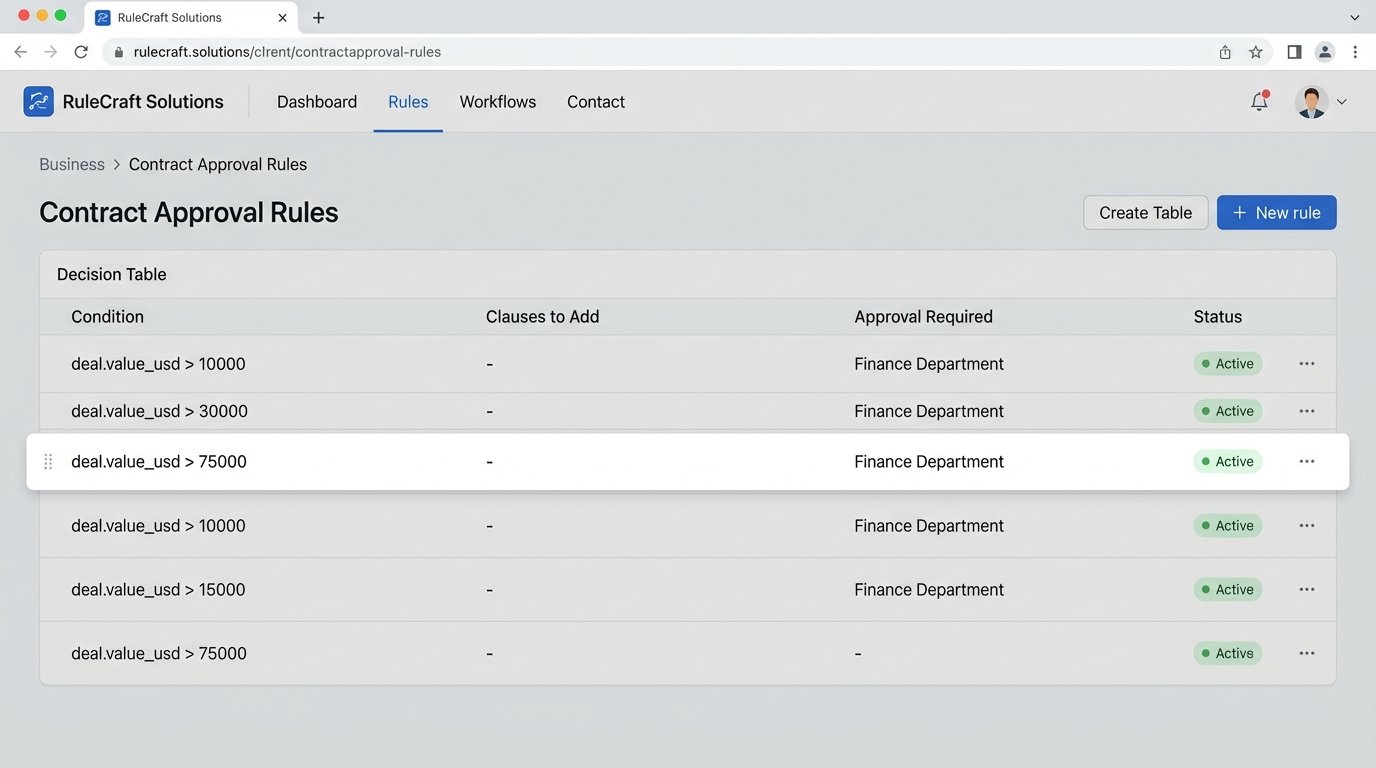
When the finance department lowers the threshold for legal review to $75,000, a developer has to check out the template file, hunt for that specific number, change it, and redeploy the entire document. The business logic is scattered across dozens of templates, hidden in conditional syntax. There is no single source of truth for the company’s business rules.
Trying to manage a business this way is like trying to rewire a skyscraper using a single, tangled extension cord. You have no idea what changing one connection will do somewhere else.
The Fix: Externalize the Rules Engine
Business rules do not belong in the presentation layer. A template is for presentation. The logic that governs which clauses to include, what thresholds to apply, or who needs to approve the document must live in a separate, centralized system. This is your rules engine.
The process should look like this:
- The system receives clean, validated data.
- The data is fed to the external rules engine.
- The rules engine processes the data and returns a simple set of instructions, like a JSON object telling the generator which templates and clauses to use.
- The document generator receives the data and the instructions, and its only job is to perform a dumb merge.
This decouples the business logic from the document’s appearance. Now, when the finance department changes a threshold, you update a single entry in your rules configuration. You don’t touch the templates at all. This architecture allows non-developers to manage and update business logic safely through a simple interface.
Mistake 4: Believing the “No-Code” Hype
No-code and low-code platforms are marketed as the final solution. They work exceptionally well for low-complexity, high-volume documents like NDAs or basic employment offer letters. The drag-and-drop interfaces are great for simple conditional logic. The problem is that legal departments see this success and assume the same tool can handle their 80-page credit agreements or multi-jurisdictional M&A documents.
These platforms hit a wall when faced with complex requirements: nested conditional logic, dynamic table generation based on object arrays, or integrations that require custom API authentication. You end up trying to force the platform to do things it was never designed for. The “no-code” solution suddenly requires a team of expensive consultants writing custom JavaScript that gets injected into the platform’s backend, completely negating the original value proposition.
The “no-code” label is a wallet-drainer for anything beyond rudimentary documents.
The Fix: Know the Ceiling and Architect for It
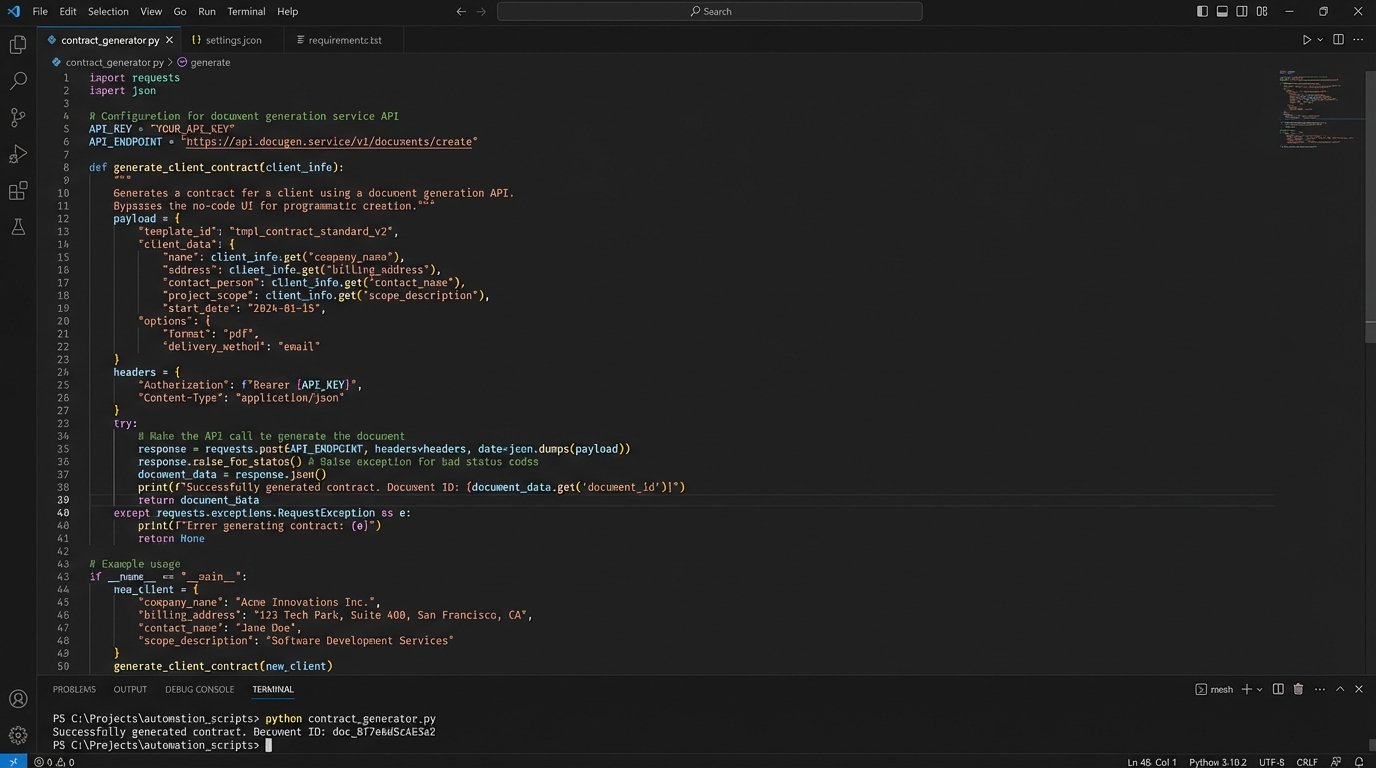
Use no-code tools for what they are good at: simple, standardized documents. For anything more complex, treat the no-code platform as just one component in a larger system, not the entire system itself. Your architecture should be designed to bypass the platform’s limitations when necessary.
This means selecting a platform with a robust API. Can you programmatically trigger document generation? Can you feed it a fully-formed data object instead of relying on its native intake form? Can you pull the generated document into your own storage system instead of leaving it siloed in the vendor’s cloud?
The best approach is a hybrid one. Use the no-code interface for simple template text editing. But for data handling, business logic, and complex assembly, you bypass the pretty interface and drive the engine directly through its API with your own code. You get the benefit of easy text updates for the legal team and the power of a proper software backend for the engineers.
Mistake 5: Treating Legal Text as Static Content
Automation logic is fundamentally tied to the text of the clauses it manipulates. A system might be configured to insert a specific data privacy clause whenever the primary text contains the phrase “personally identifiable information.” One day, a well-meaning attorney on the team decides to improve the language, changing it to “personal data” to align with GDPR. They save the new version in the shared drive.
The automation, which was looking for the old phrase, now fails silently. The required clause is omitted. Nobody notices until a dispute arises months later. This happens because the legal text and the automation code are managed in separate worlds with no link between them. The templates are treated as inert Word documents, not as critical components of a software system.
The Fix: Put Your Clause Library Under Version Control
Legal text that powers automation is code. It must be treated as such. Your clause library should not live in SharePoint or a shared folder. It should live in a version control system like Git.
Each clause becomes a file. When an attorney wants to change the language, they don’t just overwrite the old version. They check out the file, make their change, and submit a pull request. This creates a formal change management process. Other stakeholders can review the change, and more importantly, the engineering team can run automated tests to see if the proposed text change breaks any dependent automation logic.
This system provides a full audit history of every change made to every clause. It forces collaboration between legal and tech because a change to a clause cannot be deployed until its impact on the automation system is assessed. It prevents the casual, system-breaking edits that doom long-term automation projects.