
Most contract automation projects fail. They die a quiet death in a staging environment, suffocated by PowerPoints promising “AI-powered synergy” while the underlying mechanics are ignored. The truth is that contract review automation is not intelligent. It is a brute-force mechanical process of text recognition, pattern matching, and data extraction, stitched together with APIs and conditional logic. Forget the marketing. This is about building the plumbing, not admiring the faucet.
The objective here is to build a workflow that ingests a contract, guts it for specific data points, and shoves that structured data into a system where it becomes useful. It is a data engineering problem disguised as a legal tech problem. Success is not a “lights-out” process where lawyers are obsolete. Success is a junior associate spending five minutes validating machine-extracted clauses instead of two hours searching for them manually. That is the real, and achievable, target.
Prerequisites: The Foundation of a Non-Failed Project
Before writing a single line of code or signing a six-figure check for a new platform, the internal data house must be in order. Injecting automation into a chaotic environment is like pouring gasoline on a fire. It creates a faster, more expensive mess. The initial work is unglamorous and involves strict data discipline.
Standardize Your Document Corpus
Your automation tool needs a predictable target. It cannot effectively parse 50 variations of an MSA if each one uses different terminology for the same concept. The first step is to establish a set of template documents. If you cannot force a counterparty onto your paper, you must at least create a mapping of their common clause titles to your own internal standards. This initial classification work is manual and tedious, but it provides the ground truth your system will be built on.
Without this, you are not automating. You are building a system that guesses. Guesses in a legal context are malpractice waiting to happen.
Select a Tool Based on Control, Not Buzzwords
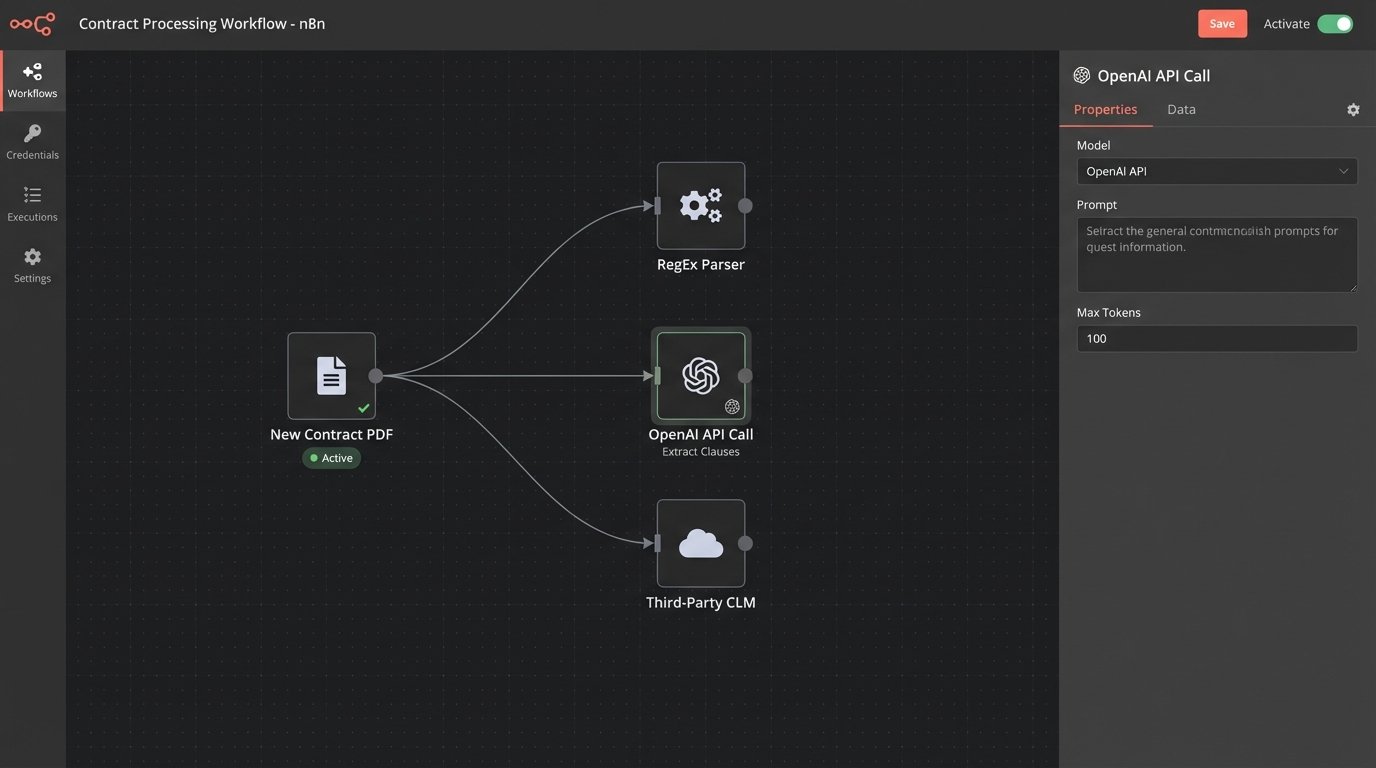
The market is flooded with platforms. They fall into three primary categories. First are the rule-based engines, which are essentially sophisticated find-and-replace machines running on Regular Expressions (RegEx). They are brittle and stupid, but they are predictable and cheap. Second are the NLP-driven models, accessed via APIs from providers like OpenAI, Google, or Cohere. These are powerful for semantic understanding but create a dependency on a third-party black box. Their costs are variable and their outputs can be inconsistent.
Third are the all-in-one Contract Lifecycle Management (CLM) platforms. These systems attempt to do everything from drafting to analytics. They are a massive wallet-drainer and often create vendor lock-in, forcing you to conform to their rigid workflows. Choosing a tool is a decision about how much control you are willing to sacrifice for convenience. For initial projects, direct API access to an NLP model offers the most flexibility without the monolithic commitment of a full CLM.
Confirm API Access to Everything
Your automation workflow is useless if it terminates in an email inbox. The extracted data must be programmatically injected into your core systems. This requires API access to your Document Management System (DMS), your matter management or practice management software, and any other relevant database. Before starting, get the API documentation for every system in the chain. If your legacy DMS from 2005 does not have a REST API, your project has a massive roadblock that needs to be solved first, likely by building a custom bridge or accepting a clunky, file-based integration.
No API means no automation. It is that simple.
Configuration: Assembling the Extraction Engine
With prerequisites handled, the build begins. The process is linear: get the document, identify the text, extract the key points, and structure the output. Each step has its own failure points that must be anticipated and handled.
Step 1: Build the Ingestion Pipeline
The system needs to know when a new contract has arrived for processing. The most efficient method is a webhook from your DMS, which sends a notification to your automation script the moment a document is saved to a specific folder. This is a real-time, event-driven approach. The sluggish, less-effective alternative is polling, where your script has to wake up every five minutes and ask the DMS “Is there anything new yet?”. This is less efficient and introduces delays.
The pipeline must also include an Optical Character Recognition (OCR) step. Many contracts will arrive as scanned PDFs, which are just images of text. A service like AWS Textract or Google Vision must first convert that image into machine-readable text. Be warned, OCR is imperfect. It will misinterpret words, miss punctuation, and mangle formatting, which directly impacts the accuracy of every subsequent step. Building a workflow without accounting for OCR garbage is pure negligence.
Trying to parse text from a low-quality scan is like trying to reassemble a shredded document using only half the strips while blindfolded. You have to design the system to handle the inevitable gaps and errors.
Step 2: Define and Isolate Extraction Targets
Do not try to boil the ocean. A project that aims to extract 40 different clauses and data points from every contract is guaranteed to fail. Start with a maximum of three to five high-value, structurally consistent targets. Good starting points include:
- Effective Date: Usually found in the preamble and formatted consistently.
- Governing Law: A standard clause with predictable language.
- Limitation of Liability: A critical risk point, often with a clear monetary cap.
- Term and Termination for Convenience: Defines the contract duration and exit ramps.
For simple, highly structured data like dates, a rule-based RegEx approach is often sufficient and reliable. For example, to find a date formatted as “Month Day, Year”:
import re
contract_text = "...This Agreement is made effective as of October 28, 2024, by and between..."
date_pattern = r"(?:January|February|March|April|May|June|July|August|September|October|November|December)\s+\d{1,2},\s+\d{4}"
match = re.search(date_pattern, contract_text)
if match:
effective_date = match.group(0)
print(f"Extracted Date: {effective_date}")
This is fast and precise for a known pattern. It will fail completely if the date is formatted differently. This is the brittleness of a rule-based system.
Step 3: Leverage NLP for Semantic Extraction
For extracting entire clauses or concepts that do not follow a rigid pattern, an NLP model is necessary. This involves sending the contract text to an API and asking a direct question in the prompt. The engineering is not in the model itself, but in the crafting of the prompt and the handling of the API response. You are essentially teaching the machine to act like a paralegal.
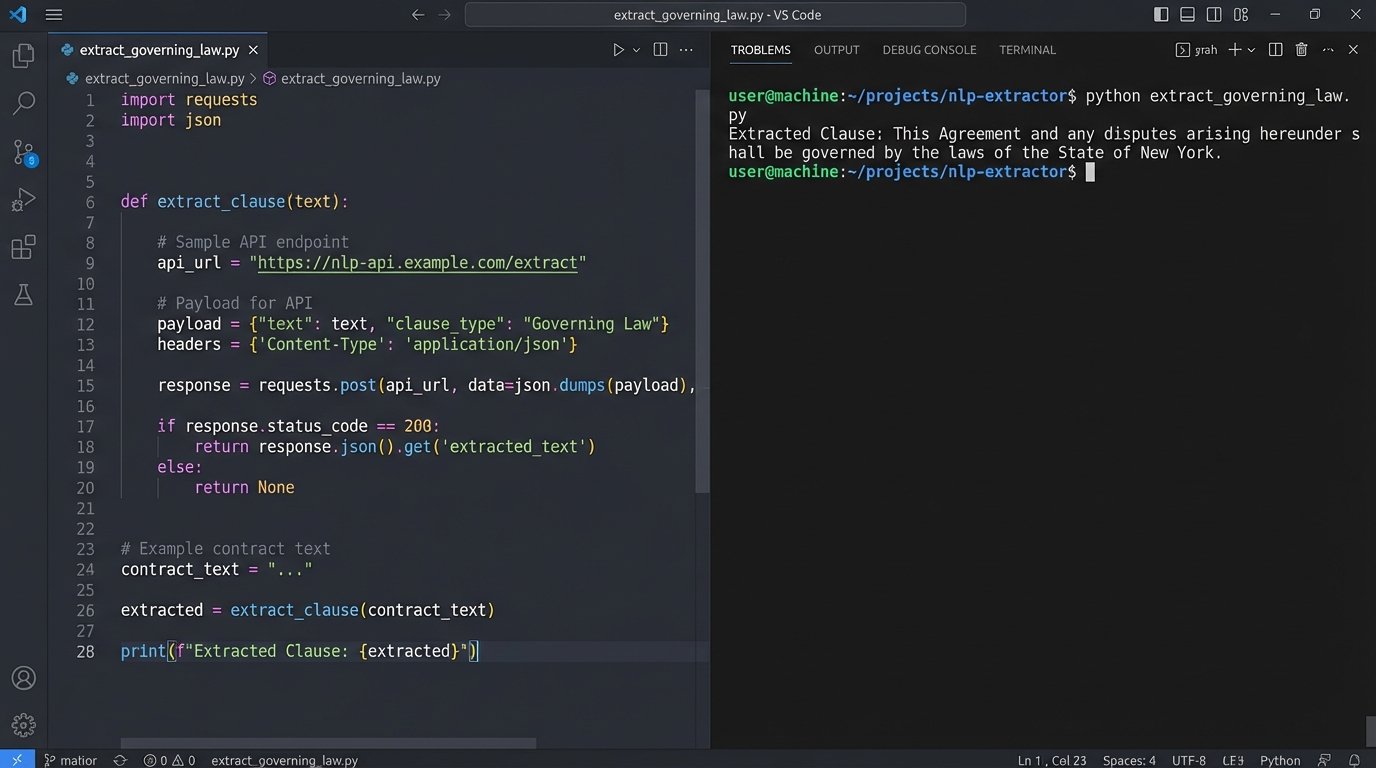
A Python script to extract the Governing Law clause using a hypothetical NLP API might look like this:
import nlp_api
# Assume contract_text contains the full text of the agreement
client = nlp_api.Client(api_key="YOUR_API_KEY")
prompt = f"""
From the following contract text, extract the full clause that specifies the Governing Law and Jurisdiction.
Return only the text of the clause itself. If no such clause is found, return "NULL".
Contract Text:
---
{contract_text}
---
"""
response = client.query(prompt)
governing_law_clause = response.get("extraction")
print(f"Extracted Clause: {governing_law_clause}")
The quality of the extraction depends entirely on the prompt’s clarity and the model’s capability. This method is more flexible than RegEx but introduces variability and requires careful handling of the API’s output, which is never guaranteed to be perfect.
Validation: The Human Firewall
Never trust the machine’s output for anything that carries legal weight. Full, un-reviewed automation is a fantasy. The correct approach is to stage every extraction for human validation. The goal of the system is to prepare a clean, side-by-side comparison for a human to approve or reject with a single click.
Implement Confidence Scoring and Thresholds
Modern NLP models provide a confidence score for their predictions, typically a number between 0 and 1. This is a critical piece of metadata. Your workflow must parse this score and use it to drive logic. A sensible rule is to set a confidence threshold, for example, at 95% (0.95). Any extraction with a score below this threshold is automatically flagged for mandatory review.
Extractions that meet the confidence score might be provisionally approved, but they should still be logged for periodic auditing. This creates a safety net and prevents obviously flawed data from polluting downstream systems. It forces the system to admit when it is not sure.
Build a Simple Validation Interface
The human-in-the-loop (HITL) component does not need to be a complex application. It can be as simple as an automated email that contains the source text, the extracted data, and two buttons: “Approve” and “Reject”. A more functional solution is a web page or a shared list (like a SharePoint list) that displays the pending validations in a queue. The key is to minimize friction for the reviewer. Show them the original clause on the left and the extracted data point on the right. That is it. Do not make them hunt for information.
This validation step is also your primary data source for improving the system. Every rejection is a lesson. The rejected data, along with the human-provided correction, must be logged and fed back to fine-tune your prompts or your RegEx rules. Without this feedback loop, the system remains static and never learns from its mistakes.
Integration and Error Handling: The Last Mile
Extracting data is only half the job. The data must be pushed into the systems where legal and business teams operate. This final step is where the value is realized, and it is also where many projects crumble under the weight of unreliable APIs and unforeseen exceptions.
Pushing Validated Data to Core Systems
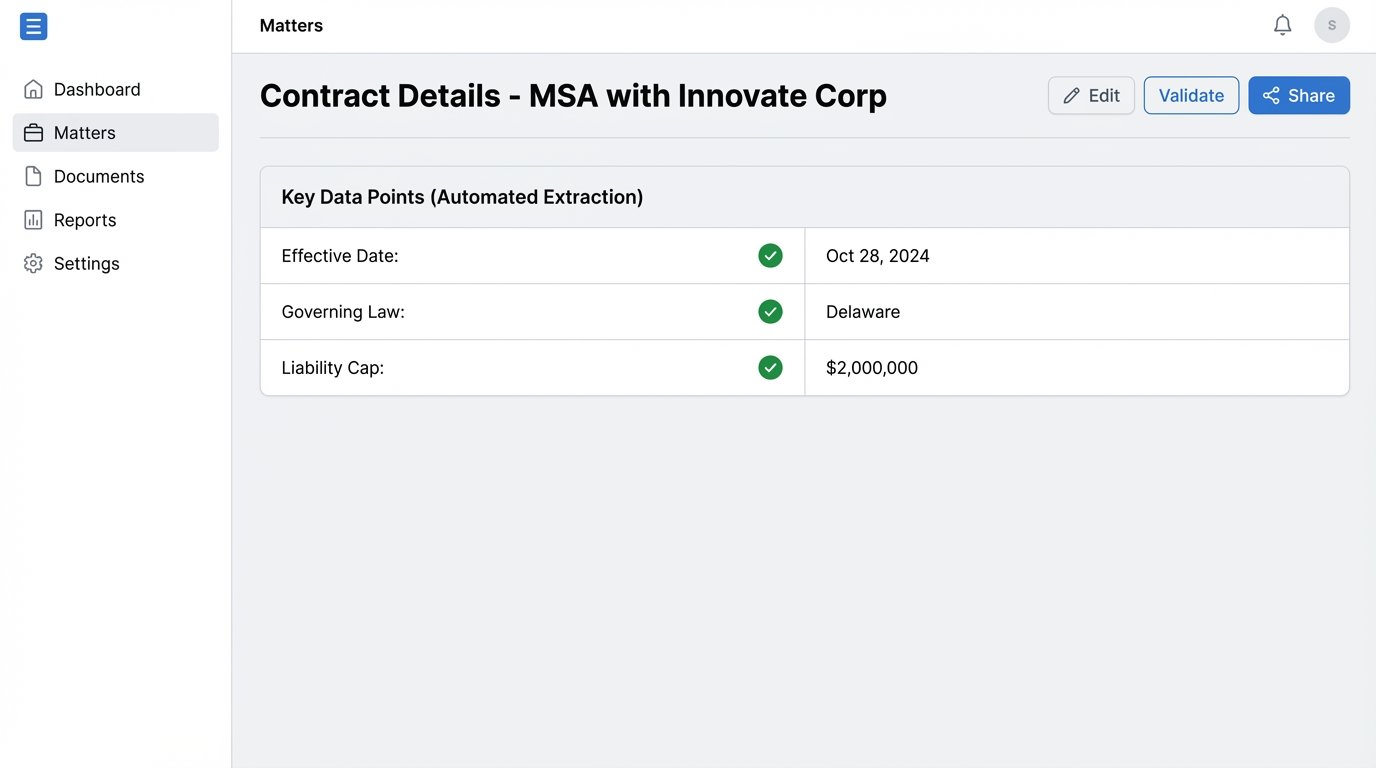
Once an extraction is validated by a human, an API call should be triggered to update the relevant record in your matter management system. For example, the extracted “Effective Date” and “Termination Date” are used to populate the “Key Dates” fields for that matter. A liability cap amount could be pushed to a custom field used for risk reporting.
This is the payoff. These actions can then trigger other workflows. A new termination date can automatically generate a calendar reminder for the responsible attorney 90 days prior. A liability cap over a certain amount can create a high-priority task for a partner to review. The integration transforms inert text into actionable, structured data.
Connecting to a legacy API is often like performing open-heart surgery with a rusty butter knife. The documentation is wrong, the endpoints are unstable, and the error messages are cryptic. You must build your integration defensively, assuming it will fail.
Design for Failure
Production environments are hostile. APIs go down. Documents arrive in corrupted formats. A model update from your NLP provider can break your finely tuned prompts overnight. A robust workflow must be built with extensive error handling and logging.
Implement retry logic with exponential backoff for all external API calls. If a call to the DMS fails, the script should not just crash. It should wait 5 seconds and try again. If it fails again, it should wait 20 seconds, then 60 seconds, before finally failing and sending a high-priority alert to an administrator with a detailed log of the failure. You need to know exactly what broke and where, otherwise you are flying blind.
Log everything. Log the hash of the incoming document, the version of the script running, the prompt sent to the NLP model, the raw JSON response, the confidence score, and the identity of the user who validated the result. When an error occurs six months from now, these logs will be the only thing that can save you from days of debugging.
The difference between a flashy demo and a production-grade system is about 1,000 lines of error-handling code. The work is not finished when it works once. The work is finished when it cannot fail silently.