
Manual time entry is fundamentally a data integrity problem disguised as a productivity issue. The focus on “lost hours” misses the point. The real damage comes from polluted data injected at the source, which then cascades through billing, analytics, and compensation systems. Every rounded-up six-minute increment and every block-billed “case review” entry is a piece of fiction that makes accurate performance measurement impossible. You’re basing strategic decisions on garbage data.
The core architectural flaw is latency. The longer the delay between an action and its recording, the greater the data corruption. A lawyer finishing a three-hour document review late on a Friday is not going to reconstruct their work with perfect fidelity on Monday morning. They will approximate. This approximation, multiplied by hundreds of lawyers over thousands of matters, creates a financial reporting model built on sand. The system rewards imprecise memory over factual accuracy.
Deconstructing the Manual Entry Failure Mode
The failure isn’t user error; it’s a system design that invites user error. Expecting professionals to stop substantive legal work every six minutes to log an activity is operationally absurd. It forces a context switch that kills deep work and incentivizes batching entries at the end of the day or week. This batching process is where the data fabrication occurs. It’s not malicious, it’s a logical response to a broken workflow.
These fabricated entries destroy any chance of meaningful analysis. A partner looking at a matter’s profitability report sees numbers that feel right but are rooted in guesstimates. You cannot calculate the true cost of a specific task, like drafting a motion, if the time allocated to it is a rough guess. You are effectively flying blind, unable to price future fixed-fee arrangements accurately or identify process inefficiencies.
Running a multi-million dollar legal operation on time data that is 20-30% inaccurate is standard practice. It is also engineering malpractice.
The Shift to Passive Data Capture
A durable solution requires removing the user from the data generation loop. Passive time capture systems work by monitoring activity signals from the tools lawyers already use. This means hooking into email servers, document management systems, calendars, and phone logs. The goal is to build a timeline of a user’s digital footprint correlated to specific matters. The system doesn’t ask what you did; it observes what you did and asks for confirmation.
The technical lift is non-trivial. It involves orchestrating API calls to multiple, often legacy, platforms. You need to pull calendar data from the Microsoft Graph API, listen for document save events from iManage or NetDocuments webhooks, and parse call logs from a VOIP system. Getting these disparate systems to report activity in a standardized format is like trying to get a coherent story from three people shouting from different rooms. You spend most of your time building data normalization layers to translate everything into a common schema before any real work can begin.
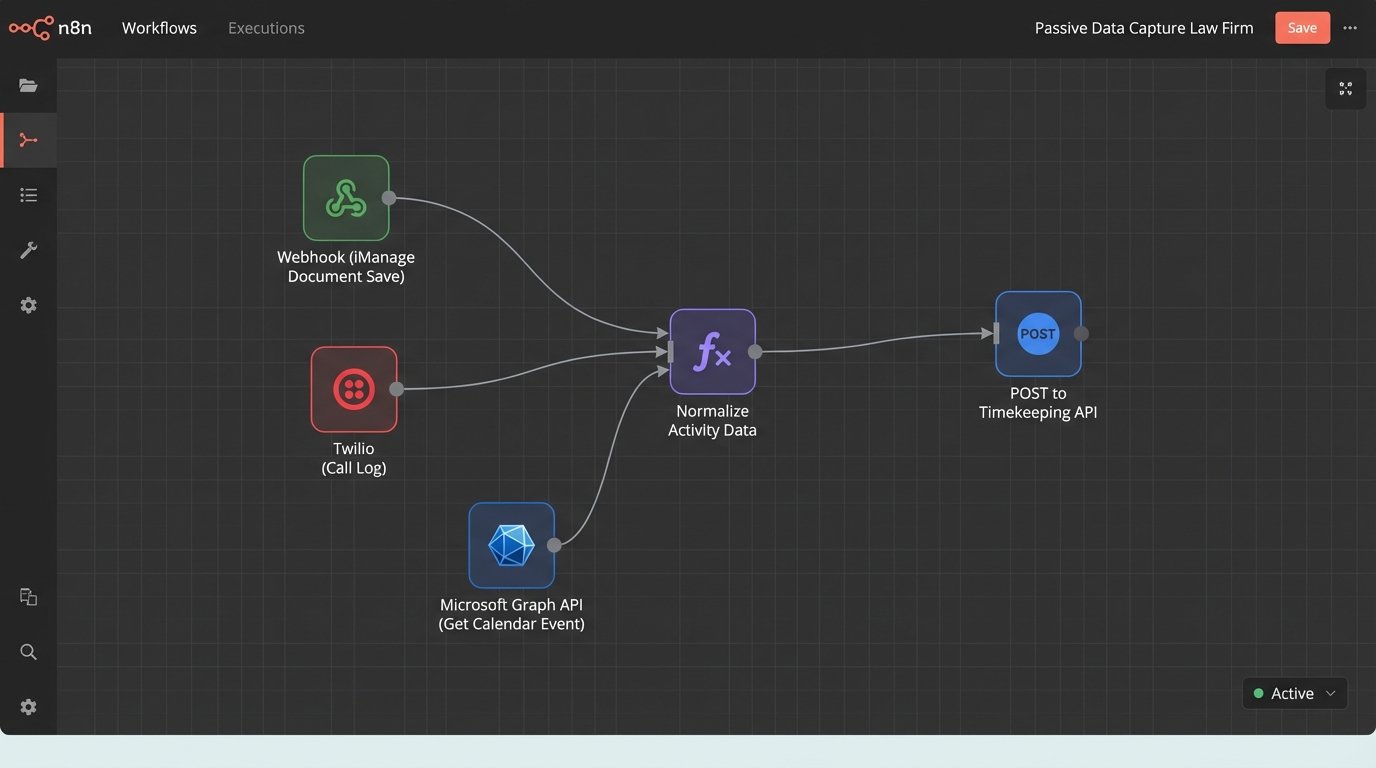
This approach introduces its own set of problems, primarily around privacy and performance. You must be surgically precise about what data you capture. Monitoring application focus or keystrokes is a privacy nightmare and often a non-starter. The correct approach is to capture metadata events: an email sent, a document edited, a meeting attended. The content remains private, but the activity becomes a data point. Filtering out non-billable, personal activity is another challenge, often requiring machine learning classifiers trained on firm-specific data.
Building the API Bridge to Time Entry
Once you have a stream of activity data, you need to inject it into the practice management system. This is not a nightly batch job. To preserve context, the process must be near real-time. When a lawyer saves a document with a matter ID in its metadata, a webhook should fire immediately. That payload triggers a serverless function that formats the data and pushes it to the timekeeping system’s API endpoint as a draft entry.
Most modern practice management systems like Clio or Actionstep have REST APIs for this, but many legacy platforms require you to bridge to an ancient SOAP endpoint or, in the worst cases, perform direct database writes. These direct writes are brittle and bypass the application’s business logic, creating a high risk of data corruption if you don’t fully understand the table schema and its dependencies. An API is always the cleaner, more supportable path.
A typical JSON payload for creating a draft time entry via a REST API might look something like this. It’s simple, but getting the `matter_id` and `user_id` mapped correctly from the source event is where the integration logic gets complex.
{

  "entry": {

    "date": "2023-10-27",

    "user_id": 101,

    "matter_id": "MAT-00234",

    "duration_seconds": 1800,

    "activity_source": "iManage.Document.Save",

    "source_event_id": "uuid-v4-goes-here",

    "draft_narrative": "Edited document: 'Motion to Compel.docx'",

    "status": "draft"

  }

}
This “draft” status is critical. The system should never automatically post time. It suggests entries, but the final confirmation must belong to the legal professional. Automation’s role is to eliminate the drudgery of data entry, not to usurp professional judgment.
From Raw Logs to Billable Narratives
A raw activity log like “Sent email to john.doe@client.com” is not a billable narrative. This is the last mile of the problem, and it’s where most off-the-shelf tools fail. They capture the activity but punt the hard work of writing a compliant, descriptive narrative back to the lawyer, defeating much of the purpose. This is where you apply Natural Language Processing (NLP) to enrich the raw data.
You can train a model to parse email subjects, document titles, and meeting attendees to generate high-quality draft narratives. For example, the system sees a calendar event titled “Call with opposing counsel re: discovery disputes” and a corresponding 30-minute phone log. It combines these data points to generate a draft narrative: “Teleconference with A. Smith (Opposing Counsel) regarding outstanding discovery requests.” The lawyer then only needs to review and approve or slightly amend it.
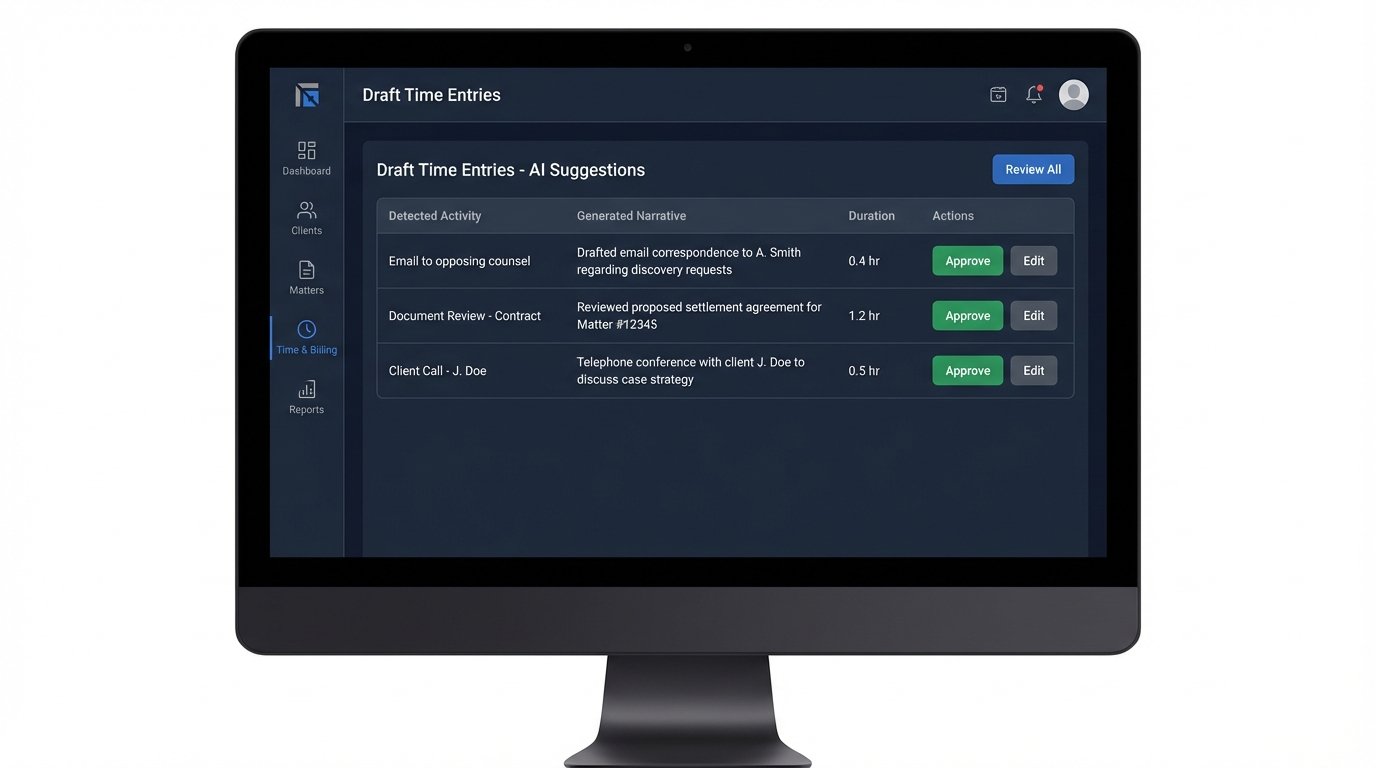
This requires significant upfront investment in data science. You need a large, clean dataset of historical time entries to train the NLP model to recognize your firm’s specific phrasing and billing codes. Off-the-shelf models provide a decent baseline, but they won’t understand your internal acronyms or matter-specific terminology without fine-tuning. This isn’t a plug-and-play solution; it’s a dedicated internal development project that can be a massive resource drain if not properly scoped.
The Human Validation Layer
The goal is not to create a fully autonomous system. The goal is to change the lawyer’s task from “data creator” to “data validator.” The user interface for this is paramount. Instead of a blank timesheet, the lawyer gets a daily or weekly digest of suggested time entries generated from their activity. The workflow becomes a simple “review and approve” process, with the ability to edit narratives or discard irrelevant entries.
A poorly designed validation UI will sink the entire project. If it takes more clicks to approve a suggested entry than to create one manually, adoption will fail. The interface must support batch operations, allowing a user to approve all suggested entries for a specific matter with a single click. It needs smart filtering and search. The design should be focused entirely on reducing the cognitive load of the approval process.
There’s a risk of users blindly “rubber-stamping” suggestions without proper review. The system’s design must mitigate this. For instance, you can flag entries with unusually high durations or vague narratives for mandatory review, preventing them from being batch-approved. You can also build in logic checks that compare total approved hours for a day against a configurable threshold, forcing a second look if the total seems anomalous.
Fixing the Downstream Financials
With accurate, contemporaneous time data, the firm’s entire financial picture sharpens. The biggest impact is on profitability analysis. Instead of relying on fuzzy, block-billed estimates, you can see the true cost of execution for a specific phase of a matter. You might discover that your “profitable” litigation practice is actually being subsidized by your corporate group because discovery costs are consistently underestimated.
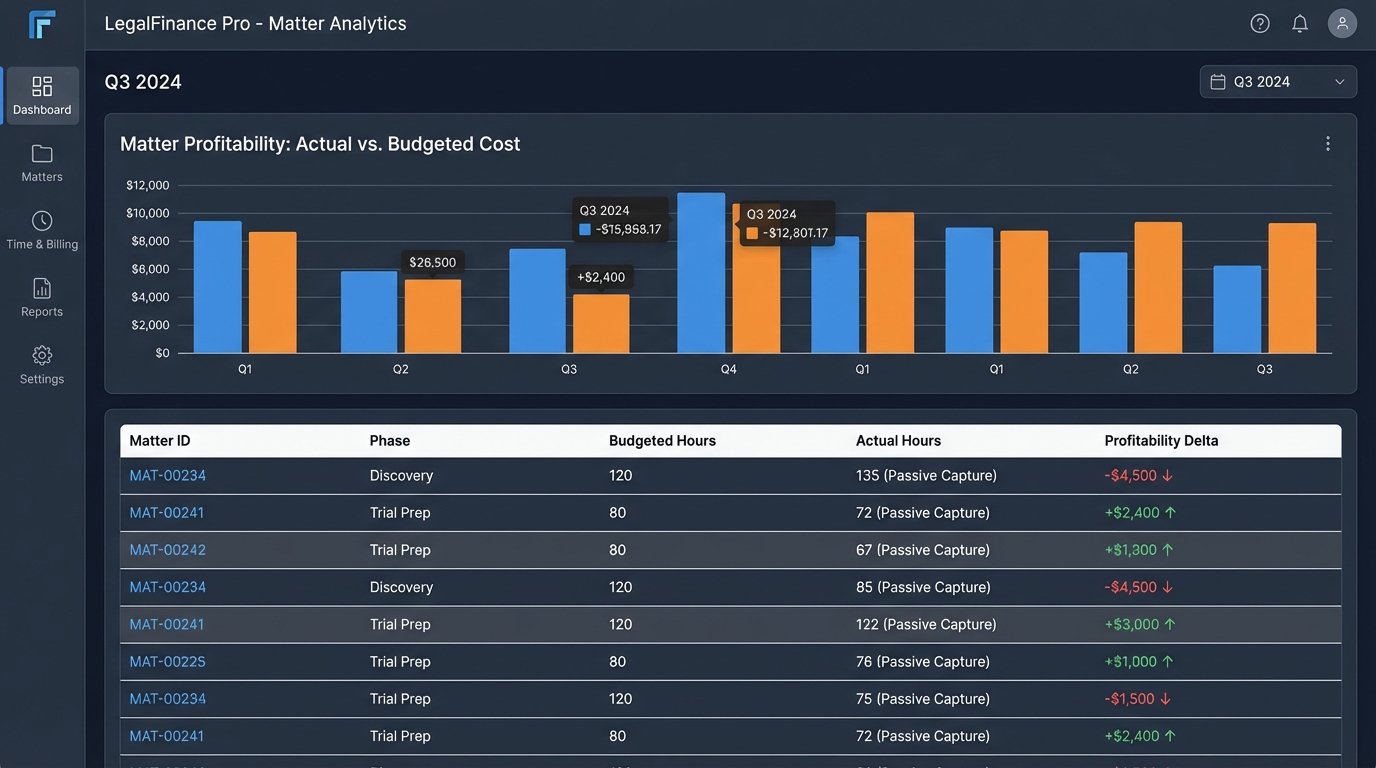
This data integrity also directly impacts revenue by reducing write-offs and write-downs. When a client challenges an invoice, you can produce a detailed activity log showing the exact work performed, timestamped to the second. “Review correspondence” becomes “Reviewed and analyzed 14-page settlement offer from opposing counsel.” An invoice backed by this level of granular, contemporaneous data is much harder to dispute than one based on vague, end-of-week recollections.
Automating time capture is not an administrative cost-saving measure. It is a foundational step in transforming a law firm’s operations to be data-driven. It fixes the corrupted data at its source, allowing for trustworthy business intelligence that impacts everything from client billing and collections to strategic planning and partner compensation. The administrative time savings are just a minor, pleasant side effect of finally getting the data right.