
Compliance isn’t a feature you bolt on at the end of a project. It is a fundamental architectural constraint. Your firm’s lawyers can draft all the policies they want, but if the automation scripts run with God-mode privileges, those policies are just expensive PDFs. We are the ones who build the guardrails, and if we build them wrong, the firm owns the fallout.
Regulations like GDPR or the CCPA, along with ABA model rules on confidentiality, are not legal abstractions for us. They are the technical specifications. Our job is to translate those requirements into concrete controls, logic gates, and immutable logs within the automation’s execution context. Ignoring this from day one means you are not building a tool. You are building a liability that just happens to run code.
Data Mapping: The Unglamorous Prerequisite
You cannot secure a data flow you have not mapped. Before a single line of automation code is written, you must document the path data will travel. This involves identifying the source systems, the specific data elements being processed, and the destination. We are talking about connecting the dots between the document management system, the practice management software, and whatever third-party API the new tool needs to call.
This process is about creating a machine-readable inventory, not a PowerPoint slide for the steering committee. The automation itself should be able to reference this map to understand its own boundaries. Think of it as mapping a city’s plumbing and electrical grid before you start drilling for a new subway line. Without that map, you are guaranteed to hit something critical.
Legacy systems are the primary source of pain here. A 15-year-old case management system with no event stream and a poorly documented SOAP API makes this mapping process a grueling exercise in reverse-engineering. You will spend more time figuring out what a field named `c_matter_info_3` actually contains than you will writing the core automation logic.
Get it done anyway. A failure here invalidates every subsequent security control you build.
Architecting Granular Access Control
Most automation platforms and RPA tools run their processes under a service account. That service account often has privileges far exceeding those of the user who triggered the job. This is the central risk vector. A marketing assistant triggering a report generation script should not inadvertently execute a process that can read confidential M&A documents.
We have to build a secondary layer of access control inside the automation logic itself. This is Role-Based Access Control (RBAC) scoped to the automation’s context. When a workflow begins, its first step must be to verify the initiating user’s permissions against the target data. This means the automation needs to query an identity provider or an internal permissions database and get a clear yes or no before proceeding.
The check needs to be explicit. It’s not enough to trust the permissions of the source application. The script must validate intent and authority for the specific action it is about to take.
For example, a script designed to update client contact information should be restricted to specific fields in the practice management database. You force this restriction at the code level, building a function that checks both the user and the data fields they are attempting to modify.
def update_client_record(user_id, record_id, field_to_update, new_value):

    # Fetch user permissions from a central store

    user_permissions = get_user_permissions(user_id)
# Define which roles can update which fields
# This logic should not live in the script itself, but be fetched from a config
field_access_map = {
'contact_email': ['paralegal', 'attorney'],
'billing_rate': ['partner', 'billing_admin']
}
# Logic-check: Does this user's role permit editing this specific field?
if user_permissions['role'] in field_access_map.get(field_to_update, []):
# Proceed with the database update call
print(f"PERMISSION GRANTED: User {user_id} updating {field_to_update}.")
# db.update(record_id, {field_to_update: new_value})
else:
# Halt execution and log the unauthorized attempt
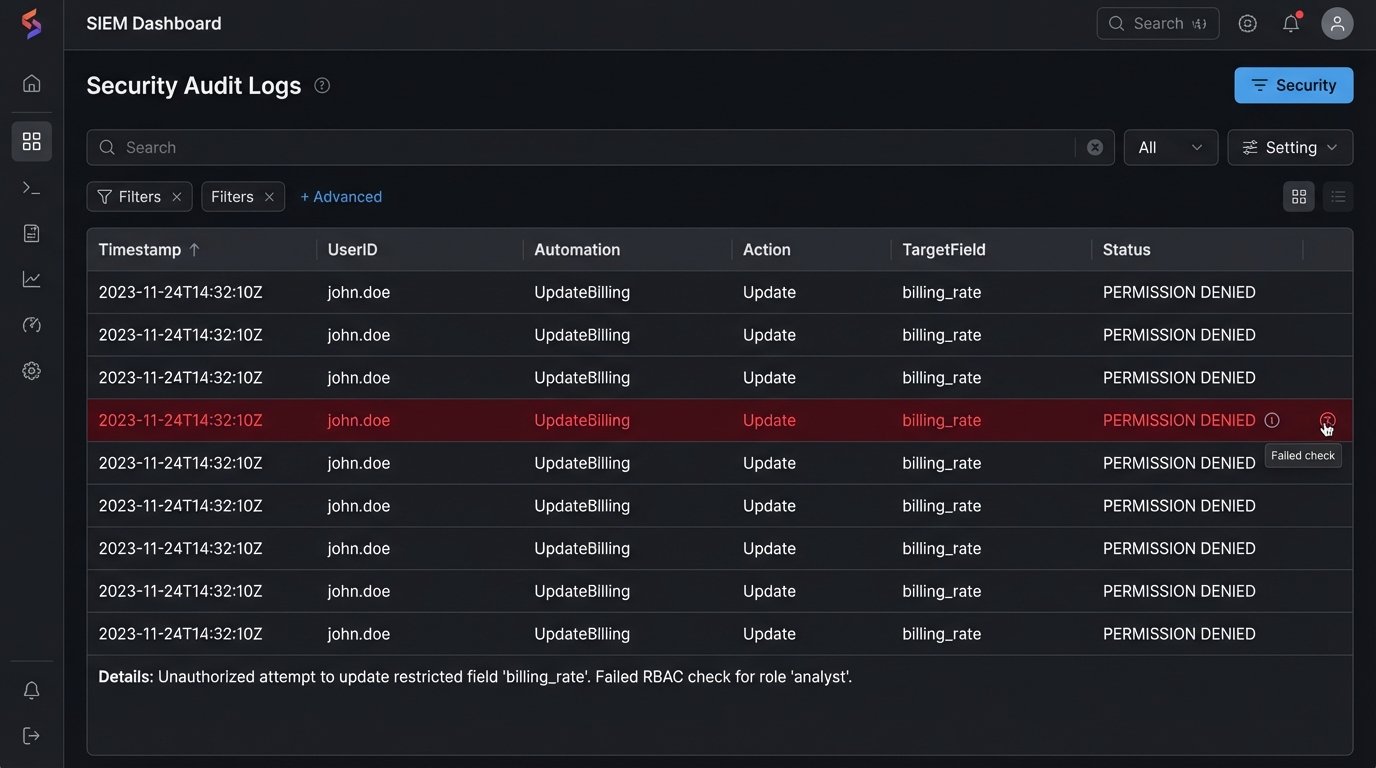
print(f"PERMISSION DENIED: User {user_id} cannot update {field_to_update}.")
log_security_event('unauthorized_access_attempt', user_id, record_id, field_to_update)
raise PermissionError("User does not have permission to modify this field.")
This type of validation adds processing overhead. Each check is another network call or a database query. In high-volume scenarios, this can introduce noticeable latency. The alternative is a security incident, so the performance hit is not optional.
Build an Audit Trail That Cannot Be Altered
Debugging logs are not audit logs. A developer’s print statements are useful for fixing bugs, but they do not provide the non-repudiation required for a compliance investigation. An audit log must be a permanent, unaltered record of every significant action an automation takes. It is your primary evidence store when something goes wrong.
Each log entry must capture a standard set of information: the timestamp (in UTC), the name of the automation or script, the ID of the user who initiated the process, the specific action taken (e.g., `document_accessed`, `record_created`), and the primary key of the data object that was affected. Any error states or security-related denials must be logged with a higher severity level.
These logs cannot live on the same server where the automation runs. A compromised machine means compromised logs. The only valid architecture is to ship logs immediately to a separate, secure, and write-once destination. This could be a dedicated logging service like Splunk or a cloud storage bucket configured for Write-Once-Read-Many (WORM) immutability. Once an entry is written, it cannot be modified or deleted for a defined retention period.
This is a wallet-drainer. Storing and indexing terabytes of logs costs real money in both licensing and infrastructure. The business will push back on the expense. Your job is to frame it as the cost of insurance against a seven-figure regulatory fine.
Checking for Conflicts and Ethical Walls
Generic data protection is one thing. Legal-specific ethical compliance is another. Automations that create new matters or add parties to existing ones must be hard-wired into the firm’s conflicts checking system. This cannot be a manual step that someone remembers to do. It has to be a blocking call in the code.
An automated client intake workflow is a classic example. The script might pull data from a web form, enrich it with data from a corporate registry, and prepare a new matter entry. Before it executes the final `create_matter` call against the practice management system’s API, it must first send the new client name, related parties, and matter description to the conflicts database endpoint.
The automation must then parse the response. An all-clear message allows the workflow to proceed. Any potential hit, however small, must halt the automation immediately. The process should then create a task for a human in the conflicts department to perform a manual review. The automation should never be allowed to make a judgment call on a potential conflict.
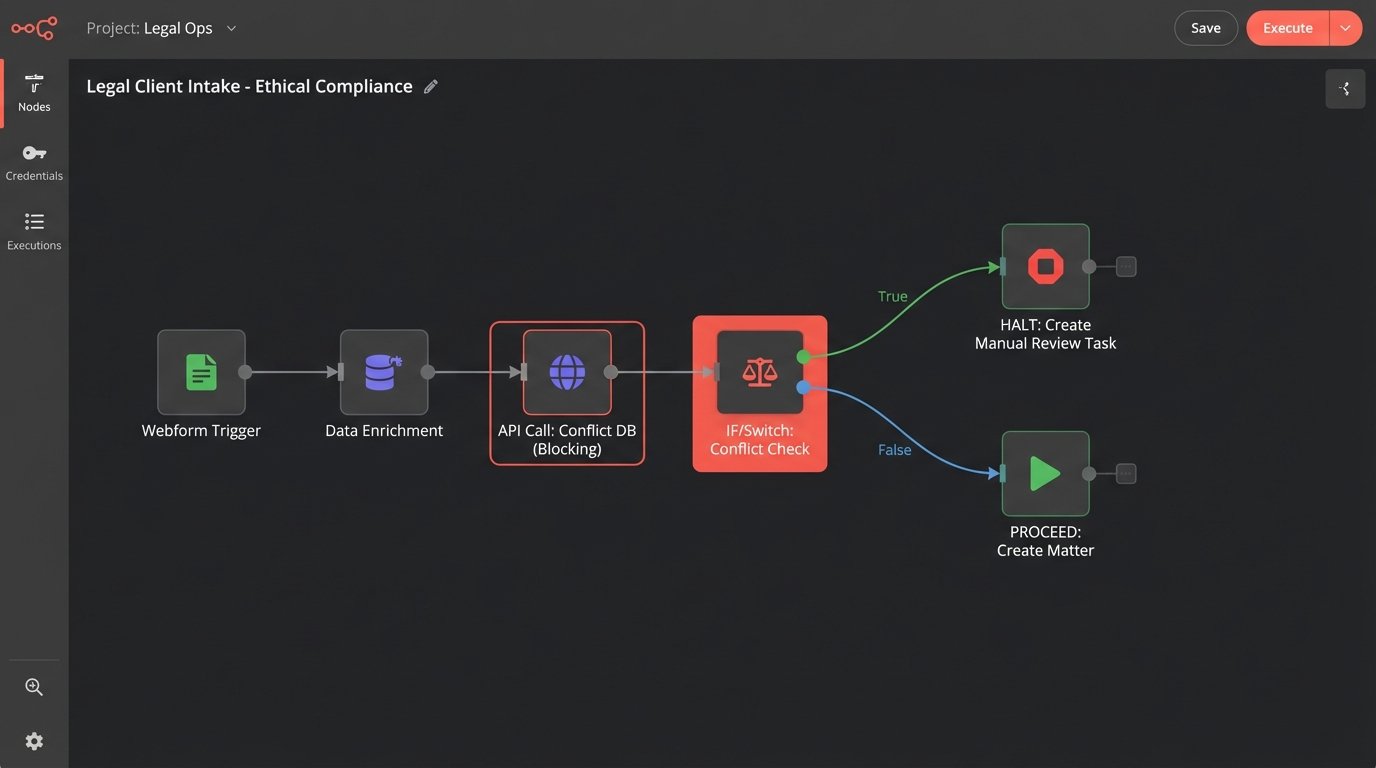
The failure mode here is critical. If the conflicts API is down or returns a timeout, the automation must fail-safe. It must stop and escalate, not proceed under the assumption that no news is good news. This requires explicit error handling for network failures and non-200 HTTP responses from the API.
import requests
CONFLICTS_API_ENDPOINT = "https://api.firm.internal/conflicts/check"
API_KEY = "your_secure_api_key"
def check_for_conflicts(matter_details):
headers = {
"Authorization": f"Bearer {API_KEY}",
"Content-Type": "application/json"
}
try:
response = requests.post(CONFLICTS_API_ENDPOINT, json=matter_details, headers=headers, timeout=10)
# Explicitly check for a successful response code
response.raise_for_status()
result = response.json()
# 'hits_found' is the key in the API response payload
if result.get('hits_found', False):
log_conflict_hit(matter_details, result.get('hits_details'))
return 'HALT_FOR_REVIEW'
else:
return 'PROCEED'
except requests.exceptions.RequestException as e:
# Any network error or non-200 response triggers a fail-safe halt
log_api_failure('conflicts_api', str(e))
return 'HALT_FOR_REVIEW'
Sanitizing Data Before It Leaves Your Network
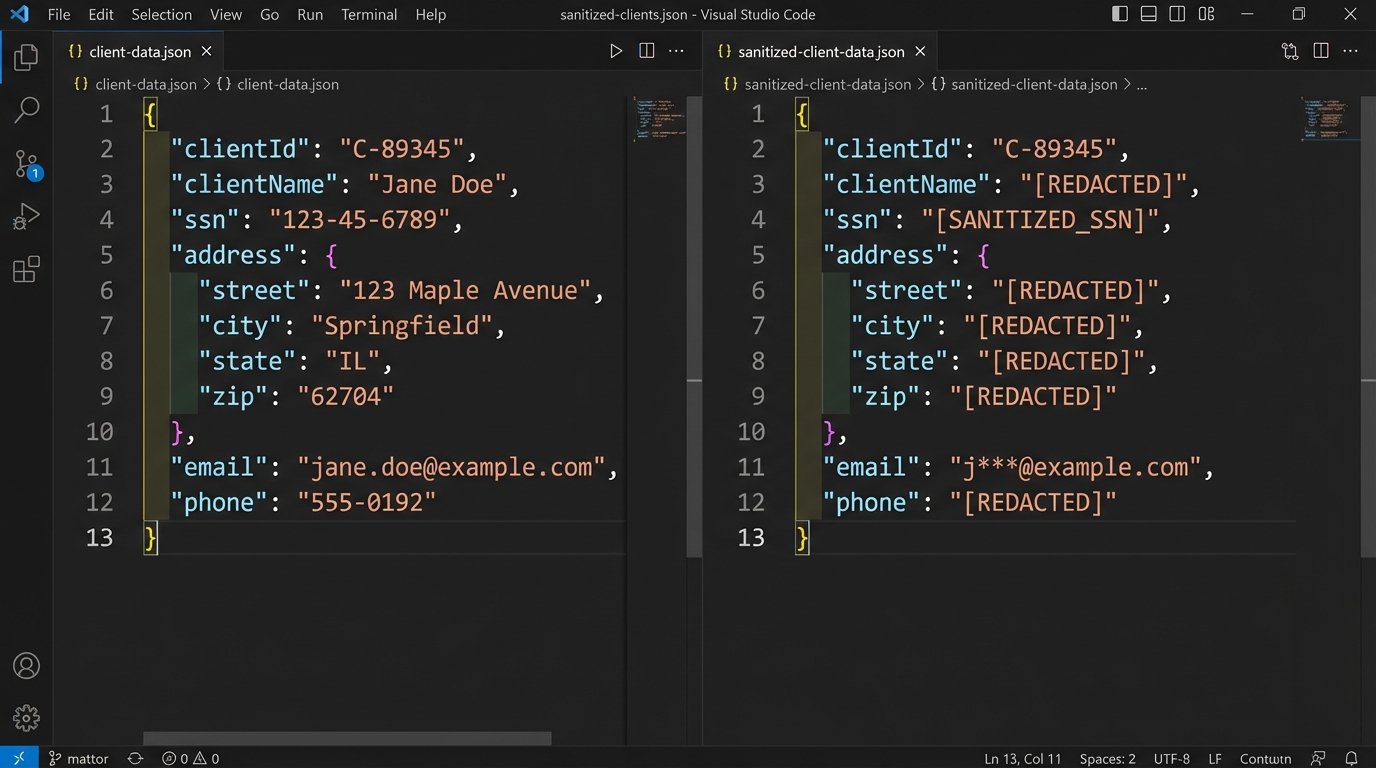
Many automations need to interact with external, third-party services. This could be an AI-powered contract analysis tool, a language translation service, or an e-signature platform. Every time proprietary or client-confidential data is sent over the internet to a vendor’s API, you create a potential point of data leakage.
You cannot simply pipe a raw document to an external endpoint. The automation must first strip or pseudonymize any sensitive information that is not strictly necessary for the API call to function. This means removing PII, redacting names of uninvolved parties, and replacing specific financial figures with placeholders if possible. Building this sanitization layer is like shoving a firehose through a needle. It forces you to be deliberate about every single data element you expose.
This is a difficult technical problem. Perfect redaction is computationally intensive and context-dependent. A simple regex to find social security numbers will miss a number that is accidentally formatted with spaces instead of dashes. You may need to employ more advanced named-entity recognition (NER) models to identify and remove sensitive data, which adds its own complexity and cost.
The performance impact is significant. The automation now has an extra, heavy-processing step that must be completed before the main work can even begin. This is a direct friction point between the desire for a fast, new feature and the requirement to maintain confidentiality.
Validate and Test Your Controls Rigorously
Designing compliant architecture is theory. Proving it works is reality. You must build a suite of tests specifically to validate the security and compliance controls you have implemented. This goes beyond typical functional testing.
These tests must attempt to subvert your controls. Write unit tests that call your permission-checking functions with user profiles that should be denied. Write integration tests that simulate a network failure from the conflicts API to ensure your fail-safe logic triggers correctly. Set up automated security scans to check for known vulnerabilities in the libraries your automation uses.
Involve the security team. Let them perform penetration testing against the automation’s endpoints and triggers. A good pentester will try to execute the automation with a crafted input designed to bypass a weak control. Their findings are invaluable for hardening the system before it goes live.
This validation must be continuous. Every time the automation’s code is updated, the full suite of compliance and security tests must run automatically as part of your CI/CD pipeline. A passing build should mean the code is functional and its security posture has not been degraded.
A compliance control that is not tested is a control that does not exist.
Ultimately, compliance is not about achieving a perfect state. It is about building a defensible architecture. When an auditor or a regulator asks how you protect client data, you need to be able to show them the code, the logs, and the test results. An automation that breaches confidentiality is a firm-level failure, and the blame will not land on the software vendor. It lands on us.