
Most law firm CRMs are glorified digital rolodexes. They hold contact information hostage in a system disconnected from the firm’s actual work engine, the case management system. The result is a broken client lifecycle, where marketing captures a lead, intake manually re-enters it, and client communication is a series of one-off, un-tracked emails. This is a data liability and a massive operational drag.
Automating this flow isn’t about buying another subscription. It’s about forcing these disparate systems to talk to each other. It requires a willingness to get your hands dirty with data exports, API calls, and the messy reality of your firm’s existing tech stack. This is the blueprint for building a functional, automated client pipeline instead of just a list of names.
Phase 1: Excavating and Sanitizing Your Contact Data
Before you can automate anything, you need a single source of truth. Your firm’s contact data is likely scattered across Outlook contacts, ancient spreadsheets, and your current practice management software. The first step is to rip it all out and consolidate it. This is the least glamorous part of the job, and it’s where most projects fail.
Expect your data to be a disaster. You’ll find missing email addresses, phone numbers formatted in a dozen different ways, and duplicate entries for the same person. You cannot import this mess directly into a new CRM. You will poison the new system from the start. The only solution is to export everything to CSV and clean it programmatically.
The Scripting Approach to Data Cleansing
Manual cleaning in Excel is a fool’s errand for any list over a few hundred contacts. We use a Python script with the pandas library to standardize the data before it ever touches the new CRM’s import tool. The script’s job is to enforce a rigid data schema.
The core logic involves a few key operations. First, we strip all non-numeric characters from phone number fields. Second, we force all email addresses to lowercase to prevent duplicates. Third, we merge duplicate contacts based on a priority system, typically favoring the record with the most recent modification date from the source system. This is a destructive process, so you version control your scripts and back up the raw exports.
Here’s a simplified Python snippet using pandas to demonstrate the phone number standardization. This is not production-ready code, it’s a conceptual model.
import pandas as pd

import re
# Load the dirty data exported from your old system
df = pd.read_csv('raw_contacts_export.csv')
# Define a function to strip junk from phone numbers
def clean_phone_number(phone):
if isinstance(phone, str):
# Remove anything that isn't a digit
return re.sub(r'\D', '', phone)
return '' # Return empty string for non-string inputs
# Apply the function to the 'Phone' and 'Mobile' columns
df['StandardizedPhone'] = df['Phone'].apply(clean_phone_number)
df['StandardizedMobile'] = df['Mobile'].apply(clean_phone_number)
# Logic to identify and merge duplicates would follow here
# ...
# Export the cleaned data, ready for import
df.to_csv('cleaned_contacts_for_import.csv', index=False)
This process is the equivalent of stripping a car down to the frame before you rebuild it. You have to see the structural flaws before you can fix them.
Phase 2: Architecting the Intake and Workflow Triggers
With clean data in your CRM, the next step is to automate the flow of new leads into the system. The goal is to eliminate manual entry entirely. A new lead from your website’s contact form should create a contact, open a potential matter, and trigger the first follow-up task without a human touching it.
This is achieved by bridging your web form to your CRM’s API. Most modern CRMs built for legal, like Lawmatics or Clio Grow, provide REST APIs for this purpose. When a user submits a form, the web server shouldn’t just send an email notification. It should make a server-side POST request to the CRM’s `contacts` or `leads` endpoint.
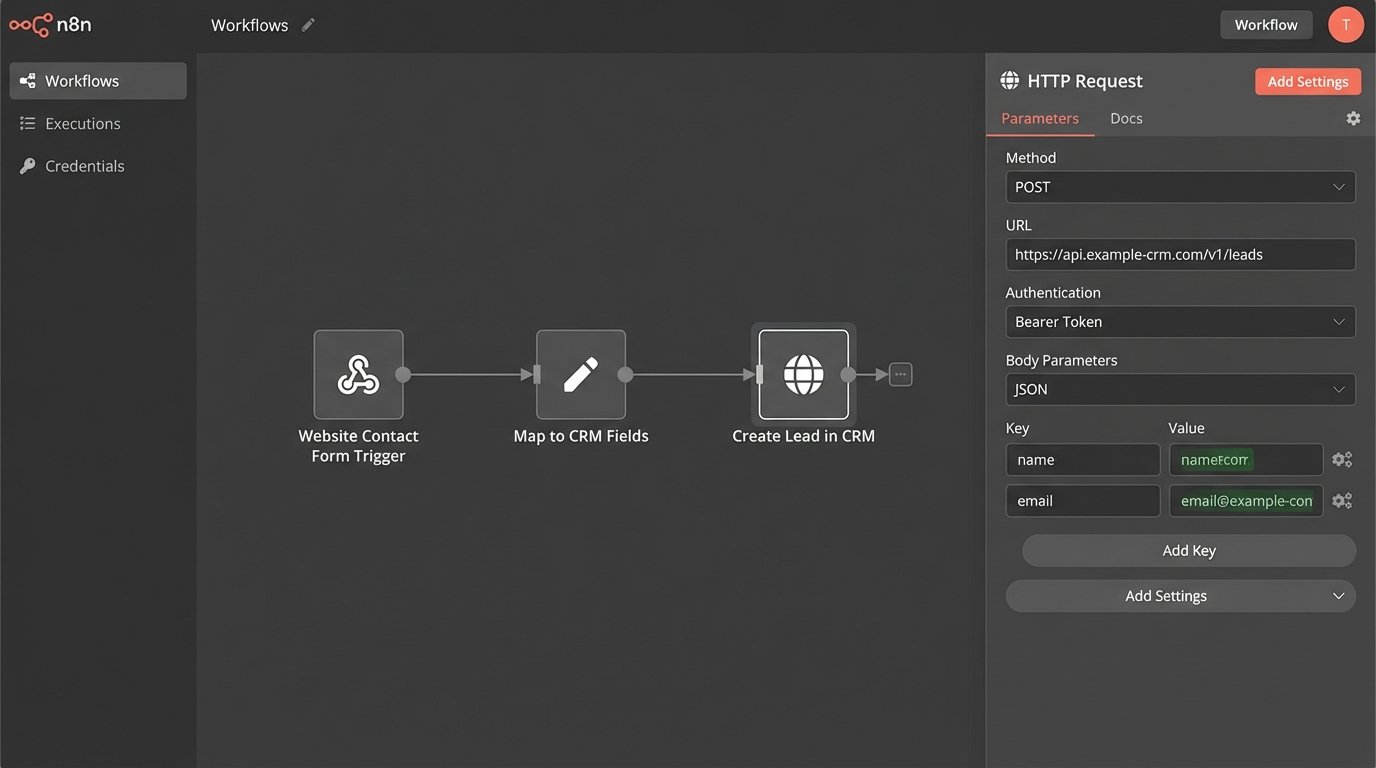
The payload of that request will be a JSON object containing the form data, mapped directly to the CRM’s data fields. This requires careful setup. You need to know the exact field names your CRM expects. Guessing will only get you `400 Bad Request` errors.
Example: API Call to Create a New Lead
Imagine a new lead fills out a form. Your website backend receives the data and constructs a JSON payload to send to your CRM. The API endpoint might look something like `https://api.yourcrm.com/v1/leads`.
The JSON you send would be structured like this:
{

  "firstName": "Jane",

  "lastName": "Doe",

  "email": "jane.doe@example.com",

  "phone": "5551234567",

  "caseType": "Personal Injury",

  "source": "Website Contact Form",

  "message": "I was in a car accident last week and need to speak with an attorney."

}
A successful POST request will return a `201 Created` status and, crucially, the ID of the newly created lead. You must log this ID. It’s the key you’ll use for all future automated actions related to this person, from conflict checks to sending documents.
This approach bypasses the unreliability of email parsing entirely. It is a direct, machine-to-machine data injection.
Setting Up Automated Workflows
Once the lead is in the CRM, you build workflows based on status changes. A “workflow” is just a sequence of pre-defined actions that fire when a trigger condition is met. The trigger is `Lead Status = New`. The actions might be:
- Action 1 (Immediate): Assign a task to the intake specialist to call the lead. Set a due date for 15 minutes from creation.
- Action 2 (Immediate): Send an automated but personalized email to the lead. “Hi Jane, we received your inquiry about your personal injury case. Our specialist will call you shortly from…”
- Action 3 (Wait 24 hours): If `Lead Status` is still `New`, send a follow-up email.
- Action 4 (Wait 72 hours): If `Lead Status` is still `New`, assign a final follow-up task and notify the head of intake.
This ensures no lead goes cold because someone forgot to check an inbox. The system forces the follow-up.
Phase 3: Automating Client Communication Post-Engagement
The automation shouldn’t stop once a lead becomes a client. The real value comes from using the CRM and your case management system to automate routine client updates. This reduces the paralegal’s burden of answering “what’s happening with my case” emails and shows clients progress without you having to actively manage it.
This requires a deeper integration. You need your case management system (e.g., Clio Manage, Filevine, MyCase) to send signals to your CRM when a case milestone is reached. The best way to do this is with webhooks. A webhook is a notification that System A sends to a specific URL in System B whenever an event happens. It’s more efficient than constantly polling an API for changes.
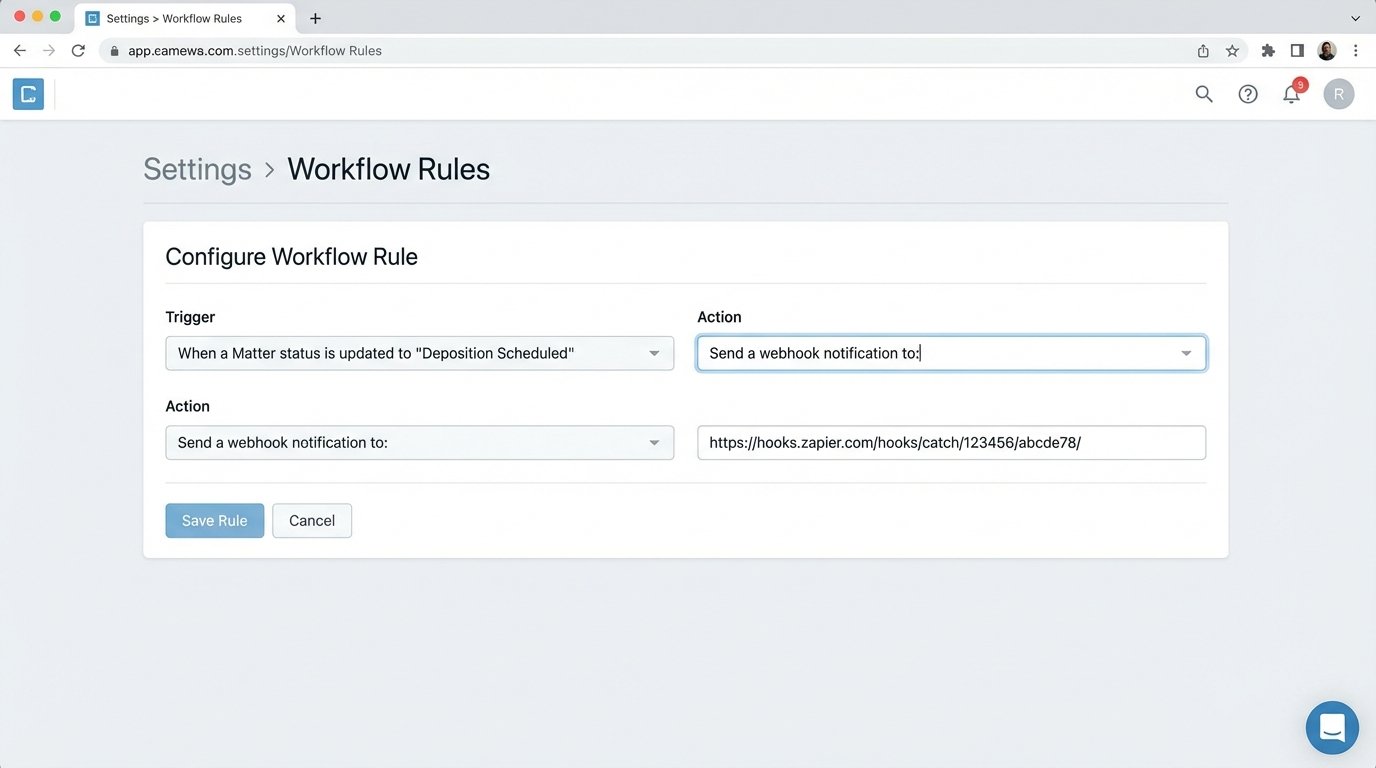
For example, you can configure your case management system to send a webhook whenever a matter’s status is updated. A paralegal changes the status from “Discovery” to “Deposition Scheduled.” This action fires a webhook containing the matter ID and the new status to a middleware service like Zapier or a custom-built serverless function.
The middleware then does the following:
- Receives the webhook payload.
- Uses the matter ID to look up the associated client in the CRM.
- Triggers a pre-defined communication sequence in the CRM for the “Deposition Scheduled” event.
- That sequence sends a templated email and an SMS message to the client with the date and time of the deposition, pulled from custom fields on the matter.
This entire chain of events happens in seconds, triggered by a single status change. It’s like setting up a series of tripwires across your case lifecycle. You define the important events and build the automated response for each one.
The friction here is deciding what to automate. Over-communicating trivial updates is just as bad as under-communicating. You must identify the key inflection points in a case that a client actually cares about. Sending an update that a routine motion was filed is noise. Sending an update that a court date has been confirmed is signal.
Phase 4: Driving Staff Adoption
The most sophisticated automation architecture is useless if your staff bypasses it. Adoption is not about a two-hour training session and a PDF manual. It is about making the new system the path of least resistance for getting work done. If it’s easier for a paralegal to just type an email manually than to update a status field, they will do that every time.
Training must be role-specific and tied to outcomes. For intake staff, demonstrate how the system automatically logs their calls and schedules their follow-ups, saving them from managing a separate to-do list. They need to see it as a tool that reduces their administrative load, not adds to it.
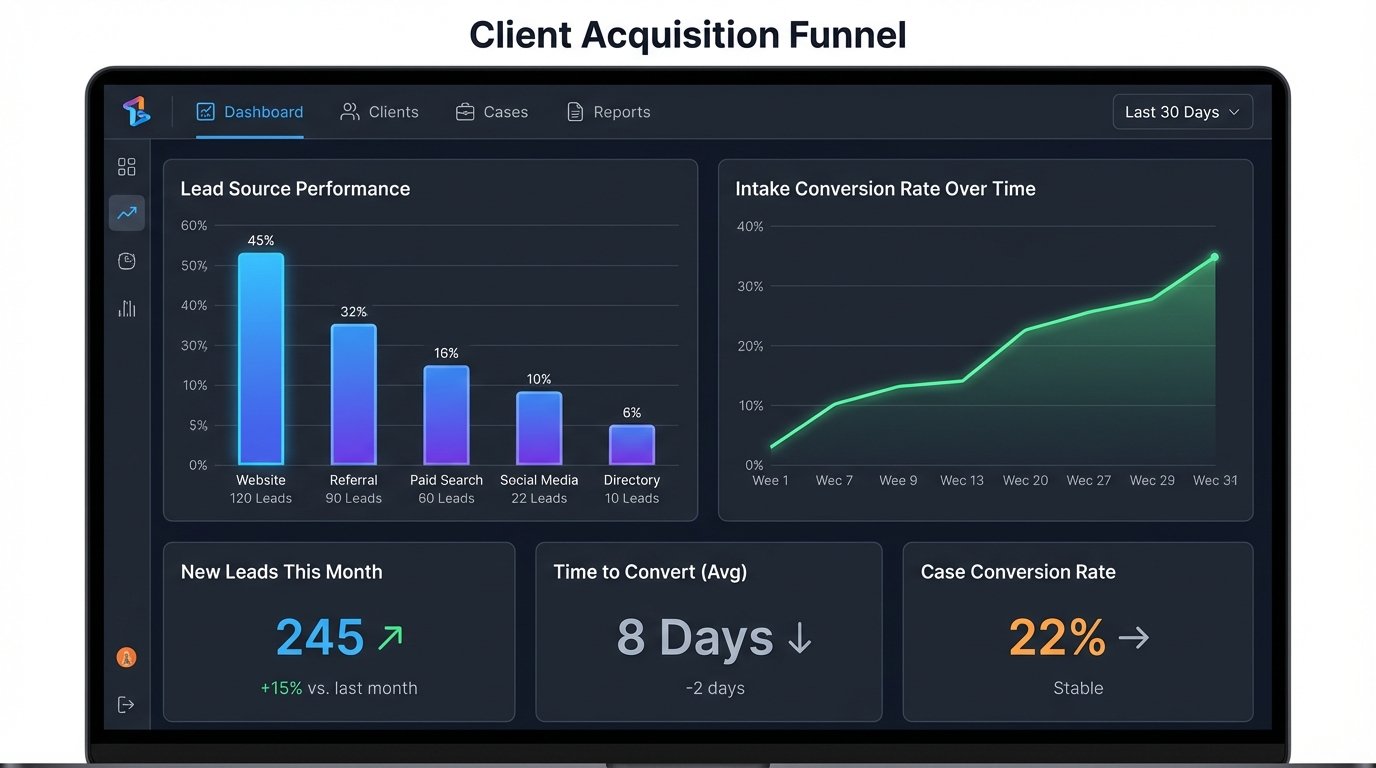
For attorneys, focus on the reporting. They don’t care about webhooks or JSON payloads. They care about the dashboard that shows lead sources, conversion rates, and the time it takes to move a case from intake to engaged. When they can see in real-time that leads from a specific marketing channel are converting at a higher rate, they will start to trust the data the system produces.
Expect resistance. The most common objection is that automation feels “impersonal.” Counter this by showing them how templates can be highly personalized with data tokens for the client’s name, case type, and specific dates. The automation handles the 80% of communication that is boilerplate, freeing up staff to spend their time on the 20% that requires a human touch.
Ultimately, a CRM automation system is not a set-it-and-forget-it platform. APIs get deprecated, systems you integrate with will change their data schemas, and your firm’s own processes will evolve. The system requires a dedicated owner who can monitor its performance, debug failures, and continuously refine the workflows. It is a living piece of your firm’s infrastructure, and it must be maintained like one.