
Most case studies on legal automation are marketing fluff. They talk about “efficiency gains” without showing the API calls. They mention “ROI” but omit the six-month integration headache. This is not one of those. This is a field report on dragging a three-attorney personal injury firm from a manual, spreadsheet-driven workflow into a system that actually works. The objective was not to buy more software, it was to force their existing, disjointed tools to communicate.
Their operational state was typical. Client intake was a fillable PDF sent via email. That data was then manually re-keyed into their case management system (CMS), a legacy platform with a notoriously fragile API. Document drafting for engagement letters and initial filings involved copying and pasting from old Word documents. This process was not just slow, it was a breeding ground for clerical errors that create malpractice risk.
The Diagnostic: Identifying the Core Failure Points
Before writing a single line of code, we mapped their entire process from initial client contact to first filing. The bottlenecks were immediately obvious. The intake process alone consumed over 45 minutes of paralegal time per client, most of it non-billable data entry. The second major failure was the lack of a single source of truth. Client information existed in three different places: the intake PDF, the CMS, and the partner’s Outlook contacts. Any update required manual changes in all three locations.
The firm had already purchased several tools over the years. They had a subscription to a document assembly platform they rarely used, a modern online form builder for a single “Contact Us” page, and their legacy CMS. The problem wasn’t a lack of software. It was a lack of connective tissue between these systems. They owned three separate engines with no transmission.
Deconstructing the Manual Intake Process
The initial client call resulted in a paralegal emailing a PDF. The client would fill it, email it back, and the paralegal would then block out time to type everything into their CMS. We measured the average time for this cycle at 52 minutes, with a 12% error rate on data entry, primarily transposed numbers in phone or social security fields. This was the first process we targeted for demolition.
Their reliance on Word templates was the second target. Each new document was a `Save As` operation from a previous client’s file. This meant metadata from old cases often carried over. It also meant any updates to standard clauses had to be manually propagated across dozens of “master” templates, a task that was rarely done. This created unacceptable version control risk.
The Architecture of the Solution: A Services-First Approach
We rejected the idea of an all-in-one platform. These “wallet-drainers” often force a firm to change its successful processes to fit the software’s rigid structure. Instead, we decided to bridge their existing, best-in-class tools using a lightweight, serverless function as the central nervous system. This approach minimized new software costs and focused the budget on pure integration engineering.
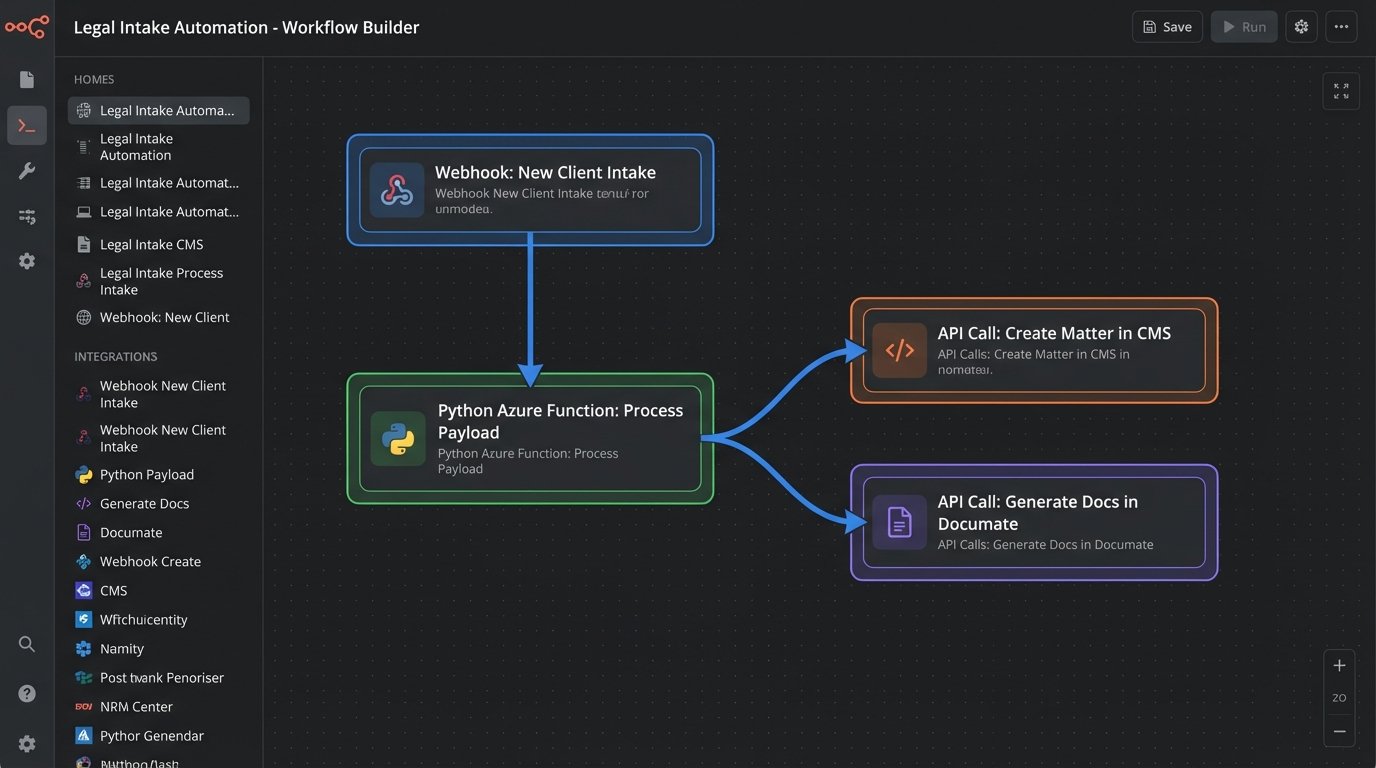
The core components of the new stack were:
- Intake Form: Their existing web form builder (JotForm), which has robust webhook capabilities.
- Integration Hub: A single Azure Function, written in Python, to act as the traffic cop for all data.
- Case Management System: Their legacy CMS, which we would interact with via its barely documented REST API.
- Document Assembly: Their licensed but unused document platform (Documate), which has a clean, modern API for data injection.
The entire philosophy was to make the intake form the one and only point of data entry. Once a client submits the form, no human should ever have to type that information again.
Phase 1: Automating Client and Matter Creation
We started by rewiring the intake process. The public-facing web form was expanded to capture all necessary information for client and matter creation. Upon submission, the form builder was configured to fire a webhook with a JSON payload to our Azure Function’s HTTP endpoint. This is a critical step. Instead of polling for new entries, the system gets data pushed to it in real-time.
The JSON payload is the lifeblood of the entire automation. It’s a structured representation of the client’s submitted information. A simplified version looks something like this:
{

  "submission_id": "5241987654321098765",

  "form_title": "PI Client Intake Form",

  "client_data": {

    "first_name": "John",

    "last_name": "Doe",

    "email": "j.doe@example.com",

    "phone": "555-123-4567",

    "date_of_incident": "2023-10-26"

  },

  "incident_details": {

    "location": "Main St & 1st Ave",

    "description": "Rear-end collision at a red light.",

    "police_report_filed": true

  }

}
The Azure Function’s first job is to catch this payload, validate the data to ensure required fields exist, and then begin a series of sequential API calls. The first call is to the CMS. We had to reverse-engineer parts of their API because the official documentation was five years out of date. We wrote a function to map the incoming JSON fields to the required fields for creating a new `Contact` and a new `Matter` in their system. This step alone eliminated the 52 minutes of manual data entry.
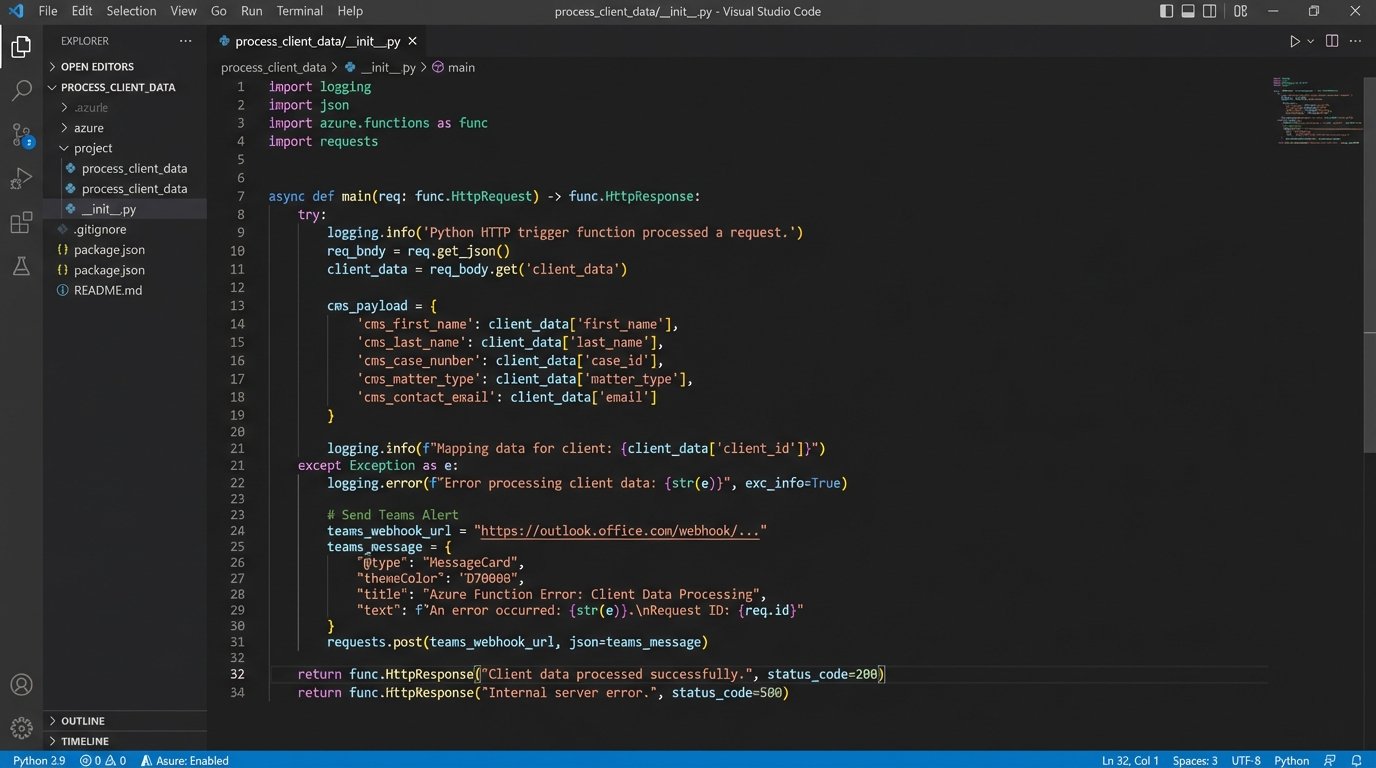
Error handling here is non-negotiable. If the CMS API call fails, the function doesn’t just die. It logs the error to a monitoring service (Application Insights) and sends a targeted alert to the firm’s paralegal via Microsoft Teams, including the failed payload and the API error response. This provides a clear, actionable failure report. The paralegal can then decide to retry or handle it manually, but the system doesn’t fail silently.
Phase 2: Gutting and Rebuilding Document Generation
Once the client and matter are successfully created in the CMS, the system returns a unique `matter_id`. Our Azure Function uses this ID for the next stage: document assembly. We had to gut their old Word documents. We extracted the core text and rebuilt them inside their dedicated document assembly tool. We replaced all the placeholder text like `[Client Name]` with actual, machine-readable variables linked to a data model.
The function now makes a second API call, this time to the document assembly platform. It passes the same client and incident data from the original JSON payload. The platform’s API ingests this data, populates the conditional logic in the templates (e.g., including a specific clause only if `police_report_filed` is `true`), and generates the engagement letter, HIPAA release, and initial representation letters as PDFs.
This part of the project felt like trying to shove a firehose through a needle. The firm had hundreds of minor variations in their documents based on case specifics. Translating years of accumulated lawyer habits into formal `IF/THEN/ELSE` logic statements was the most time-consuming part of the build. It required hours of direct collaboration with the attorneys to properly logic-check every clause.
The final step in this phase is storage. The generated documents are automatically pushed to the client’s specific folder in their document management system, which is synced with the CMS. The link to the documents is then written back into a custom field on the matter inside the CMS. The loop is closed. From a single form submission, a new client is created, a new matter is opened, and four essential documents are drafted and filed without a single mouse click from the staff.
The Results: Quantifiable Metrics, Not Vague Promises
The project was evaluated three months after full deployment. We didn’t look for soft metrics like “user satisfaction”. We tracked hard numbers. The primary KPI was the reduction of non-billable administrative time spent on intake and initial document prep.
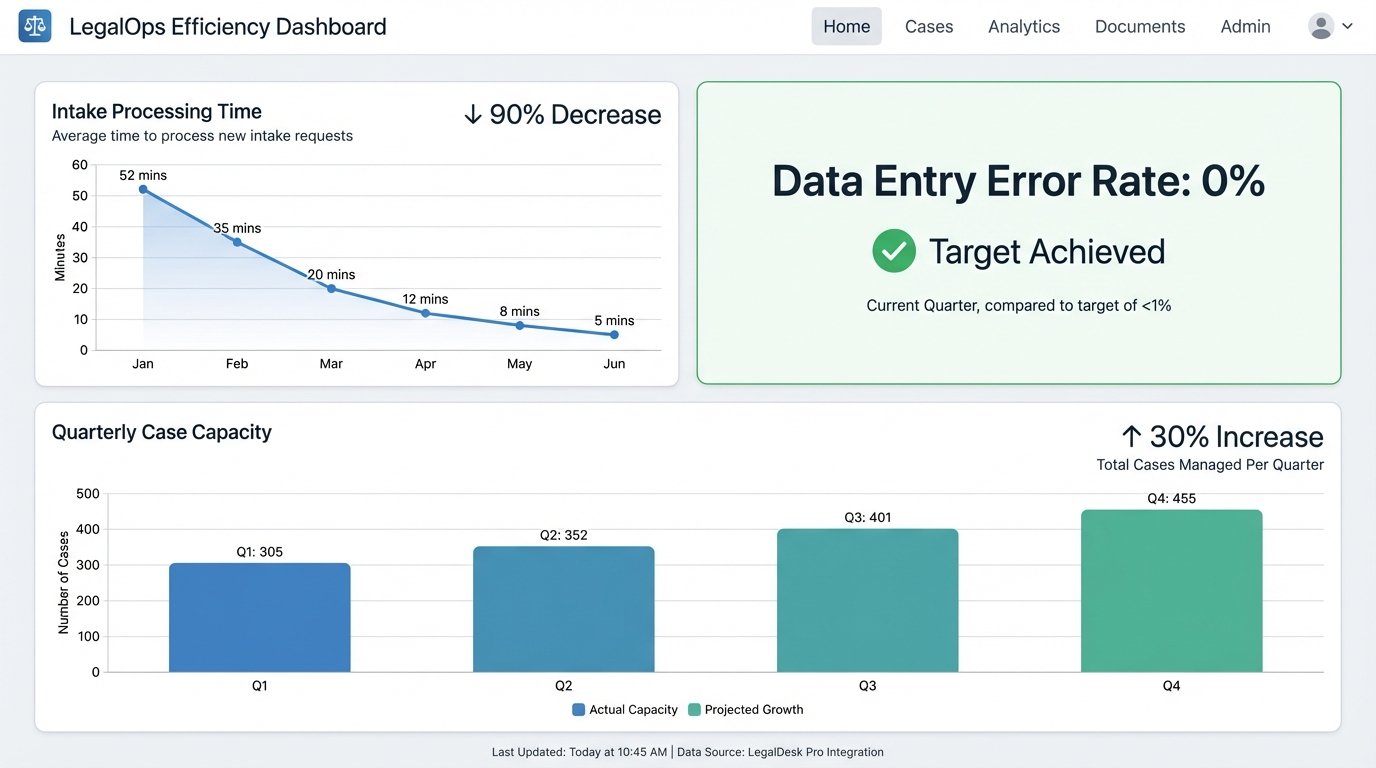
- Intake Processing Time: Reduced from an average of 52 minutes to under 5 minutes (the time required to review the auto-generated files for accuracy). This represents a 90% reduction in time spent on this task.
- Data Entry Errors: Clerical errors from manual re-keying were completely eliminated. The error rate dropped from 12% to 0%.
- Document Generation Time: The time to draft the initial suite of four documents dropped from over 30 minutes of searching, copying, and pasting to approximately 20 seconds of API processing time.
- Case Capacity: With paralegals freed from hours of daily administrative work, the firm was able to increase its active case load by 30% in the following quarter without hiring additional staff. The partners could focus on legal work, not process management.
The financial return was direct. By reallocating over 15 hours of paralegal time per week from non-billable administrative tasks to billable work like discovery requests and client communication, the firm generated enough new revenue to pay for the entire automation project in seven months.
Ongoing Maintenance and Future State
This system is not a “set it and forget it” solution. APIs change. Software gets updated. The Azure Function requires periodic monitoring and dependency updates. The cost is minimal, roughly two hours of developer time per month, but it’s a real cost that must be budgeted for. The alternative, a subscription-based integration platform, would have been a persistent operational expense, likely far higher over the long term.
The architecture is also extensible. The firm now wants to automate scheduling. The next phase will involve parsing the intake form for client availability, hitting the Calendly API to create a new meeting, and automatically sending an invite. Because we built a central data hub instead of a series of brittle point-to-point connections, adding new functions is straightforward. We simply add another step to the Azure Function’s execution sequence. This is the difference between building a tool and building a platform.