
Most talk about AI in the legal field is vendor-driven fantasy. They sell a black box solution, promising it will magically digest two decades of disorganized documents and spit out perfect legal insights. The reality is that AI tools are only as good as the data plumbing they connect to, and most firms are running on corroded pipes.
The core problem isn’t the algorithm. It is the GIGO principle, Garbage In, Garbage Out. Injecting a sophisticated large language model into a chaotic data environment is an expensive way to get hallucinated case summaries and misclassified contracts. This guide bypasses the sales pitch and focuses on the engineering required to make these tools function without setting your data integrity on fire.
Before You Buy the AI: Audit the Data Plumbing
Before any purchase order is signed, a technical audit is non-negotiable. This means mapping every system that will feed data into the AI or receive its output. The goal is to build a precise diagram of your data flow, identifying every potential point of failure before it becomes a production outage.
You are not just looking for systems. You are hunting for bottlenecks.
Mapping the Source Systems
Your firm runs on a patchwork of systems. The main culprits are typically a Case Management System (CMS), a Document Management System (DMS), and some form of billing software. Start by interrogating their APIs. The official documentation is often a work of fiction written years ago. You need to hit the actual endpoints to see what they return.
Expect undocumented rate limits, schemas that change without warning, and authentication methods that feel like a security afterthought. Your task is to document the ground truth, not the marketing material. Identify which systems have a reliable export function and which ones will require a custom script to pull data from a sluggish, decade-old SOAP endpoint.
This is the unglamorous work that determines if a project succeeds or becomes a slow-motion disaster.
The Data Integrity Check
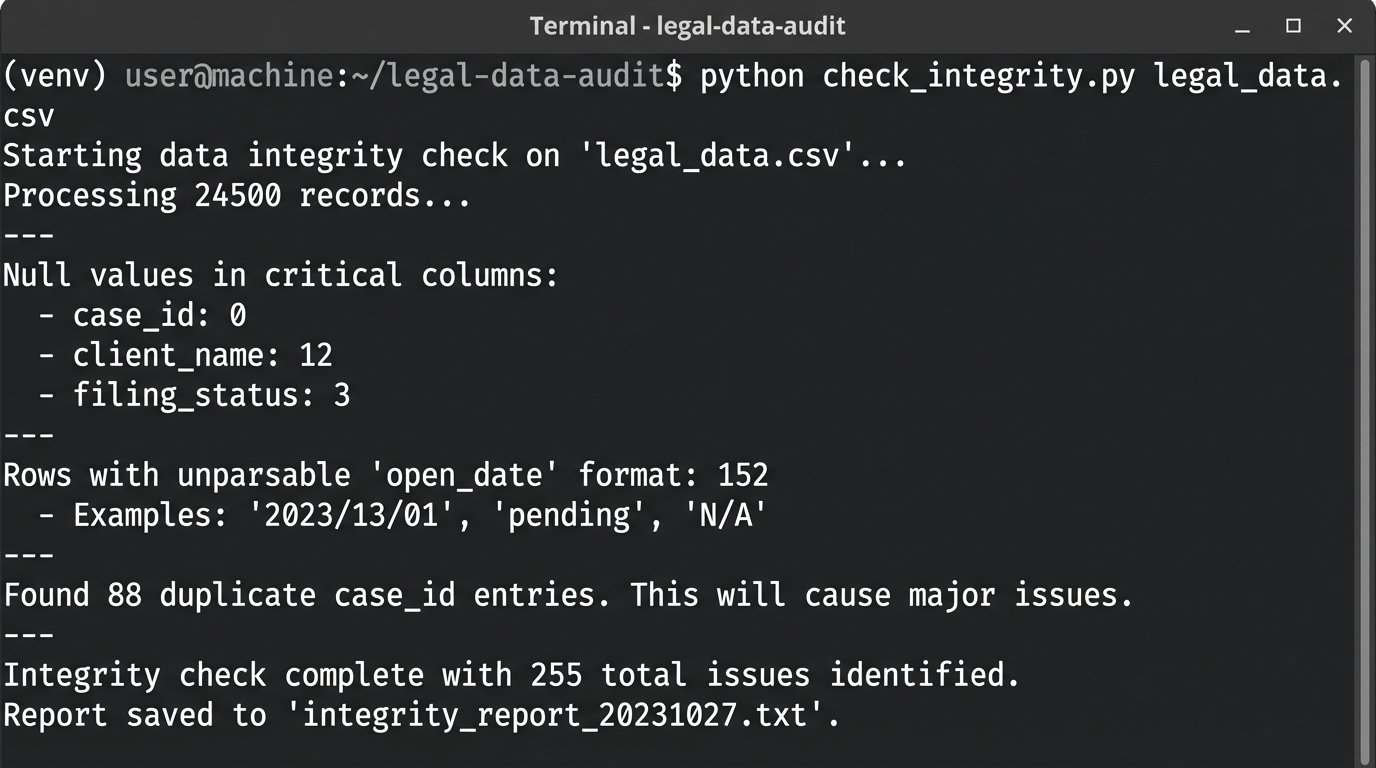
Once you know where the data lives, you need to check its quality. Export a representative sample, ideally a few thousand records, from your primary CMS into a CSV file. Then, script a basic data quality check. You are looking for obvious problems: null values in critical fields, inconsistent date formats, and duplicate entries that will confuse any analytical model.
A simple Python script using a library like Pandas can give you a fast, brutal assessment of your data hygiene. This isn’t about deep analysis. It is about finding the structural rot.
import pandas as pd
# Load a sample export from your Case Management System
try:
df = pd.read_csv('cms_export_sample.csv')
except FileNotFoundError:
print("Error: cms_export_sample.csv not found. Place your export in the script directory.")
exit()
# --- Basic Integrity Checks ---
# 1. Check for null values in critical columns
critical_columns = ['case_id', 'client_name', 'open_date', 'matter_type']
null_counts = df[critical_columns].isnull().sum()
print("Null values in critical columns:\n", null_counts)
# 2. Check for data type consistency in date fields
# This forces conversion and flags errors.
df['open_date_parsed'] = pd.to_datetime(df['open_date'], errors='coerce')
date_errors = df['open_date_parsed'].isnull().sum() - df['open_date'].isnull().sum()
print(f"\nRows with unparsable 'open_date' format: {date_errors}")
# 3. Check for duplicate case IDs which should be unique
duplicate_cases = df[df.duplicated('case_id', keep=False)]
if not duplicate_cases.empty:
print(f"\nFound {len(duplicate_cases)} duplicate case_id entries. This will cause major issues.")
# print(duplicate_cases[['case_id', 'client_name']]) # Uncomment to list them
else:
print("\nNo duplicate case_ids found. Good.")
Running this script will likely reveal that a significant percentage of your records are unusable without manual intervention. This is the ammunition you need to set realistic project timelines and manage expectations.
The output of this script is your project’s first reality check.
The Grunt Work: Building the Data Bridge
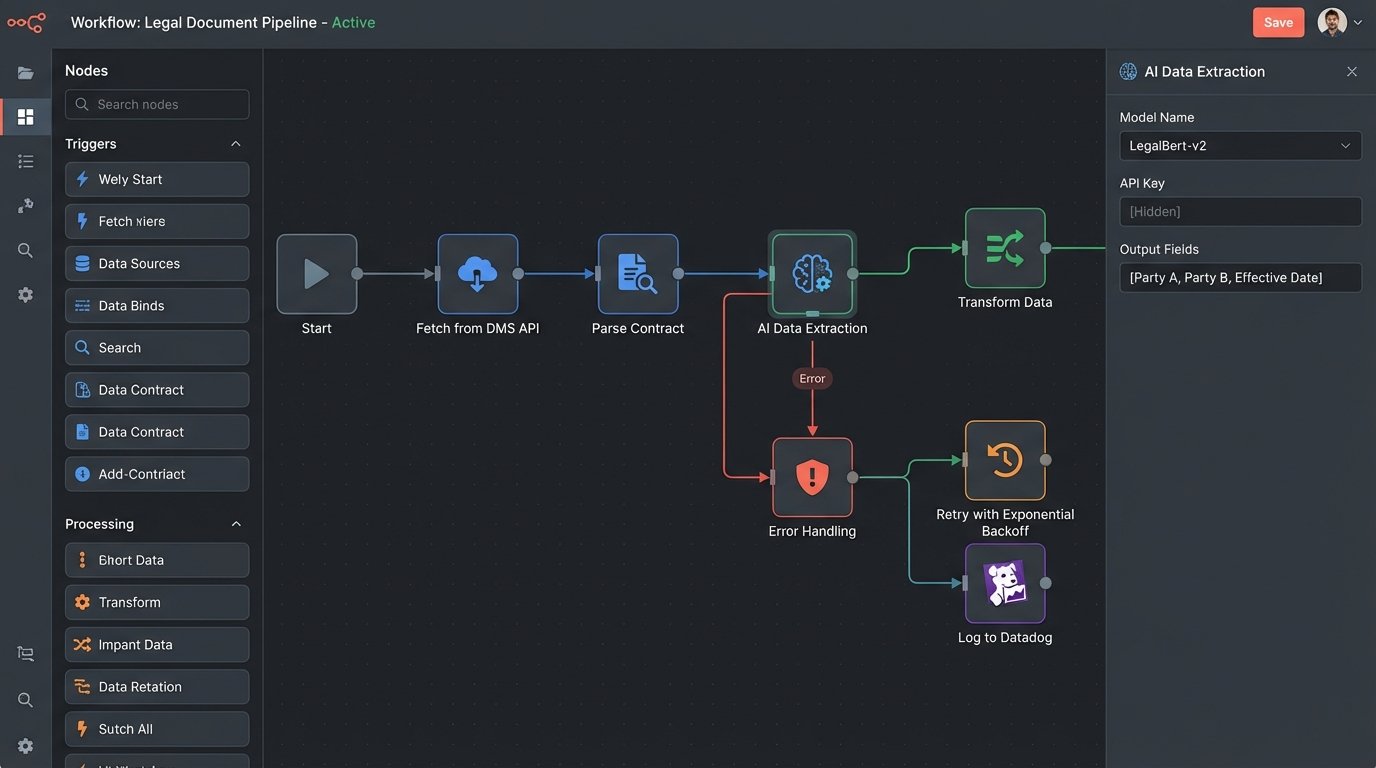
With a clear picture of your data quality, the next phase is building the pipeline. This involves creating a process that can extract data from your source systems, transform it into a format the AI model can accept, and load it into the target system. This ETL (Extract, Transform, Load) process is the engine of your entire automation.
Choosing the Right Tool for the ETL Job
You have two primary paths. The first is using middleware platforms like Zapier or Workato. These are fast to set up for simple workflows, connecting System A to System B with a graphical interface. The downside is cost and inflexibility. At scale, the per-task pricing becomes a wallet-drainer, and you will inevitably hit a wall where the pre-built connectors cannot handle your specific authentication or data transformation needs.
The second path is building a custom solution, often with Python scripts orchestrated by a tool like Apache Airflow. This offers maximum flexibility and is far cheaper to run. The cost is developer time and a higher maintenance burden. You own the code, which means you also own the bugs. For any serious, high-volume implementation, the custom route is almost always the correct one despite the initial build effort.
API Authentication and Error Handling
Connecting to APIs is a constant battle. You will need to manage API keys, refresh OAuth tokens, and, most importantly, build resilient error handling. The AI vendor’s API will go down. Your internal CMS will time out. Your script needs to handle these failures gracefully, not crash and halt the entire process.
Implement a retry mechanism with exponential backoff for transient errors like a 503 (Service Unavailable). For permanent errors like a 401 (Unauthorized), the script should fail immediately and send an alert. Trying to force real-time analysis through a legacy system’s batch-export API is like shoving a firehose through a needle. You get a trickle of data and a lot of backpressure.
Logging is not optional. When a document fails to process at 2 AM, you need a log entry that tells you the exact document ID, the API endpoint called, the status code received, and the timestamp. Without this, you are just guessing.
Logic-Checking the AI’s Output
Never trust the output of an AI model without validation. Even with a claimed 99% accuracy, that 1% can represent a catastrophic error, like misclassifying a contract’s termination date or failing to identify a critical risk clause. Your pipeline must include a post-processing step to logic-check the AI’s results.
This can be a set of simple rules. For example, if the AI extracts a contract effective date that is five years in the future, flag it for human review. If it identifies the governing law as “State of California” but the client address is in New York, that deserves a second look. The goal is to catch anomalies before they are written into your systems of record.
For high-risk workflows, route any AI output with a confidence score below a certain threshold (e.g., 95%) directly into a human validation queue. This human-in-the-loop system is critical for quality control and for building trust in the automation among the legal team.
Don’t Trust, Verify: Staging and Validation
Deploying a new AI workflow directly into your production environment is negligent. A dedicated staging environment that mirrors production is essential for testing and validation. This is where you can stress-test your code and the AI model with real-world data without impacting live operations.
The Staging Environment Is Not Optional
Your staging environment should use a sanitized but representative copy of production data. This allows you to test the full ETL pipeline, from data extraction to the final output, under realistic conditions. This is where you will discover edge cases your initial development missed, like strangely formatted addresses or non-standard document templates that break your parser.
Run your workflow against thousands of documents in staging. Track every success and every failure. This process is tedious but necessary. It prevents you from discovering a critical bug only after it has incorrectly processed hundreds of client matters.
Performance Benchmarking
In staging, you need to measure two key metrics: latency and cost. How long does it take for a single document to go through the entire process? A five-second response time is great for one document, but it becomes a massive bottleneck when you are processing a batch of 10,000. Identify the slowest step in your pipeline and optimize it.
You also need to track the cost per transaction. Most AI APIs charge per call or per token. Your benchmarking should produce a clear financial model: processing one contract costs X cents. This lets you forecast the operational expense of the system and demonstrate a clear return on investment. Without these numbers, you cannot justify the project’s budget.
Defining Success Beyond Accuracy Metrics
The vendor will sell you on accuracy. Your firm cares about impact. Success is not “the AI was 98% accurate at extracting dates.” Success is “we reduced the time for initial contract review from 45 minutes to 5 minutes.” Or “we cut the number of non-compliant clauses in new agreements by 70%.”
Work with the legal teams to define these operational key performance indicators (KPIs) before you go live. Measure the baseline before the AI is implemented. Then measure it again three months after launch. The difference between those two numbers is the actual value of your system. This is the only ROI that matters.
Keeping the Lights On: Maintenance and Model Drift
Getting an AI system into production is only half the battle. Keeping it running reliably is a long-term commitment. Models degrade, APIs change, and data patterns shift. Your system needs to be monitored and maintained.
When the Model Drifts
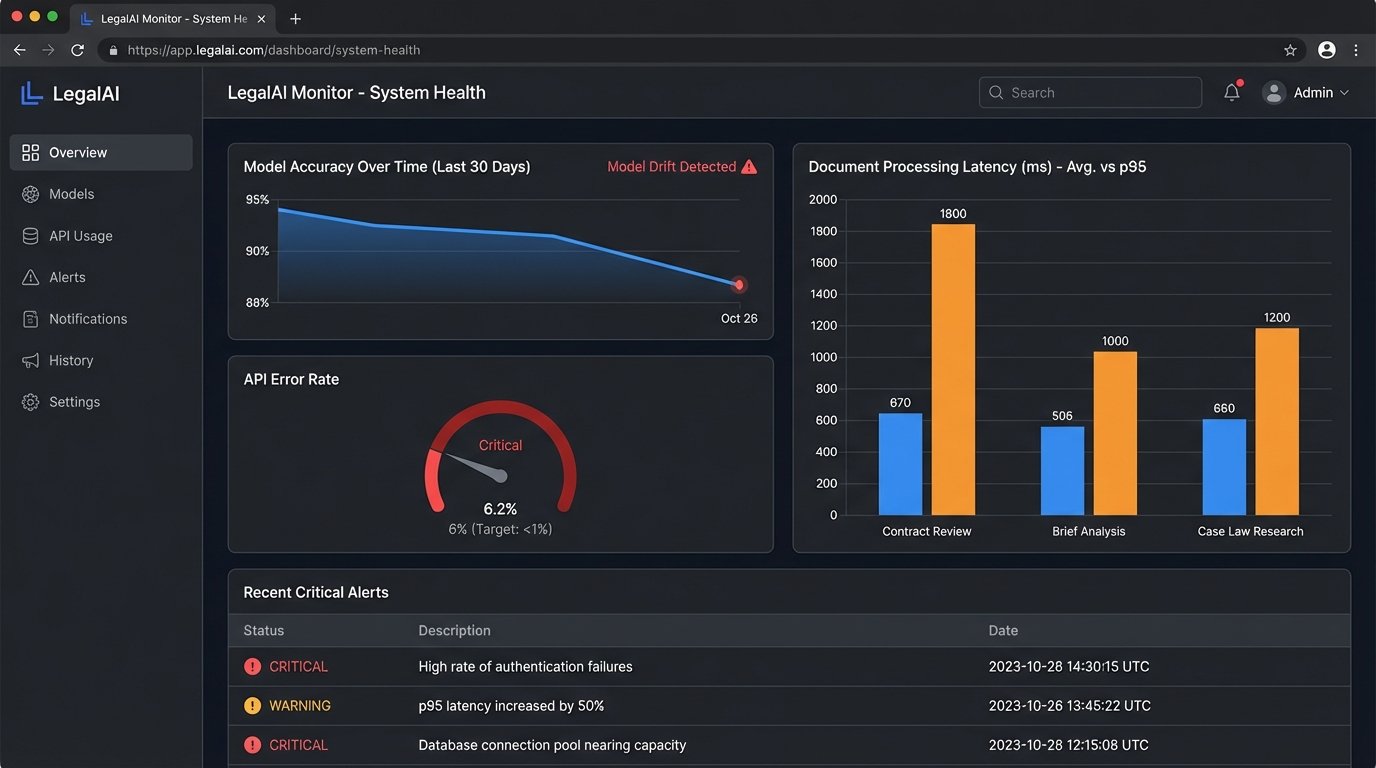
AI models are not static. Their performance can degrade over time, a phenomenon known as model drift. The patterns in your new documents might start to differ from the data the model was trained on, causing its accuracy to drop. You might see an increase in documents being flagged for human review or a subtle drop in the quality of its summaries.
This requires periodic re-validation. Every few months, take a random sample of the AI’s recent output and have a human expert review it for accuracy. Compare these results to your initial benchmarks. If you see a significant drop, it may be time to work with the vendor to retrain the model with more recent data or upgrade to a newer version of their API.
The Logging and Alerting You Actually Need
Verbose logs are useless in a crisis. You need targeted, actionable alerting. Your monitoring system should page the on-call engineer for a few critical failures only.
- Authentication Failures: A sudden spike in 401 or 403 errors means an API key has expired or been revoked. This requires immediate attention.
- High Error Rate: If the percentage of documents failing to process jumps above a set threshold (e.g., 5%), it could indicate a change in the source data format or a problem with the AI vendor’s service.
- Increased Latency: If the average processing time per document doubles, it points to a performance bottleneck that needs investigation before it impacts the entire system.
AI is a tool, not a solution. It is a powerful component that bolts onto your existing infrastructure. The real work of legal automation is not in selecting the flashiest model. It is in the difficult, thankless engineering of building, testing, and maintaining the data pipelines that feed it. Get that right, and the AI has a chance of delivering on its promise. Get it wrong, and it is just an expensive new way to create problems.