Client communication automation is sold as a tool to improve relationships. In reality, it’s a data synchronization problem that most firms are failing to solve. The disconnect isn’t a lack of desire to communicate, it’s the technical chasm between the case management system, the document server, and the client’s inbox. Getting this wrong doesn’t just look unprofessional, it actively erodes client trust by delivering incorrect or delayed information.
The standard approach is to buy an off-the-shelf platform that promises seamless integration. This rarely works. These platforms depend on clean, well-documented APIs from legacy legal software, which is often a fantasy. The result is a brittle system of webhooks and triggers that breaks the moment the underlying CMS gets a minor version update. The core engineering challenge is not sending an email. It is building a resilient data pipeline that can withstand the chaotic reality of a law firm’s tech stack.
Deconstructing Milestone Automation
Automating case milestone updates is the most requested feature and the most common point of failure. The concept is simple: when a case status changes, the client gets an email. The execution is a mess. A case status field in a system like Clio or MyCase is often a free-text field or a dropdown with 30 inconsistent options entered by paralegals over five years. Automating against this dirty data is a recipe for disaster.
A durable solution requires imposing a state machine on top of the case management process. You must first define a finite number of official, non-negotiable case states. These states become the single source of truth for all automation triggers. You bypass the messy, user-facing status field and instead build logic around specific, structured data events: a document being filed, a hearing being scheduled, or an invoice being paid. These are objective events, not subjective statuses.
The architecture involves a listener service that polls the CMS API for these specific data changes or, preferably, subscribes to webhooks if the API isn’t a complete dinosaur. The service doesn’t just check for a status change. It validates a sequence of events. For example, the “Discovery Complete” notification should only trigger if all deposition transcripts are uploaded and tagged correctly in the DMS. This requires cross-system validation, bridging the CMS and DMS APIs before any communication is fired.
This is about building an intelligent trigger, not a dumb one. A dumb trigger fires an email saying “Your case status has been updated.” An intelligent trigger fires an email saying “We have received the deposition transcript from Jane Doe’s testimony on October 15th. You can view a watermarked copy in your client portal.” The latter requires deep integration, but it’s the only one that provides actual value.
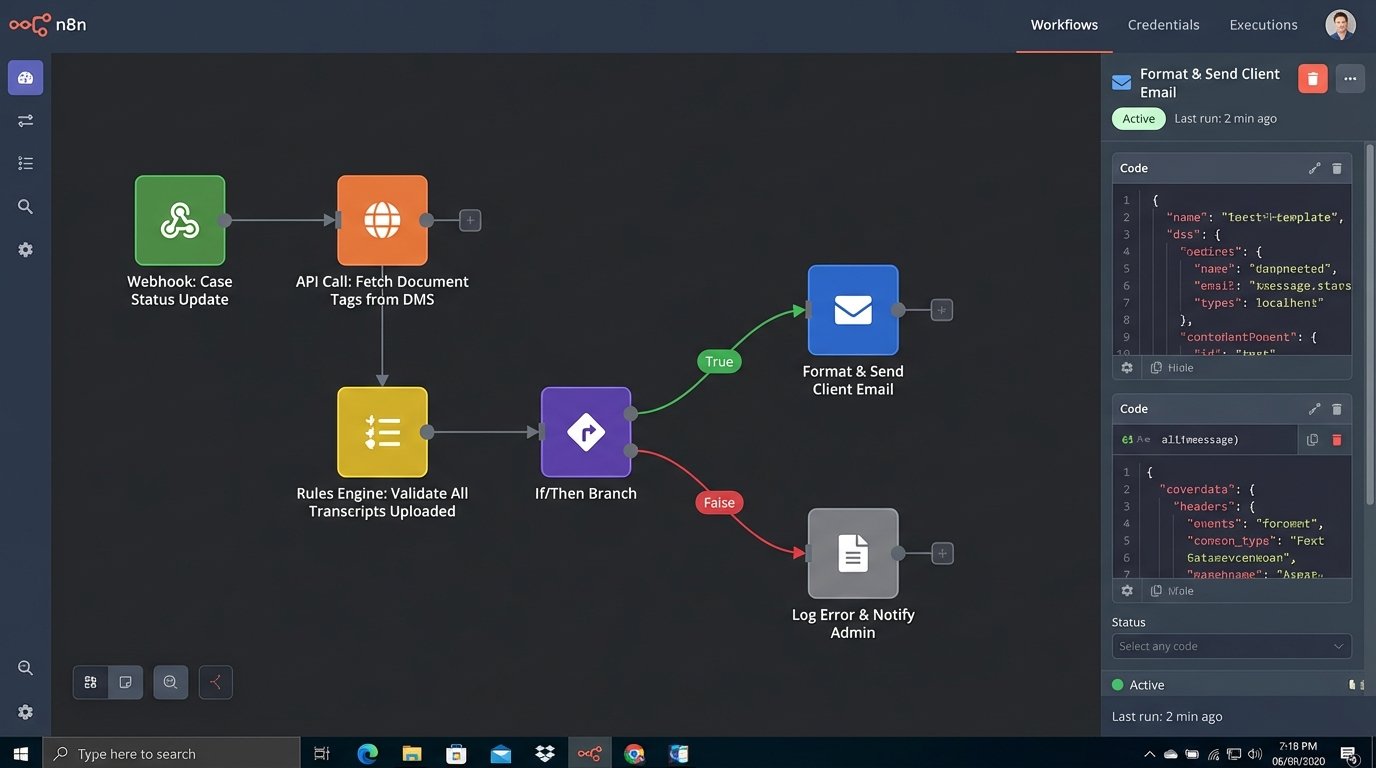
The logic to handle this is not a simple if/then statement inside a workflow builder. It often requires a dedicated microservice. This service ingests events from various sources, holds them in a temporary state, and applies a rules engine to decide if a communication threshold has been met. This is a far more complex build, but it’s the only way to prevent sending confusing, out-of-context notifications to a client who is already under stress.
The Authenticated Chatbot: Moving Beyond FAQs
Most legal chatbots are useless. They are little more than animated FAQ pages that obstruct the user interface and fail to answer any specific questions. They are a marketing gimmick, not a client service tool. The reason for their failure is that they are disconnected from the firm’s core data systems. They have no context about the user or their specific legal matter. They are, by design, ignorant.
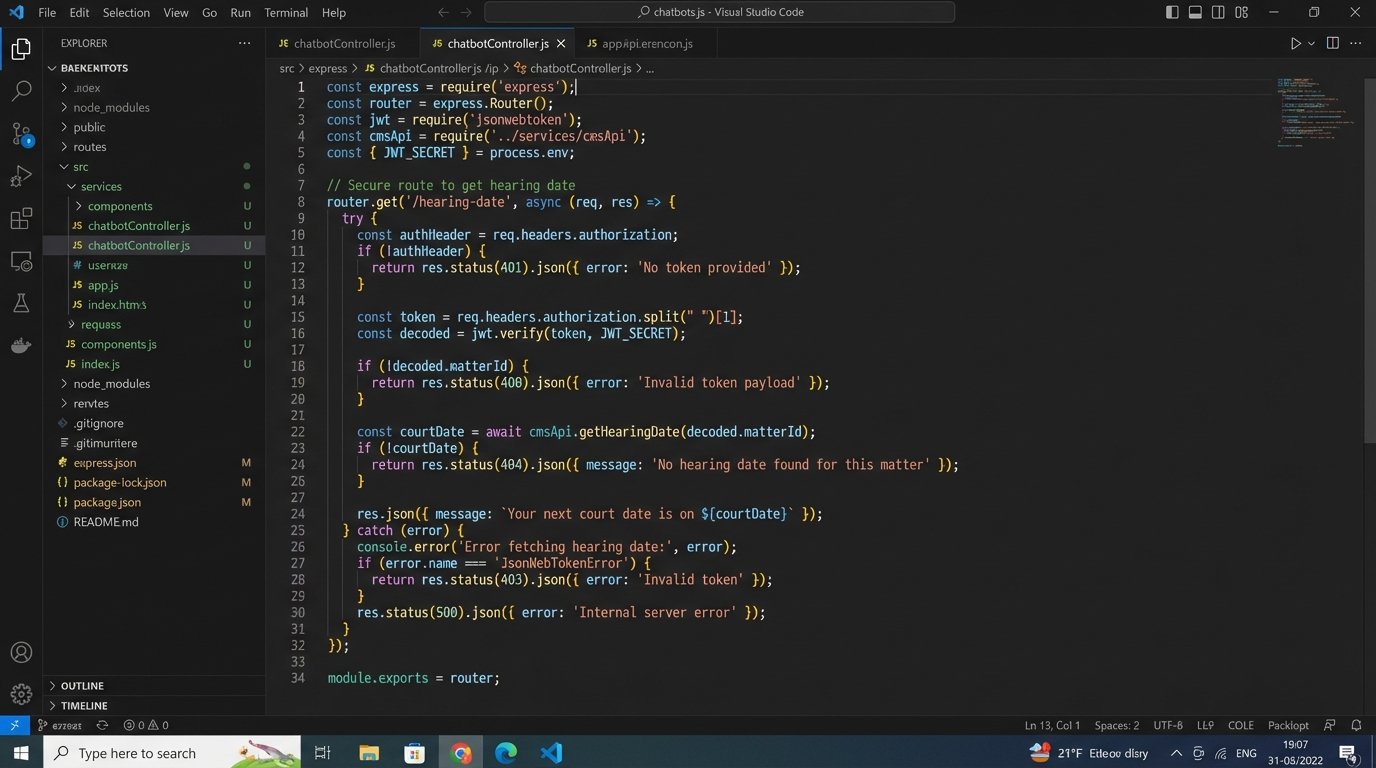
A valuable chatbot must be an authenticated one. This means when a client logs into the portal, the chatbot interface is part of that secure session. The bot’s backend has an API key or OAuth token that grants it limited, read-only access to specific endpoints in the case management system. The scope of access is critical. The service account for the bot should only be able to query data for the authenticated client and nothing more. The principle of least privilege is non-negotiable here.
With this connection, the chatbot can answer real questions. A client can ask, “When is my next court date?” and the bot can execute a GET request to `api.casemanagement.com/v1/matters/{matter_id}/events?type=hearing` to fetch the answer. It can answer, “What is my current balance?” by hitting the billing API. This transforms the bot from a static information kiosk into a dynamic, personal assistant.
Building the Secure Bridge
The technical lift for this is significant. You are essentially building a custom application that bridges your public-facing web property with your internal, secure data store. This requires an API gateway to manage traffic, handle authentication, and log all requests. You cannot expose your CMS API directly to a front-end JavaScript application. That would be grossly negligent.
The flow looks like this:
- Client authenticates to the web portal. The portal’s server generates a JSON Web Token (JWT).
- Client interacts with the chatbot UI. The chat message is sent to your firm’s chatbot API, along with the JWT.
- Your chatbot API validates the JWT.
- The API then uses its own secure credentials (e.g., a master API key) to query the necessary internal systems (CMS, DMS, billing).
- The internal system returns the data to your chatbot API, which then formats a human-readable response and sends it back to the client’s UI.
This architecture isolates the sensitive systems and ensures the client can only ever request their own data. It’s a proper engineering project, not a weekend plugin installation.
Automating the Intake Pipeline
Client communication starts the moment a potential client fills out a contact form. Most firms handle this with a simple auto-responder email saying “Thanks, we’ll get back to you.” This is a missed opportunity. The data collected in that form is the seed for the entire client matter. It should be used to immediately begin structuring the case file and routing the inquiry.
A properly automated intake process pipes the form submission data directly into the CMS via its API. A tool like Zapier or Make can handle simple mappings, but complex logic requires a custom script. For example, if the `practice_area` field is “Personal Injury” and the `incident_location` is “California,” the automation should not only create a new lead record but also assign it to the PI team in the LA office and create a follow-up task with a 24-hour SLA.
This bypasses manual data entry, which is slow and prone to error. It also allows for immediate, context-specific communication. Instead of a generic thank you email, the system can send a targeted message with links to the PI team’s bios or a request for more specific documents. This shows the potential client that their inquiry has been received, understood, and acted upon, all within seconds.
A basic implementation might use a serverless function (like AWS Lambda or Google Cloud Functions) triggered by a webhook from the form provider. Here is a conceptual snippet showing how such a function might begin to process the payload:
const AWS = require('aws-sdk');

const cmsApi = require('./cms-api-client');
exports.handler = async (event) => {
const body = JSON.parse(event.body);
const { firstName, lastName, email, practiceArea, details } = body;
// Basic validation
if (!email || !practiceArea) {
return { statusCode: 400, body: 'Missing required fields.' };
}
try {
// 1. Create lead in the Case Management System
const leadData = {
name: `${firstName} ${lastName}`,
email: email,
source: 'Website Intake Form',
status: 'New'
};
const newLead = await cmsApi.createLead(leadData);
// 2. Route based on practice area
let assignedUser;
if (practiceArea === 'Corporate') {
assignedUser = 'user-corp-intake-lead';
} else if (practiceArea === 'Litigation') {
assignedUser = 'user-lit-intake-lead';
} else {
assignedUser = 'user-general-intake';
}
// 3. Create follow-up task for the assigned user
await cmsApi.createTask({
relatedTo: newLead.id,
owner: assignedUser,
subject: `Follow up with new lead: ${firstName} ${lastName}`,
dueDate: new Date(Date.now() + 24 * 60 * 60 * 1000) // 24 hours from now
});
// 4. Send a targeted confirmation email (not shown)
return { statusCode: 200, body: 'Intake processed successfully.' };
} catch (error) {
console.error('Intake processing failed:', error);
return { statusCode: 500, body: 'Internal Server Error.' };
}
};
This code illustrates the logical steps: parse the data, create a lead, apply routing rules, and then create a task. This is where automation moves from being a simple notification tool to a core part of the firm’s operational workflow.
Notification Aggregation: The Antidote to Spam
As you begin to automate more touchpoints, you create a new problem: notification fatigue. A client might get one email when a document is shared, another when a calendar event is created, and a third when a comment is left on their case file. Each notification is individually useful, but collectively they become noise. The client starts to ignore them, defeating the entire purpose of the system.
The solution is not to send fewer notifications but to send smarter ones. This requires building a notification aggregation layer. Instead of firing an email the instant an event occurs, the event is published to a message queue (like RabbitMQ, SQS, or Kafka). A separate worker process consumes messages from this queue. It doesn’t act on them immediately. It collects all notifications for a specific client over a set period, for example, one hour.
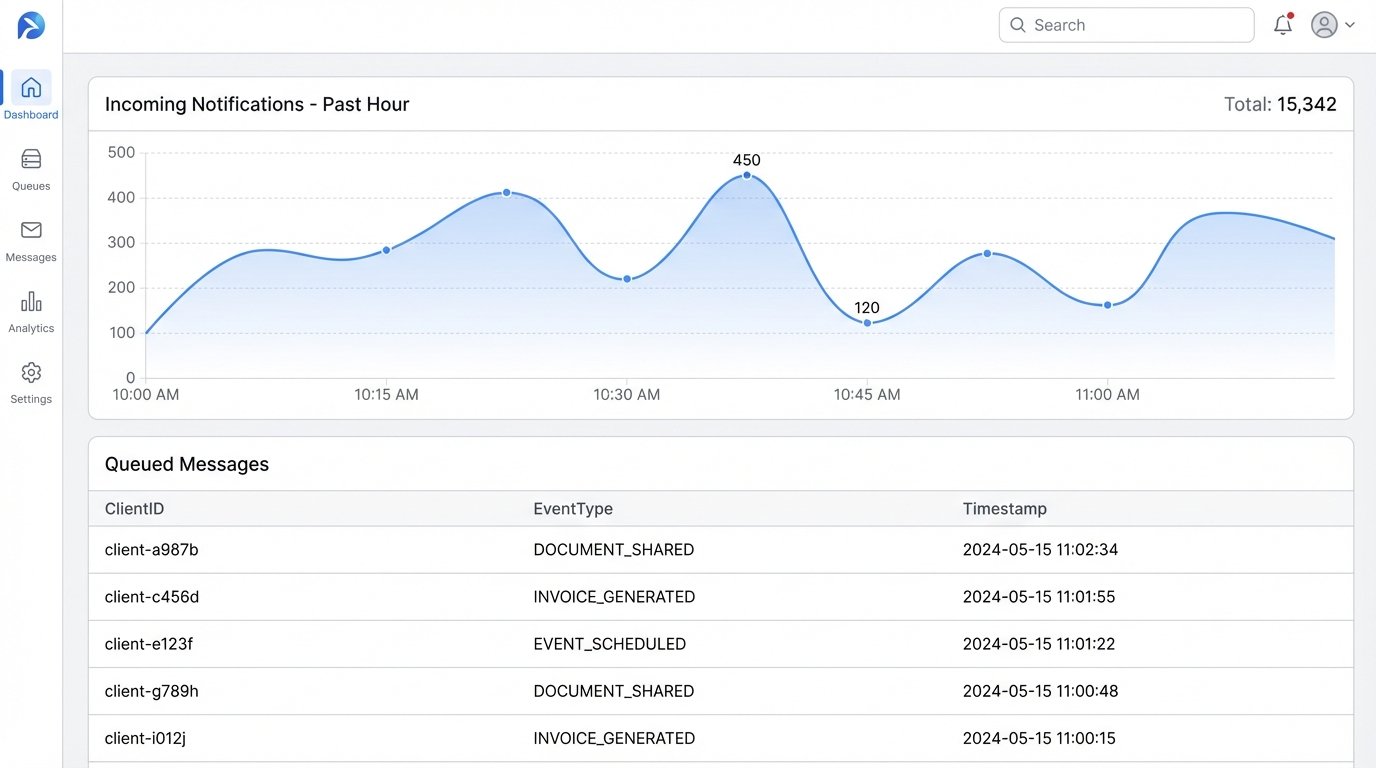
At the end of that period, the worker process bundles all the events into a single, well-formatted digest email. The subject line might be “Your hourly case update from Smith & Jones.” The body would contain a clear, bulleted list of everything that happened:
- New document shared: “Expert Witness Report – Dr. Evans”
- New calendar event: “Pre-trial conference on Nov 5, 2024”
- Invoice generated: “Invoice #INV-2024-101 for $2,500”
This approach respects the client’s attention. It provides a comprehensive summary instead of a stream of interruptions. The architecture is more complex, as it introduces a message broker and stateful workers, but it fixes a fundamental user experience problem that plagues most client portals. It is the difference between a system that serves the firm and one that serves the client.
The ultimate goal of communication automation is not just to transmit information. It is to build confidence and reduce client anxiety. This can only be achieved through systems that are reliable, context-aware, and respectful of the client’s time. Slapping a few email templates on top of a broken data foundation will not get you there. It requires a commitment to solving the underlying engineering problems first.