
The standard client intake process is a masterclass in failure by design. It relies on a paralegal acting as a human API, manually copying text from a contact form into a case management system. Each keystroke is a potential point of data corruption, a potential delay, a potential reason a high-value client chooses your competitor who responded five minutes faster. This isn’t a customer service problem. It’s a data integrity and state management problem disguised as administrative work.
Fixing it requires you to stop thinking about intake as a series of tasks and start architecting it as a data pipeline. The goal is to get structured, validated data from a potential client into your system of record with zero human intervention. Everything else, from follow-ups to conflict checks, is downstream from this single, critical objective.
Deconstructing the Point of Entry: The Web Form
Your public-facing contact form is the mouth of the funnel. Most firms treat it as a glorified suggestion box, using generic text fields that invite unstructured, messy input. A “Describe your case” field is an invitation for a novel, not actionable data. This has to be gutted and replaced with a rigid structure that forces the user to give you clean, machine-readable data from the start.
We force structure by replacing open text fields with constrained inputs. Instead of asking for a “Case Type,” we provide a dropdown menu populated directly from the practice area list in your CMS. This eliminates typos and variants like “personal injury” versus “P.I.” We use numerical inputs for financial figures and enforce date formats with calendar pickers. Each choice removes ambiguity and makes the subsequent automation dead simple.
This is about pre-validation. The form itself should perform basic checks before the data ever hits your server. A JavaScript event listener can check for a valid email format on blur, or ensure a phone number contains the correct number of digits. This isn’t about creating a beautiful user experience. It’s about rejecting garbage data at the earliest possible moment, saving processing cycles and error-handling logic down the line.
Leaving a primary data entry field as an open text area is like connecting a firehose to a sewer main. You get a massive volume of something, but most of it is useless and requires an expensive filtration plant to make it potable. Lock it down.
Bridging the Gap: Form Submission to CMS Ingestion
Once a form is submitted with validated data, it must be injected into the case management system. The worst way to do this is with a direct, front-end API call from the website to the CMS. This exposes your CMS API credentials in the client-side code, a security vulnerability so obvious it’s malpractice.
The correct architecture uses a middleware layer, typically a serverless function (AWS Lambda, Google Cloud Function, etc.), as an intermediary. The web form submits a JSON payload to the function’s endpoint. The function then authenticates itself with the CMS API using securely stored credentials and performs the data mapping and insertion. This abstracts the entire process away from the public-facing website.
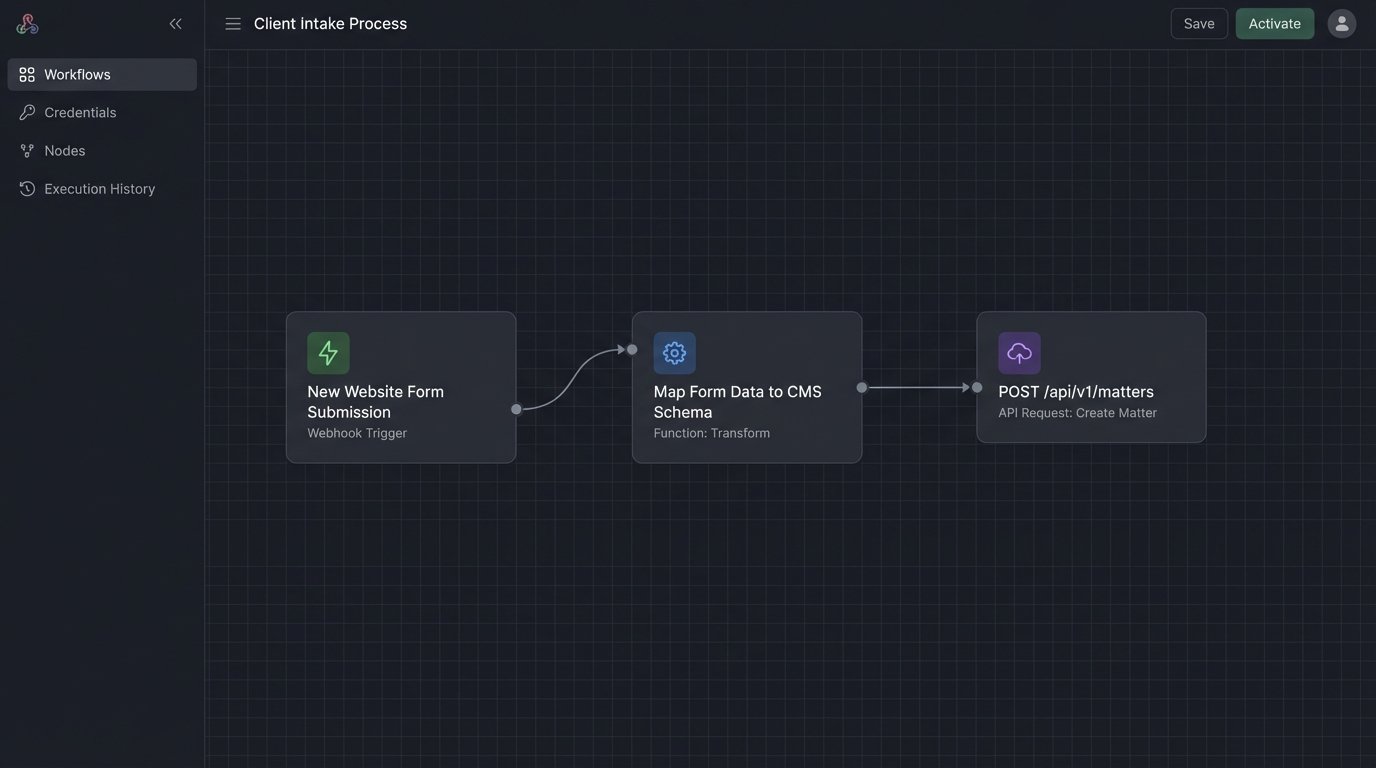
Data mapping is the most critical step here. Your form field names will never match your CMS field names perfectly. The middleware’s job is to translate. A field named `client_email` on the form might map to `contact.emails.primary.address` in the CMS API. This mapping logic must be explicitly coded. Hardcode it. Do not attempt to build a dynamic mapping system unless you have a dedicated team to maintain it. It will break.
A simple mapping object might look like this:
{

  "mappings": [

    {

      "source": "form_first_name",

      "target": "Contact.FirstName",

      "type": "string"

    },

    {

      "source": "form_last_name",

      "target": "Contact.LastName",

      "type": "string"

    },

    {

      "source": "form_case_details",

      "target": "Matter.Description",

      "type": "string"

    },

    {

      "source": "form_incident_date",

      "target": "Matter.CustomFields.IncidentDate",

      "type": "date"

    }

  ]

}
This middleware must also include robust error handling. What happens if the CMS API is down or returns a 500 error? The function shouldn’t just fail silently. It should catch the exception, log the entire submitted payload, and push a notification to an engineering channel in Slack or Teams. A better implementation sends the failed payload to a dead-letter queue for automatic or manual reprocessing later. The client gets a generic “we’ll be in touch” message, none the wiser that your backend is on fire.
Triggering Downstream Logic with Webhooks
Getting the contact into the CMS is only step one. The real value comes from what happens next. A properly automated system uses the new record creation as a trigger for a cascade of subsequent actions. Polling the CMS API for new records is inefficient and slow. The correct tool for this job is a webhook.
Most modern case management systems can be configured to fire a webhook to a specified URL when an event occurs, such as “New Contact Created” or “New Matter Opened.” We configure the CMS to send this event notification back to another serverless function. This function acts as a router, initiating multiple processes in parallel or in sequence.
Automating the Conflict Check
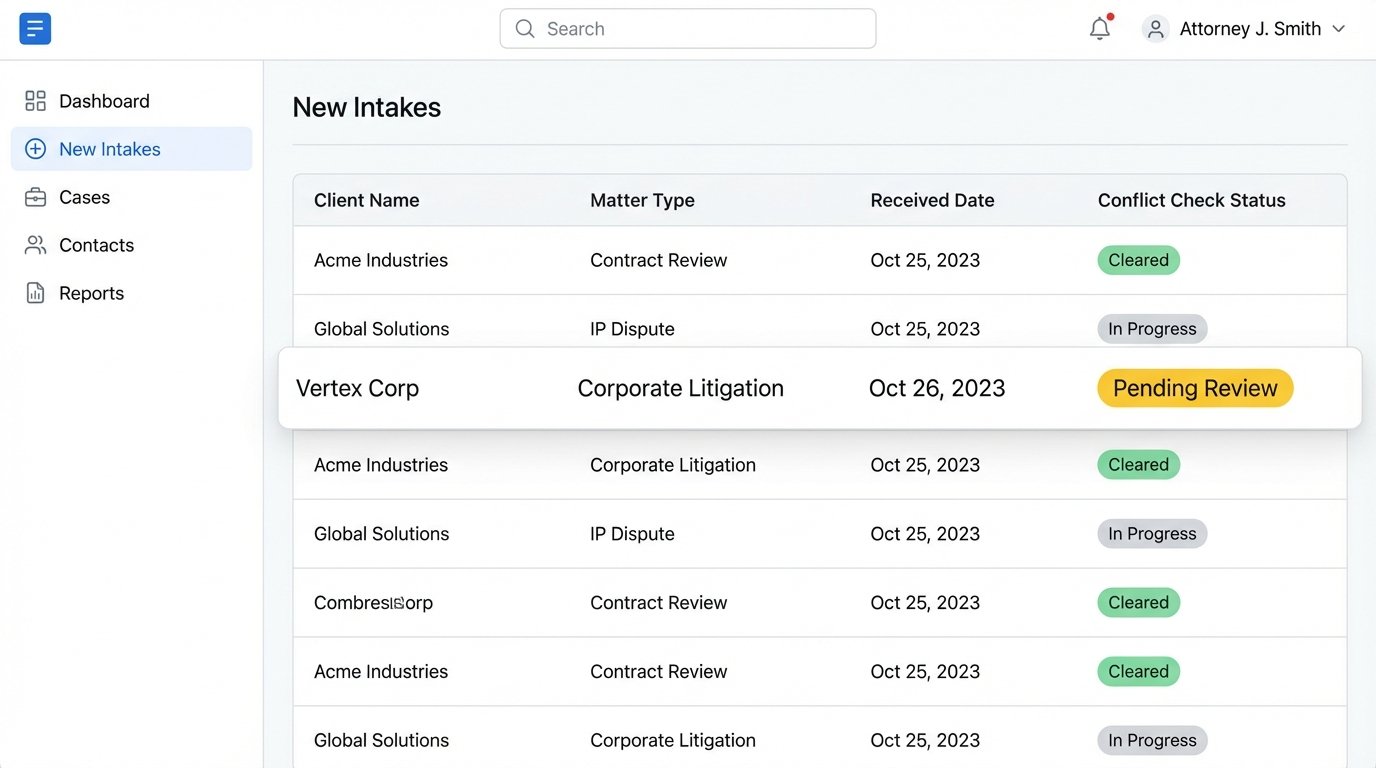
The first action is the conflict check. The webhook payload contains the ID of the newly created contact. The function receives this, queries the CMS API for the new contact’s details (name, company), and then runs a search against a dedicated conflicts database or even across the entire CMS. This is not a simple string match. It requires logic to handle variations in names, corporate parents, and subsidiaries.
The results of the conflict check are then written back to a custom field on the contact or matter record in the CMS. The status field might change from “New” to “Pending Conflict Review” or, if no conflicts are found, to “Ready for Triage.” This state change is visible to the entire legal team and provides an immediate, auditable record of the check.
Orchestrating the First Response
Simultaneously, the webhook router can trigger the client communication workflow. A common mistake is to send a generic “Thanks for your submission” email immediately. A better approach is to introduce an artificial, randomized delay of three to seven minutes. This mimics human response time and feels less robotic to the potential client.
The system checks the status of the conflict check. If it’s clear, it queues up the first meaningful email. This email can be personalized using the data from the initial form submission. For example: “Thank you for contacting us regarding your patent application matter.” If the conflict check is flagged for review, the system does nothing. It waits for a manual override or clearance from a paralegal before any engagement-related communication is sent.
This entire sequence, from form submission to a conflict-checked record and a queued-up first contact, should take less than 30 seconds of compute time. The perceived response time to the client is minutes, and the actual human labor involved is zero.
Generating Documents and Closing the Loop
A smooth intake process transitions directly into onboarding. Once an attorney decides to take the case, they change the matter status in the CMS to “Engaged” or “Approved.” This status change is, again, the trigger for the next wave of automation.
A webhook fires, notifying a document generation service. This service pulls the client and matter data directly from the CMS via API. It injects the client’s name, address, case description, and the attorney’s name into a predefined engagement letter template. The result is a fully formed PDF ready for signature.
This generated document is then pushed to an e-signature platform like DocuSign or Adobe Sign through their respective APIs. The platform handles the entire signature workflow, sending the document to the client and notifying the firm upon completion. The signed document is then automatically pulled back from the e-signature platform and attached to the matter record in the CMS. No one ever clicks “Save As” or manually uploads a file.
This reduces the time from “decision to engage” to “signed retainer in hand” from days to minutes. It eliminates the risk of a paralegal sending the wrong template or making a copy-paste error in the client’s name. It is a sealed, auditable, and brutally efficient system.
The Reality of Maintenance and Monitoring
Building this pipeline is only half the job. The other half is instrumenting it to scream when it breaks. Every API call is a potential point of failure. The CMS provider could change an endpoint, your secure credentials could expire, or the document generation service could have an outage. You need to plan for this from day one.
Every function in the pipeline must have aggressive logging. We log the incoming payload, the result of the data transformation, the API call being made, and the response from the remote server. These logs are shipped to a centralized logging service like Datadog or CloudWatch. They are not for debugging. They are for preemptive analysis. We build dashboards that monitor API latency and error rates.
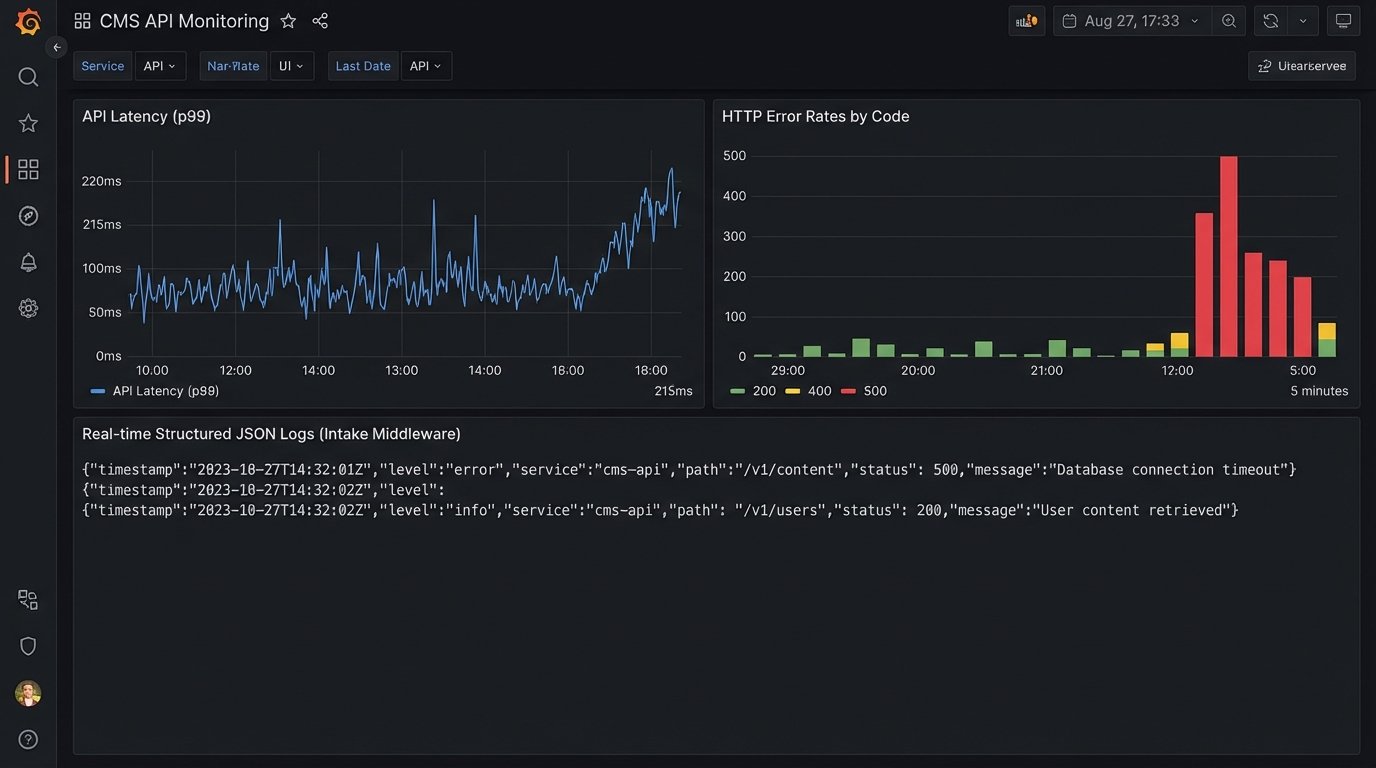
Alarms are configured for anomalies. If the percentage of 500 errors from the CMS API exceeds 1% over a five-minute window, an alert is automatically sent to the engineering team. If a payload sits in the dead-letter queue for more than an hour, another alert fires. The system is designed to report its own sickness before a user does.
This is the unglamorous reality of automation. It isn’t a “set it and forget it” solution. It’s a complex system of interconnected dependencies that requires constant monitoring. The trade is shifting from tedious manual data entry to high-leverage systems monitoring. It’s a better job, but it is still a job. The fantasy of a perfect, self-healing system sold by vendors is just that, a fantasy.